Assist Acura RLX 2014 User Guide
[x] Cancel search | Manufacturer: ACURA, Model Year: 2014, Model line: RLX, Model: Acura RLX 2014Pages: 518, PDF Size: 15.83 MB
Page 268 of 518
267
uuCustomized Featuresu
Continued
Features
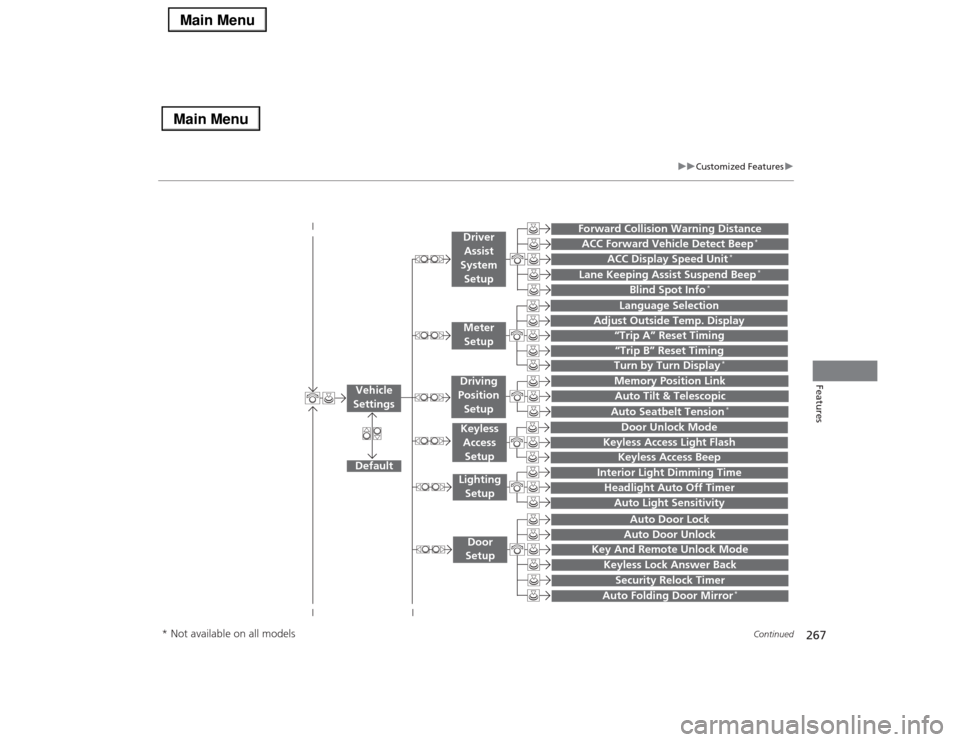
“Trip A” Reset Timing“Trip B” Reset Timing
Language Selection
Adjust Outside Temp. Display
Forward Collision Warning DistanceACC Forward Vehicle Detect Beep
*
ACC Display Speed Unit
*
Turn by Turn Display
*
Default
Memory Position Link
Door Unlock Mode
Keyless Access Light Flash
Interior Light Dimming TimeHeadlight Auto Off TimerAuto Light Sensitivity
Key And Remote Unlock ModeKeyless Lock Answer BackSecurity Relock Timer
Auto Door LockAuto Door Unlock
Vehicle
Settings
Meter
SetupDriver
Assist
System
SetupKeyless
Access
SetupLighting
SetupDoor
Setup
Keyless Access Beep
Lane Keeping Assist Suspend Beep
*
Blind Spot Info
*
Auto Tilt & TelescopicAuto Seatbelt Tension
*
Auto Folding Door Mirror
*
Driving
Position
Setup
* Not available on all models
Page 275 of 518
274
uuCustomized Featuresu
Features
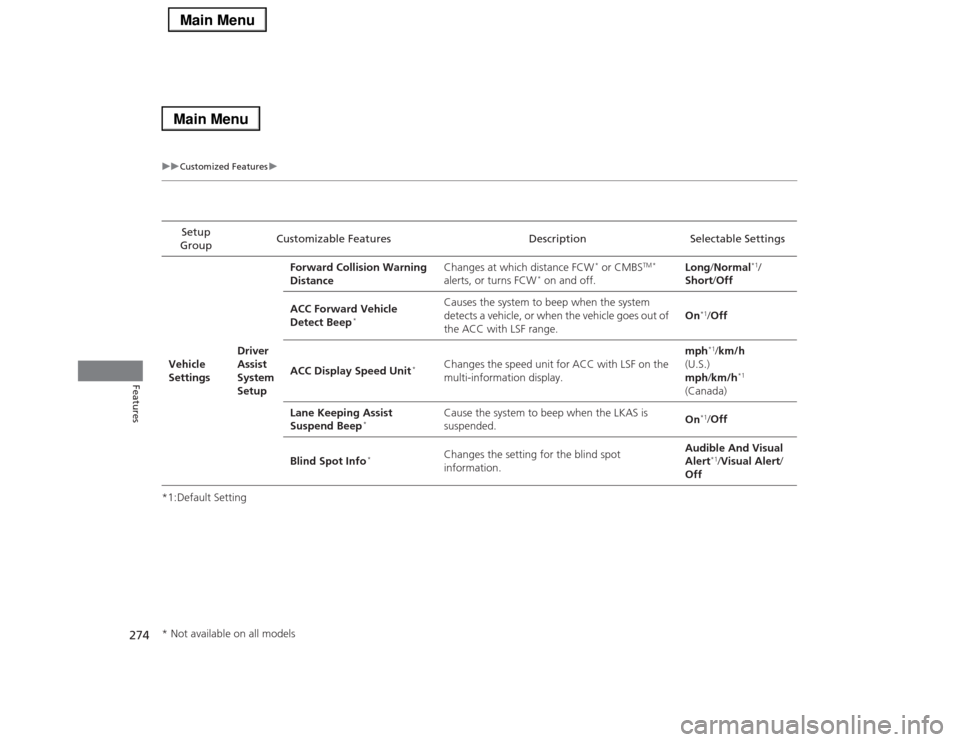
*1:Default SettingSetup
GroupCustomizable Features Description Selectable Settings
Vehicle
SettingsDriver
Assist
System
SetupForward Collision Warning
DistanceChanges at which distance FCW
* or CMBS
TM *
alerts, or turns FCW
* on and off.Long/Normal
*1/
Short/Off
ACC Forward Vehicle
Detect Beep
*
Causes the system to beep when the system
detects a vehicle, or when the vehicle goes out of
the ACC with LSF range.On
*1/Off
ACC Display Speed Unit
*
Changes the speed unit for ACC with LSF on the
multi-information display.mph
*1/km/h
(U.S.)
mph/km/h
*1
(Canada)
Lane Keeping Assist
Suspend Beep
*
Cause the system to beep when the LKAS is
suspended.On
*1/Off
Blind Spot Info
*
Changes the setting for the blind spot
information.Audible And Visual
Alert
*1/Visual Alert/
Off
* Not available on all models
Page 293 of 518
292
uuBluetooth® HandsFreeLink®uHFL Menus
Features
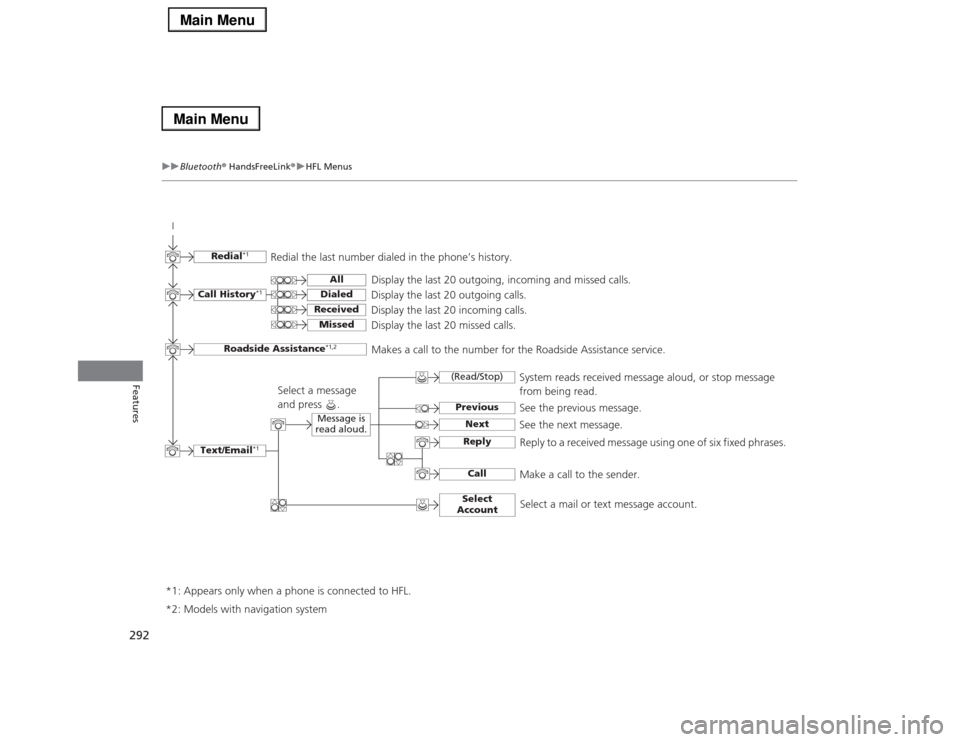
Text/Email
*1
Message is
read aloud.
*2: Models with navigation system
See the previous message.
(Read/Stop)PreviousNext
See the next message.System reads received message aloud, or stop message
from being read.
ReplyCall
Reply to a received message using one of six fixed phrases.
Make a call to the sender.
Select
Account
Select a message
and press .
Select a mail or text message account.
Redial
*1
Redial the last number dialed in the phone’s history.
Display the last 20 outgoing, incoming and missed calls.
Call History
*1
AllDialedReceived
Display the last 20 outgoing calls.
Display the last 20 incoming calls.
Missed
Display the last 20 missed calls.
Roadside Assistance
*1,2
Makes a call to the number for the Roadside Assistance service.
*1: Appears only when a phone is connected to HFL.
Page 327 of 518
uuBluetooth® HandsFreeLink®uHFL Menus
326Features
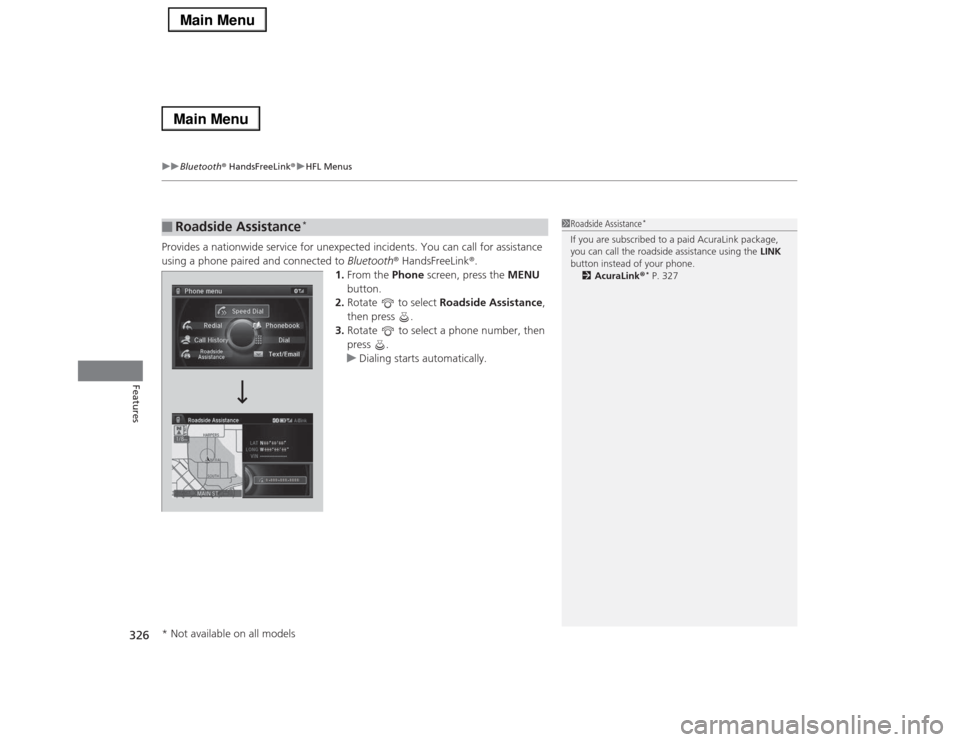
Provides a nationwide service for unexpected incidents. You can call for assistance
using a phone paired and connected to Bluetooth® HandsFreeLink®.
1.From the Phone screen, press the MENU
button.
2.Rotate to select Roadside Assistance,
then press .
3.Rotate to select a phone number, then
press .
uDialing starts automatically.■
Roadside Assistance
*
1Roadside Assistance
*
If you are subscribed to a paid AcuraLink package,
you can call the roadside assistance using the LINK
button instead of your phone.
2AcuraLink®
* P. 327
* Not available on all models
Page 328 of 518
327
Continued
Features
AcuraLink®
*
Is a subscription-based service that provides convenient features such as voice
communication in case of emergency, online security, one-on-one operator
assistance, and the transmission of important messages regarding your vehicle’s
status.
For information on traffic rerouting and traffic information updates, provided by the
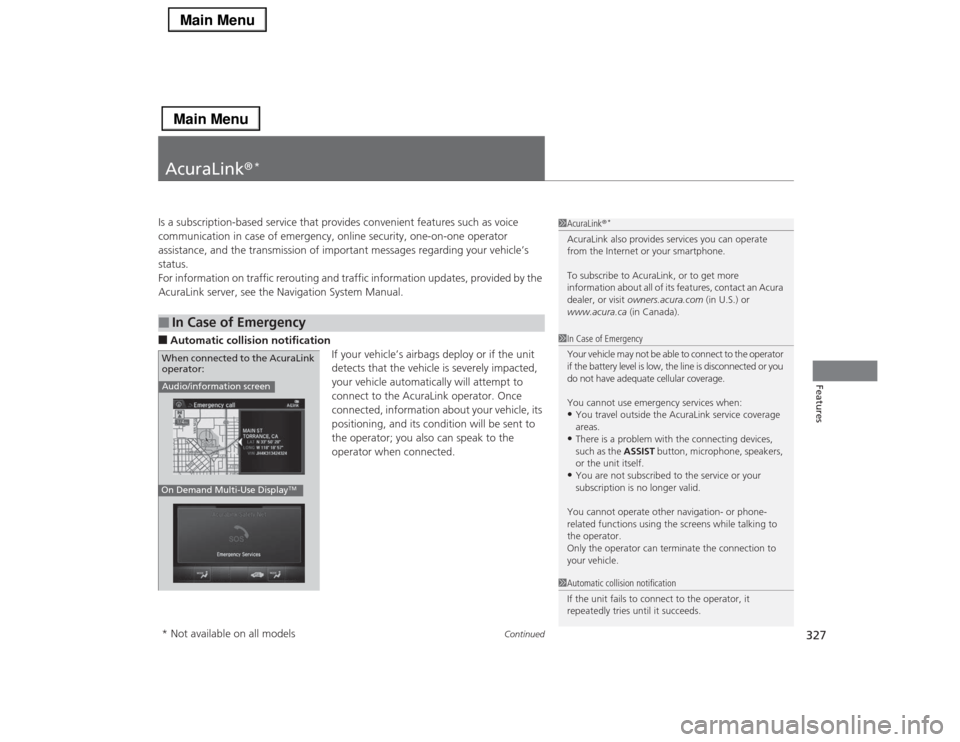
AcuraLink server, see the Navigation System Manual.■Automatic collision notification
If your vehicle’s airbags deploy or if the unit
detects that the vehicle is severely impacted,
your vehicle automatically will attempt to
connect to the AcuraLink operator. Once
connected, information about your vehicle, its
positioning, and its condition will be sent to
the operator; you also can speak to the
operator when connected. ■
In Case of Emergency
1AcuraLink®
*
AcuraLink also provides services you can operate
from the Internet or your smartphone.
To subscribe to AcuraLink, or to get more
information about all of its features, contact an Acura
dealer, or visit owners.acura.com (in U.S.) or
www.acura.ca (in Canada).1In Case of Emergency
Your vehicle may not be able to connect to the operator
if the battery level is low, the line is disconnected or you
do not have adequate cellular coverage.
You cannot use emergency services when:•You travel outside the AcuraLink service coverage
areas.•There is a problem with the connecting devices,
such as the ASSIST button, microphone, speakers,
or the unit itself.•You are not subscribed to the service or your
subscription is no longer valid.
You cannot operate other navigation- or phone-
related functions using the screens while talking to
the operator.
Only the operator can terminate the connection to
your vehicle.
1Automatic collision notification
If the unit fails to connect to the operator, it
repeatedly tries until it succeeds.
Audio/information screenOn Demand Multi-Use Display
TM
When connected to the AcuraLink
operator:* Not available on all models
Page 329 of 518
uuAcuraLink®
*u
328Features
■Manual operator connection
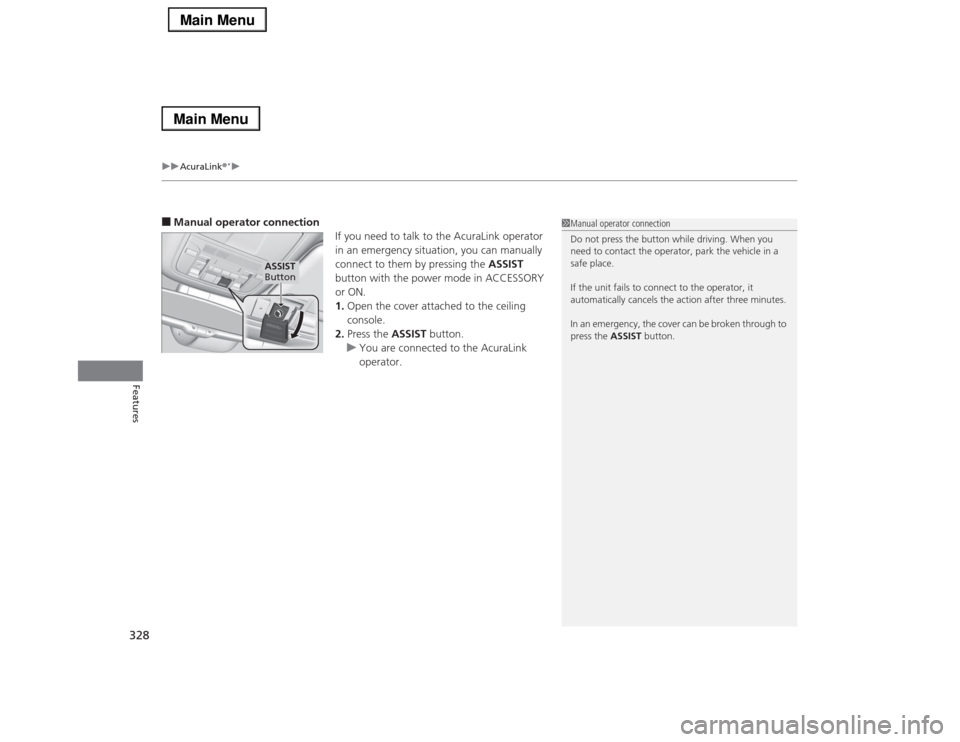
If you need to talk to the AcuraLink operator
in an emergency situation, you can manually
connect to them by pressing the ASSIST
button with the power mode in ACCESSORY
or ON.
1.Open the cover attached to the ceiling
console.
2.Press the ASSIST button.
uYou are connected to the AcuraLink
operator.
1Manual operator connection
Do not press the button while driving. When you
need to contact the operator, park the vehicle in a
safe place.
If the unit fails to connect to the operator, it
automatically cancels the action after three minutes.
In an emergency, the cover can be broken through to
press the ASSIST button.
ASSIST
Button
Page 331 of 518
uuAcuraLink®
*u
330Features
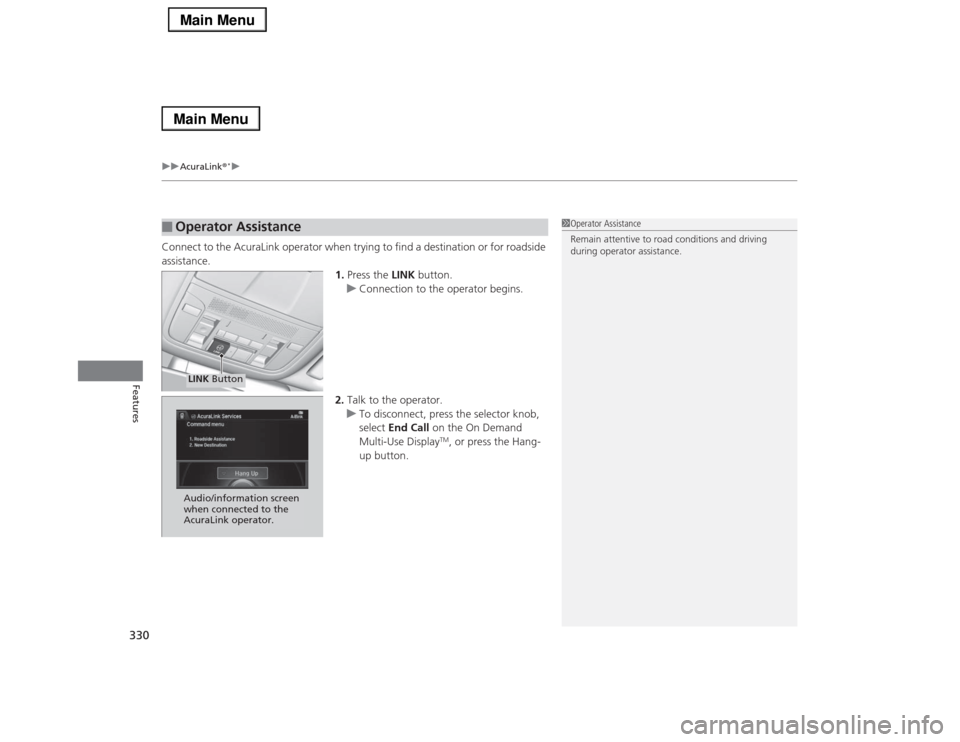
Connect to the AcuraLink operator when trying to find a destination or for roadside
assistance.
1.Press the LINK button.
uConnection to the operator begins.
2.Talk to the operator.
uTo disconnect, press the selector knob,
select End Call on the On Demand
Multi-Use Display
TM, or press the Hang-
up button.
■
Operator Assistance
1Operator Assistance
Remain attentive to road conditions and driving
during operator assistance.
LINK ButtonAudio/information screen
when connected to the
AcuraLink operator.
Page 336 of 518
335
Driving
This chapter discusses driving, refueling, and information on items such as accessories.
Before Driving
Driving Preparation .......................... 336
Maximum Load Limit........................ 339
Towing a Trailer
Towing Your Vehicle ........................ 341
When Driving
Starting the Engine .......................... 342
Precautions While Driving................. 345
Automatic Transmission ................... 346
Shifting ............................................ 347
SPORT Mode.................................... 351
Cruise Control
*................................ 352
Adaptive Cruise Control (ACC) with Low
Speed Follow (LSF)
*........................ 355
Forward Collision Warning (FCW)
*... 364Lane Departure Warning (LDW) ....... 367
Lane Keeping Assist System (LKAS)
*.... 370
Vehicle Stability Assist (VSA
®), aka Electronic
Stability Control (ESC), System ............... 375
Agile Handling Assist System............ 377
Precision All Wheel Steer System ...... 377Blind Spot Information (BSI) System
*.... 378
Tire Pressure Monitoring System (TPMS) ... 380Tire Pressure Monitoring System (TPMS) -
Required Federal Explanation ......... 382
Braking
Brake System ................................... 384
Anti-lock Brake System (ABS) ........... 389
Brake Assist System.......................... 390Collision Mitigation Braking System
TM
(CMBS
TM)*..................................... 391
Parking Your Vehicle
When Stopped ................................ 397
Parking Sensor System
*................... 398
Multi-View Rear Camera.................. 402
Refueling
Fuel Information .............................. 403
How to Refuel ................................. 404
Fuel Economy.................................... 405
Improving Fuel Economy .................. 405
Accessories and Modifications
Accessories ...................................... 406
Modifications................................... 406
* Not available on all models
Page 345 of 518

uuWhen DrivinguStarting the Engine
344Driving
■Hill Start Assist System
Hill start assist keeps the brake engaged briefly to help prevent the vehicle from
rolling on inclines as you move your foot from the brake pedal to the accelerator.
Move the shift lever to
(D
when facing uphill, or
(R
when facing downhill, then
release the brake pedal.
1Starting the Engine
Hill start assist may not prevent the vehicle from
rolling downhill on a very steep or slippery slope, and
does not operate on small inclines.
Hill start assist is not a replacement for the parking
brake.
Page 346 of 518
345
uuWhen DrivinguPrecautions While Driving
Continued
Driving
Precautions While DrivingAvoid driving in deep water and on flooded roads. This can damage the engine,
driveline, or cause electrical component failure.■
In Rain
1Precautions While DrivingNOTICEDo not operate the shift lever while pressing the
accelerator pedal. You could damage the
transmission.NOTICEThe following can damage the under spoiler:•Parking the vehicle by a parking block•Parallel parking along the road shoulder•Driving toward the bottom of a hill•Driving up or down to a different surface level
(such as a road shoulder)•Driving on a rutted or bumpy road•Driving on a road with potholes.NOTICEIf you repeatedly turn the steering wheel at an
extremely low speed, or hold the steering wheel on
the full left or right position for a while, the electric
power steering (EPS) system heats up. The system
goes into a protective mode, and limits its
performance. The steering wheel becomes harder
and harder to operate. Once the system cools down,
the EPS system is restored.
Repeated operation under these conditions can
eventually damage the system.
If the power mode is set to ACCESSORY or VEHICLE
OFF (LOCK) while driving, the engine will shut down
and all steering and brake power assist functions will
stop, making it difficult to control the vehicle.