Assist Acura RLX 2014 Owner's Guide
[x] Cancel search | Manufacturer: ACURA, Model Year: 2014, Model line: RLX, Model: Acura RLX 2014Pages: 518, PDF Size: 15.83 MB
Page 357 of 518
uuWhen DrivinguAdaptive Cruise Control (ACC) with Low Speed Follow (LSF)
*
356Driving
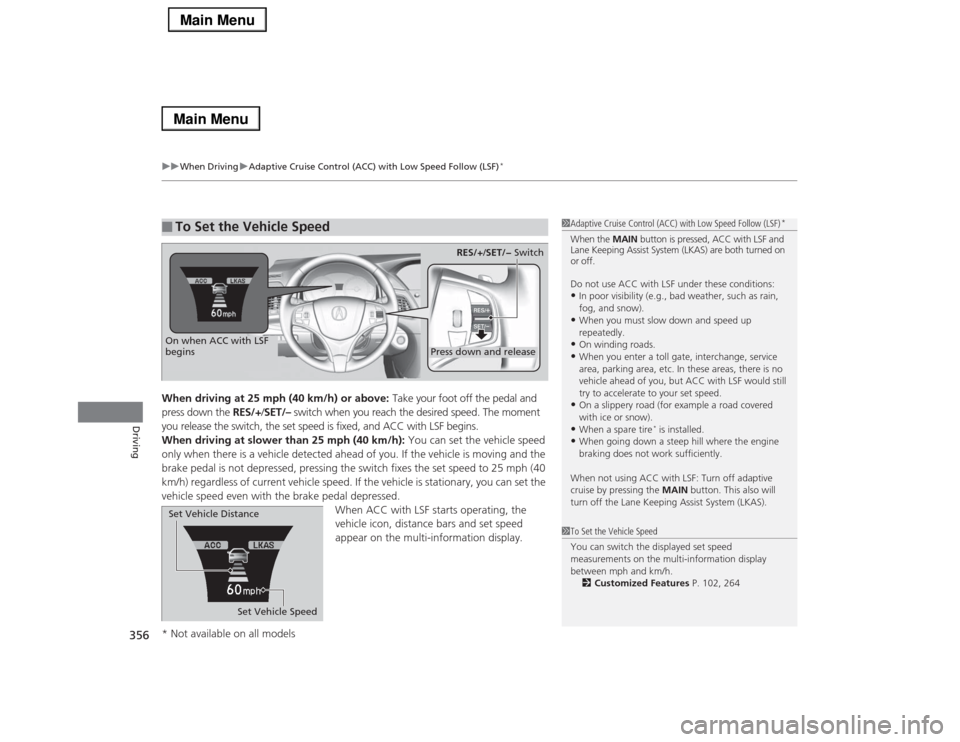
When driving at 25 mph (40 km/h) or above: Take your foot off the pedal and
press down the RES/+/SET/– switch when you reach the desired speed. The moment
you release the switch, the set speed is fixed, and ACC with LSF begins.
When driving at slower than 25 mph (40 km/h): You can set the vehicle speed
only when there is a vehicle detected ahead of you. If the vehicle is moving and the
brake pedal is not depressed, pressing the switch fixes the set speed to 25 mph (40
km/h) regardless of current vehicle speed. If the vehicle is stationary, you can set the
vehicle speed even with the brake pedal depressed.
When ACC with LSF starts operating, the
vehicle icon, distance bars and set speed
appear on the multi-information display. ■
To Set the Vehicle Speed
1Adaptive Cruise Control (ACC) with Low Speed Follow (LSF)
*
When the MAIN button is pressed, ACC with LSF and
Lane Keeping Assist System (LKAS) are both turned on
or off.
Do not use ACC with LSF under these conditions:•In poor visibility (e.g., bad weather, such as rain,
fog, and snow).•When you must slow down and speed up
repeatedly.•On winding roads.•When you enter a toll gate, interchange, service
area, parking area, etc. In these areas, there is no
vehicle ahead of you, but ACC with LSF would still
try to accelerate to your set speed.•On a slippery road (for example a road covered
with ice or snow).•When a spare tire
* is installed.
•When going down a steep hill where the engine
braking does not work sufficiently.
When not using ACC with LSF: Turn off adaptive
cruise by pressing the MAIN button. This also will
turn off the Lane Keeping Assist System (LKAS).
1To Set the Vehicle Speed
You can switch the displayed set speed
measurements on the multi-information display
between mph and km/h.
2Customized Features P. 102, 264
On when ACC with LSF
begins
Press down and release
RES/+/SET/− Switch
Set Vehicle Speed Set Vehicle Distance
* Not available on all models
Page 368 of 518

367
uuWhen DrivinguLane Departure Warning (LDW)
Continued
Driving
Lane Departure Warning (LDW)Alerts you when the system detects a possibility of your vehicle unintentionally
crossing over detected lane markings.
If your vehicle is getting too close to detected
left or right side lane markings without a turn
signal activated, LDW will give audible and
visual alerts.
The beeper sounds and the Lane Departure
message appears on the multi-information
display, letting you know that you need to
take appropriate action.
The system begins to search for lane markings when all the following conditions are met:
•The vehicle is traveling between at 40-90 mph (64-145 km/h).
•The vehicle is on a straight or slightly curved road.
•The turn signals are off.
•The brake pedal is not depressed.■
How the System Works
1Lane Departure Warning (LDW)
Important Safety Reminder
Like all assistance systems, LDW has limitations.
Over-reliance on LDW may result in a collision. It is
always your responsibility to keep the vehicle within
your driving lane.
LDW only alerts you when lane drift is detected
without a turn signal in use. LDW may not detect all
lane markings or lane departures; accuracy will vary
based on weather, speed and lane marker condition.
It is always your responsibility to safely operate the
vehicle and avoid collisions.
Models with
navigation
system
Models without
navigation
system
■
How the System Activates
1How the System Activates
LDW may automatically shut off and the LDW
indicator comes and stays on.
2Indicators P. 80
Page 371 of 518
370
uuWhen DrivinguLane Keeping Assist System (LKAS)
*
Driving
Lane Keeping Assist System (LKAS)
*
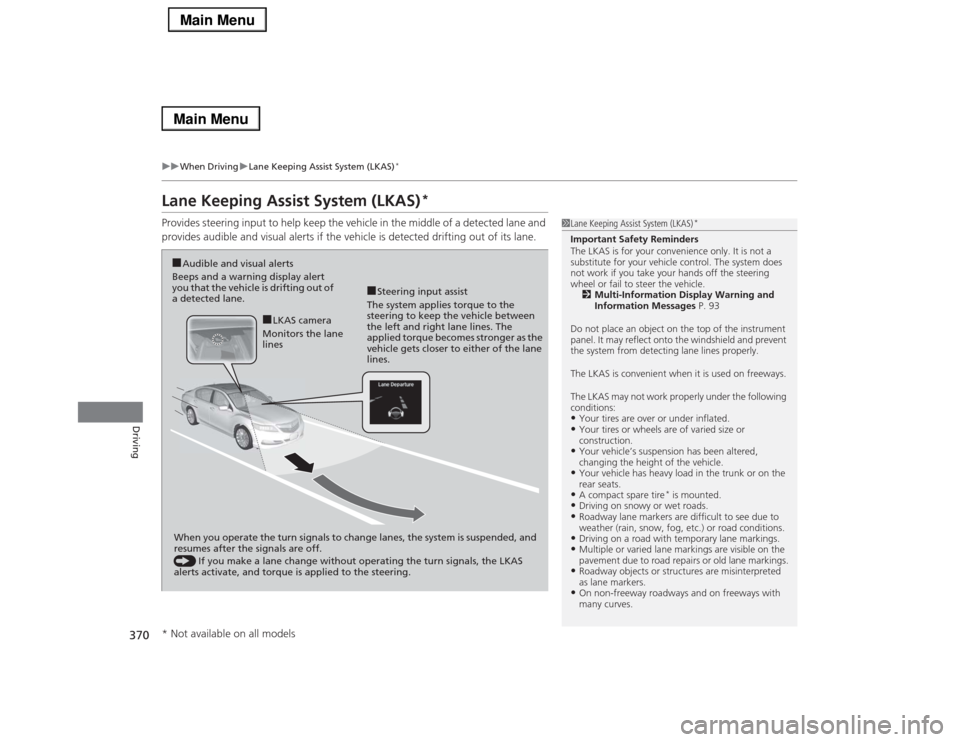
Provides steering input to help keep the vehicle in the middle of a detected lane and
provides audible and visual alerts if the vehicle is detected drifting out of its lane.
1Lane Keeping Assist System (LKAS)
*
Important Safety Reminders
The LKAS is for your convenience only. It is not a
substitute for your vehicle control. The system does
not work if you take your hands off the steering
wheel or fail to steer the vehicle.
2Multi-Information Display Warning and
Information Messages P. 93
Do not place an object on the top of the instrument
panel. It may reflect onto the windshield and prevent
the system from detecting lane lines properly.
The LKAS is convenient when it is used on freeways.
The LKAS may not work properly under the following
conditions:•Your tires are over or under inflated.•Your tires or wheels are of varied size or
construction.•Your vehicle’s suspension has been altered,
changing the height of the vehicle.•Your vehicle has heavy load in the trunk or on the
rear seats.•A compact spare tire
* is mounted.
•Driving on snowy or wet roads.•Roadway lane markers are difficult to see due to
weather (rain, snow, fog, etc.) or road conditions.•Driving on a road with temporary lane markings.•Multiple or varied lane markings are visible on the
pavement due to road repairs or old lane markings.•Roadway objects or structures are misinterpreted
as lane markers.•On non-freeway roadways and on freeways with
many curves.
■Steering input assist
The system applies torque to the
steering to keep the vehicle between
the left and right lane lines. The
applied torque becomes stronger as the
vehicle gets closer to either of the lane
lines.
■Audible and visual alerts
Beeps and a warning display alert
you that the vehicle is drifting out of
a detected lane.
When you operate the turn signals to change lanes, the system is suspended, and
resumes after the signals are off.
() If you make a lane change without operating the turn signals, the LKAS
alerts activate, and torque is applied to the steering.
■LKAS camera
Monitors the lane
lines
* Not available on all models
Page 372 of 518
Continued
371
uuWhen DrivinguLane Keeping Assist System (LKAS)
*
Driving
The system can be used when the following conditions are met.
•The lane you are driving has detectable lane markers on both sides, and your
vehicle is in the center of the lane.
•The vehicle speed is between 45 – 90 mph (72 – 145 km/h).
•You are driving on a straight or slightly curved road.
•The turn signals are off.
•The brake pedal is not depressed.
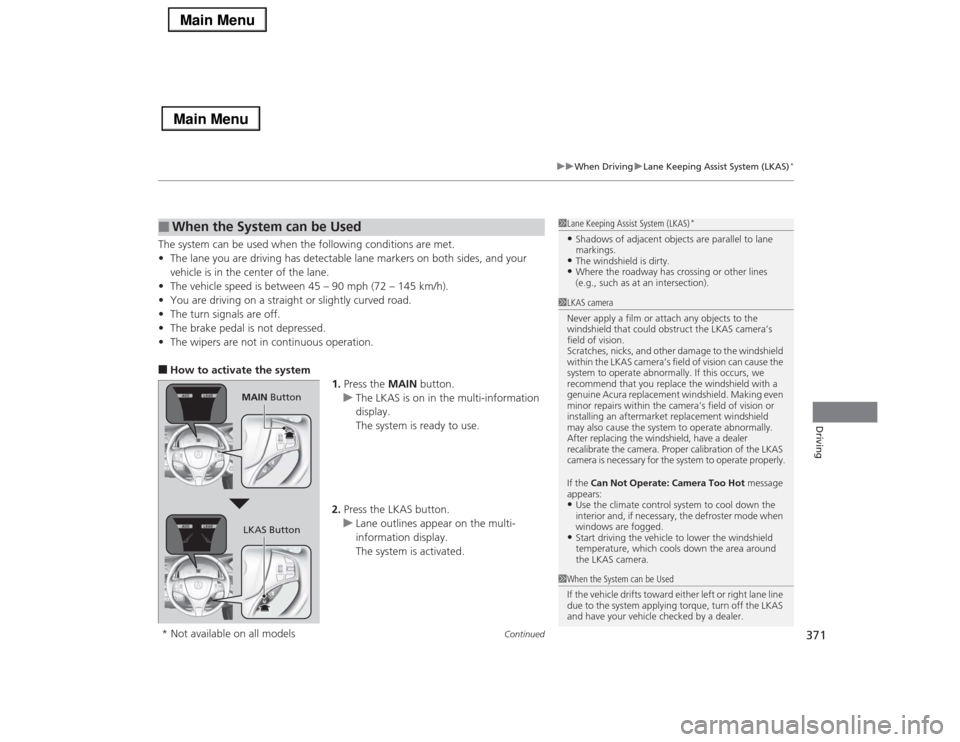
•The wipers are not in continuous operation.■How to activate the system
1.Press the MAIN button.
uThe LKAS is on in the multi-information
display.
The system is ready to use.
2.Press the LKAS button.
uLane outlines appear on the multi-
information display.
The system is activated.■
When the System can be Used
1Lane Keeping Assist System (LKAS)
*
•Shadows of adjacent objects are parallel to lane
markings.•The windshield is dirty.•Where the roadway has crossing or other lines
(e.g., such as at an intersection).
1LKAS camera
Never apply a film or attach any objects to the
windshield that could obstruct the LKAS camera’s
field of vision.
Scratches, nicks, and other damage to the windshield
within the LKAS camera’s field of vision can cause the
system to operate abnormally. If this occurs, we
recommend that you replace the windshield with a
genuine Acura replacement windshield. Making even
minor repairs within the camera’s field of vision or
installing an aftermarket replacement windshield
may also cause the system to operate abnormally.
After replacing the windshield, have a dealer
recalibrate the camera. Proper calibration of the LKAS
camera is necessary for the system to operate properly.
If the Can Not Operate: Camera Too Hot message
appears:•Use the climate control system to cool down the
interior and, if necessary, the defroster mode when
windows are fogged.•Start driving the vehicle to lower the windshield
temperature, which cools down the area around
the LKAS camera.
1When the System can be Used
If the vehicle drifts toward either left or right lane line
due to the system applying torque, turn off the LKAS
and have your vehicle checked by a dealer.
MAIN Button
LKAS Button
* Not available on all models
Page 373 of 518

uuWhen DrivinguLane Keeping Assist System (LKAS)
*
372Driving
3.Keep your vehicle near the center of the
lane while driving.
uThe dotted outer lines change to solid
ones once the system starts operating
after detecting the left and right lane
markings.
To cancel the LKAS:
Press the MAIN or LKAS button.
The LKAS is turned off every time you stop the
engine, even if you turned it on the last time
you drove the vehicle.
■
To cancel
1When the System can be Used
The LKAS temporarily deactivates when it fails to
detect lane lines. When the system detects the lines
again, it comes back on automatically.1To cancel
Pressing the MAIN button also turns ACC with LSF
on and off.
MAIN ButtonLKAS Button
Page 374 of 518

373
uuWhen DrivinguLane Keeping Assist System (LKAS)
*
Continued
Driving
■The system operation is suspended if
you:
•Set the wipers to continuous operation.
uTurning the wipers off resumes the
LKAS.
•Decrease the vehicle speed to 40 mph (64
km/h) or less.
uIncreasing the vehicle speed to 45 mph
(72 km/h) or more resumes the LKAS.
•Depress the brake pedal.
uThe LKAS resumes and starts detecting
the lane lines again once you release the
brake pedal.
■The LKAS may automatically be suspended when:
•The system fails to detect lane lines.
•The steering wheel is quickly turned.
•You fail to steer the vehicle.
•The vehicle runs on a curved road over the speed limit.
•The camera temperature gets extremely high or low.
Once these conditions no longer exist, the LKAS automatically resumes.When the LKAS is suspended,
the lane lines on the multi-
information display change to
contour lines, and the beeper
sounds.
Page 375 of 518

374
uuWhen DrivinguLane Keeping Assist System (LKAS)
*
Driving
The system may not detect lane markings and the position of your vehicle properly
under the following conditions.■
LKAS Limitations
Condition
●The vehicle interior is reflected onto the front windshield.●Headlight lenses are dirty or the headlights are not properly adjusted.●The windshield is fogged.●Driving on snowy or wet roads.●The ambient brightness suddenly changes (e.g., at the entrance or exit of a tunnel).●You drive into the low sun (e.g., at dawn or dusk).●A strong light is reflected onto the roadway.●Roadway lane markers are difficult to see due to weather (rain, snow, fog, etc.) or road conditions.●Driving on a road with temporary lane markings.●Multiple or varied lane markings are visible on the roadway due to road repairs or old lane markings.●Roadway objects or structures are misinterpreted as lane markers.●There is little contrast between lane lines and the roadway surface.●The vehicle in front of you is driving near the lane lines.●Driving over bumps.●Where marked lanes merge or split.●Where the lane is extremely narrow, wide or changing.●Where the road is hilly or the vehicle is approaching the crest of a hill.
Page 376 of 518

375
uuWhen DrivinguVehicle Stability Assist (VSA®), aka Electronic Stability Control (ESC), System
Continued
Driving
Vehicle Stability Assist (VSA®), aka Electronic Stability Control (ESC), SystemVSA® helps to stabilize the vehicle during cornering if the vehicle turns more or less
than what was intended. It also assists in maintaining traction on slippery surfaces.
It does so by regulating engine output and selectively applying the brakes.
When VSA® activates, you may notice that the
engine does not respond to the accelerator.
You may also notice some noise from the
hydraulic system. You will also see the
indicator blink.■
VSA® Operation
1Vehicle Stability Assist (VSA®), aka Electronic Stability Control (ESC), System
The VSA® may not function properly if tire type and
size are mixed. Make sure to use the same size and
type of tire, and the air pressures as specified.
When the VSA® system indicator comes on and stays
on while driving, there may be a problem with the
system. While this may not interfere with normal
driving, have your vehicle checked by a dealer
immediately.
VSA® cannot enhance stability in all driving situations
and does not control the entire braking system. You
still need to drive and corner at speeds appropriate
for the conditions and always leave a sufficient
margin of safety.
The main function of the VSA® system is generally
known as Electronic Stability Control (ESC). The
system also includes a traction control function.
VSA® System
Indicator
Page 377 of 518

uuWhen DrivinguVehicle Stability Assist (VSA®), aka Electronic Stability Control (ESC), System
376Driving
This button is on the driver’s side control
panel. To turn the VSA® system on and off,
press and hold it until you hear a beep.
VSA® will stop and the indicator will come on.
To turn it on again, press the (VSA® OFF)
button until you hear a beep.
VSA® is turned on every time you start the
engine, even if you turned it off the last time
you drove the vehicle.
■
VSA® On and Off
1Vehicle Stability Assist (VSA®), aka Electronic Stability Control (ESC), System
Without VSA®, your vehicle will have normal braking
and cornering ability, but it will not have VSA®
traction and stability enhancement.
In certain unusual conditions when your vehicle gets
stuck in shallow mud or fresh snow, it may be easier
to free it with the VSA® temporarily switched off.
When the VSA® system is off, the traction control
system is also off. You should only attempt to free
your vehicle with the VSA® off if you are not able to
free it when the VSA® is on.
Immediately after freeing your vehicle, be sure to
switch VSA® on again. We do not recommend driving
your vehicle with the VSA® and traction control
systems switched off.
If the low tire pressure/TPMS indicator comes on or
blinks, the VSA® system comes on automatically. In
this case, you cannot turn the system off by pressing
the button.
You may hear a motor sound coming from the
engine compartment while system checks are being
performed immediately after starting the engine or
while driving. This is normal.
VSA® OFF Indicator
Page 378 of 518

377
uuWhen DrivinguAgile Handling Assist System
Driving
Agile Handling Assist SystemLightly brakes each of the front and rear wheels, as needed, when you steer the
wheel, and helps support the vehicle’s stability and performance during cornering.Precision All Wheel Steer SystemMonitors road conditions while you are driving. In response to current driving
conditions, the system automatically makes slight adjustment to the relative rear
wheel toe settings to help enhance vehicle control and stability.
1Agile Handling Assist System
The agile handling assist system cannot enhance
stability in all driving situations. You still need to drive
and corner at speeds appropriate for the conditions
and always leave a sufficient margin of safety.
When the VSA® system indicator comes on and stays
on while driving, the agile handling assist system
does not activate.
You may hear a sound coming from the engine
compartment while the system is activated. This is
normal.1Precision All Wheel Steer System
The Precision All Wheel Steer System cannot enhance
vehicle control and stability in all driving situations.
You still need to drive and corner at speeds
appropriate for the conditions and always leave a
sufficient margin of safety.
The toe setting of the rear wheels may get stuck in a
non-centered setting if the system malfunctions
while driving. This can cause the vehicle to pull to a
side even as you keep the steering wheel in the
center position. If this occurs, the system
automatically limits the vehicle speed to a maximum
of 50 mph (80 km/h). Reduce your speed and be
extra cautious, as handling may be difficult. Go to a
dealer immediately.