change wheel Acura RLX 2014 Owner's Guide
[x] Cancel search | Manufacturer: ACURA, Model Year: 2014, Model line: RLX, Model: Acura RLX 2014Pages: 518, PDF Size: 15.83 MB
Page 371 of 518
370
uuWhen DrivinguLane Keeping Assist System (LKAS)
*
Driving
Lane Keeping Assist System (LKAS)
*
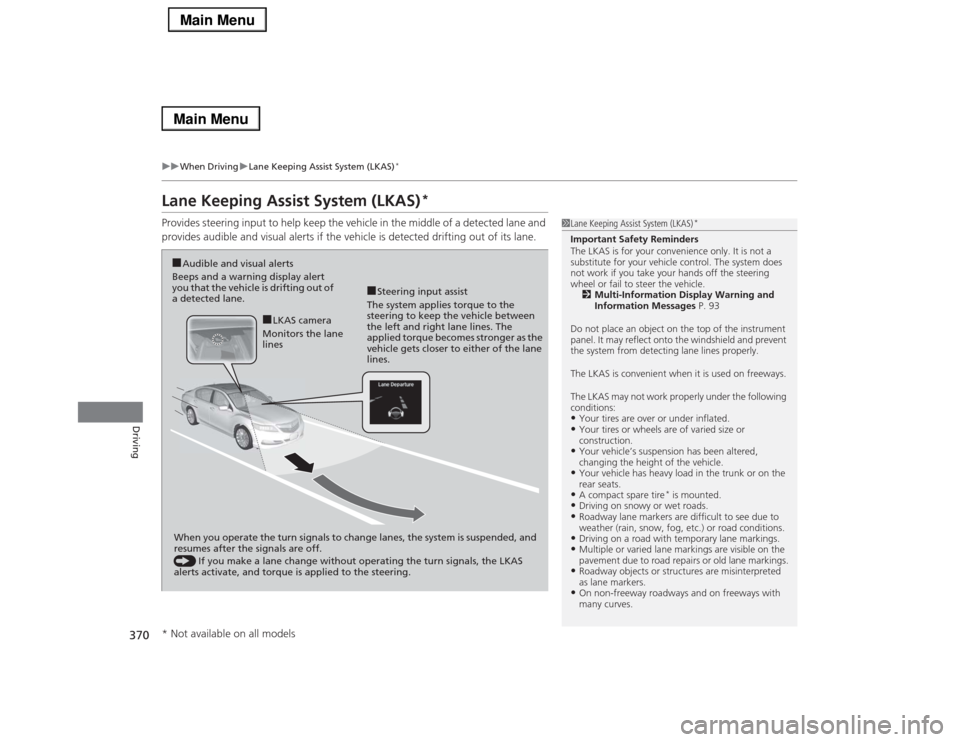
Provides steering input to help keep the vehicle in the middle of a detected lane and
provides audible and visual alerts if the vehicle is detected drifting out of its lane.
1Lane Keeping Assist System (LKAS)
*
Important Safety Reminders
The LKAS is for your convenience only. It is not a
substitute for your vehicle control. The system does
not work if you take your hands off the steering
wheel or fail to steer the vehicle.
2Multi-Information Display Warning and
Information Messages P. 93
Do not place an object on the top of the instrument
panel. It may reflect onto the windshield and prevent
the system from detecting lane lines properly.
The LKAS is convenient when it is used on freeways.
The LKAS may not work properly under the following
conditions:•Your tires are over or under inflated.•Your tires or wheels are of varied size or
construction.•Your vehicle’s suspension has been altered,
changing the height of the vehicle.•Your vehicle has heavy load in the trunk or on the
rear seats.•A compact spare tire
* is mounted.
•Driving on snowy or wet roads.•Roadway lane markers are difficult to see due to
weather (rain, snow, fog, etc.) or road conditions.•Driving on a road with temporary lane markings.•Multiple or varied lane markings are visible on the
pavement due to road repairs or old lane markings.•Roadway objects or structures are misinterpreted
as lane markers.•On non-freeway roadways and on freeways with
many curves.
■Steering input assist
The system applies torque to the
steering to keep the vehicle between
the left and right lane lines. The
applied torque becomes stronger as the
vehicle gets closer to either of the lane
lines.
■Audible and visual alerts
Beeps and a warning display alert
you that the vehicle is drifting out of
a detected lane.
When you operate the turn signals to change lanes, the system is suspended, and
resumes after the signals are off.
() If you make a lane change without operating the turn signals, the LKAS
alerts activate, and torque is applied to the steering.
■LKAS camera
Monitors the lane
lines
* Not available on all models
Page 374 of 518

373
uuWhen DrivinguLane Keeping Assist System (LKAS)
*
Continued
Driving
■The system operation is suspended if
you:
•Set the wipers to continuous operation.
uTurning the wipers off resumes the
LKAS.
•Decrease the vehicle speed to 40 mph (64
km/h) or less.
uIncreasing the vehicle speed to 45 mph
(72 km/h) or more resumes the LKAS.
•Depress the brake pedal.
uThe LKAS resumes and starts detecting
the lane lines again once you release the
brake pedal.
■The LKAS may automatically be suspended when:
•The system fails to detect lane lines.
•The steering wheel is quickly turned.
•You fail to steer the vehicle.
•The vehicle runs on a curved road over the speed limit.
•The camera temperature gets extremely high or low.
Once these conditions no longer exist, the LKAS automatically resumes.When the LKAS is suspended,
the lane lines on the multi-
information display change to
contour lines, and the beeper
sounds.
Page 403 of 518

402Driving
Multi-View Rear CameraAbout Your Multi-View Rear CameraThe audio/information screen can display your vehicle’s rear view. The display
automatically changes to the rear view when the shift lever is moved to
(R
.
You can view three different camera angles on the rearview display. Press the
interface dial to switch the angle.
If Top View is last used before you turn the power mode to OFF, Wide mode is
selected next time you turn the power on and move the shift lever to
(R
.
■
Multi-View Rear Camera Display Area
1About Your Multi-View Rear Camera
The rear camera view is restricted. You cannot see
the corner ends of the bumper or what is underneath
the bumper. Its unique lens also makes objects
appear closer or farther than they actually are.
Visually confirm that it is safe to drive before backing
up. Certain conditions (such as weather, lighting, and
high temperatures) may also restrict the rear view. Do
not rely on the rearview display which does not give
you all information about conditions at the back of
your vehicle.
If the camera lens is covered with dirt or moisture,
use a soft, moist cloth to keep the lens clean and free
of debris.
You can change the Fixed Guideline and Dynamic
Guideline settings.
2Customized Features P. 264
Fixed Guideline
On: Guidelines appear when you shift into
(R.
Off: Guidelines do not appear when the dynamic
guideline is off.
Dynamic Guideline
On: Guidelines move according to the steering wheel
direction.
Off: Guidelines do not move.
Top Down View Mode Normal View Mode Wide View Mode
Guidelines
Bumper
Camera
Approx. 118 inches (3 m)Approx. 79 inches (2 m)Approx. 39 inches (1 m) Approx. 20 inches (50 cm)
Page 470 of 518

Continued
469
uuIf a Tire Goes FlatuChanging a Flat Tire
Handling the Unexpected
1.Place the jack under the jacking point
closest to the tire to be changed.
2.Turn the end bracket (as shown in the
image) clockwise until the top of the jack
contacts the jacking point.
uMake sure that the jacking point tab is
resting in the jack notch.
3.Raise the vehicle, using the jack handle bar
and the jack handle, until the tire is off the
ground.
■
How to Set Up the Jack
1How to Set Up the Jack
Do not use the jack with people or luggage in the
vehicle.
Use the jack provided in your vehicle.
Other jacks may not support the weight (“load”) or
may not fit in the jacking point.
The following instructions must be followed to use
the jack safely.•Do not use while the engine is running.•Use only where the ground is firm and level.•Use only at the jacking points.•Do not get in the vehicle while using the jack.•Do not put anything on top of or underneath the
jack.
3
WARNING
The vehicle can easily roll off the jack,
seriously injuring anyone underneath.
Follow the directions for changing a tire
exactly, and never get under the vehicle
when it is supported only by the jack.
Jack
Handle
BarWheel Nut
Wrench as Jack Handle
Page 475 of 518

474
uuEngine Does Not StartuEmergency Engine Stop
Handling the Unexpected
Emergency Engine StopThe ENGINE START/STOP button may be used to stop the engine due to an
emergency situation even while driving. If you must stop the engine, do either of the
following operations:
•Press and hold the ENGINE START/STOP button for two seconds.
•Firmly press the ENGINE START/STOP button twice.
•The steering wheel will not lock. The power mode changes to VEHICLE OFF with
the shift lever in
(P
, and to ACCESSORY with the shift lever in any position other
than
(P
.
•Because turning off the engine also disables the power assist the engine provides
to the steering and braking systems, it will require significantly more physical
effort and time to steer and slow the vehicle. Downshift gears and use both feet
on the brake pedal, if necessary, to slow the vehicle and stop immediately in a
safe place.
1Emergency Engine StopNOTICEDo not press the button while driving unless it is
absolutely necessary for the engine to be switched
off.
Page 498 of 518
497
uuSpecificationsu
Information
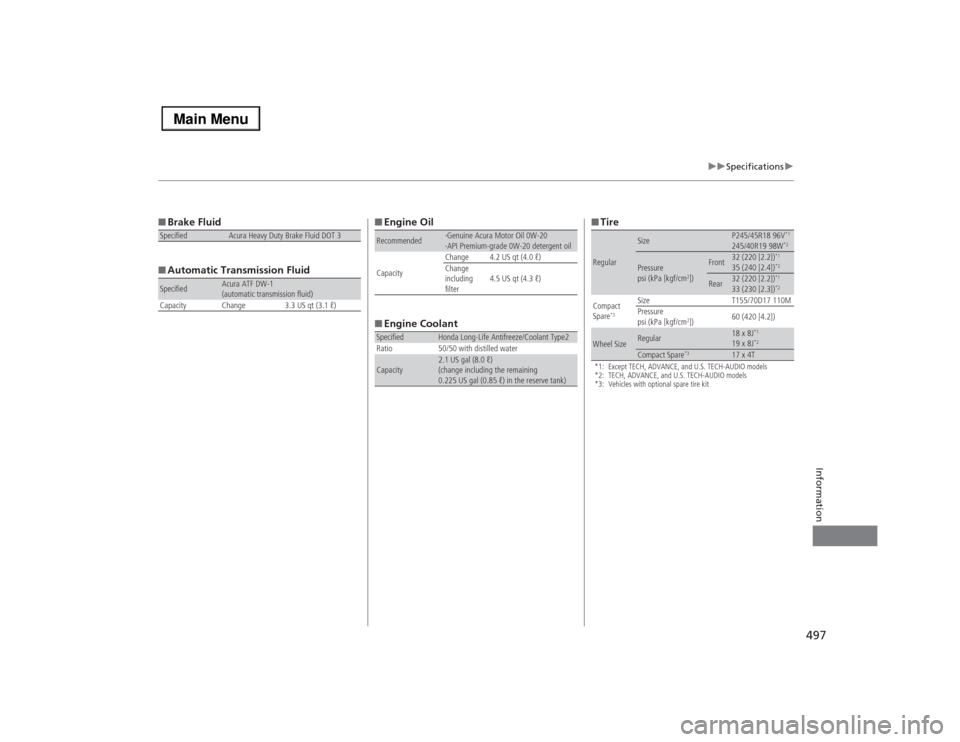
■Brake Fluid
■Automatic Transmission FluidSpecified
Acura Heavy Duty Brake Fluid DOT 3
Specified
Acura ATF DW-1
(automatic transmission fluid)
Capacity Change 3.3 US qt (3.1 ℓ)
■Engine Oil
■Engine CoolantRecommended
·Genuine Acura Motor Oil 0W-20
·API Premium-grade 0W-20 detergent oil
CapacityChange 4.2 US qt (4.0 ℓ)
Change
including
filter4.5 US qt (4.3 ℓ)
Specified
Honda Long-Life Antifreeze/Coolant Type2
Ratio 50/50 with distilled water
Capacity
2.1 US gal (8.0 ℓ)
(change including the remaining
0.225 US gal (0.85 ℓ) in the reserve tank)
■Tire*1: Except TECH, ADVANCE, and U.S. TECH-AUDIO models
*2: TECH, ADVANCE, and U.S. TECH-AUDIO models
*3: Vehicles with optional spare tire kitRegular
Size
P245/45R18 96V
*1
245/40R19 98W
*2
Pressure
psi (kPa [kgf/cm
2])
Front
32 (220 [2.2])
*1
35 (240 [2.4])
*2
Rear
32 (220 [2.2])
*1
33 (230 [2.3])
*2
Compact
Spare
*3
Size T155/70D17 110M
Pressure
psi (kPa [kgf/cm
2])60 (420 [4.2])
Wheel Size
Regular
18 x 8J
*1
19 x 8J
*2
Compact Spare
*3
17 x 4T