instrument panel Acura RLX 2014 Workshop Manual
[x] Cancel search | Manufacturer: ACURA, Model Year: 2014, Model line: RLX, Model: Acura RLX 2014Pages: 518, PDF Size: 15.83 MB
Page 130 of 518
129
uuSecurity SystemuSecurity System Alarm
Controls
■Setting the security system alarm
The security system alarm automatically sets when the following conditions have
been met:
•The power mode is set to VEHICLE OFF (LOCK).
•The hood and trunk are closed.
•All doors are locked from outside with the key, remote transmitter or keyless
access system.■When the security system alarm sets
The security system indicator in the instrument panel blinks. When the blinking
interval changes after about 15 seconds, the security system is set.■To cancel the security system alarm
The security system is canceled when the vehicle is unlocked using the key or remote
transmitter, or you grab either front door
* or any door
* handle while carrying the
keyless access remote, or the power mode is set to ON. The security system indicator
goes off at the same time.
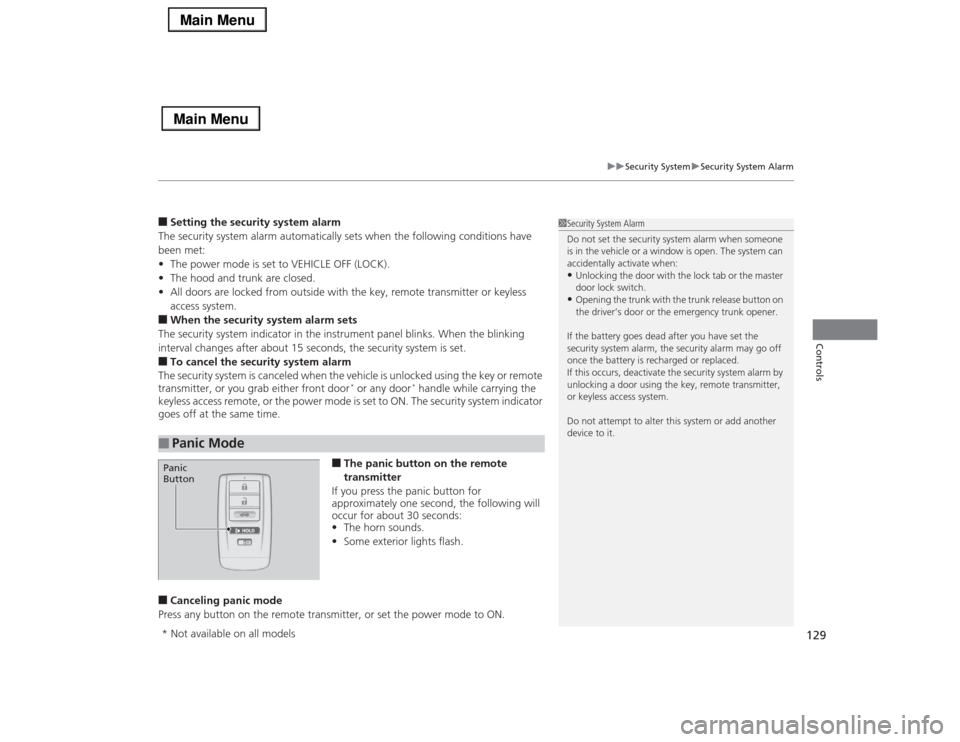
■The panic button on the remote
transmitter
If you press the panic button for
approximately one second, the following will
occur for about 30 seconds:
•The horn sounds.
•Some exterior lights flash.
■Canceling panic mode
Press any button on the remote transmitter, or set the power mode to ON.■
Panic Mode
1Security System Alarm
Do not set the security system alarm when someone
is in the vehicle or a window is open. The system can
accidentally activate when:•Unlocking the door with the lock tab or the master
door lock switch.•Opening the trunk with the trunk release button on
the driver’s door or the emergency trunk opener.
If the battery goes dead after you have set the
security system alarm, the security alarm may go off
once the battery is recharged or replaced.
If this occurs, deactivate the security system alarm by
unlocking a door using the key, remote transmitter,
or keyless access system.
Do not attempt to alter this system or add another
device to it.
Panic
Button* Not available on all models
Page 138 of 518
137
uuOperating the Switches Around the Steering WheeluLight Switches
Continued
Controls
Light Switches
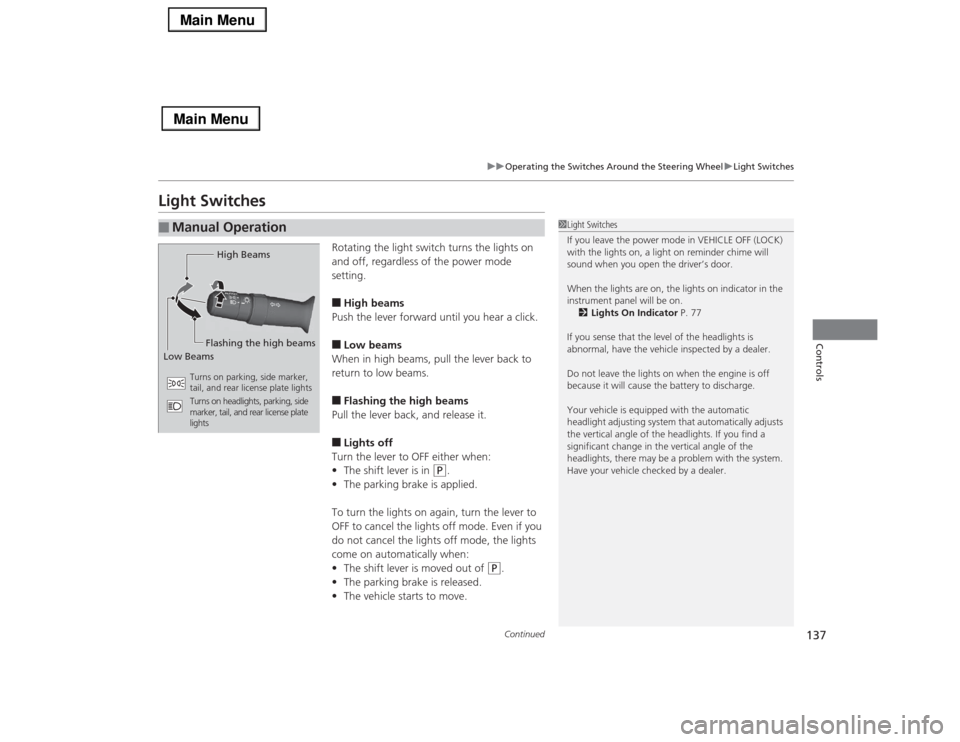
Rotating the light switch turns the lights on
and off, regardless of the power mode
setting.■High beams
Push the lever forward until you hear a click.■Low beams
When in high beams, pull the lever back to
return to low beams.■Flashing the high beams
Pull the lever back, and release it.■Lights off
Turn the lever to OFF either when:
•The shift lever is in
(P
.
•The parking brake is applied.
To turn the lights on again, turn the lever to
OFF to cancel the lights off mode. Even if you
do not cancel the lights off mode, the lights
come on automatically when:
•The shift lever is moved out of
(P
.
•The parking brake is released.
•The vehicle starts to move.
■
Manual Operation
1Light Switches
If you leave the power mode in VEHICLE OFF (LOCK)
with the lights on, a light on reminder chime will
sound when you open the driver’s door.
When the lights are on, the lights on indicator in the
instrument panel will be on.
2Lights On Indicator P. 77
If you sense that the level of the headlights is
abnormal, have the vehicle inspected by a dealer.
Do not leave the lights on when the engine is off
because it will cause the battery to discharge.
Your vehicle is equipped with the automatic
headlight adjusting system that automatically adjusts
the vertical angle of the headlights. If you find a
significant change in the vertical angle of the
headlights, there may be a problem with the system.
Have your vehicle checked by a dealer.
High Beams
Flashing the high beams
Low Beams
Turns on parking, side marker,
tail, and rear license plate lights
Turns on headlights, parking, side
marker, tail, and rear license plate
lights
Page 140 of 518

139
uuOperating the Switches Around the Steering WheeluLight Switches
Controls
The headlights automatically come on when the wipers are used several times within
a certain intervals with the headlight switch in AUTO.
The headlights automatically go off a few minutes later if the wipers are stopped.
The headlights, all other exterior lights, and the instrument panel lights turn off 15
seconds after you set the power mode to VEHICLE OFF (LOCK), take the remote with
you, and close the driver's door.
If you set the power mode to VEHICLE OFF (LOCK) with the headlight switch on, but
do not open the door, the lights turn off after 10 minutes (three minutes, if the
switch is in the AUTO position).
The lights turn on again when you unlock or open the driver’s door. If you unlock
the door, but do not open it within 15 seconds, the lights go off. If you open the
driver’s door, you will hear a lights on reminder chime.■
Headlight Integration with Wipers
*
■
Automatic Lighting Off Feature
1Automatic Lighting Control
Adjust the auto light sensitivity as follows:
2Customized Features P. 102, 264
Setting
The exterior lights come on
when the ambient light is at
MAXHIGHMIDLOWMIN
Bright
Dark
1Headlight Integration with Wipers
*
This feature activates during the headlights are off in
AUTO.
The instrument panel brightness does not change
when the headlights come on.
When the ambient light is at dark, the automatic
lighting control feature overrides, and the headlights
come on with or without the wipers sweeping more
than several times.1Automatic Lighting Off Feature
You can change the headlight auto off timer setting.
2Customized Features P. 102, 264
* Not available on all models
Page 145 of 518
144
uuOperating the Switches Around the Steering WheeluBrightness Control
Controls
Brightness Control
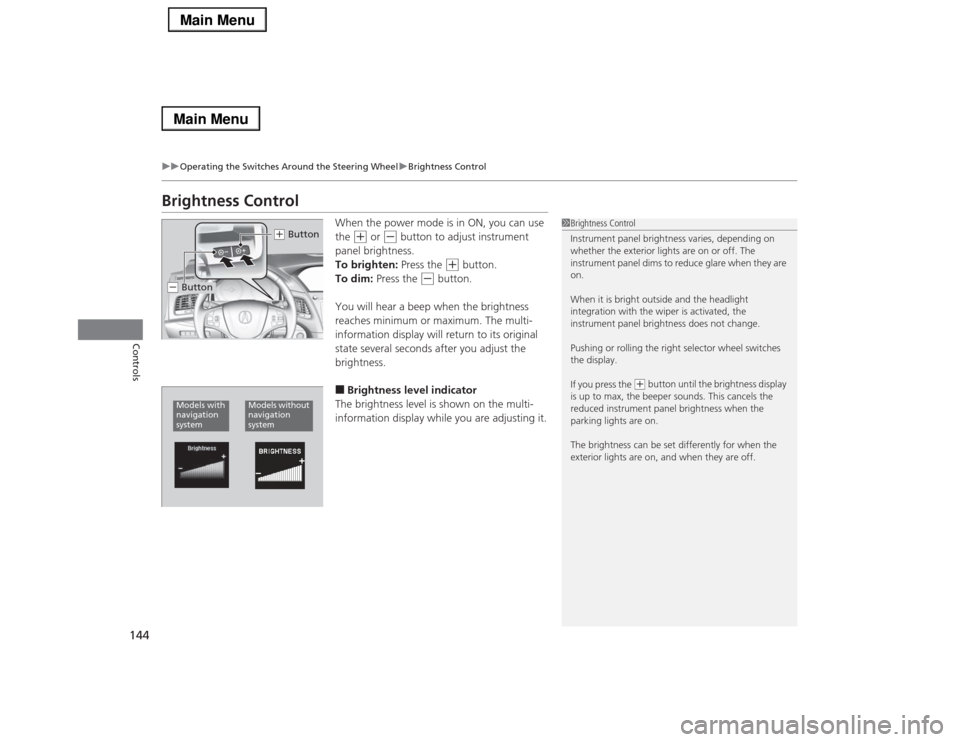
When the power mode is in ON, you can use
the
(+
or
(-
button to adjust instrument
panel brightness.
To brighten: Press the
(+
button.
To dim: Press the
(-
button.
You will hear a beep when the brightness
reaches minimum or maximum. The multi-
information display will return to its original
state several seconds after you adjust the
brightness.
■Brightness level indicator
The brightness level is shown on the multi-
information display while you are adjusting it.
1Brightness Control
Instrument panel brightness varies, depending on
whether the exterior lights are on or off. The
instrument panel dims to reduce glare when they are
on.
When it is bright outside and the headlight
integration with the wiper is activated, the
instrument panel brightness does not change.
Pushing or rolling the right selector wheel switches
the display.
If you press the
(+ button until the brightness display
is up to max, the beeper sounds. This cancels the
reduced instrument panel brightness when the
parking lights are on.
The brightness can be set differently for when the
exterior lights are on, and when they are off.
(+ Button
(- ButtonModels with
navigation
system
Models without
navigation
system
Page 149 of 518

148
uuOperating the Switches Around the Steering WheeluAdjusting the Steering Wheel
Controls
Adjusting the Steering WheelThe steering wheel height and distance from your body can be adjusted so that you
can comfortably grip the steering wheel in an appropriate driving posture.
Push and hold the adjustment switch to move
the steering wheel in, out, up or down.
Make sure you can see the instrument panel
gauges and indicators.
1Adjusting the Steering Wheel
Make any steering wheel adjustments before you
start driving.
3
WARNING
Adjusting the steering wheel position while
driving may cause you to lose control of the
vehicle and be seriously injured in a crash.
Adjust the steering wheel only when the
vehicle is stopped.
Adjustment Switch
Page 203 of 518
uuAudio System Basic OperationuOn Demand Multi-Use Display
TM
202Features
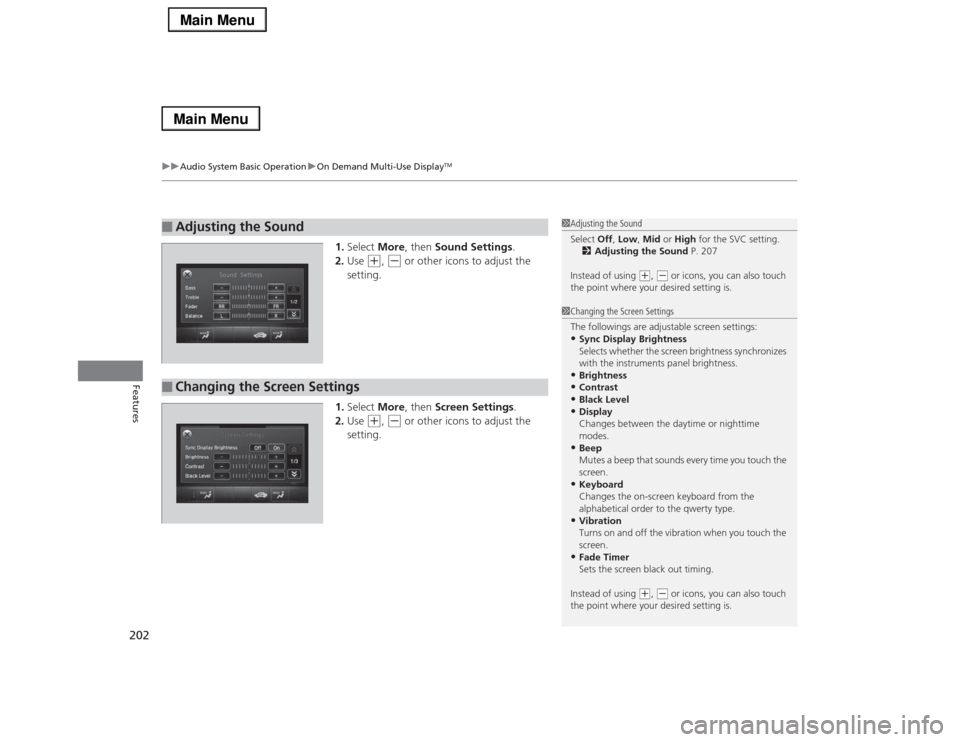
1.Select More, then Sound Settings.
2.Use
(+
, (-
or other icons to adjust the
setting.
1.Select More, then Screen Settings.
2.Use
(+
, (-
or other icons to adjust the
setting.
■
Adjusting the Sound
1Adjusting the Sound
Select Off, Low, Mid or High for the SVC setting.
2Adjusting the Sound P. 207
Instead of using
(+, (- or icons, you can also touch
the point where your desired setting is.
■
Changing the Screen Settings
1Changing the Screen Settings
The followings are adjustable screen settings:•Sync Display Brightness
Selects whether the screen brightness synchronizes
with the instruments panel brightness.•Brightness•Contrast•Black Level•Display
Changes between the daytime or nighttime
modes.•Beep
Mutes a beep that sounds every time you touch the
screen.•Keyboard
Changes the on-screen keyboard from the
alphabetical order to the qwerty type.•Vibration
Turns on and off the vibration when you touch the
screen.•Fade Timer
Sets the screen black out timing.
Instead of using
(+, (- or icons, you can also touch
the point where your desired setting is.
Page 272 of 518
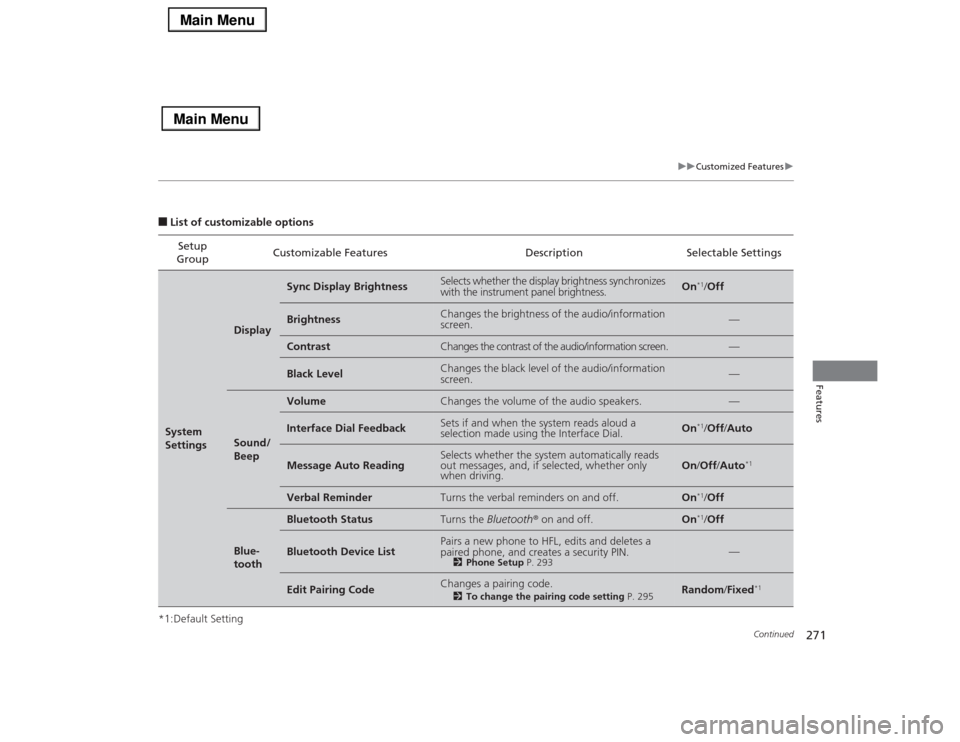
271
uuCustomized Featuresu
Continued
Features
■List of customizable options
*1:Default SettingSetup
GroupCustomizable Features Description Selectable SettingsSystem
Settings
Display
Sync Display Brightness
Selects whether the display brightness synchronizes
with the instrument panel brightness.
On
*1/Off
Brightness
Changes the brightness of the audio/information
screen.
—
Contrast
Changes the contrast of the audio/information screen.
—
Black Level
Changes the black level of the audio/information
screen.
—
Sound/
Beep
Volume
Changes the volume of the audio speakers.
—
Interface Dial Feedback
Sets if and when the system reads aloud a
selection made using the Interface Dial.
On
*1/Off/Auto
Message Auto Reading
Selects whether the system automatically reads
out messages, and, if selected, whether only
when driving.
On/Off/Auto
*1
Verbal Reminder
Turns the verbal reminders on and off.
On
*1/Off
Blue-
tooth
Bluetooth Status
Turns the Bluetooth® on and off.
On
*1/Off
Bluetooth Device List
Pairs a new phone to HFL, edits and deletes a
paired phone, and creates a security PIN.
2Phone Setup P. 293
—
Edit Pairing Code
Changes a pairing code.
2To change the pairing code setting P. 295
Random/Fixed
*1
Page 339 of 518

338
uuBefore DrivinguDriving Preparation
Driving
•Be sure items placed on the floor behind the front seats cannot roll under the
seats.
uThey can interfere with the driver’s ability to operate the pedals, the operation
of the seats, or the operation of the sensors under the seats.
•Everyone in the vehicle must fasten their seat belt.
2Fastening a Seat Belt P. 33
•Make sure that the indicators in the instrument panel come on when you start the
vehicle, and go off soon after.
uAlways have a dealer check the vehicle if a problem is indicated.
2Indicators P. 68
Page 353 of 518

352
uuWhen DrivinguCruise Control
*
Driving
Cruise Control
*
Maintains a constant vehicle speed without having to keep your foot on the
accelerator. Use cruise control on freeways or open roads where you can travel at a
constant speed with little acceleration or deceleration.
1Cruise Control
*
It may not be possible to maintain a constant speed
when driving uphill or downhill.
When not using cruise control:
Turn off cruise control by pressing the CRUISE
button.
3
WARNING
Improper use of the cruise control can lead
to a crash.
Use the cruise control only when traveling
on open highways in good weather.
When to use■Shift positions for cruise control:
In (DAlways keep sufficient distance
between you and the vehicle in
front of you.
■Vehicle speed for cruise control:
Desired speed in a range above
roughly 25 mph (40 km/h) ~How to use
CRUISE MAIN is on in the
instrument panel.Cruise control is ready to use.
■Press the
CRUISE
button on
the steering wheel.
Models with
navigation systemModels without
navigation system
* Not available on all models
Page 356 of 518

355
uuWhen DrivinguAdaptive Cruise Control (ACC) with Low Speed Follow (LSF)
*
Continued
Driving
Adaptive Cruise Control (ACC) with Low Speed Follow (LSF)
*
Helps maintain a constant vehicle speed and a set following distance behind a
vehicle detected ahead of yours and, if the detected vehicle comes to a stop,
decelerates and stops your vehicle, without you having to keep your foot on the
brake or the accelerator.
1Adaptive Cruise Control (ACC) with Low Speed Follow (LSF)
*
Important Safety ReminderAs with any system, there are limits to ACC with LSF.
Inappropriate use of ACC with LSF can result in a serious
accident. Use the brake pedal whenever necessary, and always
keep a safe distance between your vehicle and other vehicles.The radar sensor for ACC with LSF is shared with the
collision mitigation braking system
TM (CMBS
TM).
2Collision Mitigation Braking SystemTM
(CMBS
TM)* P. 3913
WARNING
Improper use of ACC with LSF can lead to a
crash.
Use ACC with LSF only when driving on
expressways or freeways and in good
weather conditions.
3
WARNING
Exiting a vehicle that has been stopped
while the ACC with LSF system is operating
can result in the vehicle moving without
operator control.A vehicle that moves without operator
control can cause a crash, resulting in
serious injury or death.Never exit a vehicle when the vehicle is
stopped by ACC with LSF.
When to use■Vehicle speed for ACC with LSF: A vehicle is
detected ahead within ACC with LSF range –
ACC with LSF operates at any vehicle speed.
No vehicle is detected within ACC with LSF
range – ACC with LSF operates at the speed of 25
mph (40km/h) or above.■Shift positions for ACC with LSF: In
(D.The radar sensor is in the front grille.
How to use■Press the MAIN button on
the steering wheel.ACC (green) is on in the
instrument panel.
ACC with LSF is ready to
use.* Not available on all models