warning Acura RLX 2014 Workshop Manual
[x] Cancel search | Manufacturer: ACURA, Model Year: 2014, Model line: RLX, Model: Acura RLX 2014Pages: 518, PDF Size: 15.83 MB
Page 275 of 518
274
uuCustomized Featuresu
Features
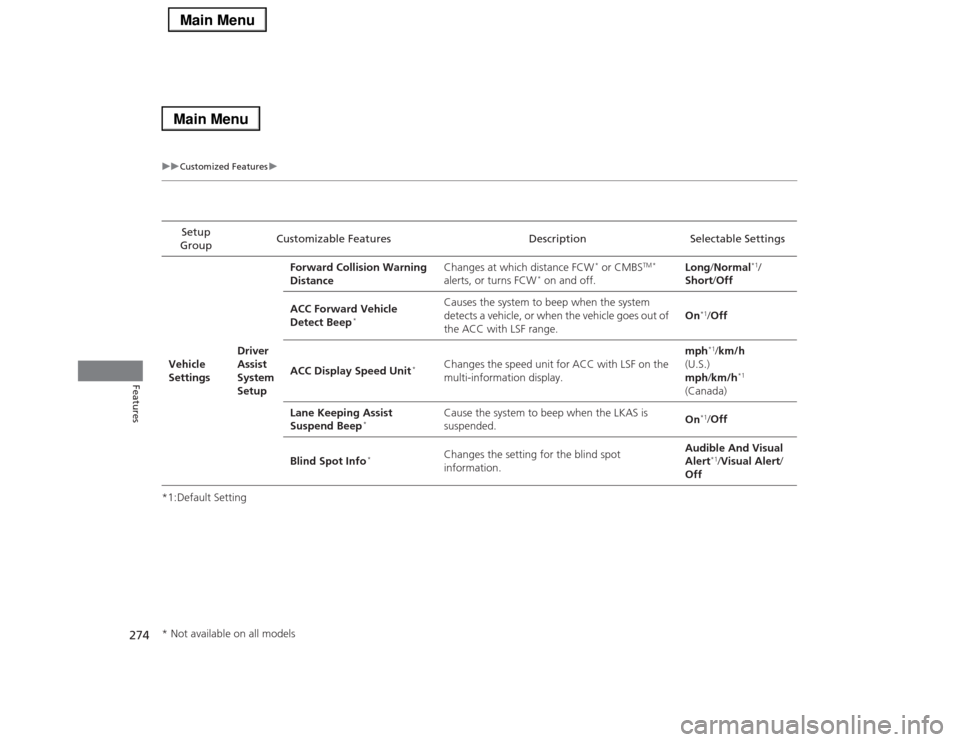
*1:Default SettingSetup
GroupCustomizable Features Description Selectable Settings
Vehicle
SettingsDriver
Assist
System
SetupForward Collision Warning
DistanceChanges at which distance FCW
* or CMBS
TM *
alerts, or turns FCW
* on and off.Long/Normal
*1/
Short/Off
ACC Forward Vehicle
Detect Beep
*
Causes the system to beep when the system
detects a vehicle, or when the vehicle goes out of
the ACC with LSF range.On
*1/Off
ACC Display Speed Unit
*
Changes the speed unit for ACC with LSF on the
multi-information display.mph
*1/km/h
(U.S.)
mph/km/h
*1
(Canada)
Lane Keeping Assist
Suspend Beep
*
Cause the system to beep when the LKAS is
suspended.On
*1/Off
Blind Spot Info
*
Changes the setting for the blind spot
information.Audible And Visual
Alert
*1/Visual Alert/
Off
* Not available on all models
Page 332 of 518

Continued
331
uuAcuraLink®
*u
Features
AcuraLink sends you messages on vehicle
features, safety and emissions recall
campaigns, maintenance reminders (U.S.
models only), and diagnostic information.
When you receive a new message, an icon
appears on the audio/information screen.
■Message category
There are six message categories.
•Feature Guide: Appears for the first 90 days of ownership, introducing vehicle
features each day.
•Quick Tips: Supplements your Owner’s Manual with updated vehicle
information.
•Diagnostic Info: Appears when a warning indicator or message comes on.
Rotate to select Check Later or Check Now.
uSelecting Check Now lets you know if you should see a dealer immediately or
later in accordance with the warning severity level.
•Scheduled Dealer Appointment (U.S. models only): An appointment made
through the Acura server or Acura Owners website can be rescheduled or
canceled from this option.
2 P. 333
•Maintenance Minder (U.S. models only): Lets you know which maintenance
item is due along with a reminder message.
•Recalls/Campaigns: Reminds you of a recall or important safety information.
You should also be notified by mail.■
AcuraLink Message
1AcuraLink Message
Messages may not appear immediately after your
vehicle purchase. It can take several days for your
dealer to register your vehicle’s ID.
If an icon includes an exclamation point, it indicates
that Acura gives high priority to this message
compared to the one without.•
: An unread message with high priority
•
: An unread message
Message Icon
1Message category
Message categories can be added, edited, or deleted
through broadcast messages from Acura.
You can call your dealer, find the nearest dealer, or
schedule appointments (U.S. models only) from the
message options in Maintenance Minder (U.S.
models only), Recalls/Campaigns, and Diagnostic
Info.
2Message Options P. 332
Page 336 of 518
335
Driving
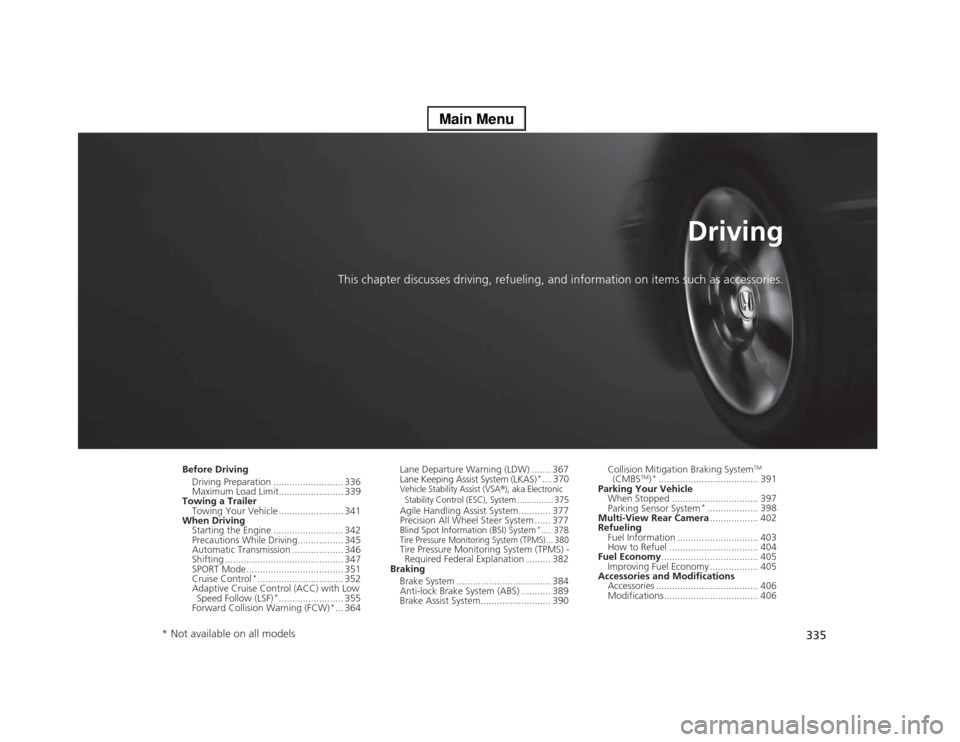
This chapter discusses driving, refueling, and information on items such as accessories.
Before Driving
Driving Preparation .......................... 336
Maximum Load Limit........................ 339
Towing a Trailer
Towing Your Vehicle ........................ 341
When Driving
Starting the Engine .......................... 342
Precautions While Driving................. 345
Automatic Transmission ................... 346
Shifting ............................................ 347
SPORT Mode.................................... 351
Cruise Control
*................................ 352
Adaptive Cruise Control (ACC) with Low
Speed Follow (LSF)
*........................ 355
Forward Collision Warning (FCW)
*... 364Lane Departure Warning (LDW) ....... 367
Lane Keeping Assist System (LKAS)
*.... 370
Vehicle Stability Assist (VSA
®), aka Electronic
Stability Control (ESC), System ............... 375
Agile Handling Assist System............ 377
Precision All Wheel Steer System ...... 377Blind Spot Information (BSI) System
*.... 378
Tire Pressure Monitoring System (TPMS) ... 380Tire Pressure Monitoring System (TPMS) -
Required Federal Explanation ......... 382
Braking
Brake System ................................... 384
Anti-lock Brake System (ABS) ........... 389
Brake Assist System.......................... 390Collision Mitigation Braking System
TM
(CMBS
TM)*..................................... 391
Parking Your Vehicle
When Stopped ................................ 397
Parking Sensor System
*................... 398
Multi-View Rear Camera.................. 402
Refueling
Fuel Information .............................. 403
How to Refuel ................................. 404
Fuel Economy.................................... 405
Improving Fuel Economy .................. 405
Accessories and Modifications
Accessories ...................................... 406
Modifications................................... 406
* Not available on all models
Page 340 of 518

339
uuBefore DrivinguMaximum Load Limit
Continued
Driving
Maximum Load LimitThe maximum load for your vehicle is 850 lbs (385 kg).
See Tire and Loading Information label attached to the driver’s doorjamb.
This figure includes the total weight of all occupants, cargo, and
accessories, and the tongue load if you are towing a trailer.
Steps for Determining Correct Load Limit -
(1)Locate the statement “The combined weight of occupants and
cargo should never exceed XXX kg or XXX lbs.” on your
vehicle’s placard.
(2)Determine the combined weight of the driver and passengers
that will be riding in your vehicle.
(3)Subtract the combined weight of the driver and passengers
from XXX kg or XXX lbs.
(4)The resulting figure equals the available amount of cargo and
luggage load capacity. For example, if the “XXX” amount
equals 1,400 lbs. and there will be five 150 lb. passengers in
your vehicle, the amount of available cargo and luggage load
capacity is 650 lbs.
(1,400 - 750 (5 x 150) = 650 lbs.)
1Maximum Load Limit
Gross Vehicle Weight Rating (GVWR):
The maximum allowable weight of the vehicle, all
occupants, all accessories and all cargo.
2Specifications P. 496
Gross Axle Weight Rating (GAWR):
The maximum allowable weight of the vehicle axle.
2Specifications P. 496
3
WARNING
Overloading or improper loading
can affect handling and stability
and cause a crash in which you
can be hurt or killed.
Follow all load limits and other
loading guidelines in this manual.
Label Example
Page 353 of 518

352
uuWhen DrivinguCruise Control
*
Driving
Cruise Control
*
Maintains a constant vehicle speed without having to keep your foot on the
accelerator. Use cruise control on freeways or open roads where you can travel at a
constant speed with little acceleration or deceleration.
1Cruise Control
*
It may not be possible to maintain a constant speed
when driving uphill or downhill.
When not using cruise control:
Turn off cruise control by pressing the CRUISE
button.
3
WARNING
Improper use of the cruise control can lead
to a crash.
Use the cruise control only when traveling
on open highways in good weather.
When to use■Shift positions for cruise control:
In (DAlways keep sufficient distance
between you and the vehicle in
front of you.
■Vehicle speed for cruise control:
Desired speed in a range above
roughly 25 mph (40 km/h) ~How to use
CRUISE MAIN is on in the
instrument panel.Cruise control is ready to use.
■Press the
CRUISE
button on
the steering wheel.
Models with
navigation systemModels without
navigation system
* Not available on all models
Page 356 of 518

355
uuWhen DrivinguAdaptive Cruise Control (ACC) with Low Speed Follow (LSF)
*
Continued
Driving
Adaptive Cruise Control (ACC) with Low Speed Follow (LSF)
*
Helps maintain a constant vehicle speed and a set following distance behind a
vehicle detected ahead of yours and, if the detected vehicle comes to a stop,
decelerates and stops your vehicle, without you having to keep your foot on the
brake or the accelerator.
1Adaptive Cruise Control (ACC) with Low Speed Follow (LSF)
*
Important Safety ReminderAs with any system, there are limits to ACC with LSF.
Inappropriate use of ACC with LSF can result in a serious
accident. Use the brake pedal whenever necessary, and always
keep a safe distance between your vehicle and other vehicles.The radar sensor for ACC with LSF is shared with the
collision mitigation braking system
TM (CMBS
TM).
2Collision Mitigation Braking SystemTM
(CMBS
TM)* P. 3913
WARNING
Improper use of ACC with LSF can lead to a
crash.
Use ACC with LSF only when driving on
expressways or freeways and in good
weather conditions.
3
WARNING
Exiting a vehicle that has been stopped
while the ACC with LSF system is operating
can result in the vehicle moving without
operator control.A vehicle that moves without operator
control can cause a crash, resulting in
serious injury or death.Never exit a vehicle when the vehicle is
stopped by ACC with LSF.
When to use■Vehicle speed for ACC with LSF: A vehicle is
detected ahead within ACC with LSF range –
ACC with LSF operates at any vehicle speed.
No vehicle is detected within ACC with LSF
range – ACC with LSF operates at the speed of 25
mph (40km/h) or above.■Shift positions for ACC with LSF: In
(D.The radar sensor is in the front grille.
How to use■Press the MAIN button on
the steering wheel.ACC (green) is on in the
instrument panel.
ACC with LSF is ready to
use.* Not available on all models
Page 365 of 518

364
uuWhen DrivinguForward Collision Warning (FCW)
*
Driving
Forward Collision Warning (FCW)
*
Alerts you when it detects the possibility of your vehicle colliding with the vehicle in
front of yours.
If the system determines a collision is possible, it gives both visual and audible alerts.
uTake appropriate action to prevent a collision (apply the brakes, change lanes,
etc.).■How the system works
The system may give warnings of potential collisions when your vehicle speed is
above 10 mph (15 km/h).
1Forward Collision Warning (FCW)
*
Important Safety Reminder
FCW cannot detect all objects ahead and may not
detect a given object; accuracy of the system will vary
based on weather, speed and other factors. FCW
does not include a braking function. It is always your
responsibility to safely operate the vehicle and avoid
collisions.
You can change the Forward Collision Warning
Distance setting or turn the system on and off.
2Customized Features P. 102, 264
For the FCW system to work properly:
The camera is shared with Lane Departure Warning
(LDW).
2LDW Camera P. 368
LONG
NORMAL
SHORT
Your Vehicle Vehicle Ahead You can set Long, Normal or Short for when warnings start:
* Not available on all models
Page 366 of 518

Continued
365
uuWhen DrivinguForward Collision Warning (FCW)
*
Driving
■Automatic shutoff
FCW may automatically shut itself off and the FCW indicator comes and stays on when:
•The temperature inside the system is high.
•The windshield is blocked by dirt, mud, leaves, wet snow, etc.
Once the conditions that caused FCW to shut off improve or are addressed (e.g.,
cleaning), the system comes back on.
1Forward Collision Warning (FCW)
*
Never apply a film or attach any objects to the
windshield that could obstruct the FCW camera’s
field of vision.
Scratches, nicks, and other damage to the windshield
within the FCW camera’s field of vision can cause the
system to operate abnormally. If this occurs, we
recommend that you replace the windshield with a
genuine Acura replacement windshield. Making even
minor repairs within the camera’s field of vision or
installing an aftermarket replacement windshield
may also cause the system to operate abnormally.
After replacing the windshield, have a dealer
recalibrate the camera. Proper calibration of the FCW
camera is necessary for the system to operate
properly.
BeepThe camera is located
behind the rearview mirror.
The beeper sounds and the BRAKE message
appears in the multi-information display until
a possible collision is avoided.
Models with
navigation system
Models without
navigation system
1Automatic shutoff
To help reduce the likelihood that high interior
temperatures will cause the camera system to shut off,
when parking, find a shady area or face the front of the
vehicle away from the sun. Also, do not use a reflective
sun shade that can concentrate heat on the camera.
If the Can Not Operate: Camera Too Hot/CAN
NOT OPERATE message appears:•Use the climate control system to cool down the
interior and, if necessary, the defroster mode when
windows are fogged.•Start driving the vehicle to lower the windshield
temperature, which cools down the area around
the FCW camera.
* Not available on all models
Page 367 of 518
366
uuWhen DrivinguForward Collision Warning (FCW)
*
Driving
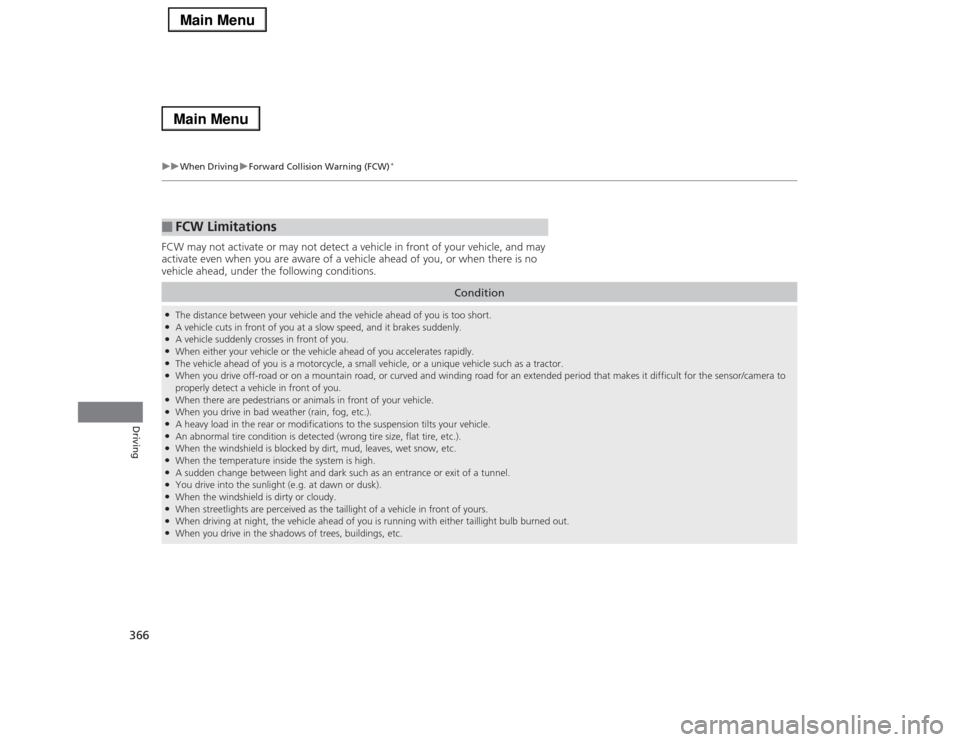
FCW may not activate or may not detect a vehicle in front of your vehicle, and may
activate even when you are aware of a vehicle ahead of you, or when there is no
vehicle ahead, under the following conditions.■
FCW Limitations
Condition
●The distance between your vehicle and the vehicle ahead of you is too short.●A vehicle cuts in front of you at a slow speed, and it brakes suddenly.●A vehicle suddenly crosses in front of you.●When either your vehicle or the vehicle ahead of you accelerates rapidly.●The vehicle ahead of you is a motorcycle, a small vehicle, or a unique vehicle such as a tractor.●When you drive off-road or on a mountain road, or curved and winding road for an extended period that makes it difficult for the sensor/camera to
properly detect a vehicle in front of you.●When there are pedestrians or animals in front of your vehicle.●When you drive in bad weather (rain, fog, etc.).●A heavy load in the rear or modifications to the suspension tilts your vehicle.●An abnormal tire condition is detected (wrong tire size, flat tire, etc.).●When the windshield is blocked by dirt, mud, leaves, wet snow, etc.●When the temperature inside the system is high.●A sudden change between light and dark such as an entrance or exit of a tunnel.●You drive into the sunlight (e.g. at dawn or dusk).●When the windshield is dirty or cloudy.●When streetlights are perceived as the taillight of a vehicle in front of yours.●When driving at night, the vehicle ahead of you is running with either taillight bulb burned out.●When you drive in the shadows of trees, buildings, etc.
Page 368 of 518

367
uuWhen DrivinguLane Departure Warning (LDW)
Continued
Driving
Lane Departure Warning (LDW)Alerts you when the system detects a possibility of your vehicle unintentionally
crossing over detected lane markings.
If your vehicle is getting too close to detected
left or right side lane markings without a turn
signal activated, LDW will give audible and
visual alerts.
The beeper sounds and the Lane Departure
message appears on the multi-information
display, letting you know that you need to
take appropriate action.
The system begins to search for lane markings when all the following conditions are met:
•The vehicle is traveling between at 40-90 mph (64-145 km/h).
•The vehicle is on a straight or slightly curved road.
•The turn signals are off.
•The brake pedal is not depressed.■
How the System Works
1Lane Departure Warning (LDW)
Important Safety Reminder
Like all assistance systems, LDW has limitations.
Over-reliance on LDW may result in a collision. It is
always your responsibility to keep the vehicle within
your driving lane.
LDW only alerts you when lane drift is detected
without a turn signal in use. LDW may not detect all
lane markings or lane departures; accuracy will vary
based on weather, speed and lane marker condition.
It is always your responsibility to safely operate the
vehicle and avoid collisions.
Models with
navigation
system
Models without
navigation
system
■
How the System Activates
1How the System Activates
LDW may automatically shut off and the LDW
indicator comes and stays on.
2Indicators P. 80