warning Acura RLX 2014 Repair Manual
[x] Cancel search | Manufacturer: ACURA, Model Year: 2014, Model line: RLX, Model: Acura RLX 2014Pages: 518, PDF Size: 15.83 MB
Page 369 of 518

uuWhen DrivinguLane Departure Warning (LDW)
368Driving
The camera is located behind the rearview
mirror.
Press the LDW button to turn the system on
and off.
uThe indicator in the button comes on
when the system is on.
■
LDW Camera
1LDW Camera
Never apply a film or attach any objects to the
windshield that could obstruct the LDW camera’s
field of vision.
Scratches, nicks, and other damage to the windshield
within the LDW camera’s field of vision can cause the
system to operate abnormally. If this occurs, we
recommend that you replace the windshield with a
genuine Acura replacement windshield. Making even
minor repairs within the camera’s field of vision or
installing an aftermarket replacement windshield
may also cause the system to operate abnormally.
After replacing the windshield, have a dealer
recalibrate the camera. Proper calibration of the LDW
camera is necessary for the system to operate properly.
Do not place an object on the top of the instrument
panel. It may reflect onto the windshield and prevent
the system from detecting lane lines properly.
To help reduce the likelihood that high interior
temperatures will cause the camera system to shut off,
when parking, find a shady area or face the front of the
vehicle away from the sun. Also, do not use a reflective
sun shade that can concentrate heat on the camera.
If the Can Not Operate: Camera Too Hot/CAN
NOT OPERATE message appears:•Use the climate control system to cool down the
interior and, if necessary, the defroster mode when
windows are fogged.•Start driving the vehicle to lower the windshield
temperature, which cools down the area around
the LDW camera.
LDW Camera■
LDW On and Off
LDW Button Indicator
Page 370 of 518
369
uuWhen DrivinguLane Departure Warning (LDW)
Driving
LDW may not activate or may not recognize lanes, and may activate even when
keeping in the middle of a lane, under the following conditions.■
LDW Limitations
Condition
●When you drive in bad weather (rain, fog, etc.).●A heavy load in the rear or modifications to the suspension tilts your vehicle.●An abnormal tire condition is detected (wrong tire size, flat tire, etc.).●When the windshield is blocked by dirt, mud, leaves, wet snow, etc.●When the temperature inside the system is high.●A sudden change between light and dark such as an entrance or exit of a tunnel.●You drive into the sunlight (e.g. at dawn or dusk).●When the windshield is dirty or cloudy.●When you drive in the shadows of trees, buildings, etc.●When you drive on a wet road surface following another vehicle.uThe camera may perceive the tire tracks in the water as lane lines.
●When there is snow or wheel tracks on the side of the road.●When the road has many repaired area or an erased lane line.●When the vehicle is running over painted signs or crosswalk markings.●When you drive in a lane with worn-out lane markings.
Page 371 of 518
370
uuWhen DrivinguLane Keeping Assist System (LKAS)
*
Driving
Lane Keeping Assist System (LKAS)
*
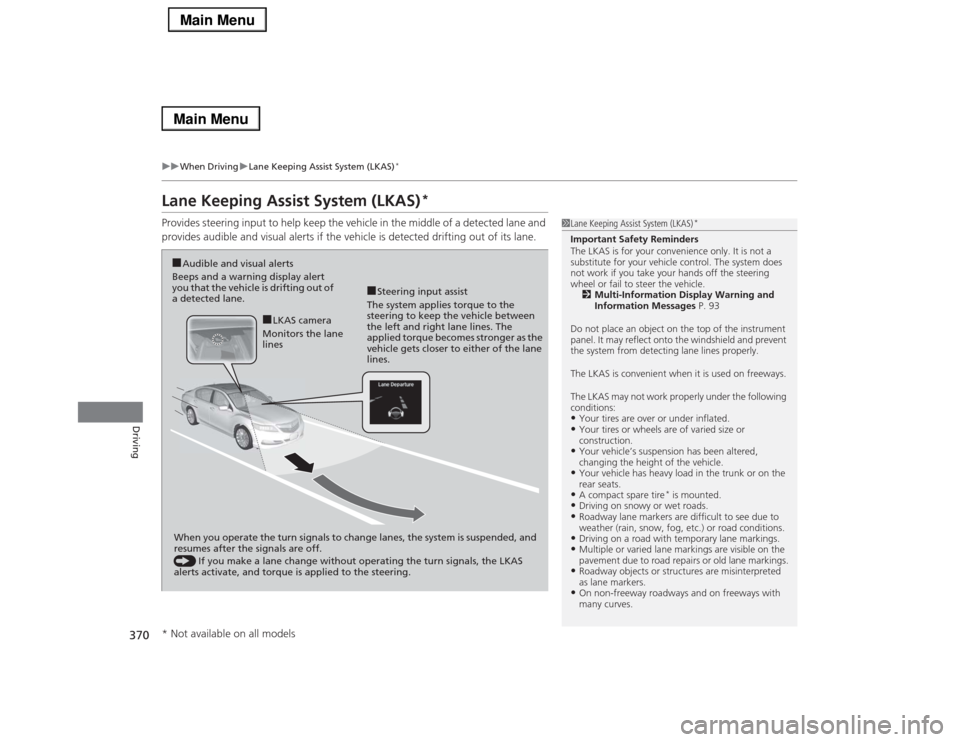
Provides steering input to help keep the vehicle in the middle of a detected lane and
provides audible and visual alerts if the vehicle is detected drifting out of its lane.
1Lane Keeping Assist System (LKAS)
*
Important Safety Reminders
The LKAS is for your convenience only. It is not a
substitute for your vehicle control. The system does
not work if you take your hands off the steering
wheel or fail to steer the vehicle.
2Multi-Information Display Warning and
Information Messages P. 93
Do not place an object on the top of the instrument
panel. It may reflect onto the windshield and prevent
the system from detecting lane lines properly.
The LKAS is convenient when it is used on freeways.
The LKAS may not work properly under the following
conditions:•Your tires are over or under inflated.•Your tires or wheels are of varied size or
construction.•Your vehicle’s suspension has been altered,
changing the height of the vehicle.•Your vehicle has heavy load in the trunk or on the
rear seats.•A compact spare tire
* is mounted.
•Driving on snowy or wet roads.•Roadway lane markers are difficult to see due to
weather (rain, snow, fog, etc.) or road conditions.•Driving on a road with temporary lane markings.•Multiple or varied lane markings are visible on the
pavement due to road repairs or old lane markings.•Roadway objects or structures are misinterpreted
as lane markers.•On non-freeway roadways and on freeways with
many curves.
■Steering input assist
The system applies torque to the
steering to keep the vehicle between
the left and right lane lines. The
applied torque becomes stronger as the
vehicle gets closer to either of the lane
lines.
■Audible and visual alerts
Beeps and a warning display alert
you that the vehicle is drifting out of
a detected lane.
When you operate the turn signals to change lanes, the system is suspended, and
resumes after the signals are off.
() If you make a lane change without operating the turn signals, the LKAS
alerts activate, and torque is applied to the steering.
■LKAS camera
Monitors the lane
lines
* Not available on all models
Page 379 of 518

378
uuWhen DrivinguBlind Spot Information (BSI) System
*
Driving
Blind Spot Information (BSI) System
*
Is designed to detect vehicles in specified alert zones adjacent to your vehicle,
particularly in harder to see areas commonly known as “blind spots.”
When the system detects vehicles approaching from behind in adjacent lanes, the
appropriate indicator comes on for a few seconds, providing assistance when you
change lanes.■How the system works
1Blind Spot Information (BSI) System
*
Important Safety Reminder
Like all assistance systems, BSI has limitations. Over
reliance on BSI may result in a collision.
The system is for your convenience only. Even if an
object is within the alert zone, the following
situations may occur.•The BSI alert indicator may not come on due to
obstruction (splashes, etc.) even without the Blind
Spot Not Available multi-information display
appearing.•The BSI alert indicator may come on even with the
message appearing.
The BSI alert indicator may not come on under
following conditions:•A vehicle does not stay in the alert zone for more
than two seconds.•A vehicle is parked in a side lane.•The speed difference between your vehicle and the
vehicle you are passing is greater than 6 mph (10
km/h).•An object not detected by the radar sensors
approaches or passes your vehicle.
3
WARNING
Failure to visually confirm that it is safe to
change lanes before doing so may result in
a crash and serious injury or death.
Do not rely only on the blind spot
information system when changing lanes.
Always look in your mirrors, to either side
of your vehicle, and behind you for other
vehicles before changing lanes.
●The shift lever is in
(D.
●Your vehicle speed is
between 20 mph (32 km/h)
and 100 mph (160 km/h)
Alert zone range
A: Approx. 1.6 ft. (0.5 m)
B: Approx. 10 ft. (3 m)
C: Approx. 10 ft. (3 m)Radar Sensors:
underneath the
rear bumper
cornersAlert Zone
A
B
C
* Not available on all models
Page 388 of 518

Continued
387
uuBrakinguBrake System
Driving
Keeps the brake applied after releasing the brake pedal until the accelerator pedal is
pressed. You can use this system while the vehicle is temporarily stopped, such as
when you stop at a traffic light.■
Automatic Brake Hold
1Automatic Brake Hold
3
WARNING
Activating the automatic brake hold system
on steep hills or slippery roads may still
allow the vehicle to move if you remove
your foot from the brake pedal.
If a vehicle unexpectedly moves, it may
cause a crash resulting in serious injury or
death.
Never activate the automatic brake hold
system or rely on it to keep a vehicle from
moving when stopped on a steep hill or
slippery roads.
3
WARNING
Using the automatic brake hold system to
park the vehicle may result in the vehicle
unexpectedly moving.
If a vehicle moves unexpectedly, it may
cause a crash, resulting in serious injury or
death.
Never leave the vehicle when braking is
temporarily kept by automatic brake hold
and always park the vehicle by putting the
transmission in
(P and applying the
parking brake.
■Turning on the system
Fasten your seat belt
properly, then start the
engine. Press the
automatic brake hold
button.●The automatic brake
hold system indicator
comes on. The system
is turned on.
■Activating the system
Depress the brake pedal
to come to a complete
stop. The shift lever must
be in
(D or
(N.
●The automatic brake
hold indicator comes
on. Braking is kept for
up to 10 minutes.●Release the brake
pedal after the
automatic brake hold
indicator comes on.
■Canceling the system
Depress the accelerator
pedal while the shift
lever is in
(D or
(R. The
system is canceled and
the vehicle starts to
move.
●The automatic brake
hold indicator goes
off. The system
continues to be on.Accelerator Pedal
Brake Pedal
Automatic Brake
Hold Button
Goes
Off On OnOn
On
On U.S.
Canada
Page 393 of 518
uuBrakinguCollision Mitigation Braking System
TM (CMBS
TM)*
392Driving
■When the system activates
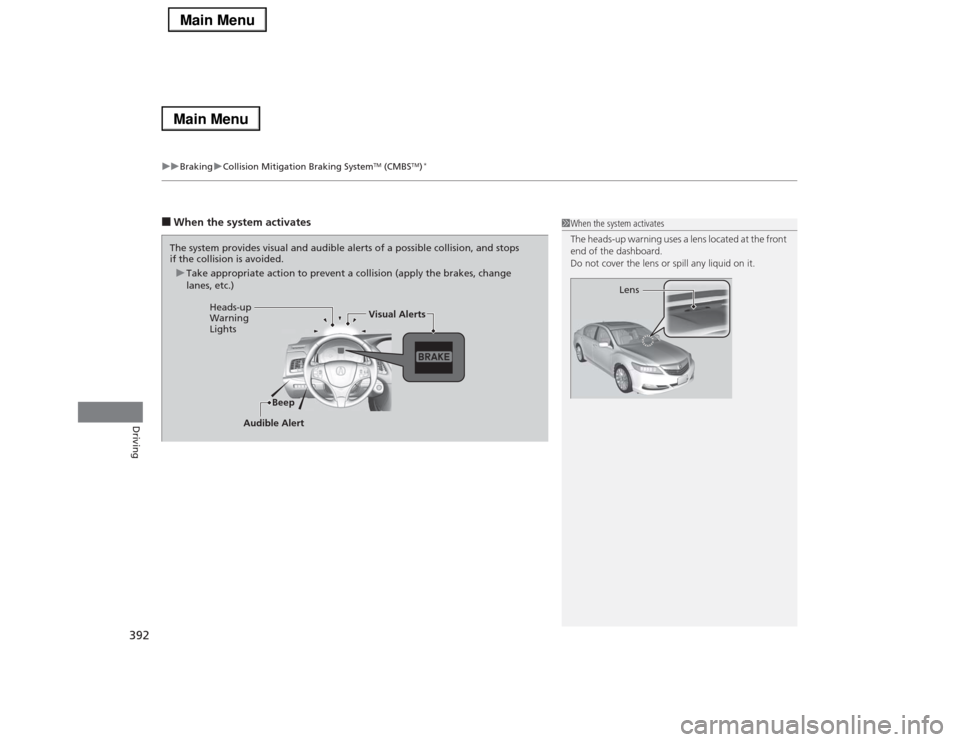
1When the system activates
The heads-up warning uses a lens located at the front
end of the dashboard.
Do not cover the lens or spill any liquid on it.
Lens
The system provides visual and audible alerts of a possible collision, and stops
if the collision is avoided.
uTake appropriate action to prevent a collision (apply the brakes, change
lanes, etc.)
Beep Heads-up
Warning
LightsVisual Alerts
Audible Alert
Page 394 of 518

393
uuBrakinguCollision Mitigation Braking System
TM (CMBS
TM)*
Continued
Driving
The system has four alert stages for a possible collision. However, depending on the circumstances, the CMBS
TM may not go through all of
the stages before initiating the last stage.
■
Collision Alert Stages
Distance between vehicles
CMBS
TM
The radar sensor
detects a vehicle
E-pretensioner
Audible & Visual WARNINGS
Braking
Stage
one
There is a risk of a
collision with the
vehicle ahead of
you.
—
You can change the distance
between vehicles at which visual
alerts will display (Long/Normal/
Short).
2List of customizable options
P. 105, 271
When your setting is:●Long: Visual alerts flash twice at
Long distance. When the Short
distance is reached, visual and
audible alerts are provided.●Normal: Visual alerts flash twice
at the Normal distance. When
the Short distance is reached,
visual and audible alerts are
provided.●Short: Visual and audible alerts
are provided immediately.
—
Stage
two
There is a risk of a
collision with the
vehicle ahead of
you.
—
Visual and audible alerts.
—
Your VehicleVehicle
Ahead
Normal
Short LongYour
VehicleVehicle
Ahead
Page 395 of 518

394
uuBrakinguCollision Mitigation Braking System
TM (CMBS
TM)*
Driving
Stage
three
The risk of a
collision has
increased, time to
respond is
reduced.
Retracts the driver’s seat
belt gently a few times,
providing a physical
warning.
Visual and audible alerts.
Lightly
applied
Stage
four
The CMBS
TM
determines that a
collision is
unavoidable.
Forcefully tightens driver
and front passenger seat
belts.
Forcefully
applied
Distance between vehicles
CMBS
TM
The radar sensor
detects a vehicle
E-pretensioner
Audible & Visual WARNINGS
Braking
Your
VehicleVehicle
Ahead
Your
VehicleVehicle
Ahead
Page 405 of 518

404
uuRefuelinguHow to Refuel
Driving
How to RefuelYour fuel tank is not equipped with a fuel fill cap. You can insert the filler nozzle
directly into the filler neck. The tank seals itself again when you pull out the filler
nozzle.
1.Stop your vehicle with the service station
pump on the left side of the vehicle in the
rear.
2.Turn off the engine.
3.Press the fuel fill door release button.
uThe fuel fill door opens.
4.Place the end of the filler nozzle on the
lower part of filler opening, then insert it
slowly and fully.
uMake sure that the end of the filler
nozzle goes down along with the filler
pipe.
uKeep the filler nozzle level.
uWhen the tank is full, the filler nozzle will
click off automatically.
uAfter filling, wait about five seconds
before removing the filler nozzle.
5.Shut the fuel fill door by hand.
1How to Refuel
Only a service station filler nozzle can be used.
The filler nozzle automatically stops to leave space in
the fuel tank so that fuel does not overflow as a result
of changes in air temperature.
If the fuel nozzle keeps turning off when the tank is
not full, there may be a problem with the pump’s fuel
vapor recovery system. Try filling at another pump. If
this does not fix the problem, consult a dealer.
Do not continue to add fuel after the nozzle has
automatically stopped. Additional fuel can exceed
the full tank capacity.
If you have to refuel your vehicle from a portable
container, use the funnel provided with your vehicle.
2Refueling From a Portable Fuel Container
P. 493
3
WARNING
Gasoline is highly flammable and explosive.
You can be burned or seriously injured
when handling fuel.
•Stop the engine, and keep heat, sparks,
and flame away.
•Handle fuel only outdoors.
•Wipe up spills immediately.
Press
Page 407 of 518

406Driving
Accessories and ModificationsAccessoriesWhen installing accessories, check the following:
•Do not install accessories on the windshield. They can obstruct your view and
delay your reaction to driving conditions.
•Do not install any accessories over areas marked SRS Airbag, on the sides or backs
of the front seats, on front or side pillars, or near the side windows. Accessories
installed in these areas may interfere with proper operation of the vehicle’s
airbags or may be propelled into you or another occupant if the airbags deploy.
•Be sure electronic accessories do not overload electrical circuits or interfere with
proper operation of your vehicle.
2Fuses P. 485
•Before installing any electronic accessory, have the installer contact a dealer for
assistance. If possible, have a dealer inspect the final installation.ModificationsDo not modify your vehicle or use non-Acura components that can affect its
handling, stability, and reliability.
Overall vehicle performance can be affected. Always make sure all equipment is
properly installed and maintained, and that it meets federal, state, province,
territory, and local regulations.
1Accessories and Modifications
Acura Genuine accessories are recommended to
ensure proper operation on your vehicle.
3
WARNING
Improper accessories or modifications can
affect your vehicle’s handling, stability, and
performance, and cause a crash in which
you can be seriously hurt or killed.
Follow all instructions in this owner’s
manual regarding accessories and
modifications.