park assist Acura RLX 2014 Owner's Manual
[x] Cancel search | Manufacturer: ACURA, Model Year: 2014, Model line: RLX, Model: Acura RLX 2014Pages: 518, PDF Size: 15.83 MB
Page 3 of 518
2Quick Reference Guide
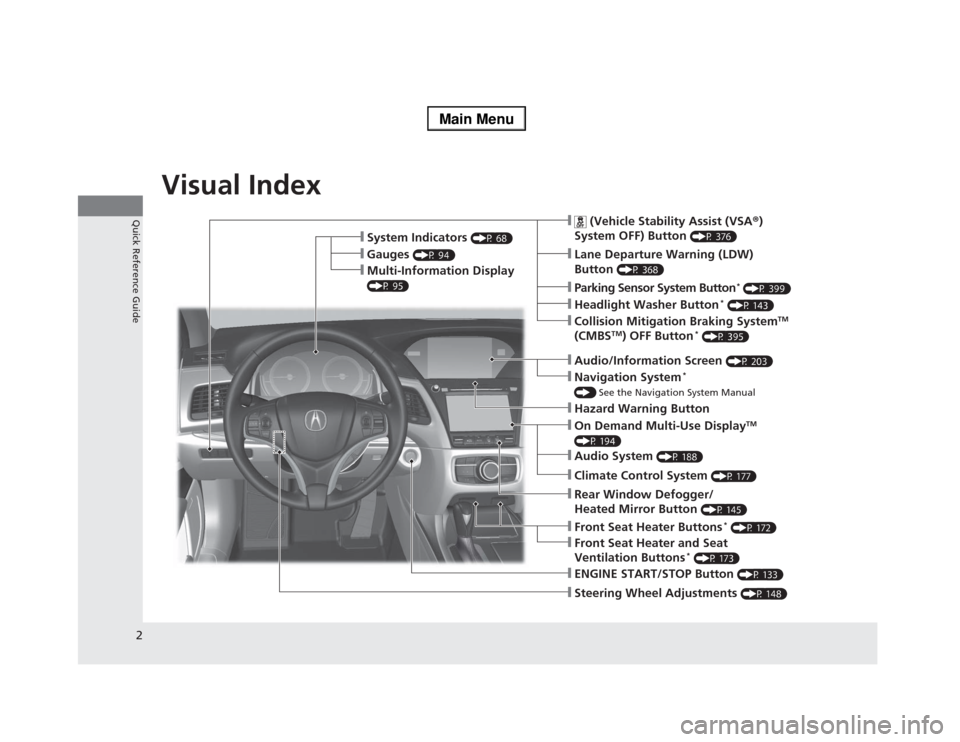
Quick Reference GuideVisual Index
❙Steering Wheel Adjustments
(P 148)
❙ENGINE START/STOP Button
(P 133)
❙
(Vehicle Stability Assist (VSA®)
System OFF) Button
(P 376)
❙Lane Departure Warning (LDW)
Button
(P 368)
❙Parking Sensor System Button
* (P 399)
❙Collision Mitigation Braking System
TM
(CMBS
TM) OFF Button
* (P 395)
❙Navigation System
*
() See the Navigation System Manual❙Audio/Information Screen
(P 203)
❙Hazard Warning Button❙On Demand Multi-Use Display
TM
(P 194)❙Audio System
(P 188)
❙System Indicators
(P 68)
❙Gauges
(P 94)
❙Multi-Information Display (P 95)
❙Climate Control System
(P 177)
❙Rear Window Defogger/
Heated Mirror Button
(P 145)
❙Front Seat Heater Buttons
* (P 172)
❙Headlight Washer Button
* (P 143)
❙Front Seat Heater and Seat
Ventilation Buttons
* (P 173)
Page 9 of 518
8Quick Reference Guide
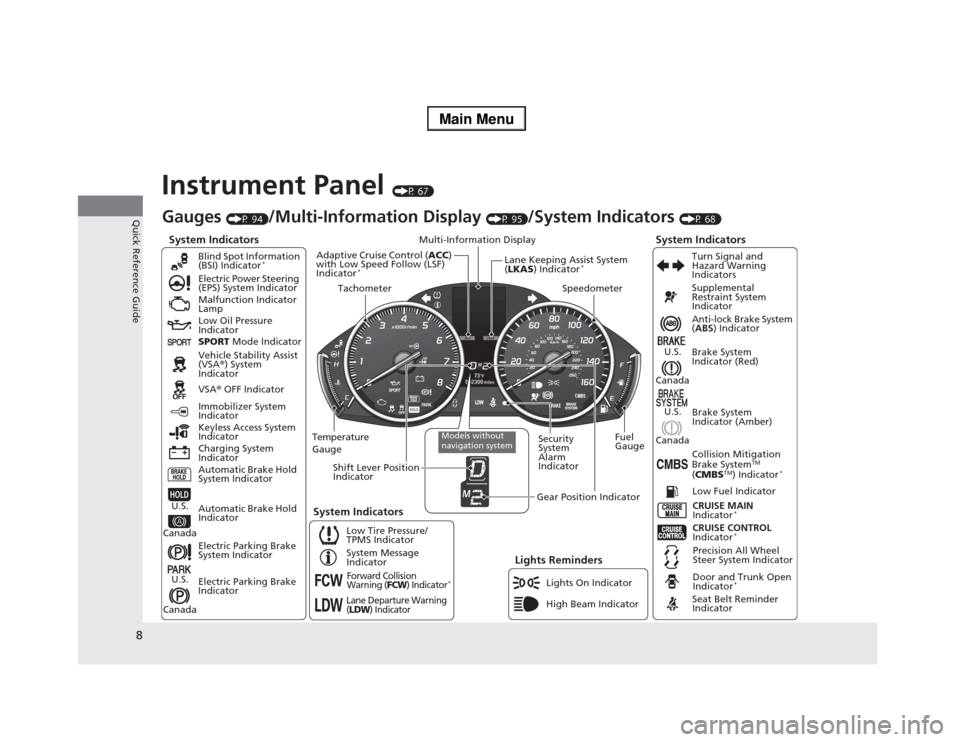
Instrument Panel
(P 67)
System Indicators
Malfunction Indicator
Lamp
Low Oil Pressure
Indicator
Charging System
IndicatorAnti-lock Brake System
(ABS) Indicator
Vehicle Stability Assist
(VSA®) System
Indicator
VSA® OFF Indicator Electric Power Steering
(EPS) System Indicator
Lights Reminders
Lights On Indicator
High Beam Indicator Immobilizer System
Indicator
Seat Belt Reminder
Indicator
System Indicators
CRUISE CONTROL
Indicator
*
System Message
IndicatorBrake System
Indicator (Red)Supplemental
Restraint System
Indicator
Door and Trunk Open
Indicator
*
CRUISE MAIN
Indicator
*
Low Fuel Indicator
Gauges
(P 94)
/Multi-Information Display
(P 95)
/System Indicators
(P 68)
Low Tire Pressure/
TPMS IndicatorTurn Signal and
Hazard Warning
Indicators
Keyless Access System
Indicator
Temperature
GaugeSecurity
System
Alarm
IndicatorFuel
Gauge
Tachometer
Multi-Information Display
Speedometer
Shift Lever Position
Indicator
Gear Position Indicator
Electric Parking Brake
System Indicator
Electric Parking Brake
Indicator Automatic Brake Hold
System IndicatorBrake System
Indicator (Amber)
SPORT Mode Indicator Blind Spot Information
(BSI) Indicator
*
System Indicators
Collision Mitigation
Brake System
TM
(CMBS
TM) Indicator
*
Precision All Wheel
Steer System Indicator
Forward Collision
Warning (
FCW
) Indicator
*
Lane Departure Warning
(LDW
) Indicator
Models without
navigation system
Lane Keeping Assist System
(LKAS) Indicator
*
Adaptive Cruise Control (ACC)
with Low Speed Follow (LSF)
Indicator
*
Automatic Brake Hold
Indicator
U.S.
CanadaU.S.
Canada
U.S.
Canada
U.S.
Canada
Page 329 of 518
uuAcuraLink®
*u
328Features
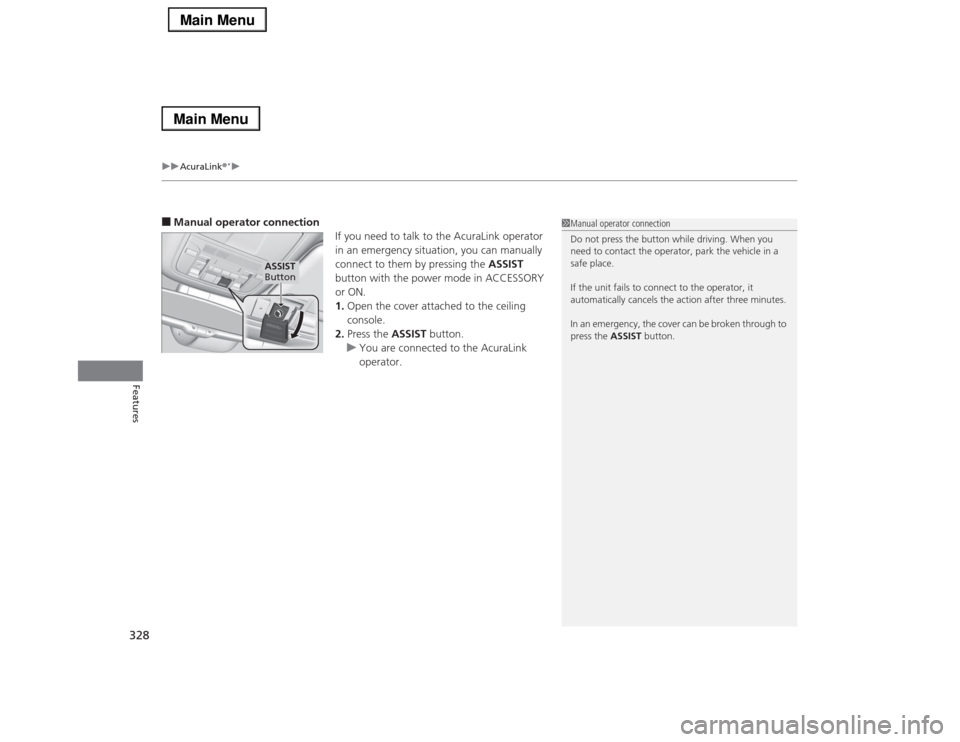
■Manual operator connection
If you need to talk to the AcuraLink operator
in an emergency situation, you can manually
connect to them by pressing the ASSIST
button with the power mode in ACCESSORY
or ON.
1.Open the cover attached to the ceiling
console.
2.Press the ASSIST button.
uYou are connected to the AcuraLink
operator.
1Manual operator connection
Do not press the button while driving. When you
need to contact the operator, park the vehicle in a
safe place.
If the unit fails to connect to the operator, it
automatically cancels the action after three minutes.
In an emergency, the cover can be broken through to
press the ASSIST button.
ASSIST
Button
Page 336 of 518
335
Driving
This chapter discusses driving, refueling, and information on items such as accessories.
Before Driving
Driving Preparation .......................... 336
Maximum Load Limit........................ 339
Towing a Trailer
Towing Your Vehicle ........................ 341
When Driving
Starting the Engine .......................... 342
Precautions While Driving................. 345
Automatic Transmission ................... 346
Shifting ............................................ 347
SPORT Mode.................................... 351
Cruise Control
*................................ 352
Adaptive Cruise Control (ACC) with Low
Speed Follow (LSF)
*........................ 355
Forward Collision Warning (FCW)
*... 364Lane Departure Warning (LDW) ....... 367
Lane Keeping Assist System (LKAS)
*.... 370
Vehicle Stability Assist (VSA
®), aka Electronic
Stability Control (ESC), System ............... 375
Agile Handling Assist System............ 377
Precision All Wheel Steer System ...... 377Blind Spot Information (BSI) System
*.... 378
Tire Pressure Monitoring System (TPMS) ... 380Tire Pressure Monitoring System (TPMS) -
Required Federal Explanation ......... 382
Braking
Brake System ................................... 384
Anti-lock Brake System (ABS) ........... 389
Brake Assist System.......................... 390Collision Mitigation Braking System
TM
(CMBS
TM)*..................................... 391
Parking Your Vehicle
When Stopped ................................ 397
Parking Sensor System
*................... 398
Multi-View Rear Camera.................. 402
Refueling
Fuel Information .............................. 403
How to Refuel ................................. 404
Fuel Economy.................................... 405
Improving Fuel Economy .................. 405
Accessories and Modifications
Accessories ...................................... 406
Modifications................................... 406
* Not available on all models
Page 345 of 518

uuWhen DrivinguStarting the Engine
344Driving
■Hill Start Assist System
Hill start assist keeps the brake engaged briefly to help prevent the vehicle from
rolling on inclines as you move your foot from the brake pedal to the accelerator.
Move the shift lever to
(D
when facing uphill, or
(R
when facing downhill, then
release the brake pedal.
1Starting the Engine
Hill start assist may not prevent the vehicle from
rolling downhill on a very steep or slippery slope, and
does not operate on small inclines.
Hill start assist is not a replacement for the parking
brake.
Page 346 of 518
345
uuWhen DrivinguPrecautions While Driving
Continued
Driving
Precautions While DrivingAvoid driving in deep water and on flooded roads. This can damage the engine,
driveline, or cause electrical component failure.■
In Rain
1Precautions While DrivingNOTICEDo not operate the shift lever while pressing the
accelerator pedal. You could damage the
transmission.NOTICEThe following can damage the under spoiler:•Parking the vehicle by a parking block•Parallel parking along the road shoulder•Driving toward the bottom of a hill•Driving up or down to a different surface level
(such as a road shoulder)•Driving on a rutted or bumpy road•Driving on a road with potholes.NOTICEIf you repeatedly turn the steering wheel at an
extremely low speed, or hold the steering wheel on
the full left or right position for a while, the electric
power steering (EPS) system heats up. The system
goes into a protective mode, and limits its
performance. The steering wheel becomes harder
and harder to operate. Once the system cools down,
the EPS system is restored.
Repeated operation under these conditions can
eventually damage the system.
If the power mode is set to ACCESSORY or VEHICLE
OFF (LOCK) while driving, the engine will shut down
and all steering and brake power assist functions will
stop, making it difficult to control the vehicle.
Page 357 of 518
uuWhen DrivinguAdaptive Cruise Control (ACC) with Low Speed Follow (LSF)
*
356Driving
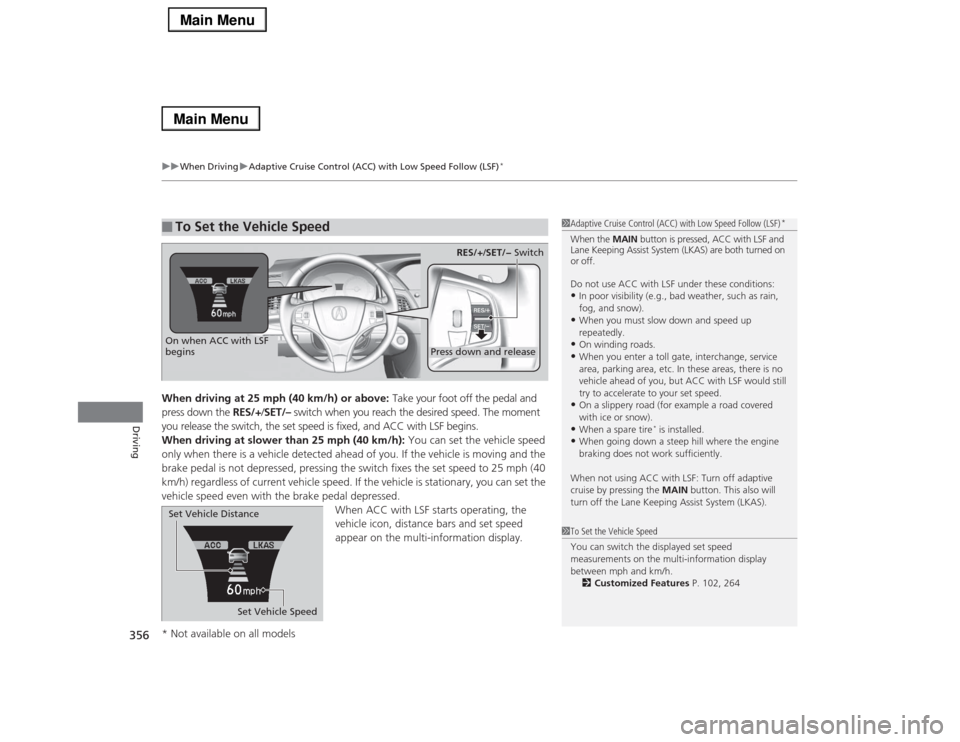
When driving at 25 mph (40 km/h) or above: Take your foot off the pedal and
press down the RES/+/SET/– switch when you reach the desired speed. The moment
you release the switch, the set speed is fixed, and ACC with LSF begins.
When driving at slower than 25 mph (40 km/h): You can set the vehicle speed
only when there is a vehicle detected ahead of you. If the vehicle is moving and the
brake pedal is not depressed, pressing the switch fixes the set speed to 25 mph (40
km/h) regardless of current vehicle speed. If the vehicle is stationary, you can set the
vehicle speed even with the brake pedal depressed.
When ACC with LSF starts operating, the
vehicle icon, distance bars and set speed
appear on the multi-information display. ■
To Set the Vehicle Speed
1Adaptive Cruise Control (ACC) with Low Speed Follow (LSF)
*
When the MAIN button is pressed, ACC with LSF and
Lane Keeping Assist System (LKAS) are both turned on
or off.
Do not use ACC with LSF under these conditions:•In poor visibility (e.g., bad weather, such as rain,
fog, and snow).•When you must slow down and speed up
repeatedly.•On winding roads.•When you enter a toll gate, interchange, service
area, parking area, etc. In these areas, there is no
vehicle ahead of you, but ACC with LSF would still
try to accelerate to your set speed.•On a slippery road (for example a road covered
with ice or snow).•When a spare tire
* is installed.
•When going down a steep hill where the engine
braking does not work sufficiently.
When not using ACC with LSF: Turn off adaptive
cruise by pressing the MAIN button. This also will
turn off the Lane Keeping Assist System (LKAS).
1To Set the Vehicle Speed
You can switch the displayed set speed
measurements on the multi-information display
between mph and km/h.
2Customized Features P. 102, 264
On when ACC with LSF
begins
Press down and release
RES/+/SET/− Switch
Set Vehicle Speed Set Vehicle Distance
* Not available on all models
Page 379 of 518

378
uuWhen DrivinguBlind Spot Information (BSI) System
*
Driving
Blind Spot Information (BSI) System
*
Is designed to detect vehicles in specified alert zones adjacent to your vehicle,
particularly in harder to see areas commonly known as “blind spots.”
When the system detects vehicles approaching from behind in adjacent lanes, the
appropriate indicator comes on for a few seconds, providing assistance when you
change lanes.■How the system works
1Blind Spot Information (BSI) System
*
Important Safety Reminder
Like all assistance systems, BSI has limitations. Over
reliance on BSI may result in a collision.
The system is for your convenience only. Even if an
object is within the alert zone, the following
situations may occur.•The BSI alert indicator may not come on due to
obstruction (splashes, etc.) even without the Blind
Spot Not Available multi-information display
appearing.•The BSI alert indicator may come on even with the
message appearing.
The BSI alert indicator may not come on under
following conditions:•A vehicle does not stay in the alert zone for more
than two seconds.•A vehicle is parked in a side lane.•The speed difference between your vehicle and the
vehicle you are passing is greater than 6 mph (10
km/h).•An object not detected by the radar sensors
approaches or passes your vehicle.
3
WARNING
Failure to visually confirm that it is safe to
change lanes before doing so may result in
a crash and serious injury or death.
Do not rely only on the blind spot
information system when changing lanes.
Always look in your mirrors, to either side
of your vehicle, and behind you for other
vehicles before changing lanes.
●The shift lever is in
(D.
●Your vehicle speed is
between 20 mph (32 km/h)
and 100 mph (160 km/h)
Alert zone range
A: Approx. 1.6 ft. (0.5 m)
B: Approx. 10 ft. (3 m)
C: Approx. 10 ft. (3 m)Radar Sensors:
underneath the
rear bumper
cornersAlert Zone
A
B
C
* Not available on all models
Page 456 of 518

455
Continued
Handling the Unexpected
If a Tire Goes FlatTemporarily Repairing a Flat TireIf the tire has a large cut or is otherwise severely damaged, you will need to have the
vehicle towed. If the tire only has a small puncture, from a nail for instance, you can
use the temporary tire repair kit so that you can drive to the nearest service station
for a more permanent repair.
If a tire goes flat while driving, grasp the steering wheel firmly, and brake gradually
to reduce speed. Then stop in a safe place.
1.Park the vehicle on a firm, level, and non-slippery surface and apply the parking
brake.
2.Move the shift lever to
(P
.
3.Turn on the hazard warning lights and set the power mode to VEHICLE OFF
(LOCK).
■
Getting Ready to Temporarily Repair the Flat Tire
1Temporarily Repairing a Flat Tire
The kit should not be used in the following situations.
Instead, contact a dealer or a roadside assistant to
have the vehicle towed.•The tire sealant has expired.•More than two tires are punctured.•The puncture or cut is larger than 3/16 inch (4mm).•The tire side wall is damaged or the puncture is
outside the contact area.•Damage has been caused by driving with the tire
extremely under inflated.•The tire bead is no longer seated.•The rim is damaged.
Do not remove a nail or screw that punctured the
tire. If you remove it from the tire, you may not be
able to repair the puncture using the kit.NOTICEDo not use a puncture-repairing agent other than the
one provided in the kit that came with your vehicle. If
a different agent is used, you may permanently
damage the tire pressure sensor.
When the puncture is:
Kit Use
Smaller than 3/16 inch
(4 mm)
Yes
Larger than 3/16 inch
(4 mm)
No
Contact
Area
Instruction
Manual
Air Only Hose (Black)Speed Restriction Label Repair Notification Label Pressure Relief
ButtonInflator Switch
Selector Switch
SEALANT/AIR side Sealant/Air Hose (Clear)AIR ONLY side
Power Plug Pressure Gauge
Tire Sealant
Expiration Date
U.S. CanadaU.S. Canada
Page 512 of 518
511Index
Belts (Seat).................................................. 30
Beverage Holders..................................... 166
Blind Spot Information (BSI) System....... 378
Bluetooth® Audio..................................... 252
Bluetooth® HandsFreeLink®.................... 287
Booster Seats (For Children)...................... 63
Brake System............................................ 384
Anti-lock Brake System (ABS) .................. 389
Automatic Brake Hold ............................. 387
Brake Assist System................................. 390
Fluid ....................................................... 427
Foot Brake .............................................. 386
Parking Brake.......................................... 384
Brake System (Amber)
Indicator ................................................... 70
Brake System (Red)
Indicator ........................................... 68, 482
Brake System Indicator (Amber)............... 70
Brightness Control (Instrument Panel)... 144
BSI (Blind Spot Information) System....... 378
Bulb Replacement.................................... 428
Back-Up Lights ........................................ 432
Brake/Taillights and Rear Side Marker
Lights .................................................... 431
Door Outer Handle Ambient Lights ......... 433
Front Side Marker Lights ......................... 430
Front Turn Signal/Parking Lights .............. 429
Headlights .............................................. 428
High-Mount Brake Light.......................... 433
Rear License Plate Lights ......................... 433
Rear Turn Signal Lights............................ 431Side Turn Signal/Emergency Indicator
Lights .................................................... 430
Taillights .................................................. 432
Bulb Specifications................................... 496
CCarbon Monoxide Gas................................ 64
Cargo Hooks............................................. 169
Carrying Cargo.................................. 337, 339
CD Player................................................... 225
Center Pocket........................................... 165
Certification Label.................................... 498
Changing Bulbs......................................... 428
Charging System Indicator................. 71, 481
Child Safety................................................. 52
Childproof Door Locks ............................. 123
Child Seat.................................................... 52
Booster Seats ............................................. 63
Child Seat for Infants ................................. 54
Child Seat for Small Children ..................... 55
Installing a Child Seat with a Lap/Shoulder Seat
Belt.......................................................... 59
Larger Children .......................................... 62
Rear-facing Child Seat ............................... 54
Selecting a Child Seat ................................ 56
Using a Tether ........................................... 61
Childproof Door Locks............................. 123
Cleaning the Exterior............................... 451
Cleaning the Interior................................ 449
Client Service Information....................... 506Climate Control System............................ 177
Changing the Mode ................................ 180
Defrosting the Windshield and
Windows ............................................... 183
Dust and Pollen Filter............................... 448
Rear Temperature Control Dial ................ 184
Sensors ................................................... 185
Using Automatic Climate Control ............ 177
Clock.......................................................... 114
CMBS
TM (Collision Mitigation Braking
SystemTM)................................................. 391
Coat Hooks............................................... 168
Collision Mitigation Braking System
TM
(CMBS
TM)................................................. 391
Compact Spare Tire (Optional)........ 466, 497
Console Compartment............................. 164
Controls..................................................... 113
Coolant (Engine)...................................... 424
Adding to the Radiator ............................ 425
Adding to the Reserve Tank..................... 424
Overheating ............................................ 479
Creeping (Automatic Transmission)........ 346
Cruise Control........................................... 352
Indicator.................................................... 78
Cup Holders.............................................. 166
Customized Features........................ 102, 264
DDaytime Running Lights.......................... 140
Dead Battery............................................. 475