parking brake Acura RLX 2014 Owner's Manual
[x] Cancel search | Manufacturer: ACURA, Model Year: 2014, Model line: RLX, Model: Acura RLX 2014Pages: 518, PDF Size: 15.83 MB
Page 5 of 518
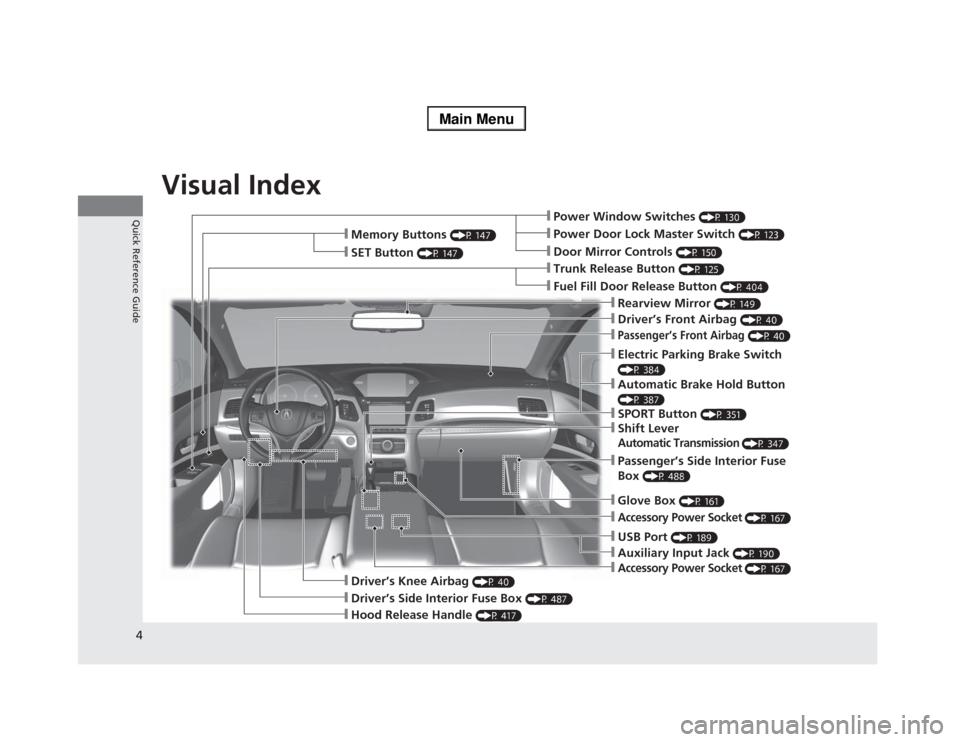
Visual Index
4Quick Reference Guide
❙Power Window Switches
(P 130)
❙Driver’s Front Airbag
(P 40)
❙Trunk Release Button
(P 125)
❙Hood Release Handle
(P 417)
❙Driver’s Side Interior Fuse Box
(P 487)
❙Passenger’s Front Airbag
(P 40)
❙Shift LeverAutomatic Transmission
(P 347)
❙Glove Box
(P 161)
❙Driver’s Knee Airbag
(P 40)
❙Door Mirror Controls
(P 150)
❙Power Door Lock Master Switch
(P 123)
❙Fuel Fill Door Release Button
(P 404)
❙Electric Parking Brake Switch (P 384)❙Passenger’s Side Interior Fuse
Box
(P 488)
❙Accessory Power Socket
(P 167)
❙Accessory Power Socket
(P 167)
❙Auxiliary Input Jack
(P 190)
❙USB Port
(P 189)
❙Memory Buttons
(P 147)
❙SET Button
(P 147)
❙Rearview Mirror
(P 149)
❙SPORT Button
(P 351)
❙Automatic Brake Hold Button (P 387)
Page 7 of 518
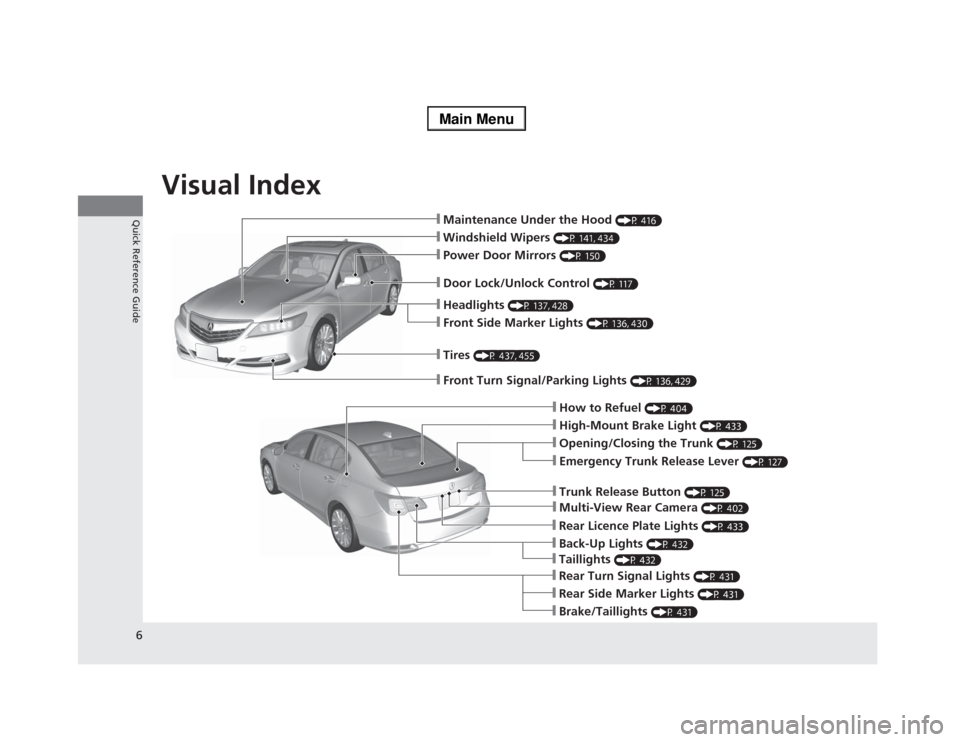
Visual Index
6Quick Reference Guide
❙Maintenance Under the Hood
(P 416)
❙Windshield Wipers
(P 141, 434)
❙Tires
(P 437, 455)
❙Door Lock/Unlock Control
(P 117)
❙Power Door Mirrors
(P 150)
❙Headlights
(P 137, 428)
❙Front Side Marker Lights
(P 136, 430)
❙How to Refuel
(P 404)
❙High-Mount Brake Light
(P 433)
❙Emergency Trunk Release Lever
(P 127)
❙Opening/Closing the Trunk
(P 125)
❙Multi-View Rear Camera
(P 402)
❙Trunk Release Button
(P 125)
❙Rear Side Marker Lights
(P 431)
❙Brake/Taillights
(P 431)
❙Rear Turn Signal Lights
(P 431)
❙Front Turn Signal/Parking Lights
(P 136, 429)
❙Back-Up Lights
(P 432)
❙Rear Licence Plate Lights
(P 433)
❙Taillights
(P 432)
Page 9 of 518
8Quick Reference Guide
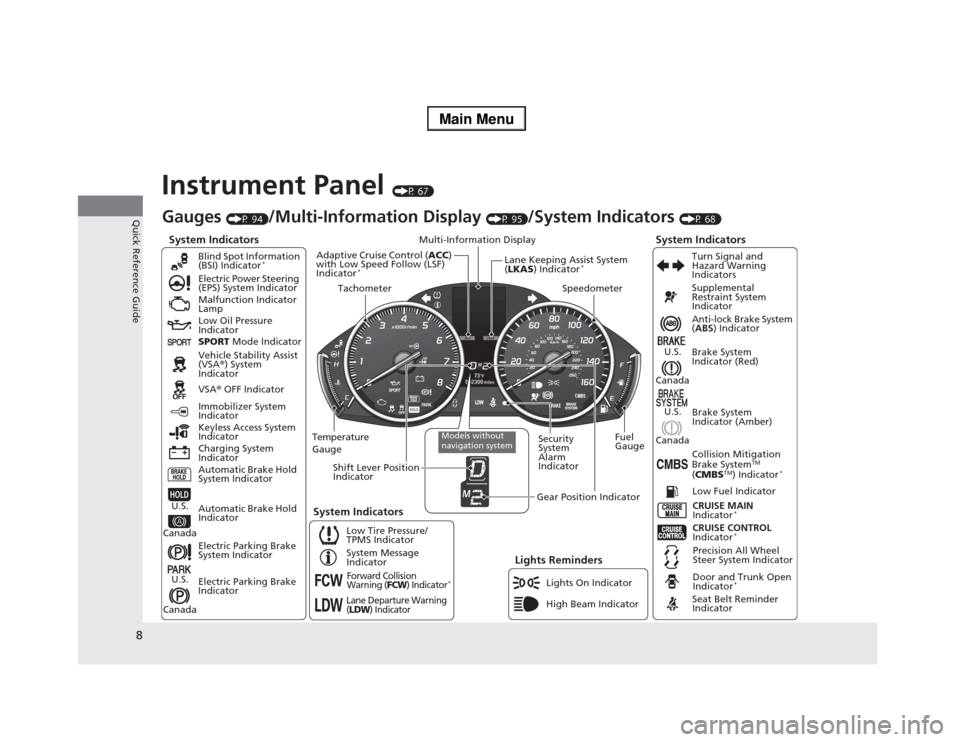
Instrument Panel
(P 67)
System Indicators
Malfunction Indicator
Lamp
Low Oil Pressure
Indicator
Charging System
IndicatorAnti-lock Brake System
(ABS) Indicator
Vehicle Stability Assist
(VSA®) System
Indicator
VSA® OFF Indicator Electric Power Steering
(EPS) System Indicator
Lights Reminders
Lights On Indicator
High Beam Indicator Immobilizer System
Indicator
Seat Belt Reminder
Indicator
System Indicators
CRUISE CONTROL
Indicator
*
System Message
IndicatorBrake System
Indicator (Red)Supplemental
Restraint System
Indicator
Door and Trunk Open
Indicator
*
CRUISE MAIN
Indicator
*
Low Fuel Indicator
Gauges
(P 94)
/Multi-Information Display
(P 95)
/System Indicators
(P 68)
Low Tire Pressure/
TPMS IndicatorTurn Signal and
Hazard Warning
Indicators
Keyless Access System
Indicator
Temperature
GaugeSecurity
System
Alarm
IndicatorFuel
Gauge
Tachometer
Multi-Information Display
Speedometer
Shift Lever Position
Indicator
Gear Position Indicator
Electric Parking Brake
System Indicator
Electric Parking Brake
Indicator Automatic Brake Hold
System IndicatorBrake System
Indicator (Amber)
SPORT Mode Indicator Blind Spot Information
(BSI) Indicator
*
System Indicators
Collision Mitigation
Brake System
TM
(CMBS
TM) Indicator
*
Precision All Wheel
Steer System Indicator
Forward Collision
Warning (
FCW
) Indicator
*
Lane Departure Warning
(LDW
) Indicator
Models without
navigation system
Lane Keeping Assist System
(LKAS) Indicator
*
Adaptive Cruise Control (ACC)
with Low Speed Follow (LSF)
Indicator
*
Automatic Brake Hold
Indicator
U.S.
CanadaU.S.
Canada
U.S.
Canada
U.S.
Canada
Page 22 of 518
21Quick Reference Guide
Pressing the electric
parking brake switch does
not release the parking
brake. Why?
Press the electric parking brake switch with the brake pedal
depressed.
Depressing the accelerator
pedal does not release the
parking brake
automatically. Why?
●Fasten the driver’s seat belt.●Check if the shift lever is in
(P
or
(N
. If so, move the lever to
any other position.
Unleaded gasoline with a
Pump Octane Number
(PON) of 91 or higher is
recommended.
Is it possible to use
unleaded gasoline with a
Pump Octane Number
(PON) of 87 or lower on
this vehicle?
Unleaded gasoline with a Pump Octane Number (PON) of 91 or
higher is recommended.
Use of lower octane gasoline can cause occasional metallic
knocking noise in the engine and will result in decreased engine
performance.
Use of gasoline with a pump octane less than 87 can lead to
engine damage.
Page 70 of 518
69
uuIndicatorsu
Continued
Instrument Panel
*1:On the left: Models with navigation system
On the right: Models without navigation systemIndicator
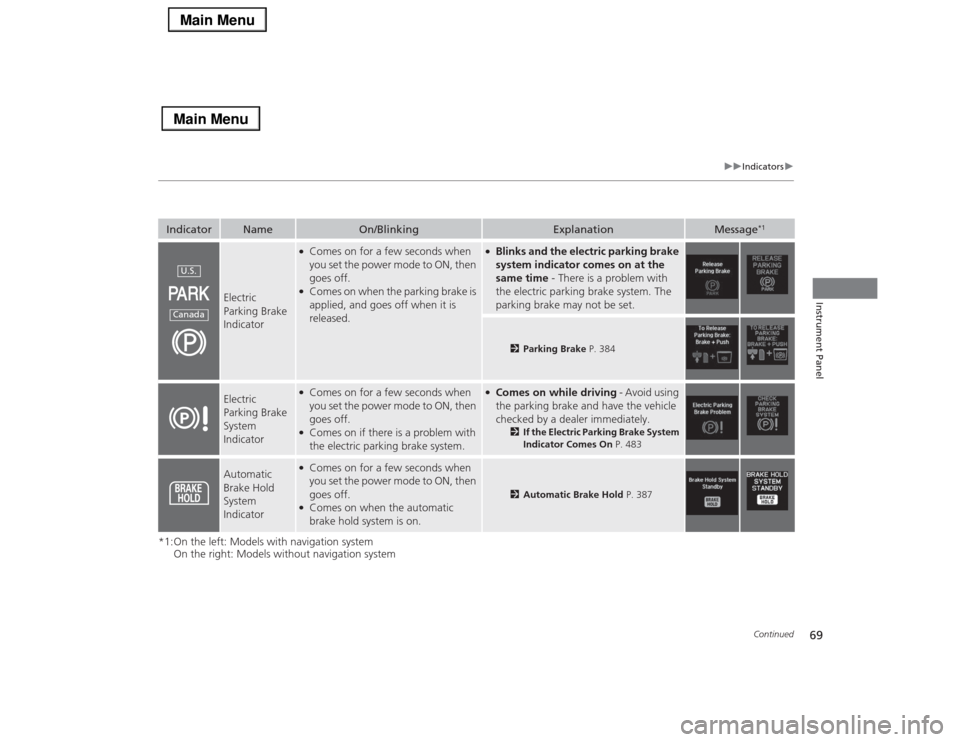
Name
On/Blinking
Explanation
Message
*1
Electric
Parking Brake
Indicator
●Comes on for a few seconds when
you set the power mode to ON, then
goes off.●Comes on when the parking brake is
applied, and goes off when it is
released.
●Blinks and the electric parking brake
system indicator comes on at the
same time - There is a problem with
the electric parking brake system. The
parking brake may not be set.
2Parking Brake P. 384
Electric
Parking Brake
System
Indicator
●Comes on for a few seconds when
you set the power mode to ON, then
goes off.●Comes on if there is a problem with
the electric parking brake system.
●Comes on while driving - Avoid using
the parking brake and have the vehicle
checked by a dealer immediately.
2If the Electric Parking Brake System
Indicator Comes On P. 483
Automatic
Brake Hold
System
Indicator
●Comes on for a few seconds when
you set the power mode to ON, then
goes off.●Comes on when the automatic
brake hold system is on.
2Automatic Brake Hold P. 387
U.S.Canada
Page 88 of 518
87
uuIndicatorsuMulti-Information Display Warning and Information Messages
Continued
Instrument Panel
*1:On the left: Models with navigation system
On the right: Models without navigation system
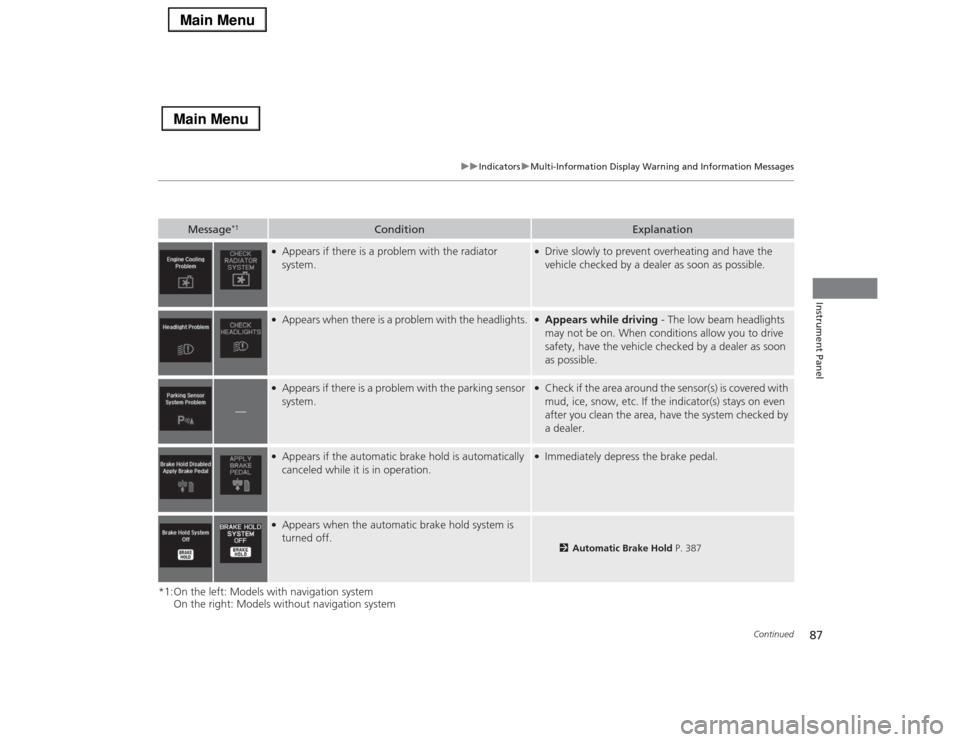
Message
*1
Condition
Explanation
●Appears if there is a problem with the radiator
system.
●Drive slowly to prevent overheating and have the
vehicle checked by a dealer as soon as possible.
●Appears when there is a problem with the headlights.
●Appears while driving - The low beam headlights
may not be on. When conditions allow you to drive
safety, have the vehicle checked by a dealer as soon
as possible.
—
●Appears if there is a problem with the parking sensor
system.
●Check if the area around the sensor(s) is covered with
mud, ice, snow, etc. If the indicator(s) stays on even
after you clean the area, have the system checked by
a dealer.
●Appears if the automatic brake hold is automatically
canceled while it is in operation.
●Immediately depress the brake pedal.
●Appears when the automatic brake hold system is
turned off.
2Automatic Brake Hold P. 387
Page 89 of 518

88
uuIndicatorsuMulti-Information Display Warning and Information Messages
Instrument Panel
*1:On the left: Models with navigation system
On the right: Models without navigation system
Message
*1
Condition
Explanation
●Appears when the automatic brake hold button is
pressed without wearing the driver’s seat belt.
●Fasten the driver’s seat belt.
2Automatic Brake Hold P. 387
●Appears when the automatic brake hold button is
pressed without depressing the brake pedal while the
automatic brake hold is in operation.
●Press the automatic brake hold button with the brake
pedal depressed.
2Automatic Brake Hold P. 387
●Appears when the parking brake is applied
automatically while it is in operation.
2Automatic Brake Hold P. 387
2Parking Brake P. 384
●Flashes when the system senses a likely collision with
a vehicle in front of you.
●Take the appropriate means to prevent a collision
(apply the brakes, change lanes, etc.)
2
Collision Mitigation Braking System
TM (CMBS
TM)* P. 391
2Forward Collision Warning (FCW)
* P. 364
2Adaptive Cruise Control (ACC) with Low Speed
Follow (LSF)
* P. 355
●Appears when your vehicle is too close to the traffic
lane lines. The beeper sounds.
●Take appropriate action to keep your vehicle within
the lane lines.
2Lane Departure Warning (LDW) P. 367
* Not available on all models
Page 92 of 518

91
uuIndicatorsuMulti-Information Display Warning and Information Messages
Continued
Instrument Panel
Message
Condition
Explanation
●Appears when the vehicle is stopped on a very steep
slope while ACC with LSF is in operation.
●ACC with LSF has been automatically canceled.
2Adaptive Cruise Control (ACC) with Low Speed
Follow (LSF)
* P. 355
●Appears when pressing the RES/+/SET/– switch down
while the vehicle is stopped on a very steep slope.
●ACC with LSF cannot be set.
2Adaptive Cruise Control (ACC) with Low Speed
Follow (LSF)
* P. 355
●Appears when the parking brake is applied
automatically while ACC with LSF is in operation.
●ACC with LSF has been automatically canceled.
2Adaptive Cruise Control (ACC) with Low Speed
Follow (LSF)
* P. 355
2Parking Brake P. 384
●Appears when pressing the RES/+/SET/– switch down
while the parking brake is applied.
●ACC with LSF cannot be set.
2Adaptive Cruise Control (ACC) with Low Speed
Follow (LSF)
* P. 355
2Parking Brake P. 384
* Not available on all models
Page 138 of 518
137
uuOperating the Switches Around the Steering WheeluLight Switches
Continued
Controls
Light Switches
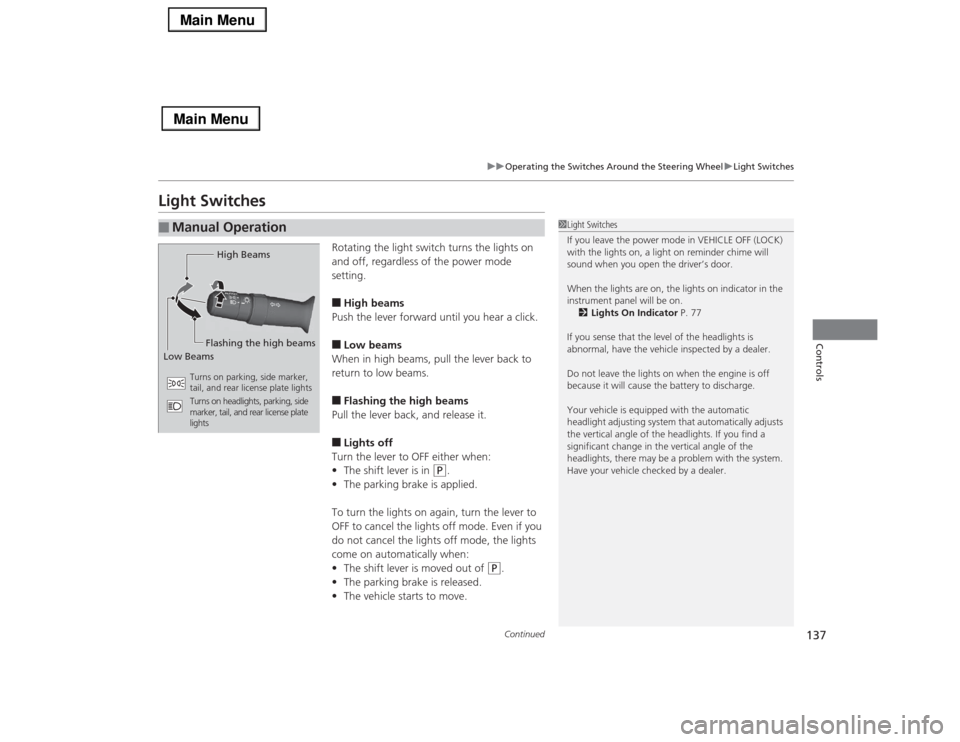
Rotating the light switch turns the lights on
and off, regardless of the power mode
setting.■High beams
Push the lever forward until you hear a click.■Low beams
When in high beams, pull the lever back to
return to low beams.■Flashing the high beams
Pull the lever back, and release it.■Lights off
Turn the lever to OFF either when:
•The shift lever is in
(P
.
•The parking brake is applied.
To turn the lights on again, turn the lever to
OFF to cancel the lights off mode. Even if you
do not cancel the lights off mode, the lights
come on automatically when:
•The shift lever is moved out of
(P
.
•The parking brake is released.
•The vehicle starts to move.
■
Manual Operation
1Light Switches
If you leave the power mode in VEHICLE OFF (LOCK)
with the lights on, a light on reminder chime will
sound when you open the driver’s door.
When the lights are on, the lights on indicator in the
instrument panel will be on.
2Lights On Indicator P. 77
If you sense that the level of the headlights is
abnormal, have the vehicle inspected by a dealer.
Do not leave the lights on when the engine is off
because it will cause the battery to discharge.
Your vehicle is equipped with the automatic
headlight adjusting system that automatically adjusts
the vertical angle of the headlights. If you find a
significant change in the vertical angle of the
headlights, there may be a problem with the system.
Have your vehicle checked by a dealer.
High Beams
Flashing the high beams
Low Beams
Turns on parking, side marker,
tail, and rear license plate lights
Turns on headlights, parking, side
marker, tail, and rear license plate
lights
Page 141 of 518
140
uuOperating the Switches Around the Steering WheeluDaytime Running Lights
Controls
Daytime Running LightsThe low beam headlights come on slightly dimmer than normal when the following
conditions have been met:
•The power mode is in ON.
•The headlight switch is AUTO, or in .
•The parking brake is released.
The low beam headlights return to the original brightness once the headlight switch
is turned on, or when the head light switch is in AUTO and it is getting darker
outside.
1Daytime Running Lights
The daytime running lights come on dimmer when
the headlight switch is in than when it is in
AUTO. In AUTO, if the ambient brightness is dark,
the low beam headlights come on.U.S. models