Tire Acura RLX 2015 Owner's Guide
[x] Cancel search | Manufacturer: ACURA, Model Year: 2015, Model line: RLX, Model: Acura RLX 2015Pages: 521, PDF Size: 22.24 MB
Page 397 of 521

uuBraking uCollision Mitigation Braking System
TM (CMBS
TM)*
396Driving
Press this button for about one second to turn
on and off the system.
When the CMBS
TM is off:
• The beeper sounds.
• The CMBS
TM indicator in the instrument
panel comes on.
• A message on the multi-information display
reminds you that the system is off.
The CMBS
TM is in the previously selected ON or
OFF setting each time you start the engine.
■
CMBS
TM On and Off
1 Collision Mitigation Braking System
TM (CMBS
TM)*
The CMBS
TM may automatically shut off, and the
CMBS
TM indicator will come and stay on when:
•You drive off-road or on a mountain road for an
extended period.•You drive with the parking brake applied.•You drive in bad weather (rain, fog, snow, etc.)•The radar sensor cover is blocked by dirt, mud, dry
leaves, wet snow, etc.•An abnormal tire condition is detected (wrong tire
size, flat tire, etc.)
Once the conditions that caused the CMBS
TM to shut
off improve, the system comes back on.
* Not available on all models
Page 398 of 521

397
uuBraking uCollision Mitigation Braking System
TM (CMBS
TM)*
Driving
The CMBS
TM may activate even when you are aware of a vehicle ahead of you, or
when there is no vehicle ahead. Some examples of this are:
■When Passing
Your vehicle approaches another vehicle ahead of you and you change lanes to pass.■At an intersection
Your vehicle approaches or passes another vehicle that is making a left or right turn.■Through a low bridge at high speed
You drive under a low or narrow bridge at high speed.■Speed bumps, road work sites, train tra cks, roadside objects, etc.
You drive over speed bumps, steel road plates, etc., or your vehicle approaches train
tracks or roadside objects [such as a traffic sign and guard rail] on a curve.■
With Little Chance of a Collision
1 Collision Mitigation Braking System
TM (CMBS
TM)*
Avoid the following conditions that may cause the
radar aim to be temporarily out of range and prevent
the CMBS
TM from working properly.
•A heavy load in the rear or modifications to the
suspension tilts your vehicle.•The tire pressures are not correct, the tire sizes are
incorrect, the tire types are different, and/or the
tires are not in good condition.
For the CMBS
TM to work properly:
Always keep the rada r sensor cover clean.
Never use chemical solvents or polishing powder for
cleaning the sensor cover. Clean it with water or a
mild detergent.
Do not put a sticker on the emblem or replace the
emblem.
Take your vehicle to a dealer if you need the radar
sensor to be repaired, or removed, or the radar
sensor cover is strongly impacted.
* Not available on all models
Page 407 of 521
406Driving
Fuel EconomyImproving Fuel EconomyFuel economy depends on several conditions, including driving conditions, your
driving habits, the condition of your vehicle, and loading. Depending on these and
other conditions, you may or may not achieve the rated fuel economy of this vehicle.
You can optimize your fuel economy with proper maintenance of your vehicle.
Always maintain your vehicle in accordance with the messages displayed on the
multi-information display.
•Use the recommended viscosity engine oil, displaying the API Certification Seal.
• Maintain the specified tire pressure.
• Do not load the vehicle with excess cargo.
• Keep your vehicle clean. A buildup of snow or mud on your vehicle’s underside
adds weight and increases wind resistance.■
Maintenance and Fuel Economy
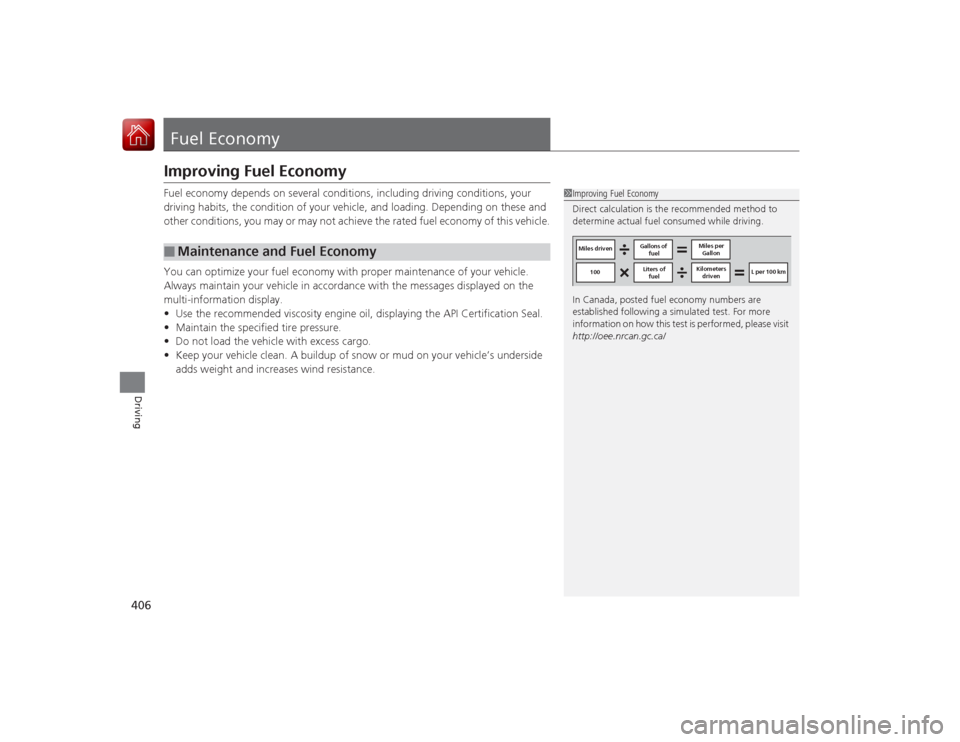
1Improving Fuel Economy
Direct calculation is the recommended method to
determine actual fuel consumed while driving.
In Canada, posted fuel economy numbers are
established following a simulated test. For more
information on how this test is performed, please visit
http://oee.nrcan.gc.ca/
Miles driven Gallons of
fuel Miles per
Gallon
100 L per 100 km
Liters of
fuel Kilometers
driven
Page 410 of 521
409
Maintenance
This chapter discusses basic maintenance.
Before Performing MaintenanceInspection and Maintenance ............ 410Safety When Performing Maintenance..... 411Parts and Fluids Used in Maintenance Service ........................................... 412
Maintenance Minder
TM..................... 413
Maintenance Under the Hood
Maintenance Items Under the Hood ..... 418Opening the Hood ........................... 419
Engine Compartment Cover ............. 420
Recommended Engine Oil ................ 421
Oil Check ......................................... 422
Adding Engine Oil ............................ 423
Changing the Engine Oil and Oil Filter ..... 424Engine Coolant ................................ 426
Transmission Fluid ............................ 428
Brake Fluid ....................................... 429
Refilling Window Washer Fluid......... 429
Replacing Light Bulbs ....................... 430Checking and Maintaining Wiper
Blades .......................................... 436Checking and Maintaining Tires
Checking Tires ................................. 439Tire and Loading Information Label ...... 440Tire Labeling .................................... 440DOT Tire Quality Grading (U.S. Vehicles)....... 442
Wear Indicators ............................... 444
Tire Service Life ................................ 444
Tire and Wheel Replacement ........... 445
Tire Rotation .................................... 446
Winter Tires ..................................... 447
Battery ............................................... 448
Remote Transmitter Care Replacing the Button Battery ........... 449Climate Control System Maintenance
.... 450
Cleaning
Interior Care .................................... 451
Exterior Care.................................... 453
Page 411 of 521
410Maintenance
Before Performing MaintenanceInspection and MaintenanceFor your safety, perform all listed inspections and maintenance to keep your vehicle
in good condition. If you become aware of any abnormality (noise, smell, insufficient
brake fluid, oil residue on the ground, etc.), have your vehicle inspected by a dealer.
(Note, however, that service at a dealer is not mandatory to keep your \
warranties in
effect.) Refer to the separate maintenance booklet for detailed maintenance and
inspection information.■Daily inspections
Perform inspections before long distance trips, when washing the vehicle, or when
refueling.■Periodic inspections
• Check the brake fluid level monthly.2 Brake Fluid P. 429
•Check the tire pressure monthly. Examine the tread for wear and foreign objects.
2 Checking and Maintaining Tires P. 439
•Check the operation of the exterior lights monthly.
2 Replacing Light Bulbs P. 430
•Check the condition of the wiper blades at least every six months.
2Checking and Maintaining Wiper Blades P. 436
■
Types of Inspection and Maintenance
1Inspection and Maintenance
Maintenance, replacement, or repair of
emissions control devices and systems may be
done by any automotive repair establishment or
individuals using parts that are “certified” to
EPA standards.
According to state and federal regulations, failure to
perform maintenance on the maintenance main
items marked with # will not void your emissions
warranties. However, all maintenance services should
be performed in accordance with the intervals
indicated by the multi-information display.
2 Maintenance Service Items P. 416
If you want to perform complex maintenance tasks
that require mor e skills and tools, you can purchase a
subscription to the Service Express website at
www.techinfo.honda.com .
2 Authorized Manuals P. 507
If you want to perform maintenance yourself, make
sure that you have the necessary tools and skills first.
After performing maintenance, update the records in
the separate maintenance booklet.U.S. models
Page 417 of 521
416
uuMaintenance Minder
TMuTo Use Maintenance Minder
TM
Maintenance
■
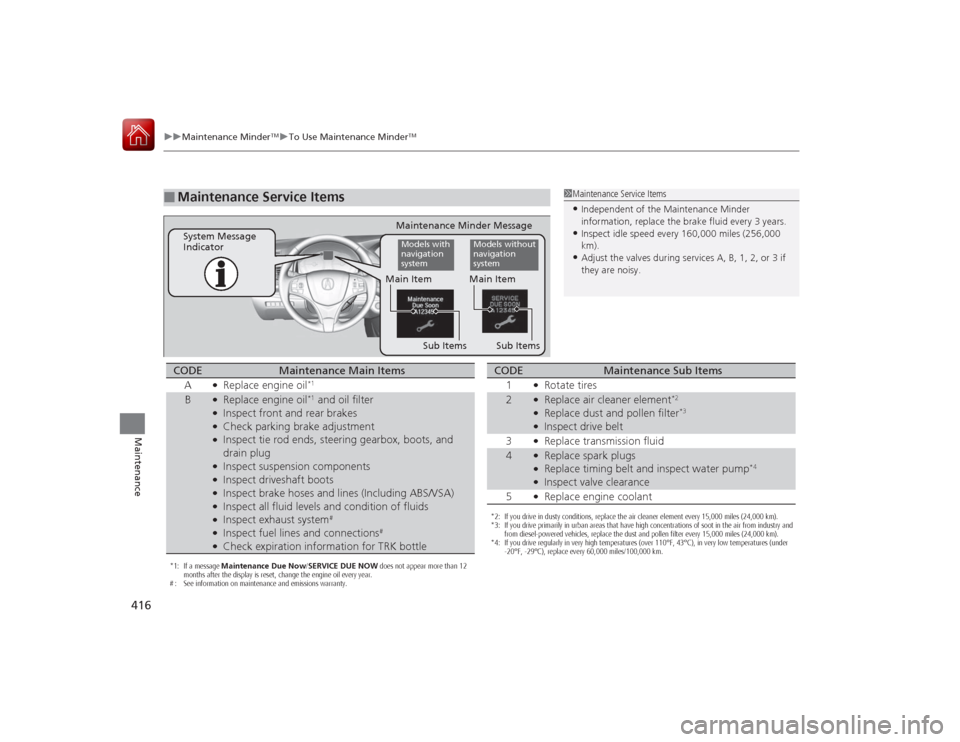
Maintenance Service Items
1Maintenance Service Items•Independent of the Maintenance Minder
information, replace the brake fluid every 3 years.•Inspect idle speed every 160,000 miles (256,000
km).•Adjust the valves during services A, B, 1, 2, or 3 if
they are noisy.
Maintenance Minder Message
System Message
Indicator
Sub Items
Main ItemModels with
navigation
system
Models without
navigation
system
Sub Items Main Item
*1: If a message
Maintenance Due Now/SERVICE DUE NOW does not appear more than 12
months after the display is reset, change the engine oil every year.
# : See information on maintenance and emissions warranty.CODE
Maintenance Main Items
A
●Replace engine oil
*1
B
●Replace engine oil
*1 and oil filter
●Inspect front and rear brakes●Check parking brake adjustment●Inspect tie rod ends, steering gearbox, boots, and
drain plug●Inspect suspension components●Inspect driveshaft boots●Inspect brake hoses and lines (Including ABS/VSA)●Inspect all fluid levels and condition of fluids●Inspect exhaust system
#
●Inspect fuel lines and connections
#
●Check expiration information for TRK bottle
*2: If you drive in dusty conditions, replace the air cleaner element every 15,000 miles (24,000 km).
*3: If you drive primarily in urban areas that have high concentrations of soot in the air from industry and from diesel-powered vehicles, replace the dust and pollen filter every 15,000 miles (24,000 km).
*4: If you drive regularly in very high temperatures (over 110°F, 43°C), in very low temperatures (under -20°F, -29°C), replace every 60,000 miles/100,000 km.CODE
Maintenance Sub Items
1
●Rotate tires
2
●Replace air cleaner element
*2
●Replace dust and pollen filter
*3
●Inspect drive belt
3●Replace transmission fluid
4
●Replace spark plugs●Replace timing belt and inspect water pump
*4
●Inspect valve clearance
5●Replace engine coolant
Page 440 of 521

439Maintenance
Checking and Maintaining TiresChecking TiresTo safely operate your vehicle, your tires must be of the proper type and size, in
good condition with adequate tread, and properly inflated.■Inflation guidelines
Properly inflated tires provide the best combination of handling, tread life, and comfort.
Refer to the driver’s doorjamb label or specification’s page for the specified pressure.
Underinflated tires wear unevenly, adversely affect handling and fuel economy, and
are more likely to fail from overheating.
Overinflated tires make your vehicle ride harshly, are more prone to road hazards,
and wear unevenly.
Every day before you drive, look at each of the tires. If one looks lower than the
others, check the pressure with a tire gauge.
At least once a month or before long trips, use a gauge to measure the pressure in all
tires. Even tires in good condition can lose 1 to 2 psi (10 to 20 kPa, 0.1 to 0.2 kgf/cm
2)
per month.
■Inspection guidelines
Every time you check inflation, also examine the tires and valve stems.
Look for:
• Bumps or bulges on the side or in the tread. Replace the tire if you find any cuts,
splits, or cracks in the side of the tire. Replace it if you see fabric or cord.
• Remove any foreign objects and inspect for air leaks.
• Uneven tread wear. Have a dealer check the wheel alignment.
• Excessive tread wear.2 Wear Indicators P. 444
•Cracks or other damage around valve stem.
1Checking Tires
Measure the air pressure when tires are cold. This
means the vehicle has been par ked for at least three
hours, or driven less than 1 mile (1.6 km). If
necessary, add or release air until the specified
pressure is reached.
If checked when hot, tire pressure can be as much as
4 – 6 psi (30 – 40 kPa, 0.3 – 0.4 kgf/cm
2) higher than
if checked when cold.
Have a dealer check the tires if you feel a consistent
vibration while driving. New tires and any that have
been removed and reinstalled should be properly
balanced.
Measure the spare tire pressure once a month or
before long trips.
3
WARNING
Using tires that are excessively worn or
improperly inflated can cause a crash in
which you can be seri ously hurt or killed.
Follow all instruc tions in this owner’s
manual regarding tire inflation and
maintenance.Vehicles with optional spare tire kit
Page 441 of 521
440
uuChecking and Maintaining Tires uTire and Loading Information Label
Maintenance
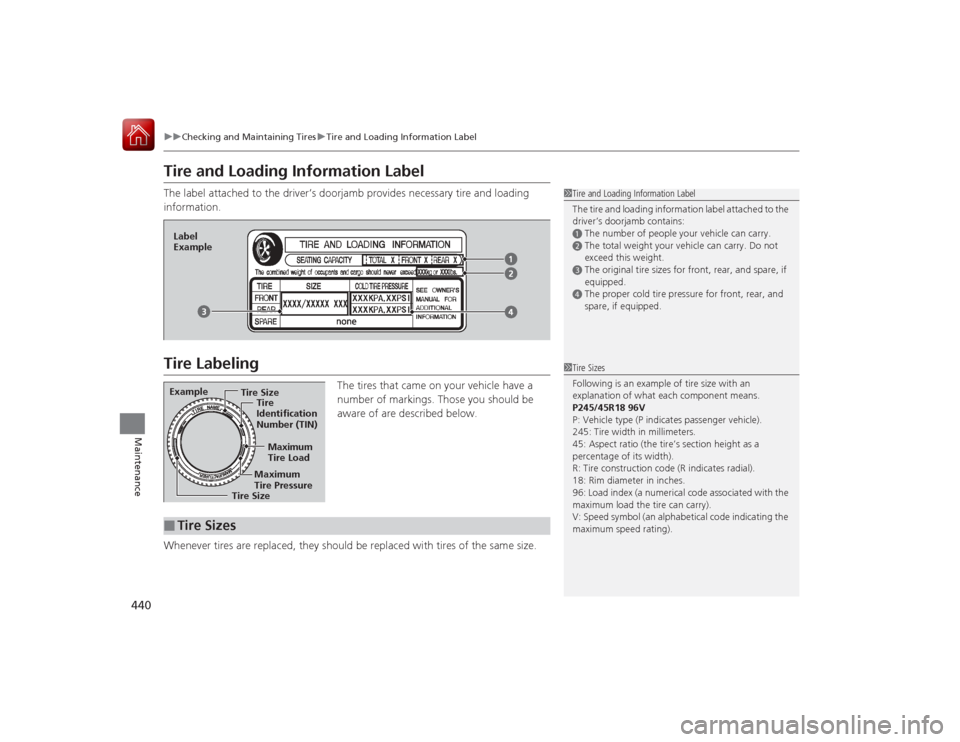
Tire and Loading Information LabelThe label attached to the driver’s doorjamb provides necessary tire and loading
information.Tire Labeling
The tires that came on your vehicle have a
number of markings. Those you should be
aware of are described below.
Whenever tires are replaced, they should be replaced with tires of the same size.
1 Tire and Loading Information Label
The tire and loading information label attached to the
driver’s doorjamb contains:aThe number of people your vehicle can carry.bThe total weight your vehicle can carry. Do not
exceed this weight.cThe original tire sizes for front, rear, and spare, if
equipped.dThe proper cold tire pressure for front, rear, and
spare, if equipped.
Label
ExampleExample
Tire Size
Tire
Identification
Number (TIN)
Maximum
Tire Load
Maximum
Tire Pressure
Tire Size■
Tire Sizes
1 Tire Sizes
Following is an example of tire size with an
explanation of what each component means.
P245/45R18 96V
P: Vehicle type (P indicates passenger vehicle).
245: Tire width in millimeters.
45: Aspect ratio (the tire’s section height as a
percentage of its width).
R: Tire construction code (R indicates radial).
18: Rim diameter in inches.
96: Load index (a numerical code associated with the
maximum load the tire can carry).
V: Speed symbol (an alphabetical code indicating the
maximum speed rating).
Page 442 of 521
441
uuChecking and Maintaining Tires uTire Labeling
Maintenance
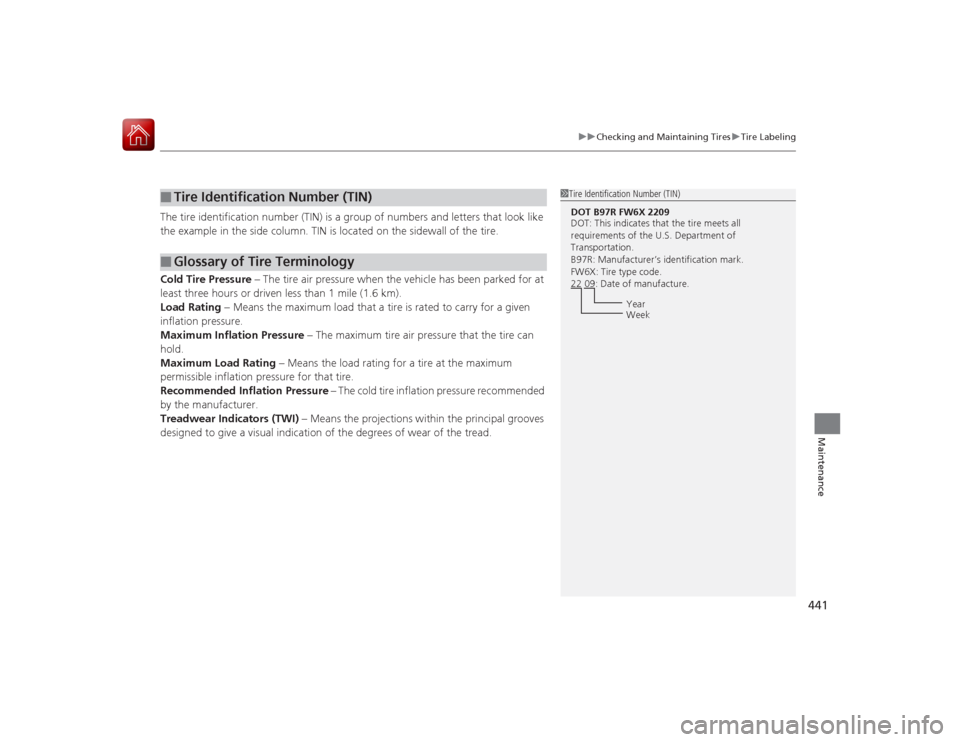
The tire identification number (TIN) is a group of numbers and letters that look like
the example in the side column. TIN is located on the sidewall of the tire.
Cold Tire Pressure – The tire air pressure when the vehicle has been parked for at
least three hours or driven less than 1 mile (1.6 km).
Load Rating – Means the maximum load that a tire is rated to carry for a given
inflation pressure.
Maximum Inflation Pressure – The maximum tire air pressure that the tire can
hold.
Maximum Load Rating – Means the load rating for a tire at the maximum
permissible inflation pressure for that tire.
Recommended Inflation Pressure – The cold tire inflation pressure recommended
by the manufacturer.
Treadwear Indicators (TWI) – Means the projections within the principal grooves
designed to give a visual indication of the degrees of wear of the tread.■
Tire Identification Number (TIN)
■
Glossary of Tire Terminology
1 Tire Identification Number (TIN)DOT B97R FW6X 2209
DOT: This indicates that the tire meets all
requirements of the U.S. Department of
Transportation.
B97R: Manufacturer’s identification mark.
FW6X: Tire type code.
22 09: Date of manufacture.
Year
Week
Page 443 of 521
442
uuChecking and Maintaining Tires uDOT Tire Quality Grading (U.S. Vehicles)
Maintenance
DOT Tire Quality Grading (U.S. Vehicles)The tires on your vehicle meet all U.S. Federal Safety
Requirements. All tires are also graded for treadwear, traction,
and temperature performance according to Department of
Transportation (DOT) standards. The following explains these
gradings.
Quality grades can be found where applicable on the tire sidewall
between tread shoulder and maximum section width.
The treadwear grade is a comparative rating based on the wear
rate of the tire when tested under controlled conditions on a
specified government test course. For example, a tire graded 150
would wear one and one-half (1 1/2) times as well on the
government course as a tire graded 100. The relative performance
of tires depends upon the actual conditions of their use, however,
and may depart significantly from the norm due to variations in
driving habits, service practices and differences in road
characteristics and climate.■
Uniform Tire Quality Grading
■
Treadwear
1 Uniform Tire Quality GradingFor example:
Treadwear 200
Traction AA
Temperature A
All passenger car tires must conform
to Federal Safety Requirements in
addition to these grades.