Tire Acura RLX 2015 User Guide
[x] Cancel search | Manufacturer: ACURA, Model Year: 2015, Model line: RLX, Model: Acura RLX 2015Pages: 521, PDF Size: 22.24 MB
Page 96 of 521
95
uuGauges and Multi-Information Display uMulti-Information Display
Continued
Instrument Panel
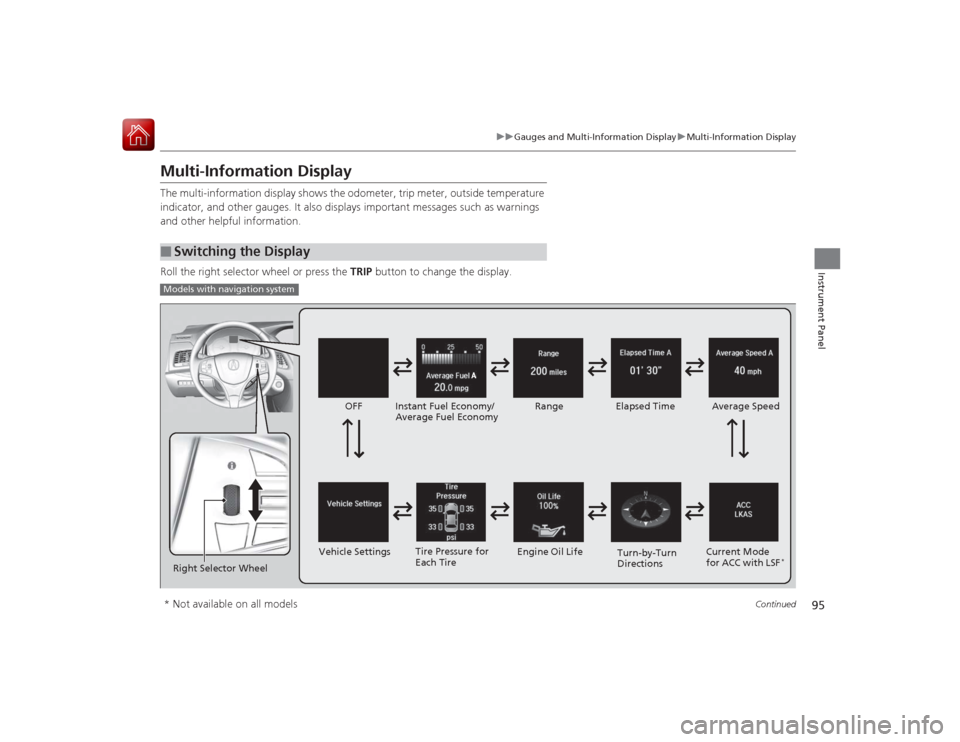
Multi-Information DisplayThe multi-information display shows the odometer, trip meter, outside temperature
indicator, and other gauges. It also displays important messages such as warnings
and other helpful information.
Roll the right selector wheel or press the TRIP button to change the display.■
Switching the DisplayModels with navigation systemRight Selector Wheel Engine Oil Life
Vehicle Settings Elapsed Time
OFF
Average Speed
Range
Instant Fuel Economy/
Average Fuel Economy
Turn-by-Turn
Directions
Tire Pressure for
Each Tire
Current Mode
for ACC with LSF
*
* Not available on all models
Page 98 of 521
97
uuGauges and Multi-Information Display uMulti-Information Display
Continued
Instrument Panel
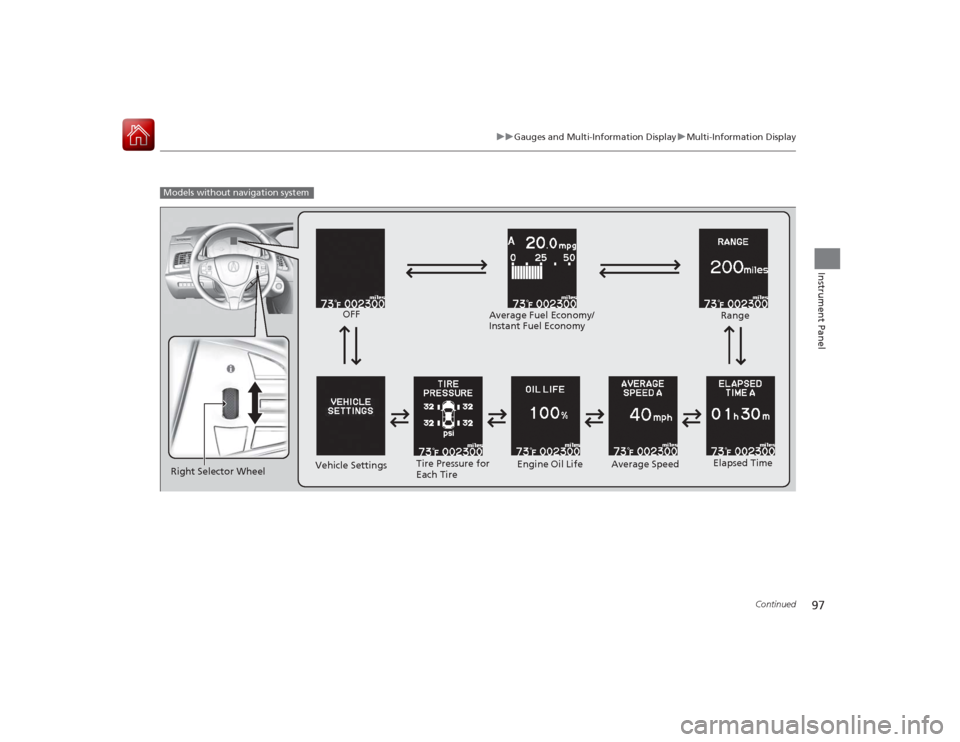
Models without navigation system
Engine Oil Life
Vehicle Settings Elapsed Time
OFF
Average SpeedRange
Average Fuel Economy/
Instant Fuel Economy
Tire Pressure for
Each Tire
Right Selector Wheel
Page 102 of 521
101
uuGauges and Multi-Information Display uMulti-Information DisplayContinued
Instrument Panel
Shows the remaining oil life and Maintenance Minder
TM.
2 Maintenance Minder
TM P. 413
Shows each tire’s pressure.2Tire Pressure Monitoring System (TPMS) P. 381■
Engine Oil Life
■
Tire Pressure Monitor
Page 154 of 521
153
uuAdjusting the Seats uAdjusting the Seat Positions
Continued
Controls
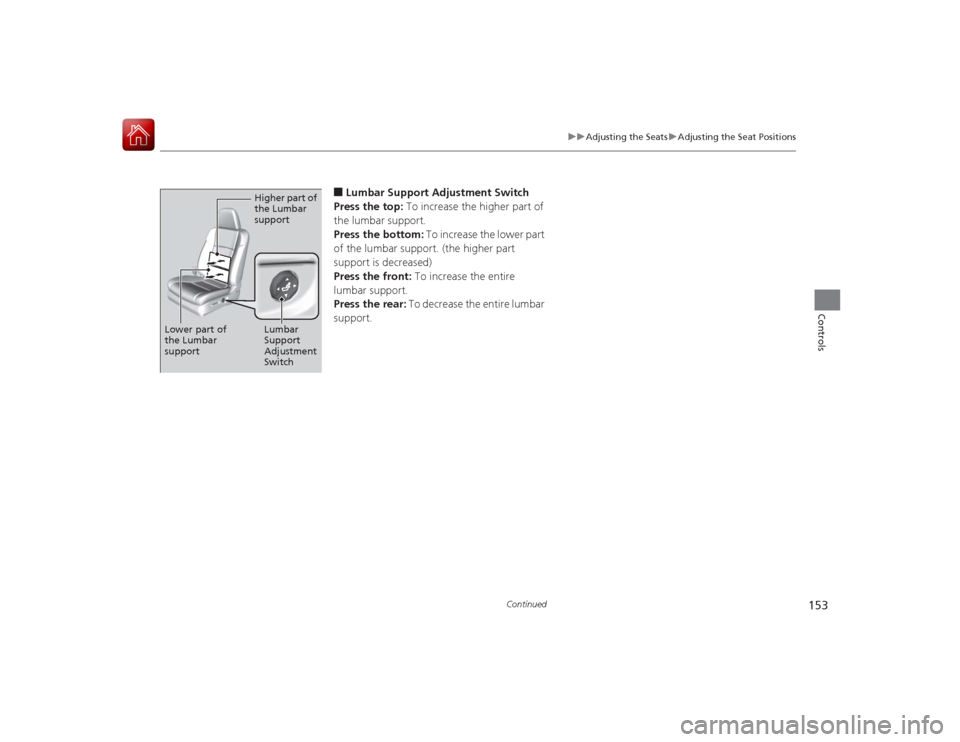
■Lumbar Support Adjustment Switch
Press the top: To increase the higher part of
the lumbar support.
Press the bottom: To increase the lower part
of the lumbar support. (the higher part
support is decreased)
Press the front: To increase the entire
lumbar support.
Press the rear: To decrease the entire lumbar
support.
Higher part of
the Lumbar
support
Lumbar
Support
Adjustment
Switch
Lower part of
the Lumbar
support
Page 334 of 521
333
Driving
This chapter discusses driving, refueling, and information on items such as accessories.
Before DrivingDriving Preparation .......................... 334
Maximum Load Limit........................ 337
Towing a Trailer
Towing Your Vehicle ........................ 339
When Driving Starting the Engine .......................... 340
Precautions While Driving................. 343
Automatic Transmission ................... 344
Shifting ............................................ 345
SPORT Mode.................................... 349
Cruise Control
*................................ 350
Adaptive Cruise Control (ACC) with Low
Speed Follow (LSF)
*........................ 353
Forward Collision Warning (FCW)
*... 364 Lane Departure Warning (LDW) ....... 367
Lane Keeping Assist System (LKAS)
*.... 371
Vehicle Stability Assist (VSA
®), aka Electronic
Stability Control (ESC), System ............... 376
Agile Handling Assist System............ 378
Precision All Wheel Steer System ...... 378Blind Spot Information (BSI) System
*.... 379
Tire Pressure Monitoring System (TPMS) ... 381Tire Pressure Monitoring System (TPMS) - Required Federal Explanation ......... 383
Braking
Brake System ................................... 385
Anti-lock Brake System (ABS) ........... 390
Brake Assist System.......................... 391 Collision Mitigation Braking System
TM
(CMBS
TM)*..................................... 392
Parking Your Vehicle
When Stopped ................................ 398
Parking Sensor System
*................... 399
Multi-View Rear Camera .................. 403
Refueling Fuel Information .............................. 404
How to Refuel ................................. 405
Fuel Economy .................................... 406
Improving Fuel Economy .................. 406
Accessories and Modifications
Accessories ...................................... 407
Modifications................................... 407
* Not available on all models
Page 335 of 521
334Driving
Before DrivingDriving PreparationCheck the following items before you start driving.
•Make sure there are no obstructions on the windows, door mirrors, exterior
lights, or other parts of the vehicle.
u Remove any frost, snow, or ice.
u Remove any snow on the roof, as this can slip down and obstruct your field of
vision while driving. If frozen solid, remove ice once it has softened.
u When removing ice from around the wheels, be sure not to damage the wheel
or wheel components.
• Make sure the hood is securely closed.
u If the hood opens while driving, your front view will be blocked.
• Make sure the tires are in good condition.
u Check air pressures, and check for damage and excessive wear.
2 Checking and Maintaining Tires P. 439
•Make sure there are no people or objects behind or around the vehicle.
u There are blind spots from the inside.■
Exterior Checks
1Exterior ChecksNOTICEWhen doors are frozen shut, use warm water around
the door edges to melt any ice. Do not try to force
them open, as this can damage the rubber trim
around the doors. When done, wipe dry to avoid
further freezing.
Do not pour warm water into the key cylinder.
You will be unable to insert the key if the water
freezes in the hole.
Heat from the engine and exhaust can ignite
flammable materials left under the hood, causing a
fire. If you’ve parked your vehicle for an extended
period, inspect and remove any debris that may have
collected, such as dried grass and leaves that have
fallen or have been carried in for use as a nest by a
small animal.
Also check under the hood for leftover flammable
materials after you or someone else has performed
maintenance on your vehicle.
Page 336 of 521
Continued
335
uuBefore Driving uDriving Preparation
Driving
• Store or secure all items on board properly.
u Carrying too much cargo, or improperly storing it, can affect your vehicle’s
handling, stability, stopping distance, and tires, and make it unsafe.
2 Maximum Load Limit P. 337
•Do not pile items higher than the seat height.
u They can block your view and may be thrown forward in the event of sudden
braking.
• Do not place anything in the front seat footwells. Make sure to secure the floor
mat.
u An object or unsecured floor mat can interfere with your brake and accelerator
pedal operation while driving.
• If you have any animals on board, do not let them move around in the vehicle.
u They may interfere with driving and a crash could occur.
• Securely close and lock all doors and the trunk.
2 Locking/Unlocking the Doors from the Inside P. 121
•Adjust your seating position properly.
u Adjust the head restraint, too.
2 Adjusting the Seats P. 152
2 Adjusting the Head Restraints P. 155
•Adjust the mirrors and steering wheel properly for your driving.
u Adjust them while sitting in the proper driving position.
2 Adjusting the Mirrors P. 149
2 Adjusting the Steering Wheel P. 148
■
Interior Checks
1Interior Checks
The headlight aim is set by the factory, and does not
need to be adjusted. However, if you regularly carry
heavy items in the trunk have the aiming readjusted
at a dealer or by a qualified technician.
Page 338 of 521
337
uuBefore Driving uMaximum Load Limit
Continued
Driving
Maximum Load LimitThe maximum load for your vehicle is 850 lbs (385 kg).
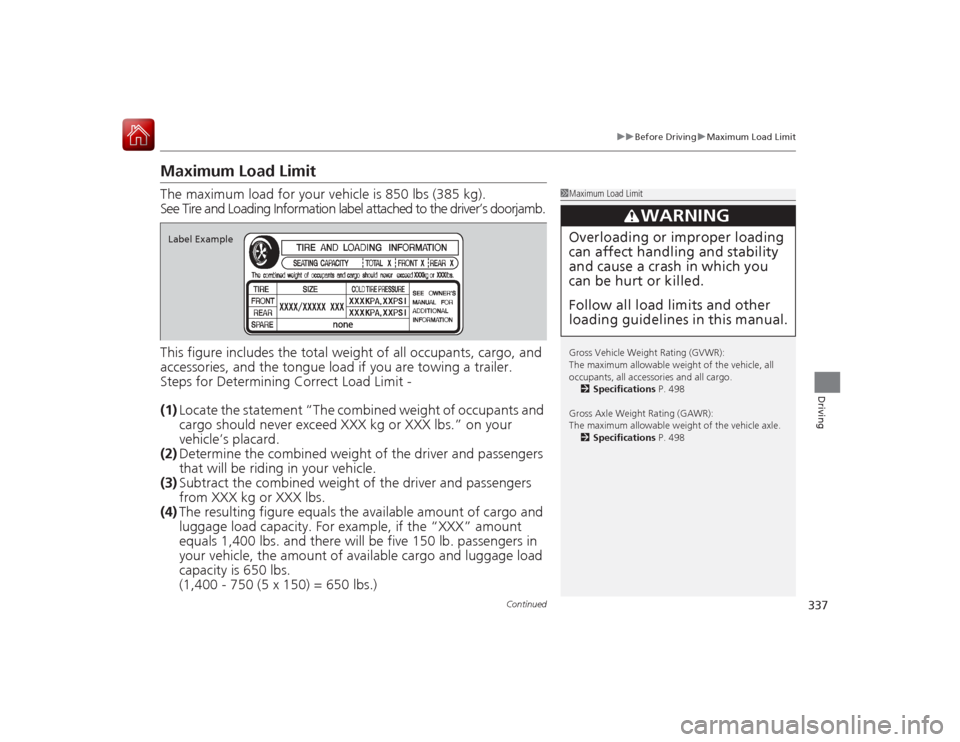
See Tire and Loading Information label attached to the driver’s doorjamb.
This figure includes the total weight of all occupants, cargo, and
accessories, and the tongue lo ad if you are towing a trailer.
Steps for Determining Correct Load Limit -
(1) Locate the statement “The combined weight of occupants and
cargo should never exceed XXX kg or XXX lbs.” on your
vehicle’s placard.
(2) Determine the combined weight of the driver and passengers
that will be riding in your vehicle.
(3) Subtract the combined weight of the driver and passengers
from XXX kg or XXX lbs.
(4) The resulting figure equals th e available amount of cargo and
luggage load capacity. For example, if the “XXX” amount
equals 1,400 lbs. an d there will be five 150 lb. passengers in
your vehicle, the amount of available cargo and luggage load
capacity is 650 lbs.
(1,400 - 750 (5 x 150) = 650 lbs.)
1 Maximum Load Limit
Gross Vehicle Weight Rating (GVWR):
The maximum allowable weight of the vehicle, all
occupants, all accessories and all cargo.
2 Specifications P. 498
Gross Axle Weight Rating (GAWR):
The maximum allowable weight of the vehicle axle. 2 Specifications P. 498
3
WARNING
Overloading or improper loading
can affect handling and stability
and cause a crash in which you
can be hurt or killed.
Follow all load limits and other
loading guidelines in this manual.
Label Example
Page 356 of 521
Continued
355
uuWhen Driving uAdaptive Cruise Control (ACC) with Low Speed Follow (LSF)
*
Driving
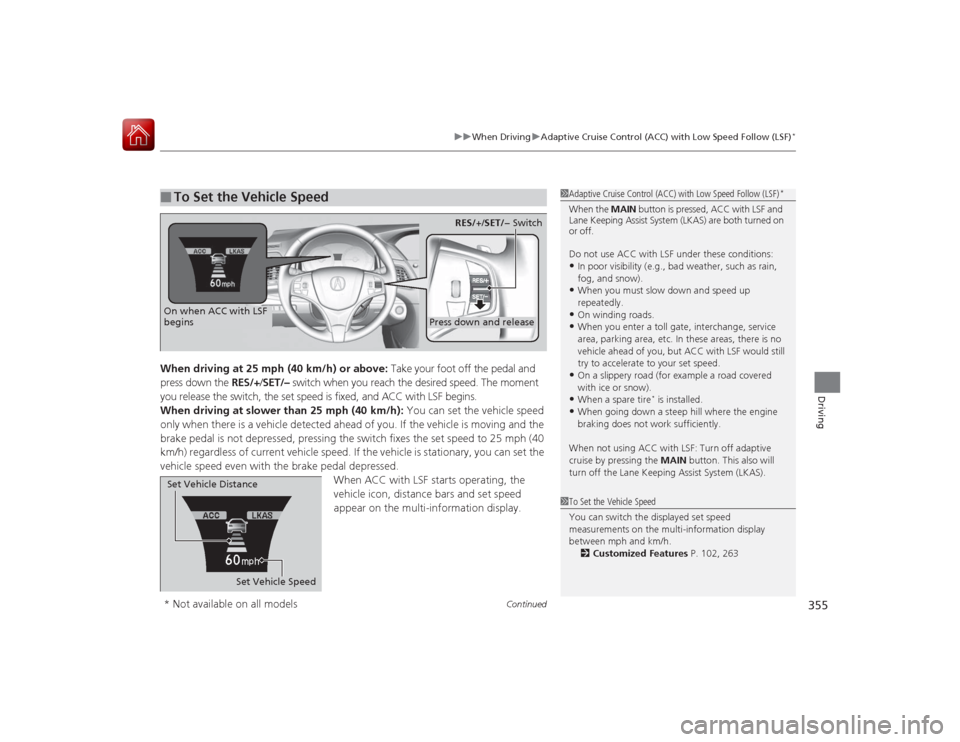
When driving at 25 mph (40 km/h) or above: Take your foot off the pedal and
press down the RES/+/SET/– switch when you reach the desired speed. The moment
you release the switch, the set speed is fixed, and ACC with LSF begins.
When driving at slower than 25 mph (40 km/h): You can set the vehicle speed
only when there is a vehicle detected ahead of you. If the vehicle is moving and the
brake pedal is not depressed, pressing the switch fixes the set speed to 25 mph (40
km/h) regardless of current vehicle speed. If the vehicle is stationary, you can set the
vehicle speed even with the brake pedal depressed. When ACC with LSF starts operating, the
vehicle icon, distance bars and set speed
appear on the multi-information display. ■
To Set the Vehicle Speed
1Adaptive Cruise Control (ACC) with Low Speed Follow (LSF)
*
When the MAIN button is pressed, ACC with LSF and
Lane Keeping Assist System (LKAS) are both turned on
or off.
Do not use ACC with LSF under these conditions:•In poor visibility (e.g., bad weather, such as rain,
fog, and snow).•When you must slow down and speed up
repeatedly.•On winding roads.•When you enter a toll gate, interchange, service
area, parking area, etc. In these areas, there is no
vehicle ahead of you, but ACC with LSF would still
try to accelerate to your set speed.•On a slippery road (for example a road covered
with ice or snow).•When a spare tire
* is installed.
•When going down a steep hill where the engine
braking does not work sufficiently.
When not using ACC with LSF: Turn off adaptive
cruise by pressing the MAIN button. This also will
turn off the Lane Keeping Assist System (LKAS).
1 To Set the Vehicle Speed
You can switch the displayed set speed
measurements on the multi-information display
between mph and km/h.
2 Customized Features P. 102, 263
On when ACC with LSF
begins
Press down and release
RES/+ /SET/− Switch
Set Vehicle Speed
Set Vehicle Distance
* Not available on all models
Page 362 of 521

Continued
361
uuWhen Driving uAdaptive Cruise Control (ACC) with Low Speed Follow (LSF)
*
Driving
To cancel ACC with LSF, do any of the
following:
• Press the CANCEL button.
• Press the MAIN button.
u ACC with LSF indicator goes off.
• Depress the brake pedal.
u When the LSF function has stopped the
vehicle, you cannot cancel ACC with LSF
by depressing the brake pedal.
■Automatic cancellation
The beeper sounds and a message appears on the multi-information display when
ACC with LSF is automatically canceled. Any of these conditions may cause the ACC
with LSF to automatically cancel:
• Your vehicle speed slows to 22 mph (35 km/h) or below when a detected vehicle
goes out of the ACC with LSF range.
• Bad weather (rain, fog, snow, etc.)
• When the radar sensor in the front grille gets dirty.
• The vehicle ahead of you cannot be detected.
• An abnormal tire condition is detected, or the tires are skidding.
• Driving on a mountainous road, or driving off road for extended periods.
• Abrupt steering wheel movement.
• When the ABS, VSA ® or CMBS
TM is activated.
• When the ABS or VSA ® system indicator comes on.
• When the vehicle is stopped on a very steep slope.
• When you manually apply the parking brake.
• When the detected vehicle within the ACC with LSF range is too close to your
vehicle.
■
To Cancel
1To Cancel
Resuming the prior set speed: After you have
canceled ACC with LSF, you can resume the prior set
speed while it is still displayed. Press the RES/+/SET/
– switch up when driving at a speed of at least 25
mph (40 km/h) or more.
Even if your vehicle speed has gone down to less than
25 mph (40 km/h), you can still resume the prior set
speed when ACC with LSF detects a vehicle ahead of
you.
You cannot set or resume in the following situations:•When the vehicle speed is less than 25 mph
(40km/h) and there is no vehicle detected in front
of your vehicle•When the MAIN button is turned off
CANCEL
ButtonMAIN
Button
1 Automatic cancellation
Even though ACC with LSF has been automatically
canceled, you can still resume the prior set speed.
Wait until the condition that caused ACC with LSF to
cancel improves, then press the RES/+/SET/– switch
down.