fuel Acura RLX 2015 Owner's Manual
[x] Cancel search | Manufacturer: ACURA, Model Year: 2015, Model line: RLX, Model: Acura RLX 2015Pages: 521, PDF Size: 22.24 MB
Page 3 of 521
ContentsThis owner’s manual should be considered a permanent part of the
vehicle and should remain with the vehicle when it is sold.
This owner’s manual covers all models of your vehicle. You may find
descriptions of equipment and features that are not on your
particular model.
Images throughout this owner’s manual (including the front cover)
represent features and equipment that are available on some, but
not all, models. Your particular model may not have some of these
features.
This owner’s manual is for vehicles sold in the United States and
Canada.
The information and specifications included in this publication were
in effect at the time of approval for printing. Honda Motor Co., Ltd.
reserves the right, however, to discontinue or change specifications
or design at any time without notice and without incurring any
obligation.
2Safe Driving P. 25For Safe Driving P. 26 Seat Belts P. 30 Airbags P. 372Instrument Panel P. 67Indicators P. 68 Gauges and Multi-Information Display P. 942Controls P. 113Setting the Clock P. 114 Locking and Unlocking the Doors P. 115
Opening and Closing the Moonroof P. 132
Adjusting the Seats P. 1522Features P. 187Audio System P. 188 Audio System Basic Operation P. 193
Customized Features P. 263 HomeLink® Universal Transceiver P. 2842 Driving P. 333Before Driving P. 334 Towing a Trailer P. 339
Multi-View Rear Camera P. 403 Refueling P. 4042Maintenance P. 409Before Performing Maintenance P. 410 Maintenance Minder
TM P. 413
Checking and Maintaining Wiper Blades P. 436
Climate Control System Maintenance P. 450
2 Handling the Unexpected P. 455Tools P. 456 If a Tire Goes Flat P. 457
Overheating P. 481 Indicator, Coming On/Blinking P. 483
When You Cannot Open the Trunk P. 4942 Information P. 497Specifications P. 498 Identification Numbers P. 500
Emissions Testing P. 503 Warranty Coverages P. 505
Page 4 of 521
Contents
Child Safety P. 52Exhaust Gas Hazard P. 64Safety Labels P. 65Opening and Closing the Trunk P. 125 Security System P. 128 Opening and Closing the Windows P. 130
Operating the Switches Around the Steering Wheel P. 133 Adjusting the Mirrors P. 149
Interior Lights/Interior Convenience Items P. 159 Climate Control System P. 177Audio Error Messages P. 253General Information on the Audio System P. 259
Bluetooth® HandsFreeLink ® P. 286 AcuraLink ®
* P. 326
When Driving P. 340 Braking P. 385Parking Your Vehicle P. 398
Fuel Economy P. 406 Accessories and Modifications P. 407Maintenance Under the Hood P. 418 Replacing Light Bulbs P. 430
Checking and Maintaining Tires P. 439 Battery P. 448 Remote Transmitter Care P. 449
Cleaning P. 451Engine Does Not Start P. 474 Jump Starting P. 477 Shift Lever Does Not Move P. 480
Fuses P. 487 Emergency Towing P. 492 When You Cannot Unlock the Fuel Fill Door P. 493
Refueling P. 495Devices that Emit Radio Waves P. 501 Reporting Safety Defects P. 502
Authorized Manuals P. 507 Client Service Information P. 508
Quick Reference Guide
P. 4
Safe Driving
P. 25
Instrument Panel
P. 67
Controls
P. 113
Features
P. 187
Driving
P. 333
Maintenance
P. 409
Handling the Unexpected
P. 455
Information
P. 497
Index
P. 512
Page 7 of 521
Visual Index
6Quick Reference Guide
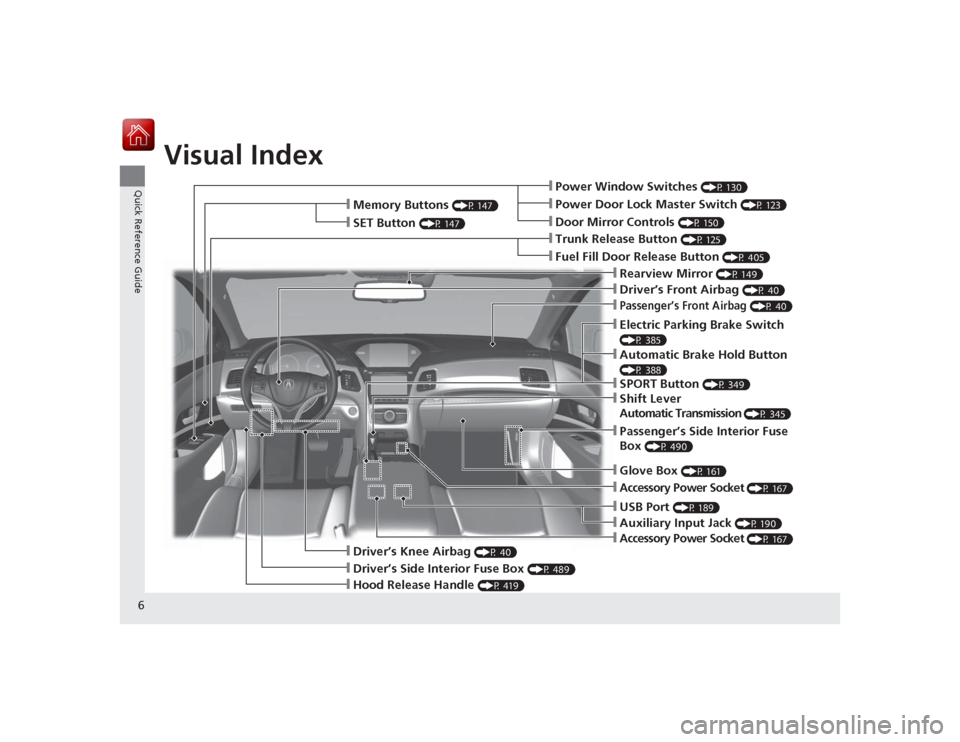
❙Power Window Switches
(P 130)
❙Driver’s Front Airbag
(P 40)
❙Trunk Release Button
(P 125)
❙Hood Release Handle
(P 419)
❙Driver’s Side Interior Fuse Box
(P 489)
❙Passenger’s Front Airbag
(P 40)
❙Shift LeverAutomatic Transmission
(P 345)
❙Glove Box
(P 161)
❙Driver’s Knee Airbag
(P 40)
❙Door Mirror Controls
(P 150)
❙Power Door Lock Master Switch
(P 123)
❙Fuel Fill Door Release Button
(P 405)
❙Electric Parking Brake Switch (P 385)❙Passenger’s Side Interior Fuse
Box
(P 490)
❙Accessory Power Socket
(P 167)
❙Accessory Power Socket
(P 167)
❙Auxiliary Input Jack
(P 190)
❙USB Port
(P 189)
❙Memory Buttons
(P 147)
❙SET Button
(P 147)
❙Rearview Mirror
(P 149)
❙SPORT Button
(P 349)
❙Automatic Brake Hold Button (P 388)
Page 9 of 521
Visual Index
8Quick Reference Guide
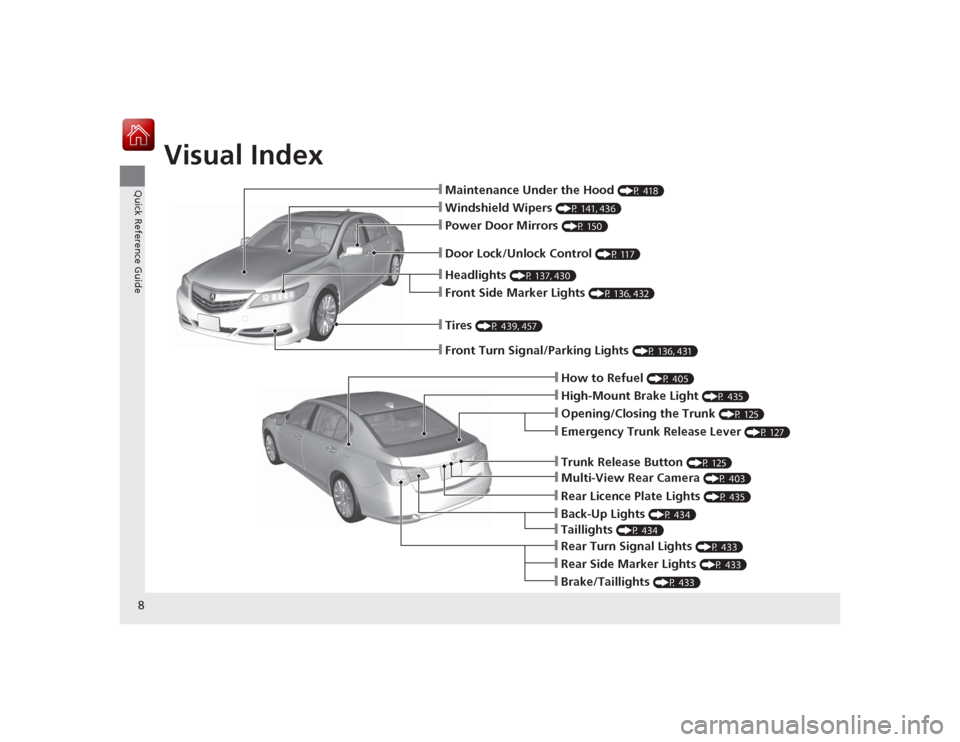
❙Maintenance Under the Hood
(P 418)
❙Windshield Wipers
(P 141, 436)
❙Tires
(P 439, 457)
❙Door Lock/Unlock Control
(P 117)
❙Power Door Mirrors
(P 150)
❙Headlights
(P 137, 430)
❙Front Side Marker Lights
(P 136, 432)
❙How to Refuel
(P 405)
❙High-Mount Brake Light
(P 435)
❙Emergency Trunk Release Lever
(P 127)
❙Opening/Closing the Trunk
(P 125)
❙Multi-View Rear Camera
(P 403)
❙Trunk Release Button
(P 125)
❙Rear Side Marker Lights
(P 433)
❙Brake/Taillights
(P 433)
❙Rear Turn Signal Lights
(P 433)
❙Front Turn Signal/Parking Lights
(P 136, 431)
❙Back-Up Lights
(P 434)
❙Rear Licence Plate Lights
(P 435)
❙Taillights
(P 434)
Page 11 of 521
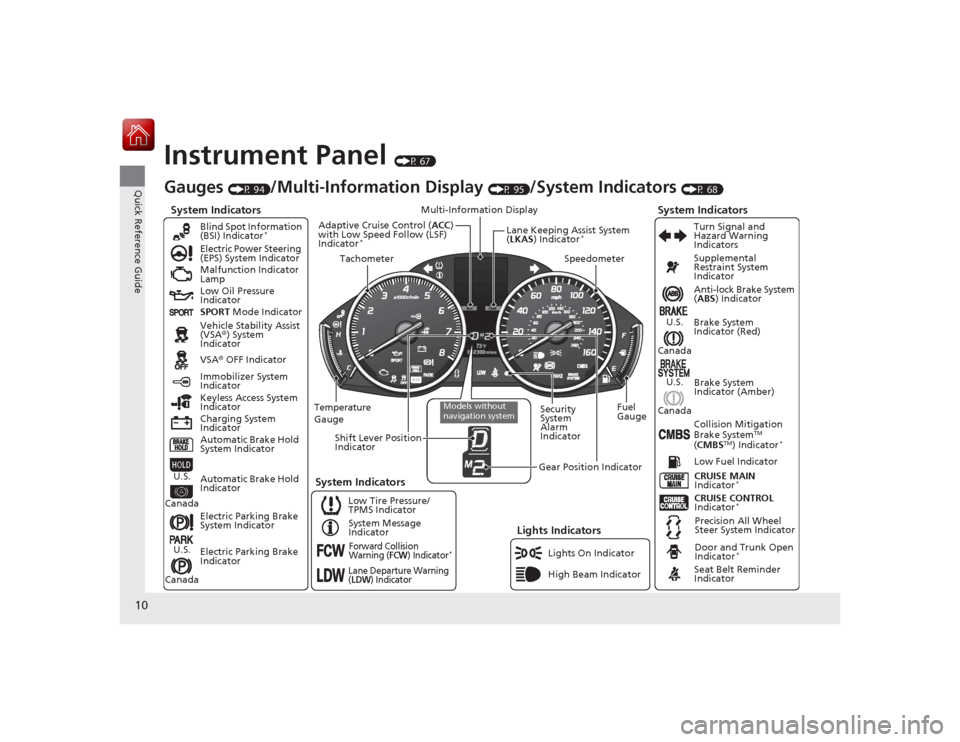
10Quick Reference Guide
Instrument Panel
(P 67)
System Indicators
Malfunction Indicator
Lamp
Low Oil Pressure
Indicator
Charging System
IndicatorAnti-lock Brake System
(
ABS ) Indicator
Vehicle Stability Assist
(VSA ®) System
Indicator
VSA ® OFF Indicator
Electric Power Steering
(EPS) System Indicator
Lights Indicators
Lights On Indicator
High Beam Indicator
Immobilizer System
Indicator
Seat Belt Reminder
Indicator
System Indicators
CRUISE CONTROL
Indicator
*
System Message
Indicator Brake System
Indicator (Red)
Supplemental
Restraint System
Indicator
Door and Trunk Open
Indicator
*
CRUISE MAIN
Indicator
*
Low Fuel Indicator
Gauges
(P 94)
/Multi-Information Display
(P 95)
/System Indicators
(P 68)
Low Tire Pressure/
TPMS Indicator Turn Signal and
Hazard Warning
Indicators
Keyless Access System
Indicator
Temperature
Gauge Security
System
Alarm
IndicatorFuel
Gauge
Tachometer
Multi-Information Display
Speedometer
Shift Lever Position
Indicator
Gear Position Indicator
Electric Parking Brake
System Indicator
Electric Parking Brake
Indicator Automatic Brake Hold
System Indicator Brake System
Indicator (Amber)
SPORT
Mode Indicator
Blind Spot Information
(BSI) Indicator
*
System Indicators
Collision Mitigation
Brake System
TM
( CMBS
TM) Indicator
*
Precision All Wheel
Steer System Indicator
Forward Collision
Warning (
FCW
) Indicator
*
Lane Departure Warning
(LDW
) Indicator
Models without
navigation system
Lane Keeping Assist System
(LKAS ) Indicator
*
Adaptive Cruise Control ( ACC)
with Low Speed Follow (LSF)
Indicator
*
Automatic Brake Hold
Indicator
U.S.
CanadaU.S.
Canada
U.S.
Canada
U.S.
Canada
Page 19 of 521
18Quick Reference Guide
VSA® OFF Button
(P 377)
● The vehicle stability assist (VSA ®) system
helps stabilize the vehicle during
cornering, and helps maintain traction
while accelerating on loose or slippery
road surfaces.
● VSA ® comes on automatically every time
you start the engine.
● To turn VSA ® on or off, press and hold
the button until you hear a beep.
Cruise Control
* (P 350)
● Cruise control allows you to maintain a
set speed without keeping your foot on
the accelerator pedal.
● To use cruise control, press the CRUISE
button, then press the RES/+/SET/– switch
down once you have achieved the desired
speed (above 25 mph or 40 km/h).
Collision Mitigation
Braking System
TM
(CMBS
TM
)
OFF Button
* (P 396)
● When a possible collision is likely
unavoidable, the CMBS
TM can help you to
reduce the vehicle speed and the severity
of the collision.
● To turn the CMBS
TM on or off, press and
hold the button until you hear a beep.
Tire Pressure Monitoring
System (TPMS)
(P 381)
● TPMS monitors tire pressure.
● TPMS is turned on automatically every
time you start the engine.
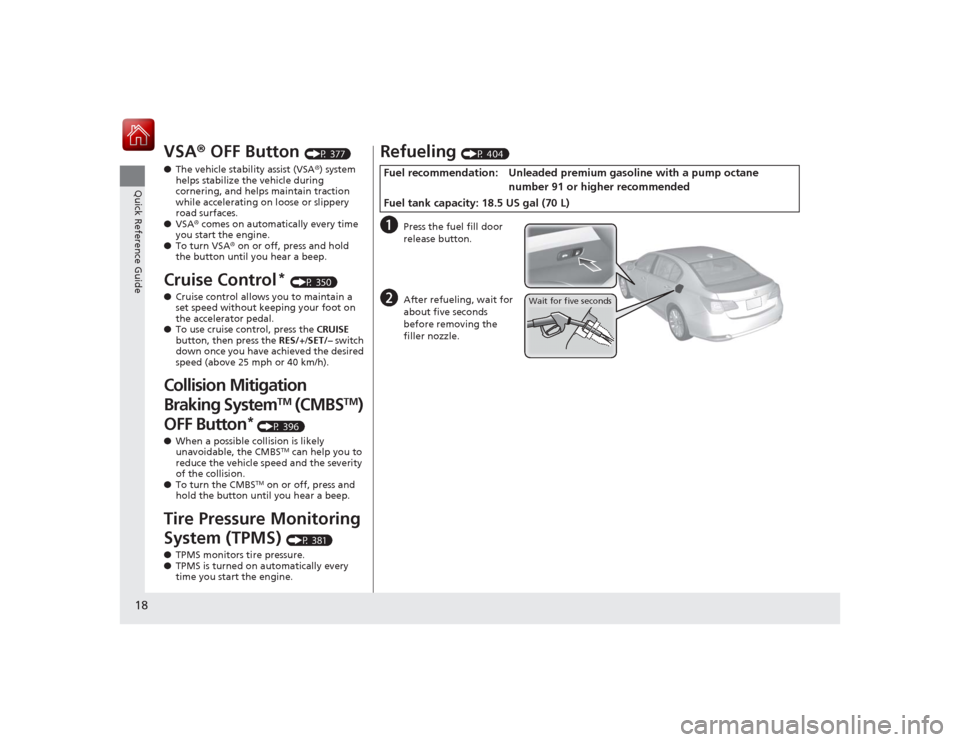
Refueling
(P 404)
a
Press the fuel fill door
release button.
b
After refueling, wait for
about five seconds
before removing the
filler nozzle.
Fuel recommendation: Unl eaded premium gasoline with a pump octane
number 91 or higher recommended
Fuel tank capacity: 18.5 US gal (70 L)
Wait for five seconds
Page 74 of 521

73
uuIndicators u
Continued
Instrument Panel
*1:On the left: Models with navigation system
On the right: Models without navigation systemIndicator
Name
On/Blinking
Explanation
Message
*1
Seat Belt
Reminder
Indicator
●Comes on and the beeper sounds if
you are not wearing a seat belt
when you set the power mode to
ON.●If the front passenger is not wearing
a seat belt, the indicator comes on
about a few seconds later.●Blinks while driving if either you or
the front passenger has not fastened
a seat belt. The beeper sounds and
the indicator blinks at regular
intervals.
●The beeper stops and the indicator goes
off when you and the front passenger
fasten their seat belts.●Stays on after you or the front
passenger has fastened the seat belt
- A detection error may have occurred in
the sensor. Have the vehicle checked by
a dealer.
2 Seat Belt Reminder P. 31
Low Fuel
Indicator
●Comes on when the fuel reserve is
running low (approximately
2.8 U.S. gal/10.5 Liter left).●Blinks if there is a problem with the
fuel gauge.
●Comes on - Refuel your vehicle as soon
as possible.●Blinks - Have the vehicle checked by a
dealer.
Page 95 of 521

94Instrument Panel
Gauges and Multi-Information Display GaugesGauges include the speedometer, tachometer, fuel gauge, and related indicators.
They are displayed when the power mode is in ON.
Displays your driving speed in mph or km/h.
Shows the number of engine revolutions per minute.
Displays the amount of fuel left in the fuel tank.
Displays the temperature of the engine coolant.■
Speedometer
■
Tachometer
■
Fuel Gauge
■
Temperature Gauge
1Fuel GaugeNOTICEYou should refuel when the needle approaches .
Running out of fuel can cause the engine to misfire,
damaging the catalytic converter.
The actual amount of remaining fuel may differ from
the fuel gauge reading.
E
1Temperature GaugeNOTICEDriving with the temperature gauge pointer in the
upper zone can cause serious engine damage. Pull
safely to the side of the road and allow engine
temperature to return to normal.
2 Overheating P. 481
Page 96 of 521
95
uuGauges and Multi-Information Display uMulti-Information Display
Continued
Instrument Panel
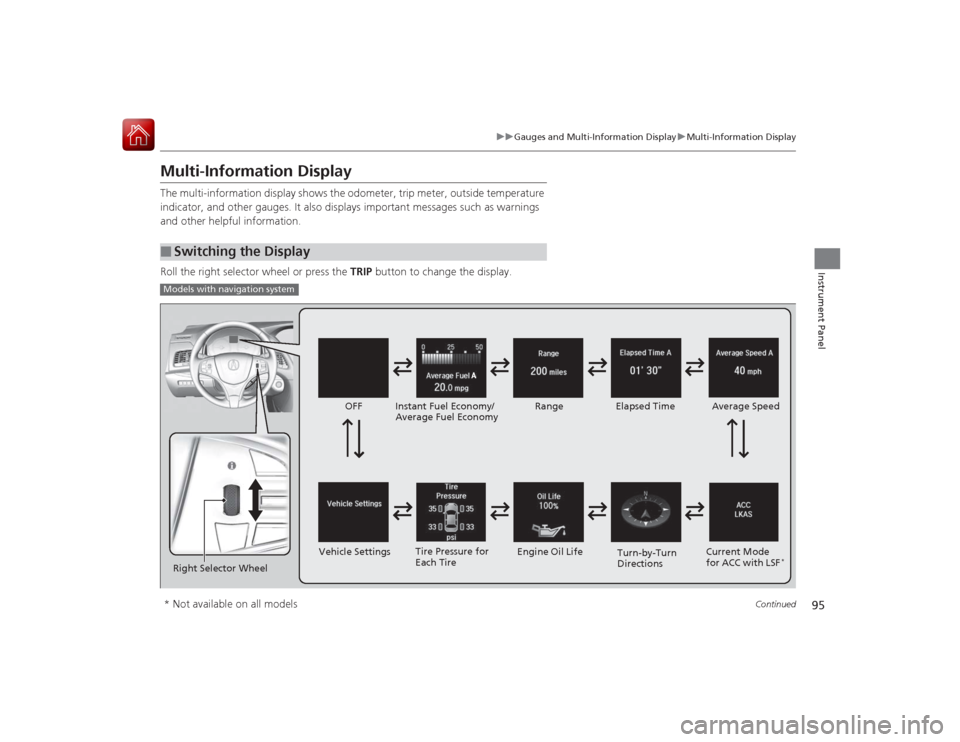
Multi-Information DisplayThe multi-information display shows the odometer, trip meter, outside temperature
indicator, and other gauges. It also displays important messages such as warnings
and other helpful information.
Roll the right selector wheel or press the TRIP button to change the display.■
Switching the DisplayModels with navigation systemRight Selector Wheel Engine Oil Life
Vehicle Settings Elapsed Time
OFF
Average Speed
Range
Instant Fuel Economy/
Average Fuel Economy
Turn-by-Turn
Directions
Tire Pressure for
Each Tire
Current Mode
for ACC with LSF
*
* Not available on all models
Page 98 of 521
97
uuGauges and Multi-Information Display uMulti-Information Display
Continued
Instrument Panel
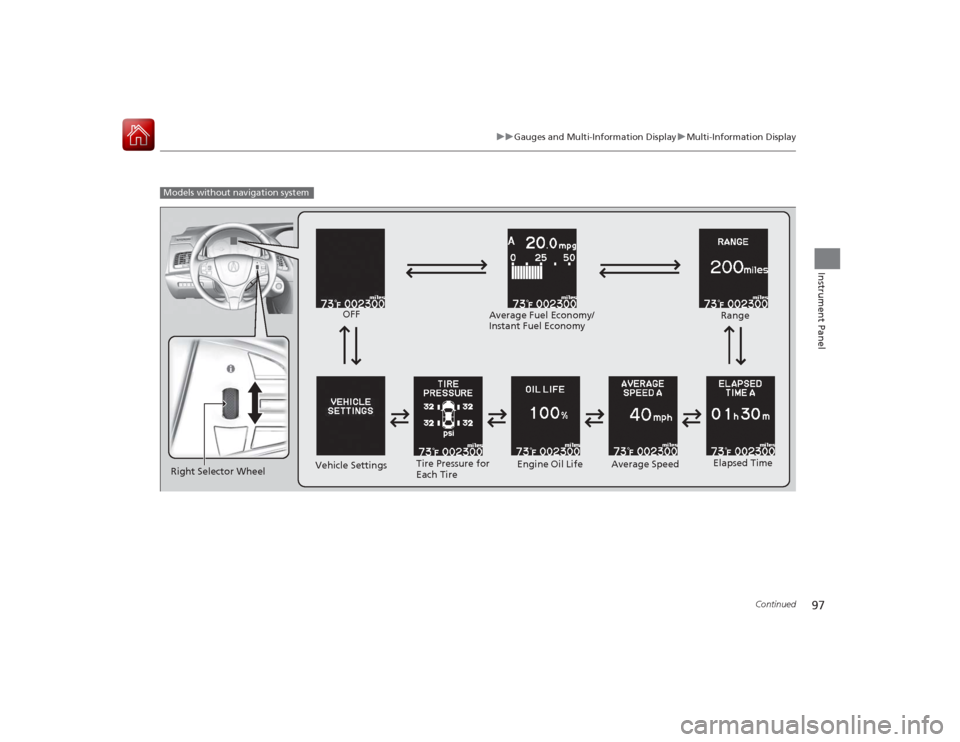
Models without navigation system
Engine Oil Life
Vehicle Settings Elapsed Time
OFF
Average SpeedRange
Average Fuel Economy/
Instant Fuel Economy
Tire Pressure for
Each Tire
Right Selector Wheel