lights Acura RLX 2015 Owner's Manual
[x] Cancel search | Manufacturer: ACURA, Model Year: 2015, Model line: RLX, Model: Acura RLX 2015Pages: 521, PDF Size: 22.24 MB
Page 4 of 521
Contents
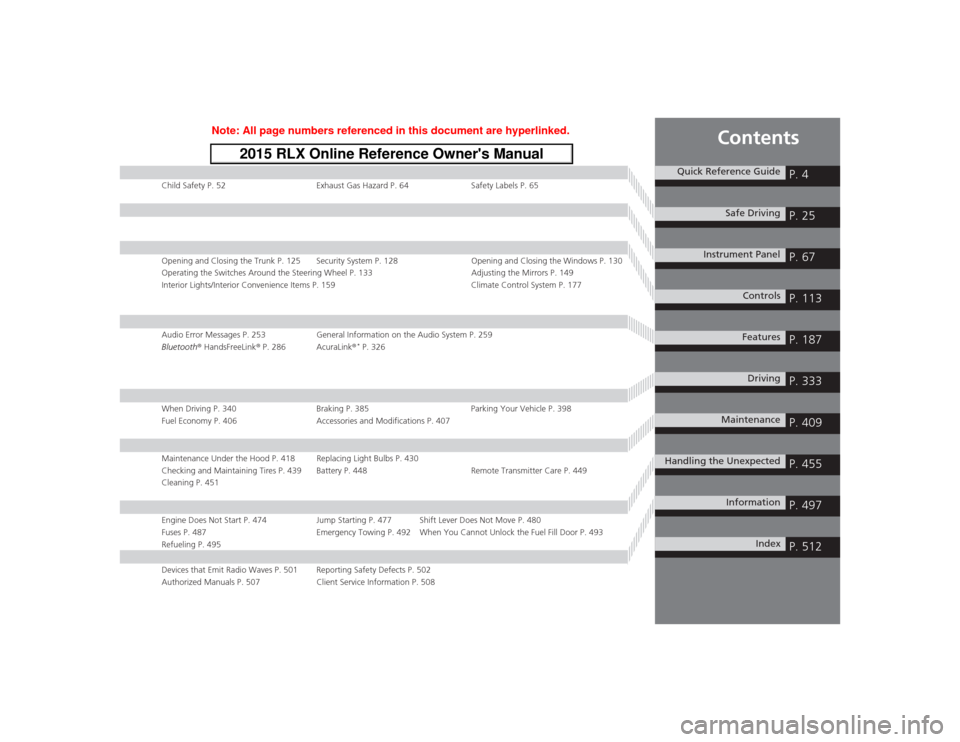
Child Safety P. 52Exhaust Gas Hazard P. 64Safety Labels P. 65Opening and Closing the Trunk P. 125 Security System P. 128 Opening and Closing the Windows P. 130
Operating the Switches Around the Steering Wheel P. 133 Adjusting the Mirrors P. 149
Interior Lights/Interior Convenience Items P. 159 Climate Control System P. 177Audio Error Messages P. 253General Information on the Audio System P. 259
Bluetooth® HandsFreeLink ® P. 286 AcuraLink ®
* P. 326
When Driving P. 340 Braking P. 385Parking Your Vehicle P. 398
Fuel Economy P. 406 Accessories and Modifications P. 407Maintenance Under the Hood P. 418 Replacing Light Bulbs P. 430
Checking and Maintaining Tires P. 439 Battery P. 448 Remote Transmitter Care P. 449
Cleaning P. 451Engine Does Not Start P. 474 Jump Starting P. 477 Shift Lever Does Not Move P. 480
Fuses P. 487 Emergency Towing P. 492 When You Cannot Unlock the Fuel Fill Door P. 493
Refueling P. 495Devices that Emit Radio Waves P. 501 Reporting Safety Defects P. 502
Authorized Manuals P. 507 Client Service Information P. 508
Quick Reference Guide
P. 4
Safe Driving
P. 25
Instrument Panel
P. 67
Controls
P. 113
Features
P. 187
Driving
P. 333
Maintenance
P. 409
Handling the Unexpected
P. 455
Information
P. 497
Index
P. 512
Page 6 of 521
5Quick Reference Guide
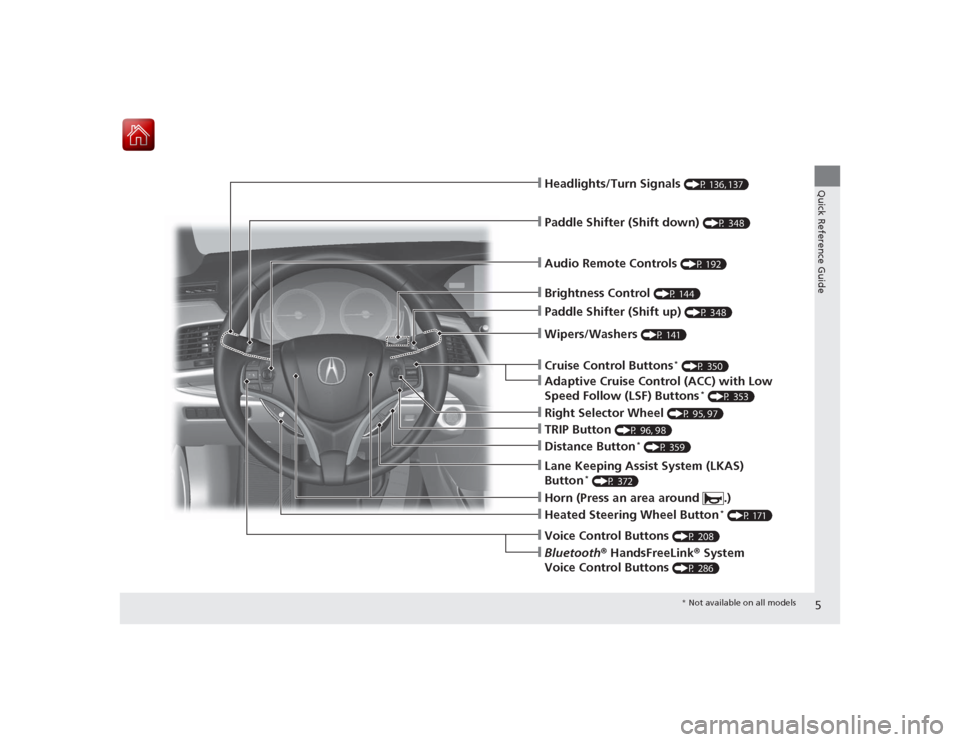
❙Wipers/Washers
(P 141)
❙Audio Remote Controls
(P 192)
❙Headlights/Turn Signals
(P 136, 137)
❙Paddle Shifter (Shift down)
(P 348)
❙Paddle Shifter (Shift up)
(P 348)
❙Horn (Press an area around .)❙Voice Control Buttons
(P 208)
❙Bluetooth® HandsFreeLink ® System
Voice Control Buttons
(P 286)
❙Brightness Control
(P 144)
❙Cruise Control Buttons
* (P 350)
❙Adaptive Cruise Control (ACC) with Low
Speed Follow (LSF) Buttons
* (P 353)
❙TRIP Button
(P 96, 98)
❙Distance Button
* (P 359)
❙Lane Keeping Assist System (LKAS)
Button
* (P 372)
❙Right Selector Wheel
(P 95, 97)
❙Heated Steering Wheel Button
* (P 171)
* Not available on all models
Page 8 of 521
7Quick Reference Guide
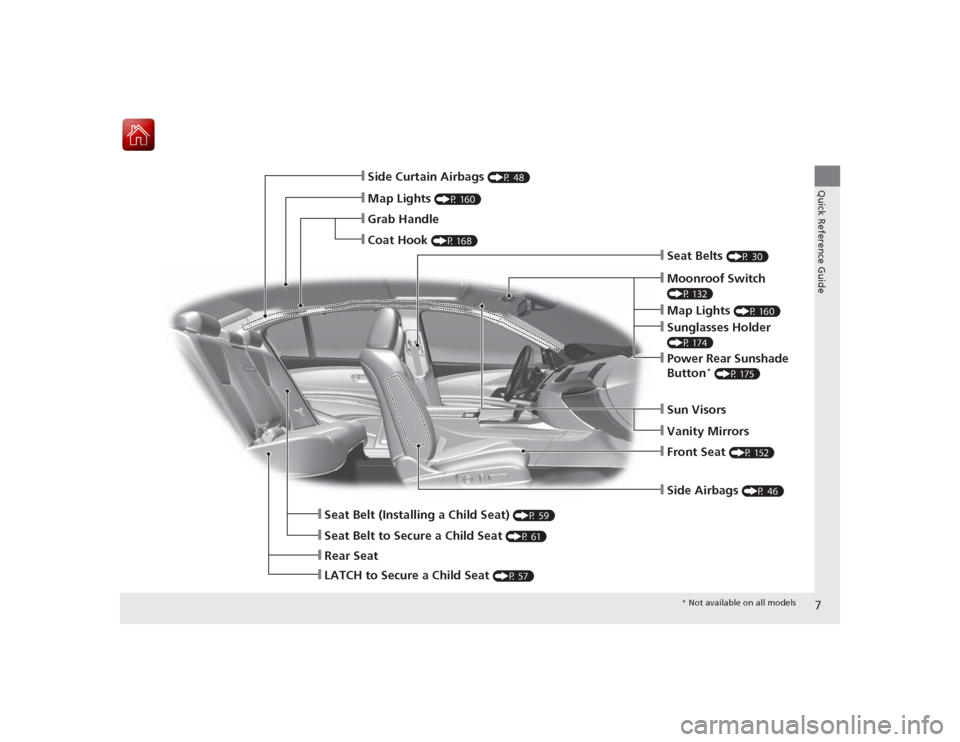
❙Side Airbags
(P 46)
❙Map Lights
(P 160)
❙Side Curtain Airbags
(P 48)
❙Seat Belts
(P 30)
❙Seat Belt to Secure a Child Seat
(P 61)
❙LATCH to Secure a Child Seat
(P 57)
❙Seat Belt (Installing a Child Seat)
(P 59)
❙Rear Seat
❙Front Seat
(P 152)
❙Coat Hook
(P 168)
❙Grab Handle
❙Moonroof Switch (P 132)❙Map Lights
(P 160)
❙Sunglasses Holder (P 174)❙Power Rear Sunshade
Button
* (P 175)
❙Sun Visors❙Vanity Mirrors
* Not available on all models
Page 9 of 521
Visual Index
8Quick Reference Guide
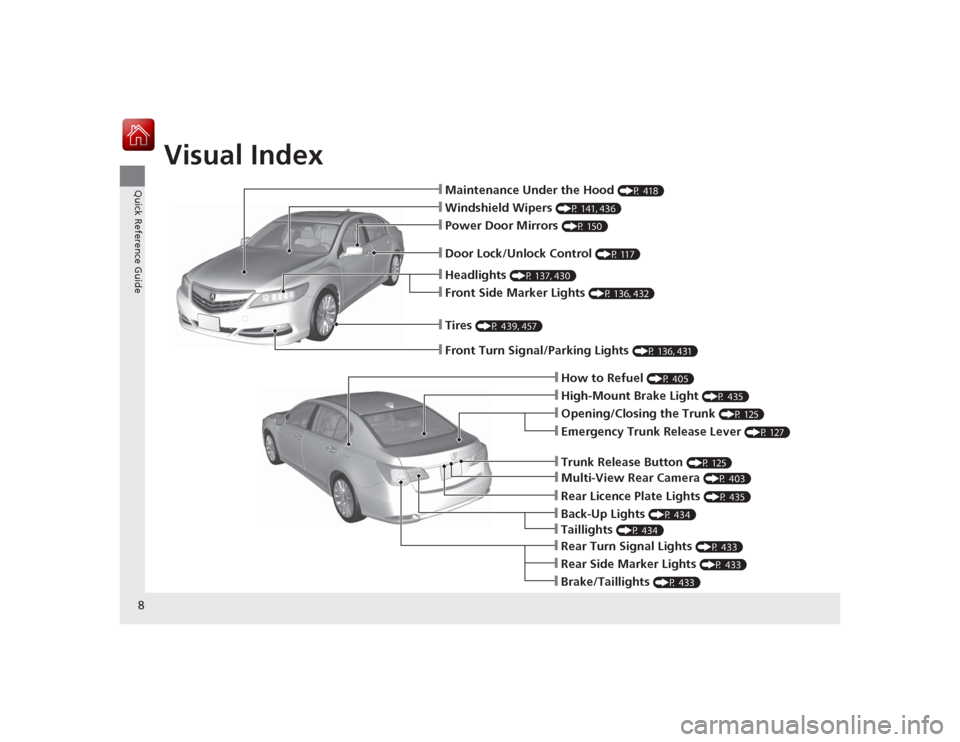
❙Maintenance Under the Hood
(P 418)
❙Windshield Wipers
(P 141, 436)
❙Tires
(P 439, 457)
❙Door Lock/Unlock Control
(P 117)
❙Power Door Mirrors
(P 150)
❙Headlights
(P 137, 430)
❙Front Side Marker Lights
(P 136, 432)
❙How to Refuel
(P 405)
❙High-Mount Brake Light
(P 435)
❙Emergency Trunk Release Lever
(P 127)
❙Opening/Closing the Trunk
(P 125)
❙Multi-View Rear Camera
(P 403)
❙Trunk Release Button
(P 125)
❙Rear Side Marker Lights
(P 433)
❙Brake/Taillights
(P 433)
❙Rear Turn Signal Lights
(P 433)
❙Front Turn Signal/Parking Lights
(P 136, 431)
❙Back-Up Lights
(P 434)
❙Rear Licence Plate Lights
(P 435)
❙Taillights
(P 434)
Page 11 of 521
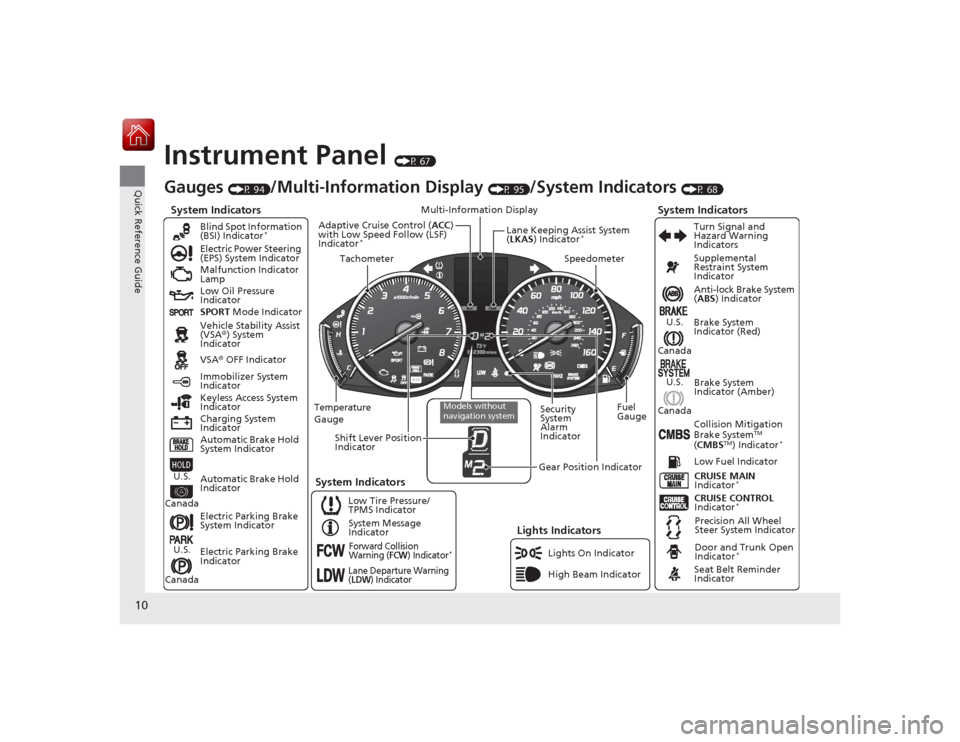
10Quick Reference Guide
Instrument Panel
(P 67)
System Indicators
Malfunction Indicator
Lamp
Low Oil Pressure
Indicator
Charging System
IndicatorAnti-lock Brake System
(
ABS ) Indicator
Vehicle Stability Assist
(VSA ®) System
Indicator
VSA ® OFF Indicator
Electric Power Steering
(EPS) System Indicator
Lights Indicators
Lights On Indicator
High Beam Indicator
Immobilizer System
Indicator
Seat Belt Reminder
Indicator
System Indicators
CRUISE CONTROL
Indicator
*
System Message
Indicator Brake System
Indicator (Red)
Supplemental
Restraint System
Indicator
Door and Trunk Open
Indicator
*
CRUISE MAIN
Indicator
*
Low Fuel Indicator
Gauges
(P 94)
/Multi-Information Display
(P 95)
/System Indicators
(P 68)
Low Tire Pressure/
TPMS Indicator Turn Signal and
Hazard Warning
Indicators
Keyless Access System
Indicator
Temperature
Gauge Security
System
Alarm
IndicatorFuel
Gauge
Tachometer
Multi-Information Display
Speedometer
Shift Lever Position
Indicator
Gear Position Indicator
Electric Parking Brake
System Indicator
Electric Parking Brake
Indicator Automatic Brake Hold
System Indicator Brake System
Indicator (Amber)
SPORT
Mode Indicator
Blind Spot Information
(BSI) Indicator
*
System Indicators
Collision Mitigation
Brake System
TM
( CMBS
TM) Indicator
*
Precision All Wheel
Steer System Indicator
Forward Collision
Warning (
FCW
) Indicator
*
Lane Departure Warning
(LDW
) Indicator
Models without
navigation system
Lane Keeping Assist System
(LKAS ) Indicator
*
Adaptive Cruise Control ( ACC)
with Low Speed Follow (LSF)
Indicator
*
Automatic Brake Hold
Indicator
U.S.
CanadaU.S.
Canada
U.S.
Canada
U.S.
Canada
Page 12 of 521
11Quick Reference Guide
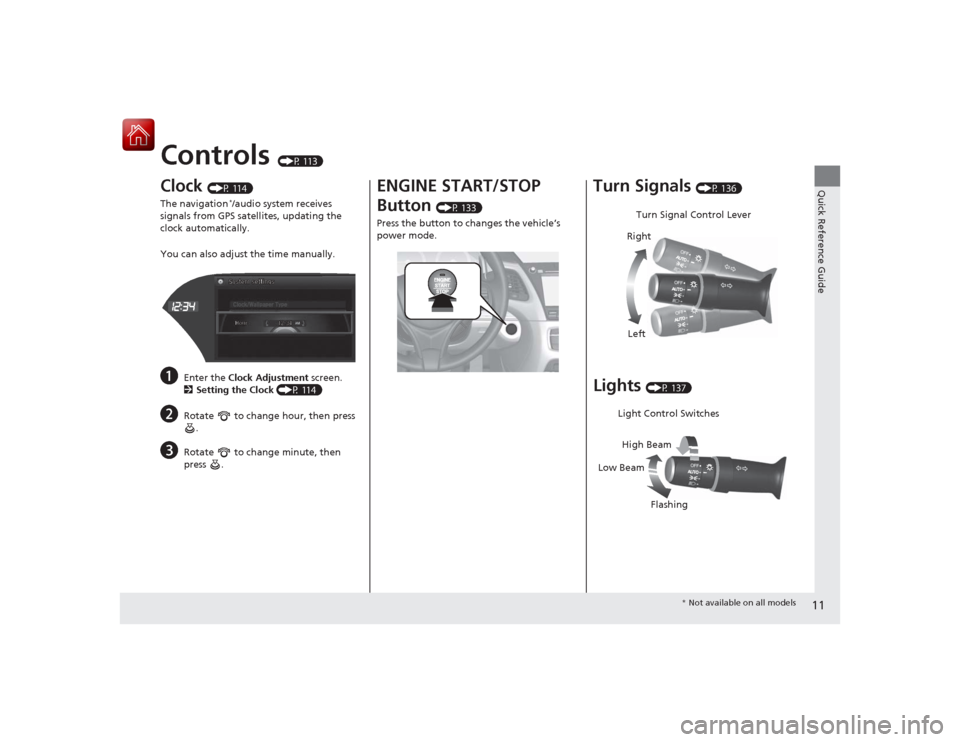
Controls
(P 113)
Clock
(P 114)
The navigation
*/audio system receives
signals from GPS satellites, updating the
clock automatically.
You can also adjust the time manually.
a
Enter the Clock Adjustment screen.
2 Setting the Clock (P 114)
b
Rotate to change hour, then press
.
c
Rotate to change minute, then
press .
ENGINE START/STOP
Button
(P 133)
Press the button to changes the vehicle’s
power mode.
Turn Signals
(P 136)
Lights
(P 137)Turn Signal Control Lever
Right
Left
Light Control Switches
Low Beam High Beam
Flashing
* Not available on all models
Page 20 of 521
19Quick Reference Guide
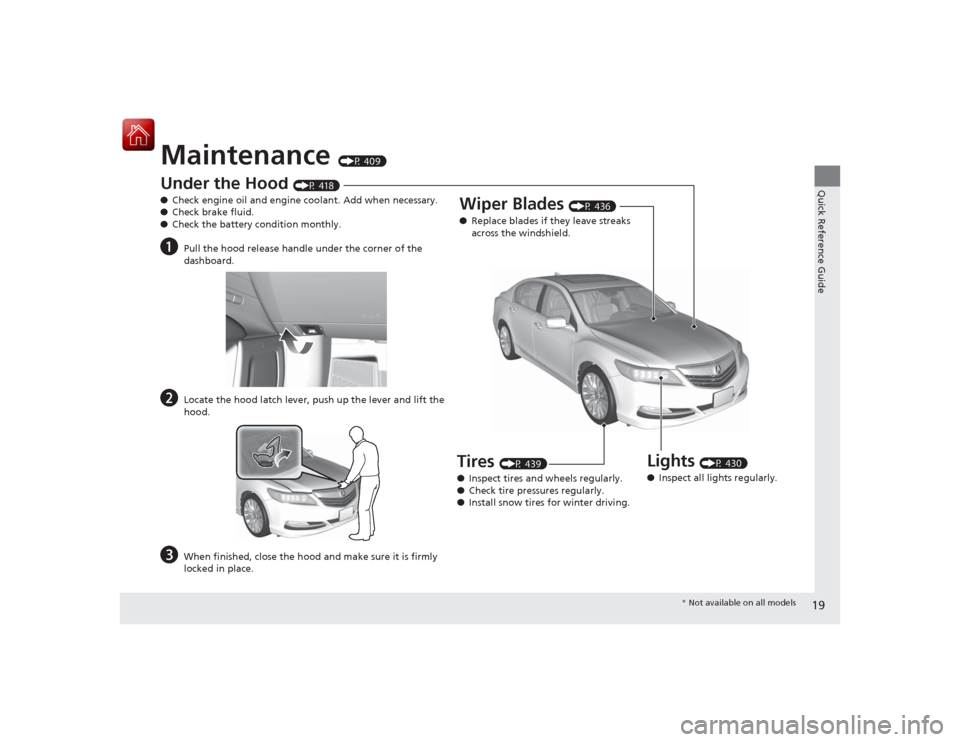
Maintenance
(P 409)
Under the Hood
(P 418)
● Check engine oil and engine coolant. Add when necessary.
● Check brake fluid.
● Check the battery condition monthly.
a
Pull the hood release handle under the corner of the
dashboard.
b
Locate the hood latch lever, push up the lever and lift the
hood.
c
When finished, close the hood and make sure it is firmly
locked in place.
Lights
(P 430)
● Inspect all lights regularly.
Wiper Blades
(P 436)
● Replace blades if they leave streaks
across the windshield.
Tires
(P 439)
● Inspect tires and wheels regularly.
● Check tire pressures regularly.
● Install snow tires for winter driving.
* Not available on all models
Page 23 of 521
22Quick Reference Guide
Why do the doors lock
after I unlocked the doors
using a remote
transmitter?
If you do not open the doors within 30 seconds, the doors are
relocked automatically for security.
Why does the beeper
sound when I open the
driver’s door?
The beeper sounds when:●The power mode is in ACCESSORY.●The exterior lights are left on.
Why does the beeper
sound when I start driving?
The beeper sounds when the driver and/or front passenger are
not wearing their seat belts.
Why does the beeper
sound when I turn the
engine off?
The beeper sounds when you tu rn off the engine with the
driver’s door open.
Why do I hear a screeching
sound when I apply the
brake pedal?
The brake pads may need to be replaced. Have your vehicle
inspected by a dealer.
Page 78 of 521
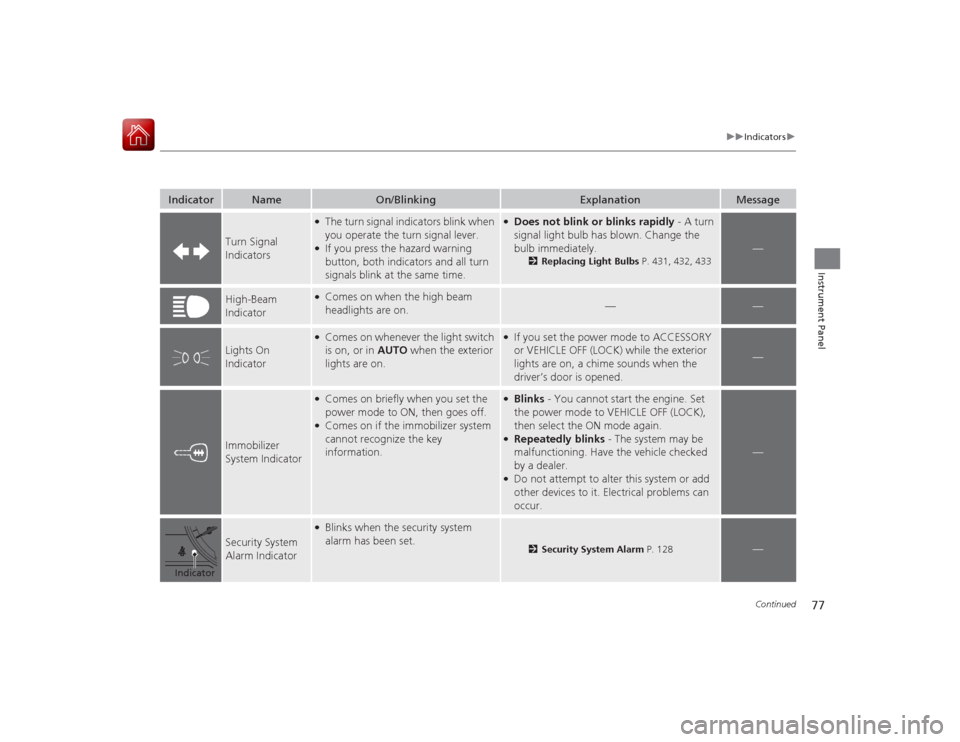
77
uuIndicators u
Continued
Instrument Panel
Indicator
Name
On/Blinking
Explanation
Message
Turn Signal
Indicators
●The turn signal indicators blink when
you operate the turn signal lever.●If you press the hazard warning
button, both indicators and all turn
signals blink at the same time.
●Does not blink or blinks rapidly - A turn
signal light bulb has blown. Change the
bulb immediately.
2Replacing Light Bulbs P. 431, 432, 433
—
High-Beam
Indicator
●Comes on when the high beam
headlights are on.
—
—
Lights On
Indicator
●Comes on whenever the light switch
is on, or in AUTO when the exterior
lights are on.
●If you set the power mode to ACCESSORY
or VEHICLE OFF (LOCK) while the exterior
lights are on, a chime sounds when the
driver’s door is opened.
—
Immobilizer
System Indicator
●Comes on briefly when you set the
power mode to ON, then goes off.●Comes on if the immobilizer system
cannot recognize the key
information.
●Blinks - You cannot start the engine. Set
the power mode to VEHICLE OFF (LOCK),
then select the ON mode again.●Repeatedly blinks - The system may be
malfunctioning. Have the vehicle checked
by a dealer.●Do not attempt to alter this system or add
other devices to it. Electrical problems can
occur.
—
Security System
Alarm Indicator
●Blinks when the security system
alarm has been set.
2 Security System Alarm P. 128
—
Indicator
Page 88 of 521

87
uuIndicators uMulti-Information Display Warning and Information Messages
Continued
Instrument Panel
*1:On the left: Models with navigation system
On the right: Models without navigation system
Message
*1
Condition
Explanation
●Appears if there is a problem with the radiator
system.
●Drive slowly to prevent overheating and have the
vehicle checked by a dealer as soon as possible.
●Appears when there is a problem with the headlights.
●Appears while driving - The low beam headlights
may not be on. When conditions allow you to drive
safety, have the vehicle checked by a dealer as soon
as possible.
—
●Appears if there is a problem with the parking sensor
system.
●Check if the area around the sensor(s) is covered with
mud, ice, snow, etc. If the indicator(s) stays on even
after you clean the area, have the system checked by
a dealer.
●Appears if the automatic brake hold is automatically
canceled while it is in operation.
●Immediately depress the brake pedal.
●Appears when the automatic brake hold system is
turned off.
2 Automatic Brake Hold P. 388