service Acura RLX 2016 User Guide
[x] Cancel search | Manufacturer: ACURA, Model Year: 2016, Model line: RLX, Model: Acura RLX 2016Pages: 581, PDF Size: 31.43 MB
Page 283 of 581
282
Features
General Information on the Audio System
SiriusXM® Radio Service
1. You need your radio ID ready before regist ering for subscription. To see the ID in
the On Demand Multi-Use DisplayTM, select until CH 000 and the radio ID
appears.
2. Have your radio ID and credit card num ber ready, and either call or visit the
SiriusXM ® website to subscribe.
Switch to the SiriusXM ® mode by pressing the SOURCE button repeatedly or
operating the On Demand Multi-Use Display
TM, and stay in this mode for about 30
minutes until the service is activated. Make sure your vehicle is in an open area with
good reception.
Loading:
SiriusXM ® is loading the audio or program information.
Ch off air:
The channel is not currently broadcasting.
Ch unauthorized:
SiriusXM ® radio is receiving information update from the network.
No signal:
The signal is too weak in the current location.
Ch unavailable:
No such channel exists, the channel is not pa rt of your subscription, or the artist or
title information is unavailable.
Check antenna:
There is a problem with the SiriusXM ® antenna. Contact a dealer.
■Subscribing to SiriusXM® Radio
■Receiving SiriusXM® Radio
■SiriusXM® Radio Display Messages
1 Subscribing to SiriusXM ® Radio
Contact Information for SiriusXM ® Radio:
•U.S.: SiriusXM ® Radio at www.siriusxm.com or
(800) 852-9696
•Canada: SiriusXM ® Canada at www.xmradio.ca , or
(877) 209-0079
1 Receiving SiriusXM ® Radio
The SiriusXM ® satellites are in orbit over the equator;
therefore, objects south of the vehicle may cause
satellite rece ption interruptions. Sa tellite signals are
more likely to be blocked by tall buildings and
mountains the farther north you travel from the
equator.
You may experience rece ption problems under the
following circumstances:
•In a location with an obstruction to the south of
your vehicle.
•In tunnels
•On the lower level of a multi-tiered road
•Large items carried on the roof rack
16 ACURA RLX E-AWD-31TY36200.book 282 ページ 2015年5月22日 金曜日 午後3時 50分
Page 303 of 581

302
uuCustomized Features u
Features
*1:Default SettingSetup
Group Customizable Features Descri
ption Selectable Settings
Vehicle
Settings Mainte-
nance
Info.
Maintenance Reset
Resets the engine oil life display when you have
performed the maintenance service. —
Default Cancels/Resets all cust
omized items in the
Vehicle Settings group as default. Default
/OK
Camera
Settings
Rear
Camera
Fixed GuidelineSelects whether the fixed guidelines come on the
rear camera monitor.On*1/ Off
Dynamic GuidelineSelects whether the dynamic guidelines come on
the rear camera monitor.On*1/Off
DefaultCancels/Resets all cust omized items in the Rear
Camera group as default.Default/OK
Cross Traffic MonitorTurns the cross traffic m onitor feature on and off.On*1/Off
Models with
multi-view
rear camera
16 ACURA RLX E-AWD-31TY36200.book 302 ページ 2015年5月22日 金曜日 午後3時 50分
Page 319 of 581

318
uuBluetooth ® HandsFreeLink ®u HFL Menus
Features
Text/Email*1
Message is
read aloud.See the previous message.
(Read/Stop)
Previous
NextSee the next message. System reads received message aloud, or stop message
from being read.
Reply
Call
Reply to a received message using one of six fixed phrases.
Make a call to the sender.
Select Account
Select a message
and press .
Select a mail or text message account.
Redial*1Redial the last number dialed in the phone’s history.
Display the last 20 outgoing, incoming and missed calls.
Call History*1All
Dialed
Received
Display the last 20 outgoing calls.
Display the last 20 incoming calls.
MissedDisplay the last 20 missed calls.
Roadside Assistance*1Makes a call to the number for the Roadside Assistance service.
*1: Appears only when a phone is connected to HFL.
16 ACURA RLX E-AWD-31TY36200.book 318 ページ 2015年5月22日 金曜日 午後3時 50分
Page 352 of 581
351
uuBluetooth ® HandsFreeLink ®u HFL Menus
Features
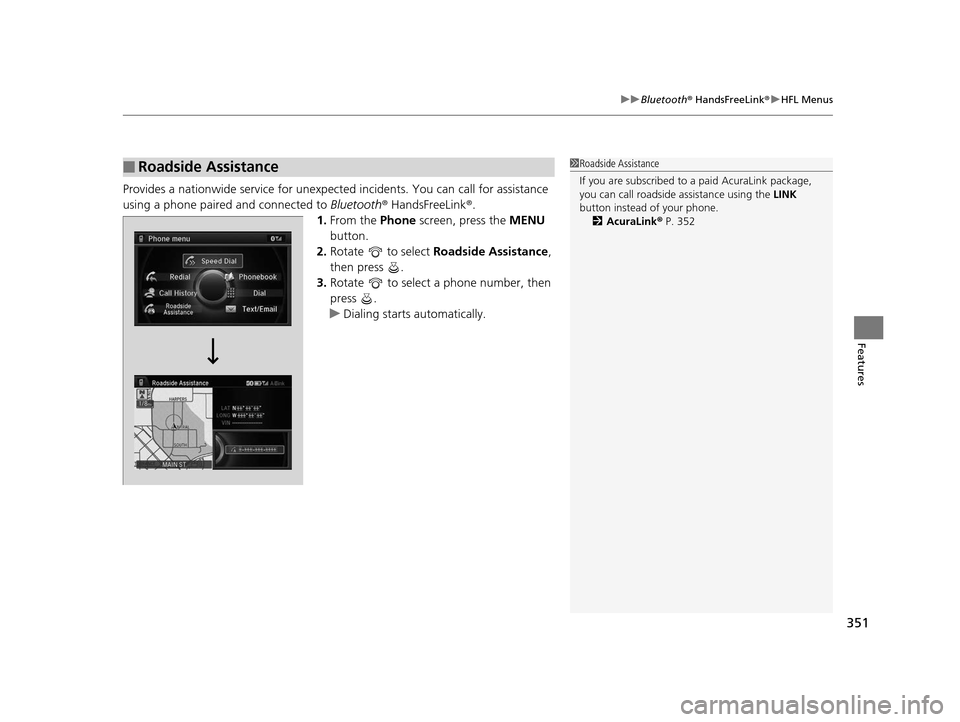
Provides a nationwide service for unexpected incidents. You can call for assistance
using a phone paired and connected to Bluetooth® HandsFreeLink ®.
1. From the Phone screen, press the MENU
button.
2. Rotate to select Roadside Assistance ,
then press .
3. Rotate to select a phone number, then
press .
u Dialing starts automatically.
■Roadside Assistance1Roadside Assistance
If you are subscribed to a paid AcuraLink package,
you can call roadside assistance using the LINK
button instead of your phone. 2 AcuraLink ® P. 352
16 ACURA RLX E-AWD-31TY36200.book 351 ページ 2015年5月22日 金曜日 午後3時 50分
Page 353 of 581

352
Features
AcuraLink®
Is a subscription-based service that provid es convenient features such as voice
communication in case of emergency, online security, one-on-one operator
assistance, and the transmission of impo rtant messages regarding your vehicle’s
status.
For information on traffic rerouting and traffi c information updates, provided by the
AcuraLink server, see the Na vigation System Manual.
■Automatic collision notification
If your vehicle’s airbags deploy or if the unit
detects that the vehicle is severely impacted,
your vehicle will automatically attempt to
connect to the AcuraLink operator. Once
connected, information about your vehicle, its
positioning, and its condition will be sent to
the operator; you also can speak to the
operator when connected.
■In Case of Emergency
1AcuraLink ®
AcuraLink also provides services you can operate
from the Internet or your smartphone.
To subscribe to AcuraLink, or to get more
information about all of its features, contact an Acura
dealer, or visit owners.acura.com (in U.S.) or
www.acura.ca (in Canada).
1In Case of Emergency
Your vehicle may not be able to connect to the operator
if the battery level is low, the line is disconnected or you
do not have adequate cellular coverage.
You cannot use emergency services when:
•You travel outside the AcuraLink service coverage
areas.
•There is a problem with the connecting devices,
such as the ASSIST button, microphone, speakers,
or the unit itself.
•You are not subscribed to the service or your
subscription is no longer valid.
You cannot operate othe r navigation- or phone-
related functions using the screens while talking to
the operator.
Only the operator can terminate the connection to
your vehicle.
1 Automatic collision notification
If the unit fails to connect to the operator, it
repeatedly tries until it succeeds.
Audio/information screen
On Demand Multi-Use DisplayTM
When connected to the AcuraLink
operator:
16 ACURA RLX E-AWD-31TY36200.book 352 ページ 2015年5月22日 金曜日 午後3時 50分
Page 355 of 581

uuAcuraLink ®u
354
Features
Your subscribed telematics service provider can track your vehicle’s location,
remotely lock or unlock doors, and help you find your vehicle.
To use these features, you need your us er ID and personal identification number
(PIN).
■Stolen vehicle tracking
This feature searches and tracks down your ve hicle position even if it is on the move.
If you believe that your vehicle has been stolen, contact the police as well as the
provider.
■Remote door lock/unlock
The provider can remotely lock or unlock doors upon your request.
■Vehicle finder
This feature is convenient to use when trying to locate yo ur vehicle in large areas,
such as a crowded parking lot. If you cannot locate your vehicle after using the
remote transmitter’s answerba ck function, you can contact the provider which can
then flash your vehicle’s exterior lights and sound the horn.
■Security alarm notification
If the security system in your vehicle detects an abnormal condition, such as
someone tampering with the lock on your ve hicle, the provider notifies you by email
or SMS.
■Security Features1 Security Features
The contact information of your provider, your user
ID and PIN will be given when you subscribe to
AcuraLink. If you forget any of the above, contact a
dealer, or go to owners.acura.com (in U.S.) or
www.acura.ca (in Canada).
You can also activate the remote door lock/unlock
and vehicle finder features from the Internet or using
your smartphone app. As k a dealer, or visit
owners.acura.com (in U.S.) or www.acura.ca (in
Canada) for details.
1 Vehicle finder
The lights will stop flas hing and horn will stop
sounding under the foll owing conditions:
•When 30 seconds have elapsed.
•You unlock the doors using the remote transmitter.
•You unlock the doors using the keyless access
system.
•You unlock the doors using the built-in key.
•The power mode is set to ACCESSORY or ON.
16 ACURA RLX E-AWD-31TY36200.book 354 ページ 2015年5月22日 金曜日 午後3時 50分
Page 359 of 581

uuAcuraLink ®u
358
Features
• Schedule Dealer Appointment (U.S. models only): Automatically sets an
appointment date at your dealer.
• Phone number : Dials a number displaye d in the message via HFL.
• Diagnostic Info : Updates the current diagnostic message by connecting to the
Acura server using HFL.
■Dealer Appointments
You can confirm the scheduled appointment date when you receive a
Maintenance Minder or Recalls/Campaigns message, or reschedule any existing
appointments. 1.Select a Maintenance Minder , Recalls/
Campaigns , or Scheduled Dealer
Appointment message.
2. Rotate to select Scheduled Dealer
Appointment or Reschedule
Appointment (depending on the screen).
Press .
u A suggested time and date are displayed.
3. Rotate to select Confirm
Appointment . Press to accept the time
and date.
4. Press to select OK.1Dealer Appointments
To set up an automated de aler appointment when a
regular maintenance is due , visit the Acura Owners
website at owners.acura.com (in U.S.) or
www.acura.ca (in Canada), and set the required
option. A reminder message wi ll be sent as the date
for the dealer appointment approaches. A reminder
message will also be sent if you schedule an
appointment online using Acura Owners’ Schedule
Service Appointment function.
If you are not satisfied with the proposed
appointment date and time, ca ll your dealer directly.
To cancel the scheduled appointment, select Cancel
Appointment when a message is displayed.
U.S. models only
16 ACURA RLX E-AWD-31TY36200.book 358 ページ 2015年5月22日 金曜日 午後3時 50分
Page 459 of 581

458
Driving
Refueling
Fuel Information
■Fuel recommendation
Use of lower octane gasoline can cause occasional metallic knocking noise in the
engine and will result in decreased engine performance.
Use of gasoline with a pump octane less than 87 can lead to engine damage.
■Top tier detergent gasoline
Because the level of detergency and additives in gasoline vary in the market, Acura
endorses the use of “TOP TIER Deterg ent Gasoline” where available to help
maintain the performance and reliability of your vehicle. TOP TIER Detergent
Gasoline meets a new gasoline standard join tly established by leading automotive
manufacturers to meet the need s of today’s advanced engines.
Qualifying gasoline retailers will, in most ca ses, identify their gasoline as having met
“TOP TIER Detergent Gasoline” standards at the retail location. This fuel is
guaranteed to contain the proper level of detergent additives and be free of metallic
additives. The proper level of detergent additives, and absence of harmful metallic
additives in gasoline, help avoid build-up of deposits in your engine and emission
control system.
For further important fuel-rel ated information for your vehicle, or on information on
gasoline that does not contain MMT, visit Acura Owners at owners.acura.com. In
Canada, visit www.acura.ca for additional informatio n on gasoline. For more
information on top tier gasoline, visit www.toptiergas.com.
■Fuel tank capacity: 15.1 US gal (57 liters)
Unleaded premium gasoline, pump octane number 91 or higher
1Fuel Information
NOTICE
We recommend quality ga soline containing
detergent additives that help prevent fuel system and
engine deposits. In addition, in order to maintain
good performance, fuel economy, and emissions
control, we strongly reco mmend the use of gasoline
that does NOT contain harmful manganese-based
fuel additives such as MMT, if such gasoline is
available.
Use of gasoline with these additives may adversely
affect performance, a nd cause the malfunction
indicator lamp on your inst rument panel to come on.
If this happens, contact a dealer for service.
Some gasoline today is ble nded with oxygenates such
as ethanol. Your vehicle is designed to operate on
oxygenated gasoline containing up to 15% ethanol
by volume. Do not use gaso line containing methanol.
If you notice any undesira ble operating symptoms, try
another service station or sw itch to another brand of
gasoline.
16 ACURA RLX E-AWD-31TY36200.book 458 ページ 2015年5月22日 金曜日 午後3時 50分
Page 460 of 581
459
uuRefueling uHow to Refuel
Driving
How to Refuel
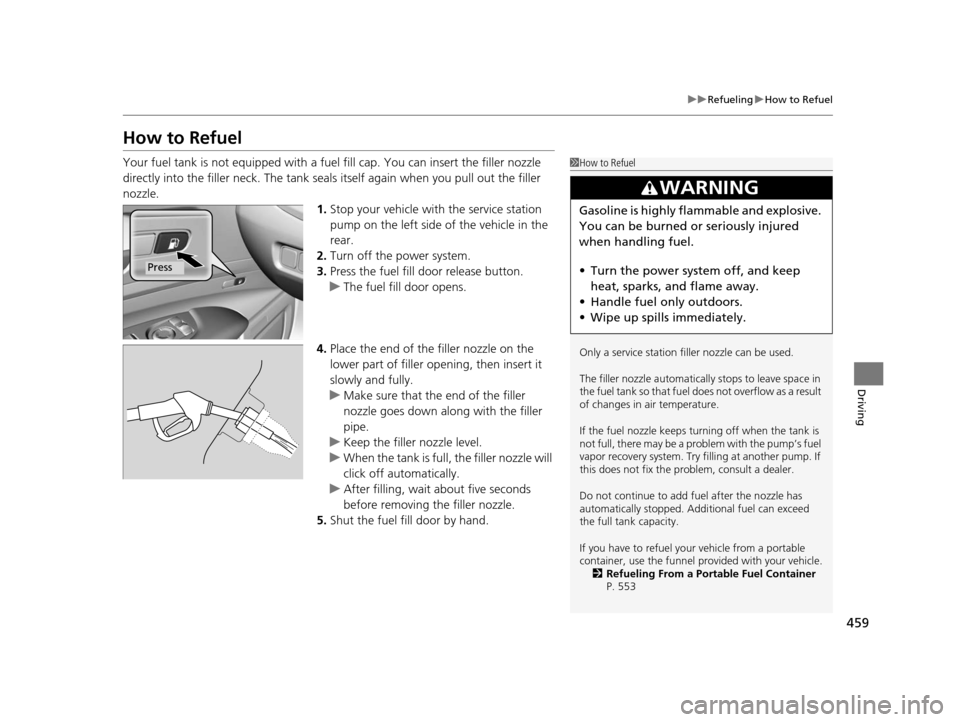
Your fuel tank is not equipped with a fu el fill cap. You can insert the filler nozzle
directly into the filler neck. The tank seals itself again when you pull out the filler
nozzle. 1.Stop your vehicle with the service station
pump on the left side of the vehicle in the
rear.
2. Turn off the power system.
3. Press the fuel fill door release button.
u The fuel fill door opens.
4. Place the end of the filler nozzle on the
lower part of filler opening, then insert it
slowly and fully.
u Make sure that the end of the filler
nozzle goes down along with the filler
pipe.
u Keep the filler nozzle level.
u When the tank is full, the filler nozzle will
click off automatically.
u After filling, wait about five seconds
before removing the filler nozzle.
5. Shut the fuel fill door by hand.1How to Refuel
Only a service station fi ller nozzle can be used.
The filler nozzle automatically stops to leave space in
the fuel tank so that fuel does not overflow as a result
of changes in air temperature.
If the fuel nozzle keeps turning off when the tank is
not full, there may be a problem with the pump’s fuel
vapor recovery system. Try fi lling at another pump. If
this does not fix the problem, consult a dealer.
Do not continue to add fuel after the nozzle has
automatically stopped. Addi tional fuel can exceed
the full tank capacity.
If you have to refuel yo ur vehicle from a portable
container, use the funnel pr ovided with your vehicle.
2 Refueling From a Portable Fuel Container
P. 553
3WARNING
Gasoline is highly flammable and explosive.
You can be burned or seriously injured
when handling fuel.
• Turn the power sy stem off, and keep
heat, sparks, and flame away.
• Handle fuel only outdoors.
• Wipe up spills immediately.
Press
16 ACURA RLX E-AWD-31TY36200.book 459 ページ 2015年5月22日 金曜日 午後3時 50分
Page 464 of 581
463
Maintenance
This chapter discusses basic maintenance.
Before Performing MaintenanceInspection and Maintenance ............ 464
Safety When Performing Maintenance..... 465Parts and Fluids Used in Maintenance Service ........................................... 466
Maintenance Minder
TM..................... 467
Maintenance Under the Hood
Maintenance Items Under the Hood ..... 472Opening the Hood ........................... 473
Engine Compartment Cover ............. 474
Recommended Engine Oil ................ 475
Oil Check ......................................... 476
Adding Engine Oil ............................ 477
Changing the Engine Oil and Oil Filter ..... 478Engine Coolant ................................ 480
Inverter Coolant ............................... 482
Transmission Fluid ............................ 482
Brake Fluid ....................................... 483
Refilling Window Washer Fluid......... 483
Replacing Light Bulbs ....................... 484
Checking and Maintaining Wiper
Blades .......................................... 489
Checking and Maintaining Tires
Checking Tires ................................. 492
Tire and Loading Information Label ...... 493Tire Labeling .................................... 493
DOT Tire Quality Grading (U.S. Vehicles) ...... 495Wear Indicators ............................... 497
Tire Service Life ................................ 497
Tire and Wheel Replacement ........... 498
Tire Rotation .................................... 499
Winter Tires ..................................... 500
12-Volt Battery ................................. 501
Remote Transmitter Care Replacing the Button Battery ........... 502
Climate Control System Maintenance.... 504Cleaning
Interior Care .................................... 505
Exterior Care.................................... 507
16 ACURA RLX E-AWD-31TY36200.book 463 ページ 2015年5月22日 金曜日 午後3時 50分