service Acura RLX 2016 Owner's Guide
[x] Cancel search | Manufacturer: ACURA, Model Year: 2016, Model line: RLX, Model: Acura RLX 2016Pages: 581, PDF Size: 31.43 MB
Page 514 of 581

513Continued
Handling the Unexpected
If a Tire Goes Flat
Temporarily Repairing a Flat Tire
If the tire has a large cut or is otherwise severely damaged, you will need to have the
vehicle towed. If the tire only has a small puncture, from a nail for instance, you can
use the temporary tire repair kit so that you can drive to the nearest service station
for a more permanent repair.
If a tire goes flat while driving, grasp the steering wheel firmly, and brake gradually
to reduce speed. Then stop in a safe place.
1. Park the vehicle on a firm, level, and n on-slippery surface and apply the parking
brake.
2. Change the gear position to
(P.
3. Turn on the hazard warning lights an d set the power mode to VEHICLE OFF
(LOCK).
Vehicles with temporary tire repair kit
1 Temporarily Repairing a Flat Tire
The kit should not be used in the following situations.
Instead, contact a dealer or a roadside assistant to
have the vehicle towed.
•The tire sealant has expired.•More than one tire is punctured.•The puncture or cut is larger than 3/16 inch (4 mm).•The tire side wall is da maged or the puncture is
outside the contact area.
•Damage has been caused by driving with the tire
extremely under inflated.
•The tire bead is no longer seated.•The rim is damaged.
Do not remove a nail or screw that punctured the
tire. If you remove it from the tire, you may not be
able to repair the puncture using the kit.
NOTICE
Do not use a puncture-repairing agent other than the
one provided in the kit that came with your vehicle. If
a different agent is used, you may permanently
damage the tire pressure sensor.
When the puncture is:Kit Use
Smaller than 3/16 inch
(4 mm)Yes
Larger than 3/16 inch (4 mm)No
Contact
Area
16 ACURA RLX E-AWD-31TY36200.book 513 ページ 2015年5月22日 金曜日 午後3時 50分
Page 521 of 581
520
uuIf a Tire Goes Flat uTemporarily Repairing a Flat Tire
Handling the Unexpected
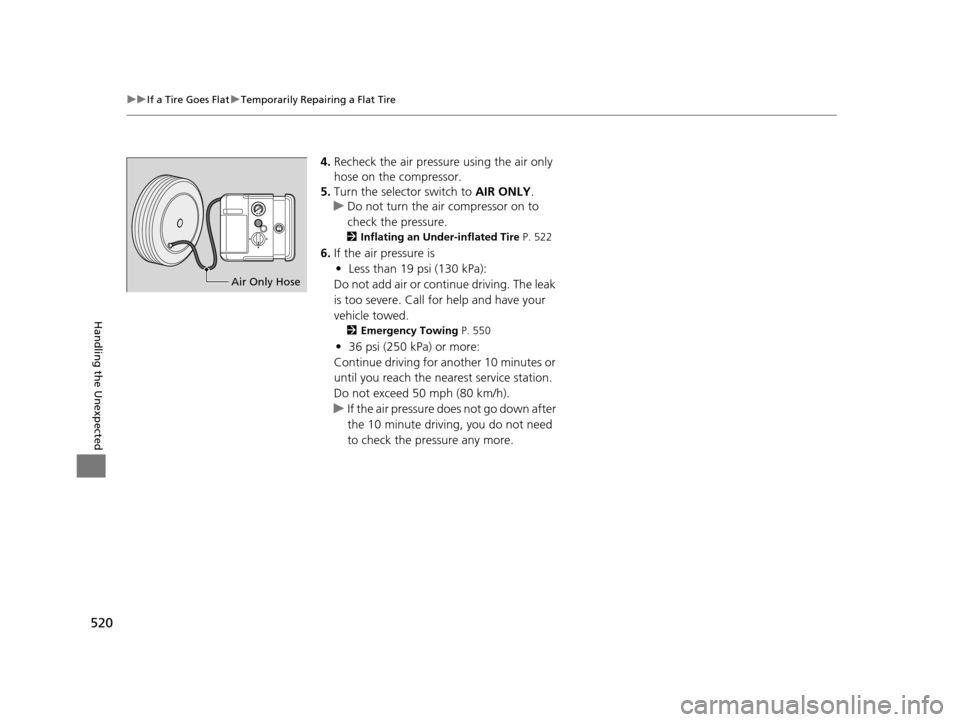
4. Recheck the air pressure using the air only
hose on the compressor.
5. Turn the selector switch to AIR ONLY.
u Do not turn the air compressor on to
check the pressure.
2 Inflating an Under-inflated Tire P. 522
6.If the air pressure is
• Less than 19 psi (130 kPa):
Do not add air or continue driving. The leak
is too severe. Call for help and have your
vehicle towed.
2 Emergency Towing P. 550
•36 psi (250 kPa) or more:
Continue driving for another 10 minutes or
until you reach the nearest service station.
Do not exceed 50 mph (80 km/h).
u If the air pressure does not go down after
the 10 minute driving, you do not need
to check the pressure any more.
Air Only Hose
16 ACURA RLX E-AWD-31TY36200.book 520 ページ 2015年5月22日 金曜日 午後3時 50分
Page 522 of 581

Continued521
uuIf a Tire Goes Flat uTemporarily Repairing a Flat Tire
Handling the Unexpected
• Greater than 19 psi (130 kPa), but less
than 36 psi (250 kPa):
Turn the air compressor on to inflate the
tire until the tire pressure reaches 36 psi
(250 kPa).
2 Inflating an Under-inflated Tire P. 522
Then drive carefully for 10 more minutes or
until you reach the nearest service station.
Do not exceed 50 mph (80 km/h).
u You should repeat this procedure as long
as the air pressure is within this range.
7. Press the pressure relief button until the
gauge returns to 0 psi (0 kPa).
8. Repackage and properly stow the kit.
AIR ONLY
side
ON
1 Distributing the Sealant in the Tire
3WARNING
Running the engine with the vehicle in an
enclosed or even partly enclosed area can
cause a rapid build-up of toxic carbon
monoxide.
Breathing this colorless, odorless gas can
cause unconsciousness and even death.
Only run the engine to power the air
compressor with the vehicle outdoors.
Pressure Relief Button
16 ACURA RLX E-AWD-31TY36200.book 521 ページ 2015年5月22日 金曜日 午後3時 50分
Page 537 of 581

536
uuJump Starting u
Handling the Unexpected
Once your vehicle’s engine has started, re move the jumper cables in the following
order.
1. Disconnect the jumper cable from your vehicle’s ground.
2. Disconnect the other end of the jumper cable from the booster battery -
terminal.
3. Disconnect the jumper cable from your vehicle’s 12-volt battery + terminal.
4. Disconnect the other end of the jumper cable from the booster battery +
terminal.
Have your vehicle inspected by a n earby service station or a dealer.
■What to Do After the Engine Starts
16 ACURA RLX E-AWD-31TY36200.book 536 ページ 2015年5月22日 金曜日 午後3時 50分
Page 544 of 581

543
uuIndicator, Coming On/Blinking uIf the Transmission Indicator Blin ks along with the Warning Message
Handling the Unexpected
If the Transmission Indicator Blinks along with the
Warning Message
■Reasons for the indicator to blink
The transmission is malfunctioned.
■What to do when the indicator blinks
• Immediately have your vehicle inspected by a dealer.
• Change the gear position to
(N when you turn the power system on.
u Check if the
(N position in the instrume nt panel and the indicator
on the
(N button light/blink.
u The power system cannot be turned on unless the parking brake is
set.
2 Turning on the Power P. 366
1If the Transmission Indicator Blinks along with the Warning
Message
You may not be able to turn on the power system.
Make sure to set the parking brake when parking
your vehicle.
Call a professional towing service if you need to tow
your vehicle. 2 Emergency Towing P. 550
16 ACURA RLX E-AWD-31TY36200.book 543 ページ 2015年5月22日 金曜日 午後3時 50分
Page 551 of 581
550
Handling the Unexpected
Emergency Towing
Call a professional towing service if you need to tow your vehicle.
■Flat bed equipment
The operator loads your vehicle on the back of a truck.
This is the only way you can safely transport your vehicle.
Any other towing method will da mage the vehicle’s drive system.
1Emergency Towing
NOTICE
Trying to lift or tow your vehicle by the bumpers will
cause serious damage. The bumpers are not designed
to support the vehicle's weight.
NOTICE
Improper towing such as towing behind a
motorhome or other motor vehicle can damage the
transmission.
Never tow your vehicle with just a rope or chain.
It is very dangerous since ropes or chains may shift
from side to side or break.
16 ACURA RLX E-AWD-31TY36200.book 550 ページ 2015年5月22日 金曜日 午後3時 50分
Page 556 of 581

555
Information
This chapter includes your vehicle’s specifications, locations of identification numbers, and other
information required by regulation.
Specifications.................................... 556
Identification Numbers
Vehicle Identification Number (VIN), Engine
Number, Motor Number, and Transmission
Number ............................................. 558
Devices that Emit Radio Waves ....... 559
Reporting Safety Defects ................. 560Emissions Testing
Testing of Readiness Codes.............. 561
Warranty Coverages ........................ 563
Authorized Manuals ......................... 565
Client Service Information ............... 566
16 ACURA RLX E-AWD-31TY36200.book 555 ページ 2015年5月22日 金曜日 午後3時 50分
Page 566 of 581
565
Information
Authorized Manuals
■Service Express
For electronic copies of service publications, you can purchase a subscription to
Service Express. Visit www.techinfo.honda.com for pricing and options.
■For U.S. Owners:
Manuals can be purchased from Helm Incorporated. You can order a manual by
phone at (800) 782-4356 (credit card orders only), or online at www.helminc.com.
■For Canadian Owners:
Please contact a dealer to order any manuals that you may require.
16 ACURA RLX E-AWD-31TY36200.book 565 ページ 2015年5月22日 金曜日 午後3時 50分
Page 567 of 581

566
Information
Client Service Information
Acura dealership personnel are trained professionals.
They should be able to answer all your questions. If you encounter a problem that
your dealership does not solve to your satisfaction, please discuss it with the
dealership’s service manager or general manager. If you are dissatisfied with the
decision made by the dealership’s management, contact Acura Client Relations/
Services.
U.S. Owners:
American Honda Motor Co., Inc.
Acura Client Relations
Mail Stop 500-2N-7E 1919 Torrance Blvd.
Torrance, CA 90501-2746
Tel: (800) 382-2238 Canadian Owners:
Honda Canada Inc.
Acura Client Services
180 Honda Boulevard Markham, ON
L6C 0H9
Tel: 1-866-78-ACURA
Fax: 1-877-939-0909
E-mail: acura_c
[email protected]
In Puerto Rico and the U.S. Virgin Islands:
Bella International
P.O. Box 190816
San Juan, PR 00919-0816
Tel: (787) 620-75461 Client Service Information
When you call or write, pl ease give us the following
information:
•Vehicle Identification Number
2Vehicle Identification Number (VIN),
Engine Number, Motor Number, and
Transmission Number P. 558
•Date of purchase•Odometer reading of your vehicle
•Your name, address, and telephone number
•A detailed description of the problem•Name of the dealer who sold the vehicle to you
16 ACURA RLX E-AWD-31TY36200.book 566 ページ 2015年5月22日 金曜日 午後3時 50分
Page 568 of 581

567
uuClient Service Information u
Continued
Information
Music recognition technology and related
data are provided by Gracenote ®.
Gracenote is the indus try standard in music
recognition technology and related content
delivery.
For more information, visit
www.gracenote.com.
When music is recorded to the HDD from a
CD, information such as the recording artist
and track name are retrieved from the
Gracenote Database and displayed (when
available).
Gracenote may not contain information for
all albums.
Gracenote is an in ternet-based music
recognition service that allows artist, album,
and track information from CDs to display
on the HDD.
Gracenote users are allowed 4 free updates
a year. More information about Gracenote,
its features, and downloads are available at
■Gracenote Music Recognition
Service (CDDB)www.acura.com (in U.S.) or www.acura.ca
(in Canada).
CD and music-related data from Gracenote,
Inc., copyright © 2000 to present
Gracenote. Gracenote Software, copyright
© 2000 to present Gracenote.
One or more patents owned by Gracenote
apply to this produc t and service. See the
Gracenote website for a non-exhaustive list
of applicable Gracenote patents.
Gracenote, CDDB, MusicID, MediaVOCS,
the Gracenote logo and logotype, and the
“Powered by Gracenote” logo are either
registered trademarks or trademarks of
Gracenote in the United States and/or other
countries.
This application or device contains software
from Gracenote, Inc. of Emeryville,
California (“Grace note”). The software
from Gracenote (the “Gracenote
Software”) enables this application to
perform disc and/or f ile identification and
obtain music- related information, including
name, artist, track, and title information
(“Gracenote Data”) from online servers or
■Gracenote ® END USER LICENSE
AGREEMENT
embedded databases (collectively,
“Gracenote Servers”) and to perform other
functions. You may use Gracenote Data
only by means of th e intended End-User
functions or this application or device.
You agree that you will use Gracenote Data,
the Gracenote Software, and Gracenote
Servers for your own personal non-
commercial use only.
You agree not to assign, copy, transfer, or
transmit the Gracenote Software or any
Gracenote Data to any third party.
YOU AGREE NOT TO USE OR EXPLOIT
GRACENOTE DATA, THE GRACENOTE
SOFTWARE, OR GRACENOTE SERVERS,
EXCEPT AS EXPRESSLY PERMITTED HEREIN.
You agree that your no n-exclusive license to
use the Gracenote Data, the Gracenote
Software, and Gracenote Servers will
terminate if you violate these restrictions. If
your license terminates , you agree to cease
any and all use of the Gracenote Data, the
Gracenote Software, and Gracenote
Servers.
16 ACURA RLX E-AWD-31TY36200.book 567 ページ 2015年5月22日 金曜日 午後3時 50分