wheel Acura RLX 2016 Owner's Guide
[x] Cancel search | Manufacturer: ACURA, Model Year: 2016, Model line: RLX, Model: Acura RLX 2016Pages: 581, PDF Size: 31.43 MB
Page 123 of 581

122
uuGauges and Displays uMulti-Information Display
Instrument Panel
4. Roll the right selector wheel until “Trip A”
Reset Timing appears on the display, then
push the right selector wheel.
u The display switches to the
customization setup screen, where you
can select When Refueled , IGN Off,
Manually Reset , or Exit .
5. Roll the right selector wheel and select
When Refueled , then push the right
selector wheel.
u The When Refueled Setup screen
appears, then the di splay returns to the
customization menu screen.
6. Roll the right selector wheel until Exit
appears on the display, then push the right
selector wheel.
7. Repeat Step 6 until you return to the
normal screen.
16 ACURA RLX E-AWD-31TY36200.book 122 ページ 2015年5月22日 金曜日 午後3時 50分
Page 126 of 581

Continued125
uuGauges and Displays uHead-Up Display
Instrument Panel
To change the item that comes on along with the vehicle speed on the head-up
display, do the following: 1.Roll the right selector wheel to select Head-
up Display Content on the multi-
information display, then push the right
selector wheel.
2 Switching the Display P. 108
■To Change Head-Up Display Content1To Change Head-Up Display Content
Accessing the Head-up Display Content menu on
the multi-information disp lay turns on the head-up
display.
When pushing the right sele ctor wheel on any other
display except Vehicle Settings on the multi-
information display, you can also access the Head-up
Display Content menu.
Right
Selector
Wheel
16 ACURA RLX E-AWD-31TY36200.book 125 ページ 2015年5月22日 金曜日 午後3時 50分
Page 127 of 581

126
uuGauges and Displays uHead-Up Display
Instrument Panel
2. Roll the right selector wheel to select the vehicle information you want to display,
then push the right selector wheel.
u The head-up display and multi-informat ion display show the same content.
Head-Up Display
Multi-
Information
Display
Right
Selector
Wheel
Power Distribution Monitor,
Vehicle SpeedCurrent Mode for ACC with LSF,
Vehicle Speed Tachometer, Gear Position
Indicator, Vehicle Speed
Vehicle Speed Turn-by-Turn Directions, Vehicle Speed Compass, Vehicle Speed
16 ACURA RLX E-AWD-31TY36200.book 126 ページ 2015年5月22日 金曜日 午後3時
50分
Page 130 of 581
129
uuGauges and Displays uHead-Up Display
Instrument Panel
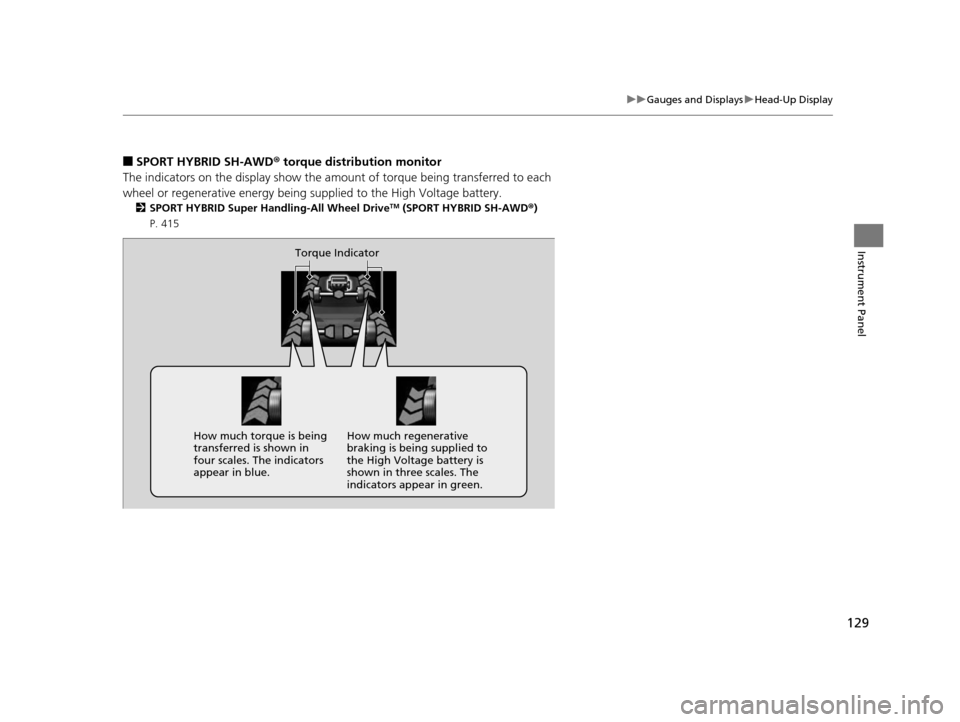
■SPORT HYBRID SH-AWD ® torque distribution monitor
The indicators on the displa y show the amount of torque being transferred to each
wheel or regenerative energy being supplied to the High Voltage battery.
2 SPORT HYBRID Super Handling-All Wheel DriveTM (SPORT HYBRID SH-AWD® )
P. 415
Torque Indicator
How much torque is being
transferred is shown in
four scales. The indicators
appear in blue. How much regenerative
braking is being supplied to
the High Voltage battery is
shown in three scales. The
indicators appear in green.
16 ACURA RLX E-AWD-31TY36200.book 129 ページ 2015年5月22日 金曜日 午後3時
50分
Page 132 of 581

131
Controls
This chapter explains how to operate the various controls necessary for driving.
Clock.................................................. 132
Locking and Unlocking the Doors
Key Types and Functions .................. 133
Low Keyless Access Remote Signal Strength ......................................... 135
Locking/Unlocking the Doors from the Outside .......................................... 136
Locking/Unlocking the Doors from the
Inside ............................................. 142
Childproof Door Locks ..................... 144
Auto Door Locking/Unlocking .......... 145
Opening and Closing the Trunk ....... 146
Security System ................................ 149
Immobilizer System .......................... 149 Security System Alarm...................... 149Opening and Closing the Windows
.... 152Opening and Closing the Moonroof....... 154Operating the Switches Around the
Steering Wheel
POWER Button................................. 155
Turn Signals ..................................... 158
Light Switches.................................. 159
Fog Lights ........................................ 162
Daytime Running Lights ................... 162
Wipers and Washers ........................ 163
Brightness Control ........................... 166
Rear Defogger/Heated Door Mirror Button...168
Driving Position Memory System ...... 169 Adjusting the Steering Wheel .......... 171
Adjusting the Mirrors ....................... 172
Interior Rearview Mirror ................... 172
Power Door Mirrors ......................... 173
Adjusting the Seats .......................... 175
Adjusting the Seat Positions ............. 175
Interior Lights/Interior Convenience Items ................................................ 182
Interior Lights .................................. 182
Interior Convenience Items .............. 184
Climate Control System ................... 200
Using Automatic Climate Control .... 200
Automatic Climate Control Sensors......209
16 ACURA RLX E-AWD-31TY36200.book 131 ページ 2015年5月22日 金曜日 午後3時 50分
Page 156 of 581
155Continued
Controls
Operating the Switches Around the Steering Wheel
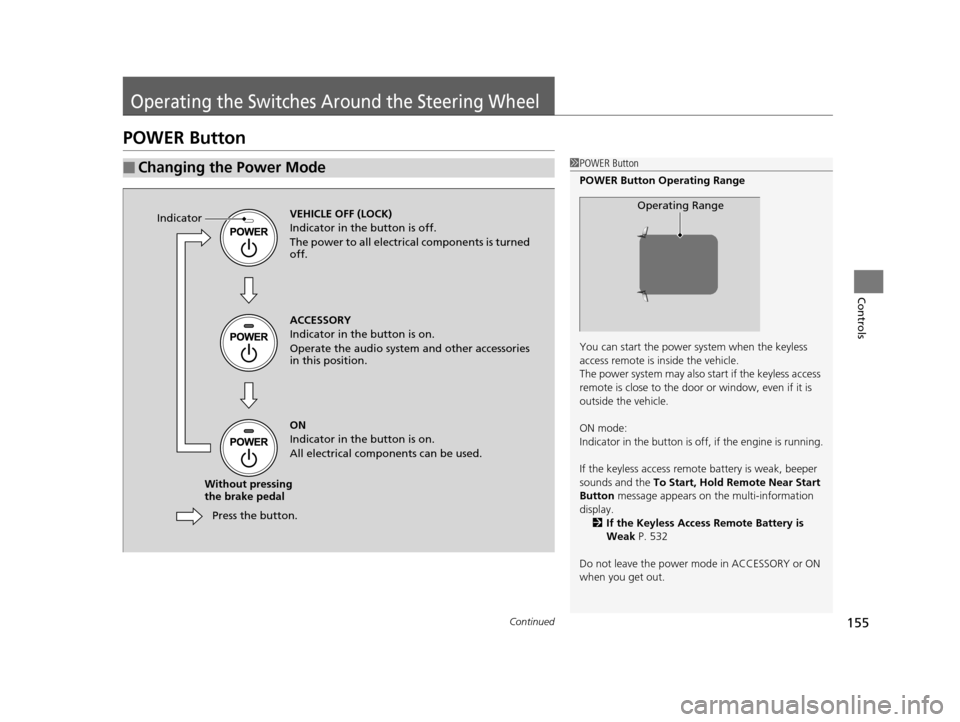
POWER Button
■Changing the Power Mode1POWER Button
POWER Button Operating Range
You can start the power system when the keyless
access remote is inside the vehicle.
The power system may also start if the keyless access
remote is close to the door or window, even if it is
outside the vehicle.
ON mode:
Indicator in the button is of f, if the engine is running.
If the keyless access remote battery is weak, beeper
sounds and the To Start, Hold Remote Near Start
Button message appears on the multi-information
display. 2 If the Keyless Access Remote Battery is
Weak P. 532
Do not leave the power mode in ACCESSORY or ON
when you get out.
Operating RangeVEHICLE OFF (LOCK)
Indicator in th e button is off.
The power to all electrical components is turned
off.
Press the button.
Without pressing
the brake pedal ACCESSORY
Indicator in the button is on.
Operate the audio system and other accessories
in this position.
ON
Indicator in the button is on.
All electrical components can be used.
Indicator
16 ACURA RLX E-AWD-31TY36200.book 155 ページ 2015年5月22日 金曜日 午後3時
50分
Page 157 of 581
156
uuOperating the Switches Around the Steering Wheel uPOWER Button
Controls
If you leave the vehicle for 30 to 60 minutes with the transmission in (P and the
power mode in ACCESSORY, the vehicle automa tically goes into the mode similar to
VEHICLE OFF (LOCK) to avoid the 12-volt battery drain.
When in this mode, you cannot lock or unlock doors with the remote transmitter or
the keyless access system.
Press the POWER button to switch the mode to VEHICLE OFF (LOCK).
If you open the driver’s doo r when the power mode is set to ACCESSORY, a warning
buzzer sounds.
■Automatic Power Off
■Power Mode Reminder
16 ACURA RLX E-AWD-31TY36200.book 156 ページ 2015年5月22日 金曜日 午後3時 50分
Page 158 of 581

157
uuOperating the Switches Around the Steering Wheel uPOWER Button
Controls
Warning buzzers may sound from inside or/
and outside the vehicle to remind you that the
keyless access remote is out of the vehicle. If
the buzzer continues even after the remote is
put back inside, place it to be within its
operational range.
■When the power mode is in ON
If the keyless access remote is taken out of the
vehicle, and the driver’s door is closed,
warning buzzers sound from both inside and
outside the vehicle. A warning message on
the multi-information display notifies the
driver inside that the remote is out.
■When the power mode is in
ACCESSORY
If the keyless access remote is taken out of the
vehicle, and the driver’s door is closed, a
warning buzzer sounds from outside the
vehicle.
■Keyless Access Remote Reminder1 Keyless Access Remote Reminder
When the keyless access remote is within the
system’s operational range, and the driver’s door is
closed, the warni ng function cancels.
If the keyless access remote is taken out of the vehicle
after the power system has been turned on, you can
no longer change the POWER button mode or
restart the power system. Always make sure if the
remote is in your vehi cle when you operate the
POWER button.
Removing the keyless access remote from the vehicle
through a window does not activate the warning
buzzer.
Do not put the keyless access remote on the
dashboard or in the glove box. It may cause the
warning buzzer to go of f. Under some other
conditions that can prevent the vehicle from locating
the remote, the warning buzzer may also go off even
if the remote is within the system’s operational
range.
16 ACURA RLX E-AWD-31TY36200.book 157 ページ 2015年5月22日 金曜日 午後3時 50分
Page 159 of 581
158
uuOperating the Switches Around the Steering Wheel uTurn Signals
Controls
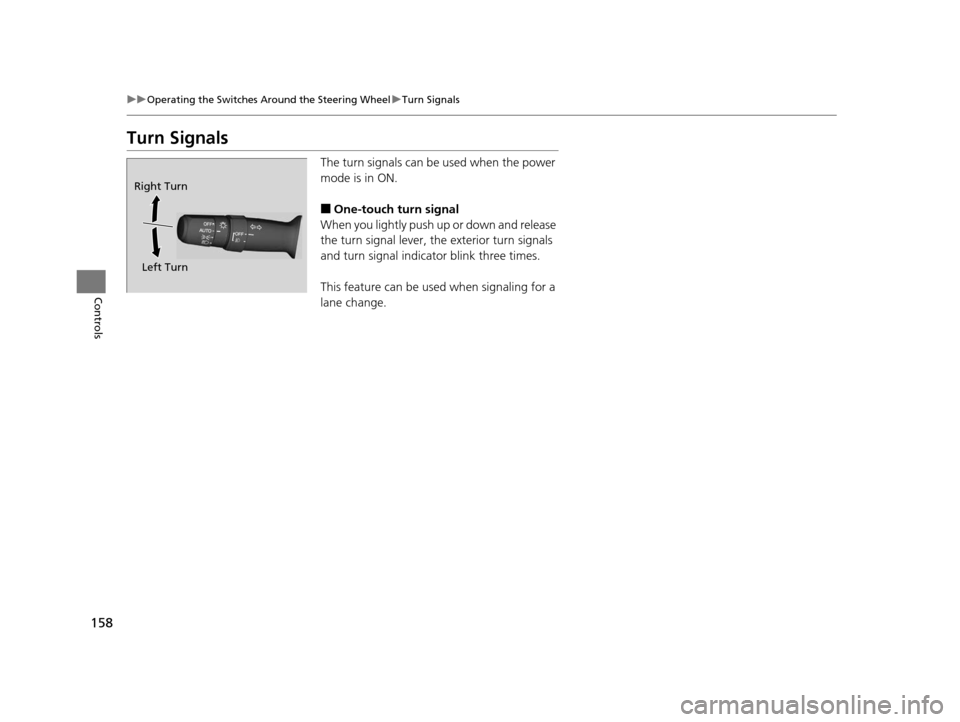
Turn Signals
The turn signals can be used when the power
mode is in ON.
■One-touch turn signal
When you lightly push up or down and release
the turn signal lever, th e exterior turn signals
and turn signal indica tor blink three times.
This feature can be used when signaling for a
lane change.
Right Turn
Left Turn
16 ACURA RLX E-AWD-31TY36200.book 158 ページ 2015年5月22日 金曜日 午後3時 50分
Page 160 of 581

159
uuOperating the Switches Around the Steering Wheel uLight Switches
Continued
Controls
Light Switches
Rotating the light switch turns the lights on
and off, regardless of the power mode
setting.
■High beams
Push the lever forward until you hear a click.
■Low beams
When in high beams, pull the lever back to
return to low beams.
■Flashing the high beams
Pull the lever back, and release it.
■Lights off
Turn the lever to OFF either when:
• The transmission is in
(P.
• The parking brake is applied.
To turn the light s on again, turn the lever to
OFF to cancel the lights off mode. Even if you
do not cancel the lights off mode, the lights
come on automatically when:
• The gear position is changed out of
(P.
• The parking brake is released.
• The vehicle starts to move.
■Manual Operation1Light Switches
If you leave the power mode in VEHICLE OFF (LOCK)
with the lights on, a light on reminder chime will
sound when you open the driver’s door.
When the lights are on, the lights on indicator in the
instrument pane l will be on.
2 Lights On Indicator P. 85
If you sense that the le vel of the headlights is
abnormal, have your vehicle inspected by a dealer.
Do not leave the lights on when the power system is
off because it will caus e the 12-volt battery to
discharge.
Your vehicle is equipped with the automatic
headlight adjusting system that automatically adjusts
the vertical angle of the headlights. If you find a
significant change in th e vertical angle of the
headlights, there may be a problem with the system.
Have your vehicle checked by a dealer.
High Beams
Flashing the high beams
Low Beams
Turns on parking, side marker,
tail, and rear license plate lights
Turns on headlights, parking, side
marker, tail, and rear license plate
lights
16 ACURA RLX E-AWD-31TY36200.book 159 ページ 2015年5月22日 金曜日 午後3時 50分