wheel Acura RLX 2016 Workshop Manual
[x] Cancel search | Manufacturer: ACURA, Model Year: 2016, Model line: RLX, Model: Acura RLX 2016Pages: 581, PDF Size: 31.43 MB
Page 290 of 581
289
uuCustomized Features u
Continued
Features
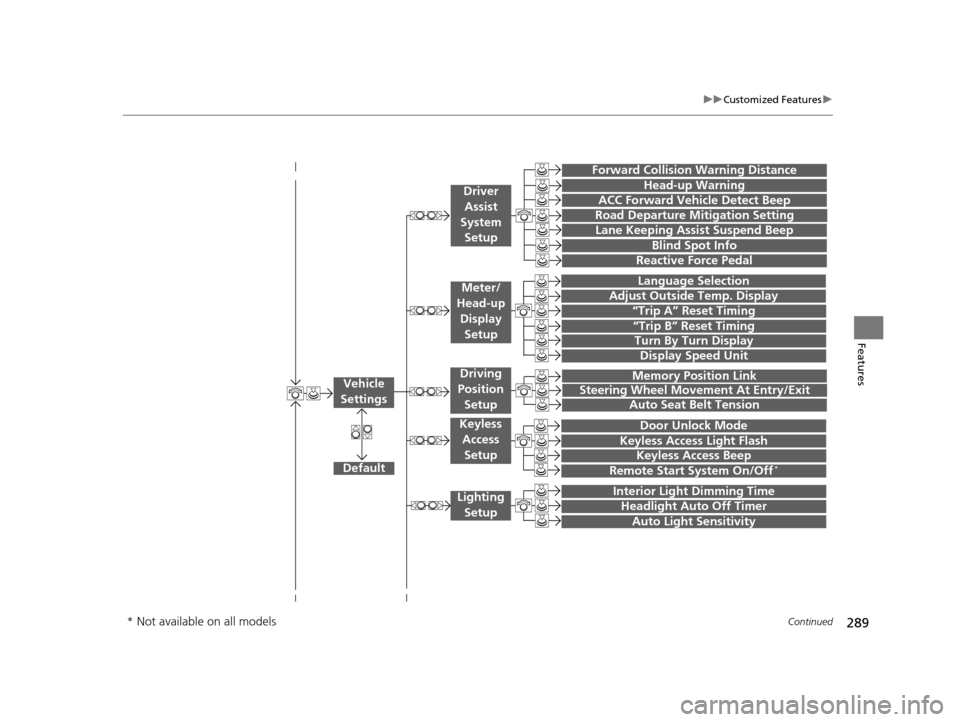
“Trip A” Reset Timing
“Trip B” Reset Timing
Language Selection
Adjust Outside Temp. Display
Forward Collision Warning Distance
ACC Forward Vehicle Detect Beep
Turn By Turn Display
Default
Memory Position Link
Door Unlock Mode
Keyless Access Light Flash
Interior Light Dimming Time
Headlight Auto Off Timer
Auto Light Sensitivity
Vehicle
Settings
Meter/
Head-up
Display Setup
Driver Assist
System Setup
Keyless Access
Setup
Lighting Setup
Keyless Access Beep
Lane Keeping Assist Suspend Beep
Blind Spot Info
Steering Wheel Movement At Entry/Exit
Auto Seat Belt Tension
Driving
Position
Setup
Display Speed Unit
Reactive Force Pedal
Head-up Warning
Road Departure Mitigation Setting
Remote Start System On/Off*
* Not available on all models
16 ACURA RLX E-AWD-31TY36200.book 289 ページ 2015年5月22日 金曜日 午後3時 50分
Page 301 of 581

300
uuCustomized Features u
Features
*1:Default SettingSetup
Group Customizable Features Desc
ription Selectable Settings
Vehicle
Settings Driving
Position
Setup
Memory Position Link
Turns the driving position memory system on and off.On*1/
Off
Steering Wheel
Movement At Entry/Exit Moves the steering wheel fully up when you get
in/get out of the vehicle.
On
*1/
Off
Auto Seat Belt Tension Turns the auto seatbelt
tension setting for the
seat belt e-pretensioner on and off. On
*1/
Off
Keyless
Access
Setup Door Unlock Mode
Changes which doors unlock when you grab the
driver’s door handle. Driver Door Only
*1/
All Doors
Keyless Access Light Flash Causes some exterior lights to flash when you
unlock/lock the doors. On
*1/
Off
Keyless Access Beep Causes the beeper to
sound when you unlock/
lock the doors. On
*1/
Off
Remote Start System On/
Off
*Turns the remote engine start feature on and off. On*1/Off
Lighting
Setup Interior Li
ght Dimming
Time Changes the length of time the interior lights stay
on after you close the doors.
60seconds/30seconds*1/
15seconds
Headlight Auto Off Timer
Changes the length of time the exterior lights
stay on after you close the driver’s door.60seconds/30seconds/
15seconds*1/0seconds
Auto Light
Sensitivity Changes the timing for the headlights to come
on. Max
/High /Mid*1/
Low /Min
* Not available on all models
16 ACURA RLX E-AWD-31TY36200.book 300 ページ 2015年5月22日 金曜日 午後3時 50分
Page 314 of 581

313Continued
Features
Bluetooth® HandsFreeLink ®
Bluetooth® HandsFreeLink ® (HFL) allows you to place and receive phone calls using
your vehicle’s navigation system, without handling your cell phone.
Using HFL
(Pick-up) button: Press to go to the Speed Dial/Call History on the multi-
information display or the head-up disp lay, or to answer an incoming call.
(Hang-up/back) button: Press to end a call, to cancel a command or to clear
the phone information on the multi-information display or the head-up display.
(Talk) button: Press to give HFL voice commands.
PHONE button: Press to go directly to the Phone screen.
Interface dial: Rotate to select an item on the screen, then press . Move , , or to select secondary menu.
■HFL Buttons
1Bluetooth ® HandsFreeLink ®
To use HFL, you need a Bluetooth-compatible cell
phone. For a list of compatible phones, pairing
procedures, and special feature capabilities:
•U.S.: Visit www.acura.com/handsfreelink , or call 1-
888-528-7876.
•Canada: Visit www.handsfreelink.ca , or call 1-888-
528-7876.
To use HFL, the Bluetooth setting must be On.
2 Customized Features P. 286
Voice control tips:
•Aim the vents away from the ceiling and close the
windows, as noise coming fr om them may interfere
with the microphone.
•Press and release the but ton when you want to
call a number using a stored voice tag, a
phonebook name, or a numbe r. Speak clearly and
naturally after a beep.
•If the microphone picks up vo ices other than yours,
the command may be misinterpreted.
•To change the volume level, use the audio system’s
volume knob or the remote audio controls on the
steering wheel.
State or local laws may pr ohibit the operation of
handheld electronic devi ces while operating a
vehicle.
Talk Button
Volume up
Microphone
Hang-up/Back Button
Pick-up
Button
Volume down
Interface
DialPHONE
Button
16 ACURA RLX E-AWD-31TY36200.book 313 ページ 2015年5月22日 金曜日 午後3時 50分
Page 342 of 581

Continued341
uuBluetooth ® HandsFreeLink ®u HFL Menus
Features
■To make a call usin g the call history
Call history is stored by All, Dialed ,
Received , and Missed .
1. Press the PHONE button.
2. Press the MENU button.
3. Rotate to select Call History, then
press .
4. Move or to select All, Dialed ,
Received , and Missed .
5. Rotate to select a number, then press
.
u Dialing starts automatically.
1. Press the button.
2. Move the left selector wheel right to select
Call History .
3. Roll the left selector wheel to select a
number.
4. Push the left selector wheel or the
button.
u Dialing starts automatically.1To make a call using the call history
The call history disp lays the last 20 dialed, received, or
missed calls.
(Appears only when a phone is connected to HFL.)
These icons next to the number indicate the
following:
: Dialed calls.
: Received calls.
: Missed calls.
The call history disp lays the last 12 dialed, received, or
missed calls.
Steering switches
111AAA#### Mr.AAA
Mr.BBB
Multi-information display
Head-up display
Steering switches
16 ACURA RLX E-AWD-31TY36200.book 341 ページ 2015年5月22日 金曜日 午後3時 50分
Page 343 of 581
uuBluetooth ® HandsFreeLink ®u HFL Menus
342
Features
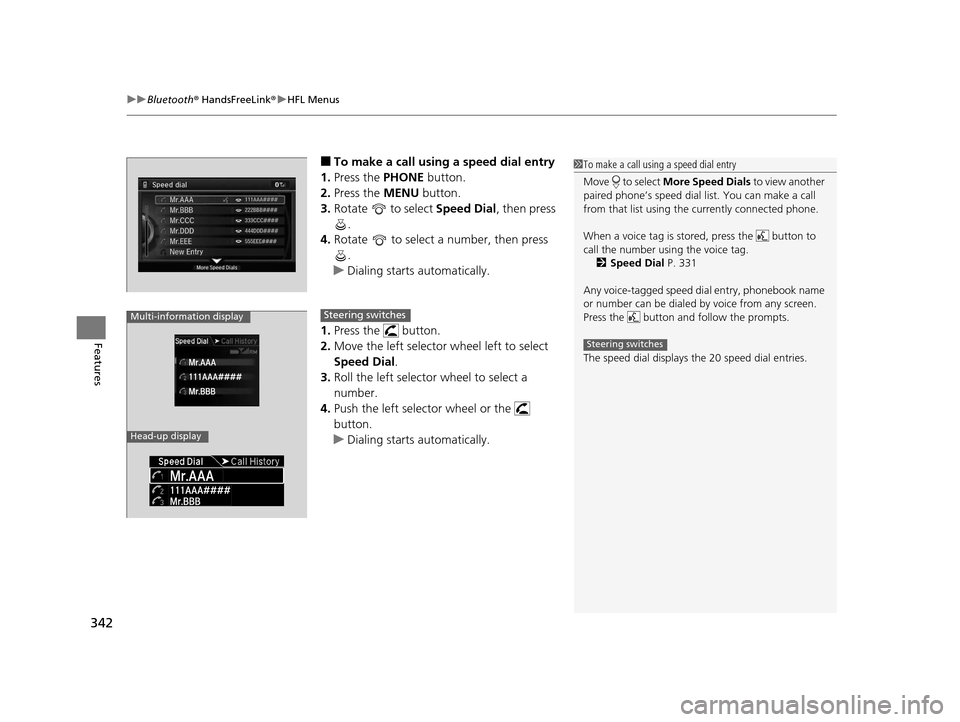
■To make a call using a speed dial entry
1. Press the PHONE button.
2. Press the MENU button.
3. Rotate to select Speed Dial, then press
.
4. Rotate to select a number, then press
.
u Dialing starts automatically.
1. Press the button.
2. Move the left selector wheel left to select
Speed Dial.
3. Roll the left selector wheel to select a
number.
4. Push the left selector wheel or the
button.
u Dialing starts automatically.1To make a call using a speed dial entry
Move to select More Speed Dials to view another
paired phone’s speed dial list. You can make a call
from that list using th e currently connected phone.
When a voice tag is stored, press the button to
call the number using the voice tag. 2 Speed Dial P. 331
Any voice-tagged speed di al entry, phonebook name
or number can be dialed by voice from any screen.
Press the button and follow the prompts.
The speed dial displays the 20 speed dial entries.
Steering switches
111AAA#### Mr.AAA
Mr.BBB
Multi-information display
Head-up display
Steering switches
16 ACURA RLX E-AWD-31TY36200.book 342 ページ 2015年5月22日 金曜日 午後3時 50分
Page 360 of 581

359
Driving
This chapter discusses driving, refueling, and information on items such as accessories.
Before Driving
Driving Preparation .......................... 360
Maximum Load Limit........................ 363
Towing a Trailer Towing Your Vehicle ........................ 365
When Driving Turning on the Power ...................... 366
Precautions While Driving................. 371
Dual Clutch Transmission ................. 372
Shifting ............................................ 373
SPORT Mode.................................... 380
Reactive Force Pedal......................... 381
Acoustic Vehicle Al erting System ...... 382
Front Sensor Camera ....................... 383
Adaptive Cruise Control (ACC) with Low Speed Follow (LSF) ......................... 385Cruise Control ............................................. 398
Road Departure Mitigation (RDM) System.... 401
Lane Keeping Assist System (LKAS)...... 405Vehicle Stability Assist (VSA ®), aka Electronic
Stability Control (ESC), System ........... 412
Agile Handling Assist System............ 414SPORT HYBRID Super Handling-All Wheel DriveTM (SPORT HYBRID SH-AWD®) .... 415Blind Spot Information (BSI) System ..... 416Tire Pressure Monitoring System (TPMS) ... 418Tire Pressure Monitoring System (TPMS) - Required Federal Explanation ......... 420
High Voltage Battery ........................ 422
Braking Brake System ................................... 423 Anti-lock Brake System (ABS) ........... 428
Brake Assist System ......................... 429
Collision Mitigation Braking System
TM
(CMBSTM) ....................................... 430
Parking Your Vehicle When Stopped ................................ 438
Parking Sensor System
*................... 439
Cross Traffic Monitor ....................... 443
Multi-View Rear Camera
*................ 447
Surround View Camera System*..... 448
Refueling Fuel Information .............................. 458
How to Refuel ................................. 459
Fuel Economy .................................... 460
Improving Fuel Economy .................. 460
Accessories and Modifications ........ 461
* Not available on all models
16 ACURA RLX E-AWD-31TY36200.book 359 ページ 2015年5月22日 金曜日 午後3時 50分
Page 361 of 581

360
Driving
Before Driving
Driving Preparation
Check the following items before you start driving.
• Make sure there are no obstructions on th e windows, door mirrors, exterior
lights, or other parts of the vehicle.
u Remove any frost, snow, or ice.
u Remove any snow on the roof, as this can slip down and obstruct your field of
vision while driving. If frozen solid , remove ice once it has softened.
u When removing ice from around the wheel s, be sure not to damage the wheel
or wheel components.
• Make sure the hood is securely closed.
u If the hood opens while driving, your front view will be blocked.
• Make sure the tires are in good condition.
u Check air pressures, and check for damage and excessive wear.
2Checking and Maintaining Tires P. 492
•Make sure there are no people or ob jects behind or around the vehicle.
u There are blind spots from the inside.
■Exterior Checks1Exterior Checks
NOTICE
When doors are frozen s hut, use warm water around
the door edges to melt any ice. Do not try to force
them open, as this can damage the rubber trim
around the doors. When done, wipe dry to avoid
further freezing.
Do not pour warm water into the key cylinder.
You will be unable to insert the key if the water
freezes in the hole.
Heat from the engine and exhaust can ignite
flammable material s left under the hood, causing a
fire. If you’ve parked y our vehicle for an extended
period, inspect and remove any debris that may have
collected, such as dried grass and leaves that have
fallen or have been carried in for use as a nest by a
small animal.
Also check under the hood fo r leftover flammable
materials after you or so meone else has performed
maintenance on your vehicle.
16 ACURA RLX E-AWD-31TY36200.book 360 ページ 2015年5月22日 金曜日 午後3時 50分
Page 362 of 581
Continued361
uuBefore Driving uDriving Preparation
Driving
• Store or secure all items on board properly.
u Carrying too much cargo, or improperly storing it, can affect your vehicle’s
handling, stability, sto pping distance, and tires, and make it unsafe.
2Maximum Load Limit P. 363
•Do not pile items higher than the seat height.
u They can block your view and may be thrown forward in the event of sudden
braking.
• Do not place anything in the front seat footwells. Make sure to secure the floor
mat.
u An object or unsecured floor mat can in terfere with your brake and accelerator
pedal operation while driving.
• If you have any animals on board, do not let them move around in the vehicle.
u They may interfere with driv ing and a crash could occur.
• Securely close and lock all doors and the trunk.
2 Locking/Unlocking the Doors from the Inside P. 142
•Adjust your seating position properly.
u Adjust the head restraint, too.
2Adjusting the Seats P. 175
2 Adjusting the Head Restraints P. 178
•Adjust the mirrors and steering wh eel properly for your driving.
u Adjust them while sitting in the proper driving position.
2 Adjusting the Mirrors P. 172
2 Adjusting the Steering Wheel P. 171
■Interior Checks1Interior Checks
The headlight aim is set by the factory, and does not
need to be adjusted. Howeve r, if you regularly carry
heavy items in the trunk ha ve the aiming readjusted
at a dealer or by a qualified technician.
16 ACURA RLX E-AWD-31TY36200.book 361 ページ 2015年5月22日 金曜日 午後3時 50分
Page 372 of 581

371
uuWhen Driving uPrecautions While Driving
Continued
Driving
Precautions While Driving
Avoid driving in deep water and on flooded roads. This can damage the power
system or driveline, or caus e electrical component failure.
■In Rain1Precautions While Driving
NOTICE
Do not select a shift button while pressing the
accelerator pedal. You could damage the
transmission.
NOTICE
The following can dama ge the under spoiler:
•Parking the vehicle by a parking block•Parallel parking along the road shoulder
•Driving toward the bottom of a hill
•Driving up or down to a different surface level
(such as a road shoulder)
•Driving on a rutted or bumpy road
•Driving on a road with potholes.
NOTICE
If you repeatedly turn the steering wheel at an
extremely low speed, or hold the steering wheel on
the full left or right position for a while, the electric
power steering (EPS) system heats up. The system
goes into a protective mode, and limits its
performance. The steering wheel becomes harder
and harder to operate. Once the system cools down,
the EPS system is restored.
Repeated operation under these conditions can
eventually damage the system.
If the power mode is set to ACCESSORY while
driving, the power system will shut down and all
steering and brake power a ssist functions will stop,
making it difficult to control the vehicle.
16 ACURA RLX E-AWD-31TY36200.book 371 ページ 2015年5月22日 金曜日 午後3時 50分
Page 379 of 581
uuWhen Driving uShifting
378
Driving
Use the paddle shifters to change between 1st and 7th gears without removing your
hands from the steering wheel. The transmiss ion will switch to the sequential mode.
■When the transmission is in (D:
The vehicle will go into the sequential mo de momentarily, and the sequential mode
gear selection indicator will come on.
Once you start traveling at a constant sp eed, the sequential mode will automatically
switch off, and the sequential mode gear selection indicator will go off.
Hold the
(+ paddle shifter for two seconds to return to normal drive.
■When the transmission is in (D with SPORT mode:
The vehicle will go into th e sequential mode, and the M (sequential mode) indicator
and sequential mode gear selection indicator will come on.
If the vehicle speed increases and the engi ne speed reaches near the tachometer’s
red zone, the transmission auto matically shifts up to 7th.
You can cancel this mode by pressing the SPORT button, or pulling the
(+ paddle
shifter for a few seconds. When the seque ntial mode is canceled, the sequential
mode indicator and sequential mode gear selection indicator go off.
■Sequential Mode1Sequential Mode
The vehicle is e ngine operated when SPORT mode is
on.
16 ACURA RLX E-AWD-31TY36200.book 378 ページ 2015年5月22日 金曜日 午後3時 50分