instrument panel Acura RLX 2016 Workshop Manual
[x] Cancel search | Manufacturer: ACURA, Model Year: 2016, Model line: RLX, Model: Acura RLX 2016Pages: 581, PDF Size: 31.43 MB
Page 119 of 581
118
uuGauges and Displays uMulti-Information Display
Instrument Panel
*1: Default SettingSetup Group Customizable Features Description Selectable Settings
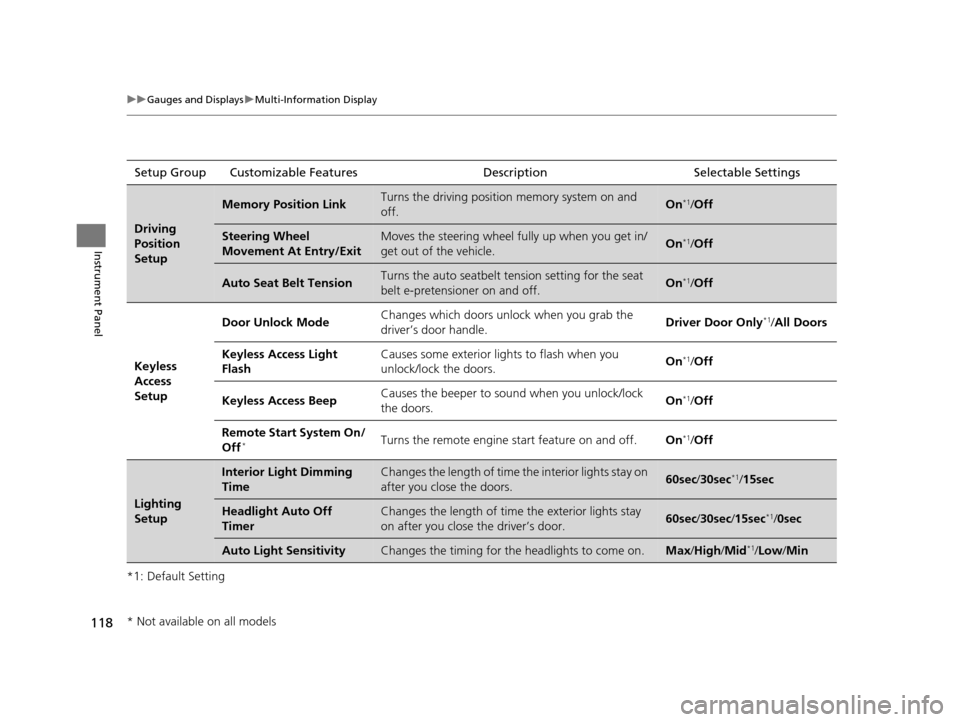
Driving
Position
Setup
Memory Position LinkTurns the driving position memory system on and
off.On*1/
Off
Steering Wheel
Movement At Entry/ExitMoves the steering wheel fu lly up when you get in/
get out of the vehicle.On*1/ Off
Auto Seat Belt TensionTurns the auto seatbelt te nsion setting for the seat
belt e-pretensioner on and off.On*1/ Off
Keyless
Access
Setup Door Unlock Mode
Changes which doors unlock when you grab the
driver’s door handle. Driver Door Only
*1/
All Doors
Keyless Access Light
Flash Causes some exterior lights to flash when you
unlock/lock the doors.
On
*1/
Off
Keyless Access Beep Causes the beeper to s
ound when you unlock/lock
the doors. On
*1/
Off
Remote Start System On/
Off
*Turns the remote engine start feature on and off. On*1/Off
Lighting
Setup
Interior Light Dimming
TimeChanges the length of time the interior lights stay on
after you close the doors.60sec /30sec*1/15sec
Headlight Auto Off
TimerChanges the length of time the exterior lights stay
on after you close the driver’s door.60sec /30sec /15sec*1/ 0sec
Auto Light SensitivityChanges the timing for the headlights to come on.Max/High /Mid*1/Low/ Min
* Not available on all models
16 ACURA RLX E-AWD-31TY36200.book 118 ページ 2015年5月22日 金曜日 午後3時 50分
Page 120 of 581

119
uuGauges and Displays uMulti-Information Display
Continued
Instrument Panel
*1: Default SettingSetup Group Customizable Features
Description Selectable Settings
Door Setup Auto Door Lock
Changes the setting for when the doors
automatically lock. With Vehicle Speed
*1/
Shift
from P /Off
Auto Door Unlock Changes the setting for when the doors
automatically unlock. All Doors When Driver’s
Door Opens
*1/
All Doors
When Shifted To Park /All
Doors When Ignition
Switched Off/Off
Key And Remote Unlock
Mode Sets up either the driver’s door or all doors to unlock
on the first operation of
the remote or built-in key. Driver Door
*1/
All Doors
Keyless Lock Answer
Back LOCK/UNLOCK- The exterior lights flash.
LOCK (2nd push)- The beeper sounds.
On
*1/
Off
Security Relock Timer Changes the time it takes for the doors to relock and
the security system to set after you unlock the
vehicle without op
ening any door. 90sec
/60sec /30sec
*1
Auto Folding Door
Mirror Changes how you can fold the door mirrors. Auto Fold Wi
th Keyless*1/
Manual Only
16 ACURA RLX E-AWD-31TY36200.book 119 ページ 2015年5月22日 金曜日 午後3時 50分
Page 121 of 581

120
uuGauges and Displays uMulti-Information Display
Instrument Panel
*1: Default SettingSetup Group Customizable Features Description Selectable Settings
Wiper SetupWiper ActionChanges the setting for the automatic intermittent
wipers in the
AUTO position.Rain Sensing*1/Intermittent /
Speed Sensitive
Maintenance
Info.Maintenance ResetResets/Cancels the engine oil life display when you
have performed the maintenance service. Cancel /Reset
Default All—Cancels/Resets all the cu stomized settings as
default.Cancel /Set
16 ACURA RLX E-AWD-31TY36200.book 120 ページ 2015年5月22日 金曜日 午後3時 50分
Page 122 of 581

121
uuGauges and Displays uMulti-Information Display
Continued
Instrument Panel
■Example of customization settings
The steps for changing the “Trip A” Reset Timing setting to When Refueled are
shown below. The default setting for “Trip A” Reset Timing is Manually Reset .
1. Roll the right selector wheel to select
Vehicle Settings , then push the right
selector wheel.
2. Roll the right selector wheel until Meter/
Head-up Display Setup appears on the
display.
3. Push the right selector wheel.
u Language Selection appears first on
the display.
16 ACURA RLX E-AWD-31TY36200.book 121 ページ 2015年5月22日 金曜日 午後3時 50分
Page 123 of 581

122
uuGauges and Displays uMulti-Information Display
Instrument Panel
4. Roll the right selector wheel until “Trip A”
Reset Timing appears on the display, then
push the right selector wheel.
u The display switches to the
customization setup screen, where you
can select When Refueled , IGN Off,
Manually Reset , or Exit .
5. Roll the right selector wheel and select
When Refueled , then push the right
selector wheel.
u The When Refueled Setup screen
appears, then the di splay returns to the
customization menu screen.
6. Roll the right selector wheel until Exit
appears on the display, then push the right
selector wheel.
7. Repeat Step 6 until you return to the
normal screen.
16 ACURA RLX E-AWD-31TY36200.book 122 ページ 2015年5月22日 金曜日 午後3時 50分
Page 124 of 581

123
uuGauges and Displays uHead-Up Display
Continued
Instrument Panel
Head-Up Display
Shows the power distribution monitor, current mode for ACC with LSF, tachometer,
gear position indicator, or turn-by-turn directions alon g with the vehicle speed. You
can choose which item to be displayed usin g the multi-information display. They are
displayed when the power mode is in ON.
To turn the head-up display on and off: Press the HUD button.
The display can be moved up and down to come level with your eyes.
To raise or lower the head-up display : Press and hold the or button until
the desired position is reached.
34
Button3 Button4
HUD Button Head-Up Display
Press and hold the button
to raise the display.
3
Press and hold the button
to lower the display.4
16 ACURA RLX E-AWD-31TY36200.book 123 ページ 2015年5月22日 金曜日 午後3時
50分
Page 125 of 581

124
uuGauges and Displays uHead-Up Display
Instrument Panel
The display also sh ows the following
warnings.
• System Message Indicator: Appears
when a problem is detected. A system
message on the multi-information display
appears at the same time.
2 Multi-Information Display Warning
and Information Messages P. 92
•Lane Departure Warning: When your
vehicle is too close to the traffic lane lines,
the lane departure warning appears.
2 Lane Keeping Assist System (LKAS)
P. 405
• Head-up Warning Lights:
Flash when the BRAKE message appears
on the multi-information display.
2 Collision Mitigation Braking SystemTM
(CMBSTM) P. 430
Come on when the BRAKE message
appears on the multi- information display.
2Adaptive Cruise Control (ACC) with
Low Speed Follow (LSF) P. 385
Lane Departure Warning
System Message Indicator
16 ACURA RLX E-AWD-31TY36200.book 124 ページ 2015年5月22日 金曜日 午後3時 50分
Page 126 of 581

Continued125
uuGauges and Displays uHead-Up Display
Instrument Panel
To change the item that comes on along with the vehicle speed on the head-up
display, do the following: 1.Roll the right selector wheel to select Head-
up Display Content on the multi-
information display, then push the right
selector wheel.
2 Switching the Display P. 108
■To Change Head-Up Display Content1To Change Head-Up Display Content
Accessing the Head-up Display Content menu on
the multi-information disp lay turns on the head-up
display.
When pushing the right sele ctor wheel on any other
display except Vehicle Settings on the multi-
information display, you can also access the Head-up
Display Content menu.
Right
Selector
Wheel
16 ACURA RLX E-AWD-31TY36200.book 125 ページ 2015年5月22日 金曜日 午後3時 50分
Page 127 of 581

126
uuGauges and Displays uHead-Up Display
Instrument Panel
2. Roll the right selector wheel to select the vehicle information you want to display,
then push the right selector wheel.
u The head-up display and multi-informat ion display show the same content.
Head-Up Display
Multi-
Information
Display
Right
Selector
Wheel
Power Distribution Monitor,
Vehicle SpeedCurrent Mode for ACC with LSF,
Vehicle Speed Tachometer, Gear Position
Indicator, Vehicle Speed
Vehicle Speed Turn-by-Turn Directions, Vehicle Speed Compass, Vehicle Speed
16 ACURA RLX E-AWD-31TY36200.book 126 ページ 2015年5月22日 金曜日 午後3時
50分
Page 128 of 581
Continued127
uuGauges and Displays uHead-Up Display
Instrument Panel
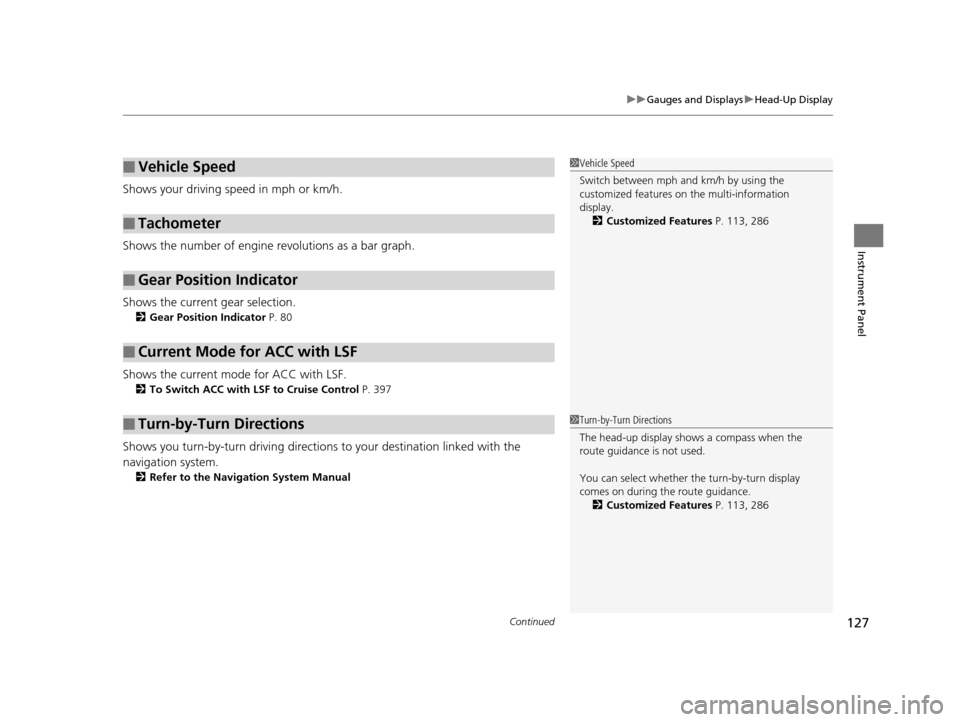
Shows your driving speed in mph or km/h.
Shows the number of engine revolutions as a bar graph.
Shows the current gear selection.
2 Gear Position Indicator P. 80
Shows the current mode for ACC with LSF.
2To Switch ACC with LSF to Cruise Control P. 397
Shows you turn-by-turn driving directions to your destination linked with the
navigation system.
2 Refer to the Navigation System Manual
■Vehicle Speed
■Tachometer
■Gear Position Indicator
■Current Mode for ACC with LSF
■Turn-by-Turn Directions
1Vehicle Speed
Switch between mph and km/h by using the
customized features on the multi-information
display.
2 Customized Features P. 113, 286
1Turn-by-Turn Directions
The head-up display shows a compass when the
route guidance is not used.
You can select whether the turn-by-turn display
comes on during the route guidance.
2 Customized Features P. 113, 286
16 ACURA RLX E-AWD-31TY36200.book 127 ページ 2015年5月22日 金曜日 午後3時 50分