instrument panel Acura RLX 2016 Repair Manual
[x] Cancel search | Manufacturer: ACURA, Model Year: 2016, Model line: RLX, Model: Acura RLX 2016Pages: 581, PDF Size: 31.43 MB
Page 129 of 581

uuGauges and Displays uHead-Up Display
128
Instrument Panel
Consists of two monitoring displays, one that indicates the vehicle’s power flow,
and the other, the torque distribution.
■Power flow monitor
Shows motor and engine power flow, indicating what supplies power to the vehicle,
or if the battery is being charged.
■Power Distribution Monitor
Head-up displayColor of
indicators
Power is
supplied by the
motors and the
engine.Blue
Power is only
supplied by the
motors.Blue
Power is only
supplied by the
engine.Blue
The motors
charge the High
Voltage battery.Green
1 Power Distribution Monitor
The power distribution monito r can be also displayed
on the audio/information display.
2 Audio/Information Screen P. 225
While the vehicle is stat ionary with the engine
running, the following may appear on the display.
Engine Icon
(Engine on)
Power Flow
Indicator
Engine Icon
(Engine off)
Power Flow
Indicator
Engine Icon
(Engine on)
Power Flow
Indicator
Engine Icon
(Engine on)
Power Flow
Indicator
16 ACURA RLX E-AWD-31TY36200.book 128 ページ 2015年5月22日 金曜日 午後3時 50分
Page 130 of 581
129
uuGauges and Displays uHead-Up Display
Instrument Panel
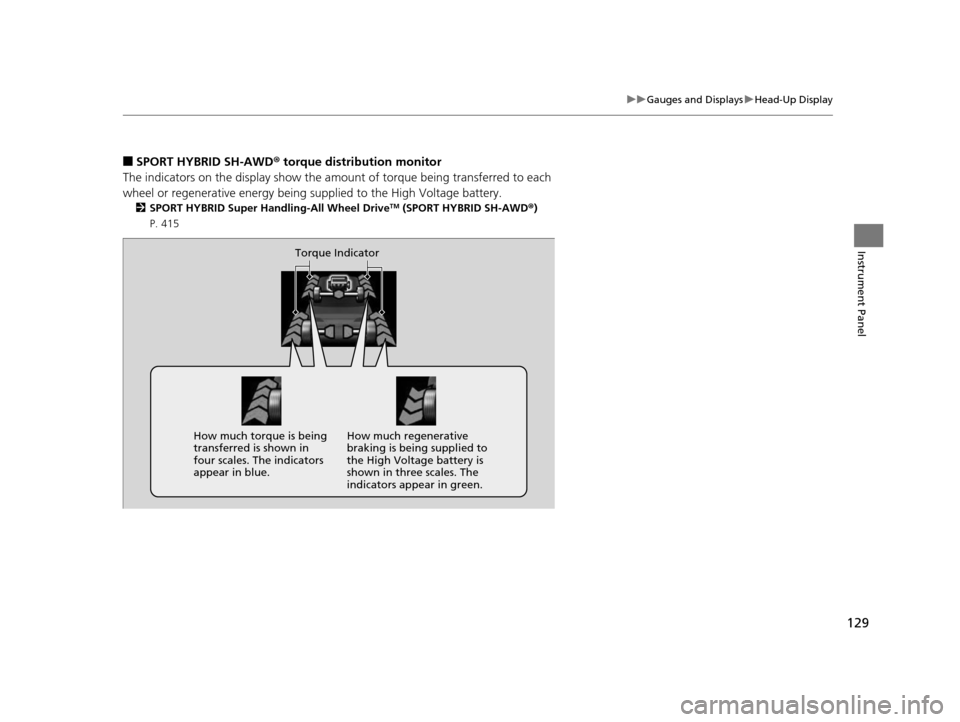
■SPORT HYBRID SH-AWD ® torque distribution monitor
The indicators on the displa y show the amount of torque being transferred to each
wheel or regenerative energy being supplied to the High Voltage battery.
2 SPORT HYBRID Super Handling-All Wheel DriveTM (SPORT HYBRID SH-AWD® )
P. 415
Torque Indicator
How much torque is being
transferred is shown in
four scales. The indicators
appear in blue. How much regenerative
braking is being supplied to
the High Voltage battery is
shown in three scales. The
indicators appear in green.
16 ACURA RLX E-AWD-31TY36200.book 129 ページ 2015年5月22日 金曜日 午後3時
50分
Page 162 of 581

161
uuOperating the Switches Around the Steering Wheel uLight Switches
Controls
The headlights automatically come on when the wipers are used several times within
a certain intervals with the headlight switch in AUTO.
The headlights automatically go off a few minutes later if the wipers are stopped.
The headlights, all other exterior lights, a nd the instrument panel lights turn off 15
seconds after you set the po wer mode to VEHICLE OFF (LOCK), take the remote with
you, and close the driver's door.
If you set the power mode to VEHICLE OFF (LOCK) with the headlight switch on, but
do not open the door, the lights turn off after 10 minutes (three minutes, if the
switch is in the AUTO position).
The lights turn on again when you unlock or open the driver’s door. If you unlock
the door, but do not open it within 15 seconds, the lights go off. If you open the
driver’s door, you will hear a lights on reminder chime.
■Headlight Integration with Wipers*
■Automatic Lighting Off Feature
1 Headlight Integration with Wipers*
This feature activates when the headlights are off in
AUTO .
The instrument panel brightness does not change
when the headlights come on.
At dark ambient light leve ls, the automatic lighting
control feature turns on the headlights, regardless of
the number of wiper sweeps.
1 Automatic Lighting Off Feature
You can change the headli ght auto off timer setting.
2 Customized Features P. 113, 286
* Not available on all models
16 ACURA RLX E-AWD-31TY36200.book 161 ページ 2015年5月22日 金曜日 午後3時 50分
Page 167 of 581

166
uuOperating the Switches Around the Steering Wheel uBrightness Control
Controls
Brightness Control
When the power mode is in ON, you can use
the
(+ or (- button to adjust instrument
panel brightness.
To brighten: Press the
(+ button.
To dim: Press the
(- button.
You will hear a beep when the brightness
reaches minimum or maximum. The multi-
information display will return to its original
state several seconds after you adjust the
brightness.
■Brightness level indicator
The brightness level is shown on the multi-
information display while you are adjusting it.
■Adjusting the Instrument Panel Brightness1 Adjusting the Instrument Panel Brightness
Instrument panel brightne ss varies, depending on
whether the exterior lights are on or off. The
instrument panel dims to reduce glare when they are
on.
When it is bright out side and the headlight
integration with the wiper
* is activated, the
instrument panel bri ghtness does not change.
Pushing or rolling the right selector wheel changes to
a different display.
If you press the
( + button until the brightness display
is up to max, the beeper sounds. This cancels the
reduced instrument panel brightness when the
parking lights are on.
The brightness can be set differently for when the
exterior lights are on, and when they are off.
( + Button
(- Button
* Not available on all models
16 ACURA RLX E-AWD-31TY36200.book 166 ページ 2015年5月22日 金曜日 午後3時 50分
Page 172 of 581

171
uuOperating the Switches Around the Steering Wheel uAdjusting the Steering Wheel
Controls
Adjusting the Steering Wheel
The steering wheel height and distance from your body can be adjusted so that you
can comfortably grip the steering wheel in an appropriate driving posture.
Push and hold the adjust ment switch to move
the steering wheel in, out, up or down.
Make sure you can see the instrument panel
gauges and indicators.1 Adjusting the Steering Wheel
Make any steering wheel adjustments before you
start driving.
3WARNING
Adjusting the steering wheel position while
driving may cause you to lose control of the
vehicle and be seriously injured in a crash.
Adjust the steering wh eel only when the
vehicle is stopped.
Adjustment Switch
16 ACURA RLX E-AWD-31TY36200.book 171 ページ 2015年5月22日 金曜日 午後3時 50分
Page 225 of 581

uuAudio System Basic Operation uOn Demand Multi-Use DisplayTM
224
Features
1. Select More, then Sound .
2. Use
(+, (- or other icons to adjust the
setting.
1. Select More, then Screen Settings .
2. Use
(+, (- or other icons to adjust the
setting.
■Adjusting the Sound1 Adjusting the Sound
Select Off, Low , Mid or High for the SVC setting.
2 Adjusting the Sound P. 230
Instead of using
( +, (- or icons, you can also touch
the point where your desired setting is.
You can also adjust the sound by selecting on
the On Demand Multi-Use Display
TM.
■Changing the Screen Settings
1 Changing the Screen Settings
The following are adjustable screen settings:
•Sync Display Brightness
Selects whether the screen brightness synchronizes
with the instruments panel brightness.
•Brightness•Contrast•Black Level•Display
Changes between the da ytime or nighttime
modes.
•Beep
Mutes a beep that sounds every time you touch the
screen.
•Keyboard
Changes the on-screen keyboard from the
alphabetical order to the qwerty type.
•Vibration
Turns on and off the vibration when you touch the
screen.
•Fade Timer
Sets the screen black out timing.
Instead of using
( +, (- or icons, you can also touch
the point where your desired setting is.
16 ACURA RLX E-AWD-31TY36200.book 224 ページ 2015年5月22日 金曜日 午後3時 50分
Page 228 of 581
Continued227
uuAudio System Basic Operation uAudio/Information Screen
Features
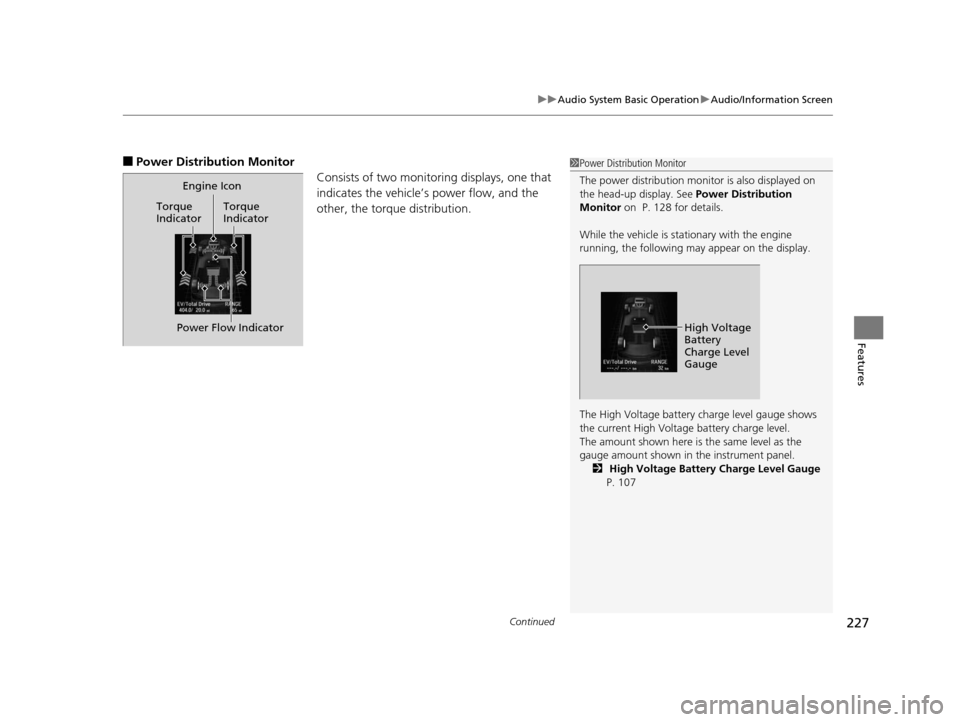
■Power Distribution Monitor
Consists of two monitoring displays, one that
indicates the vehicle’s power flow, and the
other, the torque distribution.1Power Distribution Monitor
The power distribution moni tor is also displayed on
the head-up display. See Power Distribution
Monitor on P. 128 for details.
While the vehicle is stat ionary with the engine
running, the following may appear on the display.
The High Voltage battery ch arge level gauge shows
the current High Voltage battery charge level.
The amount shown here is the same level as the
gauge amount shown in the instrument panel.
2 High Voltage Battery Charge Level Gauge
P. 107
High Voltage
Battery
Charge Level
Gauge
Engine Icon
Torque
Indicator Torque
Indicator
Power Flow Indicator
16 ACURA RLX E-AWD-31TY36200.book 227 ページ 2015年5月22日 金曜日 午後3時
50分
Page 296 of 581

295
uuCustomized Features u
Continued
Features
■List of customizable options
*1:Default Setting Setup
Group Customizable Features Description Selectable Settings
System
Settings
Display
Sync Display BrightnessSelects whether the display brightness synchronizes
with the instrument panel brightness.On*1/
Off
BrightnessChanges the brightness of the audio/information
screen.—
ContrastChanges the contrast of th e audio/information screen.—
Black LevelChanges the black level of the audio/information
screen.—
Sound/
Beep
Guidance VolumeChanges the volume of the audio speakers.—
Interface Dial FeedbackSets if and when the system reads aloud a
selection made using the Interface Dial.On /Off /Auto*1
Message Auto ReadingSelects whether the syst em automatically reads
out messages, and, if selected, whether only
when driving.On /Off /Auto*1
Verbal ReminderTurns the verbal reminders on and off.On*1/Off
Blue-
tooth
Bluetooth StatusTurns the Bluetooth® on and off.On*1/Off
Bluetooth Device ListPairs a new phone to HFL, edits and deletes a
paired phone, and creates a security PIN.
2 Phone Setup P. 319—
Edit Pairing CodeChanges a pairing code.
2To change the pairing code setting P. 321Random/Fixed*1
16 ACURA RLX E-AWD-31TY36200.book 295 ページ 2015年5月22日 金曜日 午後3時 50分
Page 384 of 581

383
uuWhen Driving uFront Sensor Camera
Continued
Driving
Front Sensor Camera
The camera, used in systems such as LKAS, RDM, ACC with LSF, and CMBSTM, is
designed to detect an object that tri ggers any of the systems to operate its
functions.
This camera is located behind the rearview
mirror.
To help reduce the likelihood that high interior
temperatures will cause the camera’s sensing
s y s t e m t o s h u t o f f , w h e n p a r k i n g , f i n d a s h a d y
area or face the front of the vehicle away from
the sun. If you use a reflective sun shade, do
not allow it to cover the camera housing.
Covering the camera can concentrate heat on
it.
■Camera Location and Handling Tips
1Front Sensor Camera
Never apply a film or attach any objects to the
windshield, the hood, or the front grill that could
obstruct the camera's fiel d of vision and cause the
system to operate abnormally.
Scratches, nicks, and othe r damage to the windshield
within the camera’s fiel d of vision can cause the
system to operate abnormall y. If this occurs, we
recommend that you replac e the windshield with a
genuine Acura replacement windshield. Making even
minor repairs within the ca mera’s field of vision or
installing an aftermarke t replacement windshield
may also cause the system to operate abnormally.
After replacing the winds hield, have a dealer
recalibrate the camera. Pr oper calibration of the
camera is necessary for the system to operate
properly.
Do not place an object on the top of the instrument
panel. It may reflect onto the windshield and prevent
the system from detecting lane lines properly.
Front Sensor
Camera
16 ACURA RLX E-AWD-31TY36200.book 383 ページ 2015年5月22日 金曜日 午後3時 50分
Page 387 of 581
uuWhen Driving uAdaptive Cruise Control (ACC) with Low Speed Follow (LSF)
386
Driving
1Adaptive Cruise Control (ACC) with Low Speed Follow (LSF)
When the MAIN button is pressed, ACC with LSF and
Lane Keeping Assist System (LKAS) are both turned on
or off.
ACC with LSF may not work properly under certain
conditions. 2 ACC with LSF Conditions and Limitations
P. 390
When not using ACC with LSF: Turn off adaptive
cruise by pressing the MAIN button. This also will
turn off the Lane Keeping Assist System (LKAS).
Do not use ACC with LSF under the following
conditions:
•On roads with heavy traf fic or while driving in
continuous stop and go traffic.
•On roads with sharp turns.
•On roads with steep downhill sections, as the set
vehicle speed can be exceed ed by coasting. In such
cases, ACC with LSF will not apply the brakes to
maintain the set speed.
•On roads with toll collection facilities or other
objects between lanes of traffic, or in parking
areas, or faci lities with driv e through access.
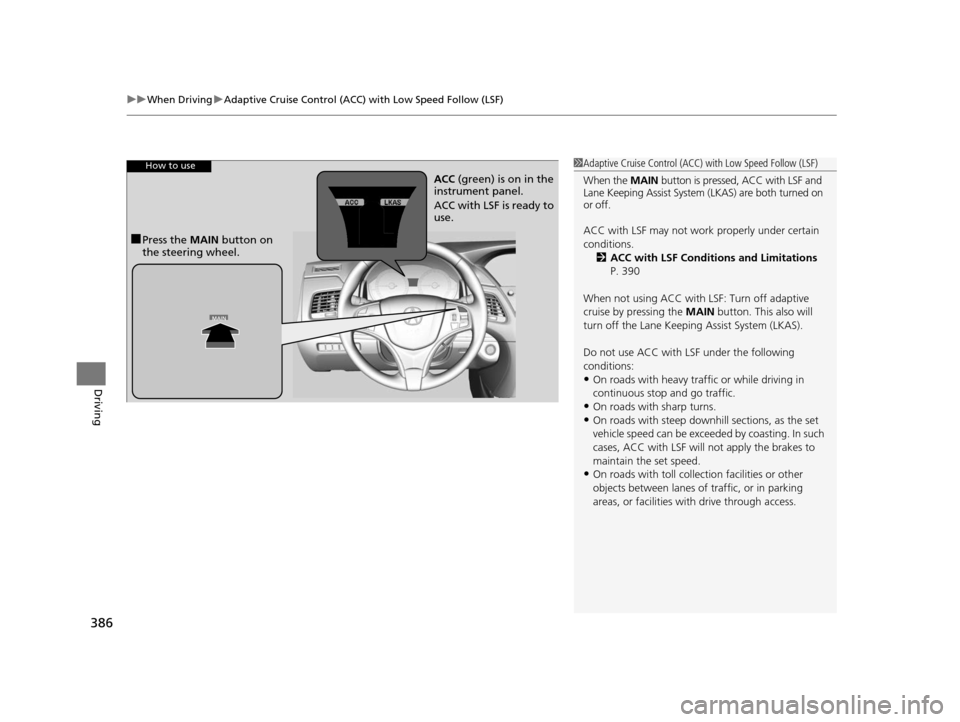
How to use
■Press the MAIN button on
the steering wheel. ACC
(green) is on in the
instrument panel.
ACC with LSF is ready to
use.
16 ACURA RLX E-AWD-31TY36200.book 386 ページ 2015年5月22日 金曜日 午後3時 50分