radio Acura RLX 2017 User Guide
[x] Cancel search | Manufacturer: ACURA, Model Year: 2017, Model line: RLX, Model: Acura RLX 2017Pages: 557, PDF Size: 37.97 MB
Page 217 of 557
216
uuAudio System Basic Operation uPlaying AM/FM Radio
Features
Playing AM/FM Radio
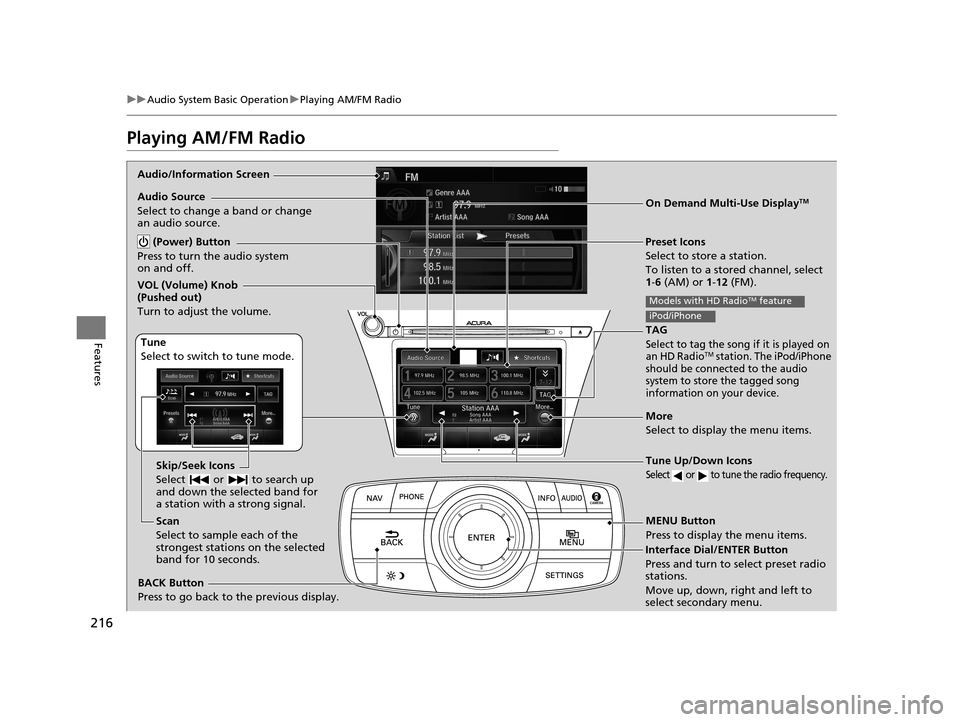
Audio/Information Screen
On Demand Multi-Use Display
TM
Tune Up/Down Icons
Select or to tune the radio frequency.
MENU Button
Press to display the menu items.
(Power) Button
Press to turn the audio system
on and off.
Audio Source
Select to change a band or change
an audio source.
Tune
Select to switch to tune mode. Preset Icons
Select to store a station.
To listen to a stored channel, select
1-
6 (AM) or 1 -12 (FM).
Skip/Seek Icons
Select or to search up
and down the selected band for
a station with a strong signal.
More
Select to display the menu items.
BACK Button
Press to go back to the previous display.
VOL (Volume) Knob
(Pushed out)
Turn to adjust the volume.
Interface Dial/ENTER Button
Press and turn to select preset radio
stations.
Move up, down, right and left to
select secondary menu.
TAG
Select to tag the song if it is played on
an HD RadioTM station. The iPod/iPhone
should be connected to the audio
system to store the tagged song
information on your device.
Models with HD RadioTM feature
iPod/iPhone
Scan
Select to sample each of the
strongest stations on the selected
band for 10 seconds.
17 ACURA RLX-31TY26300.book 216 ページ 2016年6月17日 金曜日 午前8時12分
Page 218 of 557
Continued217
uuAudio System Basic Operation uPlaying AM/FM Radio
Features
To store a station:
1. Tune to the selected station.
2. Press the MENU button.
3. Rotate to select Save Preset, then press .
4. Rotate to select the preset number you want to store that station, then press
.
You can also store that station by the following procedure.
1. Tune to the selected station.
2. Rotate to select the preset number you want to store the station.
3. Press and hold for a few seconds.
1. Tune to the selected station.
2. Select More.
3. Select Save Preset .
4. Select the preset number you want to store that station.
You can also store that station by the following procedure.
1. Tune to the selected station.
2. Change the display to the preset screen.
3. Select and hold the preset number you want to store that station.
■Preset Memory1Playing AM/FM Radio
You can control the AM/FM radio using voice
commands.
2 Voice Control Operation P. 211
The ST indicator appears on the display indicating
stereo FM broadcasts.
Stereo reproduction in AM is not available.
Switching the Audio Mode
Press the SOURCE button on the steering wheel.
2 Audio Remote Controls P. 195
You can also switch the mode by pressing the MENU
button and selecting Change Source on the Audio
menu screen.
You can store 6 AM stations and 12 FM stations into
the preset memory.
HD Radio Technology manufactured under license
from iBiquity Digital Cor poration. U.S. and Foreign
Patents. HD Radio™ an d the HD, HD Radio, and
"Arc" logos are proprietary trademarks of iBiquity
Digital Corp.
Models with HD RadioTM feature
Interface Dial
On Demand Multi-Use DisplayTM
17 ACURA RLX-31TY26300.book 217 ページ 2016年6月17日 金曜日 午前8時12分
Page 219 of 557

uuAudio System Basic Operation uPlaying AM/FM Radio
218
Features
Provides text data information related to your selected RDS-capable FM station.
■To find an RDS station from Station List
1.Move or to select the Station List
tab.
2. Rotate to select th e station, then press
.
■Manual update
Updates your available station list at any time.
1. Press the MENU button while listening to an FM station.
2. Rotate to select Refresh Station List , then press .
■Radio Data System (RDS)1Playing AM/FM Radio
iTunes Tagging
“iTunes” in “iTunes Tagging” is a trademark of Apple Inc.
When an HD RadioTM station is selected, the HD
indicator appears on the a udio/information screen
and On Demand Multi-Use Display
TM.
If you want to have the information on the song
played from the HD Radio
TM station, select TAG in On
Demand Multi-Use DisplayTM or select Tag Song in
the menu with Interface dial.
If iPod/iPhone is connected, the tag is transferred to the
connected device immediately, otherwise the tag will be
transferred when the device will be connected and
select Tag Song in the menu with Interface dial.
Models with HD RadioTM feature
17 ACURA RLX-31TY26300.book 218 ページ 2016年6月17日 金曜日 午前8時12分
Page 220 of 557

Continued219
uuAudio System Basic Operation uPlaying AM/FM Radio
Features
■Radio text
Display the radio text information of the selected RDS station.
1. Press the MENU button.
2. Rotate to select Radio Text, then press .
■Scan
Samples each of the strongest stations on the selected band for 10 seconds.
1. Press the MENU button.
2. Rotate to select Scan, then press .
To turn off scan, press to select Cancel Scan, or press the BACK button.
2Playing AM/FM Radio P. 216
To turn off scan, select Stop Scan.
■Tag song to device
You can store the TAG information in the connected iPod/iPhone.
If the iPod/iPhone is not connected to the audio system, the information is stored in
the audio unit temporarily, then once the de vice is connected to the system, data is
transferred to the iPod/iPhone.
To store the TAG information to th e iPod/iPhone, or the audio system:
1. Press the MENU button.
2. Rotate to select Tag Song, then press .
3. Select the song you want to save the information.
1Radio text
The text indicator comes on when you received a text
message. The indicator stays on until you read the
message.
Interface Dial
On Demand Multi-Use DisplayTM
Models with HD RadioTM feature
17 ACURA RLX-31TY26300.book 219 ページ 2016年6月17日 金曜日 午前8時12分
Page 221 of 557

220
uuAudio System Basic Operation uPlaying AM/FM Radio
Features
■Tagged song list
Displays the TAG information saved to the audio system.
1. Press the MENU button.
2. Rotate to select Tagged Song List, then press .
■HD subchannel
Displays the subchannel list when an HD RadioTM station is selected.
1. Press the MENU button.
2. Rotate to select HD Subchannel, then press .
3. Rotate to select a channel from a list, then press .
Select the or when the su bchannel number is displayed.
You can also select the channe l by the following procedure.
1. Select More.
2. Select HD Subchannel .
3. Select the channel number.
Interface Dial
On Demand Multi-Use DisplayTM
17 ACURA RLX-31TY26300.book 220 ページ 2016年6月17日 金曜日 午前8時12分
Page 222 of 557

221
uuAudio System Basic Operation uPlaying SiriusXM ® Radio
Continued
Features
Playing SiriusXM® Radio
Audio/Information Screen
On Demand Multi-Use Display
TM
Category Up/Down Icons
Select or to display and select
an SiriusXM® Radio category.
MENU Button
Press to display the menu items.
(Power) Button
Press to turn the audio system
on and off.
Audio Source
Select to change an audio source.
Tune
Select to switch to tune mode. Preset Icons
Select to store a station.
To listen to a stored channel, select
1-
12.
More
Select to display the menu items.
BACK Button
Press to go back to the previous display.
VOL (Volume) Knob
(Pushed out)
Turn to adjust the volume.
Interface Dial/ENTER Button
Press and turn to select preset radio
stations.
Move up, down, right and left to
select secondary menu.
Scan
Select to sample each of the
strongest stations on the selected
band for 10 seconds. Skip/Seek Icons
Select or to the previous
or next channel.
In channel mode, select and hold
to change the channel rapidly.
17 ACURA RLX-31TY26300.book 221 ページ 2016年6月17日 金曜日 午前8時12分
Page 223 of 557

uuAudio System Basic Operation uPlaying SiriusXM ® Radio
222
Features
1. Select the SiriusXM® mode.
2 Audio Remote Controls P. 195
2 On Demand Multi-Use DisplayTM P. 197
2.Press the MENU button.
3. Rotate to select Channel List, then press .
4. Rotate to select a channel from a list, then press .
2. Select a channel using the , , , ic ons on the tune mode screen or
the preset numbers ( 1-12) on the preset mode screen.
To change the tune mode:
1. Press the MENU button.
2. Rotate to select XM Tune Mode, then press .
3. Rotate to select Channel Mode or Category Mode , then press .
1. Select More.
2. Select XM Tune Mode .
3. Select Channel Mode or Category Mode .
■To Play the SiriusXM® Radio1Playing SiriusXM ® Radio
You can control the SiriusXM ® radio using voice
commands.
2 Voice Control Operation P. 211
In the channel mode, all available channels are
selectable. In the categor y mode, you can select a
channel within a ca tegory (Jazz, Rock, Classical, etc.).
There may be instances when SiriusXM ® Radio does
not broadcast all the data fi elds (artist name, title).
This does not indicate a problem with your audio
system.
SiriusXM ® Radio stations load in ascending order,
which can take about a minute. Once they have
loaded you will be able to scroll up or down to make
your selections.
Interface Dial
On Demand Multi-Use DisplayTM
Interface Dial
On Demand Multi-Use DisplayTM
17 ACURA RLX-31TY26300.book 222 ページ 2016年6月17日 金曜日 午前8時12分
Page 224 of 557

223
uuAudio System Basic Operation uPlaying SiriusXM ® Radio
Features
To store a station:
1. Tune to the selected station.
2. Press the MENU button.
3. Rotate to select Save Preset, then press .
4. Rotate to select the preset number you want to store that station, then press
.
You can also store that station by the following procedure.
1. Tune to the selected station.
2. Rotate to select the preset number you want to store the station.
3. Press and hold for a few seconds.
1. Tune to the selected station.
2. Select More.
3. Select Save Preset .
4. Select the preset number you want to store that station.
You can also store that station by the following procedure.
1. Tune to the selected station.
2. Change the display to the preset screen.
3. Select and hold the preset number you want to store that station.
■Preset Memory1Playing SiriusXM ® Radio
You can store 12 SiriusXM ® stations into the preset
memory.
Interface Dial
On Demand Multi-Use DisplayTM
17 ACURA RLX-31TY26300.book 223 ページ 2016年6月17日 金曜日 午前8時12分
Page 246 of 557
245
uuAudio System Basic Operation uPlaying Internet Radio
Continued
Features
Playing Internet Radio
Connect a compatible phone through Bluetooth®.
You can also connect the phone using your dock connector to the USB port.
Select Audio Source to select Pandora or Aha mode.
Compatible phones only
1Playing Internet Radio
Pandora ®, the Pandora logo, and the Pandora trade
dress are trademarks or registered trademarks of
Pandora Media, Inc., used with permission. Pandora
is currently available exclusively in the United States.
iPhone
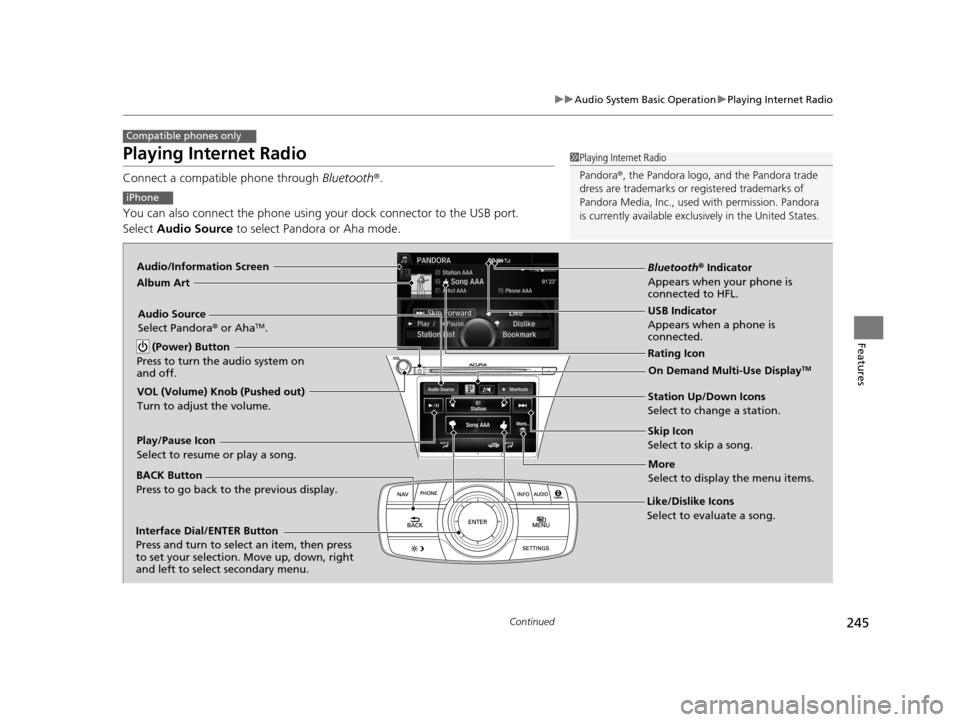
Audio/Information Screen
Album Art
USB Indicator
Appears when a phone is
connected.
Rating Icon
BACK Button
Press to go back to the previous display.
Skip Icon
Select to skip a song.
More
Select to display the menu items.
Station Up/Down Icons
Select to change a station.
Audio Source
Select Pandora
® or Aha
TM.
Play/Pause Icon
Select to resume or play a song.
Like/Dislike Icons
Select to evaluate a song.
(Power) Button
Press to turn the audio system on
and off.
Interface Dial/ENTER Button
Press and turn to select an item, then press
to set your selection. Move up, down, right
and left to select secondary menu.
On Demand Multi-Use DisplayTM
VOL (Volume) Knob (Pushed out)
Turn to adjust the volume.
Bluetooth ® Indicator
Appears when your phone is
connected to HFL.
17 ACURA RLX-31TY26300.book 245 ページ 2016年6月17日 金曜日 午前8時12分
Page 247 of 557
uuAudio System Basic Operation uPlaying Internet Radio
246
Features
You can operate some of the Pandora® menu items from your vehicle’s audio
system. The available items are:
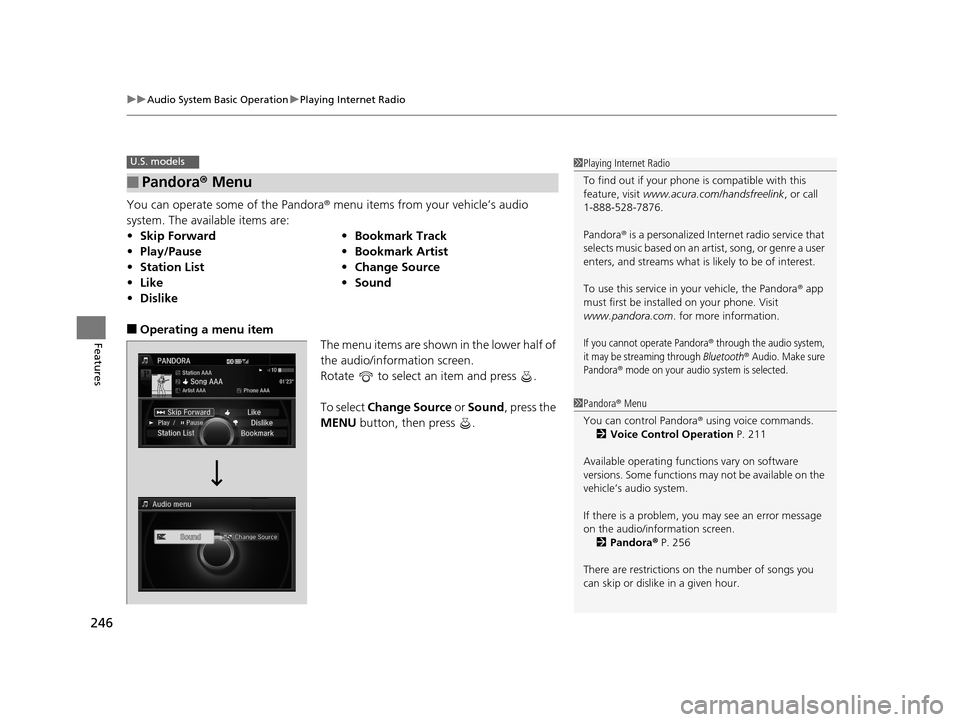
■Operating a menu item The menu items are shown in the lower half of
the audio/information screen.
Rotate to select an item and press .
To select Change Source or Sound , press the
MENU button, then press .
■Pandora® Menu
•Skip Forward •Bookmark Track
• Play/Pause •Bookmark Artist
• Station List •Change Source
• Like •Sound
• Dislike
U.S. models1Playing Internet Radio
To find out if your phone is compatible with this
feature, visit www.acura.com/handsfreelink , or call
1-888-528-7876.
Pandora ® is a personalized Internet radio service that
selects music based on an artist, song, or genre a user
enters, and streams what is likely to be of interest.
To use this service in your vehicle, the Pandora ® app
must first be installed on your phone. Visit
www.pandora.com . for more information.
If you cannot operate Pandora® through the audio system,
it may be streaming through Bluetooth® Audio. Make sure
Pandora
® mode on your audio system is selected.
1 Pandora ® Menu
You can control Pandora ® using voice commands.
2 Voice Control Operation P. 211
Available operating functi ons vary on software
versions. Some functions ma y not be available on the
vehicle’s audio system.
If there is a problem, you may see an error message
on the audio/information screen.
2 Pandora ® P. 256
There are restrictions on the number of songs you
can skip or dislike in a given hour.
17 ACURA RLX-31TY26300.book 246 ページ 2016年6月17日 金曜日 午前8時12分