radio Acura RLX 2017 Owner's Guide
[x] Cancel search | Manufacturer: ACURA, Model Year: 2017, Model line: RLX, Model: Acura RLX 2017Pages: 557, PDF Size: 37.97 MB
Page 248 of 557
247
uuAudio System Basic Operation uPlaying Internet Radio
Features
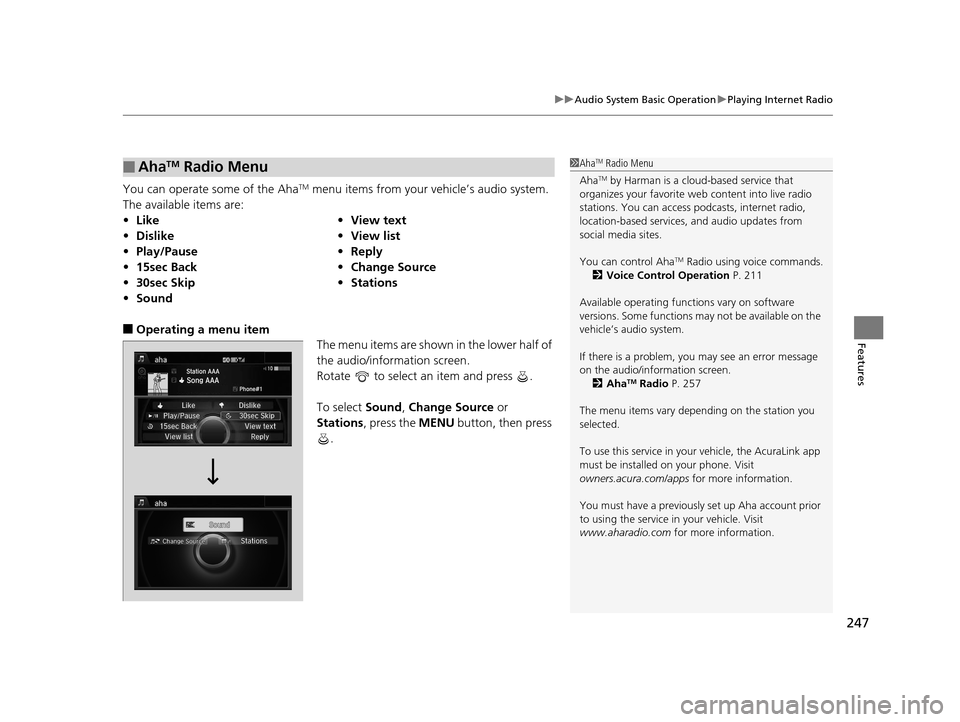
You can operate some of the AhaTM menu items from your vehicle’s audio system.
The available items are:
■Operating a menu item The menu items are shown in the lower half of
the audio/information screen.
Rotate to select an item and press .
To select Sound, Change Source or
Stations , press the MENU button, then press
.
■AhaTM Radio Menu
• Like •View text
• Dislike •View list
• Play/Pause •Reply
• 15sec Back •Change Source
• 30sec Skip •Stations
• Sound
1AhaTM Radio Menu
Aha
TM by Harman is a clou d-based service that
organizes your favorite we b content into live radio
stations. You can access podcasts, internet radio,
location-based services , and audio updates from
social media sites.
You can control Aha
TM Radio using voice commands.
2 Voice Control Operation P. 211
Available operating functi ons vary on software
versions. Some functions ma y not be available on the
vehicle’s audio system.
If there is a problem, you may see an error message
on the audio/information screen. 2 Aha
TM Radio P. 257
The menu items vary depending on the station you
selected.
To use this service in your vehicle, the AcuraLink app
must be installed on your phone. Visit
owners.acura.com/apps for more information.
You must have a previously set up Aha account prior
to using the service in your vehicle. Visit
www.aharadio.com for more information.
17 ACURA RLX-31TY26300.book 247 ページ 2016年6月17日 金曜日 午前8時12分
Page 258 of 557

257
uuAudio Error Messages uAhaTM Radio
Features
AhaTM Radio
If an error occurs while playing AhaTM Radio, you may see the following error
messages.
If you cannot clear the error message, contact a dealer.
Error MessageSolution
Cannot connect to aha. When stopped, make sure aha is
running on the phone. For iPhone, set connection priority to
USB and reconnect.
Appears when the AhaTM app is not activated. Check your device.
Incompatible USB Device
Please Check Owner’s ManualAppears when an incompatible de vice is connected. Disconnect
the device. Then turn th e audio system off, and turn it on again.
Do not reconnect the device that caused the error.
17 ACURA RLX-31TY26300.book 257 ページ 2016年6月17日 金曜日 午前8時12分
Page 259 of 557
258
Features
General Information on the Audio System
SiriusXM® Radio Service
1. You need your radio ID ready before regist ering for subscription. To see the ID in
the display: Turn the interface dial until 0 appears.
2. Have your radio ID and credit card num ber ready, and either call or visit the
SiriusXM ® website to subscribe.
Switch to the SiriusXM ® mode by pressing the SOURCE button repeatedly or
operating the On Demand Multi-Use Display
TM, and stay in this mode for about 30
minutes until the service is activated. Make sure your vehicle is in an open area with
good reception.
Loading:
SiriusXM ® is loading the audio or program information.
Ch off air:
The channel is not currently broadcasting.
Ch unauthorized:
SiriusXM ® radio is receiving information update from the network.
No signal:
The signal is too weak in the current location.
Ch unavailable:
No such channel exists, the channel is not pa rt of your subscription, or the artist or
title information is unavailable.
Check antenna:
There is a problem with the SiriusXM ® antenna. Contact a dealer.
■Subscribing to SiriusXM® Radio
■Receiving SiriusXM® Radio
■SiriusXM® Radio Display Messages
1 Subscribing to SiriusXM ® Radio
Contact Information for SiriusXM ® Radio:
•U.S.: SiriusXM ® Radio at www.siriusxm.com or
(800) 852-9696
•Canada: SiriusXM ® Canada at www.xmradio.ca , or
(877) 209-0079
1 Receiving SiriusXM ® Radio
The SiriusXM ® satellites are in orbit over the equator;
therefore, objects south of the vehicle may cause
satellite reception interruptions. Sa tellite signals are
more likely to be blocked by tall buildings and
mountains the farther north you travel from the
equator.
You may experience rece ption problems under the
following circumstances:
•In a location with an obstruction to the south of
your vehicle.
•In tunnels
•On the lower level of a multi-tiered road
•Large items carried on the roof rack
17 ACURA RLX-31TY26300.book 258 ページ 2016年6月17日 金曜日 午前8時12分
Page 270 of 557
269
uuCustomized Features u
Continued
Features
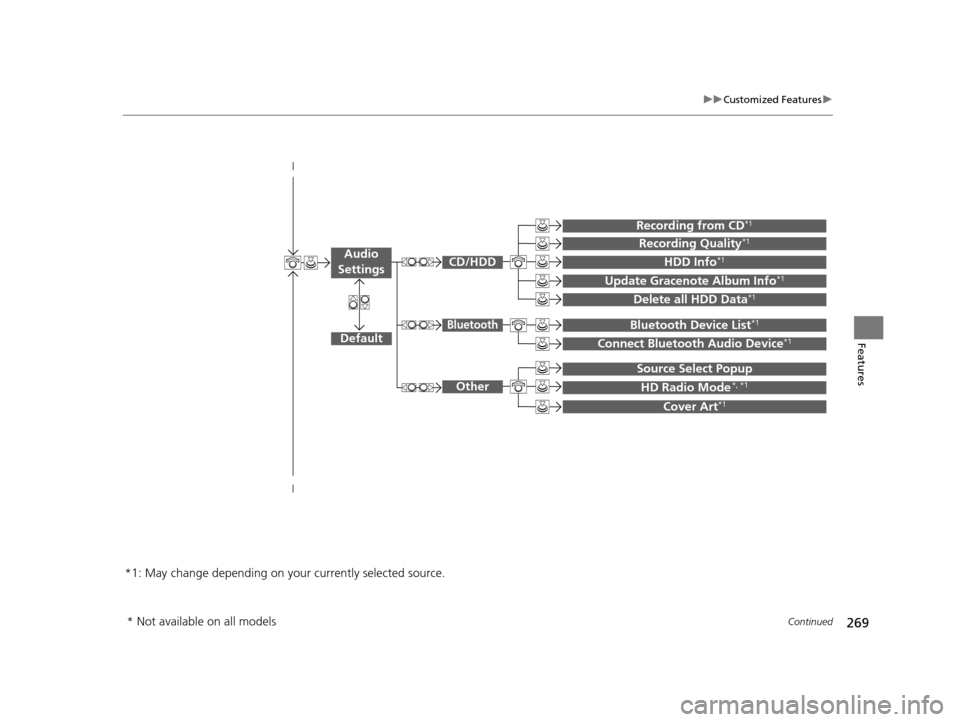
Default
Source Select Popup
HD Radio Mode*, *1
Cover Art*1
Connect Bluetooth Audio Device*1
Bluetooth Device List*1
Recording from CD*1
Recording Quality*1
HDD Info*1
Update Gracenote Album Info*1
Delete all HDD Data*1
*1: May change depending on your currently selected source.
CD/HDD
Bluetooth
Other
Audio
Settings
* Not available on all models
17 ACURA RLX-31TY26300.book 269 ページ 2016年6月17日 金曜日 午前8時12分
Page 284 of 557

283
uuCustomized Features u
Continued
Features
*1:Default SettingSetup
Group Customizable Features Description Selectable Settings
Audio
SettingsOther
Source Select Popup
Selects whether the list of selectable audio
sources comes on when the
AUDIO button is
pressed. On
/Off*1
HD Radio Mode*
Selects whether the audio system automatically
switches to the digital radio waves or receives the
analogue waves only. Auto*1/
Analog
Cover Art Turns on and off the cover art display.
On
*1/Off
Default Cancels/Resets all customized items in the
Audio
Settings group as default. Default/
OK
Phone
SettingsPhone
Connect phone
Pairs a new phone to HFL, connects or
disconnects a paired phone.
2Phone Setup P. 296
—
Bluetooth Device List
Pairs a new phone to HFL, edits or deletes a
paired phone, or creates a security PIN.
2Phone Setup P. 296
—
Edit Speed DialEdits, adds or deletes a speed dial entry.
2Phone Setup P. 296—
AM/FM mode
CD (MP3/WMA/AAC), iPod, USB,
Pandora®* or AhaTM mode
* Not available on all models
17 ACURA RLX-31TY26300.book 283 ページ 2016年6月17日 金曜日 午前8時12分
Page 346 of 557

Continued345
uuWhen Driving uStarting the Engine
Driving
3. Press the ENGINE START/STOP button
without depressing the accelerator pedal.
You can turn the engine off when the vehicle is completely stopped.
1. Shift to
(P.
2. Press the ENGINE START/STOP button.
1Starting the Engine
Bring the keyless access remote close to the ENGINE
START/STOP button if the batte ry in the keyless
access remote is weak. 2 If the Keyless Access Remote Battery is
Weak P. 510
The engine may not start if the keyless access remote
is subjected to strong radio waves.
Do not hold the ENGINE START/STOP button to
start the engine.
If the engine does not start, wait at least 30 seconds
before trying again.
■Stopping the Engine
17 ACURA RLX-31TY26300.book 345 ページ 2016年6月17日 金曜日 午前8時12分
Page 398 of 557
397
uuWhen Driving uBlind Spot Information (BSI) System*
Driving
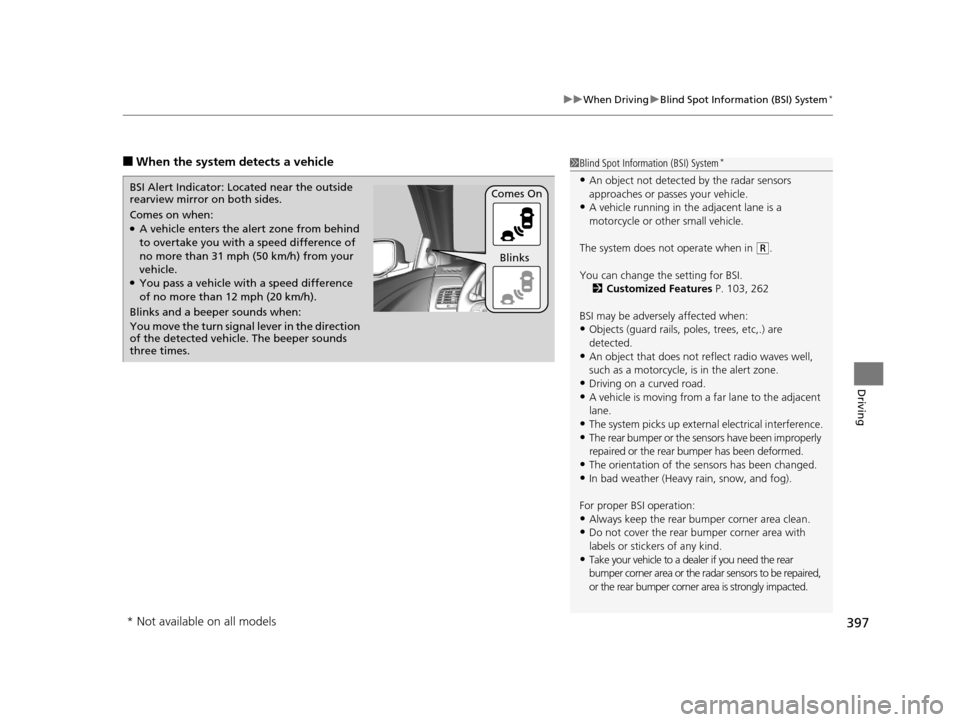
■When the system detects a vehicle1Blind Spot Inform ation (BSI) System*
•An object not detected by the radar sensors
approaches or passes your vehicle.
•A vehicle running in the adjacent lane is a
motorcycle or other small vehicle.
The system does not operate when in
( R.
You can change the setting for BSI. 2 Customized Features P. 103, 262
BSI may be adversel y affected when:
•Objects (guard rails, poles, trees, etc,.) are
detected.
•An object that does not re flect radio waves well,
such as a motorcycle, is in the alert zone.
•Driving on a curved road.•A vehicle is moving from a far lane to the adjacent
lane.
•The system picks up external electrical interference.
•The rear bumper or the sens ors have been improperly
repaired or the rear bu mper has been deformed.
•The orientation of the sensors has been changed.
•In bad weather (Heavy rain, snow, and fog).
For proper BSI operation:
•Always keep the rear bumper corner area clean.•Do not cover the rear bumper corner area with
labels or sticke rs of any kind.
•Take your vehicle to a dealer if you need the rear
bumper corner area or the radar sensors to be repaired,
or the rear bumper corner area is strongly impacted.
Comes on when:●A vehicle enters the ale rt zone from behind
to overtake you with a speed difference of
no more than 31 mph (50 km/h) from your
vehicle.
●You pass a vehicle with a speed difference
of no more than 12 mph (20 km/h).
BSI Alert Indicator: Located near the outside
rearview mirror on both sides.
Blinks and a beeper sounds when:
You move the turn signal
lever in the direction
of the detected vehicle. The beeper sounds
three times. Comes On
Blinks
* Not available on all models
17 ACURA RLX-31TY26300.book 397 ページ 2016年6月17日 金曜日 午前8時12分
Page 424 of 557
Continued423
uuParking Your Vehicle uCross Traffic Monitor*
Driving
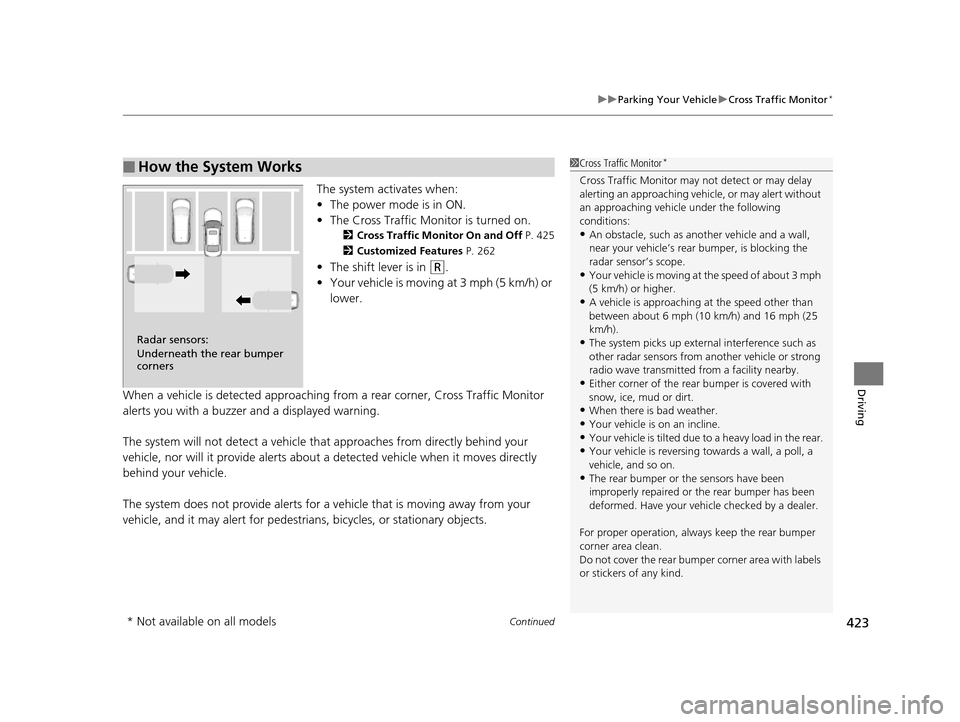
The system activates when:
• The power mode is in ON.
• The Cross Traffic Monitor is turned on.
2 Cross Traffic Monitor On and Off P. 425
2 Customized Features P. 262
•The shift lever is in (R.
• Your vehicle is moving at 3 mph (5 km/h) or
lower.
When a vehicle is detected approaching from a rear corner, Cross Traffic Monitor
alerts you with a buzzer and a displayed warning.
The system will not detect a vehicle that approaches from directly behind your
vehicle, nor will it provide alerts about a detected vehicle when it moves directly
behind your vehicle.
The system does not provide alerts for a vehicle that is moving away from your
vehicle, and it may alert for pedestrians, bicycles, or stationary objects.
■How the System Works1 Cross Traffic Monitor*
Cross Traffic Monitor may not detect or may delay
alerting an approaching vehi cle, or may alert without
an approaching vehicle under the following
conditions:
•An obstacle, such as a nother vehicle and a wall,
near your vehicle’s rear bumper, is blocking the
radar sensor’s scope.
•Your vehicle is moving at the speed of about 3 mph
(5 km/h) or higher.
•A vehicle is approaching at the speed other than
between about 6 mph (10 km/h) and 16 mph (25
km/h).
•The system picks up external interference such as
other radar sensors from an other vehicle or strong
radio wave transmitted fr om a facility nearby.
•Either corner of the rear bumper is covered with
snow, ice, mud or dirt.
•When there is bad weather.
•Your vehicle is on an incline.
•Your vehicle is tilted due to a heavy load in the rear.•Your vehicle is reversing towards a wall, a poll, a
vehicle, and so on.
•The rear bumper or the sensors have been
improperly repaired or the rear bumper has been
deformed. Have your vehi cle checked by a dealer.
For proper operation, always keep the rear bumper
corner area clean.
Do not cover the rear bumper corner area with labels
or stickers of any kind.
Radar sensors:
Underneath the rear bumper
corners
* Not available on all models
17 ACURA RLX-31TY26300.book 423 ページ 2016年6月17日 金曜日 午前8時12分
Page 523 of 557
522
Handling the Unexpected
Fuses
Fuse Locations
If any electrical devices are not working, set
the power mode to VEHICLE OFF (LOCK)
and check to see if any applicable fuse is
blown.
There are three fuse boxes in the engine
compartment.
Fuse locations are shown on the fuse box
cover. Locate the fuse in question by the
fuse number and box cover number.
■Engine Compartment Fuse Box
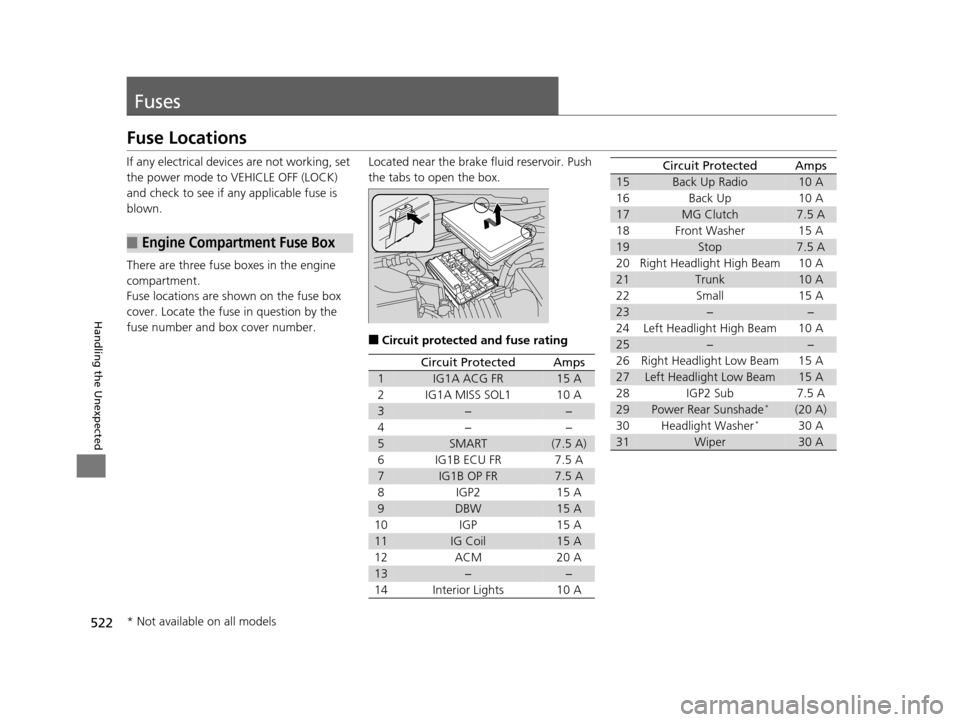
Located near the brake fluid reservoir. Push
the tabs to open the box.
■Circuit protected and fuse rating
Circuit ProtectedAmps
1IG1A ACG FR15 A
2IG1A MISS SOL110 A
3−−
4− −
5SMART(7.5 A)
6 IG1B ECU FR 7.5 A
7IG1B OP FR7.5 A
8 IGP2 15 A
9DBW15 A
10 IGP 15 A
11IG Coil15 A
12 ACM 20 A
13−−
14 Interior Lights 10 A
15Back Up Radio10 A
16 Back Up 10 A
17MG Clutch7.5 A
18 Front Washer 15 A
19Stop7.5 A
20 Right Headlight High Beam 10 A
21Trunk10 A
22 Small 15 A
23−−
24 Left Headlight High Beam 10 A
25−−
26 Right Headlight Low Beam 15 A
27Left Headlight Low Beam15 A
28 IGP2 Sub 7.5 A
29Power Rear Sunshade*(20 A)
30 Headlight Washer*30 A
31Wiper30 A
Circuit ProtectedAmps
* Not available on all models
17 ACURA RLX-31TY26300.book 522 ページ 2016年6月17日 金曜日 午前8時12分
Page 532 of 557
531
Information
This chapter includes your vehicle’s specifications, locations of identification numbers, and other
information required by regulation.
Specifications.................................... 532
Identification Numbers
Vehicle Identification Number (VIN), Engine
Number, and Transmission Number ... 534
Devices that Emit Radio Waves ....... 535
Reporting Safety Defects ................. 536Emissions Testing
Testing of Readiness Codes.............. 537
Warranty Coverages ........................ 539
Authorized Manuals ......................... 541
Client Service Information ............... 542
17 ACURA RLX-31TY26300.book 531 ページ 2016年6月17日 金曜日 午前8時12分