brake Acura RLX 2017 Owner's Guide
[x] Cancel search | Manufacturer: ACURA, Model Year: 2017, Model line: RLX, Model: Acura RLX 2017Pages: 557, PDF Size: 37.97 MB
Page 96 of 557
95
uuIndicators uMulti-Information Display Warning and Information Messages
Continued
Instrument Panel
MessageConditionExplanation
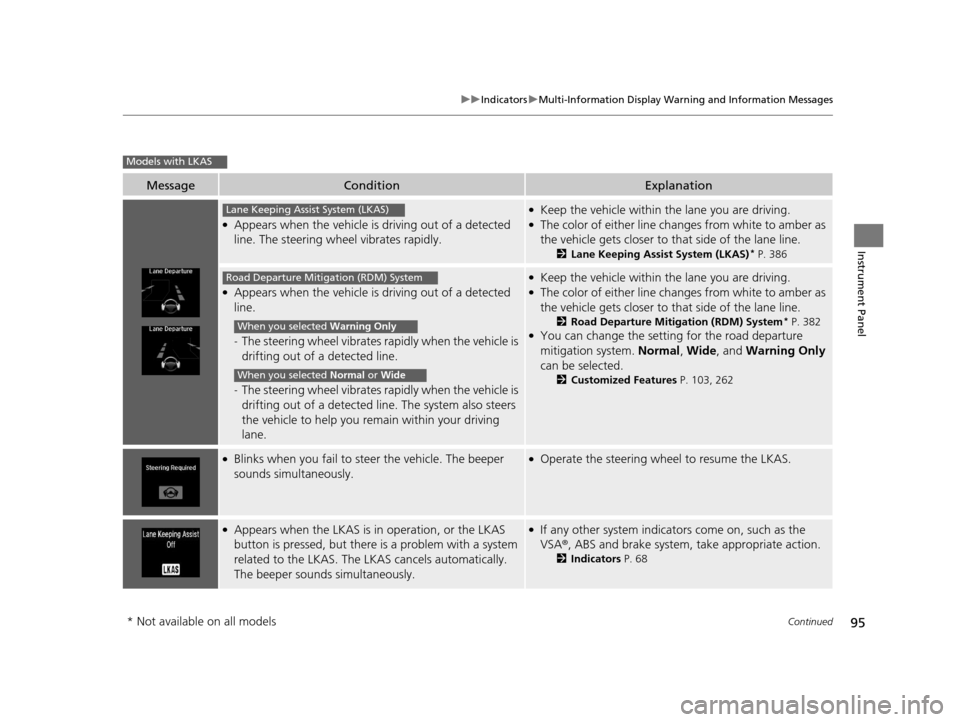
●Appears when the vehicle is driving out of a detected
line. The steering wheel vibrates rapidly.
●Keep the vehicle within the lane you are driving.●The color of either line changes from white to amber as
the vehicle gets closer to that side of the lane line.
2Lane Keeping Assist System (LKAS)* P. 386
●Appears when the vehicle is driving out of a detected
line.
-The steering wheel vibrates ra pidly when the vehicle is
drifting out of a detected line.
- The steering wheel vibrates ra pidly when the vehicle is
drifting out of a detected line. The system also steers
the vehicle to help you re main within your driving
lane.
●Keep the vehicle within the lane you are driving.●The color of either line changes from white to amber as
the vehicle gets closer to that side of the lane line.
2Road Departure Mitigation (RDM) System* P. 382●You can change the setting for the road departure
mitigation system. Normal, Wide , and Warning Only
can be selected.
2 Customized Features P. 103, 262
●Blinks when you fail to steer the vehicle. The beeper
sounds simultaneously.●Operate the steering wheel to resume the LKAS.
●Appears when the LKAS is in operation, or the LKAS
button is pressed, but there is a problem with a system
related to the LKAS. The LKAS cancels automatically.
The beeper sounds simultaneously.●If any other system indicators come on, such as the
VSA ®, ABS and brake system, take appropriate action.
2Indicators P. 68
Models with LKAS
Lane Keeping Assist System (LKAS)
Road Departure Mitigation (RDM) System
When you selected Warning Only
When you selected Normal or Wide
* Not available on all models
17 ACURA RLX-31TY26300.book 95 ページ 2016年6月17日 金曜日 午前8時12分
Page 138 of 557
137Continued
Controls
Operating the Switches Around the Steering Wheel
ENGINE START/STOP Button
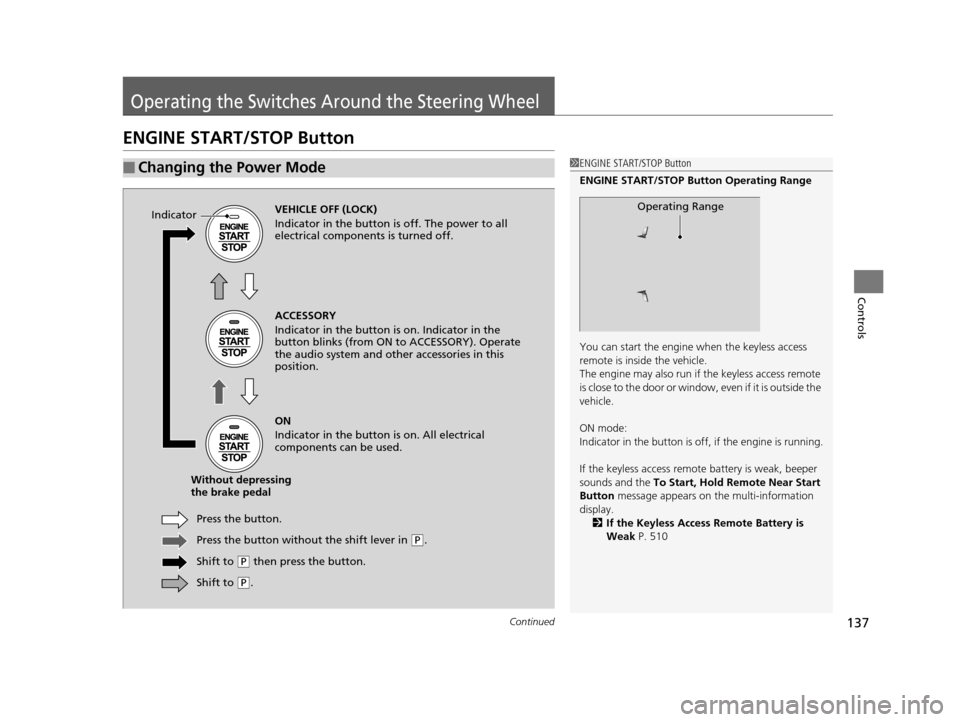
■Changing the Power Mode1ENGINE START/STOP Button
ENGINE START/STOP Button Operating Range
You can start the engine when the keyless access
remote is inside the vehicle.
The engine may also run if the keyless access remote
is close to the door or window, even if it is outside the
vehicle.
ON mode:
Indicator in the button is of f, if the engine is running.
If the keyless access remote battery is weak, beeper
sounds and the To Start, Hold Remote Near Start
Button message appears on the multi-information
display. 2 If the Keyless Access Remote Battery is
Weak P. 510
Operating RangeVEHICLE OFF (LOCK)
Indicator in the button is off. The power to all
electrical components is turned off.
Press the button withou t the shift lever in
(P.
Shift to
( P then press the button.
Press the button.
Without depressing
the brake pedal ACCESSORY
Indicator in the button is on. Indicator in the
button blinks (from ON to ACCESSORY). Operate
the audio system and other accessories in this
position.
ON
Indicator in the button is on. All electrical
components can be used.
Indicator
Shift to (
P.
17 ACURA RLX-31TY26300.book 137 ページ 2016年6月17日 金曜日 午前8時12分
Page 142 of 557
141
uuOperating the Switches Around the Steering Wheel uLight Switches
Continued
Controls
Light Switches
Rotating the light switch turns the lights on
and off, regardless of the power mode
setting.
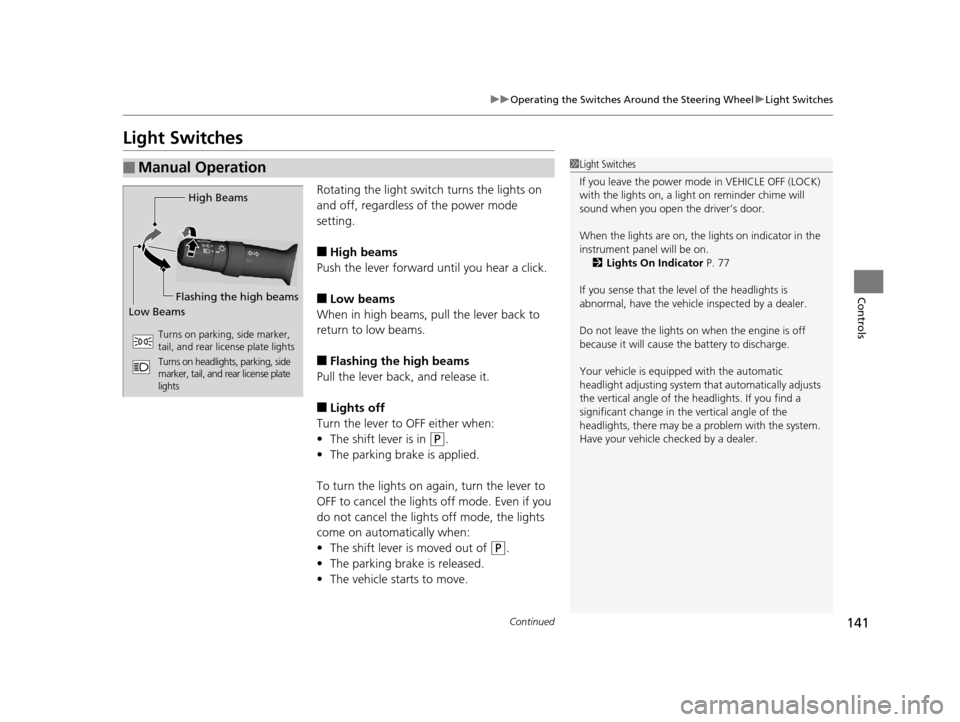
■High beams
Push the lever forward until you hear a click.
■Low beams
When in high beams, pull the lever back to
return to low beams.
■Flashing the high beams
Pull the lever back, and release it.
■Lights off
Turn the lever to OFF either when:
• The shift lever is in
(P.
• The parking brake is applied.
To turn the light s on again, turn the lever to
OFF to cancel the lights off mode. Even if you
do not cancel the lights off mode, the lights
come on automatically when:
• The shift lever is moved out of
(P.
• The parking brake is released.
• The vehicle starts to move.
■Manual Operation1Light Switches
If you leave the power mode in VEHICLE OFF (LOCK)
with the lights on, a light on reminder chime will
sound when you open the driver’s door.
When the lights are on, the lights on indicator in the
instrument pane l will be on.
2 Lights On Indicator P. 77
If you sense that the le vel of the headlights is
abnormal, have the vehicl e inspected by a dealer.
Do not leave the lights on when the engine is off
because it will cause the battery to discharge.
Your vehicle is equipped with the automatic
headlight adjusting system that automatically adjusts
the vertical angle of the headlights. If you find a
significant change in th e vertical angle of the
headlights, there may be a problem with the system.
Have your vehicle checked by a dealer.
High Beams
Flashing the high beams
Low Beams
Turns on parking, side marker,
tail, and rear license plate lights
Turns on headlights, parking, side
marker, tail, and rear license plate
lights
17 ACURA RLX-31TY26300.book 141 ページ 2016年6月17日 金曜日 午前8時12分
Page 145 of 557

144
uuOperating the Switches Around the Steering Wheel uDaytime Running Lights
Controls
Daytime Running Lights
The low beam headlights come on slightly dimmer than normal when the following
conditions have been met:
• The power mode is in ON.
• The headlight switch is AUTO, or in .
• The parking brake is released.
The low beam headlights return to the original brightness once the headlight switch
is turned on, or when the head light switch is in AUTO and it is getting darker
outside.1 Daytime Running Lights
The daytime running lights come on dimmer when
the headlight switch is in than when it is in
AUTO . In AUTO , if the ambient brightness is dark,
the low beam headlights come on.
U.S. models
17 ACURA RLX-31TY26300.book 144 ページ 2016年6月17日 金曜日 午前8時12分
Page 152 of 557
151
uuOperating the Switches Around the Steering Wheel uDriving Position Memory System
Controls
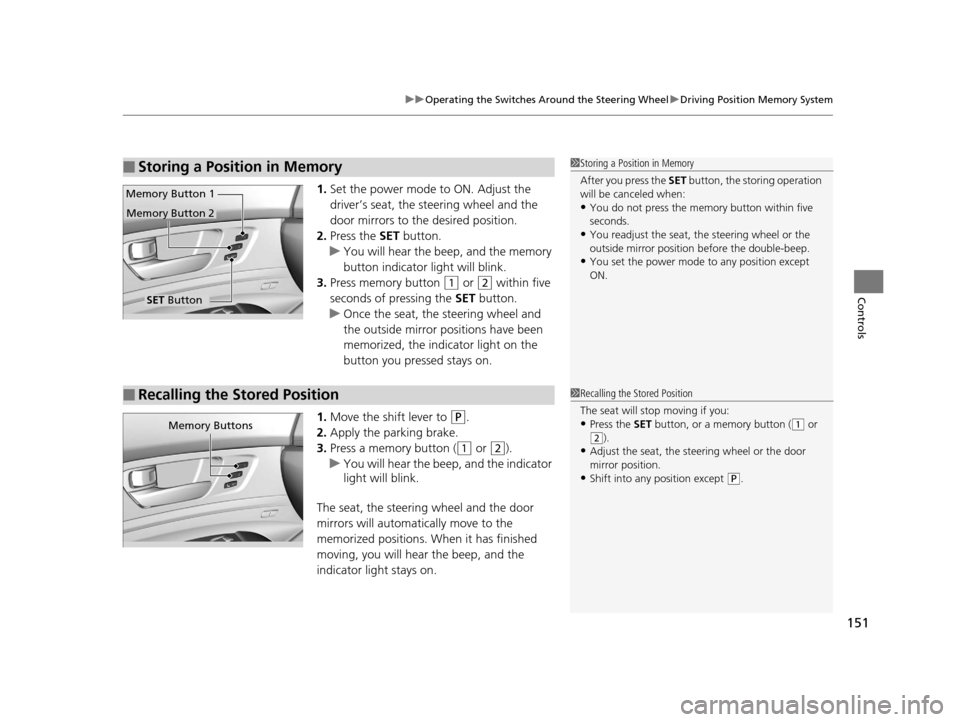
1. Set the power mode to ON. Adjust the
driver’s seat, the steering wheel and the
door mirrors to the desired position.
2. Press the SET button.
u You will hear the beep, and the memory
button indicator light will blink.
3. Press memory button
(1 or (2 within five
seconds of pressing the SET button.
u Once the seat, the steering wheel and
the outside mirror positions have been
memorized, the indicator light on the
button you pressed stays on.
1. Move the shift lever to
(P.
2. Apply the parking brake.
3. Press a memory button (
(1 or (2).
u You will hear the beep, and the indicator
light will blink.
The seat, the steering wheel and the door
mirrors will automatically move to the
memorized positions. When it has finished
moving, you will hear the beep, and the
indicator light stays on.
■Storing a Position in Memory1 Storing a Position in Memory
After you press the SET button, the storing operation
will be canceled when:
•You do not press the memory button within five
seconds.
•You readjust the seat, the steering wheel or the
outside mirror position before the double-beep.
•You set the power mode to any position except
ON.
SET Button
Memory Button 1
Memory Button 2
■Recalling the Stored Position1
Recalling the Stored Position
The seat will st op moving if you:
•Press the SET button, or a memory button ((1 or
(2).
•Adjust the seat, the st eering wheel or the door
mirror position.
•Shift into any position except ( P.
Memory Buttons
17 ACURA RLX-31TY26300.book 151 ページ 2016年6月17日 金曜日 午前8時12分
Page 338 of 557
337
Driving
This chapter discusses driving, refueling, and information on items such as accessories.
Before Driving
Driving Preparation .......................... 338
Maximum Load Limit........................ 341
Towing a Trailer Towing Your Vehicle ........................ 343
When Driving
Starting the Engine .......................... 344
Precautions While Driving................. 349
Automatic Transmission ................... 350
Shifting ............................................ 351
SPORT Mode.................................... 355
Cruise Control
*................................ 356
Front Sensor Camera*...................... 359
Adaptive Cruise Control (ACC) with Low Speed Follow (LSF)
*........................ 361 Forward Collision Warning (FCW) .... 375
Lane Departure Warning (LDW) ....... 378
Road Departure Mitigation (RDM) System*... 382Lane Keeping Assist System (LKAS)*.... 386Vehicle Stability Assist (VSA®), aka Electronic
Stability Control (ESC), System ............... 393
Agile Handling Assist ....................... 395
Precision All-Wheel SteerTM (P-AWS ®)
System ........................................... 395
Blind Spot Information (BSI) System*.... 396Tire Pressure Monitoring System (TPMS) ... 398Tire Pressure Monitoring System (TPMS) -
Required Federal Explanation ............. 400
Braking Brake System ....................................... 402
Anti-lock Brake System (ABS) ............... 407 Brake Assist System .............................. 408
Collision Mitigation Braking SystemTM (CMBSTM)*.....409Parking Your Vehicle
When Stopped ..................................... 417
Parking Sensor System
*........................ 418
Cross Traffic Monitor*.......................... 422
Multi-View Rear Camera*..................... 426
Surround View Camera System*.......... 427
Refueling Fuel Information ................................... 437
How to Refuel ...................................... 438
Fuel Economy and CO
2 Emissions ......... 439
Improving Fuel Economy and Reducing CO2
Emissions............................................ 439
* Not available on all models
17 ACURA RLX-31TY26300.book 337 ページ 2016年6月17日 金曜日 午前8時12分
Page 340 of 557
Continued339
uuBefore Driving uDriving Preparation
Driving
• Store or secure all items on board properly.
u Carrying too much cargo, or improperly storing it, can affect your vehicle’s
handling, stability, sto pping distance, and tires, and make it unsafe.
2Maximum Load Limit P. 341
•Do not pile items higher than the seat height.
u They can block your view and may be thrown forward in the event of sudden
braking.
• Do not place anything in the front seat footwells. Make sure to secure the floor
mat.
u An object or unsecured floor mat can in terfere with your brake and accelerator
pedal operation while driving.
• If you have any animals on board, do not let them move around in the vehicle.
u They may interfere with driv ing and a crash could occur.
• Securely close and lock all doors and the trunk.
2 Locking/Unlocking the Doors from the Inside P. 124
•Adjust your seating position properly.
u Adjust the head restraint, too.
2Adjusting the Seats P. 156
2 Adjusting the Head Restraints P. 159
•Adjust the mirrors and steering wh eel properly for your driving.
u Adjust them while sitting in the proper driving position.
2 Adjusting the Mirrors P. 153
2 Adjusting the Steering Wheel P. 152
■Interior Checks1Interior Checks
The headlight aim is set by the factory, and does not
need to be adjusted. Howeve r, if you regularly carry
heavy items in the trunk ha ve the aiming readjusted
at a dealer or by a qualified technician.
17 ACURA RLX-31TY26300.book 339 ページ 2016年6月17日 金曜日 午前8時12分
Page 345 of 557
344
Driving
When Driving
Starting the Engine
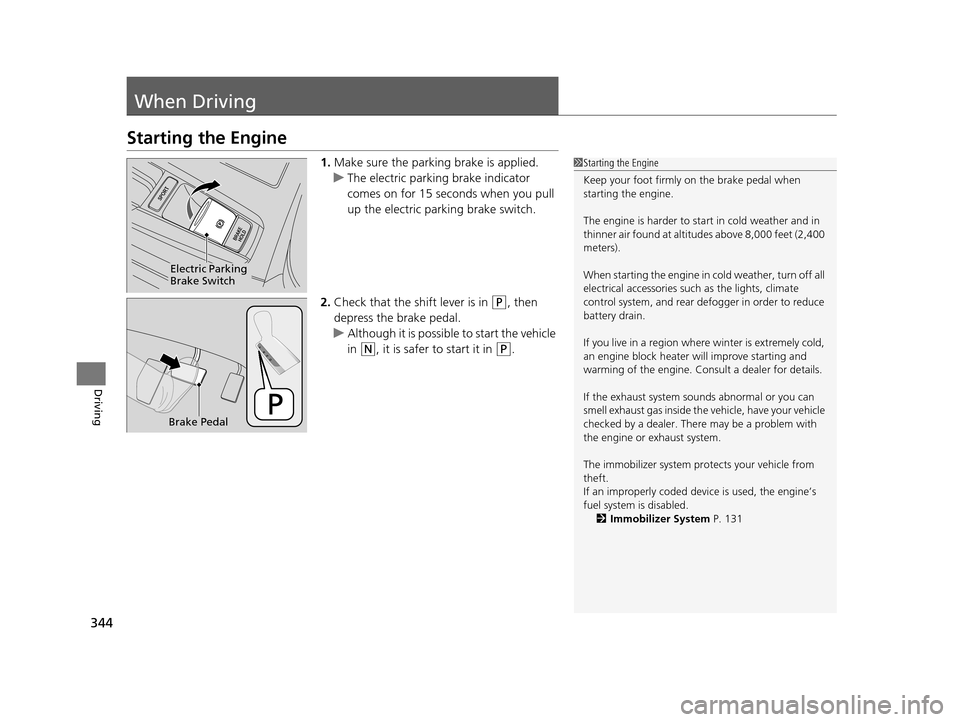
1.Make sure the parking brake is applied.
u The electric parking brake indicator
comes on for 15 seconds when you pull
up the electric parking brake switch.
2. Check that the shift lever is in
(P, then
depress the brake pedal.
u Although it is possibl e to start the vehicle
in
(N, it is safer to start it in (P.
1 Starting the Engine
Keep your foot firmly on the brake pedal when
starting the engine.
The engine is harder to st art in cold weather and in
thinner air found at altitudes above 8,000 feet (2,400
meters).
When starting the engine in cold weather, turn off all
electrical accessories such as the lights, climate
control system, and rear de fogger in order to reduce
battery drain.
If you live in a region where winter is extremely cold,
an engine block heater will improve starting and
warming of the engine. Cons ult a dealer for details.
If the exhaust system sounds abnormal or you can
smell exhaust gas inside the vehicle, have your vehicle
checked by a dealer. There may be a problem with
the engine or exhaust system.
The immobilizer system pr otects your vehicle from
theft.
If an improperly c oded device is used, the engine’s
fuel system is disabled.
2 Immobilizer System P. 131
Electric Parking
Brake Switch
Brake Pedal
17 ACURA RLX-31TY26300.book 344 ページ 2016年6月17日 金曜日 午前8時12分
Page 349 of 557
uuWhen Driving uStarting the Engine
348
Driving
1. While depressing the brake pedal, press the ENGINE START/STOP button.
2. Put the shift lever to
(D. Select (R when reversing.
3. With the parking brake applied, release the brake pedal and gently depress the
accelerator pedal.
u Make sure the electric parking brake indicator goes off.
4. Gradually release the brake pedal and gently depress the accelerator pedal to pull
away.
■Hill Start Assist System
Hill start assist keeps the brake engaged br iefly to help prevent the vehicle from
rolling on inclines as you move your fo ot from the brake pedal to the accelerator.
Move the shift lever to
(D when facing uphill, or (R when facing downhill, then
release the brake pedal.
■Starting to Drive1 Starting to Drive
You can also release the parking brake by pressing
the electric parking brake sw itch while depressing the
brake pedal.
When facing downhill, you can start your vehicle
more smoothly by manually releasing it with the
electric parking brake switch than by releasing it with
the accelerator pedal.
The engine stops when the sh ift lever is moved out of
(P before the ENGINE START/STOP button is
pressed. Follow the step 1 when starting to drive.
When the engine was started using the two-way
keyless access remote*
When the engine was started using the two-way keyless access remote*
When the engine was started in any case
1 Hill Start Assist System
Hill start assist may not prevent the vehicle from
rolling downhill on a very steep or slippe ry slope, and
does not operate on small inclines.
Hill start assist is not a replacement for the parking
brake.
* Not available on all models
17 ACURA RLX-31TY26300.book 348 ページ 2016年6月17日 金曜日 午前8時12分
Page 350 of 557
349
uuWhen Driving uPrecautions While Driving
Continued
Driving
Precautions While Driving
Avoid driving in deep water and on flooded roads. This can damage the engine,
driveline, or cause electrical component failure.
■In Rain1Precautions While Driving
NOTICE
Do not operate the shift lever while pressing the
accelerator pedal. You could damage the transmission.
NOTICE
The following can dama ge the under spoiler:
•Parking the vehicle by a parking block
•Parallel parking along the road shoulder•Driving toward the bottom of a hill
•Driving up or down to a different surface level
(such as a road shoulder)
•Driving on a rutted or bumpy road
•Driving on a road with potholes.
NOTICE
If you repeatedly turn the steering wheel at an
extremely low speed, or hold the steering wheel on
the full left or right position for a while, the electric
power steering (EPS) system heats up. The system
goes into a protective mode, and limits its
performance. The steering wheel becomes harder
and harder to operate. Once the system cools down,
the EPS system is restored.
Repeated operation under these conditions can
eventually damage the system.
If the power mode is set to ACCESSORY while
driving, the engine will shut down and all steering
and brake power assist functi ons will stop, making it
difficult to control the vehicle.
17 ACURA RLX-31TY26300.book 349 ページ 2016年6月17日 金曜日 午前8時12分