brake Acura RLX 2017 Repair Manual
[x] Cancel search | Manufacturer: ACURA, Model Year: 2017, Model line: RLX, Model: Acura RLX 2017Pages: 557, PDF Size: 37.97 MB
Page 410 of 557
409
uuBraking uCollision Mitigation Braking SystemTM (CMBSTM)*
Continued
Driving
Collision Mitigation Braking SystemTM (CMBSTM)*
Can assist you when there is a possibility of your vehicle colliding with a vehicle or a
pedestrian detected in front of yours. The CMBSTM is designed to alert you when a
potential collision is determined, as well as to reduce your vehicle speed to help
minimize collision severity when a collision is deemed unavoidable.
■How the system works
1 Collision Mitigation Braking SystemTM (CMBSTM)*
Important Safety Reminder
The CMBSTM is designed to reduce the severity of an
unavoidable collision. It does not prevent collision nor
stop the vehicle automatically. It is still your
responsibility to operate the brake pedal and steering
wheel appropriately acco rding to the driving
conditions.
The CMBS
TM may not activate or may not detect a
vehicle in front of y our vehicle under certain
conditions: 2 CMBS
TM Conditions and Limitations P. 413
You can read about handling information for the
camera equipped with this system. 2 Front Sensor Camera
* P. 359
1How the system works
Rapid vibrations on the steering wheel alert you
when the your vehicle speed is between 19 and 62
mph (30 and 100 km/h) with an oncoming vehicle
detected in front of you.
When the CMBS
TM activates, it may automatically
apply the brake. It will be canceled when your vehicle
stops or a potential coll ision is not determined.
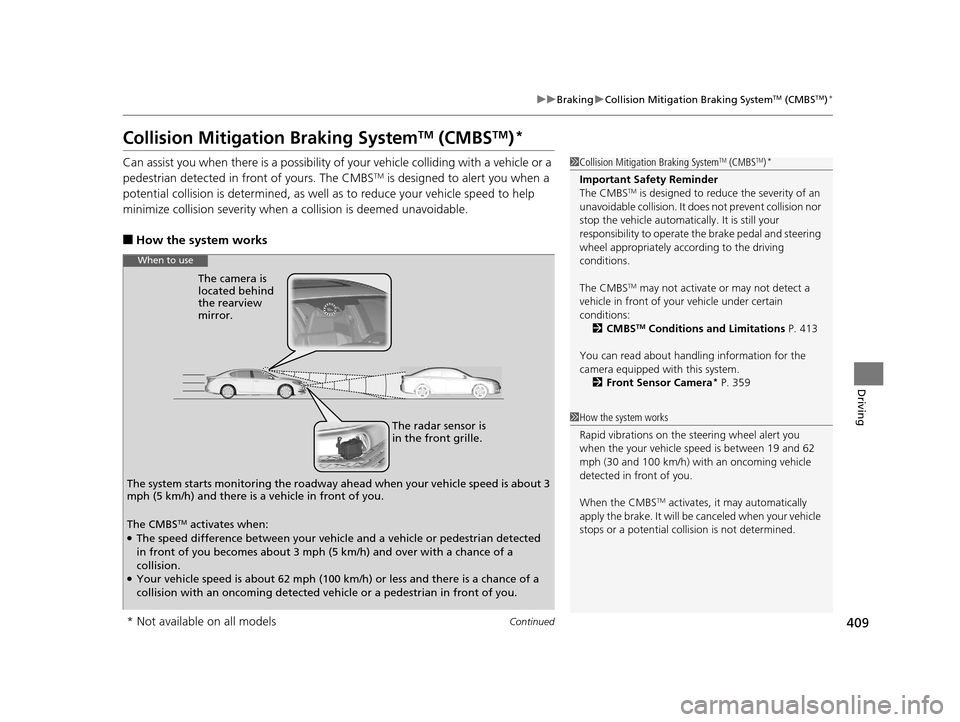
The radar sensor is
in the front grille.
The camera is
located behind
the rearview
mirror.
The system starts monitoring the roadway ah ead when your vehicle speed is about 3
mph (5 km/h) and there is a vehicle in front of you.
When to use
The CMBSTM activates when:●The speed difference between your vehicle and a vehicle or pedestrian detected
in front of you becomes about 3 mph (5 km/h) and over with a chance of a
collision.
●Your vehicle speed is about 62 mph (100 km/h) or less and there is a chance of a
collision with an oncoming detected vehicle or a pedestrian in front of you.
* Not available on all models
17 ACURA RLX-31TY26300.book 409 ページ 2016年6月17日 金曜日 午前8時12分
Page 411 of 557
uuBraking uCollision Mitigation Braking SystemTM (CMBSTM)*
410
Driving
■When the system activates
At system’s earliest collision alert stage, you can change the distance ( Long/
Normal /Short) between vehicles at which aler ts will come on through multi-
information display setting options.
2 List of customizable options P. 106
■Vibration alert on the steering wheel
When a potential collision to an oncoming detected vehicle is determined, the
system alerts you with rapid vibration on th e steering wheel, in addition to visual and
audible alerts.
u Take appropriate action to prevent a co llision (apply the brakes, operate the
steering wheel, etc.).
1 When the system activates
The camera in the CMBS
TM is also designed to detect
pedestrians.
However, this pedestrian detection feature may not
activate or may not detect a pedestrian in front of
your vehicle under certain conditions.
Refer to the ones indicating the pedestrian detection
limitations from the list. 2 CMBS
TM Conditions and Limitations P. 413
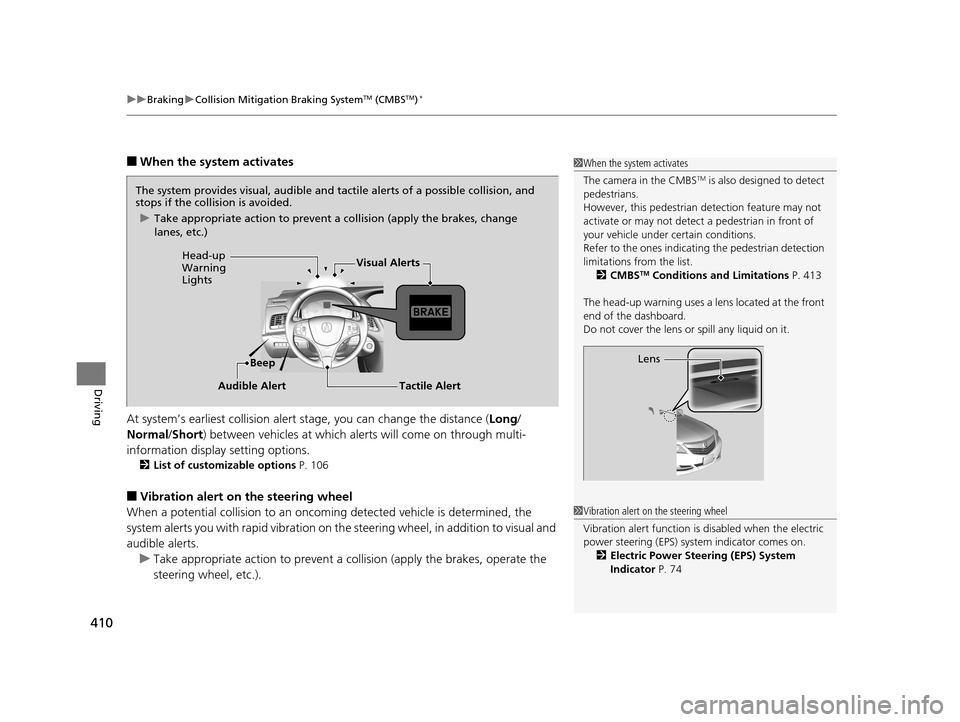
The head-up warning uses a lens located at the front
end of the dashboard.
Do not cover the lens or spill any liquid on it.
Lens
The system provides visual, audible and tactile alerts of a possible collision, and
stops if the collision is avoided.
u Take appropriate action to prevent a collision (apply the brakes, change
lanes, etc.)
Beep
Head-up
Warning
Lights
Visual Alerts
Audible Alert
Tactile Alert
1 Vibration alert on the steering wheel
Vibration alert function is disabled when the electric
power steering (EPS) system indicator comes on.
2 Electric Power Steering (EPS) System
Indicator P. 74
17 ACURA RLX-31TY26300.book 410 ページ 2016年6月17日 金曜日 午前8時12分
Page 415 of 557
414
uuBraking uCollision Mitigation Braking SystemTM (CMBSTM)*
Driving
■Vehicle conditions
• Headlight lenses are dirty or the headlights are not properly adjusted.
• The outside of the windshie ld is blocked by dirt, mud, leaves, wet snow, etc.
• The inside of the windshield is fogged.
• An abnormal tire or wheel condition (wrong sized, varied size or construction,
improperly inflated, compact spare tire
*, etc.).
• When tire chains are installed.
• The vehicle is tilted due to a heav y load or suspension modifications.
• The camera temperature gets too high.
• Driving with the parking brake applied.
• When the radar sensor in the front grille gets dirty.
■Detection limitations
• A vehicle or pedestrian suddenly crosses in front of you.
• The distance between your vehicle and the vehicle or pedestrian ahead of you is
too short.
• A vehicle cuts in front of you at a slow speed, and it brakes suddenly.
• When you accelerate rapidly and approach the vehicle or pedestrian ahead of you
at high speed.
• The vehicle ahead of you is a motorcycle, bicycle, mobility scooter or other small
vehicle.
• When there are animals in front of your vehicle.
• When you drive on a cu rved, winding or undulating road that makes it difficult for
the sensor to properly detect a vehicle in front of you.
• The speed difference between your vehicle an d a vehicle or pedestrian in front of
you is significantly large.
• An oncoming vehicle suddenly comes in front of you.
• Another vehicle suddenly comes in front of you at an intersection, etc.
• Your vehicle abruptly crosses over in front of an oncoming vehicle.
• When driving through a narrow iron bridge.
• When the lead vehicle suddenly slows down.
* Not available on all models
17 ACURA RLX-31TY26300.book 414 ページ 2016年6月17日 金曜日 午前8時12分
Page 418 of 557
417
Driving
Parking Your Vehicle
When Stopped
1.Depress the brake pedal firmly.
2. With the brake pedal depressed, pull up the electric pa rking brake switch slowly,
but fully.
3. Move the shift lever from
(D to (P.
4. Turn off the engine.
u The electric parking brake indicato r goes off in about 15 seconds.
Always set the parking brake firmly, in pa rticular if you are parked on an incline.
1Parking Your Vehicle
Do not park your vehicle near flammable objects,
such as dry grass, oil, or timber.
Heat from the exhaust can cause a fire.
1 When Stopped
NOTICE
The following can dama ge the transmission:•Depressing the accelerator and brake pedals
simultaneously.
•Holding the vehicle in place when facing uphill by
depressing the accelerator pedal.
•Moving the shift lever into ( P before the vehicle
stops completely.
If extremely cold temperatures, the parking brake
may freeze up if applied. If such temperatures are
expected, do not apply the parking brake but, if
parking on a slope, either turn the front wheels so
they will contact the curb if the vehicle is rolls down
the slope or block the wheels to keep the vehicle
from moving. If you do not take either precaution,
the vehicle may roll unexpe ctedly, leading to a crash.
17 ACURA RLX-31TY26300.book 417 ページ 2016年6月17日 金曜日 午前8時12分
Page 442 of 557
441
Maintenance
This chapter discusses basic maintenance.
Before Performing MaintenanceInspection and Maintenance ............ 442
Safety When Performing Maintenance..... 443Parts and Fluids Used in Maintenance Service ........................................... 444
Maintenance Minder
TM..................... 445
Maintenance Under the Hood
Maintenance Items Under the Hood ..... 450Opening the Hood ........................... 451
Engine Compartment Cover ............. 452
Recommended Engine Oil ................ 453
Oil Check ......................................... 454
Adding Engine Oil ............................ 455
Changing the Engine Oil and Oil Filter ..... 456Engine Coolant ................................ 458
Transmission Fluid ............................ 460
Brake Fluid ....................................... 461
Refilling Window Washer Fluid......... 461
Replacing Light Bulbs ....................... 462
Checking and Maintaining Wiper
Blades .......................................... 468
Checking and Maintaining Tires
Checking Tires ................................. 471
Tire and Loading Information Label ...... 472Tire Labeling .................................... 472DOT Tire Quality Grading (U.S. Vehicles)....... 474
Wear Indicators ............................... 476
Tire Service Life ................................ 476
Tire and Wheel Replacement ........... 477
Tire Rotation .................................... 478
Winter Tires ..................................... 479
Battery ............................................... 480
Remote Transmitter Care Replacing the Button Battery ........... 481
Climate Control System Maintenance.... 483Cleaning
Interior Care .................................... 484
Exterior Care.................................... 486
Accessories and Modifications................ 488
17 ACURA RLX-31TY26300.book 441 ページ 2016年6月17日 金曜日 午前8時12分
Page 443 of 557
442
Maintenance
Before Performing Maintenance
Inspection and Maintenance
For your safety, perform all listed inspections and maintenance to keep your vehicle
in good condition. If you become aware of any abnormality (noise, smell, insufficient
brake fluid, oil residue on the ground, etc.), have your vehicle inspected by a dealer.
(Note, however, that service at a dealer is not mandatory to keep your warranties in
effect.)
■Daily inspections
Perform inspections before long distance trips, when washing the vehicle, or when
refueling.
■Periodic inspections
• Check the brake fluid level monthly.
2 Brake Fluid P. 461
•Check the tire pressure monthly. Examin e the tread for wear and foreign objects.
2Checking and Maintaining Tires P. 471
•Check the operation of the exterior lights monthly.
2 Replacing Light Bulbs P. 462
•Check the condition of the wiper bl ades at least every six months.
2Checking and Maintaining Wiper Blades P. 468
■Types of Inspection and Maintenance
1Inspection and Maintenance
Maintenance, replacement, or repair of
emissions control devices and systems may be
done by any automotive repair establishment or
individuals using parts that are “certified” to
EPA standards.
According to state and fede ral regulations, failure to
perform maintenance on the maintenance main
items marked with # will not void your emissions
warranties. However, all maintenance services should
be performed in accordan ce with the intervals
indicated by the mult i-information display.
2 Maintenance Service Items P. 448
If you want to perform complex maintenance tasks
that require more skills a nd tools, you can purchase a
subscription to the Service Express website at
www.techinfo.honda.com .
2 Authorized Manuals P. 541
If you want to perform ma intenance yourself, make
sure that you have the necessary tools and skills first.
After performing ma intenance, update the records in
the separate maintenance booklet.
U.S. models
17 ACURA RLX-31TY26300.book 442 ページ 2016年6月17日 金曜日 午前8時12分
Page 444 of 557
443
uuBefore Performing Maintenance uSafety When Performing Maintenance
Maintenance
Safety When Performing Maintenance
Some of the most important safe ty precautions are given here.
However, we cannot warn you of every conceivable hazard that can arise in
performing maintenance. Only you can decide whether or not you should perform
a given task.
• To reduce the possibility of fire or explos ion, keep cigarettes, sparks, and flames
away from the battery and all fuel related parts.
• Never leave rags, towels, or other flammable objects under the hood.
u Heat from the engine and exhaust can ignite them causing a fire.
• To clean parts, use a co mmercially available degreaser or parts cleaner, not
gasoline.
• Wear eye protection and prot ective clothing when working with the battery or
compressed air.
• Engine exhaust contains carbon monoxide, which is poisonous and can kill you.
u Operate the engine only when there is sufficient ventilation.
• The vehicle must be in a stationary condition.
u Make sure your vehicle is parked on le vel ground, the parking brake is set, and
the engine is off.
• Be aware that hot parts can burn you.
u Make sure to let the engine and exhaust system cool thoroughly before
touching vehicle parts.
• Be aware that moving parts can injure you.
u Do not start the engine unless instruct ed, and keep your hands and limbs away
from moving parts.
■Maintenance Safety
■Vehicle Safety
1 Safety When Performing Maintenance
3WARNING
Improperly maintaining this vehicle or
failing to correct a pr oblem before driving
can cause a crash in which you can be
seriously hurt or killed.
Always follow the inspection and
maintenance recommendations according
to the schedules in this owner’s manual.
3WARNING
Failure to properly follow maintenance
instructions and prec autions can cause you
to be seriously hurt or killed.
Always follow the procedures and
precautions in this owner’s manual.
17 ACURA RLX-31TY26300.book 443 ページ 2016年6月17日 金曜日 午前8時12分
Page 449 of 557
448
uuMaintenance MinderTMuTo Use Maintenance MinderTM
Maintenance
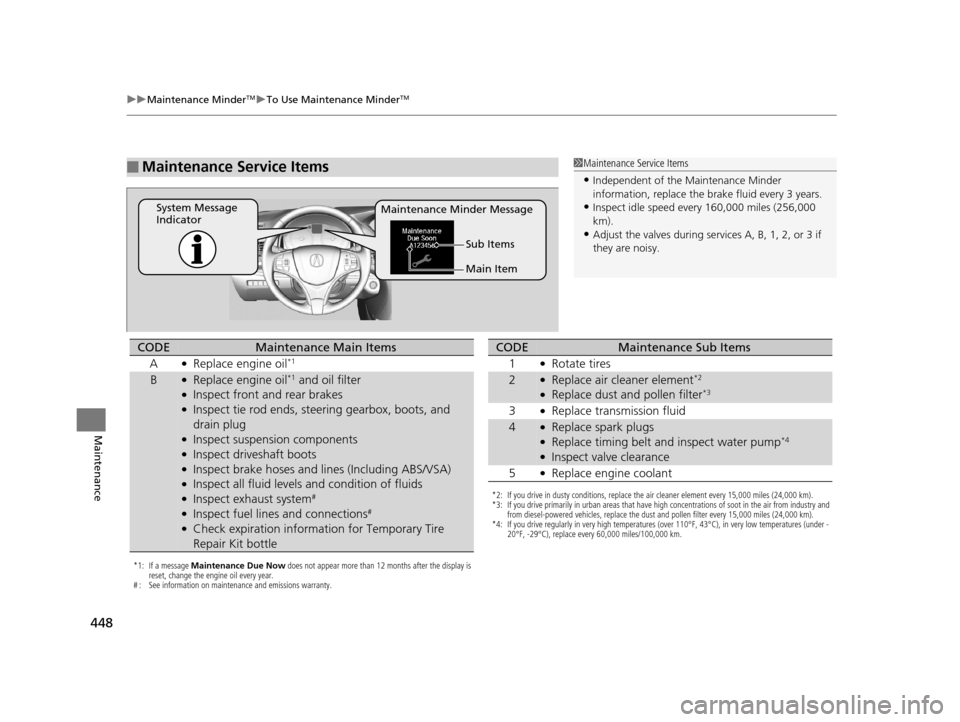
■Maintenance Service Items1Maintenance Service Items
•Independent of the Maintenance Minder
information, replace the brake fluid every 3 years.
•Inspect idle speed every 160,000 miles (256,000
km).
•Adjust the valves during services A, B, 1, 2, or 3 if
they are noisy.
Maintenance Minder Message
System Message
Indicator
Main Item Sub Items
*1: If a message Maintenance Due Now does not appear more than 12 months after the display is
reset, change the engine oil every year.
# : See information on maintenance and emissions warranty.
CODEMaintenance Main Items
A
●Replace engine oil*1
B●Replace engine oil*1 and oil filter●Inspect front and rear brakes●Inspect tie rod ends, steering gearbox, boots, and
drain plug
●Inspect suspension components●Inspect driveshaft boots●Inspect brake hoses and li nes (Including ABS/VSA)●Inspect all fluid levels and condition of fluids●Inspect exhaust system#
●Inspect fuel lines and connections#
●Check expiration informat ion for Temporary Tire
Repair Kit bottle
*2: If you drive in dusty conditions, replace the air cleaner element every 15,000 miles (24,000 km).
*3: If you drive primarily in urban areas that have high concentrations of soot in the air from industry and from diesel-powered vehicles, replace the dust and pollen filter every 15,000 miles (24,000 km).
*4: If you drive regularly in very high temperatures (over 110°F, 43°C), in very low temperatures (under - 20°F, -29°C), replace every 60,000 miles/100,000 km.
CODEMaintenance Sub Items
1
●Rotate tires
2●Replace air cleaner element*2
●Replace dust and pollen filter*3
3●Replace transmission fluid
4●Replace spark plugs●Replace timing belt and inspect water pump*4
●Inspect valve clearance
5
●Replace engine coolant
17 ACURA RLX-31TY26300.book 448 ページ 2016年6月17日 金曜日 午前8時12分
Page 451 of 557
450
Maintenance
Maintenance Under the Hood
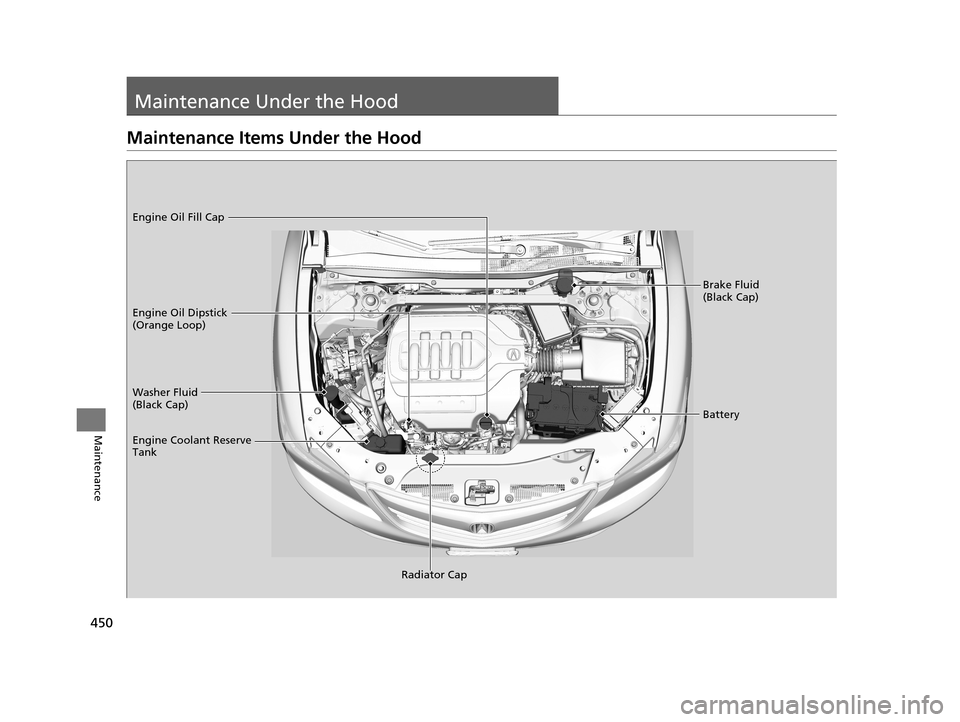
Maintenance Items Under the Hood
Brake Fluid
(Black Cap)
Washer Fluid
(Black Cap) Engine Oil Dipstick
(Orange Loop) Engine Oil Fill Cap
Battery
Engine Coolant Reserve
Tank
Radiator Cap
17 ACURA RLX-31TY26300.book 450 ページ 2016年6月17日 金曜日 午前8時12分
Page 452 of 557
451
uuMaintenance Under the Hood uOpening the Hood
Maintenance
Opening the Hood
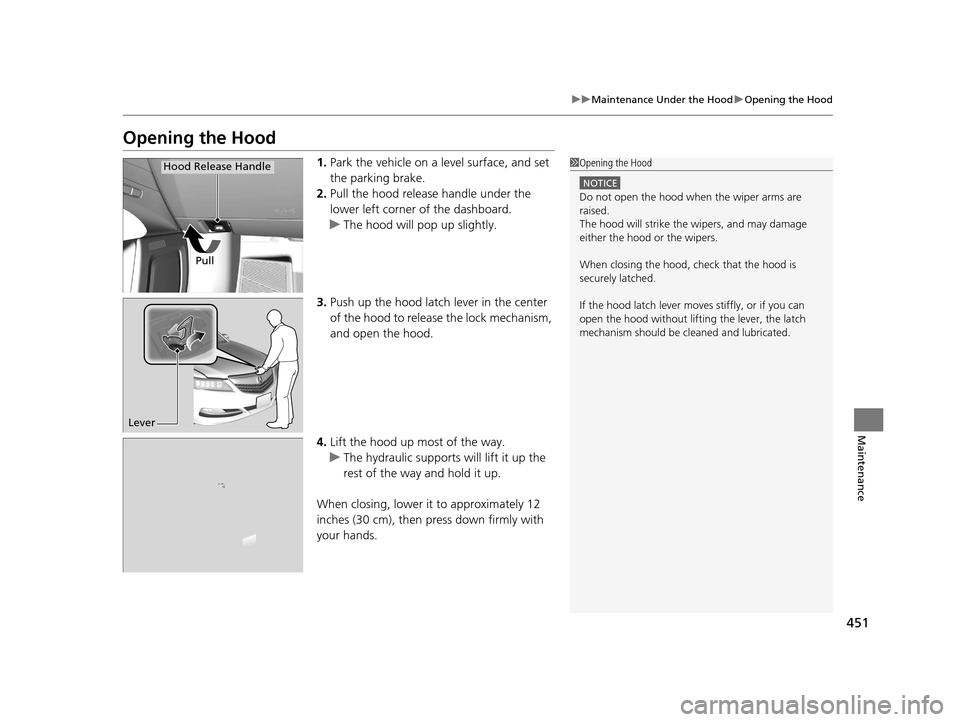
1. Park the vehicle on a level surface, and set
the parking brake.
2. Pull the hood release handle under the
lower left corner of the dashboard.
u The hood will pop up slightly.
3. Push up the hood latch lever in the center
of the hood to release the lock mechanism,
and open the hood.
4. Lift the hood up most of the way.
u The hydraulic supports will lift it up the
rest of the way and hold it up.
When closing, lower it to approximately 12
inches (30 cm), then pr ess down firmly with
your hands.1 Opening the Hood
NOTICE
Do not open the hood when the wiper arms are
raised.
The hood will strike the wipers, and may damage
either the hood or the wipers.
When closing the hood, check that the hood is
securely latched.
If the hood latch lever moves stiffly, or if you can
open the hood without lifti ng the lever, the latch
mechanism should be cleaned and lubricated.
Pull
Hood Release Handle
Lever
17 ACURA RLX-31TY26300.book 451 ページ 2016年6月17日 金曜日 午前8時12分