mirror Acura RLX 2017 Owner's Guide
[x] Cancel search | Manufacturer: ACURA, Model Year: 2017, Model line: RLX, Model: Acura RLX 2017Pages: 557, PDF Size: 37.97 MB
Page 410 of 557
409
uuBraking uCollision Mitigation Braking SystemTM (CMBSTM)*
Continued
Driving
Collision Mitigation Braking SystemTM (CMBSTM)*
Can assist you when there is a possibility of your vehicle colliding with a vehicle or a
pedestrian detected in front of yours. The CMBSTM is designed to alert you when a
potential collision is determined, as well as to reduce your vehicle speed to help
minimize collision severity when a collision is deemed unavoidable.
■How the system works
1 Collision Mitigation Braking SystemTM (CMBSTM)*
Important Safety Reminder
The CMBSTM is designed to reduce the severity of an
unavoidable collision. It does not prevent collision nor
stop the vehicle automatically. It is still your
responsibility to operate the brake pedal and steering
wheel appropriately acco rding to the driving
conditions.
The CMBS
TM may not activate or may not detect a
vehicle in front of y our vehicle under certain
conditions: 2 CMBS
TM Conditions and Limitations P. 413
You can read about handling information for the
camera equipped with this system. 2 Front Sensor Camera
* P. 359
1How the system works
Rapid vibrations on the steering wheel alert you
when the your vehicle speed is between 19 and 62
mph (30 and 100 km/h) with an oncoming vehicle
detected in front of you.
When the CMBS
TM activates, it may automatically
apply the brake. It will be canceled when your vehicle
stops or a potential coll ision is not determined.
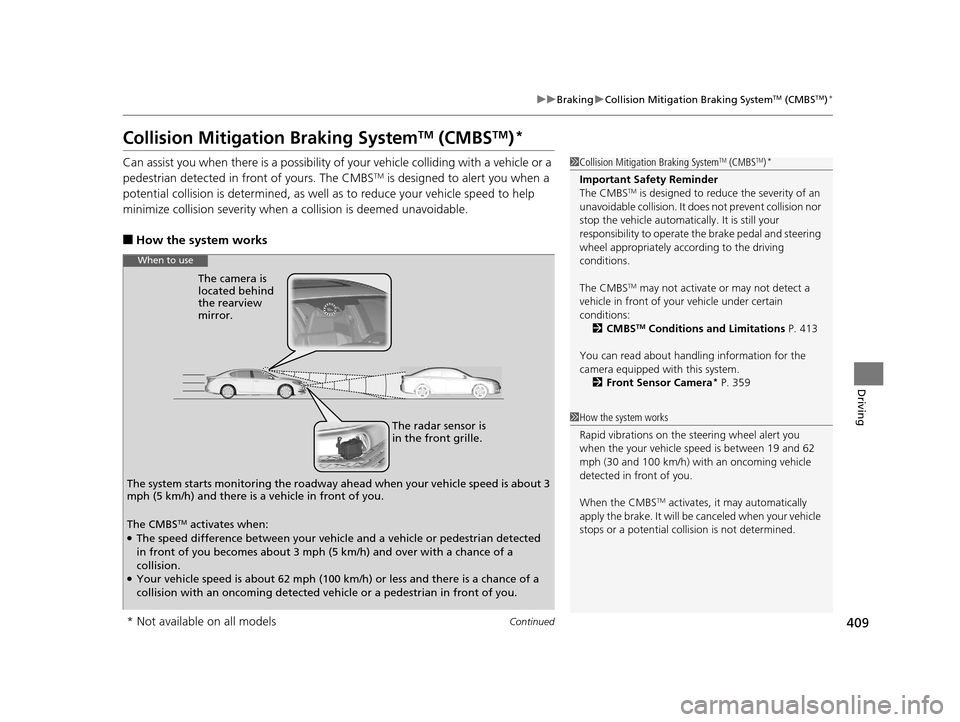
The radar sensor is
in the front grille.
The camera is
located behind
the rearview
mirror.
The system starts monitoring the roadway ah ead when your vehicle speed is about 3
mph (5 km/h) and there is a vehicle in front of you.
When to use
The CMBSTM activates when:●The speed difference between your vehicle and a vehicle or pedestrian detected
in front of you becomes about 3 mph (5 km/h) and over with a chance of a
collision.
●Your vehicle speed is about 62 mph (100 km/h) or less and there is a chance of a
collision with an oncoming detected vehicle or a pedestrian in front of you.
* Not available on all models
17 ACURA RLX-31TY26300.book 409 ページ 2016年6月17日 金曜日 午前8時12分
Page 416 of 557
415
uuBraking uCollision Mitigation Braking SystemTM (CMBSTM)*
Continued
Driving
• When there is a group of people in front of your vehicle walking together side by
side.
• Surrounding conditions or belongings of the pedestrian alter the pedestrian’s
shape, preventing the system from recognizing that the person is a pedestrian.
• When the pedestrian is shorte r than about 3.3 feet (1 meter) or taller than about
6.6 feet (2 meters) in height.
• When a pedestrian blends in with the background.
• When a pedestrian is bent over or squatting, or when their hands are raised or
they are running.
• When several pedestrians are walking ahead in a group.
• When the camera cannot correctly identify that a pedestrian is present due to an
unusual shape (holding luggage, body position, size).
■Automatic shutoff
The CMBSTM may automatically shut itself off and the CMBSTM indicator comes and
stays on when:
• The temperature inside the system is high.
• You drive off-road or on a mountain road, or curved and winding road for an
extended period.
• An abnormal tire condition is detected (wrong tire size, flat tire, etc.).
• The camera behind the rearview mirror, or the area around the camera, including
the windshield, gets dirty.
Once the conditions th at caused the CMBS
TM to shut off improve or are addressed
(e.g., cleaning), the system comes back on.
Limitations applicable to pedestrian detection only
17 ACURA RLX-31TY26300.book 415 ページ 2016年6月17日 金曜日 午前8時12分
Page 423 of 557
422
uuParking Your Vehicle uCross Traffic Monitor*
Driving
Cross Traffic Monitor*
Monitors the rear corner areas using the radar sensors when reversing, and alerts
you if a vehicle approaching fro m a rear corner is detected.
The system is convenient when you are backing out of a parking space.1 Cross Traffic Monitor*
The parking sensor system’s alerting buzzer overrides
the Cross Traffic Monitor buzzer when the sensors
are detecting obstacles at the closest range.
3CAUTION
Cross Traffic Monitor cannot detect all
approaching vehicles and may not detect
an approaching vehicle at all.
Failure to visually confirm that it is safe to
back up the vehicle before doing so may
result in a collision.
Do not solely rely on the system when
reversing; always also use your mirrors, and
look behind and to the sides of your vehicle
before reversing.
Models with parking sensor system
* Not available on all models
17 ACURA RLX-31TY26300.book 422 ページ 2016年6月17日 金曜日 午前8時12分
Page 428 of 557
427
Driving
Surround View Camera System*
Is a four camera system that views areas commonly known as “blind spots” from
different angles, then displays the images on the audi o/information screen. This
system can be used to:
• Check the right and left sides of the vehi cle while crossing at intersections with
poor visibility (fog, heavy rain, obstructed view, etc.).
2Checking from the front wide view at intersections P. 435
•Check for obstacles in front of the vehicle when parking or maneuvering in
confined areas.
2 Checking the sides of your vehicle P. 435
•Check for obstacles when you are moving in (R.
2 Checking for Obstacles at the Back of Your Vehicle P. 431
•Assist you when backing into or parallel parking the vehicle in a lined parking
space.
2 Reversing into a Parking Space Marked with Parking Lines P. 432
2 Parallel Parking into a Parking Space Marked with Parking Lines P. 433
1Surround View Camera System*
3WARNING
Failure to visually assess the area around
the vehicle (directly or by use of the
mirrors) may result in a crash causing
serious injury or death.
The areas shown in the surround view
camera system display are limited. The
display may not show all pedestrians or
other objects around your vehicle.
Do not solely rely only on the surround
view camera system display to assess
whether it is safe to move your vehicle.
3WARNING
Failure to pay proper attention to your
surroundings while driv ing may result in a
crash causing serious injury or death.
To help mitigate the ch ances of a collision,
only look at the surround view camera
system display when it is safe to do so.
* Not available on all models
17 ACURA RLX-31TY26300.book 427 ページ 2016年6月17日 金曜日 午前8時12分
Page 432 of 557

431
uuSurround View Camera System*uWhen Parking Your Vehicle
Continued
Driving
When Parking Your Vehicle
The display automatically changes to the rear view when the shift lever is moved to
(R.
■Checking for Obstacles at the Back of Your Vehicle1When Parking Your Vehicle
The ground view can be disp layed even with the door
mirrors folded. However, the viewable angle and
blind spot change.
Do not refer to the surround view camera system
when the door mirrors are folded.
Folded
Not folded
Rear Wide View
Rear Normal View Rear Ground View
When the
steering wheel is
turned more
than 90 degrees.
The projection lines
appear approx. 10
inches (25 cm) outside
the vehicle body.
Blind spots
appear in
black.
Press the CAMERA
button.
Approximate distances
the guide lines indicate
Approximate distances the
projection lines indicate 39 inches (1 m)
79 inches (2 m)
118 inches
(3 m)
20 inches
(50 cm)
118 inches
(3 m)
1
Checking for Obstacles at the Back of Your Vehicle
When moving the shift lever from/to
(R, you may
experience a delay in sw itching between the audio/
information screen and a rear view image.
17 ACURA RLX-31TY26300.book 431 ページ 2016年6月17日 金曜日 午前8時12分
Page 436 of 557

Continued435
uuSurround View Camera System*uWhen Parking Your Vehicle
Driving
■Checking from the front wide view at intersections
The front wide view screen is useful when you need to check for vehicles crossing
from either direction at an inte rsection with poor visibility.
■Checking the sides of your vehicle
The side view screens are conv enient when you pull over at a curb or tollbooth, or
slowly pass by oncoming vehicles on a narrow road.
1 Checking from the front wide view at intersections
The front wide view image is a wide-angled view. The
displayed image will be largely distorted, and objects
may appear closer or more distant than they actually
are.
The angle
provided by the
front wide view
screen is 180
degrees. Front Wide View ScreenWhen the vehicle
speed is below 12
mph (20 km/h),
press the
CAMERA button
repeatedly until
the front wide
view comes on.
1 Checking the sides of your vehicle
When the door mirrors are folded, the side views
cannot be displayed.
Side View Screen
12 inches
(30 cm)
12 inches
(30 cm) Press and hold the
CAMERA
button.
Approximate distance
the projection lines
indicate is 12 inches (30
cm) from the vehicle.
Side Views
The images
from the side
cameras.12 inches
(30 cm)
17 ACURA RLX-31TY26300.book 435 ページ 2016年6月17日 金曜日 午前8時12分
Page 465 of 557
464
uuReplacing Light Bulbs uFront Side Marker Light Bulbs
Maintenance
Front Side Marker Light Bulbs
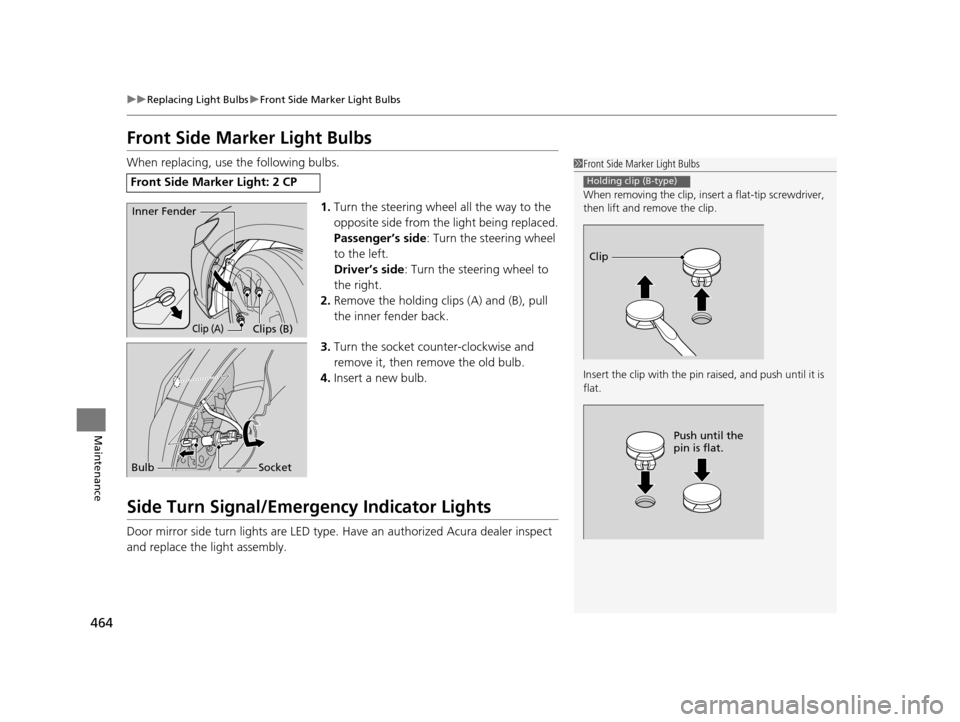
When replacing, use the following bulbs.
1.Turn the steering wheel all the way to the
opposite side from the light being replaced.
Passenger’s side : Turn the steering wheel
to the left.
Driver’s side : Turn the steering wheel to
the right.
2. Remove the holding clips (A) and (B), pull
the inner fender back.
3. Turn the socket counter-clockwise and
remove it, then remove the old bulb.
4. Insert a new bulb.
Side Turn Signal/Emergency Indicator Lights
Door mirror side turn lights are LED type. Have an authorized Acura dealer inspect
and replace the light assembly.
Front Side Marker Light: 2 CP
1 Front Side Marker Light Bulbs
When removing the clip, insert a flat-tip screwdriver,
then lift and remove the clip.
Insert the clip with the pin raised, and push until it is
flat.
Holding clip (B-type)
Clip
Push until the
pin is flat.
Inner Fender
Clip (A)Clips (B)
Bulb Socket
17 ACURA RLX-31TY26300.book 464 ページ 2016年6月17日 金曜日 午前8時12分
Page 487 of 557
486
uuCleaning uExterior Care
Maintenance
Exterior Care
Dust off the vehicle body after you drive.
Regularly inspect your vehi cle for scratches on painted surfaces. A scratch on a
painted surface can result in body rust. If you find a scratch, promptly repair it.
Wash the vehicle regularly. Wash more frequently when driving in the following
conditions:
• If driving on roads with road salt.
• If driving in coastal areas.
• If tar, soot, bird droppings, insects, or tree sap are stuck to painted surfaces.
• Make sure to follow the instructions indicated on the automated car wash.
• Fold in the door mirrors.
• Turn off the automatic intermittent wipers
*.
• Keep sufficient distance between the cleaning nozzl e and the vehicle body.
• Take particular care around the windows. Standing too close may cause water to
enter the vehicle interior.
• Do not spray high pressure water directly into the engine compartment. Instead,
use low pressure water and a mild detergent.
A good coat of automotive body wax helps protect your vehicle’s paint from the
elements. Wax will wear off over time and expose your vehicle’s paint to the
elements, so reapply as necessary.
■Washing the Vehicle
■Using an Automated Car Wash
■Using High Pressure Cleaners
■Applying Wax
1 Washing the Vehicle
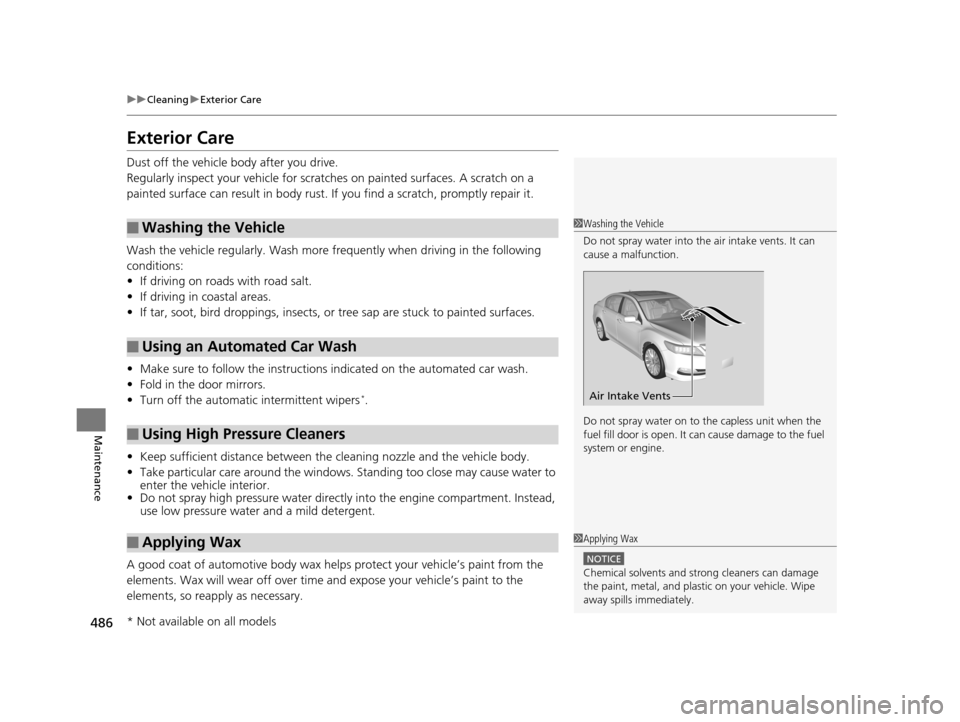
Do not spray water into the air intake vents. It can
cause a malfunction.
Do not spray water on to the capless unit when the
fuel fill door is open. It ca n cause damage to the fuel
system or engine.
Air Intake Vents
1 Applying Wax
NOTICE
Chemical solvents and st rong cleaners can damage
the paint, metal, and plasti c on your vehicle. Wipe
away spills immediately.
* Not available on all models
17 ACURA RLX-31TY26300.book 486 ページ 2016年6月17日 金曜日 午前8時12分
Page 533 of 557
532
Information
Specifications
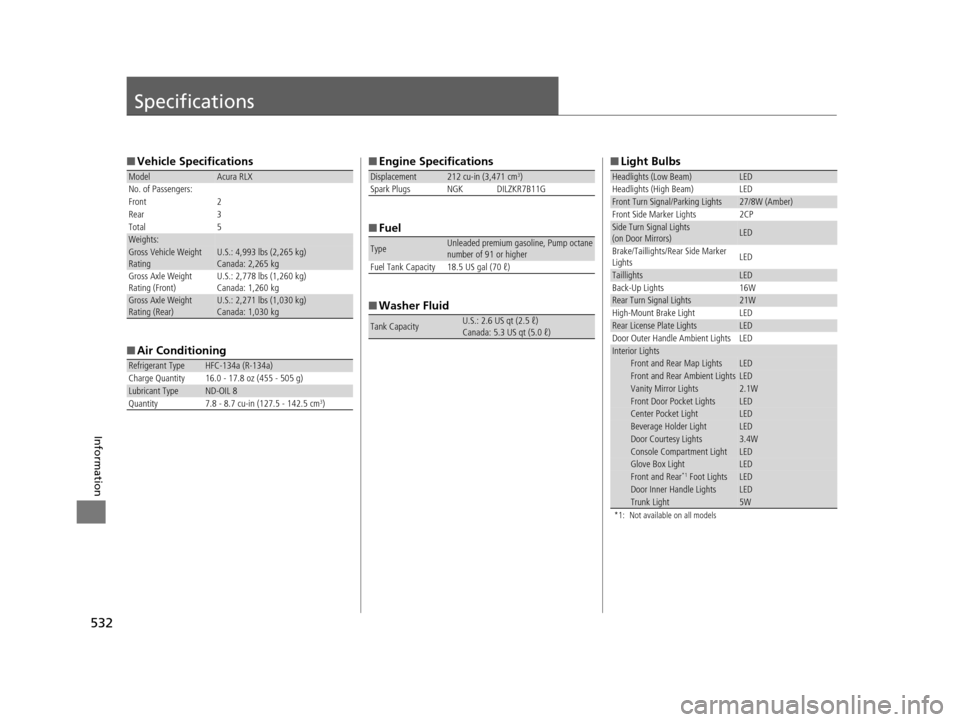
■Vehicle Specifications
■ Air Conditioning
ModelAcura RLX
No. of Passengers:
Front 2
Rear 3
Total 5
Weights:Gross Vehicle Weight
Rating U.S.: 4,993 lbs (2,265 kg)
Canada: 2,265 kg
Gross Axle Weight
Rating (Front)U.S.: 2,778 lbs (1,260 kg)
Canada: 1,260 kg
Gross Axle Weight
Rating (Rear)U.S.: 2,271 lbs (1,030 kg)
Canada: 1,030 kg
Refrigerant Type HFC-134a (R-134a)
Charge Quantity 16.0 - 17.8 oz (455 - 505 g)
Lubricant TypeND-OIL 8
Quantity 7.8 - 8.7 cu-in (127.5 - 142.5 cm3)
■ Engine Specifications
■ Fuel
■ Washer Fluid
Displacement212 cu-in (3,471 cm3)
Spark Plugs NGK DILZKR7B11G
TypeUnleaded premium gasoline, Pump octane
number of 91 or higher
Fuel Tank Capacity 18.5 US gal (70 ℓ)
Tank CapacityU.S.: 2.6 US qt (2.5 ℓ)
Canada: 5.3 US qt (5.0 ℓ)
■ Light Bulbs
*1: Not available on all models
Headlights (Low Beam)LED
Headlights (High Beam) LED
Front Turn Signal/Parking Lights27/8W (Amber)
Front Side Marker Lights 2CP
Side Turn Signal Lights
(on Door Mirrors)LED
Brake/Taillights/Rear Side Marker
Lights LED
TaillightsLED
Back-Up Lights 16W
Rear Turn Signal Lights21W
High-Mount Brake Light LED
Rear License Plate LightsLED
Door Outer Handle Ambient Lights LED
Interior LightsFront and Rear Map LightsLEDFront and Rear Ambient LightsLEDVanity Mirror Lights2.1WFront Door Pocket LightsLEDCenter Pocket LightLEDBeverage Holder LightLEDDoor Courtesy Lights3.4WConsole Compartment LightLEDGlove Box LightLEDFront and Rear*1 Foot LightsLEDDoor Inner Handle LightsLEDTrunk Light5W
17 ACURA RLX-31TY26300.book 532 ページ 2016年6月17日 金曜日 午前8時12分
Page 547 of 557
Index
546
Index
Index
A
AAC.................................................... 224, 248
ABS (Anti-lock Brake System) ................... 407
Accessories and Modifications ................. 488
Accessory Power Sockets .......................... 171
AcuraLink .................................................. 330
Adaptive Cruise Control (ACC) with Low Speed Follow (LSF) ............................ 82, 361
Additives Coolant ................................................... 458
Engine Oil ................................................ 453
Washer .................................................... 461
Additives, Engine Oil ................................ 453
Adjusting
Armrest ................................... 159, 161, 162
Front Seats .............................................. 156
Head Restraints........................................ 159
Mirrors .................................................... 153
Steering Wheel ........................................ 152
Temperature ............................................ 100
Adjusting the Clock .................................. 114
Agile Handling Assist ................................ 395
Aha
TM Menu .............................................. 247
AhaTM Radio .............................................. 257
Air Conditioning System (Climate Control
System) .................................................... 181
Changing the Mode ................................ 184
Defrosting the Windshield and
Windows ............................................... 188
Dust and Pollen Filter ............................... 483
Rear Temperature Control Dial................. 189 Sensors ................................................... 190
Using Automatic Climate Control ............ 181
Air Pressure ....................................... 472, 533
Airbags ........................................................ 37
Advanced Airbags ..................................... 43
Airbag Care............................................... 51
Driver’s Knee Airbag.................................. 44
Event Data Recorder .................................... 0
Front Airbags (SRS) .................................... 40
Indicator.............................................. 49, 74
Passenger Airbag Off Indicator .................. 50
Sensors ..................................................... 37
Side Airbags .............................................. 46
Side Curtain Airbags.................................. 48
AM/FM Radio ............................................ 216
Anti-lock Brake System (ABS) .................. 407
Indicator.................................................... 74
Armrest ..................................... 159, 161, 162
Audio Remote Controls ........................... 195
Audio System ............................................ 192
Adjusting the Sound................................ 209
Auxiliary Input Jack.................................. 193
Error Messages ........................................ 253
General Information ................................ 258
HDD ........................................................ 227
Internet Radio ......................................... 245
iPod ........................................................ 237
MP3/WMA/AAC .............................. 224, 248
Reactivating ............................................ 194
Recommended CDs ................................. 259
Recommended Devices............................ 261 Remote Controls ..................................... 195
Security Code ......................................... 194
Shortcuts ................................................ 198
Theft Protection ...................................... 194
USB Flash Drives...................................... 261
USB Port ................................................. 193
Audio/Information Screen ....................... 205
Authorized Manuals ................................ 541
Auto Door Locking/Unlocking ................ 127
Customize ...................................... 109, 278
Automatic Brake Hold ............................. 405
Indicator ........................................... 70, 405
Automatic Brake Hold System Indicator ........................................... 70, 405
Automatic Lighting .................................. 142
Automatic Transmission .......................... 350
Creeping................................................. 350
Fluid ....................................................... 460
Kickdown ............................................... 350
Operating the Shift Lever .................. 17, 352
Shift Lever Does Not Move ...................... 515
Shifting ................................................... 351
Auxiliary Input Jack ................................. 193
Average Fuel Economy ............................ 100
Average Speed ......................................... 101
B
Battery...................................................... 480
Charging System Indicator ................ 72, 518
Jump Starting ......................................... 512
17 ACURA RLX-31TY26300.book 546 ページ 2016年6月17日 金曜日 午前8時12分