parking brake Acura RLX 2017 Quick Guide
[x] Cancel search | Manufacturer: ACURA, Model Year: 2017, Model line: RLX, Model: Acura RLX 2017Pages: 73, PDF Size: 7.37 MB
Page 5 of 73
2 || 3
S AFETY
V
ISUAL I NDEX
TABLE OF
CONTENTS
INDEX
VISUAL INDEX
VOICE COMMAND INDEX
SAFETY
INFORMATION
CLIENT
INFORMATION
INSTRUMENT PANEL
SPECIFICATIONS
VEHICLE
CONTROLS
MAINTENANCE
AUDIO AND
CONNECTIVITY
HANDLING THE UNEXPECTED
BLUETOOTH®
HANDSFREELINK®
DRIVING
ACURALINK®
NAVIGATION
SAFETY INFORMATION
Your safety—and the safety of others—is very important, and operating this vehicle
safely is an important responsibility. While we strive to help you make informed
decisions about safety, it is not practical or possible to warn you about all the
hazards associated with operating or maintaining your vehicle. Therefore, you must
use your own good judgment.
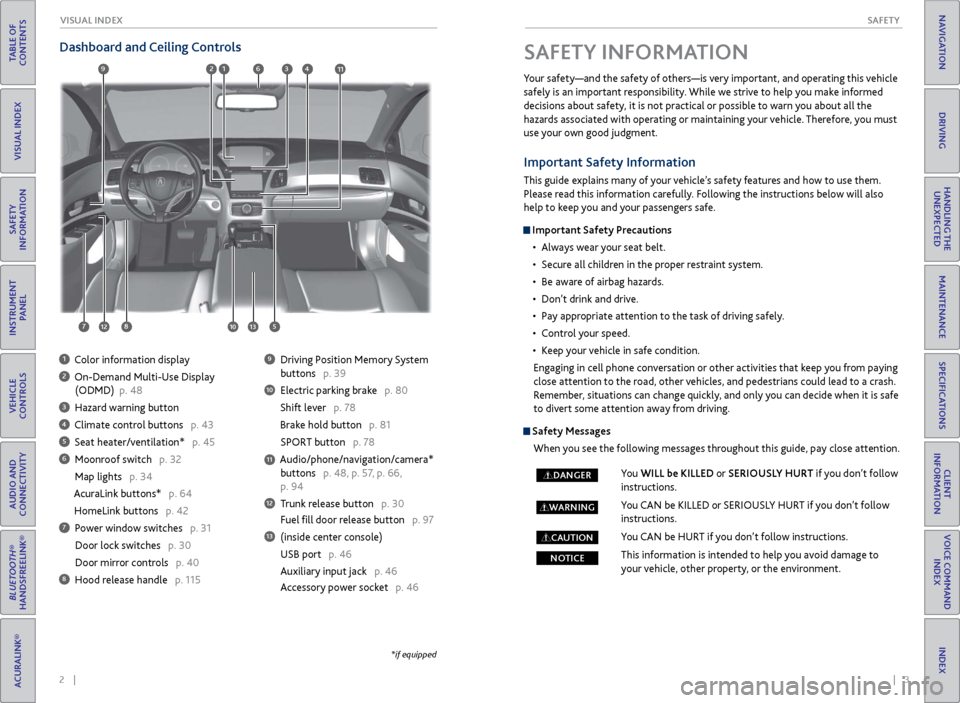
Dashboard and Ceiling Controls
1 Color information display
2 On-Demand Multi-Use Display
(ODMD)
p. 48
3 Hazard warning button
4 Climate control buttons p. 43
5 Seat heater/ventilation* p. 45
6 Moonroof switch p. 32
Map lights p. 34
AcuraLink buttons* p. 64
HomeLink buttons p. 42
7 Power window switches p. 31
Door lock switches
p. 30
Door mirr
or controls p. 40
8 Hood release handle p. 115
9 Driving Position Memory System
buttons
p. 39
10 Electric parking brak e p. 80
Shift lever p. 78
Brake hold button p. 81
SPOR
T button p. 78
Audio/phone/navigation/camera* buttons p. 48, p. 57, p. 66,
p. 94
12 Trunk release button p. 30
Fuel fill door release button p. 97
13 (inside center console)
USB port
p. 46
Auxiliary input jack
p. 46
Accessory power socket p. 46
11
*if equipped
Important Safety Information
This guide explains many of your vehicle’s safety features and how to use them.
Please read this information carefully. Following the instructions below will also
help to keep you and your passengers safe.
Important Safety Precautions
•
Al
ways wear your seat belt.
•
Secur
e all children in the proper restraint system.
•
Be awar
e of airbag hazards.
•
Don’t drink
and drive.
•
P
ay appropriate attention to the task of driving safely.
•
C
ontrol your speed.
•
K
eep your vehicle in safe condition.
Engaging in cell phone conversation or other activities that keep you from paying
close attention to the road, other vehicles, and pedestrians could lead to a crash.
Remember, situations can change quickly, and only you can decide when it is safe
to divert some attention away from driving.
Safety Messages When you see the following messages throughout this guide, pay close attention.
You WILL be KILLED or SERIOUSLY HURT if you don’t follow
instructions.
You CAN be KILLED or SERIOUSLY HURT if you don’t follow
instructions.
You CAN be HURT if you don’t follow instructions.
This information is intended to help you avoid damage to
your vehicle, other property, or the environment.
DANGER
WARNING
CAUTION
NOTICE
69123411
781012513
Page 15 of 73
22 || 23
I NSTRUMENT P
ANELI
NSTRUMENT P
ANEL
TABLE OF
CONTENTS
INDEX
VISUAL INDEX
VOICE COMMAND INDEX
SAFETY
INFORMATION
CLIENT
INFORMATION
INSTRUMENT PANEL
SPECIFICATIONS
VEHICLE
CONTROLS
MAINTENANCE
AUDIO AND
CONNECTIVITY
HANDLING THE UNEXPECTED
BLUETOOTH®
HANDSFREELINK®
DRIVING
ACURALINK®
NAVIGATION
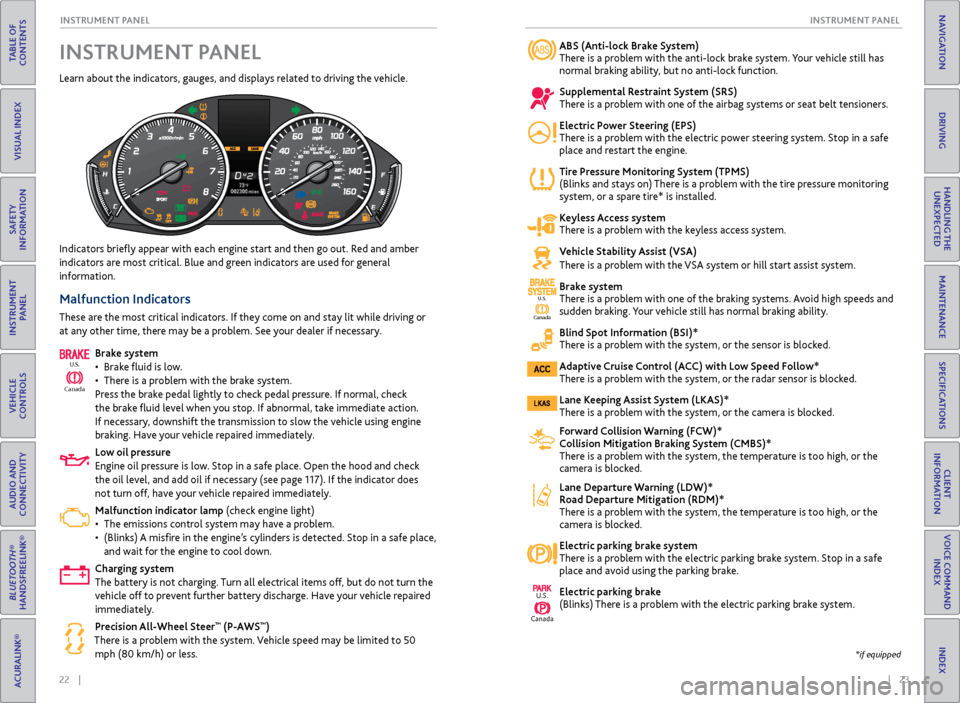
ABS (Anti-lock Brake System)
There is a problem with the anti-lock brake system. Your vehicle still has
normal braking ability, but no anti-lock function.
Supplemental Restraint System (SRS)
There is a problem with one of the airbag systems or seat belt tensioners.
Electric Power Steering (EPS)
There is a problem with the electric power steering system. Stop in a safe
place and restart the engine.
Tire Pressure Monitoring System (TPMS)
(Blinks and stays on) There is a problem with the tire pressure monitoring
system, or a spare tire* is installed.
Keyless Access system
There is a problem with the keyless access system.
Vehicle Stability Assist (VSA)
There is a problem with the VSA system or hill start assist system.
Brake system
There is a problem with one of the braking systems. Avoid high speeds and
sudden braking.
Your vehicle still has normal braking ability.
Blind Spot Information (BSI)*
There is a problem with the system, or the sensor is blocked.
Adaptive Cruise Control (ACC) with Low Speed Follow*
There is a problem with the system, or the radar sensor is blocked.
Lane Keeping Assist System (LKAS)*
There is a problem with the system, or the camera is blocked.
Forward Collision Warning (FCW)*
Collision Mitigation Braking System (CMBS)*
There is a problem with the system, the temperature is too high, or the
camera is blocked.
Lane Departure Warning (LDW)*
Road Departure Mitigation (RDM)*
There is a problem with the system, the temperature is too high, or the
camera is block
ed.
Electric parking brake system
There is a problem with the electric parking brake system. Stop in a safe
place and av
oid using the parking brake.
Electric parking brake
(Blinks) There is a problem with the electric parking brake system.
Indicators briefly appear with each engine start and then go out. Red and amber
indicators are most critical. Blue and green indicators are used for general
information.
Malfunction Indicators
These are the most critical indicators. If they come on and stay lit while driving or
at any other time, there may be a problem. See your dealer if necessary.
Brake system
•
Brak
e fluid is low.
•
Ther
e is a problem with the brake system.
Press the brake pedal lightly to check pedal pressure. If normal, check
the brake fluid level when you stop. If abnormal, take immediate action.
If necessary, downshift the transmission to slow the vehicle using engine
braking. Have your vehicle repaired immediately.
Low oil pressure
Engine oil pressure is low. Stop in a safe place. Open the hood and check
the oil level, and add oil if necessary (see page 117). If the indicator does
not turn off, have your vehicle repaired immediately.
Malfunction indicator lamp (check engine light)
•
The emissions contr
ol system may have a problem.
•
(Blinks)
A misfire in the engine’s cylinders is detected. Stop in a safe place,
and wait for the engine to cool down.
Charging system
The battery is not charging. Turn all electrical items off, but do not turn the
vehicle off to prevent further battery discharge. Have your vehicle repaired
immediately.
Precision All-Wheel Steer
™ (P-AWS™)
There is a problem with the system. Vehicle speed may be limited to 50 mph (80 km/h) or less.
Ca nada
U.S.
INSTRUMENT PANEL
Learn about the indicators, gauges, and displays related to driving the vehicle.
Canada
U.S.
U.S.
Canada
*if equipped
Page 16 of 73
24 || 25
I NSTRUMENT P
ANELI
NSTRUMENT P
ANEL
TABLE OF
CONTENTS
INDEX
VISUAL INDEX
VOICE COMMAND INDEX
SAFETY
INFORMATION
CLIENT
INFORMATION
INSTRUMENT PANEL
SPECIFICATIONS
VEHICLE
CONTROLS
MAINTENANCE
AUDIO AND
CONNECTIVITY
HANDLING THE UNEXPECTED
BLUETOOTH®
HANDSFREELINK®
DRIVING
ACURALINK®
NAVIGATION
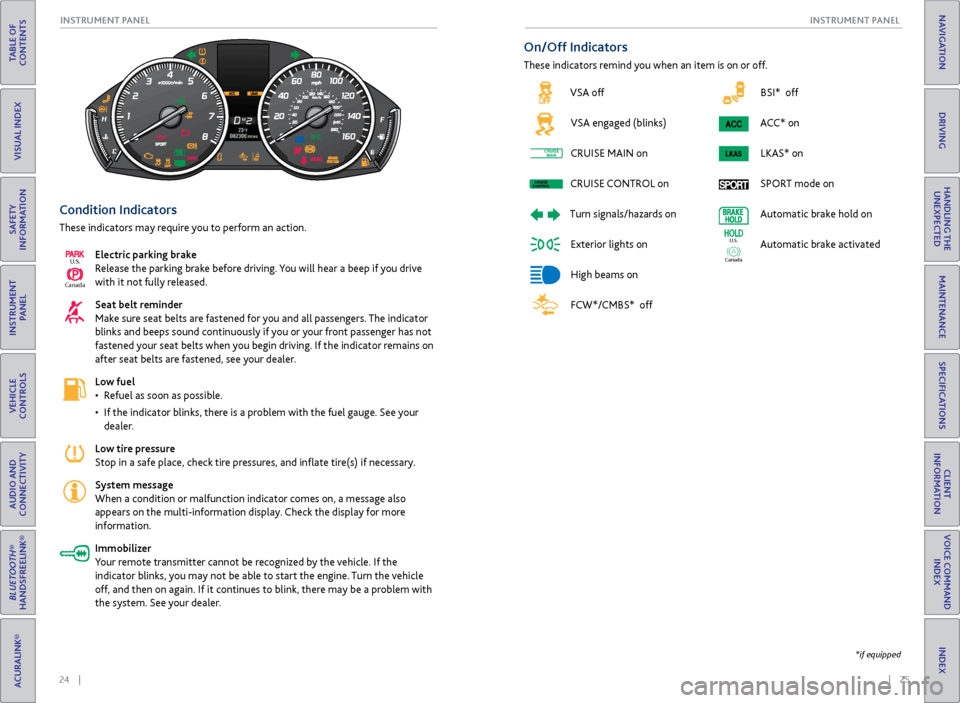
BSI* off
ACC* on LKAS* on
SPORT mode on
Automatic brake hold on
Automatic brake activated
Ca nada
U.S.
Condition Indicators
These indicators may require you to perform an action.
Electric parking brake
Release the parking brake before driving. You will hear a beep if you drive
with it not fully released.
Seat belt reminder
Make sure seat belts are fastened for you and all passengers. The indicator
blinks and beeps sound continuously if you or your front passenger has not
fastened your seat belts when you begin driving. If the indicator remains on
after seat belts are fastened, see your dealer.
Low fuel
•
R
efuel as soon as possible.
•
If
the indicator blinks, there is a problem with the fuel gauge. See your
dealer.
Low tire pressure
Stop in a safe place, check tire pressures, and inflate tire(s) if necessary.
System message
When a condition or malfunction indicator comes on, a message also
appears on the multi-information display. Check the display for more
information.
Immobilizer
Your remote transmitter cannot be recognized by the vehicle. If the
indicator blinks, you may not be able to start the engine. Turn the vehicle
off, and then on again. If it continues to blink, there may be a problem with
the system. See your dealer.
Ca nada
U.S.
On/Off Indicators
These indicators remind you when an item is on or off.
*if equipped
VSA off
VSA engaged (blinks)
CRUISE
MAIN on
CRUISE
CONTROL
on
Turn
signals/hazards on
Exterior lights on
High beams on
FCW*/CMBS* off
CRUISEMAINCRUISE
CONTROLCRUISE
MAINCRUISE
CONTROL
Page 43 of 73
78 || 79
DRIVING
DRIVING
TABLE OF
CONTENTS
INDEX
VISUAL INDEX
VOICE COMMAND INDEX
SAFETY
INFORMATION
CLIENT
INFORMATION
INSTRUMENT PANEL
SPECIFICATIONS
VEHICLE
CONTROLS
MAINTENANCE
AUDIO AND
CONNECTIVITY
HANDLING THE UNEXPECTED
BLUETOOTH®
HANDSFREELINK®
DRIVING
ACURALINK®
NAVIGATION
When you change the shift lever from D to R and vice versa, come to a
complete stop and keep the brake pedal pressed. Operating the shift lever
before the vehicle has come to a complete standstill can damage the
transmission.
Do not operate the shift lever while pressing the accelerator pedal. You could
damage the transmission.
NOTICE
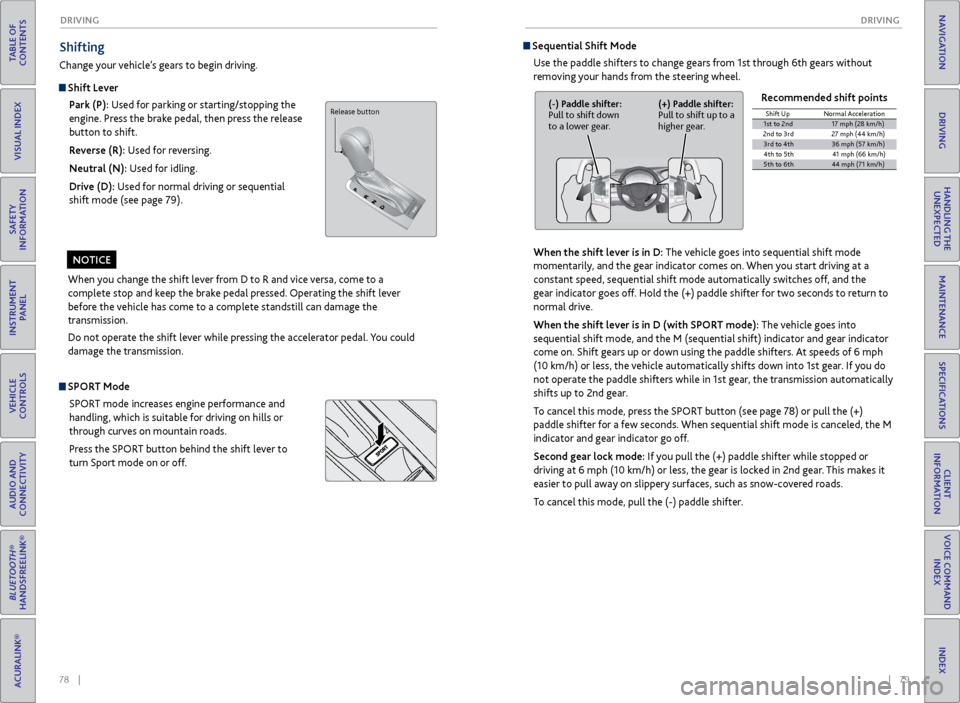
Shifting
Change your vehicle’s gears to begin driving.
Shift Lever
Park (P): Used for parking or starting/stopping the
engine. Press the brake pedal, then press the release
button to shift.
Reverse (R): Used for reversing.
Neutral (N): Used for idling.
Drive (D): Used for normal driving or sequential
shift mode (see page 79).
Sequential Shift Mode
Use the paddle shifters to change gears from 1st through 6th gears without
removing your hands from the steering wheel.
When the shift lever is in D: The vehicle goes into sequential shift mode
momentarily, and the gear indicator comes on. When you start driving at a
constant speed, sequential shift mode automatically switches off, and the
gear indicator goes off. Hold the (+) paddle shifter for two seconds to return to
normal drive.
When the shift lever is in D (with SPORT mode): The vehicle goes into
sequential shift mode, and the M (sequential shift) indicator and gear indicator
come on. Shift gears up or down using the paddle shifters. At speeds of 6 mph
(10 km/h) or less, the vehicle automatically shifts down into 1st gear. If you do
not operate the paddle shifters while in 1st gear, the transmission automatically
shifts up to 2nd gear.
To cancel this mode, press the SPORT button (see page 78) or pull the (+)
paddle shifter for a few seconds. When sequential shift mode is canceled, the M
indicator and gear indicator go off.
Second gear lock mode: If you pull the (+) paddle shifter while stopped or
driving at 6 mph (10 km/h) or less, the gear is locked in 2nd gear. This makes it
easier to pull away on slippery surfaces, such as snow-covered roads.
To cancel this mode, pull the (-) paddle shifter. Recommended shift points
(-) Paddle shifter:
Pull to shift down
to a lower gear.
(+) Paddle shifter:
Pull to shift up to a
higher gear.Shift Up
Normal Acceleration1st to 2n d17 mph (28 km/h)
2nd to 3r d2 7 mph (44 km/h)
3rd to 4th36 mph (57 km/h)
4th to 5t h4 1 mph (66 km/h )
5th to 6th44 mph (71 km/h)
SPORT Mode
SPORT mode increases engine performance and
handling, which is suitable for driving on hills or
through curves on mountain roads.
Press the SPORT button behind the shift lever to
turn Sport mode on or off.
Release button
Page 44 of 73
80 || 81
DRIVING
DRIVING
TABLE OF
CONTENTS
INDEX
VISUAL INDEX
VOICE COMMAND INDEX
SAFETY
INFORMATION
CLIENT
INFORMATION
INSTRUMENT PANEL
SPECIFICATIONS
VEHICLE
CONTROLS
MAINTENANCE
AUDIO AND
CONNECTIVITY
HANDLING THE UNEXPECTED
BLUETOOTH®
HANDSFREELINK®
DRIVING
ACURALINK®
NAVIGATION
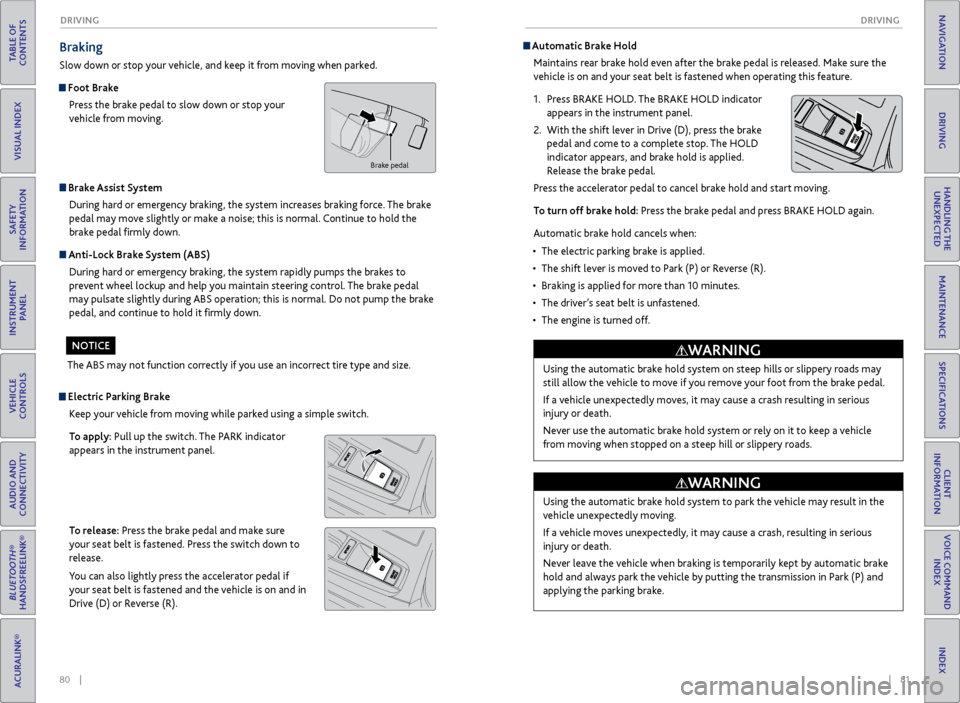
Braking
Slow down or stop your vehicle, and keep it from moving when parked.
Foot Brake
Press the brake pedal to slow down or stop your
vehicle from moving.
Brake Assist System During hard or emergency braking, the system increases braking force. The brake
pedal may move slightly or make a noise; this is normal. Continue to hold the
brake pedal firmly down.
Anti-Lock Brake System (ABS) During hard or emergency braking, the system rapidly pumps the brakes to
prevent wheel lockup and help you maintain steering control. The brake pedal
may pulsate slightly during ABS operation; this is normal. Do not pump the brake
pedal, and continue to hold it firmly down.
The ABS may not function correctly if you use an incorrect tire type and size.
NOTICE
Electric Parking Brake Keep your vehicle from moving while parked using a simple switch.
To apply: Pull up the switch. The PARK indicator
appears in the instrument panel.
To release: Press the brake pedal and make sure
your seat belt is fastened. Press the switch down to
release.
You can also lightly press the accelerator pedal if
your seat belt is fastened and the vehicle is on and in
Drive (D) or Reverse (R).
Automatic Brake HoldMaintains rear brake hold even after the brake pedal is released. Make sure the
vehicle is on and your seat belt is fastened when operating this feature.
1.
Pr
ess BRAKE HOLD. The BRAKE HOLD indicator
appears in the instrument panel.
2.
With
the shift lever in Drive (D), press the brake
pedal and come to a complete stop. The HOLD
indicator appears, and brake hold is applied.
Release the brake pedal.
Press the accelerator pedal to cancel brake hold and start moving.
To turn off brake hold: Press the brake pedal and press BRAKE HOLD again.
Automatic brake hold cancels when:
•
The electric parking brak
e is applied.
•
The shift lev
er is moved to Park (P) or Reverse (R).
•
Braking is applied
for more than 10 minutes.
•
The
driver’s seat belt is unfastened.
•
The
engine is turned off.
Brake pedal
Using the automatic brake hold system on steep hills or slippery roads may
still allow the vehicle to move if you remove your foot from the brake pedal.
If a vehicle unexpectedly moves, it may cause a crash resulting in serious
injury or death.
Never use the automatic brake hold system or rely on it to keep a vehicle
from moving when stopped on a steep hill or slippery roads.
WARNING
Using the automatic brake hold system to park the vehicle may result in the
vehicle unexpectedly moving.
If a vehicle moves unexpectedly, it may cause a crash, resulting in serious
injury or death.
Never leave the vehicle when braking is temporarily kept by automatic brake
hold and always park the vehicle by putting the transmission in Park (P) and
applying the parking brake.
WARNING
Page 50 of 73
92 || 93
DRIVING
DRIVING
TABLE OF
CONTENTS
INDEX
VISUAL INDEX
VOICE COMMAND INDEX
SAFETY
INFORMATION
CLIENT
INFORMATION
INSTRUMENT PANEL
SPECIFICATIONS
VEHICLE
CONTROLS
MAINTENANCE
AUDIO AND
CONNECTIVITY
HANDLING THE UNEXPECTED
BLUETOOTH®
HANDSFREELINK®
DRIVING
ACURALINK®
NAVIGATION
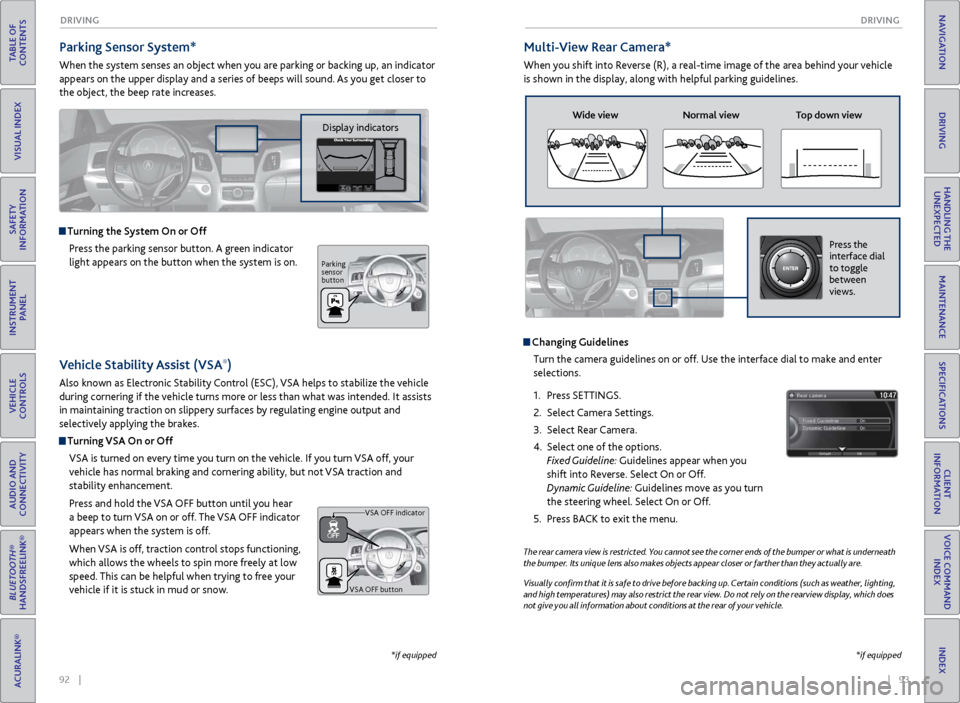
Parking Sensor System*
When the system senses an object when you are parking or backing up, an indicator
appears on the upper display and a series of beeps will sound. As you get closer to
the object, the beep rate increases.
Turning the System On or Off
Press the parking sensor button. A green indicator
light appears on the button when the system is on.
*if equipped
Multi-View Rear Camera*
When you shift into Reverse (R), a real-time image of the area behind your vehicle
is shown in the display, along with helpful parking guidelines.
The rear camera view is restricted. You cannot see the corner ends of the bumper or what is underneath
the bumper. Its unique lens also makes objects appear closer or farther than they actually are.
Visually confirm that it is safe to drive before backing up. Certain conditions (such as weather, lighting,
and high temperatures) may also restrict the rear view. Do not rely on the rearview display, which does
not give you all information about conditions at the rear of your vehicle.
Changing GuidelinesTurn the camera guidelines on or off. Use the interface dial to make and enter
selections.
1.
Pr
ess SETTINGS.
2.
Select Camera
Settings.
3.
Select
Rear Camera.
4.
Select one of the options.
Fixed Guideline: Guidelines appear when you
shift into Reverse. Select On or Off.
Dynamic Guideline: Guidelines move as you turn
the steering wheel. Select On or Off.
5.
Pr
ess BACK to exit the menu.
Wide view Normal view Top down view
Press the
interface dial
to toggle
between
views.
*if equipped
Vehicle Stability Assist (VSA®)
Also known as Electronic Stability Control (ESC), VSA helps to stabilize the vehicle
during cornering if the vehicle turns more or less than what was intended. It assists
in maintaining traction on slippery surfaces by regulating engine output and
selectively applying the brakes.
Turning VSA On or Off
VSA is turned on every time you turn on the vehicle. If you turn VSA off, your
vehicle has normal braking and cornering ability, but not VSA traction and
stability enhancement.
Press and hold the VSA
OFF button until
you hear
a beep to turn VSA on or off. The VSA OFF indicator
appears when the system is off.
When VSA is off, traction control stops functioning,
which allows the wheels to spin more freely at low
speed. This can be helpful when trying to free your
vehicle if it is stuck in mud or snow.
VSA OFF button VSA OFF indicator
Display indicators
Parking
sensor
button
Page 53 of 73
98 || 99
HANDLING THE UNEXPECTED
HANDLING THE UNEXPECTED
TABLE OF
CONTENTS
INDEX
VISUAL INDEX
VOICE COMMAND INDEX
SAFETY
INFORMATION
CLIENT
INFORMATION
INSTRUMENT PANEL
SPECIFICATIONS
VEHICLE
CONTROLS
MAINTENANCE
AUDIO AND
CONNECTIVITY
HANDLING THE UNEXPECTED
BLUETOOTH®
HANDSFREELINK®
DRIVING
ACURALINK®
NAVIGATION
HANDLING THE UNEXPECTED
Learn about what to do in critical or emergency situations.
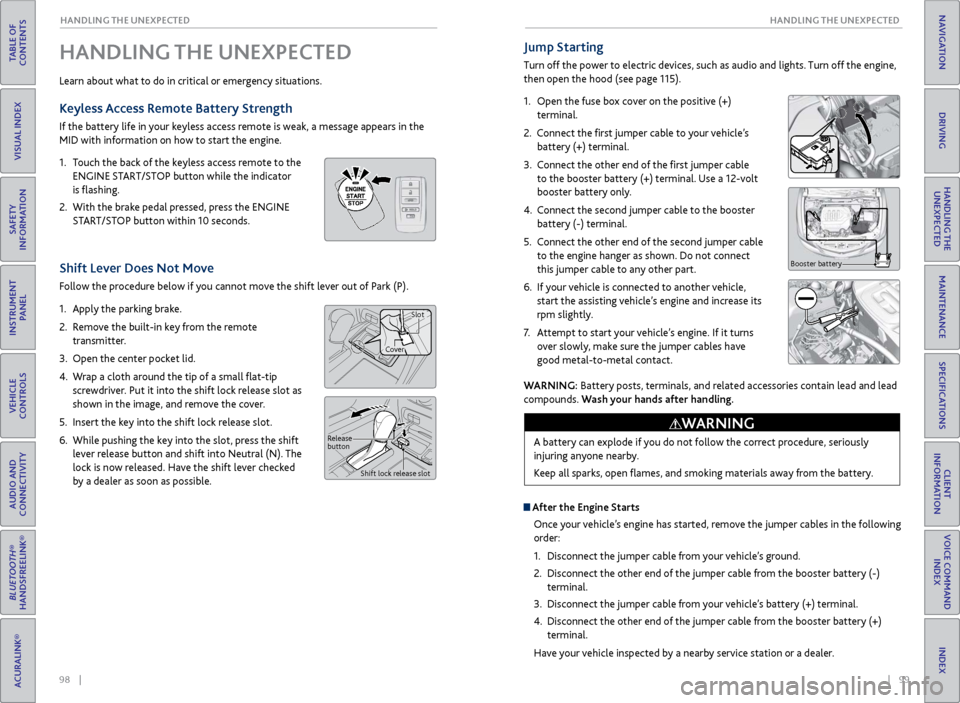
Keyless Access Remote Battery Strength
If the battery life in your keyless access remote is weak, a message appears in the
MID with information on how to start the engine.
1.
T
ouch the back of the keyless access remote to the
ENGINE START/STOP button while the indicator
is flashing.
2.
With
the brake pedal pressed, press the ENGINE
START/STOP button within 10 seconds.
Shift Lever Does Not Move
Follow the procedure below if you cannot move the shift lever out of Park (P).
1.
Appl
y the parking brake.
2.
R
emove the built-in key from the remote
transmitter.
3.
Open
the center pocket lid.
4.
W
rap a cloth around the tip of a small flat-tip
screwdriver. Put it into the shift lock release slot as
shown in the image, and remove the cover.
5.
Insert
the key into the shift lock release slot.
6.
While pushing
the key into the slot, press the shift
lever release button and shift into Neutral (N). The
lock is now released. Have the shift lever checked
by a dealer as soon as possible.
Jump Starting
Turn off the power to electric devices, such as audio and lights. Turn off the engine,
then open the hood (see page 115).
1.
Open the fuse box cover on the positive (+)
terminal.
2.
Connect the first jumper cable to your vehicle’s battery (+) terminal.
3.
C
onnect the other end of the first jumper cable
to the booster battery (+) terminal. Use a 12-volt
booster battery only.
4.
C
onnect the second jumper cable to the booster
battery (-) terminal.
5.
C
onnect the other end of the second jumper cable
to the engine hanger as shown. Do not connect
this jumper cable to any other part.
6.
If
your vehicle is connected to another vehicle,
start the assisting vehicle’s engine and increase its
rpm slightly.
7.
A
ttempt to start your vehicle’s engine. If it turns
over slowly, make sure the jumper cables have
good metal-to-metal contact.
Booster battery
WARNING: Battery posts, terminals, and related accessories contain lead and lead
compounds. Wash your hands after handling.
A battery can explode if you do not follow the correct procedure, seriously
injuring anyone nearby.
Keep all sparks, open flames, and smoking materials away from the battery.
WARNING
Release
button Shift lock release slot
CoverSlot
After the Engine Starts
Once your vehicle’s engine has started, remove the jumper cables in the following
order:
1.
Disconnect
the jumper cable from your vehicle’s ground.
2.
Disconnect
the other end of the jumper cable from the booster battery (-)
terminal.
3.
Disconnect
the jumper cable from your vehicle’s battery (+) terminal.
4.
Disconnect
the other end of the jumper cable from the booster battery (+)
terminal.
Have your vehicle inspected by a nearby service station or a dealer.
Page 56 of 73
104 || 105
HANDLING THE UNEXPECTED
HANDLING THE UNEXPECTED
TABLE OF
CONTENTS
INDEX
VISUAL INDEX
VOICE COMMAND INDEX
SAFETY
INFORMATION
CLIENT
INFORMATION
INSTRUMENT PANEL
SPECIFICATIONS
VEHICLE
CONTROLS
MAINTENANCE
AUDIO AND
CONNECTIVITY
HANDLING THE UNEXPECTED
BLUETOOTH®
HANDSFREELINK®
DRIVING
ACURALINK®
NAVIGATION
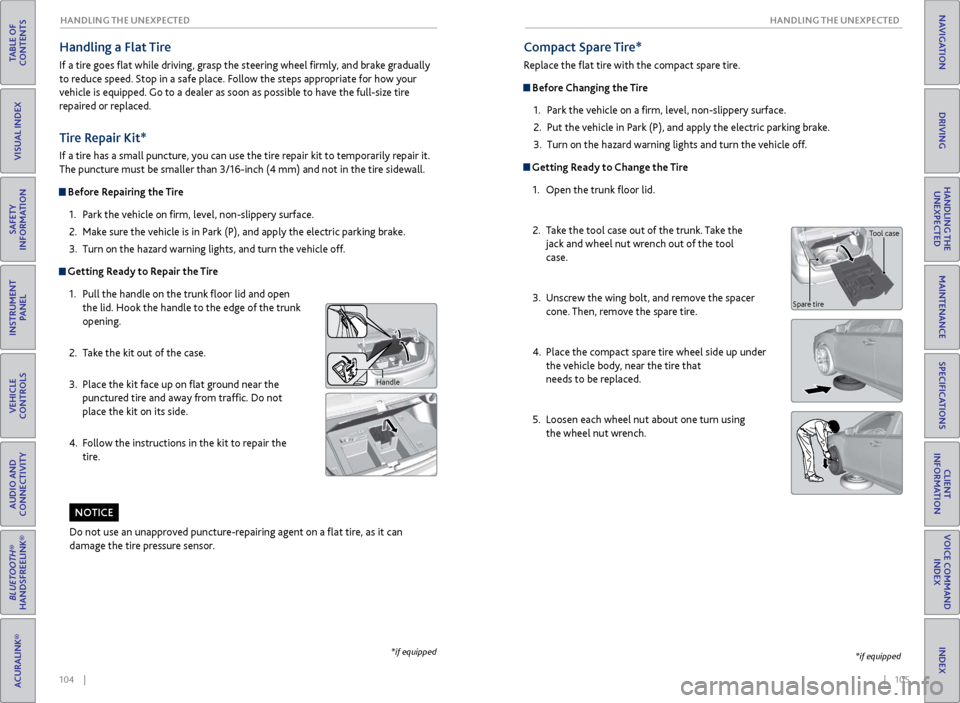
Tire Repair Kit*
If a tire has a small puncture, you can use the tire repair kit to temporarily repair it.
The puncture must be smaller than 3/16-inch (4 mm) and not in the tire sidewall.
Before Repairing the Tire
1.
P
ark the vehicle on firm, level, non-slippery surface.
2.
Mak
e sure the vehicle is in Park (P), and apply the electric parking brake.
3.
Turn on the
hazard warning lights, and turn the vehicle off.
Getting Ready to Repair the Tire1.
Pull the
handle on the trunk floor lid and open
the lid. Hook the handle to the edge of the trunk
opening.
2.
T
ake the kit out of the case.
3.
Place
the kit face up on flat ground near the
punctured tire and away from traffic. Do not
place the kit on its side.
4.
F
ollow the instructions in the kit to repair the
tire.
Handle
Compact Spare Tire*
Replace the flat tire with the compact spare tire.
Before Changing the Tire
1.
P
ark the vehicle on a firm, level, non-slippery surface.
2.
Put
the vehicle in Park (P), and apply the electric parking brake.
3.
Turn on the
hazard warning lights and turn the vehicle off.
Getting Ready to Change the Tire1.
Open the trunk
floor lid.
2.
T
ake the tool case out of the trunk. Take the
jack and wheel nut wrench out of the tool
case.
3.
Unscr
ew the wing bolt, and remove the spacer
cone. Then, remove the spare tire.
4.
Place
the compact spare tire wheel side up under
the vehicle body, near the tire that
needs to be replaced.
5.
Loosen each
wheel nut about one turn using
the wheel nut wrench.
*if equipped
Do not use an unapproved puncture-repairing agent on a flat tire, as it can
damage the tire pressure sensor.
NOTICE
Tool case
Spare tire
Handling a Flat Tire
If a tire goes flat while driving, grasp the steering wheel firmly, and brake gradually
to reduce speed. Stop in a safe place. Follow the steps appropriate for how your
vehicle is equipped. Go to a dealer as soon as possible to have the full-size tire
repaired or replaced.
*if equipped
Page 58 of 73

108 || 109
HANDLING THE UNEXPECTED
HANDLING THE UNEXPECTED
TABLE OF
CONTENTS
INDEX
VISUAL INDEX
VOICE COMMAND INDEX
SAFETY
INFORMATION
CLIENT
INFORMATION
INSTRUMENT PANEL
SPECIFICATIONS
VEHICLE
CONTROLS
MAINTENANCE
AUDIO AND
CONNECTIVITY
HANDLING THE UNEXPECTED
BLUETOOTH®
HANDSFREELINK®
DRIVING
ACURALINK®
NAVIGATION
Fuse Locations
If any electrical devices are not working, turn off the vehicle and check to see if any
applicable fuse is blown. Fuse locations are shown on the fuse box cover. Locate the
fuse by the fuse number and box cover number.
Engine Compartment Fuse Boxes
Located near the brake fluid reserve tank. Push the tabs to open the box.
Located near the (+) terminal on the battery. Push the tabs to open the box.
Circuit Protecte dAmps
EPS80 A
*if equipped
Circuit ProtectedAmps1IG1A ACG FR15A2IG1A MISS SOL110 A3
4
5SMART(7.5 A)
6 IG1B ECU FR 7.5A
7IG1B OP FR7. 5A
8 IGP2 15A
9DBW15 A
10 IGP 15A
11IG Coil15A
12 ACM 20 A
13
14 Interior Lights10A
15Back Up Radio 10A
16 Back Up 10A
17 MG Clutch 7.5 A
18 Front Washer 15A
19 Stop 7.5 A
20 Right Headlight High Beam
21 Trunk 10A
22 Small1 5A
23
24 Left Headlight High Beam
25
26 Right Headlight Low Beam
27 Left Headlight Low Beam 15A
28 IGP2 Sub 7.5A
29 Power Rear Sunshade
*(20A)
30 Headlight Washer*30 A
31 Wiper 30A
Circuit Protected
Amps
10 A
15 A
10
A
Circuit Protected Amps
1 IG1A ACG FR 15A
2 IG1A MISS SOL1 10A
3
4
5 SMART (7.5 A)
6 IG1B ECU FR 7.5A
7 IG1B OP FR 7.5A
8 IGP2 15A
9 DBW 15A
10 IGP 15A
11 IG Coil 15A
12 ACM 20 A
13
14 Interior Light s10A
15Back Up Radio10A
16 Back Up 10A
17MG Clutc h7.5 A
18 Front Washer 15A
19Stop7.5 A
20 Right Headlight High Beam
21Trunk10A
22 Small15A23
24 Left Headlight High Beam
25
26 Right Headlight Low Beam
27Left Headlight Low Beam15A
28 IGP2 Sub 7.5A
29Power Rear Sunshade*(20A )
30 Headlight Washer*30 A31Wipe r30A
Circuit ProtectedAmps
10A
15 A
10
A
Located near the battery. Push the tabs to open the box.
Circuit Protecte dAmps1Main Fuse150A
2
Horn & Hazard30A
R/B Main 260A
ABS/VSA RLY 30A
RF
C50A
R/B Main 350A
AS F/B Main 260A
ABS/VSA Motor 40A
Heater Moto
r40A
3 R/B Main
1 60A
DR F/B Main 160A
AS F/B Main 1 60A
IG Main 1 30A
DR F/B Main 260A
IG Main 2 30A
Left Precision All-Wheel Steer 40
A
Rear Defroster 40A
4 ST MG 30 A
5 Left Electric Parking Brake 30A
6R ight Electric Parking Brake 30 A
7 Injector 20A
8 Hazard 15A
9
10
11 Horn 10A
Circuit Protected
Amps
Circuit Protected Amps
1 Main Fuse 150A
2 Horn & Hazard
30A
R/B Main 26 0A
ABS/VSA RLY 30A
RF C5 0A
R/B Main 35 0A
AS F/B Main 26 0A
ABS/VSA Motor 40A
Heater Moto r4 0A
3
R/B Main 160ADR F/B Main 160AAS F/B Main 160AIG Main 130ADR F/B Main 260AIG Main 230ALeft Precision All-Wheel
Steer40A
Rear Defroster40A
4 ST MG 30 A
5Left Electric Parking Brake30A
6R ight Electric Parking Brake 30 A
7Injector20A
8 Hazard 15A
9
1011Horn10 A
Circuit ProtectedAmps
Driver’s Side Interior Fuse Box
Located under the dashboard.
Fuse label
Circuit ProtectedAmps1Driver’s Side Door Lock10 A2Passenger’s Side Door Lock10A3Driver’s Door Lock10A4Driver’s Side Door Unlock10A
5Passenger’s Side Door
U nlock10 A
6Driver’s Door Unlock10A7Door Lock20 A89Tilt Steering Wheel20A10IG1 DR 17.5A11Meter10 A12IG1 Box20 A13ACCESSORY7.5A
14
15 Driver’s Power Seat Sliding 20A
16 Moonroo f20A
17 Rear Driver’s Side Power
Window 20
A
18 Telescopic Steering Wheel 20A
19 Driver’s Power Window 20A
20 Left e-pretensioner
*(20A )
21 Fuel Pump 20A
22
23 ST Cut 7.5A
24 IG1 DR2 7.5A
25 Start DIAG 7.5A
26 A/C 7.5A
27 DRL 7.5A
28 ACC Key Lock 7.5A
29 Driver’s Lumbar Suppor t 7.5A
30 SMART 10A
31
32 Driver’s Power Seat
Reclining 20
A
33 Right Precision All-Wheel
Steer 40
A
34 IG1 Box 30A
Circuit Protected
Amps
Circuit Protected Amps
1 Driver’s Side Door Lock 10A
2 Passenger’s Side Door Lock 10A
3 Driver’s Door Lock 10A
4 Driver’s Side Door Unlock 10A
5 Passenger’s Side Door
U nlock 10
A
6 Driver’s Door Unlock 10A
7 Door Lock 20A
8
9 Tilt Steering Wheel 20A
10 IG1 DR1 7.5A
11 Meter 10A
12 IG1 Box 20A
13 ACCESSORY 7.5A
1415Driver’s Power Seat Sliding20 A16Moonroo f20A
17Rear Driver’s Side Power
Window20A
18Telescopic Steering Wheel20A19Driver’s Power Window20A20Left e-pretensioner*(20A )21Fuel Pump20A2223ST Cut7.5A24IG1 DR 27.5A
25Start DIAG7.5A26A/C7.5A27DRL7.5A28ACC Key Lock7.5A29Driver’s Lumbar Suppor t7.5A30SMART10A31
32Driver’s Power Seat
Reclining20A
33Right Precision All-Wheel
Steer40A
34IG1 Box30A
Circuit ProtectedAmps
*if equipped
Page 60 of 73
112 || 113
MAINTENANCE
MAINTENANCE
TABLE OF
CONTENTS
INDEX
VISUAL INDEX
VOICE COMMAND INDEX
SAFETY
INFORMATION
CLIENT
INFORMATION
INSTRUMENT PANEL
SPECIFICATIONS
VEHICLE
CONTROLS
MAINTENANCE
AUDIO AND
CONNECTIVITY
HANDLING THE UNEXPECTED
BLUETOOTH®
HANDSFREELINK®
DRIVING
ACURALINK®
NAVIGATION
Learn about basic maintenance that you can perform on the vehicle yourself, as
well as information about how to best maintain the vehicle.
Safety Precautions
Some of the most important safety precautions are listed below; however,
we cannot warn you of every conceivable hazard that can arise in performing
maintenance. Only you can decide whether or not you should perform a given task.
Maintenance Safety
•
T
o reduce the possibility of fire or explosion, keep cigarettes, sparks, and flames
away from the battery and all fuel-related parts.
•
Nev
er leave rags, towels, or other flammable objects under the hood. Heat
from the engine and exhaust can ignite them, causing a fire.
•
T
o clean parts, use a commercially available degreaser or parts cleaner, not
gasoline.
•
W
ear eye protection and protective clothing when working with the battery or
compressed air.
•
Do not run
the engine in confined spaces where carbon monoxide gas can
accumulate.
Vehicle Safety
•
The
vehicle must be in a stationary condition, and parked on level ground with
the parking brake set and the engine off.
•
Be awar
e that hot parts can burn you.
•
Be awar
e that moving parts can injure you.
MAINTENANCE
Improperly maintaining this vehicle or failing to correct a problem before
driving can cause a crash in which you can be seriously hurt or killed.
Always follow the inspection and maintenance recommendations according to
the schedules in this guide.
WARNING
Failure to properly follow maintenance instructions and precautions can cause
you to be seriously hurt or killed.
Always follow the procedures and precautions in this guide.
WARNING
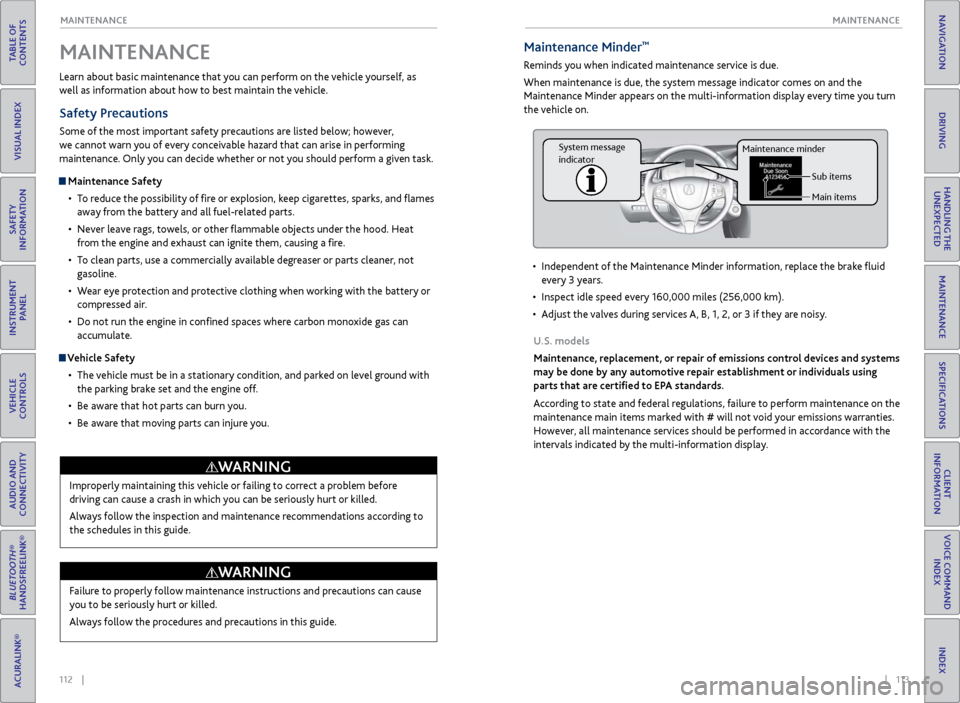
Maintenance Minder™
Reminds you when indicated maintenance service is due.
When maintenance is due, the system message indicator comes on and the
Maintenance Minder appears on the multi-information display every time you turn
the vehicle on.
•
Independent
of the Maintenance Minder information, replace the brake fluid
every 3 years.
•
Inspect idle speed ev
ery 160,000 miles (256,000 km).
•
A
djust the valves during services A, B, 1, 2, or 3 if they are noisy.
U.S. models
Maintenance, replacement, or repair of emissions control devices and systems
may be done by any automotive repair establishment or individuals using
parts that are certified to EPA standards.
According to state and federal regulations, failure to perform maintenance on the
maintenance main items marked with # will not void your emissions warranties.
However, all maintenance services should be performed in accordance with the
intervals indicated by the multi-information display.
Sub items
Main items
Maintenance minder
System message
indicator