warning Acura RLX Hybrid 2017 Repair Manual
[x] Cancel search | Manufacturer: ACURA, Model Year: 2017, Model line: RLX Hybrid, Model: Acura RLX Hybrid 2017Pages: 577, PDF Size: 38.63 MB
Page 403 of 577

uuWhen Driving uLane Keeping Assist System (LKAS)
402
Driving
Provides assistance to keep the vehicle in the center of the lane. When the vehicle
nears a white or yellow line, steering force of the electric power steering will become
stronger.
When the vehicle enters the warning area, the LKAS alerts you with slight steering
wheel vibration as well as a warning display.
■Lane Keep Support Function1 Lane Keeping Assist System (LKAS)
The LKAS may not functi on as designed on while
driving in frequent stop and go traffic, or on roads
with sharp curves.
When it fails to detect lanes, the system will
temporarily be canceled. When lane is detected,
system will recover automatically.
■Lane Departure Warning Function
Warning Area
Warning Area
17 ACURA RLX E-AWD-31TY36300.book 402 ページ 2016年6月17日 金曜日 午前8時 29分
Page 413 of 577
412
uuWhen Driving uBlind Spot Information (BSI) System
Driving
Blind Spot Information (BSI) System
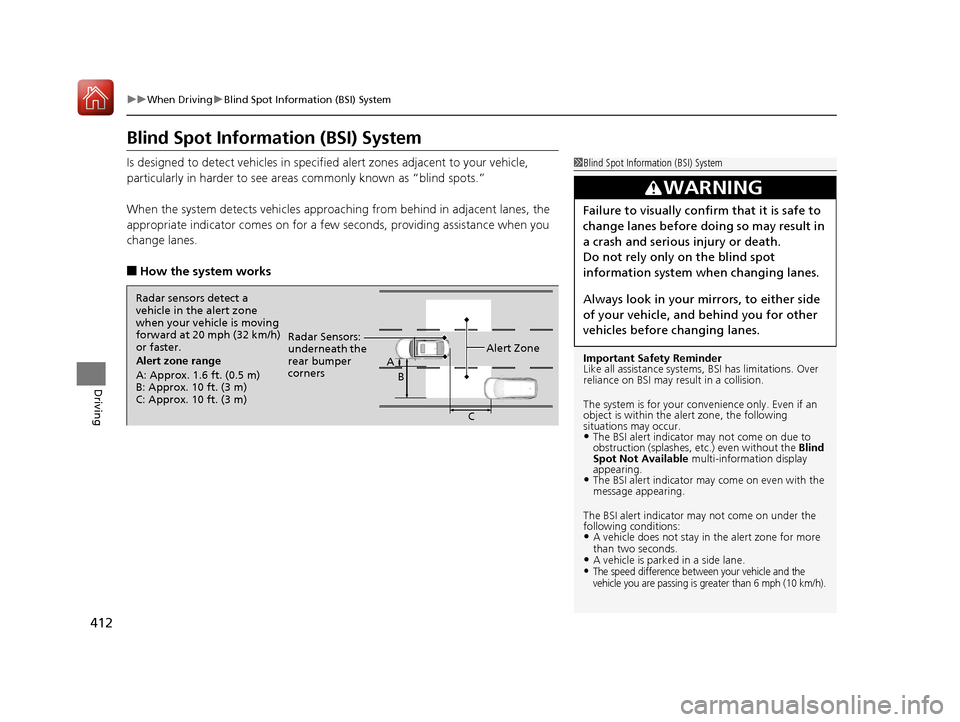
Is designed to detect vehicl es in specified alert zones adjacent to your vehicle,
particularly in harder to see areas commonly known as “blind spots.”
When the system detects vehi cles approaching from behind in adjacent lanes, the
appropriate indicator comes on for a few se conds, providing assistance when you
change lanes.
■How the system works
1 Blind Spot Inform ation (BSI) System
Important Safety Reminder
Like all assistance systems, BSI has limitations. Over
reliance on BSI may result in a collision.
The system is for your convenience only. Even if an
object is within the alert zone, the following
situations may occur.
•The BSI alert indicator may not come on due to
obstruction (splashes, et c.) even without the Blind
Spot Not Available multi-information display
appearing.
•The BSI alert indicator may come on even with the
message appearing.
The BSI alert i ndicator may not come on under the
following conditions:
•A vehicle does not stay in the alert zone for more
than two seconds.
•A vehicle is parked in a side lane.•The speed difference between your vehicle and the
vehicle you are passing is greater than 6 mph (10 km/h).
3WARNING
Failure to visually confirm that it is safe to
change lanes before doing so may result in
a crash and serious injury or death.
Do not rely only on the blind spot
information system wh en changing lanes.
Always look in your mirrors, to either side
of your vehicle, and behind you for other
vehicles before changing lanes.
Alert zone range
A: Approx. 1.6 ft. (0.5 m)
B: Approx. 10 ft. (3 m)
C: Approx. 10 ft. (3 m) Radar Sensors:
underneath the
rear bumper
corners
Alert ZoneA
B
C
Radar sensors detect a
vehicle in the alert zone
when your vehicle is moving
forward at 20 mph (32 km/h)
or faster.
17 ACURA RLX E-AWD-31TY36300.book 412 ページ 2016年6月17日 金曜日 午前8時 29分
Page 423 of 577

uuBraking uBrake System
422
Driving
Keeps the brake applied after releasing the br ake pedal until the accelerator pedal is
pressed. You can use this system while the vehicle is temporarily stopped, such as
when you stop at a traffic light.
■Automatic Brake Hold1 Automatic Brake Hold
3WARNING
Activating the automatic brake hold system
on steep hills or slippery roads may still
allow the vehicle to move if you remove
your foot from the brake pedal.
If a vehicle unexpectedly moves, it may
cause a crash resulting in serious injury or
death.
Never activate the automatic brake hold
system or rely on it to keep a vehicle from
moving when stopped on a steep hill or
slippery roads.
3WARNING
Using the automatic brake hold system to
park the vehicle may result in the vehicle
unexpectedly moving.
If a vehicle moves unexpectedly, it may
cause a crash, resulting in serious injury or
death.
Never leave the vehicle when braking is
temporarily kept by automatic brake hold
and always park the vehicle by putting the
transmission in
( P and applying the parking
brake.
■Turning on the system
Fasten your seat belt
properly, then start the
power system. Press the
automatic brake hold
button.
●The automatic brake
hold system indicator
comes on. The system
is turned on.
■Activating the system
Depress the brake pedal
to come to a complete
stop. The transmission
must be in
( D or (N.●The automatic brake
hold indicator comes
on. Braking is kept for
up to 10 minutes.
●Release the brake
pedal after the
automatic brake hold
indicator comes on.
■Canceling the system
Depress the accelerator
pedal while the
transmission is in
( D.
The system is canceled
and the vehicle starts to
move.
●The automatic brake
hold indicator goes
off. The system
continues to be on.
Accelerator PedalBrake PedalAutomatic Brake
Hold Button
Goes
Off
On On On
On
On
U.S.
Canada
17 ACURA RLX E-AWD-31TY36300.book 422 ページ 2016年6月17日 金曜日 午前8時
29分
Page 428 of 577

Continued427
uuBraking uCollision Mitigation Braking SystemTM (CMBSTM)
Driving
■When the system activates
At system’s earliest collision alert st age, you can change the distance (Long/
Normal /Short ) between vehicles at which alerts will come on through multi-
information display setting options.
2 List of customizable options P. 116
■Vibration alert on the steering wheel
When a potential coll ision to an oncoming detected vehicle is determined, the
system alerts you with rapid vibration on th e steering wheel, in addition to visual and
audible alerts.
u Take appropriate action to prevent a col lision (apply the brakes, operate the
steering wheel, etc.).
1 When the system activates
The camera in the CMBS
TM is also designed to detect
pedestrians.
However, this pedestrian detection feature may not
activate or may not detect a pedestrian in front of
your vehicle under certain conditions.
Refer to the ones indicating the pedestrian detection
limitations from the list. 2 CMBS
TM Conditions and Limitations P. 430
The head-up warning uses a lens located at the front
end of the dashboard.
Do not cover the lens or spill any liquid on it.
Lens
The system provides visual, audible and tactile alerts of a possible collision, and
stops if the collision is avoided.
u Take appropriate action to prevent a collision (apply the brakes, change
lanes, etc.)
Beep
Head-up
Warning
Lights
Visual Alerts
Audible Alert
Tactile Alert
1 Vibration alert on the steering wheel
Vibration alert function is disabled when the electric
power steering (EPS) system indicator comes on. 2 Electric Power Steering (EPS) System
Indicator P. 82
17 ACURA RLX E-AWD-31TY36300.book 427 ページ 2016年6月17日 金曜日 午前8時 29分
Page 429 of 577
428
uuBraking uCollision Mitigation Braking SystemTM (CMBSTM)
Driving
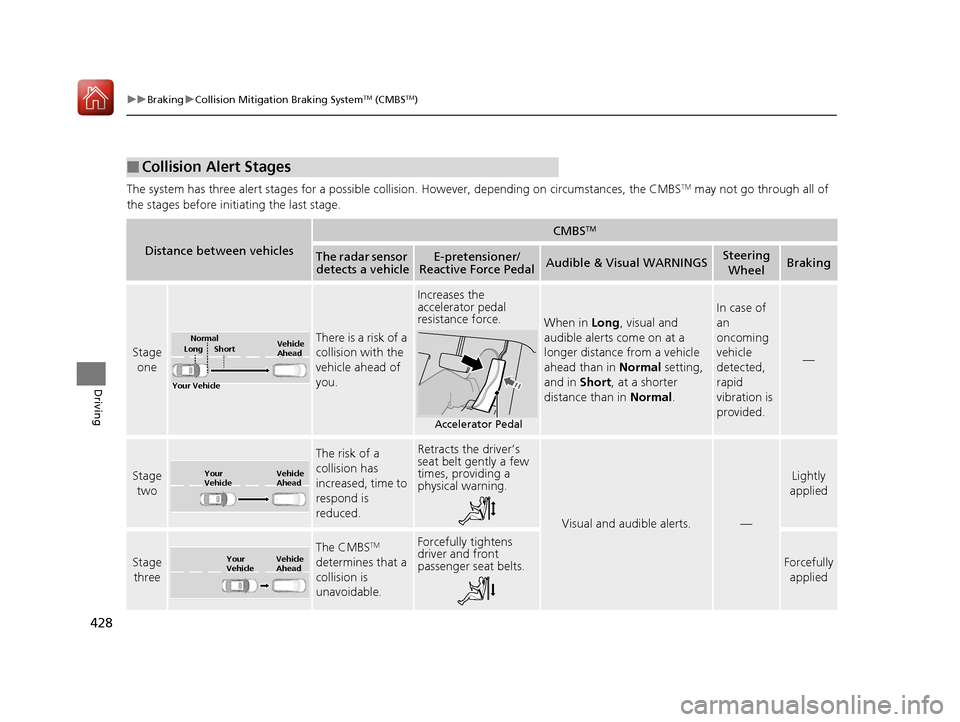
The system has three alert stages for a possible collision. However, depending on circumstances, the CMBSTM may not go through all of
the stages before initiating the last stage.
■Collision Alert Stages
Distance between vehicles
CMBSTM
The radar sensor detects a vehicleE-pretensioner/
Reactive Force PedalAudible & Visual WARNINGSSteering
WheelBraking
Stage one
There is a risk of a
collision with the
vehicle ahead of
you.
Increases the
accelerator pedal
resistance force.
When in Long, visual and
audible alerts come on at a
longer distance from a vehicle
ahead than in Normal setting,
and in Short , at a shorter
distance than in Normal.
In case of
an
oncoming
vehicle
detected,
rapid
vibration is
provided.
—
Stage
two
The risk of a
collision has
increased, time to
respond is
reduced.Retracts the driver’s
seat belt gently a few
times, providing a
physical warning.
Visual and audible alerts.—
Lightly
applied
Stage
three
The CMBSTM
determines that a
collision is
unavoidable.Forcefully tightens
driver and front
passenger seat belts.
Forcefully
applied
Your Vehicle Vehicle
Ahead
Normal
Short
Long
Accelerator Pedal
Your
Vehicle Vehicle
Ahead
Your
Vehicle
Vehicle
Ahead
17 ACURA RLX E-AWD-31TY36300.book 428 ページ 2016年6月17日 金曜日 午前8時
29分
Page 435 of 577
434
Driving
Parking Your Vehicle
When Stopped
1.Depress the brake pedal firmly.
2. With the brake pedal depressed, pull up th e electric parking brake switch slowly,
but fully.
3. Change the gear position to
(P.
4. Turn off the power system.
u The electric parking brake indicator goes off in about 15 seconds.
Always confirm the electric parking brake is se t, in particular if you are parked on an
incline.
1 Parking Your Vehicle
Do not park your vehicle near flammable objects,
such as dry grass, oil, or timber.
Heat from the exhaust can cause a fire.
3WARNING
The vehicle can roll aw ay if left unattended
without confirming that Park is engaged.
Always keep your foot on the brake pedal
until you have confirmed that
( P is shown
on the gear position indicator.
17 ACURA RLX E-AWD-31TY36300.book 434 ページ 2016年6月17日 金曜日 午前8時 29分
Page 442 of 577

Continued441
uuParking Your Vehicle uCross Traffic Monitor
Driving
The system activates when:
• The power mode is in ON.
• The Cross Traffic Monitor is turned on.
2 Cross Traffic Monitor On and Off P. 443
2 Customized Features P. 283
•The transmission is in (R.
• Your vehicle is moving at 3 mph (5 km/h) or
lower.
When a vehicle is detected approaching from a rear corner, Cross Traffic Monitor
alerts you with a buzzer and a displayed warning or accelerator pedal resistibility.
The system will not detect a vehicle that approaches from directly behind your
vehicle, nor will it provide alerts about a detected vehicle when it moves directly
behind your vehicle.
The system does not provide alerts for a vehicle that is moving away from your
vehicle, and it may alert for pedestrians, bicycles, or stationary objects.
■How the System Works1 Cross Traffic Monitor
Cross Traffic Monitor may not detect or may delay
alerting an approaching vehi cle, or may alert without
an approaching vehicle under the following
conditions:
•An obstacle, such as a nother vehicle and a wall,
near your vehicle’s rear bumper, is blocking the
radar sensor’s scope.
•Your vehicle is moving at the speed of about 3 mph
(5 km/h) or higher.
•A vehicle is approaching at the speed other than
between about 6 mph (10 km/h) and 16 mph (25
km/h).
•The system picks up external interference such as
other radar sensors from an other vehicle or strong
radio wave transmitted fr om a facility nearby.
•Either corner of the rear bumper is covered with
snow, ice, mud or dirt.
•When there is bad weather.
•Your vehicle is on an incline.
•Your vehicle is tilted due to a heavy load in the rear.•Your vehicle is reversing towards a wall, a poll, a
vehicle, and so on.
•The rear bumper or the sensors have been
improperly repaired or the rear bumper has been
deformed. Have your vehi cle checked by a dealer.
For proper operation, always keep the rear bumper
corner area clean.
Do not cover the rear bumper corner area with labels
or stickers of any kind.
Radar sensors:
Underneath the rear bumper
corners
17 ACURA RLX E-AWD-31TY36300.book 441 ページ 2016年6月17日 金曜日 午前8時 29分
Page 446 of 577
445
Driving
Surround View Camera System*
Is a four camera system that views areas commonly known as “blind spots” from
different angles, then displays the images on the audi o/information screen. This
system can be used to:
• Check the right and left sides of the vehi cle while crossing at intersections with
poor visibility (fog, heavy rain, obstructed view, etc.).
2Checking from the front wide view at intersections P. 453
•Check for obstacles in front of the vehicle when parking or maneuvering in
confined areas.
2 Checking the sides of your vehicle P. 453
•Check for obstacles when you are moving in (R.
2 Checking for Obstacles at the Back of Your Vehicle P. 449
•Assist you when backing into or parallel parking the vehicle in a lined parking
space.
2 Reversing into a Parking Space Marked with Parking Lines P. 450
2 Parallel Parking into a Parking Space Marked with Parking Lines P. 451
1Surround View Camera System*
3WARNING
Failure to visually assess the area around
the vehicle (directly or by use of the
mirrors) may result in a crash causing
serious injury or death.
The areas shown in the surround view
camera system display are limited. The
display may not show all pedestrians or
other objects around your vehicle.
Do not solely rely only on the surround
view camera system display to assess
whether it is safe to move your vehicle.
3WARNING
Failure to pay proper attention to your
surroundings while driv ing may result in a
crash causing serious injury or death.
To help mitigate the ch ances of a collision,
only look at the surround view camera
system display when it is safe to do so.
* Not available on all models
17 ACURA RLX E-AWD-31TY36300.book 445 ページ 2016年6月17日 金曜日 午前8時 29分
Page 457 of 577
456
uuRefueling uHow to Refuel
Driving
How to Refuel
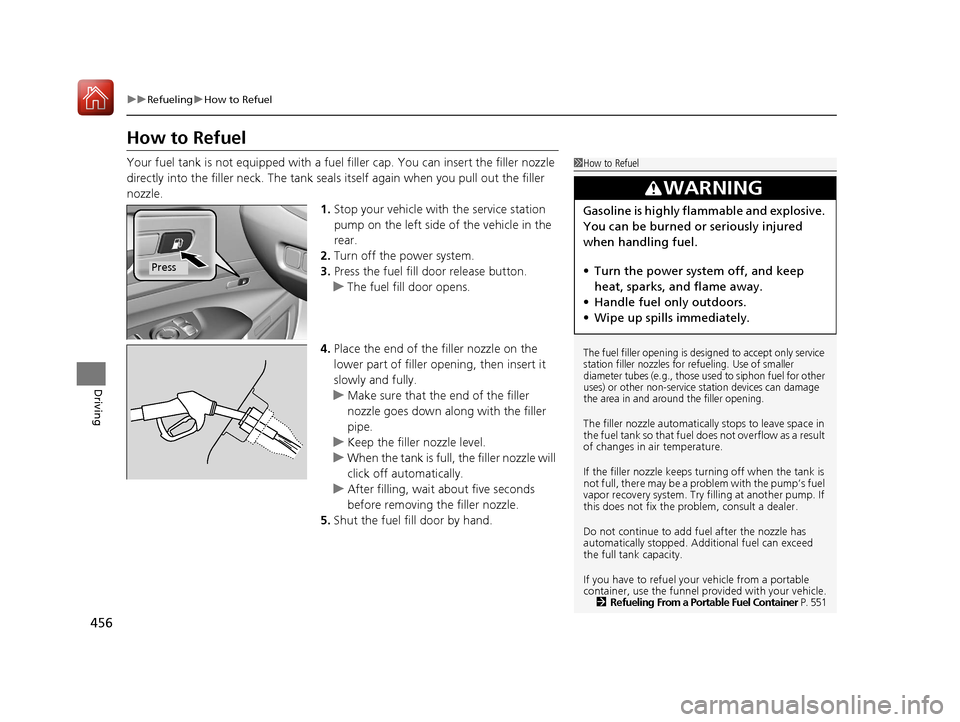
Your fuel tank is not equipped with a fuel filler cap. You can insert the filler nozzle
directly into the filler neck. The tank seal s itself again when you pull out the filler
nozzle.
1.Stop your vehicle with the service station
pump on the left side of the vehicle in the
rear.
2. Turn off the power system.
3. Press the fuel fill door release button.
u The fuel fill door opens.
4. Place the end of the filler nozzle on the
lower part of filler opening, then insert it
slowly and fully.
u Make sure that the end of the filler
nozzle goes down along with the filler
pipe.
u Keep the filler nozzle level.
u When the tank is full, the filler nozzle will
click off automatically.
u After filling, wait about five seconds
before removing th e filler nozzle.
5. Shut the fuel fill door by hand.1How to Refuel
The fuel filler opening is desi gned to accept only service
station filler nozzles for re fueling. Use of smaller
diameter tubes (e.g., those used to siphon fuel for other
uses) or other non-service station devices can damage
the area in and around the filler opening.
The filler nozzle automatically stops to leave space in
the fuel tank so that fuel does not overflow as a result
of changes in air temperature.
If the filler nozzle keeps tu rning off when the tank is
not full, there may be a problem with the pump’s fuel
vapor recovery system. Try fi lling at another pump. If
this does not fix the problem, consult a dealer.
Do not continue to add fuel after the nozzle has
automatically stopped. Addi tional fuel can exceed
the full tank capacity.
If you have to refuel y our vehicle from a portable
container, use the funnel pr ovided with your vehicle.
2 Refueling From a Portable Fuel Container P. 551
3WARNING
Gasoline is highly flammable and explosive.
You can be burned or seriously injured
when handling fuel.
• Turn the power syste m off, and keep
heat, sparks, and flame away.
• Handle fuel only outdoors.
• Wipe up spills immediately.
Press
17 ACURA RLX E-AWD-31TY36300.book 456 ページ 2016年6月17日 金曜日 午前8時 29分
Page 462 of 577
461
uuBefore Performing Maintenance uSafety When Performing Maintenance
Maintenance
Safety When Performing Maintenance
Some of the most important safe ty precautions are given here.
However, we cannot warn you of every conceivable hazard that can arise in
performing maintenance. Only you can decide whether or not you should perform
a given task.
• To reduce the possibility of fire or explos ion, keep cigarettes, sparks, and flames
away from the 12-volt battery and all fuel related parts.
• Never leave rags, towels, or other flammable objects under the hood.
u Heat from the engine and exhaust can ignite them causing a fire.
• To clean parts, use a co mmercially available degreaser or parts cleaner, not
gasoline.
• Wear eye protection and pr otective clothing when working with the 12-volt
battery or compressed air.
• Engine exhaust contains carbon monoxide, which is poisonous and can kill you.
u Operate the engine only when there is sufficient ventilation.
• The vehicle must be in a stationary condition.
u Make sure your vehicle is parked on le vel ground, the parking brake is set, and
the power system is turned off.
• Be aware that hot parts can burn you.
u Make sure to let the power system incl uding the engine and exhaust system
cool thoroughly before touching vehicle parts.
• Be aware that moving parts can injure you.
u Do not activate the power system unle ss instructed, and keep your hands and
limbs away from moving parts.
■Maintenance Safety
■Vehicle Safety
1 Safety When Performing Maintenance
3WARNING
Improperly maintaining this vehicle or
failing to correct a pr oblem before driving
can cause a crash in which you can be
seriously hurt or killed.
Always follow the inspection and
maintenance recommendations according
to the schedules in this owner’s manual.
3WARNING
Failure to properly follow maintenance
instructions and prec autions can cause you
to be seriously hurt or killed.
Always follow the procedures and
precautions in this owner’s manual.
17 ACURA RLX E-AWD-31TY36300.book 461 ページ 2016年6月17日 金曜日 午前8時 29分