radio Acura RLX HYBRID 2018 Owner's Guide
[x] Cancel search | Manufacturer: ACURA, Model Year: 2018, Model line: RLX HYBRID, Model: Acura RLX HYBRID 2018Pages: 609, PDF Size: 48.11 MB
Page 269 of 609
uuAudio System Basic Operation uPlaying Internet Radio
268
Features
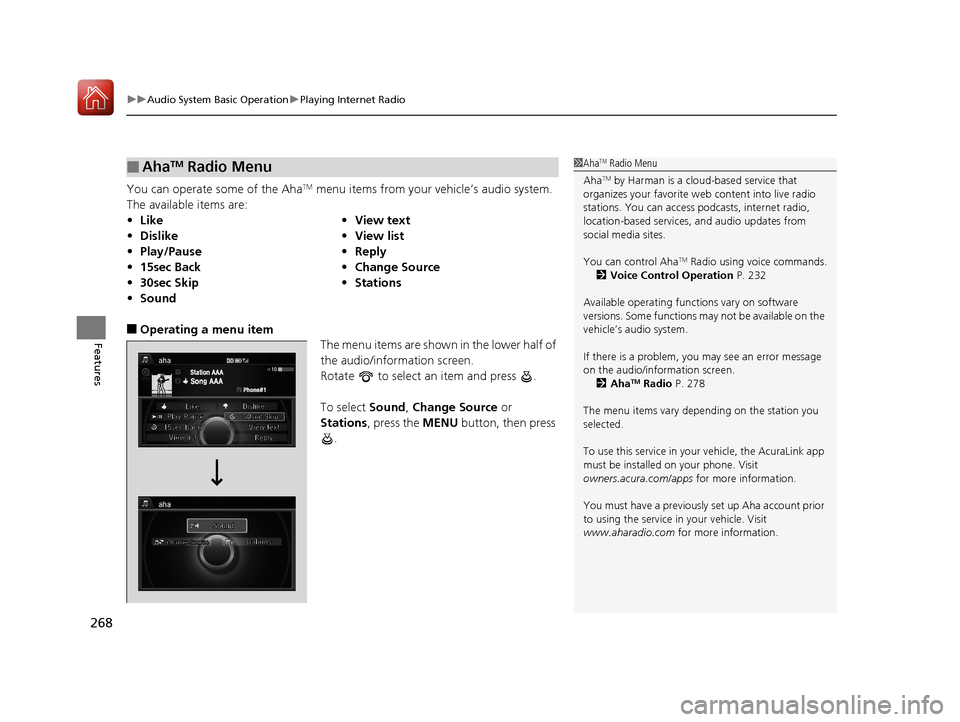
You can operate some of the AhaTM menu items from your vehicle’s audio system.
The available items are:
■Operating a menu item The menu items are shown in the lower half of
the audio/information screen.
Rotate to select an item and press .
To select Sound, Change Source or
Stations , press the MENU button, then press
.
■AhaTM Radio Menu
• Like •View text
• Dislike •View list
• Play/Pause •Reply
• 15sec Back •Change Source
• 30sec Skip •Stations
• Sound
1AhaTM Radio Menu
Aha
TM by Harman is a clou d-based service that
organizes your favorite we b content into live radio
stations. You can access podcasts, internet radio,
location-based services , and audio updates from
social media sites.
You can control Aha
TM Radio using voice commands.
2 Voice Control Operation P. 232
Available operating functi ons vary on software
versions. Some functions ma y not be available on the
vehicle’s audio system.
If there is a problem, you may see an error message
on the audio/information screen. 2 Aha
TM Radio P. 278
The menu items vary depending on the station you
selected.
To use this service in your vehicle, the AcuraLink app
must be installed on your phone. Visit
owners.acura.com/apps for more information.
You must have a previously set up Aha account prior
to using the service in your vehicle. Visit
www.aharadio.com for more information.
18 ACURA RLX E-AWD-31TY36400.book 268 ページ 2017年7月20日 木曜日 午後6時 8分
Page 279 of 609
278
uuAudio Error Messages uAhaTM Radio
Features
AhaTM Radio
If an error occurs while playing AhaTM Radio, you may see the following error
messages.
If you cannot clear the error message, contact a dealer.
Error MessageSolution
Cannot connect to aha. When stopped, check your mobile
device.Appears when the AhaTM app is not activated. Check your device.
Incompatible USB Device
Please Check Owner’s ManualAppears when an incompatible device is connected. Disconnect
the device. Then turn the audio syst em off, and turn it on again.
Do not reconnect the device that caused the error.
18 ACURA RLX E-AWD-31TY36400.book 278 ページ 2017年7月20日 木曜日 午後6時 8分
Page 280 of 609
279
Features
General Information on the Audio System
SiriusXM® Radio Service
1.You need your radio ID ready before regist ering for subscription. To see the ID in
the On Demand Multi-Use DisplayTM, select until CH 000 and the radio ID
appears.
2. Have your radio ID and credit card numb er ready, and either call or visit the
SiriusXM ® website to subscribe.
Switch to the SiriusXM ® mode by pressing the SOURCE button repeatedly or
operating the On Demand Multi-Use Display
TM, and stay in this mode for about 30
minutes until the service is activated. Make su re your vehicle is in an open area with
good reception.
Loading:
SiriusXM ® is loading the audio or program information.
Channel off air:
The channel is not currently broadcasting.
Channel unsubscribed:
You are not subscribed to the channel selected.
No signal:
The signal is too weak in the current location.
Channel unavailable:
No such channel exists.
Check antenna, Antenna disconnected, Antenna shorted:
There is a problem with the SiriusXM ® antenna. Contact a dealer.
■Subscribing to SiriusXM® Radio
■Receiving SiriusXM ® Radio
■SiriusXM ® Radio Display Messages
1 Subscribing to SiriusXM ® Radio
Contact Information for SiriusXM ® Radio:
•U.S.: SiriusXM ® Radio at www.siriusxm.com/
subscribenow or 1-855-236-9236
•Canada: SiriusXM ® Canada at www.siriusxm.ca/
subscribe-now , or (877) 209-0079
1Receiving SiriusXM ® Radio
The SiriusXM ® satellites are in orbit over the equator;
therefore, objects south of the vehicle may cause
satellite rece ption interruptions. Sa tellite signals are
more likely to be blocked by tall buildings and
mountains the farther north you travel from the
equator.
You may experience rece ption problems under the
following circumstances:
•In a location with an obstruction to the south of
your vehicle.
•In tunnels
•On the lower level of a multi-tiered road•Large items carried on the roof rack
18 ACURA RLX E-AWD-31TY36400.book 279 ページ 2017年7月20日 木曜日 午後6時 8分
Page 306 of 609
305
uuCustomized Features u
Continued
Features
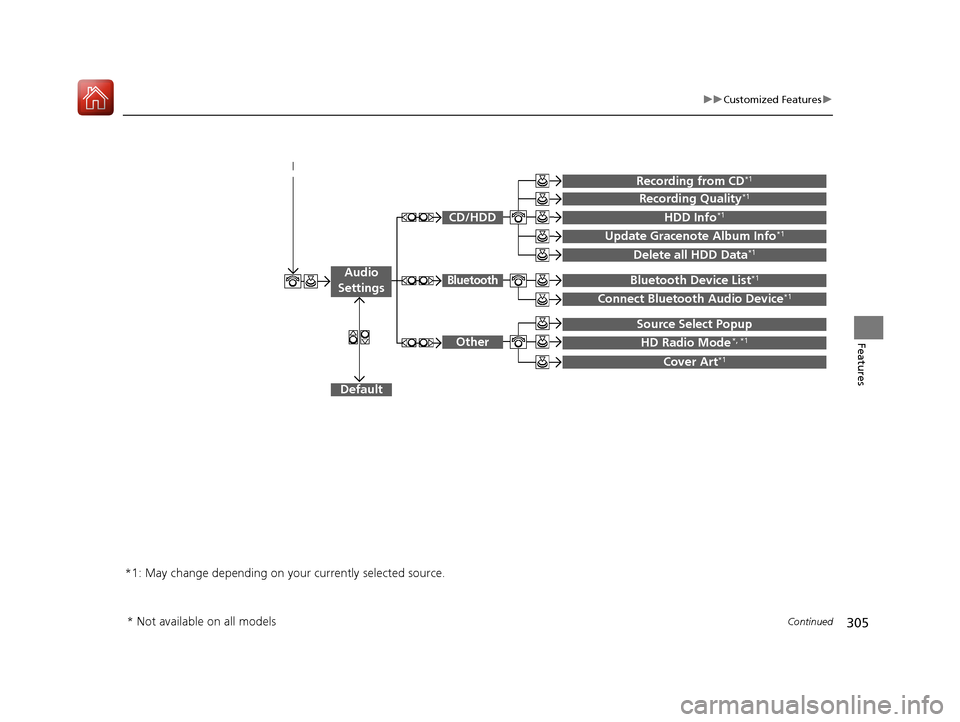
Default
Source Select Popup
HD Radio Mode*, *1
Cover Art*1
Connect Bluetooth Audio Device*1
Bluetooth Device List*1
Recording from CD*1
Recording Quality*1
HDD Info*1
Update Gracenote Album Info*1
Delete all HDD Data*1
*1: May change depending on your currently selected source.
CD/HDD
Bluetooth
Other
Audio
Settings
* Not available on all models
18 ACURA RLX E-AWD-31TY36400.book 305 ページ 2017年7月20日 木曜日 午後6時 8分
Page 321 of 609
320
uuCustomized Features u
Features
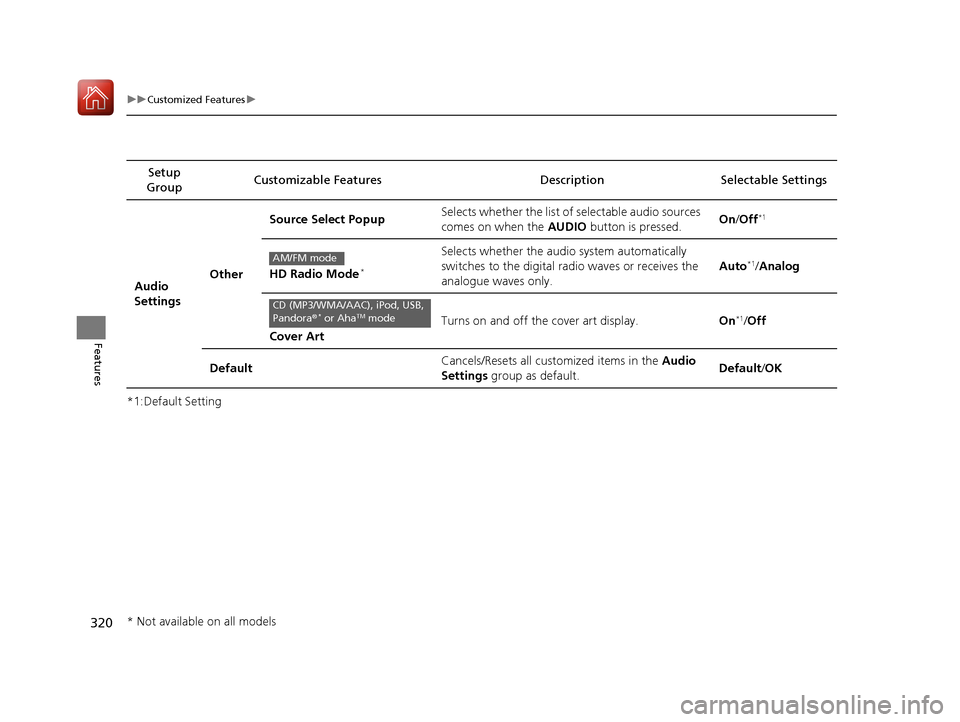
*1:Default SettingSetup
Group Customizable Features Description Selectable Settings
Audio
SettingsOther
Source Select Popup
Selects whether the list of selectable audio sources
comes on when the
AUDIO button is pressed. On
/Off*1
HD Radio Mode*
Selects whether the audi o system automatically
switches to the digital radio waves or receives the
analogue waves only. Auto*1/
Analog
Cover Art Turns on and off the cover art display.
On
*1/Off
Default Cancels/Resets all customized items in the
Audio
Settings group as default. Default
/OK
AM/FM mode
CD (MP3/WMA/AAC), iPod, USB,
Pandora ®* or AhaTM mode
* Not available on all models
18 ACURA RLX E-AWD-31TY36400.book 320 ページ 2017年7月20日 木曜日 午後6時 8分
Page 382 of 609
Continued381
uuWhen Driving uTurning on the Power
Driving
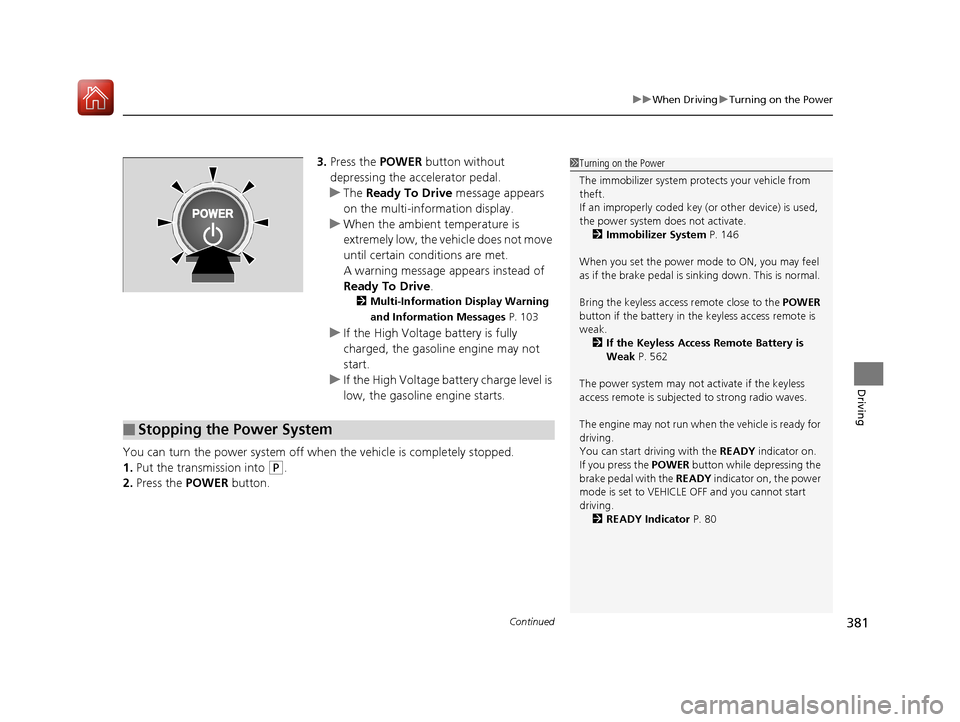
3. Press the POWER button without
depressing the accelerator pedal.
u The Ready To Drive message appears
on the multi-information display.
u When the ambient temperature is
extremely low, the vehicle does not move
until certain conditions are met.
A warning message appears instead of
Ready To Drive .
2Multi-Information Display Warning
and Information Messages P. 103
uIf the High Voltage battery is fully
charged, the gasoline engine may not
start.
u If the High Voltage battery charge level is
low, the gasoline engine starts.
You can turn the power system off when the vehicle is completely stopped.
1. Put the transmission into
(P.
2. Press the POWER button.
1Turning on the Power
The immobilizer system pr otects your vehicle from
theft.
If an improperly c oded key (or other device) is used,
the power system does not activate. 2 Immobilizer System P. 146
When you set the power mode to ON, you may feel
as if the brake pedal is sinking down. This is normal.
Bring the keyless access remote close to the POWER
button if the battery in the keyless access remote is
weak.
2 If the Keyless Access Remote Battery is
Weak P. 562
The power system may not activate if the keyless
access remote is subjecte d to strong radio waves.
The engine may not run when the vehicle is ready for
driving.
You can start driving with the READY indicator on.
If you press the POWER button while depressing the
brake pedal with the READY indicator on, the power
mode is set to VEHICLE OFF and you cannot start
driving. 2 READY Indicator P. 80
■Stopping the Power System
18 ACURA RLX E-AWD-31TY36400.book 381 ページ 2017年7月20日 木曜日 午後6時 8分
Page 447 of 609
uuWhen Driving uBlind spot information (BSI) System
446
Driving
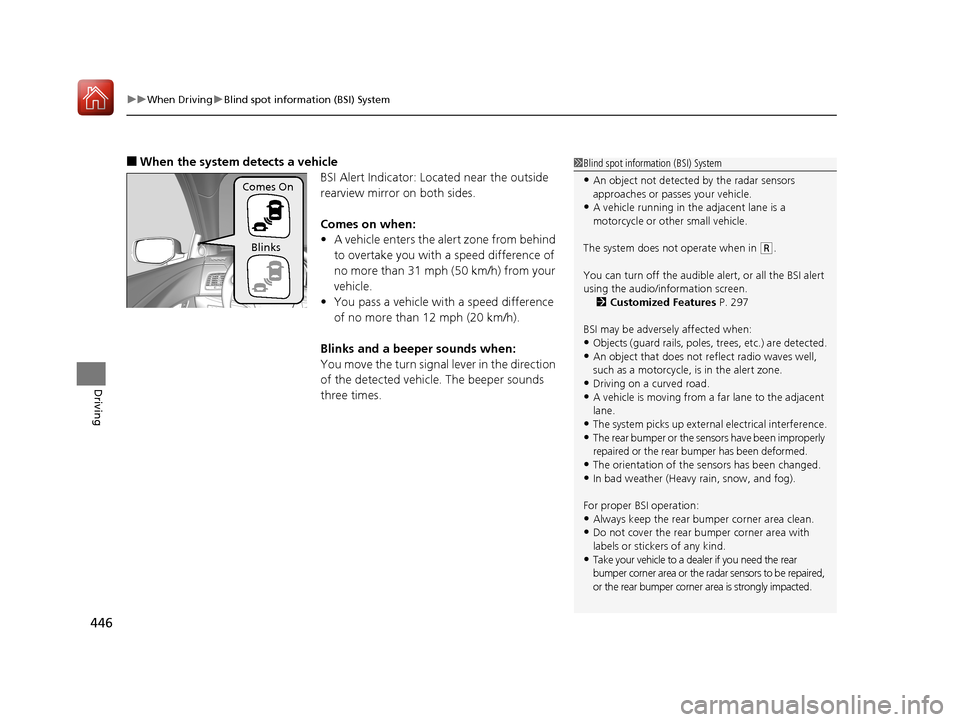
■When the system detects a vehicle
BSI Alert Indicator: Located near the outside
rearview mirror on both sides.
Comes on when:
•A vehicle enters the alert zone from behind
to overtake you with a speed difference of
no more than 31 mph (50 km/h) from your
vehicle.
• You pass a vehicle with a speed difference
of no more than 12 mph (20 km/h).
Blinks and a beeper sounds when:
You move the turn signal lever in the direction
of the detected vehicle. The beeper sounds
three times.1 Blind spot inform ation (BSI) System
•An object not detected by the radar sensors
approaches or passes your vehicle.
•A vehicle running in the adjacent lane is a
motorcycle or other small vehicle.
The system does not operate when in
( R.
You can turn off the audible alert, or all the BSI alert
using the audio/information screen. 2 Customized Features P. 297
BSI may be adversel y affected when:
•Objects (guard rails, poles, trees, etc.) are detected.•An object that does not re flect radio waves well,
such as a motorcycle, is in the alert zone.
•Driving on a curved road.•A vehicle is moving from a far lane to the adjacent
lane.
•The system picks up external electrical interference.
•The rear bumper or the sens ors have been improperly
repaired or the rear bu mper has been deformed.
•The orientation of the sensors has been changed.
•In bad weather (Heavy rain, snow, and fog).
For proper BSI operation:
•Always keep the rear bumper corner area clean.•Do not cover the rear bumper corner area with
labels or sticke rs of any kind.
•Take your vehicle to a dealer if you need the rear
bumper corner area or the radar sensors to be repaired,
or the rear bumper corner area is strongly impacted.
Comes On
Blinks
18 ACURA RLX E-AWD-31TY36400.book 446 ページ 2017年7月20日 木曜日 午後6時 8分
Page 476 of 609
Continued475
uuParking Your Vehicle uCross Traffic Monitor
Driving
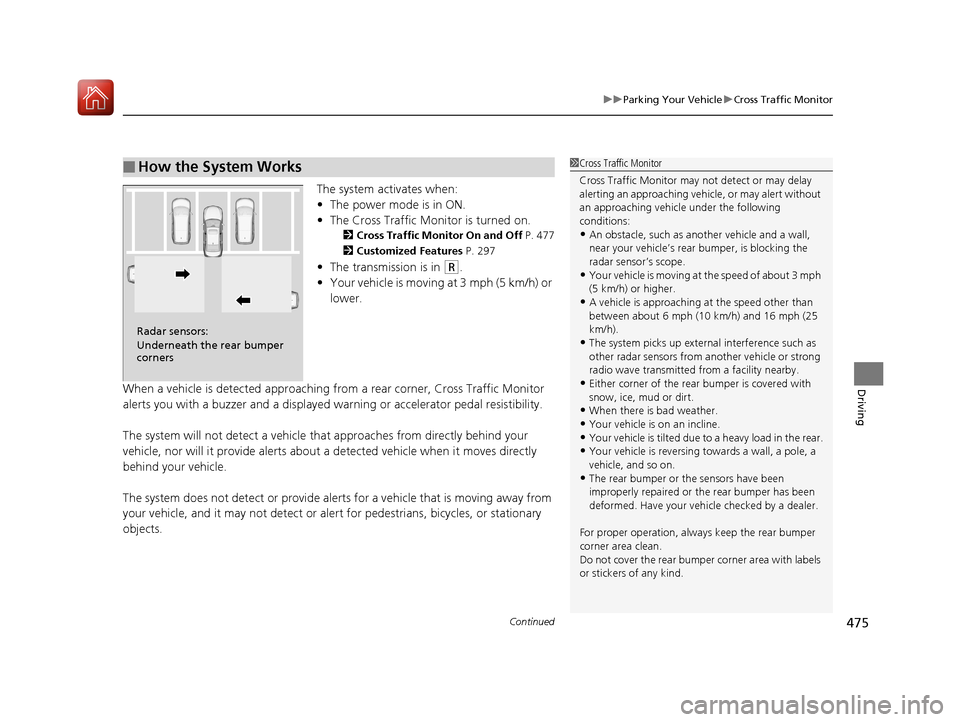
The system activates when:
• The power mode is in ON.
• The Cross Traffic Monitor is turned on.
2 Cross Traffic Monitor On and Off P. 477
2 Customized Features P. 297
•The transmission is in (R.
• Your vehicle is moving at 3 mph (5 km/h) or
lower.
When a vehicle is detected approaching from a rear corner, Cross Traffic Monitor
alerts you with a buzzer and a displayed warning or accelerator pedal resistibility.
The system will not detect a vehicle that approaches from directly behind your
vehicle, nor will it provide alerts about a detected vehicle when it moves directly
behind your vehicle.
The system does not detect or provide alerts for a vehicle that is moving away from
your vehicle, and it may not detect or ale rt for pedestrians, bicycles, or stationary
objects.
■How the System Works1 Cross Traffic Monitor
Cross Traffic Monitor may not detect or may delay
alerting an approaching vehi cle, or may alert without
an approaching vehicle under the following
conditions:
•An obstacle, such as a nother vehicle and a wall,
near your vehicle’s rear bumper, is blocking the
radar sensor’s scope.
•Your vehicle is moving at the speed of about 3 mph
(5 km/h) or higher.
•A vehicle is approaching at the speed other than
between about 6 mph (10 km/h) and 16 mph (25
km/h).
•The system picks up external interference such as
other radar sensors from an other vehicle or strong
radio wave transmitted fr om a facility nearby.
•Either corner of the rear bumper is covered with
snow, ice, mud or dirt.
•When there is bad weather.
•Your vehicle is on an incline.
•Your vehicle is tilted due to a heavy load in the rear.•Your vehicle is reversing towards a wall, a pole, a
vehicle, and so on.
•The rear bumper or the sensors have been
improperly repaired or the rear bumper has been
deformed. Have your vehi cle checked by a dealer.
For proper operation, always keep the rear bumper
corner area clean.
Do not cover the rear bumper corner area with labels
or stickers of any kind.
Radar sensors:
Underneath the rear bumper
corners
18 ACURA RLX E-AWD-31TY36400.book 475 ページ 2017年7月20日 木曜日 午後6時 8分
Page 575 of 609
574
Handling the Unexpected
Fuses
Fuse Locations
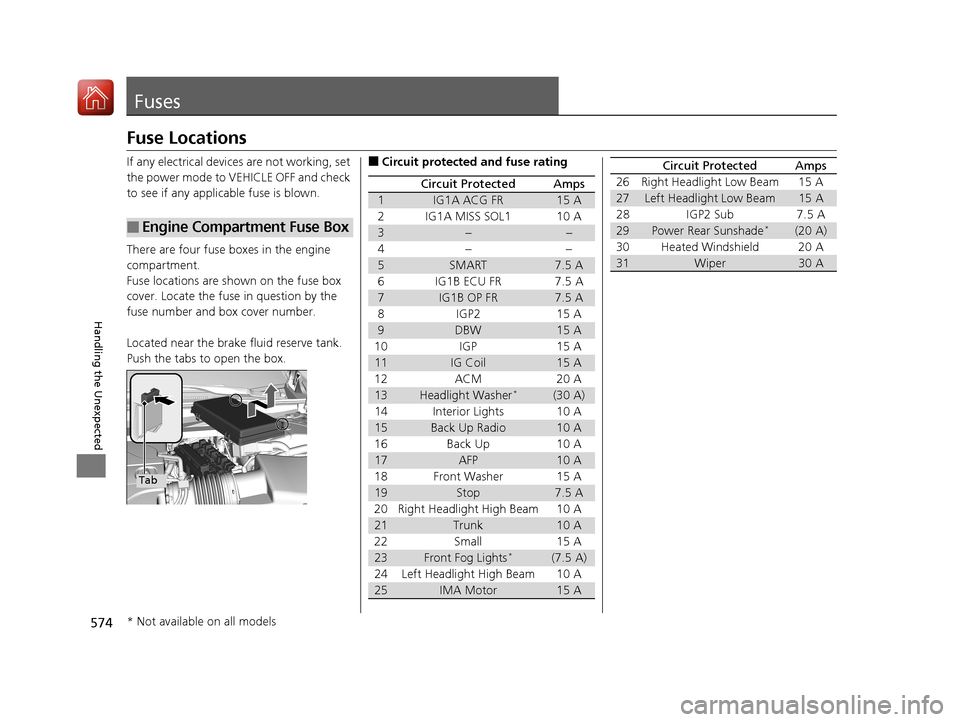
If any electrical devices are not working, set
the power mode to VEHICLE OFF and check
to see if any applic able fuse is blown.
There are four fuse boxes in the engine
compartment.
Fuse locations are shown on the fuse box
cover. Locate the fuse in question by the
fuse number and box cover number.
Located near the brake fluid reserve tank.
Push the tabs to open the box.
■Engine Compartment Fuse Box
Tab
■Circuit protected and fuse rating
Circuit ProtectedAmps
1IG1A ACG FR15 A
2IG1A MISS SOL110 A
3−−
4− −
5SMART7.5 A
6 IG1B ECU FR 7.5 A
7IG1B OP FR7.5 A
8 IGP2 15 A
9DBW15 A
10 IGP 15 A
11IG Coil15 A
12 ACM 20 A
13Headlight Washer*(30 A)
14 Interior Lights 10 A
15Back Up Radio10 A
16 Back Up 10 A
17AFP10 A
18 Front Washer 15 A
19Stop7.5 A
20 Right Headlight High Beam 10 A
21Trunk10 A
22 Small 15 A
23Front Fog Lights*(7.5 A)
24 Left Headlight High Beam 10 A
25IMA Motor15 A
26 Right Headlight Low Beam 15 A
27Left Headlight Low Beam15 A
28 IGP2 Sub 7.5 A
29Power Rear Sunshade*(20 A)
30 Heated Windshield 20 A
31Wiper30 A
Circuit ProtectedAmps
* Not available on all models
18 ACURA RLX E-AWD-31TY36400.book 574 ページ 2017年7月20日 木曜日 午後6時 8分
Page 586 of 609
585
Information
This chapter includes your vehicle’s specifications, locations of identification numbers, and other
information required by regulation.
Specifications.................................... 586
Identification Numbers Vehicle Identification Number (VIN), Engine Number, Motor Number, and
Transmission Number ..................... 588
Devices that Emit Radio Waves ....... 589
Reporting Safety Defects ................. 590Emissions Testing
Testing of Readiness Codes.............. 591
Warranty Coverages ........................ 593
Authorized Manuals ......................... 595
Client Service Information ............... 596
18 ACURA RLX E-AWD-31TY36400.book 585 ページ 2017年7月20日 木曜日 午後6時 8分