brake Acura TL 2000 3.2 User Guide
[x] Cancel search | Manufacturer: ACURA, Model Year: 2000, Model line: TL, Model: Acura TL 2000Pages: 311, PDF Size: 3.05 MB
Page 102 of 311
Mirrors, Parking Brake
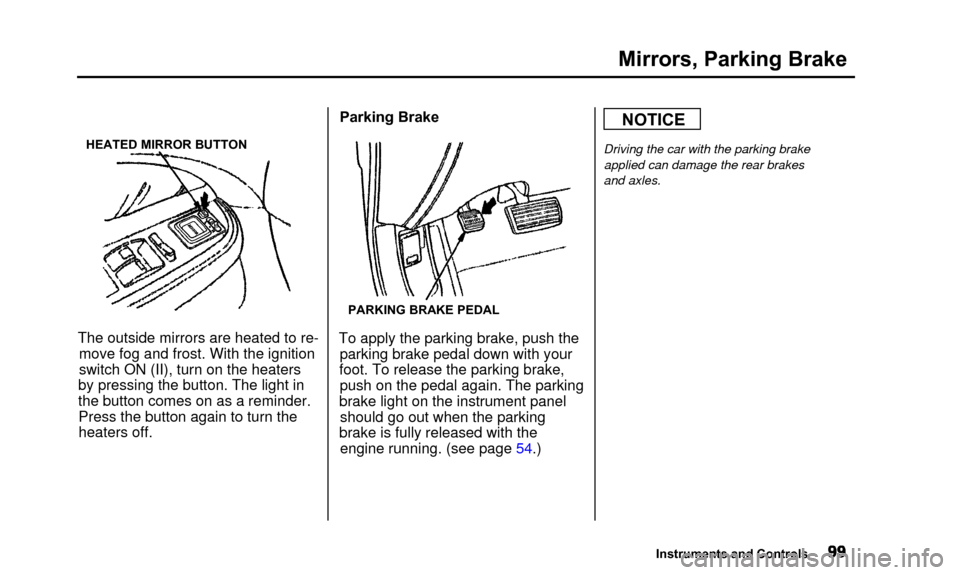
HEATED MIRROR BUTTON
The outside mirrors are heated to re-move fog and frost. With the ignition
switch ON (II), turn on the heaters
by pressing the button. The light in
the button comes on as a reminder. Press the button again to turn theheaters off. Parking Brake
PARKING BRAKE PEDAL
To apply the parking brake, push the
parking brake pedal down with your
foot. To release the parking brake, push on the pedal again. The parking
brake light on the instrument panel should go out when the parking
brake is fully released with the engine running. (see page 54.)
NOTICE
Driving the car with the parking brake
applied can damage the rear brakes
and axles.
Instruments and Controls
Page 149 of 311

Break-in Period, Gasoline
Break-in Period
Help assure your car's future
reliability and performance by payingextra attention to how you drive
during the first 600 miles (1,000 km).
During this period:
• Avoid full-throttle starts and rapid acceleration.
• Avoid hard braking. New brakesneed to be broken-in by moderate
use for the first 200 miles (300
km).
You should follow these same re- commendations with an overhauledor exchanged engine, or when the
brakes are relined. Gasoline
Your Acura is designed to operate on
premium unleaded gasoline with a
pump octane number of 91 or higher.
Use of a lower octane gasoline can cause occasional, metallic knocking
noises in the engine and will result
in decreased engine performance.
We recommend gasolines containing detergent additives that help prevent
fuel system and engine deposits. Using gasoline containing lead will
damage your car's emissions
controls. This contributes to air
pollution. In Canada, some gasolines contain
an octane-enhancing additive called
MMT. If you use such gasolines,
your emissions control system performance may deteriorate and
the Malfunction Indicator Lamp on
your instrument panel may turn on. If this happens, contact your
authorized Acura dealer for service.
Before Driving
Page 151 of 311
Service Station Procedures
4. Stop filling the tank after the fuelnozzle automatically clicks off. Do
not try to "top off' the tank, leavesome room for the fuel to expand
with temperature changes.
Your car has an on-board refueling vapor recovery system to helpkeep fuel vapors from going into
the atmosphere. If the fuel pump
keeps clicking off even though the
tank is not full, there may be aproblem with this system. Consult
your dealer. 5. Screw the fuel fill cap back on,
tighten it until it clicks several
times. If you do not properly
tighten the cap, the MalfunctionIndicator Lamp may come on (see
page 54).
6. Push the fuel fill door closed until it latches. Opening the Hood
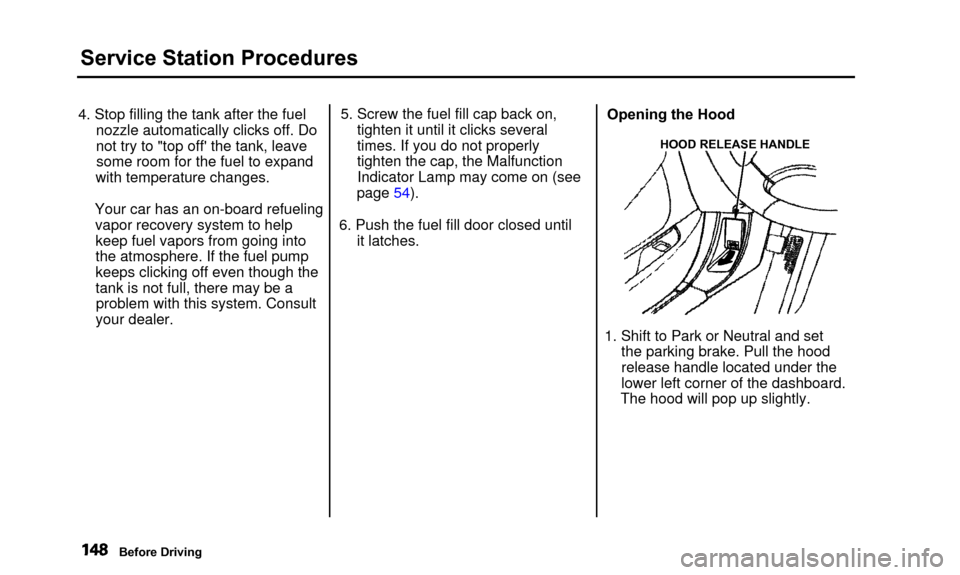
HOOD RELEASE HANDLE
1. Shift to Park or Neutral and set
the parking brake. Pull the hood
release handle located under the
lower left corner of the dashboard.
The hood will pop up slightly.
Before Driving
Page 156 of 311
Accessories and Modifications
Modifying your car, or installing
some non-Acura accessories, can
make your car unsafe. Before you
make any modifications or add anyaccessories, be sure to read the
following information.
Accessories Your dealer has Genuine Acura accessories that allow you to
personalize your car. These accessories have been designed andapproved for your car, and are
covered by warranty.
Non-Acura accessories are usually
designed for universal applications.
Although aftermarket accessories may fit on your car, they may not
meet factory specifications, and
could adversely affect your car's
handling and stability. (See "Modifications" on the page 154 for
additional information.) Improper accessories or
modifications can affect your
car's handling, stability and performance, and cause a
crash in which you can be hurt
or killed.
Follow all instructions in this
owner's manual regarding
accessories and modifications.
When properly installed, cellular phones, alarms, two-way radios, and
low-powered audio systems should not interfere with your car's
computer-controlled systems, such
as the SRS and anti-lock brakesystem.
However, if electronic accessories are improperly installed, or exceed
your car's electrical system capacity, they can interfere with the operation of your car, or even cause the
airbags to deploy.
Before installing any accessory:
• Make sure the accessory does not obscure any lights, or interfere
with proper car operation or performance.
• Be sure electronic accessories do not overload electrical circuits(see page 275).
• Have the installer contact your Acura dealer for assistance beforeinstalling any electronic accessory.
If possible, have your dealer inspect
the final installation.
Before Driving
Page 157 of 311

Accessories and Modifications
Modifications
Do not remove any originalequipment or modify your car in any
way that would alter its design or operation. This could make your car
unsafe and illegal to drive.
For example, do not make any
modifications that would change the
ride height of your car, or install
wheels and tires with a different overall diameter.
Such modifications can adversely
affect handling, and interfere with
the operation of the car's anti-lock
brakes and other systems. In addition, any modifications that
decrease ground clearance increase
the chance of undercarriage parts striking a curb, speed bump, or other
raised object, which could cause
your airbags to deploy.
Do not modify your steering wheelor any other part of your
Supplemental Restraint System.
Modifications could make the system ineffective.
Additional Safety Precautions
• Do not attach or place objects on the airbag covers. Any object
attached to or placed on the covers
marked "SRS AIRBAG," in the center of the steering wheel and
on top of the dashboard, could
interfere with the proper operation
of the airbags. Or, if the airbags
inflate, the objects could be
propelled inside the car and hurt someone.
• Do not attach hard objects on or near a front door. If a side airbag
inflates, a cup holder or other hard object attached on or near the
door could be propelled inside the
car and hurt someone.
• Do not place any objects over the outside edge of a front seat-back.
Covering the outside edge of a
front seat-back, with a non-Acura seat cover for example, could
prevent the airbag from inflating
properly.
Before Driving
Page 162 of 311

Driving
This section gives you tips onstarting the engine under various
conditions, and how to operate the
automatic transmission. It also
includes important information on
parking your car, the braking system,
the Traction Control System, and
facts you need if you are planning to
tow a trailer.Preparing to Drive.................... 160
Starting the Engine.................... 161
Starting in Cold Weather
at High Altitude................. 161
Automatic Transmission........... 162 Shift Lever Position Indicator .. 162
Shift Lever Positions............. 163
Engine Speed Limiter............ 169
Shift Lock Release.............. 169
Parking................................... 171
The Braking System................. 172
Brake Wear Indicators.......... 172
Brake System Design .............. 173
Anti-lock Brakes.................... 173
Important Safety
Reminders................... 174
ABS Indicator.................... 174
Traction Control System ........... 175
TCS ON/OFF Switch ............. 176
TCS Indicator....................... 176
Driving in Bad Weather............. 178
Towing a Trailer........................ 180
Driving
Page 164 of 311

Starting the Engine
1. Apply the parking brake.
2. In cold weather, turn off all electrical accessories to reduce
the drain on the battery.
3. Make sure the shift lever is in Park. Press on the brake pedal.
4. Without touching the accelerator pedal, turn the ignition key to the
START (III) position. If the enginedoes not start right away, do not
hold the key in START (III) for
more than 15 seconds at a time.
Pause for at least 10 seconds
before trying again.
5. If the engine does not start within 15 seconds, or starts but stalls
right away, repeat step 4 with the accelerator pedal pressed half-way
down. If the engine starts, release
pressure on the accelerator pedal so the engine does not race. 6. If the engine still does not start,
press the accelerator pedal all the
way down and hold it there while starting in order to clear flooding.
As before, keep the ignition key in the START (III) position for nomore than 15 seconds. Return tostep 5 if the engine does not start.
If it starts, lift your foot off the accelerator pedal so the engine
does not race.
Starting in Cold Weather at High
Altitude (Above 8,000 feet/ 2,400 meters)
An engine is harder to start in cold weather. The thinner air found athigh altitude above 8,000 feet (2,400meters) adds to the problem.
Use the following procedure:
1. Turn off all electrical accessories to reduce the drain on the battery. 2. Push the accelerator pedal half-
way to the floor and hold it there
while starting the engine. Do nothold the ignition key in START (III) for more than 15 seconds.
When the engine starts, release the accelerator pedal gradually as
the engine speeds up and smoothsout.
3. If the engine fails to start in step 2, push the accelerator pedal to the
floor and hold it there while you try to start the engine for no more
than 15 seconds. If the enginedoes not start, return to step 2.
Driving
Page 166 of 311

Automatic Transmission
Shift Lever Positions
SHIFT LEVER
SEQUENTIAL
SPORTSHIFT MODE
POSITION
The shift lever has nine positions. It must be in Park or Neutral to start
the engine. When you are stopped inD
5, D4, D3, 2, 1,N,R,or the
Sequential SportShift mode, press
firmly on the brake pedal and keep
your foot off the accelerator pedal. To select the Sequential SportShift
mode, slide the shift lever toward the
left from the "D
5" position.
In this mode the shift lever allows
you to shift up and down manually.
To shift from:
P toR
R to N
N to Ds
D
5 to D4
D4 to D3D3 to2
2 to l
1to2
2 to D
3D3 to D4D4 to D5
N to R R to P Do this:
Press the brake pedal, then
move the shift lever.
Move the lever.
Whenever you move the shift lever, slide it along the guide on the
console.
You cannot shift out of Park with the brake pedal depressed when theignition switch is in LOCK (0) or
ACCESSORY (I).
CONTINUED
Driving
Page 167 of 311

Automatic Transmission
Park (P) - This position mechani-
cally locks the transmission. Use Park whenever you are turning off or
starting the engine. To shift out ofPark, you must press on the brake
pedal and have your foot off the
accelerator pedal. Move the shift lever to the right to shift out of thePark position.
If you have done all of the above and
still cannot move the lever out of
Park, see Shift Lock Release on page 169. To avoid transmission damage, cometo a complete stop before shiftinginto Park. The shift lever must be in
Park before you can remove the key
from the ignition switch. Reverse (R) - To shift to Reverse
from Park, see the explanation under Park. To shift to Reverse from
Neutral, come to a complete stop and
then shift.
Your car has a reverse lockout so
you cannot accidentally shift to Reverse from Neutral or any other
driving position when the vehicle
speed exceeds 7 — 9 mph (12 — 14
km/h).
If you cannot shift to Reverse when
the car is stopped, press the brake
pedal and slowly shift to Neutral
then to Reverse.
If there is a problem in the reverse
lockout system, or your vehicle's
battery is disconnected or goes dead,
you cannot shift to Reverse. (Refer
to Shift Lock Release on page 169).
Driving
Page 168 of 311

Automatic Transmission
Neutral (N) - Use Neutral if you
need to restart a stalled engine, or ifit is necessary to stop briefly with
the engine idling. Shift to Park posi-
tion if you need to leave the car for
any reason. Press on the brake pedal
when you are moving the shift lever from Neutral to another gear.
Drive (D
5) — Use this position for
your normal driving. The transmission automatically selects a
suitable gear for your speed and
acceleration. You may notice the
transmission shifting up at higher speeds when the engine is cold. This
helps the engine warm up faster. Sequential SportShift Mode - With
the shift lever in "D
5" position, you
can select the Sequential SportShift mode to shift gears; much like a
manual transmission, but without a
clutch pedal.
When the Sequential SportShift Mode is selected, the transmission
will automatically upshift and downshift between first and second
gear.
To enter the Sequential SportShift mode, slide the shift lever further to
the left. To return to "D
5", slide the
shift lever to the right.
When you move the shift lever from "D
5" to the Sequential SportShift
mode, the display shows the selected
gear.
Downshift
In the Sequential SportShift mode,
each time you push forward on the
shift lever, the transmission shifts to
a higher gear. Pull back on the lever
to downshift. The number of the
gear selected is displayed next to the "D
5" indicator (see page 162).
CONTINUED
Driving