ECU Acura TL 2000 3.2 Owner's Guide
[x] Cancel search | Manufacturer: ACURA, Model Year: 2000, Model line: TL, Model: Acura TL 2000Pages: 311, PDF Size: 3.05 MB
Page 112 of 311

Comfort and Convenience Features
The climate control system in your
Acura provides a comfortable drivingenvironment in all weather condi-
tions.
The standard audio system hasmany features. This section de-
scribes those features and how to
use them.
The security system helps to dis- courage vandalism and theft of your
Acura.
Climate Control System.......... .......... 110
3.2 TL without Navigation System
Fully-automatic Operation............ 112
Semi-automatic Operation............ 113
Rear Window Defogger
Button.......... .............................. 116
Sunlight Sensor/ Temperature Sensor............ 117
3.2 TL with Navigation System
Fully-automatic Operation.......... 118
Semi-automatic Operation.......... 119
Rear Window Defogger Button........................................ 122
Audio System.............................. 123 Operating the Radio.......... .......... 124
Adjusting the Sound.................... 128
Audio System Lighting.......... .... 129
Radio Frequencies.................... 129
Radio Reception............
........ 129
Operating the CD Player......... ... 131
Operating the CD Changer.......... .. 133
Protecting Compact Discs.......... 134
CD Player Error Indications.......... 135
CD Changer Error
Indications.......... .................... 136Operating the Cassette
Player........................................ 137
Tape Search Functions.......... .. 138
Caring for the Cassette
Player........................................ 140
Remote Audio Controls............ 141
Theft Protection.......... ............ 142
Security System.............................. 143
Comfort and Convenience Features
Page 146 of 311

Security System
The security system helps to protectyour vehicle and valuables from theft.
The horn sounds and a combination of headlights, parking lights, side
marker lights and taillights flashes if someone attempts to break into your
vehicle or remove the radio. This alarm continues for two minutes,
then the system resets. To reset an alarming system before the two
minutes have elapsed, unlock either
front door with the key or the remote transmitter.
The security system sets auto- matically fifteen seconds after you
lock the doors, hood, and trunk. For
the system to activate, you must lock
the doors from the outside with the
key, lock tab, door lock switch, or
remote transmitter. The securitysystem light next to the driver's door
lock starts blinking immediately to show you the system is setting itself.SECURITY SYSTEM LIGHT
Once the security system is set,
opening any door (without using the
key or the remote transmitter), or the hood, will cause it to alarm. Italso alarms if the radio is removed
from the dashboard or the wiring is cut. With the system set, you can still
open the trunk with the remote
transmitter without triggering the alarm. The alarm will sound if the
trunk is opened with the trunk
release handle.
The security system will not set if the hood, trunk, or any door is not
fully closed. If the system will not set,check the Door Monitor on the
instrument panel (see page 56), to see if the doors and trunk are fully
closed. Since it is not part of the
monitor display, manually check the
hood.
Do not attempt to alter this system or add other devices to it.
Comfort and Convenience Features
Page 152 of 311

Service Station Procedures
LATCH
2. Standing in front of the car, putyour fingers under the front edgeof the hood to the right of center.Slide your hand to the Ieft until
you feel the hood latch handle. Push this handle up until it
releases the hood. Lift the hood. If you can open the hood without
lifting the hood latch handle, or
the hood latch handIe moves stiffly or does not spring back as
before, the mechanism should be
cleaned and lubricated (see page 215).
3. Lift the hood up most of the way.The hydraulic supports will lift itup the rest of the way and hold itup.
To close the hood, lower it to about a foot (30 cm) above the fender, then
press down firmly with your hands.
After closing the hood, make sure it is securely latched.
CONTINUED
Before Driving
Page 159 of 311

Carrying Cargo
Load Limit
The maximum load for your car is 850 lbs (395 kg).
This figure includes the total weight of all occupants, cargo, accessories,
and the tongue weight if you are
towing a trailer.
To figure out how much cargo you can carry:
• Add up the weight of all occupants.
• If you are towing a trailer, add the tongue weight to the numberabove.
• Subtract the total from 850 lbs (395 kg).
The final number is the total weight of cargo you can carry. Overloading or improper
loading can affect handling and
stability and cause a crash in
which you can be hurt or killed.
Follow all load limits and other
loading guidelines in this
manual. Carrying Items in the Passenger
Compartment
• Store or secure all items that could
be thrown around and hurtsomeone during a crash.
• Do not put any items on top of the rear shelf. They can block your
view and be thrown around the carduring a crash.
• Be sure items placed on the floor behind the front seats cannot roll
under the seats and interfere with
the driver's ability to operate the
pedals, or with the proper operation of the seats.
• Keep the glove box closed while driving. If the lid is open, a
passenger could injure their knees during a crash or sudden stop.
Before Driving
Page 163 of 311
Preparing to Drive
You should do the following checksand adjustments every day before
you drive your car.
1. Make sure all windows, mirrors, and outside lights are clean and
unobstructed. Remove frost, snow, or ice.
2. Check that the hood and trunk are fully closed.
3. Visually check the tires. If a tire looks low, use a gauge to check its
pressure.
4. Check that any items you may be carrying with you inside are stored
properly or fastened down securely. 5. Check the adjustment of the seat
(see page 12).
6. Check the adjustment of the inside and outside mirrors (seepage 97).
7. Check the adjustment of the steering wheel (see page 17).
8. Make sure the doors are securely closed and locked.
9. Fasten your seat belt. Check that your passengers have fastenedtheir seat belts (see page 15). 10. Turn the ignition switch ON (II).
Check the indicator lights in the
instrument panel.
11. Start the engine (see page 161). 12. Check the gauges and indicator lights in the instrument panel (see
page 53).
Driving
Page 174 of 311

Parking
Always use the parking brake whenyou park your car. The indicator onthe instrument panel shows that the
parking brake is not fully released; it does not indicate that the parking
brake is firmly set. Make sure the
parking brake is set firmly or your car may roll if it is parked on an
incline.
Set the parking brake before you put
the transmission in Park. This keeps
the car from moving and putting
pressure on the parking mechanism in the transmission — making it
easier to move the shift lever out of
Park when you want to drive away. If the car is facing uphill, turn the
front wheels away from the curb.
If the car is facing downhill, turn the
front wheels toward the curb.
Make sure the parking brake is fully
released before driving away.
Driving with the parking brake
partially set can overheat or damage
the rear brakes. Parking Tips
• Make sure the moonroof and the
windows are closed.
• Turn off the lights.
• Place any packages, valuables, etc., in the trunk or take them with you.
• Check the indicator on the driver'sdoor to verify that the security
system is set.
• Never park over dry leaves, tallgrass, or other flammable
materials. The three way catalytic
converter gets very hot, and could
cause these materials to catch on
fire.
Driving
Page 185 of 311

Towing a Trailer
Towing Equipment and
Accessories Towing can require a variety of equipment, depending on the size of
your trailer, how it Will be used, and how much load you are towing.
Discuss your needs with your trailer
sales or rental agency, and follow the
guidelines in the rest of this section.
Also make sure that all equipment is properly installed and that it meets
federal, state, province, and local
regulations. Hitches
Any hitch used on your vehicle must be properly bolted to the underbody. Safety Chain
Always use a safety chain. Make sure that it is secured to both the
trailer and hitch, and that it crosses
under the tongue so it can catch the
trailer if it becomes unhitched. Leave enough slack to allow the
trailer to turn corners easily, but do not let the chain drag on the ground.
Driving
Page 187 of 311
Towing a Trailer
Additional Trailer EquipmentMany states and Canadian provinces
require special outside mirrors when
towing a trailer. Even if they don't,
you should install special mirrors if
you cannot clearly see behind you, or if the trailer creates a blind spot.
Ask your trailer sales or rental agency if any other items are
recommended or required for your towing situation. Pre-Tow Checklist
When preparing to tow, and before driving away, be sure to check the
following:
• The vehicle has been properly serviced, and the tires, brakes,
suspension, and cooling system
are in good operating condition.
• All weights and loads are within limits (see pages 180 and 181).
• The hitch, safety chain, and any other attachments are secure.
• All items on and in the trailer areproperly secured and cannot shift
while you drive.
• The lights and brakes on your vehicle and the trailer are workingproperly.
• Your vehicle tires and spare are properly inflated (see page 254),and the trailer tires and spare are
inflated as recommended by the
trailer maker.
Driving
Page 204 of 311
Engine Oil
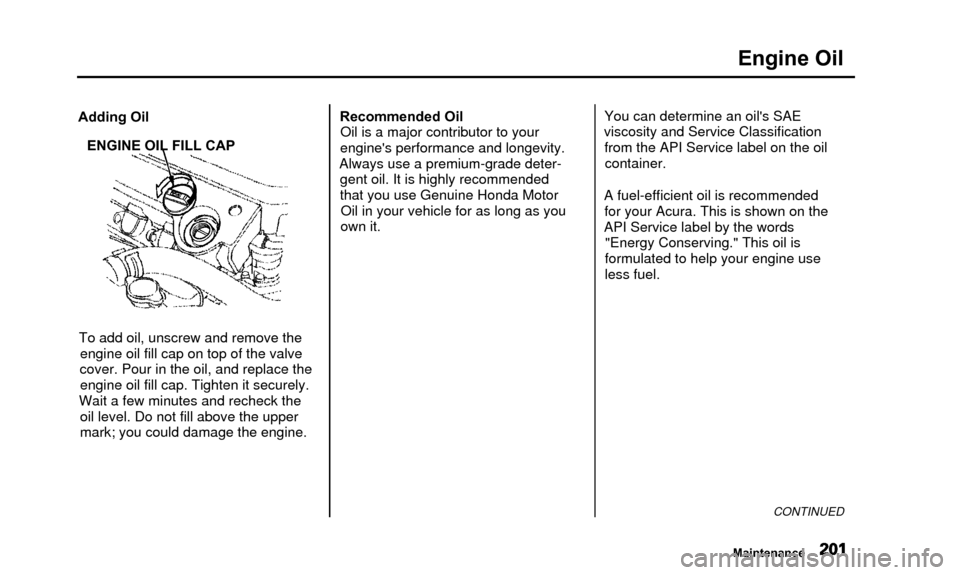
Adding OilENGINE OIL FILL CAP
To add oil, unscrew and remove the engine oil fill cap on top of the valve
cover. Pour in the oil, and replace the engine oil fill cap. Tighten it securely.
Wait a few minutes and recheck the oil level. Do not fill above the upper
mark; you could damage the engine. Recommended Oil
Oil is a major contributor to your
engine's performance and longevity.
Always use a premium-grade deter- gent oil. It is highly recommended
that you use Genuine Honda MotorOil in your vehicle for as long as you
own it. You can determine an oil's SAE
viscosity and Service Classification from the API Service label on the oilcontainer.
A fuel-efficient oil is recommended for your Acura. This is shown on the
API Service label by the words "Energy Conserving." This oil is
formulated to help your engine use
less fuel.
CONTINUED
Maintenance
Page 213 of 311
Cooling System
6. Tighten the drain bolt at the rearof the engine cylinder blocksecurely.
Tightening torque: 7 Ibf-ft(10N-m,1.0kgf-m)
7. Mix the recommended antifreeze with an equal amount of purifiedor distilled water in a clean
container. The cooling system
capacity is:
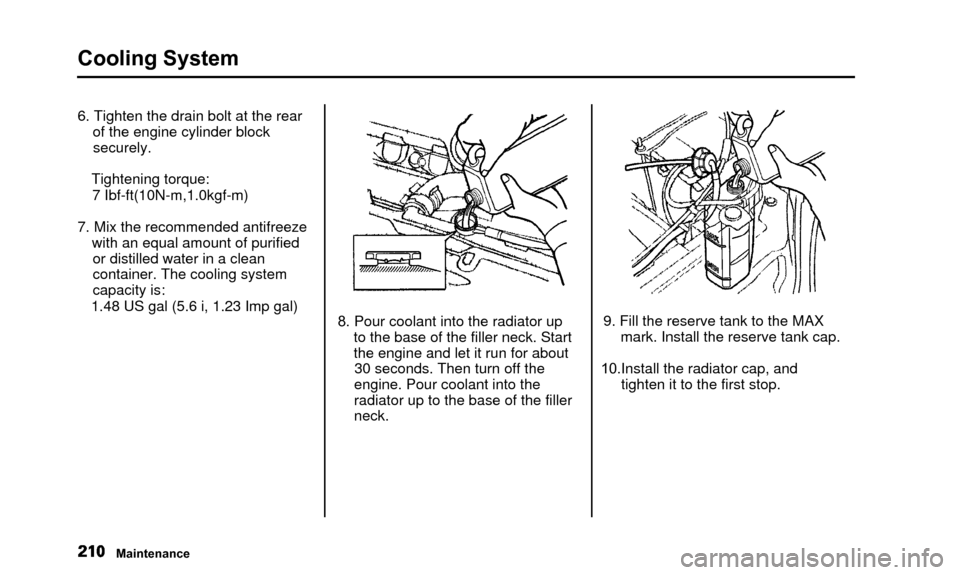
1.48 US gal (5.6 i, 1.23 Imp gal) 8. Pour coolant into the radiator up
to the base of the filler neck. Start
the engine and let it run for about30 seconds. Then turn off the
engine. Pour coolant into the
radiator up to the base of the filler
neck. 9. Fill the reserve tank to the MAX
mark. Install the reserve tank cap.
10.Install the radiator cap, and tighten it to the first stop.
Maintenance