ECU Acura TL 2000 3.2 User Guide
[x] Cancel search | Manufacturer: ACURA, Model Year: 2000, Model line: TL, Model: Acura TL 2000Pages: 311, PDF Size: 3.05 MB
Page 36 of 311
Protecting Children
Child Seat Installation
The lap/shoulder belts in the backand front passenger seating positions
have a locking mechanism that must
be activated to secure a child seat.
The following pages provide instructions and tips on how tosecure a forward-facing child seat
with this type of seat belt.
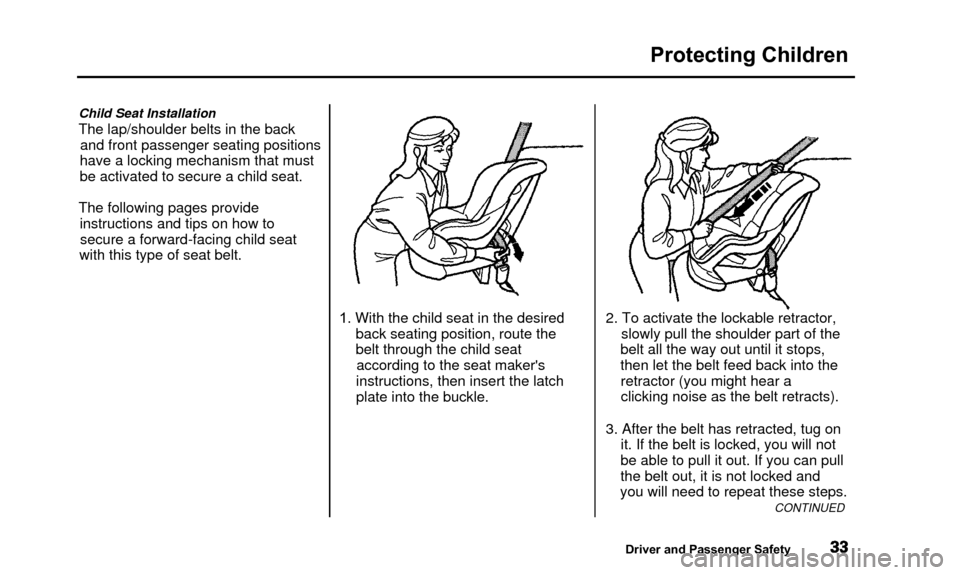
1. With the child seat in the desiredback seating position, route the
belt through the child seataccording to the seat maker's
instructions, then insert the latch
plate into the buckle. 2. To activate the lockable retractor,
slowly pull the shoulder part of the
belt all the way out until it stops,
then let the belt feed back into the retractor (you might hear a
clicking noise as the belt retracts).
3. After the belt has retracted, tug on it. If the belt is locked, you will not
be able to pull it out. If you can pull
the belt out, it is not locked and
you will need to repeat these steps.
CONTINUED
Driver and Passenger Safety
Page 37 of 311
Protecting Children
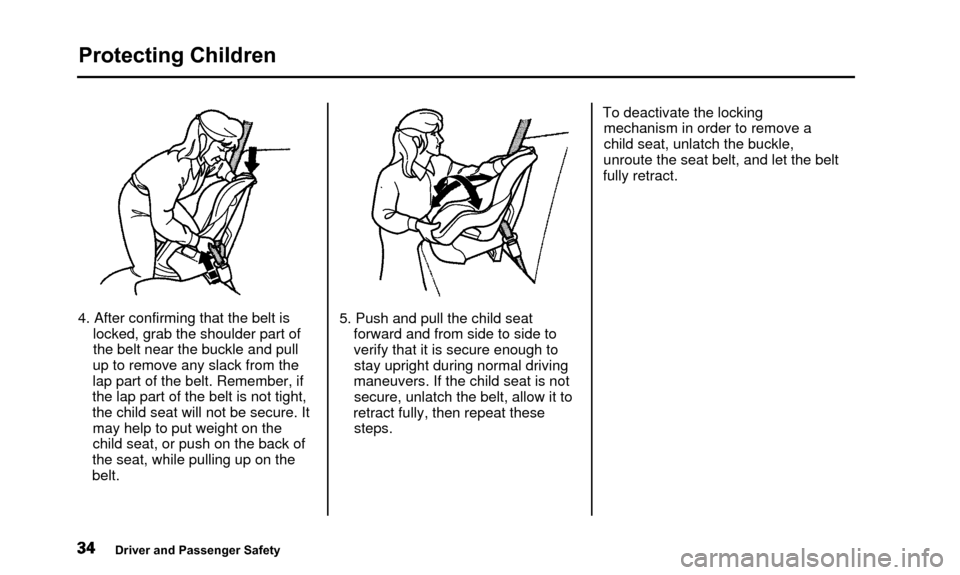
4. After confirming that the belt islocked, grab the shoulder part of
the belt near the buckle and pull
up to remove any slack from the
lap part of the belt. Remember, if
the lap part of the belt is not tight,
the child seat will not be secure. It may help to put weight on the
child seat, or push on the back of
the seat, while pulling up on the
belt. 5. Push and pull the child seat
forward and from side to side to
verify that it is secure enough tostay upright during normal driving
maneuvers. If the child seat is not secure, unlatch the belt, allow it to
retract fully, then repeat these steps. To deactivate the locking
mechanism in order to remove a
child seat, unlatch the buckle,
unroute the seat belt, and let the belt
fully retract.
Driver and Passenger Safety
Page 41 of 311
Protecting Children
Of course, children vary widely. And
while age may be one indicator of
when a child can safely ride in the
front, there are other important
factors you should consider.
Physical Size
Physically, a child must be large
enough for the lap/shoulder belt to
properly fit over the hips, chest, and shoulder (see pages 15 and 36). If
the seat belt does not fit properly, the child should not sit in the front. Maturity
To safely ride in front, a child must be able to follow the rules, including sitting properly and wearing the seat
belt properly throughout a ride.
If you decide that a child can safely
ride up front, be sure to:
• Carefully read the owner's manual and make sure you understand allseat belt instructions and all safety
information.
• Move the vehicle seat to the rear-
most position.
• Have the child sit up straight, backagainst the seat, and feet on or
near the floor.
• Check that the child's seat belt is properly positioned and secured.
• Supervise the child. Even maturechildren sometimes need to be
reminded to fasten the seat beltsor sit properly.
Driver and Passenger Safety
Page 42 of 311
Protecting Children
Using Child Seats with Tethers
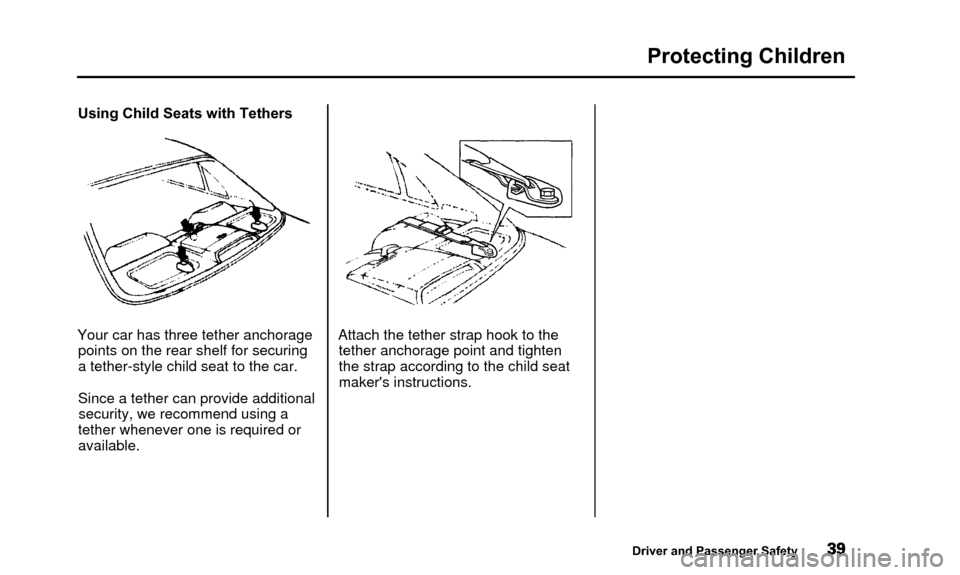
Your car has three tether anchorage points on the rear shelf for securing
a tether-style child seat to the car.
Since a tether can provide additionalsecurity, we recommend using a
tether whenever one is required or available. Attach the tether strap hook to the
tether anchorage point and tighten
the strap according to the child seat
maker's instructions.
Driver and Passenger Safety
Page 44 of 311
Additional Information About Your Seat Belts
All seat belts have an emergencylocking retractor. In normal driving,
the retractor lets you move freely in
your seat while it keeps some tension on the belt. During a collisionor sudden stop, the retractor
automatically locks the belt to help
restrain your body.
The seat belts in all seating positions except the driver's have an additional
locking mechanism that must be activated to secure a child seat. (See
pages 29 and 33 for instructions on
how to secure child seats with this type of seat belt.) If the shoulder part of the belt is
pulled all the way out, the locking
mechanism will activate. The belt
will retract, but it will not allow the passenger to move freely.
To deactivate the locking mechanism, unlatch the buckle and
let the seat belt fully retract. To
refasten the belt, pull it out only as
far as needed. See page 15 for instructions on how
to wear the lap/shoulder belt
properly.
Driver and Passenger Safety
Page 71 of 311

Controls Near the Steering Wheel
Make sure the rear window is clear
and you have good visibility before
starting to drive.
The defogger and antenna wires on the inside of the rear window can beaccidentally damaged. When
cleaning the glass, always wipe side
to side. Steering Wheel Adjustment
See page 17 for important safety
information about how to properly
position the steering wheel.
Make any steering wheel adjustment
before you start driving.
Adjusting the steering wheelposition while driving may
cause you to lose control of the
car and be seriously injured in a
crash.
Adjust the steering wheel only
when the car is stopped.
To adjust the steering wheel upward or downward:
1. Push the lever under the steering column all the way down. 2. Move the steering wheel to the
desired position, making sure the
wheel points toward your chest, not toward your face. Make sure
you can see the instrument panel gauges and the indicator lights.
3. Push the lever up to lock the steering wheel in that position.
4. Make sure you have securely locked the steering wheel in place
by trying to move it up and down.
Instruments and Controls
Page 82 of 311

Keys and Locks
You cannot lock or unlock the doorswith the remote transmitter if any door is not fully closed or the key is
in the ignition switch.
If you unlock the doors with the
remote transmitter, but do not open any of the doors within 30 seconds,
the doors automatically relock and
the security system sets.
When you push the LOCK button a second time within 5 seconds after
you have locked the doors, the horn
will sound once to verify that the security system will be set. To open the trunk, push the Trunk
Release button for approximatelyone second.
The trunk will not open if the key is in the ignition switch.Panic Mode
Panic mode allows you to remotely
activate your car's security system to
attract attention. When activated, the
horn will sound, and the exterior
lights will flash, for about 30 seconds.
To activate panic mode, press and hold the PANIC button for about twoseconds.
To cancel PANIC mode before 30 seconds, press any button on the
remote transmitter. You can also
turn the ignition switch to
ACCESSORY (I) or ON (II).
Panic mode will not activate if the
ignition switch is in ON (II).
CONTINUED
Instruments and Controls
Page 87 of 311

HomeLink Universal Transmitter
The HomeLink Universa l
Transmitter built into your car ca n
be programmed to operate remotely-
controlled devices around your home ,
such as garage doors, lighting, or
home security systems. It can
replace up to three remote
transmitters.
Customer Assistance
If you have problems with training
the HomeLink Universal
Transmitter, or would like information on home products thatcan be operated by the transmitter,
call (800) 355-3515. On the internet,
go to www.homelink.jci.com. Important Safety Precautions
Always refer to the operating instructions and safety information
that came with your garage dooropener or other equipment you
intend to operate with the HomeLink
Universal Transmitter. If you do not
have this information, you should contact the manufacturer of theequipment.
While training or using the transmitter, make sure you have aclear view of the garage door or gate,
and that no one will be injured by its
movement.
General Information
If you are training the transmitter to
operate a garage door or gate, it is
recommended that you unplug the
motor for that device during training.
Repeatedly pressing the remote
control button could burn out the
motor. The HomeLink transmitter stores
the code in a permanent memory.
There should be no need to retrain the transmitter if your car's battery
goes dead or is disconnected.
If your garage door opener wasmanufactured before April 1982, you
may not be able to program the
HomeLink Universal Transmitter to
operate it. Garage door openers
manufactured before that date do
not have a safety feature that causes
them to stop and reverse if an obstacle is detected during closing,
increasing the risk of injury. If you
have questions, call (800) 355-3515.
Instruments and Controls
Page 89 of 311

HomeLink Universal Transmitte
Canadian Owners:
The remote control you are trainingfrom may stop transmitting after tw oseconds. This is not long enough for
the HomeLink transmitter to learn the code. Release and press the
button on the remote control every
two seconds until the transmitter has learned the code.
5. The red light in the transmitter should begin flashing. It will flash
slowly at first, then rapidly.
6. When the red light flashes rapidly, release both buttons. The
transmitter should have learned the code from the remote control.
7. Plug in the garage door opener motor, then test the transmitter
button by pushing it. It should operate the garage door.
If the button does not work, repeat
this procedure to train it again. If it still does not work, you may have a
variable or rolling code garage door opener. Test this by pressing
and holding the HomeLink
transmitter button you just trained. If the red light blinks for two
seconds, then stays on, you have a
rolling code garage door opener.
You may be able to verify this with
the manufacturer's documentation.
Go to "Training With a Rolling
Code System."
8. Repeat these steps to train the other two transmitter buttons to
operate any other remotely-
controlled devices around your
home (lighting, automatic gate , security system, etc.). Training With a Rolling Code
SystemFor security purposes, newer garage
door opening systems use a "rolling"
or variable code. Information from
the remote control and the garage door opener are needed before the
HomeLink transmitter can operate
the garage door opener.
The 'Training the Transmitter" procedure trains the HomeLink
transmitter to the proper garagedoor opener code. The following
procedure synchronizes the
HomeLink transmitter to the garage door opener so they send and
receive the correct codes.
Instruments and Controls
Page 96 of 311

Seat Adjustments
Make sure all items in the trunk and
those extending through the pass-
through are secured.
For security, this cover can be
locked and unlocked only with the master key. To lock the cover, insert
the key and turn it clockwise. Never drive with this cover open and
the trunk lid open.
See Carbon Monoxide Hazard on
page 49.
Instruments and Controls