ECU Acura TLX 2015 User Guide
[x] Cancel search | Manufacturer: ACURA, Model Year: 2015, Model line: TLX, Model: Acura TLX 2015Pages: 75, PDF Size: 24.55 MB
Page 57 of 75
106 || 107
HANDLING THE UNEXPECTED
HANDLING THE UNEXPECTED
TABLE OF
CONTENTS
INDEX
VISUAL INDEX
VOICE COMMAND INDEX
SAFETY
INFORMATION
CLIENT
INFORMATION
INSTRUMENT PANEL
SPECIFICATIONS
VEHICLE
CONTROLS
MAINTENANCE
AUDIO AND
CONNECTIVITY
HANDLING THE UNEXPECTED
BLUETOOTH®
HANDSFREELINK®
DRIVING
ACURALINK®
NAVIGATION
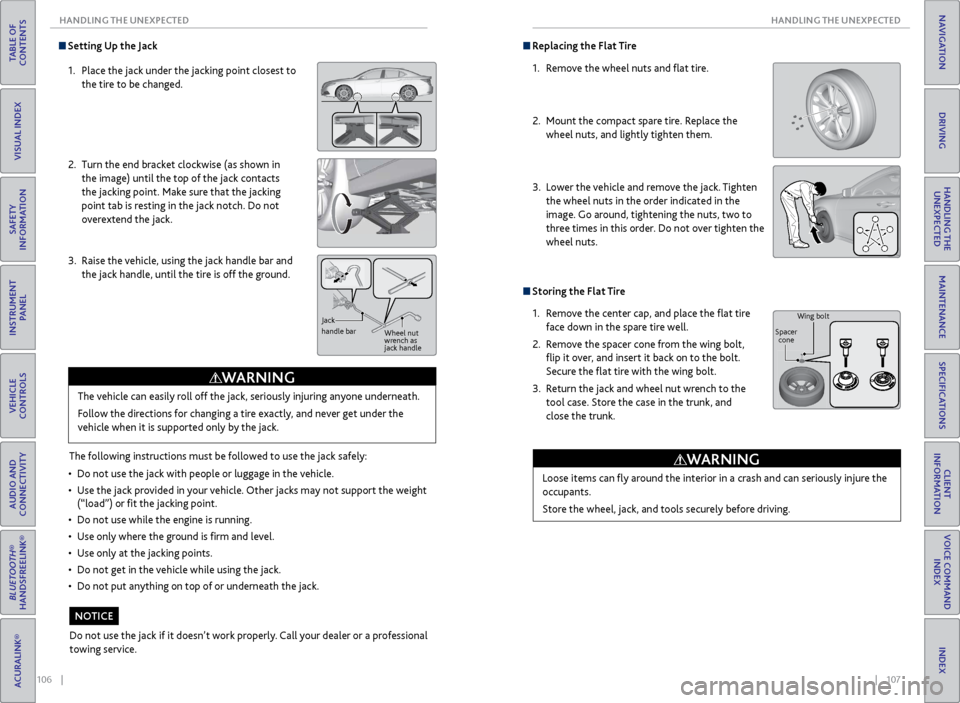
Setting Up the Jack
1. Place the jack under the jacking point closest to
the tire to be changed.
2. Turn the end bracket clockwise (as shown in
the image) until the top of the jack contacts
the jacking point. Make sure that the jacking
point tab is resting in the jack notch. Do not
overextend the jack.
3. Raise the vehicle, using the jack handle bar and
the jack handle, until the tire is off the ground.
The following instructions must be followed to use the jack safely:
• Do not use the jack with people or luggage in the vehicle.
• Use the jack provided in your vehicle. Other jacks may not support the weight
(“load”) or fit the jacking point.
• Do not use while the engine is running.
• Use only where the ground is firm and level.
• Use only at the jacking points.
• Do not get in the vehicle while using the jack.
• Do not put anything on top of or underneath the jack.The vehicle can easily roll off the jack, seriously injuring anyone underneath.
Follow the directions for changing a tire exactly, and never get under the
vehicle when it is supported only by the jack.
WARNING
Jack
handle bar
Wheel nut
wrench as
jack handle
Do not use the jack if it doesn’t work properly. Call your dealer or a professional
towing service.
NOTICE
Replacing the Flat Tire
1. Remove the wheel nuts and flat tire.
2. Mount the compact spare tire. Replace the
wheel nuts, and lightly tighten them.
3. Lower the vehicle and remove the jack. Tighten
the wheel nuts in the order indicated in the
image. Go around, tightening the nuts, two to
three times in this order. Do not over tighten the
wheel nuts.
Storing the Flat Tire
1. Remove the center cap, and place the flat tire
face down in the spare tire well.
2. Remove the spacer cone from the wing bolt,
flip it over, and insert it back on to the bolt.
Secure the flat tire with the wing bolt.
3. Return the jack and wheel nut wrench to the
tool case. Store the case in the trunk, and
close the trunk.
Loose items can fly around the interior in a crash and can seriously injure the
occupants.
Store the wheel, jack, and tools securely before driving.
WARNING
Wing bolt
Spacer cone
Page 62 of 75
116 || 117
MAINTENANCE
MAINTENANCE
TABLE OF
CONTENTS
INDEX
VISUAL INDEX
VOICE COMMAND INDEX
SAFETY
INFORMATION
CLIENT
INFORMATION
INSTRUMENT PANEL
SPECIFICATIONS
VEHICLE
CONTROLS
MAINTENANCE
AUDIO AND
CONNECTIVITY
HANDLING THE UNEXPECTED
BLUETOOTH®
HANDSFREELINK®
DRIVING
ACURALINK®
NAVIGATION
Engine Oil
Park the vehicle on level ground, and wait approximately three minutes after
turning the engine off before you check the oil.
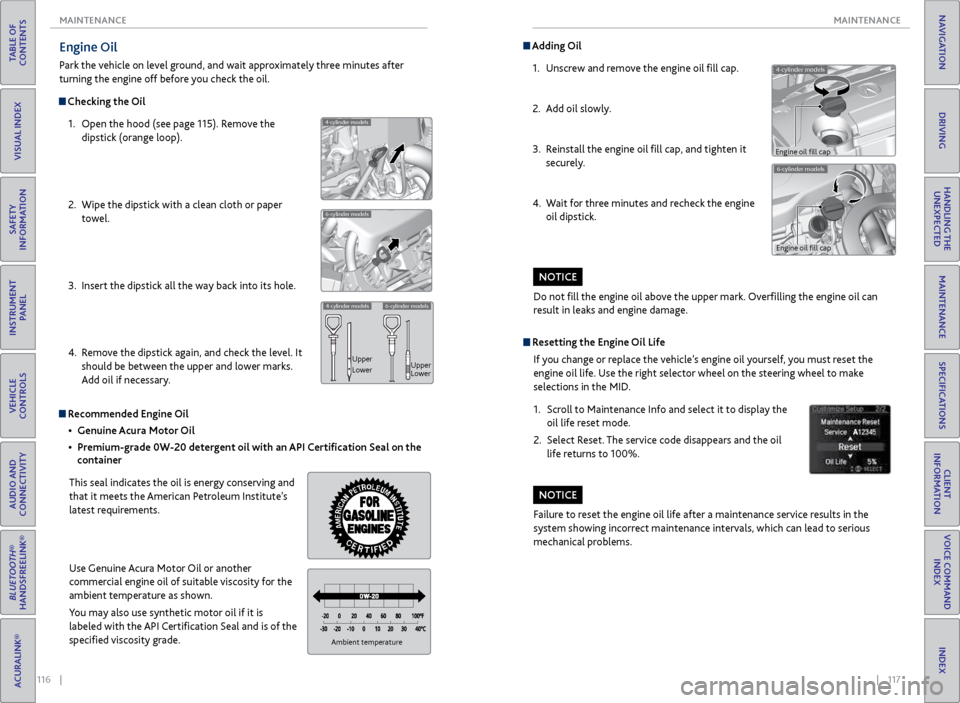
Checking the Oil
1. Open the hood (see page 115). Remove the
dipstick (orange loop).
2. Wipe the dipstick with a clean cloth or paper
towel.
3. Insert the dipstick all the way back into its hole.
4. Remove the dipstick again, and check the level. It
should be between the upper and lower marks.
Add oil if necessary.
4-cylinder models
6-cylinder models
4-cylinder models6-cylinder models
Upper
Lower Upper
Lower
Recommended Engine Oil
• Genuine Acura Motor Oil
• Premium-grade 0W-20 detergent oil with an API Certification Seal on the
container
This seal indicates the oil is energy conserving and
that it meets the American Petroleum Institute’s
latest requirements.
Use Genuine Acura Motor Oil or another
commercial engine oil of suitable viscosity for the
ambient temperature as shown.
You may also use synthetic motor oil if it is
labeled with the API Certification Seal and is of the
specified viscosity grade.
Ambient temperature
Do not fill the engine oil above the upper mark. Overfilling the engine oil can
result in leaks and engine damage.
NOTICE
4-cylinder models
Adding Oil 1. Unscrew and remove the engine oil fill cap.
2. Add oil slowly.
3. Reinstall the engine oil fill cap, and tighten it
securely.
4. Wait for three minutes and recheck the engine
oil dipstick.
6-cylinder models
Engine oil fill cap
Engine oil fill cap
Resetting the Engine Oil Life
If you change or replace the vehicle’s engine oil yourself, you must reset the
engine oil life. Use the right selector wheel on the steering wheel to make
selections in the MID.
1. Scroll to Maintenance Info and select it to display the
oil life reset mode.
2. Select Reset. The service code disappears and the oil
life returns to 100%.
Failure to reset the engine oil life after a maintenance service results in the
system showing incorrect maintenance intervals, which can lead to serious
mechanical problems.
NOTICE
Page 74 of 75
140 || 141
INDEX
INDEX
TABLE OF
CONTENTS
INDEX
VISUAL INDEX
VOICE COMMAND INDEX
SAFETY
INFORMATION
CLIENT
INFORMATION
INSTRUMENT PANEL
SPECIFICATIONS
VEHICLE
CONTROLS
MAINTENANCE
AUDIO AND
CONNECTIVITY
HANDLING THE UNEXPECTED
BLUETOOTH®
HANDSFREELINK®
DRIVING
ACURALINK®
NAVIGATION
INDEX
ABS (Anti-lock Brake System) indicator ..... 23
ACC indicator ........................................... 23, 25
AcuraLink® ....................................................... 62
ASSIST button ............................................ 63
Emergency Assistance ............................... 63
LINK button ................................................ 64
Messages ...................................................... 62
Operator Assistance .................................. 64
Security Features ....................................... 64
Subscription Features ................................63
AcuraLink featuring Aha™ ........................... 54
AcuraLink Real-Time Traffic .......................... 71
Adaptive Cruise Control (ACC) with Low Speed Follow (LSF) ........................ 86
Advanced Airbags ............................................. 8
Aha Radio™ .................................................... 54
Aha Radio™ Commands ............................. 138
Airbags .............................................................. 8
About Your Airbags .................................... 10
Advanced Airbags ........................................ 8
Airbag Care .................................................. 13
Airbag System Components ..................... 12
Airbag System Indicators ......................... 10
Driver’s Knee Airbag .................................... 8
Front Airbags (SRS) ...................................... 8
Passenger Airbag Off indicator ................. 11
Side Airbags ................................................... 9
Side Curtain Airbags .................................... 9
SRS indicator .............................................. 10
Anti-Lock Brake System (ABS) .............. 23, 81
ASSIST button ................................................ 63
Audio Commands ......................................... 137
Audio Operation ............................................ 44
Aha Radio™ ................................................ 54
Auxiliary Input Jack .................................... 44
Bluetooth® Audio ........................................ 51
Compact Disc (CD) .................................... 49
FM/AM Radio .............................................. 47
Hard Disc Drive (HDD) Audio .................. 52
iPod® ........................................................... 50
On-Demand Multi-Use Display (ODMD) ... 46
Pandora® ..................................................... 53
SiriusXM® Radio......................................... 48
Sound ........................................................... 45
Steering Wheel Controls .......................... 45
USB Adapter Cable .................................... 44
USB Flash Drive .......................................... 50
Automatic Brake Hold ............................ 25, 82
Automatic Dimming Rearview Mirror ........39
Automatic Rain-Sensing Wipers ................. 33
Auto Idle Stop ................................................ 83
Auto idle stop indicator .......................... 24, 25Auto Park Mode ..............................................
79
AUX Commands ............................................ 139
Auxiliary Input Jack ........................................ 44
Battery .......................................................... 119
Blind Spot Information (BSI) System ... 23, 93
Bluetooth® Audio ........................................... 51
Bluetooth® Audio Commands ................... 138
Bluetooth® HandsFreeLink® ......................... 55
Call History ................................................. 60
Dialing a Number ....................................... 58
Displays and Controls ................................ 55
E-Mail ............................................................ 61
Making a Call .............................................. 58
On-Demand Multi-Use Display (ODMD) .... 56
Pairing a Phone ............................................ 57
Phonebook ...................................................59
SMS Text Messaging ................................... 61
Speed Dial ............................................. 59, 60
Voice Command Tips .................................. 56
Brake Assist System ........................................ 81
Brake Hold ................................................ 25, 82
Brake system indicator ........................... 22, 23
Braking ............................................................ 81
Brightness Control .......................................... 32
BSI indicator ............................................. 23, 25
Call History ..................................................... 60
Carbon Monoxide Gas ..................................... 4
Car Wash Mode .............................................. 80
Change a Setting ............................................ 40
Changing a Flat Tire ...................................... 105
Changing Fuses ............................................. 110
Charging system indicator ............................ 22
Childproof Door Locks ................................... 29
Child Safety ..................................................... 14
Childproof Door Locks ............................... 29
Protecting Child Passengers ..................... 14
Protecting Infants ....................................... 15
Protecting Larger Children ........................ 19
Protecting Smaller Children ...................... 16
Child Seat ......................................................... 16
Adding Security with a Tether .................. 19
Installing a Child Seat ................................ 18
LATCH-Compatible Child Seat ................. 17
Selecting a Child Seat ................................ 16
Client Information ........................................ 131
Climate Control Commands ....................... 136
Climate Control System ............................... 42
Clock ........................................................... 40
CMBS indicator ........................................ 23, 25
Collision Mitigation Braking System™ (CMBS™) ...91
Compact Disc (CD) ........................................ 49
Compact Disc (CD) Commands ................. 137Condition Indicators
....................................... 24
Contact Us ..................................................... 132
Cross Traffic Monitor ..................................... 96
Cruise Control .......................................... 25, 85
Customized Features .....................................40
Dashboard and Ceiling Controls .................... 2
Detour ............................................................ 71
Dialing a Number ........................................... 58
Door Mirrors ................................................... 39
Doors ........................................................... 28
Childproof Door Locks ............................... 29
Front Door Inner Handle ........................... 29
Lock Tab ........................................................ 29
Master Door Lock Switch .......................... 29
DOT Tire Quality Grading ........................... 125
Driver’s Knee Airbag ......................................... 8
Driving ............................................................ 72
Driving Position Memory System ................ 37
ECON mode indicator ................................... 25
Electric Parking Brake ....................... 23, 24, 81
Electric Power Steering (EPS) indicator ...... 23
Electronic Gear Selector ................................ 79
Electronic Stability Control (ESC) System ... 84
E-Mail ............................................................ 61
Emergency Assistance ...................................63
Emergency Engine Stop ............................... 102
Emergency Towing ........................................ 102
Engine and Fuel .................................... 129, 130
Engine Coolant
.............................................. 118
Engine Oil ....................................................... 116
Engine Oil Life ................................................ 117
Engine Start/Stop Button .............................. 76
EPS indicator .................................................... 23
Exterior Lights .......................................... 25, 32
Fastening a Seat Belt ........................................ 7
FCW indicator ........................................... 23, 25
Find Nearest Place ......................................... 69
Find Place Commands .................................. 135
Flat Tire .......................................................... 105
Floor Mats ........................................................ 37
Fluids ................................................. 129, 130
FM/AM Radio ................................................... 47
FM/AM Radio Commands ........................... 137
Fog lights indicator ......................................... 25
Foot Brake ........................................................ 81
Forward Collision Warning (FCW) with Pedestrian Detection ............... 23, 88
Frequently Asked Questions ....................... 131
Front Airbags (SRS) ........................................... 8
Front Door Inner Handle ............................... 29
Front Seats ....................................................... 35
Fuel Information ............................................. 97
Fuse Locations .............................................. 108
Changing Fuses ......................................... 110
Driver’s Side Interior Fuse Boxes ........... 109Engine Compartment Fuse Boxes .........
108
Garage Opener ................................................ 41
Gear Selector ................................................... 79
Hard Disc Drive (HDD) Audio ....................... 52
Hard Disc Drive (HDD) Commands ........... 137
Headlight Washers ........................................ 34
Headlight-Wiper Integration ....................... 33
Head Restraints .............................................. 36
Heated Steering Wheel ................................ 38
Heated Windshield Button .......................... 34
High beams indicator ..................................... 25
Home Address ................................................ 68
HomeLink® ...................................................... 41
Hood .......................................................... 114
IDS button ....................................................... 84
Immobilizer indicator ..................................... 24
Info Commands ............................................. 139
Installing a Child Seat .................................... 18
Instrument Panel ............................................ 22
Condition Indicators ................................... 24
Malfunction Indicators .............................. 22
On/Off Indicators ....................................... 25
Integrated Dynamics System (IDS) ............ 84
Interface Dial Feedback ................................. 67
Interior Lights .................................................. 32
Intermittent Wipers ...................................... 33
iPod® ........................................................... 50
iPod® Commands ........................................ 138
Jump Starting ................................................. 99
Keyless Access System ............................ 23, 28
Lane Departure Warning (LDW) ........... 23, 89
Lane Keeping Assist System (LKAS) ............90
Lap/Shoulder Seat Belts .................................. 5
LATCH-Compatible Child Seat ..................... 17
LDW indicator ................................................. 23
Light Bulbs ............................................. 129, 130
Lights ..................................................... 25, 32
Brightness Control ...................................... 32
Exterior Lights ............................................. 32
Interior Lights .............................................. 32
LINK button .................................................... 64
LKAS indicator .......................................... 23, 25
Locking the Doors .......................................... 28
Lock Tab ............................................................ 29
Low fuel indicator ........................................... 24
Low oil pressure indicator ............................. 22
Low Speed Follow (LSF) ................................ 86
Low tire pressure indicator ............................24
Maintenance ................................................... 111
Opening the Hood .................................... 115
Safety Precautions ..................................... 111
Service Codes ............................................. 112
Under the Hood ........................................ 114
Maintenance Minder™ ................................ 112
Making a Call .................................................. 58