sport mode Acura TLX 2015 Owner's Guide
[x] Cancel search | Manufacturer: ACURA, Model Year: 2015, Model line: TLX, Model: Acura TLX 2015Pages: 75, PDF Size: 24.55 MB
Page 14 of 75

20 || 21
SAFETY
SAFETY
TABLE OF
CONTENTS
INDEX
VISUAL INDEX
VOICE COMMAND INDEX
SAFETY
INFORMATION
CLIENT
INFORMATION
INSTRUMENT PANEL
SPECIFICATIONS
VEHICLE
CONTROLS
MAINTENANCE
AUDIO AND
CONNECTIVITY
HANDLING THE UNEXPECTED
BLUETOOTH®
HANDSFREELINK®
DRIVING
ACURALINK®
NAVIGATION
Reporting Safety Defects
In the U.S.
If you believe that your vehicle has a defect which could cause a crash or could
cause injury or death, you should immediately inform the National Highway Traffic
Safety Administration (NHTSA) in addition to notifying American Honda Motor
Co., Inc.
If NHTSA receives similar complaints, it may open an investigation, and if it finds
that a safety defect exists in a group of vehicles, it may order a recall and remedy
campaign. However, NHTSA cannot become involved in individual problems
between you, your dealer, or American Honda Motor Co., Inc.
To contact NHTSA, you may call the Vehicle Safety Hotline toll-free at 1-888-
327-4236 (TTY: 1-800-424-9153); go to http://www.safercar.gov; or write to:
Administrator, NHTSA, 1200 New Jersey Avenue, SE., Washington, DC 20590. You
can also obtain other information about motor vehicle safety from http://www.
safercar.gov.
In Canada
If you believe that your vehicle has a defect which could cause a crash or could
cause injury or death, you should immediately inform Honda Canada, Inc., and you
may also inform Transport Canada.
If Transport Canada receives similar complaints, it may open an investigation, and
if it finds that a safety defect exists in a group of vehicles, it may lead to a recall
and remedy campaign. However, Transport Canada cannot become involved in
individual problems between you, your dealer, or Honda Canada, Inc.
To contact Transport Canada’s Defect Investigations and Recalls Division, you may
call 1-800-333-0510. For more information on reporting safety defects or about
motor vehicle safety, go to http://www.tc.gc.ca/roadsafety.
Allowing a child age 12 or under to sit in the front can result in injury or
death if the passenger’s front airbag inflates.
If a larger child must ride in front, move the vehicle seat as far to the rear as
possible, have the child sit up properly and wear the seat belt properly, using
a booster seat if needed.
WARNING
Safety Label Locations
Safety labels are in the locations shown. They warn you of potential hazards that
can cause serious injury or death. Read these labels carefully. If a lap/shoulder belt cannot be used properly, position the child in a booster seat
in a rear seating position. For the child’s safety, check that the child meets the
booster seat manufacturer’s recommendations.
Some U.S. states and Canadian provinces/territories require children to use a
booster seat until they reach a given age or weight (e.g., 6 years or 60 lbs). Be
sure to check current laws in the state or province/territory where you intend to
drive.
Radiator cap
Doorjambs
Sun visors
U.S. models
Canadian models
Dashboard
(U.S. models)
Page 16 of 75
24 || 25
INSTRUMENT P
ANEL
INSTRUMENT P ANEL
TABLE OF
CONTENTS
INDEX
VISUAL INDEX
VOICE COMMAND INDEX
SAFETY
INFORMATION
CLIENT
INFORMATION
INSTRUMENT PANEL
SPECIFICATIONS
VEHICLE
CONTROLS
MAINTENANCE
AUDIO AND
CONNECTIVITY
HANDLING THE UNEXPECTED
BLUETOOTH®
HANDSFREELINK®
DRIVING
ACURALINK®
NAVIGATION
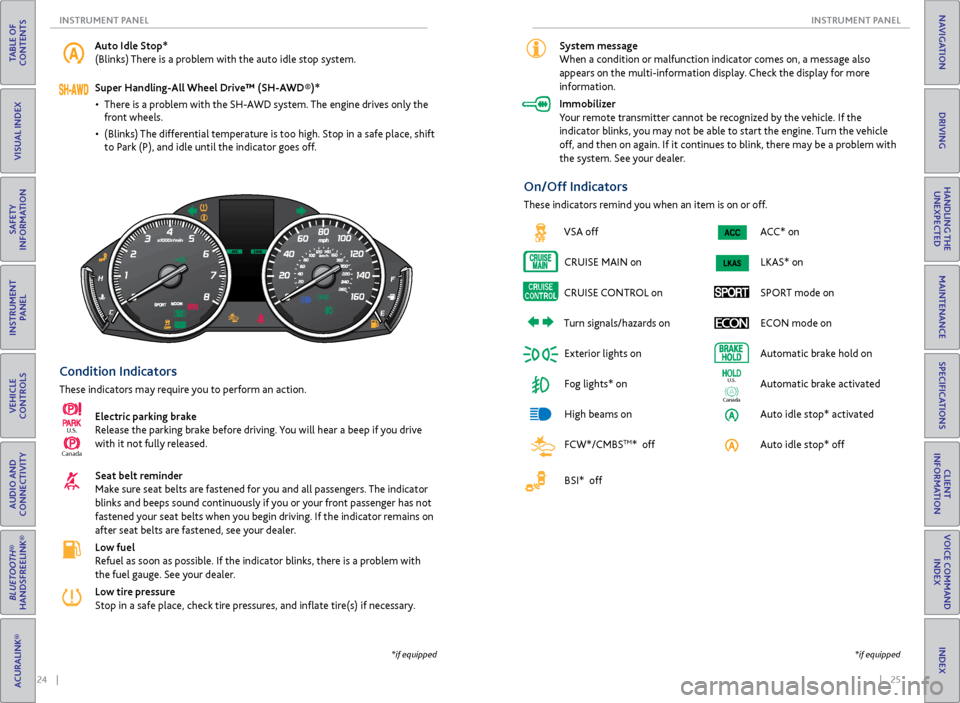
Condition Indicators
These indicators may require you to perform an action.
Electric parking brake
Release the parking brake before driving. You will hear a beep if you drive
with it not fully released.
Seat belt reminder
Make sure seat belts are fastened for you and all passengers. The indicator
blinks and beeps sound continuously if you or your front passenger has not
fastened your seat belts when you begin driving. If the indicator remains on
after seat belts are fastened, see your dealer.
Low fuel
Refuel as soon as possible. If the indicator blinks, there is a problem with
the fuel gauge. See your dealer.
Low tire pressure
Stop in a safe place, check tire pressures, and inflate tire(s) if necessary.
Canada
U.S.
*if equipped
Auto Idle Stop*
(Blinks) There is a problem with the auto idle stop system.
Super Handling-All Wheel Drive™ (SH-AWD®)*
• There is a problem with the SH-AWD system. The engine drives only the
front wheels.
• (Blinks) The differential temperature is too high. Stop in a safe place, shift
to Park (P), and idle until the indicator goes off.
ACC* onLKAS* on
SPORT mode on ECON mode on
Automatic brake hold on
Automatic brake activated
Auto idle stop* activated
Auto idle stop* off
Ca nada
U.S.
On/Off Indicators
These indicators remind you when an item is on or off.
*if equipped
System message
When a condition or malfunction indicator comes on, a message also
appears on the multi-information display. Check the display for more
information.
Immobilizer
Your remote transmitter cannot be recognized by the vehicle. If the
indicator blinks, you may not be able to start the engine. Turn the vehicle
off, and then on again. If it continues to blink, there may be a problem with
the system. See your dealer.
VSA off
CRUISE MAIN on
CRUISE CONTROL on
Turn signals/hazards on Exterior lights on
Fog lights* on
High beams on
FCW*/CMBS
TM* off
BSI* off
Page 21 of 75
34 || 35
VEHICLE CONTROLS
VEHICLE CONTROLS
TABLE OF
CONTENTS
INDEX
VISUAL INDEX
VOICE COMMAND INDEX
SAFETY
INFORMATION
CLIENT
INFORMATION
INSTRUMENT PANEL
SPECIFICATIONS
VEHICLE
CONTROLS
MAINTENANCE
AUDIO AND
CONNECTIVITY
HANDLING THE UNEXPECTED
BLUETOOTH®
HANDSFREELINK®
DRIVING
ACURALINK®
NAVIGATION
Do not use the wipers when the windshield is dry. The windshield will get
scratched, or the rubber blades will get damaged.
In cold weather, the blades may freeze to the windshield, becoming stuck.
Operating the wipers in this condition may damage the wipers. Use the defroster
to warm the windshield, or manually clear the windshield of ice and snow before
turning on the wipers.
NOTICE
Headlight Washers*
Canadian models
Heated Windshield Button*
Canadian models
Turn the headlights on. Press the
headlight washer button to operate the
washers.
The headlight washers also operate
when you first turn on the windshield
wipers.
Turn the vehicle on. Press the heated
windshield button to de-ice the
windshield.
The heated windshield may
automatically activate when the
outside temperature is below 4°C,
and deactivate when the temperature
reaches 6°C.
*if equipped
Adjusting the Seats
Make seat adjustments before driving to ensure the best comfort and safety.
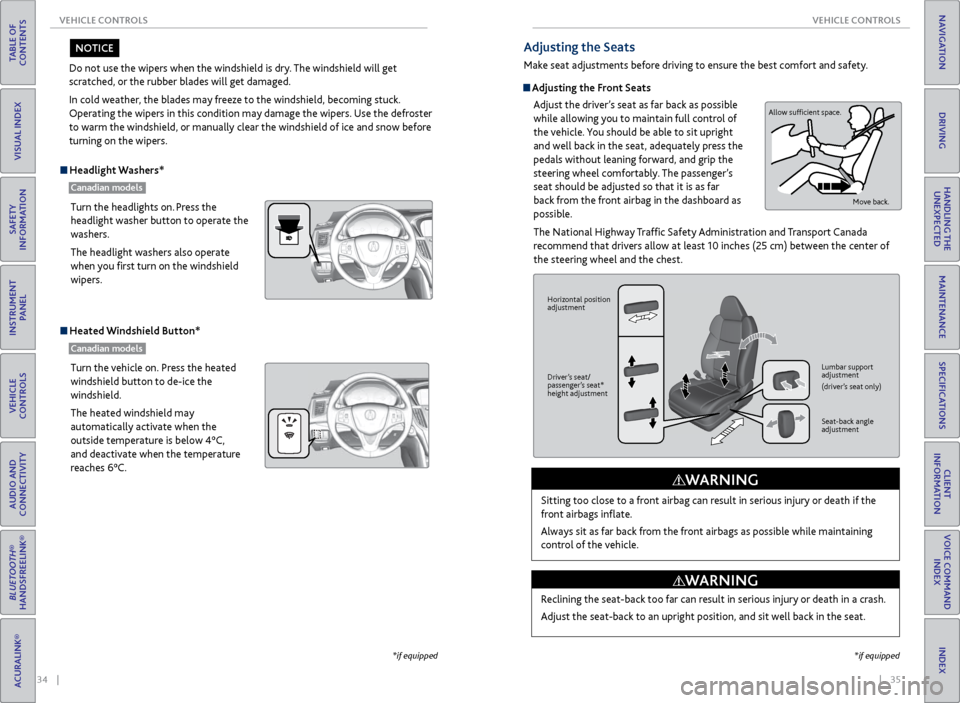
Adjusting the Front Seats
Adjust the driver’s seat as far back as possible
while allowing you to maintain full control of
the vehicle. You should be able to sit upright
and well back in the seat, adequately press the
pedals without leaning forward, and grip the
steering wheel comfortably. The passenger’s
seat should be adjusted so that it is as far
back from the front airbag in the dashboard as
possible.
The National Highway Traffic Safety Administration and Transport Canada
recommend that drivers allow at least 10 inches (25 cm) between the center of
the steering wheel and the chest.
Sitting too close to a front airbag can result in serious injury or death if the
front airbags inflate.
Always sit as far back from the front airbags as possible while maintaining
control of the vehicle.
WARNING
Allow sufficient space. Move back.
Horizontal position
adjustment
Driver’s seat/
passenger’s seat*
height adjustment Lumbar support
adjustment
(driver’s seat only)
Seat-back angle
adjustment
Reclining the seat-back too far can result in serious injury or death in a crash.
Adjust the seat-back to an upright position, and sit well back in the seat.
WARNING
*if equipped
Page 43 of 75
78 || 79
DRIVING
DRIVING
TABLE OF
CONTENTS
INDEX
VISUAL INDEX
VOICE COMMAND INDEX
SAFETY
INFORMATION
CLIENT
INFORMATION
INSTRUMENT PANEL
SPECIFICATIONS
VEHICLE
CONTROLS
MAINTENANCE
AUDIO AND
CONNECTIVITY
HANDLING THE UNEXPECTED
BLUETOOTH®
HANDSFREELINK®
DRIVING
ACURALINK®
NAVIGATION
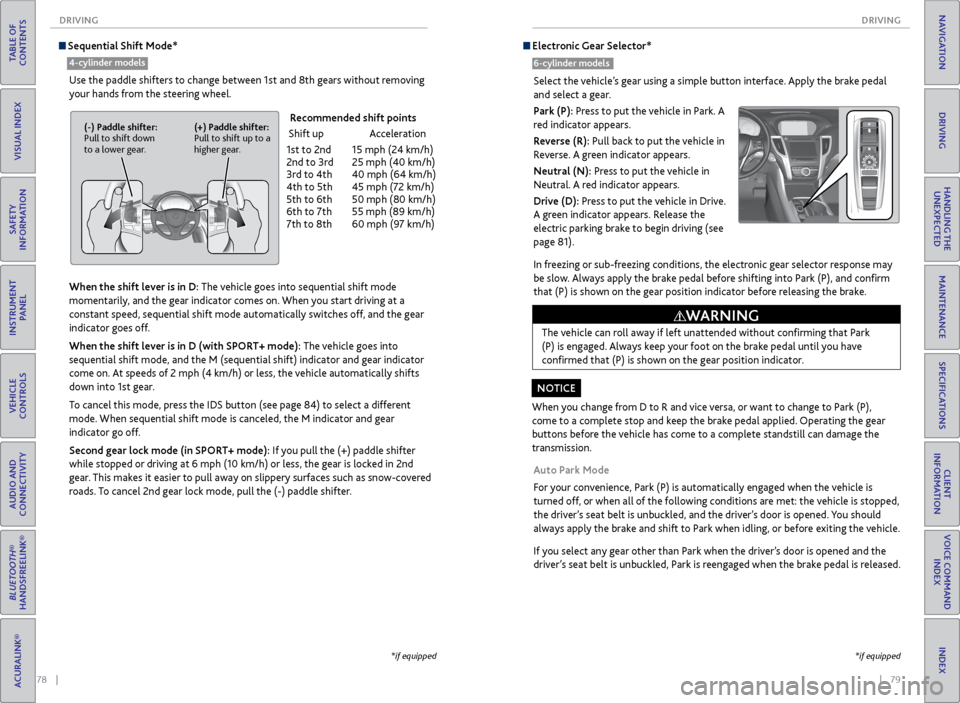
Sequential Shift Mode*
Use the paddle shifters to change between 1st and 8th gears without removing
your hands from the steering wheel.
When the shift lever is in D: The vehicle goes into sequential shift mode
momentarily, and the gear indicator comes on. When you start driving at a
constant speed, sequential shift mode automatically switches off, and the gear
indicator goes off.
When the shift lever is in D (with SPORT+ mode): The vehicle goes into
sequential shift mode, and the M (sequential shift) indicator and gear indicator
come on. At speeds of 2 mph (4 km/h) or less, the vehicle automatically shifts
down into 1st gear.
To cancel this mode, press the IDS button (see page 84) to select a different
mode. When sequential shift mode is canceled, the M indicator and gear
indicator go off.
Second gear lock mode (in SPORT+ mode): If you pull the (+) paddle shifter
while stopped or driving at 6 mph (10 km/h) or less, the gear is locked in 2nd
gear. This makes it easier to pull away on slippery surfaces such as snow-covered
roads. To cancel 2nd gear lock mode, pull the (-) paddle shifter.
(-) Paddle shifter:
Pull to shift down
to a lower gear. (+) Paddle shifter:
Pull to shift up to a
higher gear.
Recommended shift points
Shift up Acceleration
1st to 2nd 15 mph (24 km/h)
2nd to 3rd 25 mph (40 km/h)
3rd to 4th 40 mph (64 km/h)
4th to 5th 45 mph (72 km/h)
5th to 6th 50 mph (80 km/h)
6th to 7th 55 mph (89 km/h)
7th to 8th 60 mph (97 km/h)
*if equipped
4-cylinder models
*if equipped
Electronic Gear Selector*
6-cylinder models
Select the vehicle’s gear using a simple button interface. Apply the brake pedal
and select a gear.
Park (P): Press to put the vehicle in Park. A
red indicator appears.
Reverse (R): Pull back to put the vehicle in
Reverse. A green indicator appears.
Neutral (N): Press to put the vehicle in
Neutral. A red indicator appears.
Drive (D): Press to put the vehicle in Drive.
A green indicator appears. Release the
electric parking brake to begin driving (see
page 81).
In freezing or sub-freezing conditions, the electronic gear selector response may
be slow. Always apply the brake pedal before shifting into Park (P), and confirm
that (P) is shown on the gear position indicator before releasing the brake.
Auto Park Mode
For your convenience, Park (P) is automatically engaged when the vehicle is
turned off, or when all of the following conditions are met: the vehicle is stopped,
the driver’s seat belt is unbuckled, and the driver’s door is opened. You should
always apply the brake and shift to Park when idling, or before exiting the vehicle.
If you select any gear other than Park when the driver’s door is opened and the
driver’s seat belt is unbuckled, Park is reengaged when the brake pedal is released.
When you change from D to R and vice versa, or want to change to Park (P),
come to a complete stop and keep the brake pedal applied. Operating the gear
buttons before the vehicle has come to a complete standstill can damage the
transmission.
NOTICE The vehicle can roll away if left unattended without confirming that Park
(P) is engaged. Always keep your foot on the brake pedal until you have
confirmed that (P) is shown on the gear position indicator.
WARNING
Page 44 of 75
80 || 81
DRIVING
DRIVING
TABLE OF
CONTENTS
INDEX
VISUAL INDEX
VOICE COMMAND INDEX
SAFETY
INFORMATION
CLIENT
INFORMATION
INSTRUMENT PANEL
SPECIFICATIONS
VEHICLE
CONTROLS
MAINTENANCE
AUDIO AND
CONNECTIVITY
HANDLING THE UNEXPECTED
BLUETOOTH®
HANDSFREELINK®
DRIVING
ACURALINK®
NAVIGATION
Car Wash Mode
Follow the procedure below to use a conveyor-style car wash where you or
an attendant do not remain in the vehicle. Make sure the wiper lever is in the
OFF position (see page 33). You should inform the car wash attendant of this
procedure.
1. When the engine is running, apply the brake pedal and select Neutral (N).
2. Within 5 seconds, press the ENGINE START/STOP button. The vehicle goes
into Accessory mode.
This mode lasts for 15 minutes before the gear changes to Park and the vehicle
turns off.
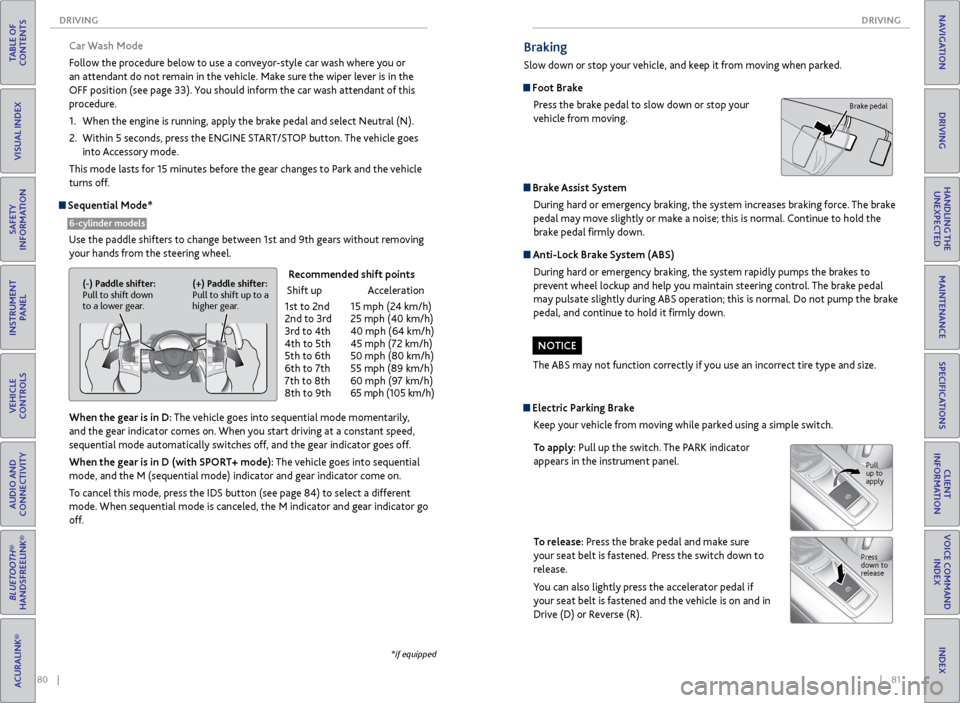
Sequential Mode*
Use the paddle shifters to change between 1st and 9th gears without removing your hands from the steering wheel.
When the gear is in D: The vehicle goes into sequential mode momentarily,
and the gear indicator comes on. When you start driving at a constant speed,
sequential mode automatically switches off, and the gear indicator goes off.
When the gear is in D (with SPORT+ mode): The vehicle goes into sequential
mode, and the M (sequential mode) indicator and gear indicator come on.
To cancel this mode, press the IDS button (see page 84) to select a different
mode. When sequential mode is canceled, the M indicator and gear indicator go
off.
6-cylinder models
(-) Paddle shifter:
Pull to shift down
to a lower gear. (+) Paddle shifter:
Pull to shift up to a
higher gear.
Recommended shift points
Shift up Acceleration
1st to 2nd 15 mph (24 km/h)
2nd to 3rd 25 mph (40 km/h)
3rd to 4th 40 mph (64 km/h)
4th to 5th 45 mph (72 km/h)
5th to 6th 50 mph (80 km/h)
6th to 7th 55 mph (89 km/h)
7th to 8th 60 mph (97 km/h)
8th to 9th 65 mph (105 km/h)
*if equipped
Braking
Slow down or stop your vehicle, and keep it from moving when parked.
Foot Brake
Press the brake pedal to slow down or stop your
vehicle from moving.
Brake Assist System During hard or emergency braking, the system increases braking force. The brake
pedal may move slightly or make a noise; this is normal. Continue to hold the
brake pedal firmly down.
Anti-Lock Brake System (ABS)
During hard or emergency braking, the system rapidly pumps the brakes to
prevent wheel lockup and help you maintain steering control. The brake pedal
may pulsate slightly during ABS operation; this is normal. Do not pump the brake
pedal, and continue to hold it firmly down.
The ABS may not function correctly if you use an incorrect tire type and size.
NOTICE
Brake pedal
Electric Parking Brake Keep your vehicle from moving while parked using a simple switch.
To apply: Pull up the switch. The PARK indicator
appears in the instrument panel.
To release: Press the brake pedal and make sure
your seat belt is fastened. Press the switch down to
release.
You can also lightly press the accelerator pedal if
your seat belt is fastened and the vehicle is on and in
Drive (D) or Reverse (R).
Pull
up to
apply
Press
down to
release
Page 46 of 75
84 || 85
DRIVING
DRIVING
TABLE OF
CONTENTS
INDEX
VISUAL INDEX
VOICE COMMAND INDEX
SAFETY
INFORMATION
CLIENT
INFORMATION
INSTRUMENT PANEL
SPECIFICATIONS
VEHICLE
CONTROLS
MAINTENANCE
AUDIO AND
CONNECTIVITY
HANDLING THE UNEXPECTED
BLUETOOTH®
HANDSFREELINK®
DRIVING
ACURALINK®
NAVIGATION
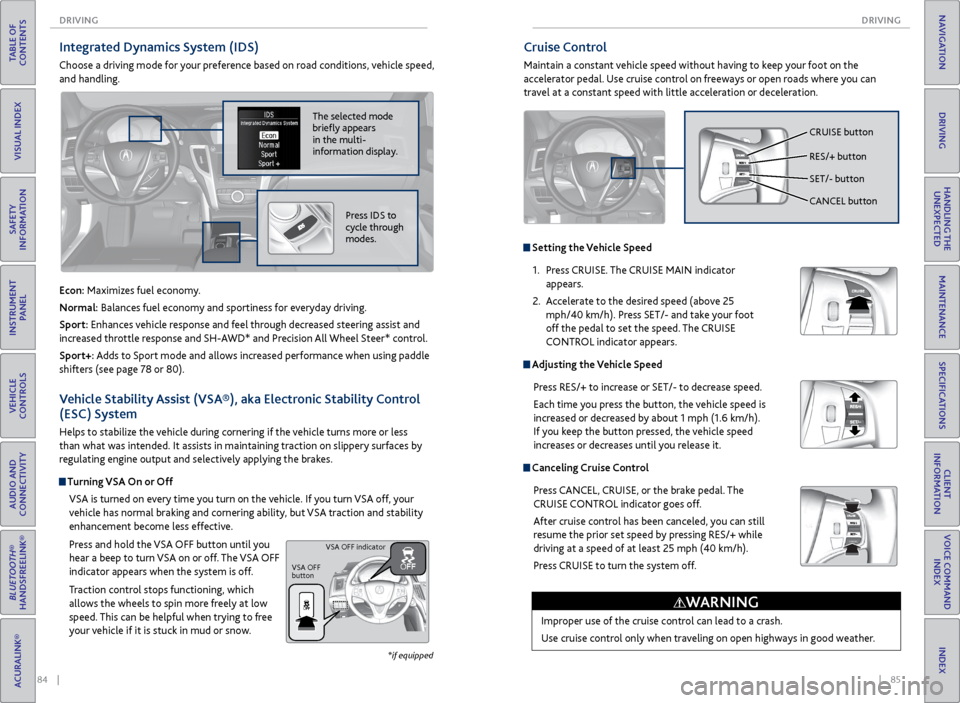
Cruise Control
Maintain a constant vehicle speed without having to keep your foot on the
accelerator pedal. Use cruise control on freeways or open roads where you can
travel at a constant speed with little acceleration or deceleration.
Improper use of the cruise control can lead to a crash.
Use cruise control only when traveling on open highways in good weather.
WARNING
Setting the Vehicle Speed1. Press CRUISE. The CRUISE MAIN indicator
appears.
2. Accelerate to the desired speed (above 25
mph/40 km/h). Press SET/- and take your foot
off the pedal to set the speed. The CRUISE
CONTROL indicator appears.
Adjusting the Vehicle Speed
Press RES/+ to increase or SET/- to decrease speed.
Each time you press the button, the vehicle speed is
increased or decreased by about 1 mph (1.6 km/h).
If you keep the button pressed, the vehicle speed
increases or decreases until you release it.
Canceling Cruise ControlPress CANCEL, CRUISE, or the brake pedal. The
CRUISE CONTROL indicator goes off.
After cruise control has been canceled, you can still
resume the prior set speed by pressing RES/+ while
driving at a speed of at least 25 mph (40 km/h).
Press CRUISE to turn the system off.
CRUISE button
RES/+ button
SET/- button
CANCEL button
Integrated Dynamics System (IDS)
Choose a driving mode for your preference based on road conditions, vehicle speed,
and handling.
Vehicle Stability Assist (VSA®), aka Electronic Stability Control
(ESC) System
Helps to stabilize the vehicle during cornering if the vehicle turns more or less
than what was intended. It assists in maintaining traction on slippery surfaces by
regulating engine output and selectively applying the brakes.
Turning VSA On or OffVSA is turned on every time you turn on the vehicle. If you turn VSA off, your
vehicle has normal braking and cornering ability, but VSA traction and stability
enhancement become less effective.
Press and hold the VSA OFF button until you
hear a beep to turn VSA on or off. The VSA OFF
indicator appears when the system is off.
Traction control stops functioning, which
allows the wheels to spin more freely at low
speed. This can be helpful when trying to free
your vehicle if it is stuck in mud or snow.
VSA OFF
button VSA OFF indicator
The selected mode
briefly appears
in the multi-
information display.
Econ: Maximizes fuel economy.
Normal: Balances fuel economy and sportiness for everyday driving.
Sport: Enhances vehicle response and feel through decreased steering assist and
increased throttle response and SH-AWD* and Precision All Wheel Steer* control.
Sport+: Adds to Sport mode and allows increased performance when using paddle
shifters (see page 78 or 80).
Press IDS to
cycle through
modes.
*if equipped
Page 51 of 75
94 || 95
DRIVING
DRIVING
TABLE OF
CONTENTS
INDEX
VISUAL INDEX
VOICE COMMAND INDEX
SAFETY
INFORMATION
CLIENT
INFORMATION
INSTRUMENT PANEL
SPECIFICATIONS
VEHICLE
CONTROLS
MAINTENANCE
AUDIO AND
CONNECTIVITY
HANDLING THE UNEXPECTED
BLUETOOTH®
HANDSFREELINK®
DRIVING
ACURALINK®
NAVIGATION
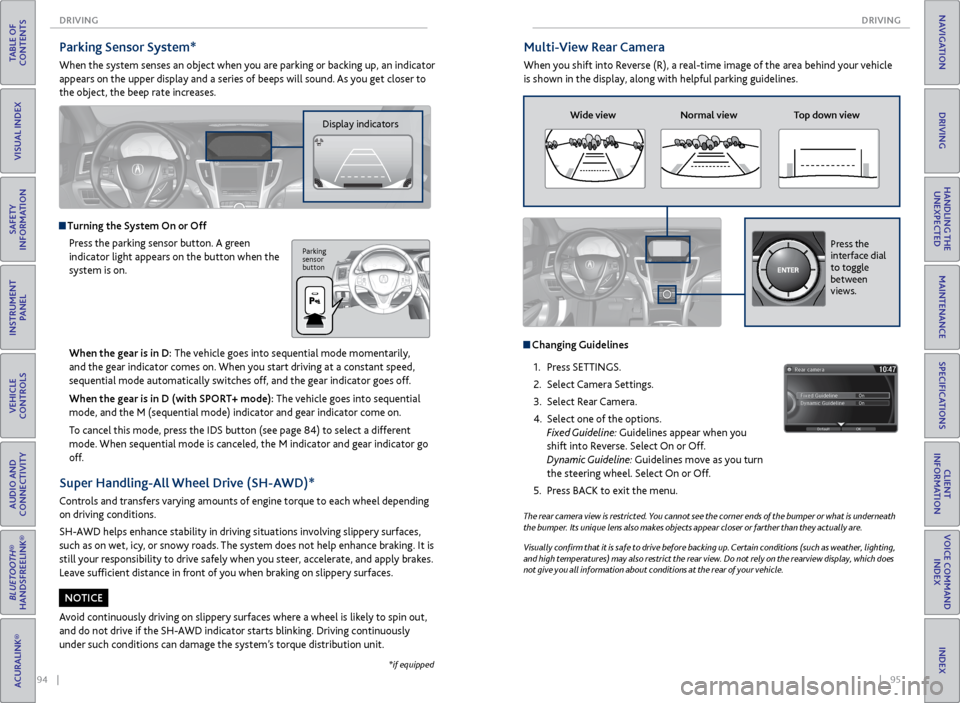
Multi-View Rear Camera
When you shift into Reverse (R), a real-time image of the area behind your vehicle
is shown in the display, along with helpful parking guidelines.
The rear camera view is restricted. You cannot see the corner ends of the bumper or what is underneath
the bumper. Its unique lens also makes objects appear closer or farther than they actually are.
Visually confirm that it is safe to drive before backing up. Certain conditions (such as weather, lighting,
and high temperatures) may also restrict the rear view. Do not rely on the rearview display, which does
not give you all information about conditions at the rear of your vehicle.
Wide view Normal view Top down view
Changing Guidelines
1. Press SETTINGS.
2. Select Camera Settings.
3. Select Rear Camera.
4. Select one of the options.
Fixed Guideline: Guidelines appear when you
shift into Reverse. Select On or Off.
Dynamic Guideline: Guidelines move as you turn
the steering wheel. Select On or Off.
5. Press BACK to exit the menu.
Press the
interface dial
to toggle
between
views.
Parking Sensor System*
When the system senses an object when you are parking or backing up, an indicator
appears on the upper display and a series of beeps will sound. As you get closer to
the object, the beep rate increases.
Display indicators
Turning the System On or Off
Press the parking sensor button. A green
indicator light appears on the button when the
system is on.
Parking
sensor
button
*if equipped
When the gear is in D: The vehicle goes into sequential mode momentarily,
and the gear indicator comes on. When you start driving at a constant speed,
sequential mode automatically switches off, and the gear indicator goes off.
When the gear is in D (with SPORT+ mode): The vehicle goes into sequential
mode, and the M (sequential mode) indicator and gear indicator come on.
To cancel this mode, press the IDS button (see page 84) to select a different
mode. When sequential mode is canceled, the M indicator and gear indicator go
off.
Super Handling-All Wheel Drive (SH-AWD)*
Controls and transfers varying amounts of engine torque to each wheel depending
on driving conditions.
SH-AWD helps enhance stability in driving situations involving slippery surfaces,
such as on wet, icy, or snowy roads. The system does not help enhance braking. It is
still your responsibility to drive safely when you steer, accelerate, and apply brakes.
Leave sufficient distance in front of you when braking on slippery surfaces.
Avoid continuously driving on slippery surfaces where a wheel is likely to spin out,
and do not drive if the SH-AWD indicator starts blinking. Driving continuously
under such conditions can damage the system’s torque distribution unit.
NOTICE
Page 55 of 75
102 || 103
HANDLING THE UNEXPECTED
HANDLING THE UNEXPECTED
TABLE OF
CONTENTS
INDEX
VISUAL INDEX
VOICE COMMAND INDEX
SAFETY
INFORMATION
CLIENT
INFORMATION
INSTRUMENT PANEL
SPECIFICATIONS
VEHICLE
CONTROLS
MAINTENANCE
AUDIO AND
CONNECTIVITY
HANDLING THE UNEXPECTED
BLUETOOTH®
HANDSFREELINK®
DRIVING
ACURALINK®
NAVIGATION
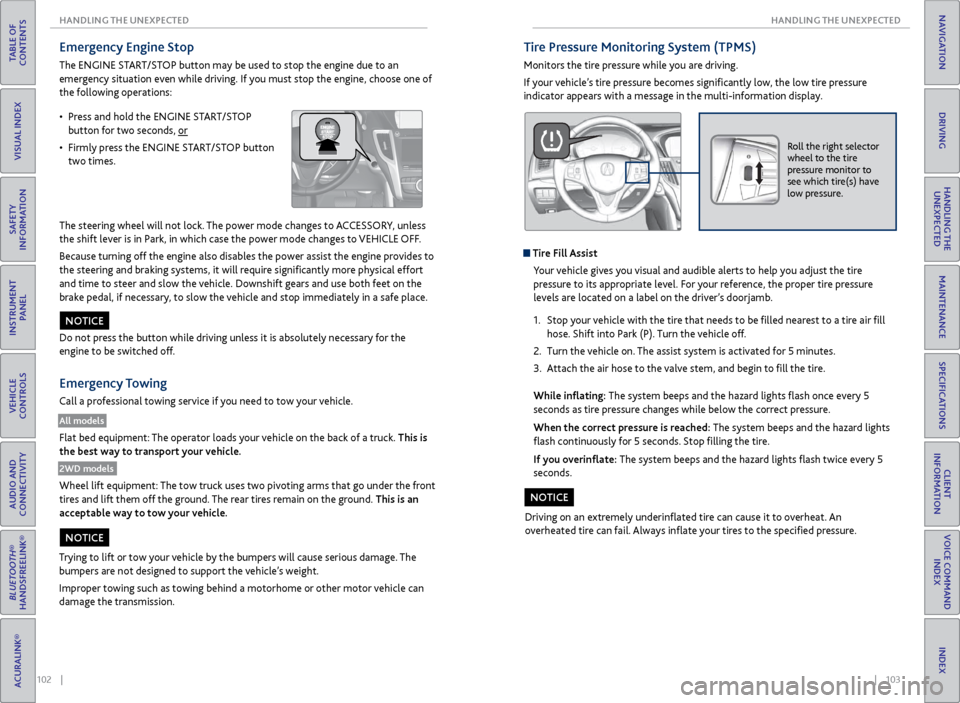
Emergency Engine Stop
The ENGINE START/STOP button may be used to stop the engine due to an
emergency situation even while driving. If you must stop the engine, choose one of
the following operations:
The steering wheel will not lock. The power mode changes to ACCESSORY, unless
the shift lever is in Park, in which case the power mode changes to VEHICLE OFF.
Because turning off the engine also disables the power assist the engine provides to
the steering and braking systems, it will require significantly more physical effort
and time to steer and slow the vehicle. Downshift gears and use both feet on the
brake pedal, if necessary, to slow the vehicle and stop immediately in a safe place.
Do not press the button while driving unless it is absolutely necessary for the
engine to be switched off.
Emergency Towing
Call a professional towing service if you need to tow your vehicle.
All models
Flat bed equipment: The operator loads your vehicle on the back of a truck. This is
the best way to transport your vehicle.
2WD models
Wheel lift equipment: The tow truck uses two pivoting arms that go under the front
tires and lift them off the ground. The rear tires remain on the ground. This is an
acceptable way to tow your vehicle.
NOTICE
Trying to lift or tow your vehicle by the bumpers will cause serious damage. The
bumpers are not designed to support the vehicle’s weight.
Improper towing such as towing behind a motorhome or other motor vehicle can
damage the transmission.
NOTICE
• Press and hold the ENGINE START/STOP
button for two seconds, or
• Firmly press the ENGINE START/STOP button
two times.
Tire Pressure Monitoring System (TPMS)
Monitors the tire pressure while you are driving.
If your vehicle’s tire pressure becomes significantly low, the low tire pressure
indicator appears with a message in the multi-information display.
Roll the right selector
wheel to the tire
pressure monitor to
see which tire(s) have
low pressure.
Tire Fill Assist
Your vehicle gives you visual and audible alerts to help you adjust the tire
pressure to its appropriate level. For your reference, the proper tire pressure
levels are located on a label on the driver’s doorjamb.
1. Stop your vehicle with the tire that needs to be filled nearest to a tire air fill
hose. Shift into Park (P). Turn the vehicle off.
2. Turn the vehicle on. The assist system is activated for 5 minutes.
3. Attach the air hose to the valve stem, and begin to fill the tire.
While inflating: The system beeps and the hazard lights flash once every 5
seconds as tire pressure changes while below the correct pressure.
When the correct pressure is reached: The system beeps and the hazard lights
flash continuously for 5 seconds. Stop filling the tire.
If you overinflate: The system beeps and the hazard lights flash twice every 5
seconds.
Driving on an extremely underinflated tire can cause it to overheat. An
overheated tire can fail. Always inflate your tires to the specified pressure.
NOTICE
Page 75 of 75
142 || 143
INDEX
INDEX
TABLE OF
CONTENTS
INDEX
VISUAL INDEX
VOICE COMMAND INDEX
SAFETY
INFORMATION
CLIENT
INFORMATION
INSTRUMENT PANEL
SPECIFICATIONS
VEHICLE
CONTROLS
MAINTENANCE
AUDIO AND
CONNECTIVITY
HANDLING THE UNEXPECTED
BLUETOOTH®
HANDSFREELINK®
DRIVING
ACURALINK®
NAVIGATION
Malfunction indicator lamp .......................... 22
Malfunction Indicators .................................. 22
Map Display Commands ............................ 134
Map Legend ............................................... 66, 70
Master Door Lock Switch .............................. 29
Maximum Load Limit ..................................... 73
Mirrors ........................................................... 39
Moonroof ......................................................... 31
Multi-Information Display ............................ 26
Multi-View Rear Camera ...............................95
Navigation ....................................................... 65
AcuraLink Real-Time Traffic™ ................... 71
Detour ........................................................... 71
Display and Controls ................................. 66
Entering a Destination .............................. 68
Find Nearest Place ..................................... 69
Home Address ............................................ 68
Interface Dial Feedback ............................. 67
Map Legend ........................................... 66, 70
Place Category ........................................... 69
Routing ......................................................... 70
Steering Wheel Controls ........................... 65
Street Address ............................................ 68
System Guidance Volume ......................... 67
Traffic ............................................................ 71
Voice Command Tips .................................. 65
Voice Prompt ............................................... 67
Navigation Commands ............................... 134
Neutral (Car Wash Mode) ............................ 80
On-Demand Multi-Use Display (ODMD) ... 46
One-Touch Turn Signal ................................. 33
On/Off Indicators ........................................... 25
Opening the Hood ........................................ 115
Opening the Trunk ......................................... 28
Operator Assistance ...................................... 64
Overheating ................................................... 101
Pairing a Phone ................................................ 57
Pandora® .......................................................... 53
Pandora® Commands ................................. 138
Parking Brake ................................................... 81
Parking Sensor System .................................. 94
Passenger Airbag Off Indicator ..................... 11
Phone ............................................................ 57
Phonebook .......................................................59
Phone Commands ........................................ 139
Place Category ............................................... 69
Power Door Mirrors ....................................... 39
Power Mode ..................................................... 76
Power Moonroof ............................................. 31
Power Windows ............................................. 30
Precision All Wheel Steer System indicator ... 22
Protecting Child Passengers ......................... 14
Protecting Infants ........................................... 15
Protecting Larger Children ............................ 19
Protecting Smaller Children .......................... 16Radio
............................................................ 47
Rain-Sensing Wipers ..................................... 33
RDM indicator ................................................. 23
Readiness Codes ............................................ 128
Rear Camera ....................................................95
Rearview Mirror .............................................. 39
Refueling ........................................................... 97
Remote Battery Strength ............................. 98
Remote Engine Start ...................................... 75
Remote Transmitter ....................................... 27
Reporting Safety Defects .............................. 21
Reserve Tank .................................................. 118
Reverse Tilt Door Mirrors ............................. 39
Road Departure Mitigation (RDM) System ...23, 92
Roadside Assistance ..................................... 133
Route Commands ........................................ 134
Routing ............................................................ 70
Safety Information ........................................... 3
Carbon Monoxide Gas ................................. 4
Child Safety .................................................. 14
Important Safety Information .................... 3
Important Safety Precautions .................... 3
Reporting Safety Defects .......................... 21
Safety Label Locations .............................. 20
Safety Messages ............................................ 3
Seat Belts ........................................................... 5
Adjusting the Shoulder Anchor .................. 7
Fastening a Seat Belt .................................... 7
Lap/Shoulder Seat Belts .............................. 5
Seat Belt Inspection ..................................... 6
Seat belt reminder indicator ..................... 24
Seat Heaters ................................................... 43
Seat Ventilation ............................................. 43
Seats ............................................................ 35
Sequential Mode ............................................ 80
Sequential Shift Mode ................................... 78
Service Codes ................................................ 112
Settings ........................................................... 40
Setting the Clock ........................................... 40
SH-AWD indicator .......................................... 24
Shifting ............................................................ 77
Electronic Gear Selector ............................ 79
Sequential Mode ........................................ 80
Sequential Shift Mode ............................... 78
Shift Lever .................................................... 77
Shift Lever Does Not Move ...................... 98
Shoulder Anchor ............................................... 7
Side Airbags ....................................................... 9
Side Curtain Airbags ......................................... 9
SiriusXM® Radio ............................................ 48
SiriusXM® Radio Commands ...................... 137
SMS Text Messaging ....................................... 61
Song By Voice™ Commands ....................... 139
Sound ........................................................... 45
Specifications ................................................ 129Speed Dial .................................................
59, 60
SPORT mode indicator .................................. 25
Supplemental Restraint System indicator ... 10, 23
START/STOP button ................................................... 76
Steering Wheel ............................................... 38
Steering Wheel and Nearby Controls ........... 1
Steering Wheel Controls ................. 45, 55, 65
Street Address ................................................ 68
Super Handling-All Wheel Drive (AWD) ... 94
System Guidance Volume ............................. 67
System message indicator ............................ 24
Text Messaging ................................................ 61
Tire Chains ...................................................... 123
Tire Information ............................................ 121
Inflation Guidelines .................................. 121
Inspection Guidelines ............................... 121
Tire and Loading Information Label ...... 122
Tire and Wheel Replacement.................. 122
Tire Grading ............................................... 125
Tire Labeling ............................................... 124
Tire Identification Number (TIN) ........... 124
Tire Service Life ......................................... 123
Tire Terminology ....................................... 124
Wear Indicators
......................................... 121
Winter Tires ................................................ 123
Tire Pressure Monitoring System (TPMS)............................. 23, 103, 127
Tire Repair Kit ............................................... 104
Tires ................................................. 129, 130
TPMS indicator ................................................ 23
Traffic ............................................................ 71
Troubleshooting ............................................ 131
Trunk ........................................................... 28
Trunk Release Button .................................... 30
Turn-by-turn directions ................................. 70
Turn Signal ...................................................... 33
Turn signal indicator ...................................... 25
Under the Hood ............................................ 114
Unlocking the Doors ..................................... 28
USB Adapter Cable ........................................ 44
USB Commands ........................................... 138
USB Flash Drive .............................................. 50
Vehicle Controls .............................................. 27
Vehicle Stability Assist (VSA®) .............. 23, 84
Visual Index ....................................................... 1
Voice Command Index ................................ 134
Voice Command Tips ...............................56, 65
Voice Prompt ................................................... 67
VSA indicator ................................................... 23
VSA off indicator ............................................. 25
Warranty Coverages ..................................... 133
Wear Indicators ............................................. 121
Window s ......................................................... 30
Window Washer Fluid .................................. 119
Winter Tires .................................................... 123Wipers
........................................................... 33
Wiper Blades .................................................. 102
XM® Radio ...................................................... 48
XM® Radio Commands ................................ 137