Fuel Acura TLX 2015 User Guide
[x] Cancel search | Manufacturer: ACURA, Model Year: 2015, Model line: TLX, Model: Acura TLX 2015Pages: 75, PDF Size: 24.55 MB
Page 64 of 75
120 || 121
MAINTENANCE
MAINTENANCE
TABLE OF
CONTENTS
INDEX
VISUAL INDEX
VOICE COMMAND INDEX
SAFETY
INFORMATION
CLIENT
INFORMATION
INSTRUMENT PANEL
SPECIFICATIONS
VEHICLE
CONTROLS
MAINTENANCE
AUDIO AND
CONNECTIVITY
HANDLING THE UNEXPECTED
BLUETOOTH®
HANDSFREELINK®
DRIVING
ACURALINK®
NAVIGATION
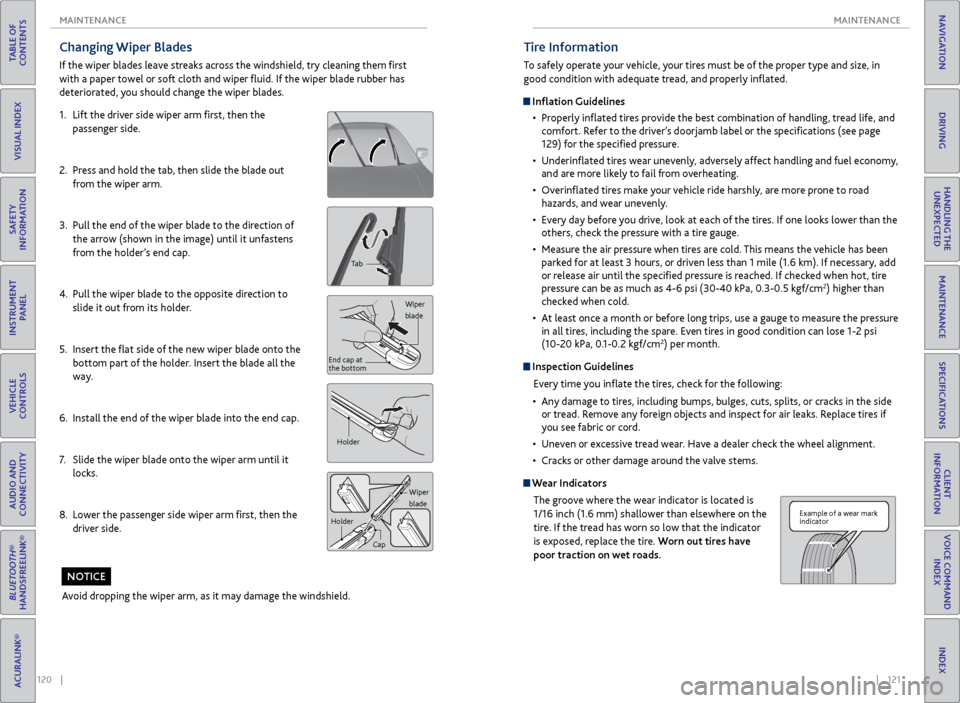
Changing Wiper Blades
If the wiper blades leave streaks across the windshield, try cleaning them first
with a paper towel or soft cloth and wiper fluid. If the wiper blade rubber has
deteriorated, you should change the wiper blades.
1. Lift the driver side wiper arm first, then the
passenger side.
2. Press and hold the tab, then slide the blade out
from the wiper arm.
3. Pull the end of the wiper blade to the direction of
the arrow (shown in the image) until it unfastens
from the holder’s end cap.
4. Pull the wiper blade to the opposite direction to
slide it out from its holder.
5. Insert the flat side of the new wiper blade onto the
bottom part of the holder. Insert the blade all the
way.
6. Install the end of the wiper blade into the end cap.
7. Slide the wiper blade onto the wiper arm until it
locks.
8. Lower the passenger side wiper arm first, then the
driver side.
Tab
Wiper
blade
End cap at
the bottom
Holder
Wiper
blade
Holder
Cap
Avoid dropping the wiper arm, as it may damage the windshield.
NOTICE
Tire Information
To safely operate your vehicle, your tires must be of the proper type and size, in
good condition with adequate tread, and properly inflated.
Inflation Guidelines• Properly inflated tires provide the best combination of handling, tread life, and
comfort. Refer to the driver’s doorjamb label or the specifications (see page
129) for the specified pressure.
• Underinflated tires wear unevenly, adversely affect handling and fuel economy,
and are more likely to fail from overheating.
• Overinflated tires make your vehicle ride harshly, are more prone to road
hazards, and wear unevenly.
• Every day before you drive, look at each of the tires. If one looks lower than the
others, check the pressure with a tire gauge.
• Measure the air pressure when tires are cold. This means the vehicle has been
parked for at least 3 hours, or driven less than 1 mile (1.6 km). If necessary, add
or release air until the specified pressure is reached. If checked when hot, tire
pressure can be as much as 4-6 psi (30-40 kPa, 0.3-0.5 kgf/cm
2) higher than
checked when cold.
• At least once a month or before long trips, use a gauge to measure the pressure
in all tires, including the spare. Even tires in good condition can lose 1-2 psi
(10-20 kPa, 0.1-0.2 kgf/cm
2) per month.
Inspection Guidelines
Every time you inflate the tires, check for the following:
• Any damage to tires, including bumps, bulges, cuts, splits, or cracks in the side
or tread. Remove any foreign objects and inspect for air leaks. Replace tires if
you see fabric or cord.
• Uneven or excessive tread wear. Have a dealer check the wheel alignment.
• Cracks or other damage around the valve stems.
Wear Indicators
The groove where the wear indicator is located is
1/16 inch (1.6 mm) shallower than elsewhere on the
tire. If the tread has worn so low that the indicator
is exposed, replace the tire. Worn out tires have
poor traction on wet roads.
Example of a wear mark
indicator
Page 67 of 75
126 || 127
MAINTENANCE
MAINTENANCE
TABLE OF
CONTENTS
INDEX
VISUAL INDEX
VOICE COMMAND INDEX
SAFETY
INFORMATION
CLIENT
INFORMATION
INSTRUMENT PANEL
SPECIFICATIONS
VEHICLE
CONTROLS
MAINTENANCE
AUDIO AND
CONNECTIVITY
HANDLING THE UNEXPECTED
BLUETOOTH®
HANDSFREELINK®
DRIVING
ACURALINK®
NAVIGATION
Temperature
The temperature grades are A (the highest), B, and C, representing the tire’s
resistance to the generation of heat and its ability to dissipate heat when
tested under controlled conditions on a specified indoor laboratory test wheel.
Sustained high temperature can cause the material of the tire to degenerate and
reduce tire life, and excessive temperature can lead to sudden tire failure. The
grade C corresponds to a level of performance which all passenger car tires must
meet under the Federal Motor Vehicle Safety Standard No. 109. Grades B and
A represent higher levels of performance on the laboratory test wheel than the
minimum required by law.
WARNING: The temperature grade for this tire is established for a tire that
is properly inflated and not overloaded. Excessive speed, underinflation, or
excessive loading, either separately or in combination, can cause heat buildup
and possible tire failure.Tire Pressure Monitoring System (TPMS) - Required Federal
Explanation
Each tire, including the spare (if provided), should be checked monthly
when cold and inflated to the inflation pressure recommended by the
vehicle manufacturer on the vehicle placard or tire inflation pressure label.
(If your vehicle has tires of a different size than the size indicated on the
vehicle placard or tire inflation pressure label, you should determine the
proper tire inflation pressure for those tires.)
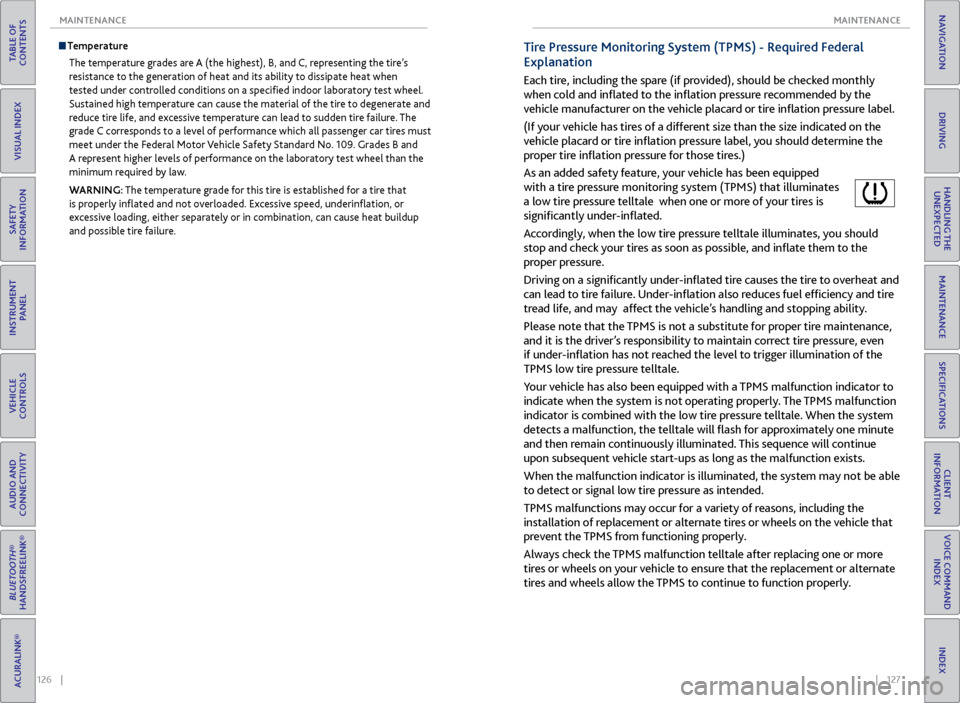
As an added safety feature, your vehicle has been equipped
with a tire pressure monitoring system (TPMS) that illuminates
a low tire pressure telltale when one or more of your tires is
significantly under-inflated.
Accordingly, when the low tire pressure telltale illuminates, you should
stop and check your tires as soon as possible, and inflate them to the
proper pressure.
Driving on a significantly under-inflated tire causes the tire to overheat and
can lead to tire failure. Under-inflation also reduces fuel efficiency and tire
tread life, and may affect the vehicle’s handling and stopping ability.
Please note that the TPMS is not a substitute for proper tire maintenance,
and it is the driver’s responsibility to maintain correct tire pressure, even
if under-inflation has not reached the level to trigger illumination of the
TPMS low tire pressure telltale.
Your vehicle has also been equipped with a TPMS malfunction indicator to
indicate when the system is not operating properly. The TPMS malfunction
indicator is combined with the low tire pressure telltale. When the system
detects a malfunction, the telltale will flash for approximately one minute
and then remain continuously illuminated. This sequence will continue
upon subsequent vehicle start-ups as long as the malfunction exists.
When the malfunction indicator is illuminated, the system may not be able
to detect or signal low tire pressure as intended.
TPMS malfunctions may occur for a variety of reasons, including the
installation of replacement or alternate tires or wheels on the vehicle that
prevent the TPMS from functioning properly.
Always check the TPMS malfunction telltale after replacing one or more
tires or wheels on your vehicle to ensure that the replacement or alternate
tires and wheels allow the TPMS to continue to function properly.
Page 68 of 75
128 || 129
SPECIFICATIONS
MAINTENANCE
TABLE OF
CONTENTS
INDEX
VISUAL INDEX
VOICE COMMAND INDEX
SAFETY
INFORMATION
CLIENT
INFORMATION
INSTRUMENT PANEL
SPECIFICATIONS
VEHICLE
CONTROLS
MAINTENANCE
AUDIO AND
CONNECTIVITY
HANDLING THE UNEXPECTED
BLUETOOTH®
HANDSFREELINK®
DRIVING
ACURALINK®
NAVIGATION
Testing of Readiness Codes
Your vehicle has “Readiness Codes” as part of the onboard self-diagnostic system.
Some states refer to these codes as a test to see if your vehicle’s emissions
components are working properly. The codes may not be read if you go through the
testing just after the battery has gone dead or been disconnected.
To check if they are set, set the power mode to ON without starting the engine.
The malfunction indicator lamp will come on for several seconds. If it goes off, the
readiness codes are set. If it blinks five times, the readiness codes are not set.
If you are required to have your vehicle tested before the readiness codes are set,
prepare the vehicle for retesting by doing the following:
1. Fill the gas tank to approximately 3/4 full.
2. Park the vehicle and leave the engine off for 6 hours or more.
3. Make sure the ambient temperature is between 40°F and 95°F (4°C and 35°C).
4. Start the engine without touching the accelerator pedal, and let it idle for 20
seconds.
5. Keep the vehicle in Park. Increase the engine speed to 2,000 rpm, and hold it
there for about 3 minutes.
6. Let the engine idle with your foot off the accelerator for 20 seconds.
7. Select a nearby, lightly traveled major highway where you can maintain a speed
of 50 to 60 mph (80 to 97 km/h) for at least 20 minutes. Drive on the highway
with the vehicle in Drive. Do not use cruise control. When traffic allows, drive
for 90 seconds without using the accelerator pedal. (Vehicle speed may vary
slightly; this is OK.) If you cannot do this for a continuous 90 seconds because of
traffic conditions, drive for at least 30 seconds, then repeat two more times (for
a total of 90 seconds).
8. Drive in city/suburban traffic for at least 10 minutes. When traffic conditions
allow, let the vehicle coast for several seconds without using the accelerator
pedal or the brake pedal.
9. Park the vehicle and leave the engine off for 30 minutes.
The readiness codes are erased when the battery is disconnected, and set again
only after several days of driving under a variety of conditions.
If a testing facility determines that the readiness codes are not set, you may be
requested to return at a later date to complete the test, or see your dealer.
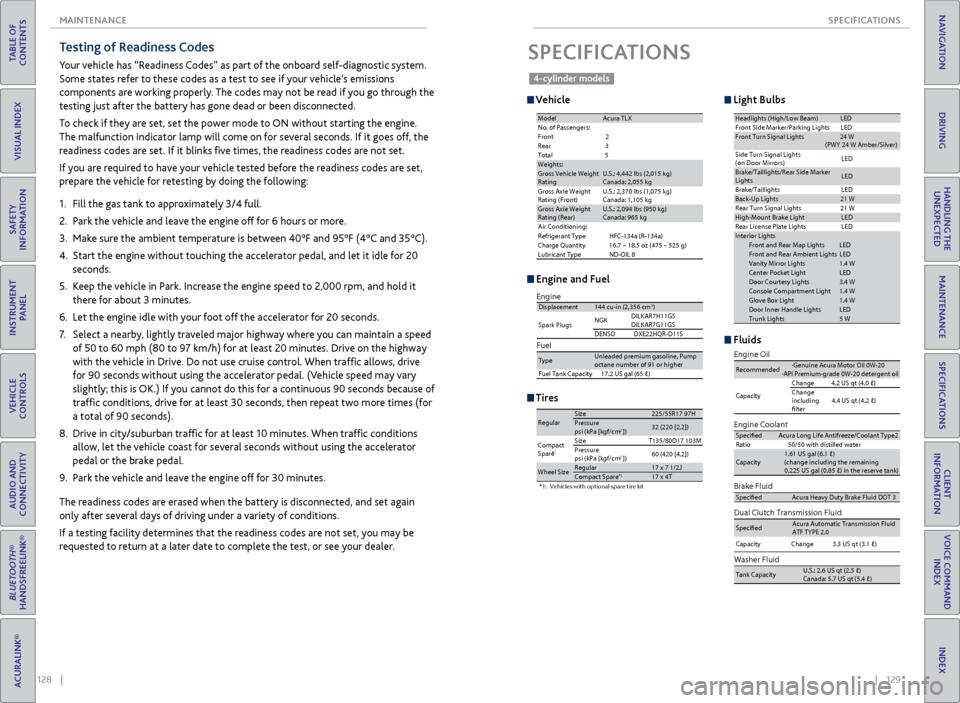
Vehicle
Engine and Fuel
Light Bulbs
Fluids
SPECIFICATIONS
Tires
ModelAcura TL XNo. of Passengers:
Front 2
Rear 3
Tota l5
Weights :Gross Vehicle Weight
Rating U.S.: 4,442 lbs (2,015 kg )
Canada: 2,055 kg
Gross Axle Weight
Rating (Front)U.S.: 2,370 lbs (1,075 kg )
Canada: 1,105 kg
Gross Axle Weight
Rating (Rear )U.S.: 2,094 lbs (950 kg )
Canada: 965 kg
Air Conditioning:
Refrigerant Type HFC-134a (R-134a)
Charge Quantity 16.7 – 18.5 oz (475 – 525 g)
Lubricant Type ND-OIL 8
Headlights (High/Low Beam )LEDFront Side Marker/Parking Lights LEDFront Turn Signal Lights 24 W
(PWY 24 W Amber/Silver)
Side Turn Signal Lights
(on Door Mirrors) LE
D
Brake/Taillights/Rear Side Marker
Light s LE
D
Brake/Taillights
Back-Up Lights21 W
Rear Turn Signal Lights
High-M ount Brake Ligh tLED
Rear License Plate Lights
In terior Light sFront and Rear Map LightsLEDFront and Rear Ambient Light sLEDVanity Mirror Lights1.4 WCenter Pocket LightLEDDoor Courtesy Lights3.4 WConsole Compartment Ligh t1.4 WGlove Box Ligh t1.4 WDoor Inner Handle LightsLEDTrunk Lights5 W
LE D
LE D
21
W
Brake Fluid
Dual Clutch Transmission Fluid
Specife dAcura Heavy Duty B\krake \fluid DOT \b
SpecifedAcura Automatic Tra\knsmission \fluid
AT\f TYPE 2.0
Engine Oi l
Engine Coolan
t
Recommended·Genuine Acura Mot\kor Oil 0W-2 0
·API Premium-grade\k 0W-20 detergent oi\k l
Capacity Change
4.2 US qt (4.0 )
Change
including
flter 4.4 US qt (4.2
)
SpecifedAcura Long Life An\ktifreeze/Coolant Ty\kpe2
Ratio 50/50 with distill\ked wate r
Capacity \k Change \k \b.\b US \kqt (\b.1 )
Capacity
1.61 US gal (6.1 \k)
(change including \kthe remaining
0.225 US gal (0.85 \k) in the reserve t\kank )
Washer Fluid
Tank CapacityU.S.: 2.6 US qt (2.5\k )
Canada: 5.7 US qt \k(5.4 )
Fuel
Displacement144 cu-in (2,356 cm3)
Spark Plugs NG
K DILKAR7H11GS
DILKAR7G11GS
DENSO DXE22HQR-D11 S
TypeUnleaded premium gasoline, Pump
octane number of 91 or higher
Fuel Tank Capacity 17.2 US gal (65 )
Engine
*1:Vehicles with optional spare tire kit
RegularSize225/55R 17 97HPressure
psi (kPa [kgf/cm2])32 (220 [2.2])
Compact
Spar e*1SizeT135/80D17 103M
Pressure
psi (kPa [kgf/cm
2]) 60
(420 [4.2])
Wheel SizeRegular17 x 7 1/2 JCompact Spar e*117 x 4T
4-cylinder models
Page 69 of 75
130 || 131
CLIENT INFORMATION
SPECIFICATIONS
TABLE OF
CONTENTS
INDEX
VISUAL INDEX
VOICE COMMAND INDEX
SAFETY
INFORMATION
CLIENT
INFORMATION
INSTRUMENT PANEL
SPECIFICATIONS
VEHICLE
CONTROLS
MAINTENANCE
AUDIO AND
CONNECTIVITY
HANDLING THE UNEXPECTED
BLUETOOTH®
HANDSFREELINK®
DRIVING
ACURALINK®
NAVIGATION
Learn about information specific to you as an Acura client and how to get help.
Frequently Asked Questions/Troubleshooting
Below are some frequently asked questions and troubleshooting items that you
may have about the vehicle.
Q: How do I set the vehicle clock?
A: For vehicles without navigation, see page 40. For vehicles with navigation, the
time is automatically set using GPS signals.
Q: Why doesn’t the vehicle start when I press the ENGINE START/STOP button?
A: The brake pedal must be pressed to start the engine.
Q: What is the AUTO setting on my headlight lever?
A: When in the AUTO position, the vehicle’s exterior lights will automatically turn
on or off depending on the ambient lighting.
Q: Why won’t the driver’s door unlock when I grab the door handle, even though the
keyless access remote is within range?
A: If you pull the handle too quickly, the system may not have time to confirm the
door is unlocked. Wait to hear a beep to confirm the door is unlocked. If you are
wearing gloves, the system may be slow to respond.
Q: After my battery was disconnected or went dead, the audio system is asking for a
code. Where do I find this?
A: In most cases, you do not need to enter a code. Turn on the vehicle and the audio
system, and press and hold the power button until the system reactivates.
Q: Why can’t I select an item using the interface dial?*
A: To prevent driver distraction, certain items are limited are inoperable while the
vehicle is moving. Use voice commands or pull over to select the items.
Q: Where can I find the vehicle identification number (VIN)?
A: Check the label on the driver’s doorjamb.
Q: Why can’t I operate Pandora through the audio system?
A: Audio may be streaming through Bluetooth® Audio. Make sure Pandora mode
is selected and the phone cable is properly connected to the USB adapter. Some
phones may prompt you to “Allow” a connection.
CLIENT INFORMATION
*if equipped
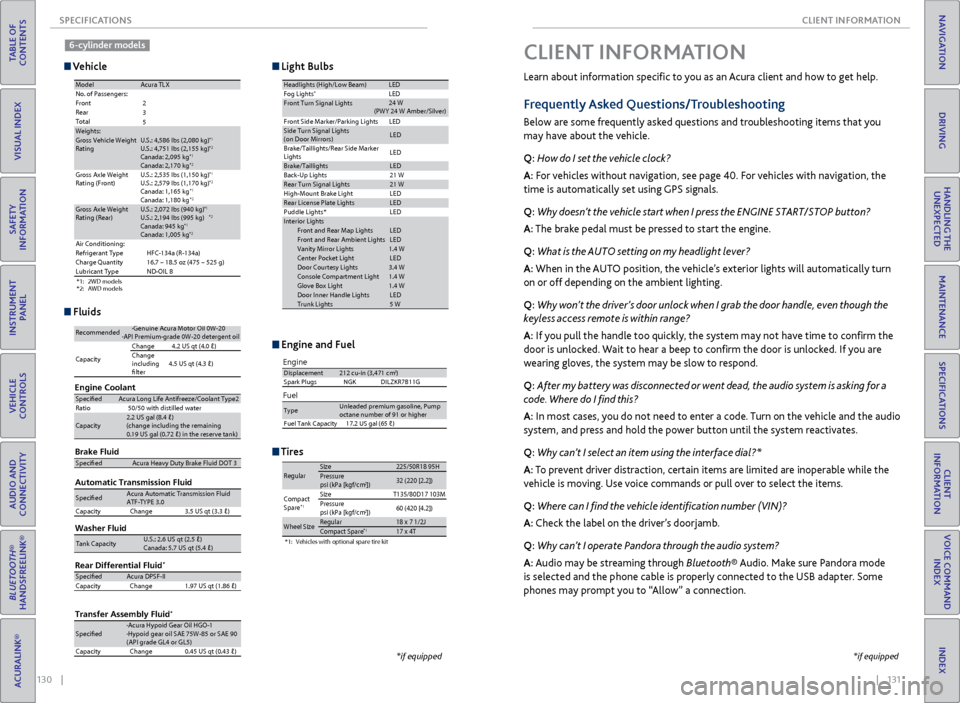
Vehicle
Engine and Fuel
Light Bulbs
Fluids
Tires
*1: 2WD models
*2: AWD models
ModelAcura TL XNo. of Passengers:
Front
Rear
Total
Weights:Gross Vehicle Weight
Rating U.S.: 4,586 lbs (2,080 kg)*1U.S.: 4,751 lbs (2,155 kg)*2Canada: 2,095 kg*1Canada: 2,170 kg*2Gross Axle Weight
Rating (Front )U.S.: 2,535 lbs (1,150 kg)*1U.S.: 2,579 lbs (1,170 kg)*2Canada: 1,165 kg*1Canada: 1,180 kg*2Gross Axle Weight
Rating (Rear)U.S.: 2,072 lbs (940 kg)*1U.S.: 2,194 lbs (995 kg)*2Canada: 945 kg*1Canada: 1,005 kg*2Air Conditioning:
Refrigerant Type HFC-134a (R-134a)
Charge Quantity 16.7 – 18.5 oz (475 – 525 g)
Lubricant Type ND-OIL 8
2
3
5
Headlights (High/Low Beam )LEDFog Lights*LEDFront Turn Signal Lights
Front Side Marker/Parking Lights LEDSide Turn Signal Lights
(on Door Mirrors)LE D
Brake/Taillights/Rear Side Marker
Light s LE
D
Brake/TaillightsLED
Back-Up Lights
Rear Turn Signal Lights21 W
High-M ount Brake Ligh t
Rear License Plate LightsLED
Puddle Lights * LED
In terior Light s
Front and Rear Map Lights LED
Front and Rear Ambient Lights LED
Vanity Mirror Lights 1.4 W
Center Pocket Light LED
Door Courtesy Light s3.4 W
Console Compartment Light 1.4 W
Glove Box Ligh t1 .4 W
Door Inner Handle Lights LED
Trunk Lights 5 W
21 W
LE D
24
W
(PWY 24 W Amber/Silver)
Brake Flui d
Automatic Transmission Flui dSpecifedAcura Heavy Duty B\krake \fluid DOT \b
SpecifedAcura Automatic Tra\knsmission \flui d
AT\f-TYPE \b. 0
Capacity Change \b.5 US qt (\b.\b)
Engine Oil
Engine Coolan t
Recommended·Genuine Acura Mot\kor Oil 0W-2 0·API Premium-grade\k 0W-20 detergent o\ki l
Capacity Change
4.2 US qt (4.0 )
Change
including
flter 4.5 US qt (4.\b
)
SpecifedAcura Long Life An\ktifreeze/Coolant Ty\kpe2
Ratio 50/50 with distill\ked wate r
Capacity2.2 US gal (8.4 )\k
(change including \kthe remaining
0.19 US gal (0.72 \k) in the reserve \ktank )
Washer Fluid
Tank CapacityU.S.: 2.6 US qt (2\k.5 )
Canada: 5.7 US qt \k(5.4 )
Rear Differential Flui d*
Transfer Assembly Flui d*
SpecifedAcura DPS\f-II
Capacity Change 1.97 US qt (1.86 \k)
Specifed·Acura Hypoid Gear\k Oil HGO-1
·Hypoid gear oil S\kAE 75W-85 or SAE 9 0
(API grade GL4 or \kGL5)
Capacity Change 0.45 US qt (0.4\b )
Engine
Fuel
Displacement212 cu-in (3,471 cm3)
Spark Plugs NGKD ILZKR7B11G
TypeUnleaded premium gasoline, Pump
octane number of 91 or higher
Fuel Tank Capacity 17.2 US gal (65 )
*1:Vehicles with optional spare tire kit
RegularSize225/50R 18 95HPressure
psi (kPa [kgf/cm2])32 (220 [2.2])
Compact
Spar e*1SizeT135/80D17 103M
Pressure
psi (kPa [kgf/cm
2]) 60
(420 [4.2])
Wheel SizeRegular18 x 7 1/2 JCompact Spar e*117 x 4T
*if equipped
6-cylinder models
Page 70 of 75

132 || 133
CLIENT INFORMATION
CLIENT INFORMATION
TABLE OF
CONTENTS
INDEX
VISUAL INDEX
VOICE COMMAND INDEX
SAFETY
INFORMATION
CLIENT
INFORMATION
INSTRUMENT PANEL
SPECIFICATIONS
VEHICLE
CONTROLS
MAINTENANCE
AUDIO AND
CONNECTIVITY
HANDLING THE UNEXPECTED
BLUETOOTH®
HANDSFREELINK®
DRIVING
ACURALINK®
NAVIGATION
Contact Us
Acura dealer personnel are trained professionals. They should be able to answer
all your questions. If you encounter a problem that your dealership does not solve
to your satisfaction, please discuss it with the dealership’s service manager or
general manager. If you are dissatisfied with the decision made by the dealership’s
management, contact Acura Client Relations/Services.
U.S. Owners:
American Honda Motor Co., Inc.
Acura Client Relations
1919 Torrance Blvd.
Mail Stop 500-2N-7E
Torrance, CA 90501-2746
Tel: (800) 382-2238
In Puerto Rico and
the U.S. Virgin Islands:
Bella International
P.O. Box 190816
San Juan, PR 00919-0816
Tel: (787) 620-7546 Canadian Owners:
Honda Canada, Inc.
Acura Client Services
180 Honda Blvd.
Markham, ON
L6C 0H9
Tel: (888) 922-8729
Fax: (877) 939-0909
E-Mail: [email protected]
Q: Is my phone compatible with Bluetooth features?
A:
Visit www.acura.com/handsfreelink (U.S) or www.handsfreelink.ca (Canada) to
check phone compatibility for Bluetooth® Audio, Bluetooth® HandsFreeLink®, and
SMS text messaging.
Q: Every time I press the Talk button, the system gives me voice prompts. Can I turn
these off?*
A: Press SETTINGS. Use the interface dial to select System Settings then Voice
Prompt. Select Off.
When you call or write, please give us the following information:
• Vehicle Identification Number
• Date of purchase
• Odometer reading of your vehicle
• Your name, address, and telephone number
• A detailed description of the problem
• Name of the dealer who sold the vehicle to you
*if equipped
Acura Total Luxury Care Roadside Assistance
Your Acura TLC Roadside Assistance representative is here to help you 24 hours a
day, 7 days a week by calling (800) 594-8500 (U.S.) or (800) 565-7587 (Canada).
Under your 4-year/50,000-mile (80,000 km) warranty, the following benefits are
available:
• Towing services — full cost of towing to the closest Acura dealer
• Roadside assistance — jump starting, fuel delivery, lockout, and flat tire
• Trip planning — detailed trip routing, emergency services, and more
Warranty Coverages
Below is a brief summary of the warranties covering your new vehicle.
New Vehicle Limited Warranty: Covers your new vehicle, except for the emissions
control system and accessories, against defects in materials and workmanship.
Emissions Control Systems Defects Warranty and Emissions Performance
Warranty: Covers your vehicle’s emissions control systems. Time, mileage, and
coverage are conditional.
Seat Belt Limited Warranty: Covers seat belts that fail to function properly.
Rust Perforation Limited Warranty: Covers all exterior body panels that rust
through from the inside.
Accessory Limited Warranty: Covers Acura accessories.
Replacement Parts Limited Warranty: Covers all Acura replacement parts against
defects in materials and workmanship.
Replacement Battery Limited Warranty: Provides prorated coverage for a
replacement battery purchased from an Acura dealer.
Replacement Muffler Lifetime Limited Warranty: Covers a replacement muffler
for the duration of the ownership.
Restrictions and exclusions apply to all these warranties. See the Owner
Information CD or visit owners.acura.com (U.S.) or www.myacura.ca (Canada)
for complete descriptions of each warranty, including time, mileage, and other
conditional limitations.
Your vehicle’s original tires are covered by their manufacturer. Tire warranty
information can be found on the Owner Information CD or owners.acura.com (U.S.)
or www.myacura.ca (Canada).
Page 71 of 75
134 || 135
VOICE COMMAND INDEX
VOICE COMMAND INDEX
TABLE OF
CONTENTS
INDEX
VISUAL INDEX
VOICE COMMAND INDEX
SAFETY
INFORMATION
CLIENT
INFORMATION
INSTRUMENT PANEL
SPECIFICATIONS
VEHICLE
CONTROLS
MAINTENANCE
AUDIO AND
CONNECTIVITY
HANDLING THE UNEXPECTED
BLUETOOTH®
HANDSFREELINK®
DRIVING
ACURALINK®
NAVIGATION
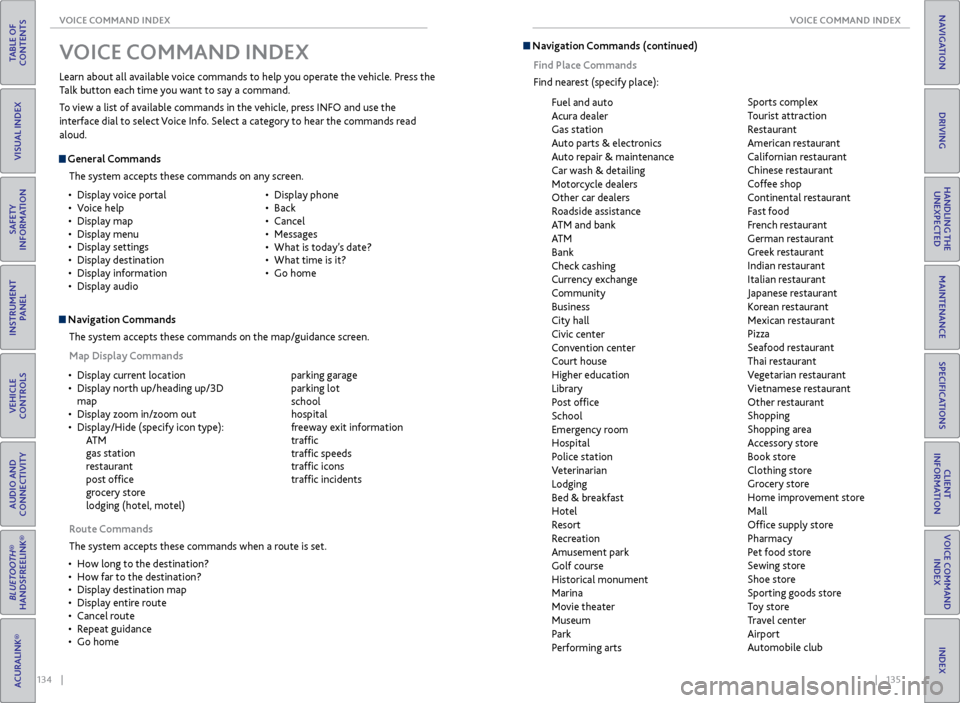
V OICE COMMAND INDEX
Learn about all available voice commands to help you operate the vehicle. Press the
Talk button each time you want to say a command.
To view a list of available commands in the vehicle, press INFO and use the
interface dial to select Voice Info. Select a category to hear the commands read
aloud.
General Commands
The system accepts these commands on any screen.
Navigation CommandsThe system accepts these commands on the map/guidance screen.
Map Display Commands
•
Display voice portal
• Voice help
• Display map
• Display menu
• Display settings
• Display destination
• Display information
• Display audio •
Display phone
• Back
• Cancel
• Messages
• What is today’s date?
• What time is it?
• Go home
Route Commands
The system accepts these commands when a route is set.
• How long to the destination?
• How far to the destination?
• Display destination map
• Display entire route
• Cancel route
• Repeat guidance
• Go home
•
Display current location
• Display north up/heading up/3D
map
• Display zoom in/zoom out
• Display/Hide (specify icon type):
AT M
gas station
restaurant
post office
grocery store
lodging (hotel, motel)
parking garage
parking lot
school
hospital
freeway exit information
traffic
traffic speeds
traffic icons
traffic incidents
Navigation Commands (continued)
Find Place Commands
Find nearest (specify place):
Fuel and auto
Acura dealer
Gas station
Auto parts & electronics
Auto repair & maintenance
Car wash & detailing
Motorcycle dealers
Other car dealers
Roadside assistance
ATM and bank
AT M
Bank
Check cashing
Currency exchange
Community
Business
City hall
Civic center
Convention center
Court house
Higher education
Library
Post office
School
Emergency room
Hospital
Police station
Veterinarian
Lodging
Bed & breakfast
Hotel
Resort
Recreation
Amusement park
Golf course
Historical monument
Marina
Movie theater
Museum
Park
Performing arts Sports complex
Tourist attraction
Restaurant
American restaurant
Californian restaurant
Chinese restaurant
Coffee shop
Continental restaurant
Fast food
French restaurant
German restaurant
Greek restaurant
Indian restaurant
Italian restaurant
Japanese restaurant
Korean restaurant
Mexican restaurant
Pizza
Seafood restaurant
Thai restaurant
Vegetarian restaurant
Vietnamese restaurant
Other restaurant
Shopping
Shopping area
Accessory store
Book store
Clothing store
Grocery store
Home improvement store
Mall
Office supply store
Pharmacy
Pet food store
Sewing store
Shoe store
Sporting goods store
Toy store
Travel center
Airport
Automobile club
Page 74 of 75
140 || 141
INDEX
INDEX
TABLE OF
CONTENTS
INDEX
VISUAL INDEX
VOICE COMMAND INDEX
SAFETY
INFORMATION
CLIENT
INFORMATION
INSTRUMENT PANEL
SPECIFICATIONS
VEHICLE
CONTROLS
MAINTENANCE
AUDIO AND
CONNECTIVITY
HANDLING THE UNEXPECTED
BLUETOOTH®
HANDSFREELINK®
DRIVING
ACURALINK®
NAVIGATION
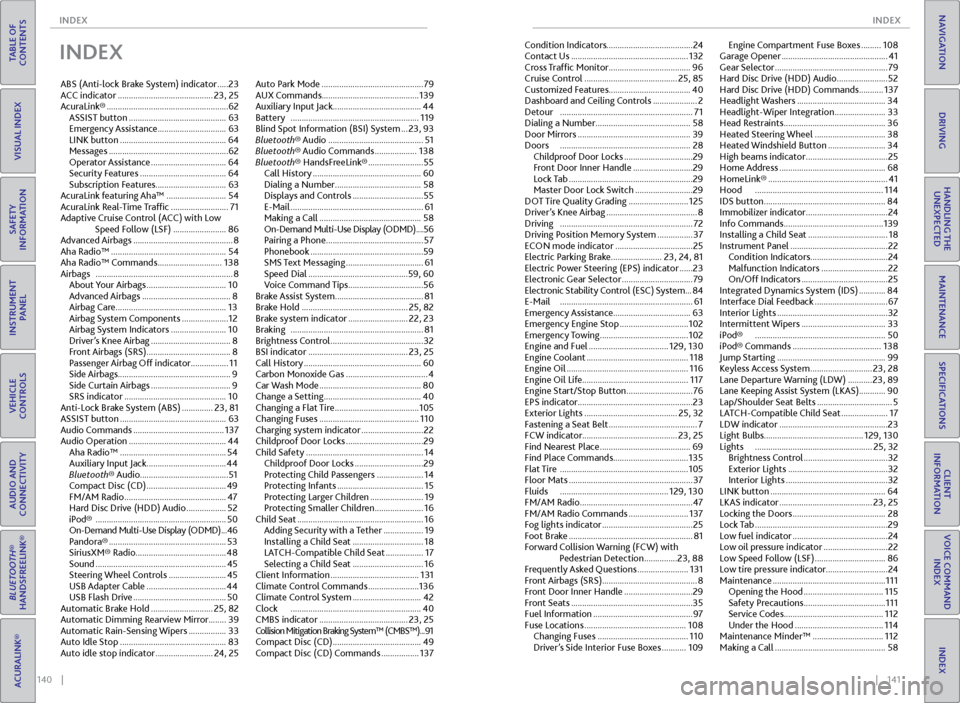
INDEX
ABS (Anti-lock Brake System) indicator ..... 23
ACC indicator ........................................... 23, 25
AcuraLink® ....................................................... 62
ASSIST button ............................................ 63
Emergency Assistance ............................... 63
LINK button ................................................ 64
Messages ...................................................... 62
Operator Assistance .................................. 64
Security Features ....................................... 64
Subscription Features ................................63
AcuraLink featuring Aha™ ........................... 54
AcuraLink Real-Time Traffic .......................... 71
Adaptive Cruise Control (ACC) with Low Speed Follow (LSF) ........................ 86
Advanced Airbags ............................................. 8
Aha Radio™ .................................................... 54
Aha Radio™ Commands ............................. 138
Airbags .............................................................. 8
About Your Airbags .................................... 10
Advanced Airbags ........................................ 8
Airbag Care .................................................. 13
Airbag System Components ..................... 12
Airbag System Indicators ......................... 10
Driver’s Knee Airbag .................................... 8
Front Airbags (SRS) ...................................... 8
Passenger Airbag Off indicator ................. 11
Side Airbags ................................................... 9
Side Curtain Airbags .................................... 9
SRS indicator .............................................. 10
Anti-Lock Brake System (ABS) .............. 23, 81
ASSIST button ................................................ 63
Audio Commands ......................................... 137
Audio Operation ............................................ 44
Aha Radio™ ................................................ 54
Auxiliary Input Jack .................................... 44
Bluetooth® Audio ........................................ 51
Compact Disc (CD) .................................... 49
FM/AM Radio .............................................. 47
Hard Disc Drive (HDD) Audio .................. 52
iPod® ........................................................... 50
On-Demand Multi-Use Display (ODMD) ... 46
Pandora® ..................................................... 53
SiriusXM® Radio......................................... 48
Sound ........................................................... 45
Steering Wheel Controls .......................... 45
USB Adapter Cable .................................... 44
USB Flash Drive .......................................... 50
Automatic Brake Hold ............................ 25, 82
Automatic Dimming Rearview Mirror ........39
Automatic Rain-Sensing Wipers ................. 33
Auto Idle Stop ................................................ 83
Auto idle stop indicator .......................... 24, 25Auto Park Mode ..............................................
79
AUX Commands ............................................ 139
Auxiliary Input Jack ........................................ 44
Battery .......................................................... 119
Blind Spot Information (BSI) System ... 23, 93
Bluetooth® Audio ........................................... 51
Bluetooth® Audio Commands ................... 138
Bluetooth® HandsFreeLink® ......................... 55
Call History ................................................. 60
Dialing a Number ....................................... 58
Displays and Controls ................................ 55
E-Mail ............................................................ 61
Making a Call .............................................. 58
On-Demand Multi-Use Display (ODMD) .... 56
Pairing a Phone ............................................ 57
Phonebook ...................................................59
SMS Text Messaging ................................... 61
Speed Dial ............................................. 59, 60
Voice Command Tips .................................. 56
Brake Assist System ........................................ 81
Brake Hold ................................................ 25, 82
Brake system indicator ........................... 22, 23
Braking ............................................................ 81
Brightness Control .......................................... 32
BSI indicator ............................................. 23, 25
Call History ..................................................... 60
Carbon Monoxide Gas ..................................... 4
Car Wash Mode .............................................. 80
Change a Setting ............................................ 40
Changing a Flat Tire ...................................... 105
Changing Fuses ............................................. 110
Charging system indicator ............................ 22
Childproof Door Locks ................................... 29
Child Safety ..................................................... 14
Childproof Door Locks ............................... 29
Protecting Child Passengers ..................... 14
Protecting Infants ....................................... 15
Protecting Larger Children ........................ 19
Protecting Smaller Children ...................... 16
Child Seat ......................................................... 16
Adding Security with a Tether .................. 19
Installing a Child Seat ................................ 18
LATCH-Compatible Child Seat ................. 17
Selecting a Child Seat ................................ 16
Client Information ........................................ 131
Climate Control Commands ....................... 136
Climate Control System ............................... 42
Clock ........................................................... 40
CMBS indicator ........................................ 23, 25
Collision Mitigation Braking System™ (CMBS™) ...91
Compact Disc (CD) ........................................ 49
Compact Disc (CD) Commands ................. 137Condition Indicators
....................................... 24
Contact Us ..................................................... 132
Cross Traffic Monitor ..................................... 96
Cruise Control .......................................... 25, 85
Customized Features .....................................40
Dashboard and Ceiling Controls .................... 2
Detour ............................................................ 71
Dialing a Number ........................................... 58
Door Mirrors ................................................... 39
Doors ........................................................... 28
Childproof Door Locks ............................... 29
Front Door Inner Handle ........................... 29
Lock Tab ........................................................ 29
Master Door Lock Switch .......................... 29
DOT Tire Quality Grading ........................... 125
Driver’s Knee Airbag ......................................... 8
Driving ............................................................ 72
Driving Position Memory System ................ 37
ECON mode indicator ................................... 25
Electric Parking Brake ....................... 23, 24, 81
Electric Power Steering (EPS) indicator ...... 23
Electronic Gear Selector ................................ 79
Electronic Stability Control (ESC) System ... 84
E-Mail ............................................................ 61
Emergency Assistance ...................................63
Emergency Engine Stop ............................... 102
Emergency Towing ........................................ 102
Engine and Fuel .................................... 129, 130
Engine Coolant
.............................................. 118
Engine Oil ....................................................... 116
Engine Oil Life ................................................ 117
Engine Start/Stop Button .............................. 76
EPS indicator .................................................... 23
Exterior Lights .......................................... 25, 32
Fastening a Seat Belt ........................................ 7
FCW indicator ........................................... 23, 25
Find Nearest Place ......................................... 69
Find Place Commands .................................. 135
Flat Tire .......................................................... 105
Floor Mats ........................................................ 37
Fluids ................................................. 129, 130
FM/AM Radio ................................................... 47
FM/AM Radio Commands ........................... 137
Fog lights indicator ......................................... 25
Foot Brake ........................................................ 81
Forward Collision Warning (FCW) with Pedestrian Detection ............... 23, 88
Frequently Asked Questions ....................... 131
Front Airbags (SRS) ........................................... 8
Front Door Inner Handle ............................... 29
Front Seats ....................................................... 35
Fuel Information ............................................. 97
Fuse Locations .............................................. 108
Changing Fuses ......................................... 110
Driver’s Side Interior Fuse Boxes ........... 109Engine Compartment Fuse Boxes .........
108
Garage Opener ................................................ 41
Gear Selector ................................................... 79
Hard Disc Drive (HDD) Audio ....................... 52
Hard Disc Drive (HDD) Commands ........... 137
Headlight Washers ........................................ 34
Headlight-Wiper Integration ....................... 33
Head Restraints .............................................. 36
Heated Steering Wheel ................................ 38
Heated Windshield Button .......................... 34
High beams indicator ..................................... 25
Home Address ................................................ 68
HomeLink® ...................................................... 41
Hood .......................................................... 114
IDS button ....................................................... 84
Immobilizer indicator ..................................... 24
Info Commands ............................................. 139
Installing a Child Seat .................................... 18
Instrument Panel ............................................ 22
Condition Indicators ................................... 24
Malfunction Indicators .............................. 22
On/Off Indicators ....................................... 25
Integrated Dynamics System (IDS) ............ 84
Interface Dial Feedback ................................. 67
Interior Lights .................................................. 32
Intermittent Wipers ...................................... 33
iPod® ........................................................... 50
iPod® Commands ........................................ 138
Jump Starting ................................................. 99
Keyless Access System ............................ 23, 28
Lane Departure Warning (LDW) ........... 23, 89
Lane Keeping Assist System (LKAS) ............90
Lap/Shoulder Seat Belts .................................. 5
LATCH-Compatible Child Seat ..................... 17
LDW indicator ................................................. 23
Light Bulbs ............................................. 129, 130
Lights ..................................................... 25, 32
Brightness Control ...................................... 32
Exterior Lights ............................................. 32
Interior Lights .............................................. 32
LINK button .................................................... 64
LKAS indicator .......................................... 23, 25
Locking the Doors .......................................... 28
Lock Tab ............................................................ 29
Low fuel indicator ........................................... 24
Low oil pressure indicator ............................. 22
Low Speed Follow (LSF) ................................ 86
Low tire pressure indicator ............................24
Maintenance ................................................... 111
Opening the Hood .................................... 115
Safety Precautions ..................................... 111
Service Codes ............................................. 112
Under the Hood ........................................ 114
Maintenance Minder™ ................................ 112
Making a Call .................................................. 58
Page 75 of 75
142 || 143
INDEX
INDEX
TABLE OF
CONTENTS
INDEX
VISUAL INDEX
VOICE COMMAND INDEX
SAFETY
INFORMATION
CLIENT
INFORMATION
INSTRUMENT PANEL
SPECIFICATIONS
VEHICLE
CONTROLS
MAINTENANCE
AUDIO AND
CONNECTIVITY
HANDLING THE UNEXPECTED
BLUETOOTH®
HANDSFREELINK®
DRIVING
ACURALINK®
NAVIGATION
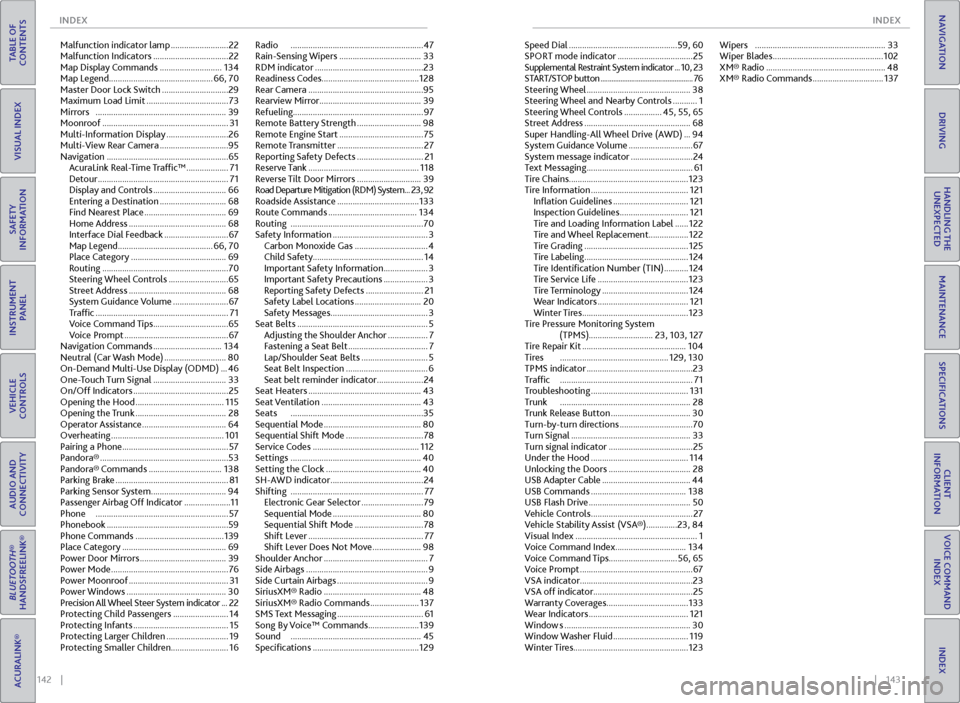
Malfunction indicator lamp .......................... 22
Malfunction Indicators .................................. 22
Map Display Commands ............................ 134
Map Legend ............................................... 66, 70
Master Door Lock Switch .............................. 29
Maximum Load Limit ..................................... 73
Mirrors ........................................................... 39
Moonroof ......................................................... 31
Multi-Information Display ............................ 26
Multi-View Rear Camera ...............................95
Navigation ....................................................... 65
AcuraLink Real-Time Traffic™ ................... 71
Detour ........................................................... 71
Display and Controls ................................. 66
Entering a Destination .............................. 68
Find Nearest Place ..................................... 69
Home Address ............................................ 68
Interface Dial Feedback ............................. 67
Map Legend ........................................... 66, 70
Place Category ........................................... 69
Routing ......................................................... 70
Steering Wheel Controls ........................... 65
Street Address ............................................ 68
System Guidance Volume ......................... 67
Traffic ............................................................ 71
Voice Command Tips .................................. 65
Voice Prompt ............................................... 67
Navigation Commands ............................... 134
Neutral (Car Wash Mode) ............................ 80
On-Demand Multi-Use Display (ODMD) ... 46
One-Touch Turn Signal ................................. 33
On/Off Indicators ........................................... 25
Opening the Hood ........................................ 115
Opening the Trunk ......................................... 28
Operator Assistance ...................................... 64
Overheating ................................................... 101
Pairing a Phone ................................................ 57
Pandora® .......................................................... 53
Pandora® Commands ................................. 138
Parking Brake ................................................... 81
Parking Sensor System .................................. 94
Passenger Airbag Off Indicator ..................... 11
Phone ............................................................ 57
Phonebook .......................................................59
Phone Commands ........................................ 139
Place Category ............................................... 69
Power Door Mirrors ....................................... 39
Power Mode ..................................................... 76
Power Moonroof ............................................. 31
Power Windows ............................................. 30
Precision All Wheel Steer System indicator ... 22
Protecting Child Passengers ......................... 14
Protecting Infants ........................................... 15
Protecting Larger Children ............................ 19
Protecting Smaller Children .......................... 16Radio
............................................................ 47
Rain-Sensing Wipers ..................................... 33
RDM indicator ................................................. 23
Readiness Codes ............................................ 128
Rear Camera ....................................................95
Rearview Mirror .............................................. 39
Refueling ........................................................... 97
Remote Battery Strength ............................. 98
Remote Engine Start ...................................... 75
Remote Transmitter ....................................... 27
Reporting Safety Defects .............................. 21
Reserve Tank .................................................. 118
Reverse Tilt Door Mirrors ............................. 39
Road Departure Mitigation (RDM) System ...23, 92
Roadside Assistance ..................................... 133
Route Commands ........................................ 134
Routing ............................................................ 70
Safety Information ........................................... 3
Carbon Monoxide Gas ................................. 4
Child Safety .................................................. 14
Important Safety Information .................... 3
Important Safety Precautions .................... 3
Reporting Safety Defects .......................... 21
Safety Label Locations .............................. 20
Safety Messages ............................................ 3
Seat Belts ........................................................... 5
Adjusting the Shoulder Anchor .................. 7
Fastening a Seat Belt .................................... 7
Lap/Shoulder Seat Belts .............................. 5
Seat Belt Inspection ..................................... 6
Seat belt reminder indicator ..................... 24
Seat Heaters ................................................... 43
Seat Ventilation ............................................. 43
Seats ............................................................ 35
Sequential Mode ............................................ 80
Sequential Shift Mode ................................... 78
Service Codes ................................................ 112
Settings ........................................................... 40
Setting the Clock ........................................... 40
SH-AWD indicator .......................................... 24
Shifting ............................................................ 77
Electronic Gear Selector ............................ 79
Sequential Mode ........................................ 80
Sequential Shift Mode ............................... 78
Shift Lever .................................................... 77
Shift Lever Does Not Move ...................... 98
Shoulder Anchor ............................................... 7
Side Airbags ....................................................... 9
Side Curtain Airbags ......................................... 9
SiriusXM® Radio ............................................ 48
SiriusXM® Radio Commands ...................... 137
SMS Text Messaging ....................................... 61
Song By Voice™ Commands ....................... 139
Sound ........................................................... 45
Specifications ................................................ 129Speed Dial .................................................
59, 60
SPORT mode indicator .................................. 25
Supplemental Restraint System indicator ... 10, 23
START/STOP button ................................................... 76
Steering Wheel ............................................... 38
Steering Wheel and Nearby Controls ........... 1
Steering Wheel Controls ................. 45, 55, 65
Street Address ................................................ 68
Super Handling-All Wheel Drive (AWD) ... 94
System Guidance Volume ............................. 67
System message indicator ............................ 24
Text Messaging ................................................ 61
Tire Chains ...................................................... 123
Tire Information ............................................ 121
Inflation Guidelines .................................. 121
Inspection Guidelines ............................... 121
Tire and Loading Information Label ...... 122
Tire and Wheel Replacement.................. 122
Tire Grading ............................................... 125
Tire Labeling ............................................... 124
Tire Identification Number (TIN) ........... 124
Tire Service Life ......................................... 123
Tire Terminology ....................................... 124
Wear Indicators
......................................... 121
Winter Tires ................................................ 123
Tire Pressure Monitoring System (TPMS)............................. 23, 103, 127
Tire Repair Kit ............................................... 104
Tires ................................................. 129, 130
TPMS indicator ................................................ 23
Traffic ............................................................ 71
Troubleshooting ............................................ 131
Trunk ........................................................... 28
Trunk Release Button .................................... 30
Turn-by-turn directions ................................. 70
Turn Signal ...................................................... 33
Turn signal indicator ...................................... 25
Under the Hood ............................................ 114
Unlocking the Doors ..................................... 28
USB Adapter Cable ........................................ 44
USB Commands ........................................... 138
USB Flash Drive .............................................. 50
Vehicle Controls .............................................. 27
Vehicle Stability Assist (VSA®) .............. 23, 84
Visual Index ....................................................... 1
Voice Command Index ................................ 134
Voice Command Tips ...............................56, 65
Voice Prompt ................................................... 67
VSA indicator ................................................... 23
VSA off indicator ............................................. 25
Warranty Coverages ..................................... 133
Wear Indicators ............................................. 121
Window s ......................................................... 30
Window Washer Fluid .................................. 119
Winter Tires .................................................... 123Wipers
........................................................... 33
Wiper Blades .................................................. 102
XM® Radio ...................................................... 48
XM® Radio Commands ................................ 137