adjust Acura TLX 2015 Owner's Manual
[x] Cancel search | Manufacturer: ACURA, Model Year: 2015, Model line: TLX, Model: Acura TLX 2015Pages: 75, PDF Size: 24.55 MB
Page 47 of 75

86 || 87
DRIVING
DRIVING
TABLE OF
CONTENTS
INDEX
VISUAL INDEX
VOICE COMMAND INDEX
SAFETY
INFORMATION
CLIENT
INFORMATION
INSTRUMENT PANEL
SPECIFICATIONS
VEHICLE
CONTROLS
MAINTENANCE
AUDIO AND
CONNECTIVITY
HANDLING THE UNEXPECTED
BLUETOOTH®
HANDSFREELINK®
DRIVING
ACURALINK®
NAVIGATION
When in Operation
If a vehicle detected ahead of you slows down
abruptly, or if another vehicle cuts in front of
you, a beep sounds and BRAKE appears on the
multi-information display to alert you.
When a vehicle detected ahead is within ACC
with low speed follow range and stops, your
vehicle also stops. The Stopped message
appears on the multi-information display.
When the vehicle ahead of you starts again, the vehicle icon on the multi-
information display blinks. Press RES/+/SET/– up or down, or press the
accelerator pedal to resume the prior set speed.
Canceling ACCYou can press CANCEL or MAIN, or press the brake
pedal. The ACC indicator goes off.
Certain conditions may cause ACC to cancel
automatically. When this happens, a beep sounds
and a message appears on the multi-information
display.
After cruise control has been canceled, you can still
resume the prior set speed by pressing RES/ACCEL.
Improper use of ACC with LSF can lead to a crash.
Use ACC with LSF only when driving on expressways or freeways and in good
weather conditions.
WARNING
Exiting a vehicle that has been stopped while the ACC with LSF system is
operating can result in the vehicle moving without operator control. Always
make sure Park (P) is selected before exiting the vehicle.
A vehicle that moves without operator control can cause a crash, resulting in
serious injury or death.
Never exit a vehicle when the vehicle is stopped by ACC with LSF.
WARNING
ACC with LSF has limited braking capability and may not stop your vehicle in
time to avoid a collision with a vehicle that quickly stops in front of you.
Always be prepared to apply the brake pedal if the conditions require.
WARNING
Adaptive Cruise Control (ACC) with Low Speed Follow (LSF)*
Helps maintain a constant vehicle speed and a set following distance behind a
vehicle detected ahead of yours. When the vehicle ahead changes speed, ACC
senses the change and accelerates or decelerates to maintain a set interval.
MAIN button
RES/+ button
SET/- button
CANCEL button
Distance button
Activating and Setting the Vehicle Speed
1. Press MAIN. The ACC indicator appears.
2. Accelerate to the desired speed.
Above 25 mph (40 km/h): Press RES/+/SET/- and
take your foot off the pedal to set the speed
Below 25 mph (40 km/h) (Low Speed Follow):
Press SET/- to set the speed at 25 mph (40
km/h) or below.
Adjusting the Vehicle Speed Press RES/+ to increase or SET/- to decrease.
Each time you press the switch up or down, the
vehicle speed is increased or decreased by about 1
mph (1 km/h). If you keep the switch pressed up or
down, the vehicle speed increases or decreases by
10 mph (16 km/h) until you release it.
Adjusting the Vehicle Distance Press the Distance button to change the following
distance. Each time you press the button, the
following distance setting cycles through short,
middle, long, and extra long following distances.
Switching to Standard Cruise ControlPress and hold the Distance button.
*if equipped
Page 55 of 75
102 || 103
HANDLING THE UNEXPECTED
HANDLING THE UNEXPECTED
TABLE OF
CONTENTS
INDEX
VISUAL INDEX
VOICE COMMAND INDEX
SAFETY
INFORMATION
CLIENT
INFORMATION
INSTRUMENT PANEL
SPECIFICATIONS
VEHICLE
CONTROLS
MAINTENANCE
AUDIO AND
CONNECTIVITY
HANDLING THE UNEXPECTED
BLUETOOTH®
HANDSFREELINK®
DRIVING
ACURALINK®
NAVIGATION
Emergency Engine Stop
The ENGINE START/STOP button may be used to stop the engine due to an
emergency situation even while driving. If you must stop the engine, choose one of
the following operations:
The steering wheel will not lock. The power mode changes to ACCESSORY, unless
the shift lever is in Park, in which case the power mode changes to VEHICLE OFF.
Because turning off the engine also disables the power assist the engine provides to
the steering and braking systems, it will require significantly more physical effort
and time to steer and slow the vehicle. Downshift gears and use both feet on the
brake pedal, if necessary, to slow the vehicle and stop immediately in a safe place.
Do not press the button while driving unless it is absolutely necessary for the
engine to be switched off.
Emergency Towing
Call a professional towing service if you need to tow your vehicle.
All models
Flat bed equipment: The operator loads your vehicle on the back of a truck. This is
the best way to transport your vehicle.
2WD models
Wheel lift equipment: The tow truck uses two pivoting arms that go under the front
tires and lift them off the ground. The rear tires remain on the ground. This is an
acceptable way to tow your vehicle.
NOTICE
Trying to lift or tow your vehicle by the bumpers will cause serious damage. The
bumpers are not designed to support the vehicle’s weight.
Improper towing such as towing behind a motorhome or other motor vehicle can
damage the transmission.
NOTICE
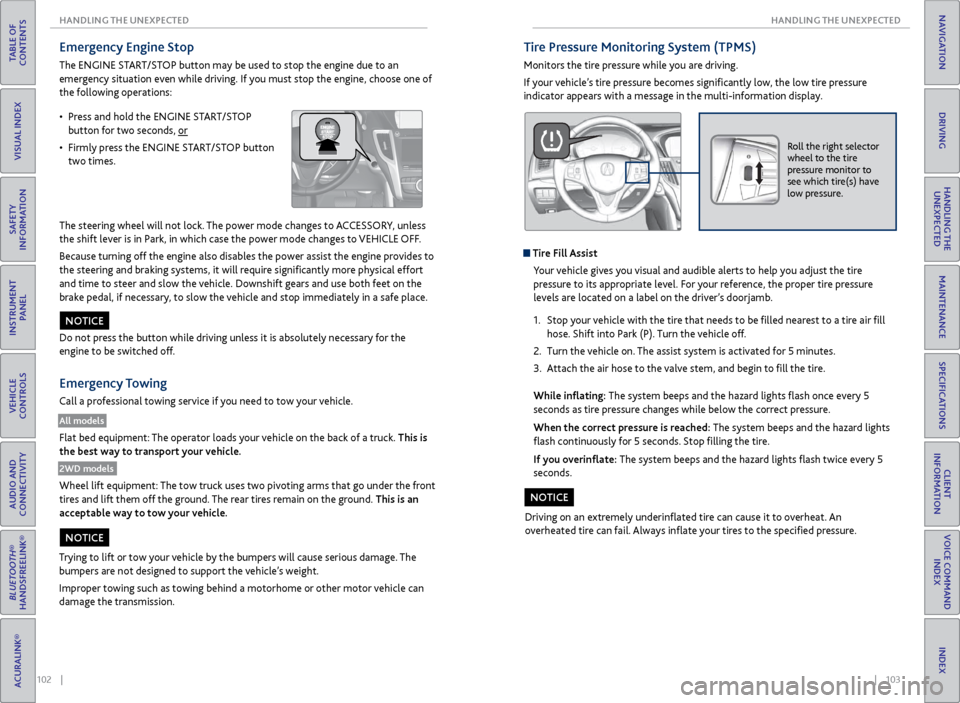
• Press and hold the ENGINE START/STOP
button for two seconds, or
• Firmly press the ENGINE START/STOP button
two times.
Tire Pressure Monitoring System (TPMS)
Monitors the tire pressure while you are driving.
If your vehicle’s tire pressure becomes significantly low, the low tire pressure
indicator appears with a message in the multi-information display.
Roll the right selector
wheel to the tire
pressure monitor to
see which tire(s) have
low pressure.
Tire Fill Assist
Your vehicle gives you visual and audible alerts to help you adjust the tire
pressure to its appropriate level. For your reference, the proper tire pressure
levels are located on a label on the driver’s doorjamb.
1. Stop your vehicle with the tire that needs to be filled nearest to a tire air fill
hose. Shift into Park (P). Turn the vehicle off.
2. Turn the vehicle on. The assist system is activated for 5 minutes.
3. Attach the air hose to the valve stem, and begin to fill the tire.
While inflating: The system beeps and the hazard lights flash once every 5
seconds as tire pressure changes while below the correct pressure.
When the correct pressure is reached: The system beeps and the hazard lights
flash continuously for 5 seconds. Stop filling the tire.
If you overinflate: The system beeps and the hazard lights flash twice every 5
seconds.
Driving on an extremely underinflated tire can cause it to overheat. An
overheated tire can fail. Always inflate your tires to the specified pressure.
NOTICE
Page 60 of 75
112 || 113
MAINTENANCE
MAINTENANCE
TABLE OF
CONTENTS
INDEX
VISUAL INDEX
VOICE COMMAND INDEX
SAFETY
INFORMATION
CLIENT
INFORMATION
INSTRUMENT PANEL
SPECIFICATIONS
VEHICLE
CONTROLS
MAINTENANCE
AUDIO AND
CONNECTIVITY
HANDLING THE UNEXPECTED
BLUETOOTH®
HANDSFREELINK®
DRIVING
ACURALINK®
NAVIGATION
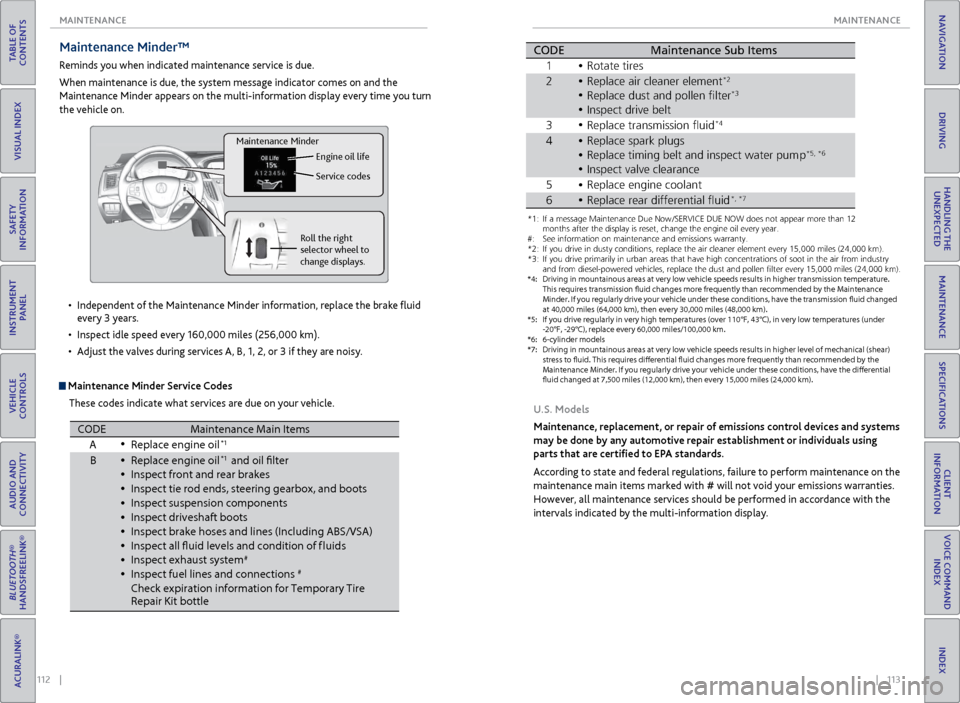
Maintenance Minder™
Reminds you when indicated maintenance service is due.
When maintenance is due, the system message indicator comes on and the
Maintenance Minder appears on the multi-information display every time you turn
the vehicle on.
Maintenance Minder Service Codes
These codes indicate what services are due on your vehicle.
•
Independent of the Maintenance Minder information, replace the brake fluid
every 3 years.
• Inspect idle speed every 160,000 miles (256,000 km).
• Adjust the valves during services A, B, 1, 2, or 3 if they are noisy.
Roll the right
selector wheel to
change displays. Engine oil life
Service codes
Maintenance Minder
CODEMaintenance Main Items
A Replace engine oi l*1
BReplace engine oi l*1 and oil flter
\fnspect front and re\rar bra\bes
\fnspect tie rod end\rs, steering gearbox,\r and boots
\fnspect suspension \rcomponent s
\fnspect driveshaft b\root s
\fnspect bra\be hoses \rand lines (\fncludin\rg ABS/VSA)
\fnspect all fuid le\rvels and condition\r of f luids
\fnspect exhaust sys\rte m
#
\fnspect fuel lines \rand connections#
Chec\b expiration in\rformation for Tempora\rry Tire
Repair Kit bottl e
*1:I f a message Maintenance Due Now /SERVICE DUE NOW does not appear m\hore than 1\f months
after the display is\h reset\b change the e\hngine oil every year\h.
*\f: If you drive in dus\hty conditions\b repla\hce the air cleaner \helement every 15\b000\h miles (\f4\b000 km) .
*3: If you drive primar\hily in urban areas \hthat have high conce\hntrations of soot \hin the air from ind\hustry and
from diesel-powered\h vehicles\b replace t\hhe dust and pollen f\hlter every 15\b000 mi\hles (\f4\b000 km) .
*4: Driving in mountai\hnous areas at very \hlow vehicle speeds r\hesults in higher tra\hnsmission temperat\hure.
This requires trans\hmission fuid change\hs more frequently t\hhan recommended by \hthe Maintenance
Minder. If you regularly drive your vehicle under these conditions\b have the transmission fuid changed
at 40\b000 miles (64\b0\h00 km)\b then every 3\h0\b000 miles (48\b000 k\hm) .
*5: If you drive regula\hrly in very high temp\heratures (over 110\h°F\b 43°C)\b in very lo\hw temperatures (un\hder
-\f0°F\b -\f9°C)\b replac\he every 60\b000 miles\h/100\b000 km.
*6: 6-cylinder models
CODE Maintenance Sub Items
1 Rotate tires
2 Replace air cleaner\r element
*2
Replace dust and p\rollen flter*3
3Replace transmissio\rn fui d*4
4Replace spar\b plugs\r
Replace timing belt\r and inspect water \rpump*5 *6
\fnspect valve clear\rance
5 Replace engine coo\rlan t
•
•
•
•
•
•
•
•
•
•
•
•
•
\fnspect drive belt•
•
•
•
•
•
*1: If a message Maint\Nenance Due N\fw /SE\bVICE DUE NOW d\fes n\N\ft appear m\fre than 1\N2 m\fnths after the disp\Nlay is reset, chang\Ne the engine \fil ev\Nery year .
#: See inf\frmati\fn \fn ma\Nintenance and emis\Nsi\fns warranty.
*2: If y\fu drive in dust\Ny c\fnditi\fns, replac\Ne the air cleaner el\Nement every 15,000 \Nmiles (24,000 km) .
*3: If y\fu drive primaril\Ny in urban areas tha\Nt have high c\fncent\Nrati\fns \ff s\f\ft in th\Ne air fr\fm industr y
and fr\fm diesel-p\fwe\Nred vehicles, replac\Ne the dust and p\fll\Nen flter every 15,00\N0 miles (24,000 km\N).
*4: Driving in mountai\ynous areas at very \y\fow vehic\fe s\beeds re\ysu\fts in higher tran\ysmission tem\beratur\ye.
This requires trans\ymission fuid change\ys more frequent\fy t\yhan recommended by t\yhe Maintenance
M inder. If you regu\far\fy drive your vehic\fe under these conditions, have the transmission fuid changed
at 40,000 mi\fes (64\y,000 km), then ever\yy 30,000 mi\fes (48,\y000 km).
*5: If you drive regu\fa\yr\fy in very high tem\b\yeratures (over 110\y°F, 43°C), in very \y\fow tem\beratures (u\ynder
-20°F, -29°C), re\b\f\yace every 60,000 mi\y\fes/100,000 km.
*6: 6-cy\finder mode\fs
*7: Driving in mountai\ynous areas at very \y\fow vehic\fe s\beeds re\ysu\fts in higher \feve\y\f of mechanica\f (shea\yr)
stress to fuid. Thi\ys requires diferen\ytia\f fuid changes mo\yre frequent\fy than r\yecommended by th e
M aintenance Minder. I\yf you regu\far\fy driv\ye your vehic\fe under\y these conditions, \yhave the diferentia\y\f
fuid changed at 7,5\y00 mi\fes (12,000 km\y), then every 15,00\y0 mi\fes (24,000 km)\y.
CODEMaintenance Sub Item s
1 \b\ftate tires
2\beplace air cleaner \Nelement*2
\beplace dust and p\f\Nllen flte r*3
Inspect drive belt
3 \beplace transmissi\fn\N fuid*4
4\beplace spark plugs
\beplace timing belt\N and inspect water \Npum p*5, *6
Inspect valve clea\Nrance
5 \beplace engine c\f\fla\Nnt
6\beplace rear differen\Ntial fui d*, *7
U.S. Models
Maintenance, replacement, or repair of emissions control devices and systems
may be done by any automotive repair establishment or individuals using
parts that are certified to EPA standards.
According to state and federal regulations, failure to perform maintenance on the
maintenance main items marked with # will not void your emissions warranties.
However, all maintenance services should be performed in accordance with the
intervals indicated by the multi-information display.
Page 75 of 75
142 || 143
INDEX
INDEX
TABLE OF
CONTENTS
INDEX
VISUAL INDEX
VOICE COMMAND INDEX
SAFETY
INFORMATION
CLIENT
INFORMATION
INSTRUMENT PANEL
SPECIFICATIONS
VEHICLE
CONTROLS
MAINTENANCE
AUDIO AND
CONNECTIVITY
HANDLING THE UNEXPECTED
BLUETOOTH®
HANDSFREELINK®
DRIVING
ACURALINK®
NAVIGATION
Malfunction indicator lamp .......................... 22
Malfunction Indicators .................................. 22
Map Display Commands ............................ 134
Map Legend ............................................... 66, 70
Master Door Lock Switch .............................. 29
Maximum Load Limit ..................................... 73
Mirrors ........................................................... 39
Moonroof ......................................................... 31
Multi-Information Display ............................ 26
Multi-View Rear Camera ...............................95
Navigation ....................................................... 65
AcuraLink Real-Time Traffic™ ................... 71
Detour ........................................................... 71
Display and Controls ................................. 66
Entering a Destination .............................. 68
Find Nearest Place ..................................... 69
Home Address ............................................ 68
Interface Dial Feedback ............................. 67
Map Legend ........................................... 66, 70
Place Category ........................................... 69
Routing ......................................................... 70
Steering Wheel Controls ........................... 65
Street Address ............................................ 68
System Guidance Volume ......................... 67
Traffic ............................................................ 71
Voice Command Tips .................................. 65
Voice Prompt ............................................... 67
Navigation Commands ............................... 134
Neutral (Car Wash Mode) ............................ 80
On-Demand Multi-Use Display (ODMD) ... 46
One-Touch Turn Signal ................................. 33
On/Off Indicators ........................................... 25
Opening the Hood ........................................ 115
Opening the Trunk ......................................... 28
Operator Assistance ...................................... 64
Overheating ................................................... 101
Pairing a Phone ................................................ 57
Pandora® .......................................................... 53
Pandora® Commands ................................. 138
Parking Brake ................................................... 81
Parking Sensor System .................................. 94
Passenger Airbag Off Indicator ..................... 11
Phone ............................................................ 57
Phonebook .......................................................59
Phone Commands ........................................ 139
Place Category ............................................... 69
Power Door Mirrors ....................................... 39
Power Mode ..................................................... 76
Power Moonroof ............................................. 31
Power Windows ............................................. 30
Precision All Wheel Steer System indicator ... 22
Protecting Child Passengers ......................... 14
Protecting Infants ........................................... 15
Protecting Larger Children ............................ 19
Protecting Smaller Children .......................... 16Radio
............................................................ 47
Rain-Sensing Wipers ..................................... 33
RDM indicator ................................................. 23
Readiness Codes ............................................ 128
Rear Camera ....................................................95
Rearview Mirror .............................................. 39
Refueling ........................................................... 97
Remote Battery Strength ............................. 98
Remote Engine Start ...................................... 75
Remote Transmitter ....................................... 27
Reporting Safety Defects .............................. 21
Reserve Tank .................................................. 118
Reverse Tilt Door Mirrors ............................. 39
Road Departure Mitigation (RDM) System ...23, 92
Roadside Assistance ..................................... 133
Route Commands ........................................ 134
Routing ............................................................ 70
Safety Information ........................................... 3
Carbon Monoxide Gas ................................. 4
Child Safety .................................................. 14
Important Safety Information .................... 3
Important Safety Precautions .................... 3
Reporting Safety Defects .......................... 21
Safety Label Locations .............................. 20
Safety Messages ............................................ 3
Seat Belts ........................................................... 5
Adjusting the Shoulder Anchor .................. 7
Fastening a Seat Belt .................................... 7
Lap/Shoulder Seat Belts .............................. 5
Seat Belt Inspection ..................................... 6
Seat belt reminder indicator ..................... 24
Seat Heaters ................................................... 43
Seat Ventilation ............................................. 43
Seats ............................................................ 35
Sequential Mode ............................................ 80
Sequential Shift Mode ................................... 78
Service Codes ................................................ 112
Settings ........................................................... 40
Setting the Clock ........................................... 40
SH-AWD indicator .......................................... 24
Shifting ............................................................ 77
Electronic Gear Selector ............................ 79
Sequential Mode ........................................ 80
Sequential Shift Mode ............................... 78
Shift Lever .................................................... 77
Shift Lever Does Not Move ...................... 98
Shoulder Anchor ............................................... 7
Side Airbags ....................................................... 9
Side Curtain Airbags ......................................... 9
SiriusXM® Radio ............................................ 48
SiriusXM® Radio Commands ...................... 137
SMS Text Messaging ....................................... 61
Song By Voice™ Commands ....................... 139
Sound ........................................................... 45
Specifications ................................................ 129Speed Dial .................................................
59, 60
SPORT mode indicator .................................. 25
Supplemental Restraint System indicator ... 10, 23
START/STOP button ................................................... 76
Steering Wheel ............................................... 38
Steering Wheel and Nearby Controls ........... 1
Steering Wheel Controls ................. 45, 55, 65
Street Address ................................................ 68
Super Handling-All Wheel Drive (AWD) ... 94
System Guidance Volume ............................. 67
System message indicator ............................ 24
Text Messaging ................................................ 61
Tire Chains ...................................................... 123
Tire Information ............................................ 121
Inflation Guidelines .................................. 121
Inspection Guidelines ............................... 121
Tire and Loading Information Label ...... 122
Tire and Wheel Replacement.................. 122
Tire Grading ............................................... 125
Tire Labeling ............................................... 124
Tire Identification Number (TIN) ........... 124
Tire Service Life ......................................... 123
Tire Terminology ....................................... 124
Wear Indicators
......................................... 121
Winter Tires ................................................ 123
Tire Pressure Monitoring System (TPMS)............................. 23, 103, 127
Tire Repair Kit ............................................... 104
Tires ................................................. 129, 130
TPMS indicator ................................................ 23
Traffic ............................................................ 71
Troubleshooting ............................................ 131
Trunk ........................................................... 28
Trunk Release Button .................................... 30
Turn-by-turn directions ................................. 70
Turn Signal ...................................................... 33
Turn signal indicator ...................................... 25
Under the Hood ............................................ 114
Unlocking the Doors ..................................... 28
USB Adapter Cable ........................................ 44
USB Commands ........................................... 138
USB Flash Drive .............................................. 50
Vehicle Controls .............................................. 27
Vehicle Stability Assist (VSA®) .............. 23, 84
Visual Index ....................................................... 1
Voice Command Index ................................ 134
Voice Command Tips ...............................56, 65
Voice Prompt ................................................... 67
VSA indicator ................................................... 23
VSA off indicator ............................................. 25
Warranty Coverages ..................................... 133
Wear Indicators ............................................. 121
Window s ......................................................... 30
Window Washer Fluid .................................. 119
Winter Tires .................................................... 123Wipers
........................................................... 33
Wiper Blades .................................................. 102
XM® Radio ...................................................... 48
XM® Radio Commands ................................ 137