lock Acura TLX 2015 Owners Manual
[x] Cancel search | Manufacturer: ACURA, Model Year: 2015, Model line: TLX, Model: Acura TLX 2015Pages: 545, PDF Size: 19.64 MB
Page 334 of 545
Continued
333
uuWhen Driving uShifting
Driving
In freezing or sub-freezing conditions, the electronic gear selector response may be
slow.
Always depress the brake pedal before changing the gear position to
(P
, and
confirm that
(P
is shown on the gear position indicator before releasing the brake.
■When opening the driver’s door
If you open the driver’s door under the following conditions, the gear position
automatically changes to
(P
.
• The vehicle is stationary with the engine running, or moving at 1 mph (2 km/h) or
slower.
• The transmission is in other than
(P
.
• You have unfastened the driver side seat belt.
u If you manually change the gear position from
(P
with the brake pedal
depressed, the gear position will automatically return to
(P
once you release
the brake pedal.
■When turning off the power mode
If you turn the engine off while the vehicle is stationary, and the transmission is in
other than
(P
, the gear position automatically changes to
(P
.
1 When opening the driver’s door
You should always select
(P before opening the
driver’s door.
Make sure to park the vehicle in a safe place. 2 When Stopped P. 411
If you want to drive the vehicle after the gear position
has automatically changed to ( P under the described
conditions, close the door, fasten the seat belt,
depress the brake pedal, then change the gear
position.
If you leave the vehicle, turn off the engine and lock
the doors.
Page 339 of 545
338
uuWhen Driving uShifting
Driving
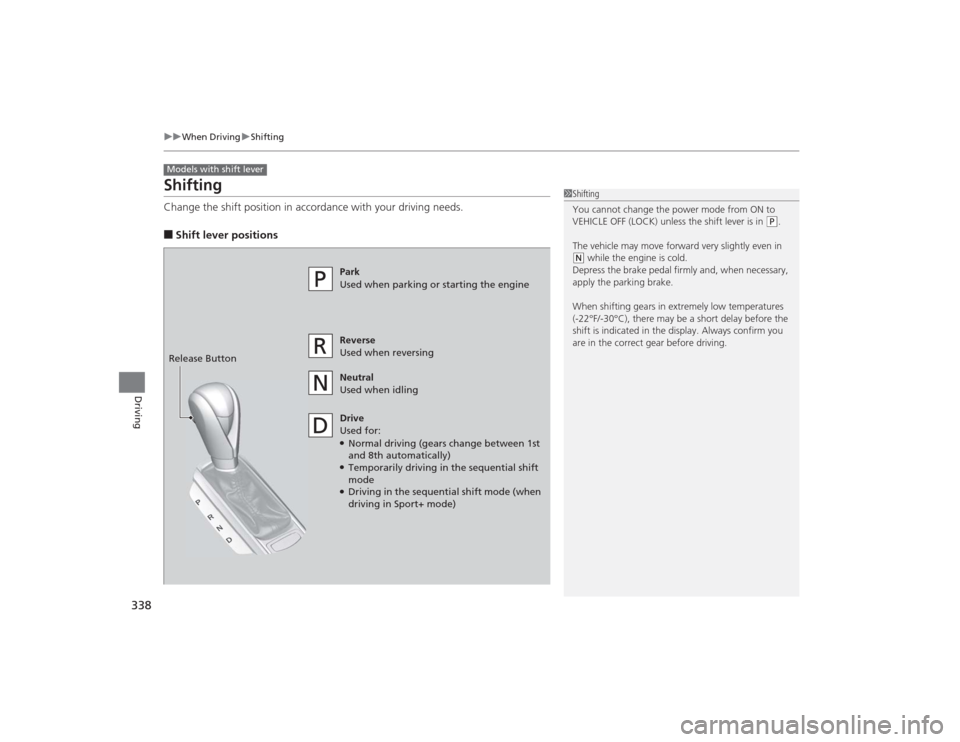
ShiftingChange the shift position in accordance with your driving needs.■Shift lever positionsModels with shift lever
1Shifting
You cannot change the power mode from ON to
VEHICLE OFF (LOCK) unless the shift lever is in
(P.
The vehicle may move forward very slightly even in
( N while the engine is cold.
Depress the brake pedal firmly and, when necessary,
apply the parking brake.
When shifting gears in extremely low temperatures
(-22°F/-30°C), there may be a short delay before the
shift is indicated in the display. Always confirm you
are in the correct gear before driving.
Park
Used when parking or starting the engine
Reverse
Used when reversing
Neutral
Used when idling
Drive
Used for:●Normal driving (gears change between 1st
and 8th automatically)●Temporarily driving in the sequential shift
mode●Driving in the sequential shift mode (when
driving in Sport+ mode)
Release Button
Page 342 of 545
341
uuWhen Driving uShifting
Driving
■Second gear lock mode
If you pull the
(+
paddle shifter while stopped or driving at 6 mph (10 km/h) or less,
the gear position will be locked in 2nd gear. This makes it easier to pull away on
slippery surfaces such as snow covered roads.
To cancel the 2nd gear lock mode, pull the
(-
paddle shifter.
■
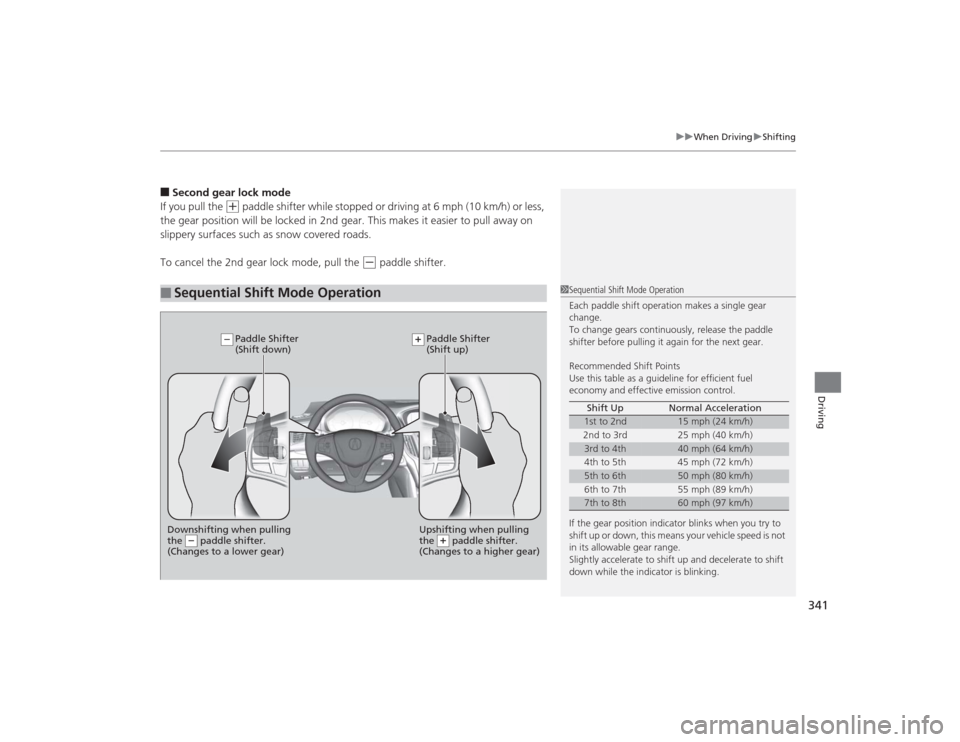
Sequential Shift Mode Operation
1 Sequential Shift Mode Operation
Each paddle shift operation makes a single gear
change.
To change gears continuously, release the paddle
shifter before pulling it again for the next gear.
Recommended Shift Points
Use this table as a guideline for efficient fuel
economy and effective emission control.
If the gear position indicator blinks when you try to
shift up or down, this means your vehicle speed is not
in its allowable gear range.
Slightly accelerate to shift up and decelerate to shift
down while the indicator is blinking. Shift Up Normal Acceleration
1st to 2nd
15 mph (24 km/h)
2nd to 3rd 25 mph (40 km/h)
3rd to 4th
40 mph (64 km/h)
4th to 5th 45 mph (72 km/h)
5th to 6th
50 mph (80 km/h)
6th to 7th 55 mph (89 km/h)
7th to 8th
60 mph (97 km/h)
Downshifting when pulling
the paddle shifter.
(Changes to a lower gear)
Upshifting when pulling
the paddle shifter.
(Changes to a higher gear)
Paddle Shifter
(Shift down) Paddle Shifter
(Shift up)
Page 358 of 545
357
uuWhen Driving uAdaptive Cruise Control (ACC) with Low Speed Follow (LSF)
*
Continued
Driving
The system may automatically shut off and the ACC indicator will come on under
certain conditions. Some examples of these conditions are listed below. Other
conditions may reduce some of the ACC functions.2 Front Sensor Camera
* P. 351
■Environmental conditions
• Driving in bad weather (rain, fog, snow, etc.).■Roadway conditions
• Driving on a snowy or wet roadway (obscured lane marking, vehicle tracks,
reflected lights, road spray, high contrast).■Vehicle conditions
• The outside of the windshield is blocked by dirt, mud, leaves, wet snow, etc.
• An abnormal tire or wheel condition (Wrong sized, varied size or construction,
improperly inflated, compact spare tire
*, etc.).
• The camera temperature gets too hot.
• The parking brake is applied.
■
ACC with LSF Conditions and Limitations* Not available on all models
Page 370 of 545

369
uuWhen Driving uForward Collision Warning (FCW) with Pedestrian Detection
*
Continued
Driving
■Roadway conditions
• Driving on a snowy or wet roadway (obscured lane marking, vehicle tracks,
reflected lights, road spray, high contrast).■Vehicle conditions
• Headlight lenses are dirty or the headlights are not properly adjusted.
• The outside of the windshield is blocked by dirt, mud, leaves, wet snow, etc.
• The inside of the windshield is fogged.
• The camera temperature gets too hot.
• An abnormal tire or wheel condition (wrong sized, varied size or construction,
improperly inflated, compact spare tire
*, etc.).
• The vehicle is tilted due to a heavy load or suspension modifications.
* Not available on all models
Page 375 of 545

374
uuWhen Driving uLane Departure Warning (LDW)
*
Driving
■Vehicle conditions
• Headlight lenses are dirty or the headlights are not properly adjusted.
• The outside of the windshield is blocked by dirt, mud, leaves, wet snow, etc.
• The inside of the windshield is fogged.
• The camera temperature gets too hot.
• An abnormal tire or wheel condition (wrong sized, varied size or construction,
improperly inflated, compact spare tire
*, etc.).
• The vehicle is tilted due to a heavy load or suspension modifications.
* Not available on all models
Page 380 of 545

379
uuWhen Driving uRoad Departure Mitigation (RDM) System
*
Driving
■Vehicle conditions
• Headlight lenses are dirty or the headlights are not properly adjusted.
• The outside of the windshield is blocked by dirt, mud, leaves, wet snow, etc.
• The inside of the windshield is fogged.
• The camera temperature gets too hot.
• An abnormal tire or wheel condition (wrong sized, varied size or construction,
improperly inflated, compact spare tire
*, etc.).
• The vehicle is tilted due to a heavy load or suspension modifications.
* Not available on all models
Page 386 of 545

385
uuWhen Driving uLane Keeping Assist System (LKAS)
*
Driving
■Vehicle conditions
• Headlight lenses are dirty or the headlights are not properly adjusted.
• The outside of the windshield is blocked by dirt, mud, leaves, wet snow, etc.
• The inside of the windshield is fogged.
• The camera temperature gets too hot.
• An abnormal tire or wheel condition (wrong sized, varied size or construction,
improperly inflated, compact spare tire
*, etc.).
• The vehicle is tilted due to a heavy load or suspension modifications.
* Not available on all models
Page 400 of 545
Continued
399
uuBraking uBrake System
Driving
Your vehicle is equipped with disc brakes at all four wheels. The brake assist system
increases the stopping force when you depress the brake pedal hard in an
emergency situation. The anti-lock brake system (ABS) helps you retain steering
control when braking very hard.2 Brake Assist System P. 403
2 Anti-lock Brake System (ABS) P. 402■
Foot Brake
1Foot Brake
Check the brakes after driving through deep water,
or if there is a buildup of road surface water. If
necessary, dry the brakes by lightly depressing the
pedal several times.
If you hear a continuous metallic friction sound when
applying the brakes, the brake pads need to be
replaced. Have your vehicle checked by a dealer.
Constantly using the brake pedal while going down a
long hill builds up heat, which reduces the brake
effectiveness. Apply engine braking by taking your
foot off the accelerator pedal and downshifting to a
lower gear.
Do not rest your foot on the brake pedal while
driving, as it will lightly apply the brakes and cause
them to lose effectiveness over time and reduce pad
life. It will also confuse drivers behind you.
Page 403 of 545
402
uuBraking uAnti-lock Brake System (ABS)
Driving
Anti-lock Brake System (ABS)Helps prevent the wheels from locking up, and help s you retain steering control by
pumping the brakes rapidly, much faster than you.
The electronic brake distribution (EBD) system, which is part of the ABS, also
balances the front-to-rear braking distribution according to vehicle loading.
You should never pump the brake pedal. Let the ABS work for you by always
keeping firm, steady pressure on the brake pedal. This is sometimes referred to as
“stomp and steer.”■ABS operation
The brake pedal may pulsate slightly when the ABS is working. Keep holding the
pedal firmly down. On dry pavement, you will need to press on the brake pedal very
hard before the ABS activates. However, you may feel the ABS activate immediately
if you are trying to stop on snow or ice.
When the vehicle speed goes under 6 mph (10 km/h), the ABS stops.■
ABS
1 Anti-lock Brake System (ABS)NOTICEThe ABS may not function correctly if you use an
incorrect tire type and size.
When the ABS indicator comes on while driving,
there may be a problem with the system.
While normal braking is not affected, there is a
possibility of the ABS not operating. Have your
vehicle checked by a dealer immediately.
The ABS does not reduce the time or distance it takes
to stop the vehicle. It only helps with steering control
during hard braking.
In the following cases, your vehicle may need more
stopping distance than a vehicle without the ABS:•When driving on rough road surfaces, including
when driving on uneven surfaces, such as gravel or
snow.•When tire chains are installed.
You may hear a motor sound coming from the
engine compartment while system checks are being
performed immediatel y after starting the engine or
while driving. This is normal.