light Acura TLX 2015 User Guide
[x] Cancel search | Manufacturer: ACURA, Model Year: 2015, Model line: TLX, Model: Acura TLX 2015Pages: 545, PDF Size: 19.64 MB
Page 35 of 545
uuSeat Belts uAbout Your Seat Belts
34Safe Driving
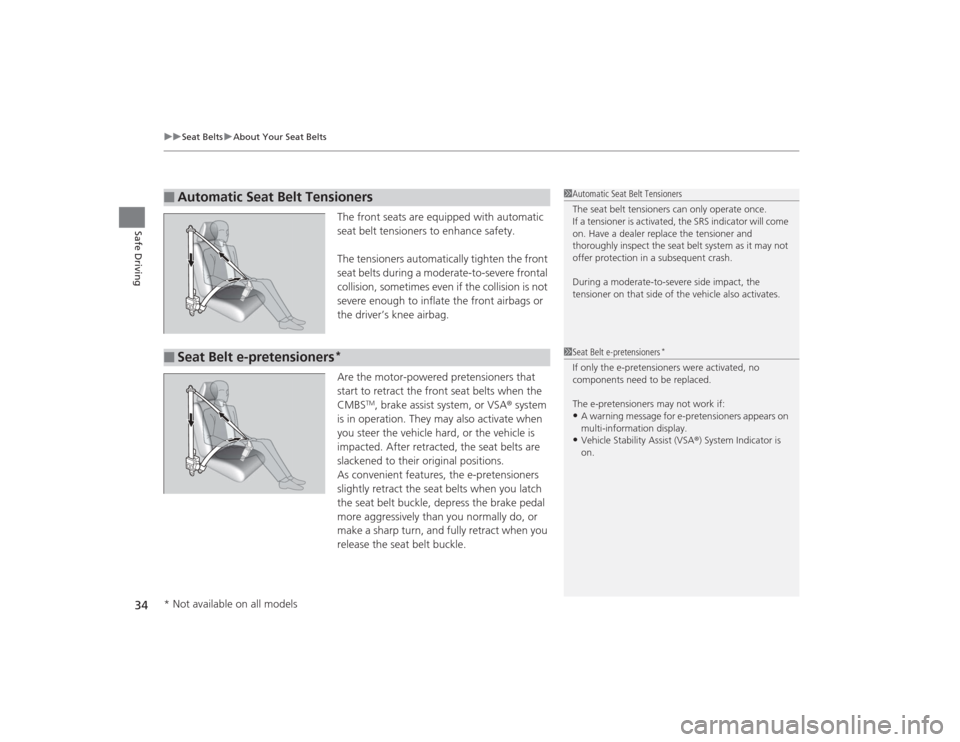
The front seats are equipped with automatic
seat belt tensioners to enhance safety.
The tensioners automatically tighten the front
seat belts during a moderate-to-severe frontal
collision, sometimes even if the collision is not
severe enough to inflate the front airbags or
the driver’s knee airbag.
Are the motor-powered pretensioners that
start to retract the front seat belts when the
CMBS
TM, brake assist system, or VSA ® system
is in operation. They may also activate when
you steer the vehicle hard, or the vehicle is
impacted. After retracted, the seat belts are
slackened to their original positions.
As convenient features, the e-pretensioners
slightly retract the seat belts when you latch
the seat belt buckle, depress the brake pedal
more aggressively than you normally do, or
make a sharp turn, and fully retract when you
release the seat belt buckle.
■
Automatic Seat Belt Tensioners
1 Automatic Seat Belt Tensioners
The seat belt tensioners can only operate once.
If a tensioner is activated, the SRS indicator will come
on. Have a dealer replace the tensioner and
thoroughly inspect the seat belt system as it may not
offer protection in a subsequent crash.
During a moderate-to-severe side impact, the
tensioner on that side of the vehicle also activates.
■
Seat Belt e-pretensioners
*
1Seat Belt e-pretensioners
*
If only the e-pretensioners were activated, no
components need to be replaced.
The e-pretensioners may not work if:•A warning message for e-pretensioners appears on
multi-information display.•Vehicle Stability Assist (VSA ®) System Indicator is
on.
* Not available on all models
Page 52 of 545

Continued
51
uuAirbags uAirbag System Indicators
Safe Driving
■When side curtain airbags deploy in a frontal collision
One or both side curtain airbags may inflate in a moderate-to-severe angled frontal
collision.
In this case, the side curtain airbags will deploy slightly after the front airbags.Airbag System IndicatorsIf a problem occurs in the airbag system, the SRS indicator will come on and a
message appears on the multi-information display.
■When the power mode is set to ON
The indicator comes on for a few seconds,
then goes off. This tells you the system is
working properly.
If the indicator comes on at any other time, or does not come on at all, have the
system checked by a dealer as soon as possible. If you don’t, your airbags and seat
belt tensioners may not work properly when they are needed.
■
Supplemental Restraint System (SRS) Indicator
1 Supplemental Restraint System (SRS) Indicator
3
WARNING
Ignoring the SRS indicator can result in
serious injury or death if the airbag systems
or tensioners do not work properly.
Have your vehicle checked by a dealer as
soon as possible if the SRS indicator alerts
you to a possible problem.
Models with
full color
display
Models without
full color
display
Page 77 of 545
76
uuIndicators u
Instrument Panel
*1:On the left: Models with full color display
On the right: Models without full color display
*2:Models with full color display
*3:Models without full color displayIndicator
Name
On/Blinking
Explanation
Message
*1
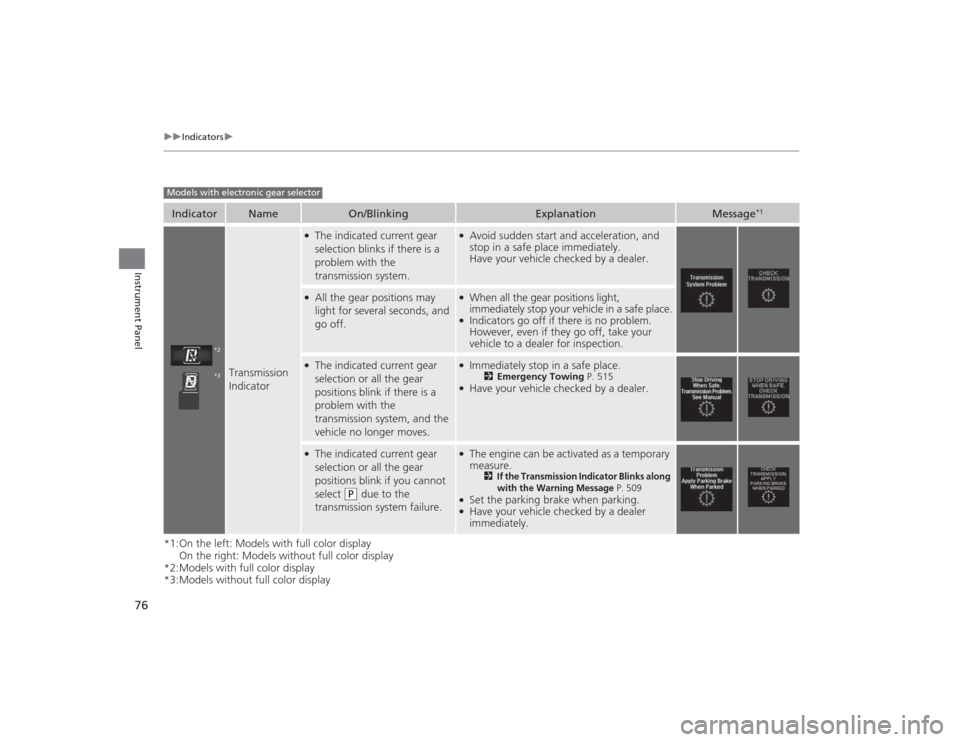
Transmission
Indicator
●The indicated current gear
selection blinks if there is a
problem with the
transmission system.
●Avoid sudden start and acceleration, and
stop in a safe place immediately.
Have your vehicle checked by a dealer.
●All the gear positions may
light for several seconds, and
go off.
●When all the gear positions light,
immediately stop your vehicle in a safe place.●Indicators go off if there is no problem.
However, even if they go off, take your
vehicle to a dealer for inspection.
●The indicated current gear
selection or all the gear
positions blink if there is a
problem with the
transmission system, and the
vehicle no longer moves.
●Immediately stop in a safe place.
2 Emergency Towing P. 515
●Have your vehicle checked by a dealer.
●The indicated current gear
selection or all the gear
positions blink if you cannot
select
(P
due to the
transmission system failure.
●The engine can be activated as a temporary
measure.
2
If the Transmission Indicator Blinks along
with the Warning Message
P. 509
●Set the parking brake when parking.●Have your vehicle checked by a dealer
immediately.
Models with electronic gear selector
*2*3
Page 84 of 545
83
uuIndicators u
Continued
Instrument Panel
Indicator
Name
On/Blinking
Explanation
Message
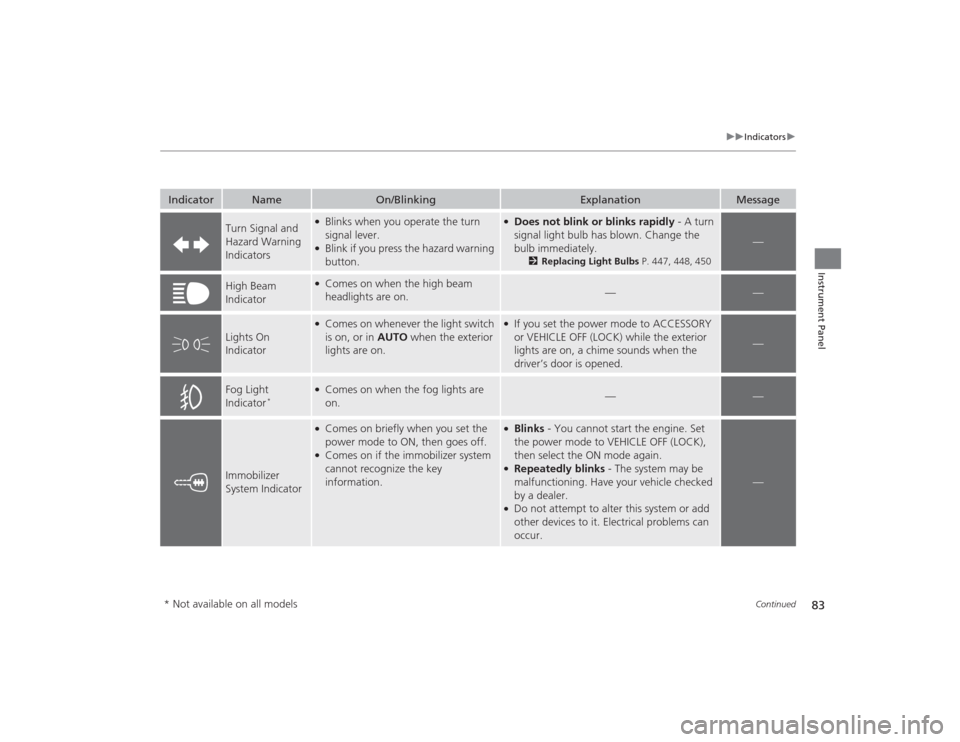
Turn Signal and
Hazard Warning
Indicators
●Blinks when you operate the turn
signal lever.●Blink if you press the hazard warning
button.
●Does not blink or blinks rapidly - A turn
signal light bulb has blown. Change the
bulb immediately.
2Replacing Light Bulbs P. 447, 448, 450
—
High Beam
Indicator
●Comes on when the high beam
headlights are on.
—
—
Lights On
Indicator
●Comes on whenever the light switch
is on, or in AUTO when the exterior
lights are on.
●If you set the power mode to ACCESSORY
or VEHICLE OFF (LOCK) while the exterior
lights are on, a chime sounds when the
driver’s door is opened.
—
Fog Light
Indicator
*
●Comes on when the fog lights are
on.
—
—
Immobilizer
System Indicator
●Comes on briefly when you set the
power mode to ON, then goes off.●Comes on if the immobilizer system
cannot recognize the key
information.
●Blinks - You cannot start the engine. Set
the power mode to VEHICLE OFF (LOCK),
then select the ON mode again.●Repeatedly blinks - The system may be
malfunctioning. Have your vehicle checked
by a dealer.●Do not attempt to alter this system or add
other devices to it. Electrical problems can
occur.
—
* Not available on all models
Page 105 of 545
104
uuIndicators uMulti-Information Display Warn ing and Information Messages
Instrument Panel
*1:On the left: Models with full color display
On the right: Models without full color display
Message
*1
Condition
Explanation
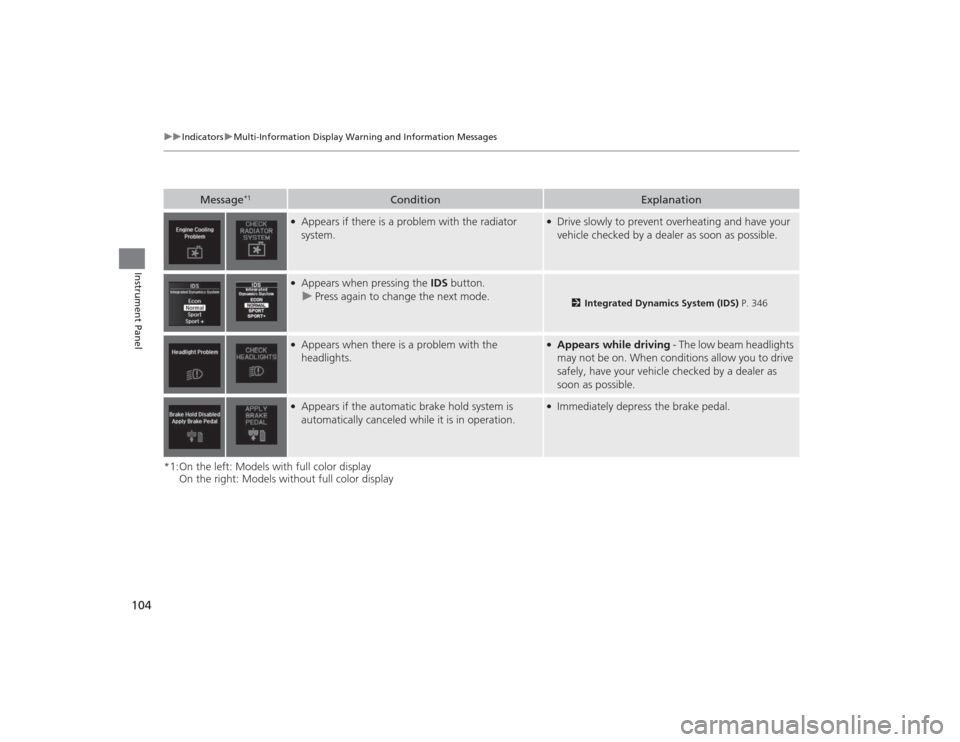
●Appears if there is a problem with the radiator
system.
●Drive slowly to prevent overheating and have your
vehicle checked by a dealer as soon as possible.
●Appears when pressing the IDS button.
u Press again to change the next mode.
2 Integrated Dynamics System (IDS) P. 346
●Appears when there is a problem with the
headlights.
●Appears while driving - The low beam headlights
may not be on. When conditions allow you to drive
safely, have your vehicle checked by a dealer as
soon as possible.
●Appears if the automatic brake hold system is
automatically canceled while it is in operation.
●Immediately depress the brake pedal.
Page 128 of 545
127
uuGauges and Multi-Information Display uMulti-Information Display
Continued
Instrument Panel
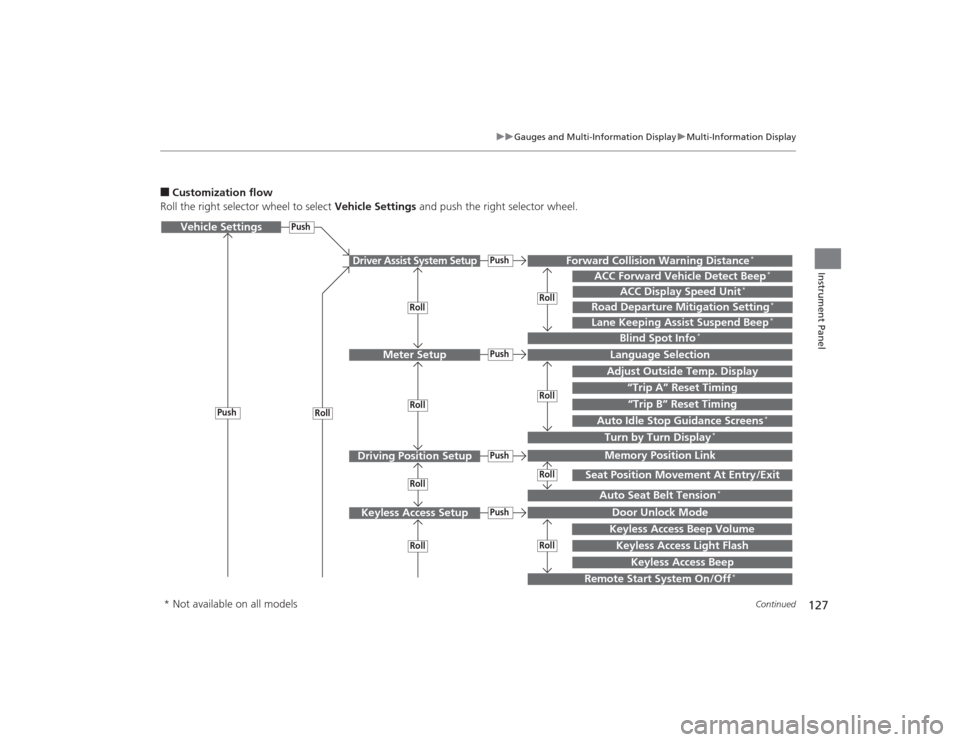
■Customization flow
Roll the right selector wheel to select Vehicle Settings and push the right selector wheel.Vehicle Settings
“Trip A” Reset Timing
Language SelectionAdjust Outside Temp. DisplayMemory Position LinkDoor Unlock ModeKeyless Access Light Flash
Driver Assist System Setup
Meter Setup
Driving Position SetupKeyless Access Setup
“Trip B” Reset Timing
Turn by Turn Display
*
Forward Collision Warning Distance
*
ACC Forward Vehicle Detect Beep
*
Push
PushPush
Lane Keeping Assist Suspend Beep
*
Blind Spot Info
*
Seat Position Movement At Entry/Exit
Auto Seat Belt Tension
*
Roll
Keyless Access Beep
Push
Roll
PushPush
RollRollRoll
RollRollRoll
ACC Display Speed Unit
*
Road Departure Mitigation Setting
*
Remote Start System On/Off
*
Keyless Access Beep Volume
Auto Idle Stop Guidance Screens
*
Roll
* Not available on all models
Page 129 of 545
128
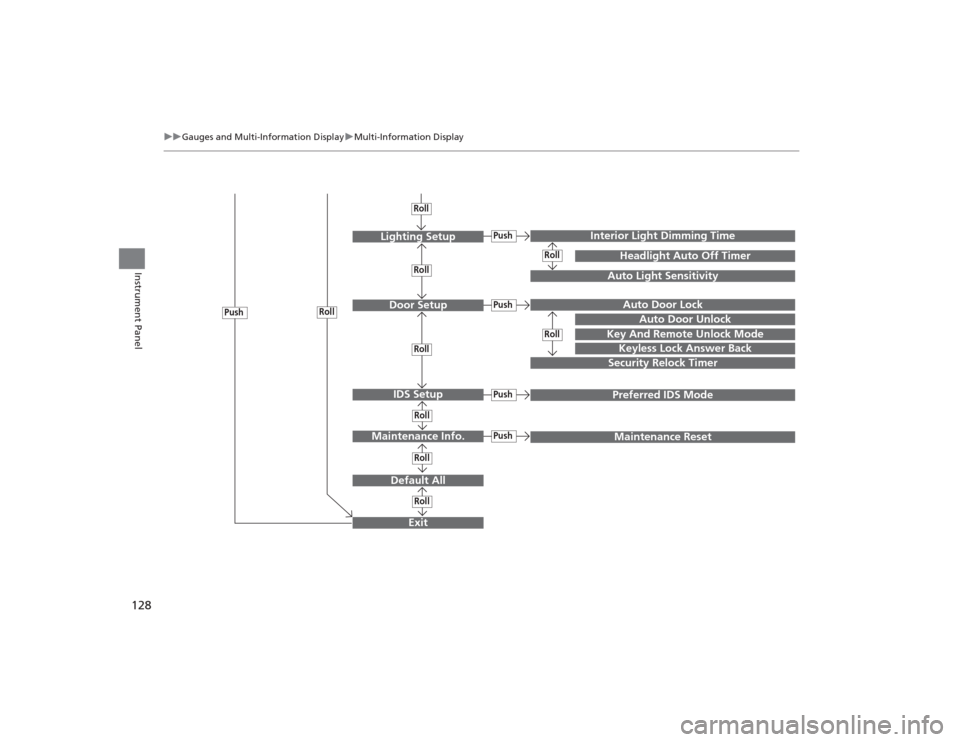
uuGauges and Multi- Information Display uMulti-Information Display
Instrument Panel
Exit
Door Setup
Maintenance Info.
Default AllLighting Setup
Key And Remote Unlock Mode
Auto Door Lock
Auto Door Unlock
Keyless Lock Answer BackSecurity Relock Timer
Interior Light Dimming Time
Headlight Auto Off Timer
Auto Light Sensitivity
PushPush
RollRoll
Roll
IDS Setup
Push
Preferred IDS Mode
Push
Push
Maintenance Reset
RollRoll
RollRollRollRoll
Page 132 of 545
131
uuGauges and Multi-Information Display uMulti-Information Display
Continued
Instrument Panel
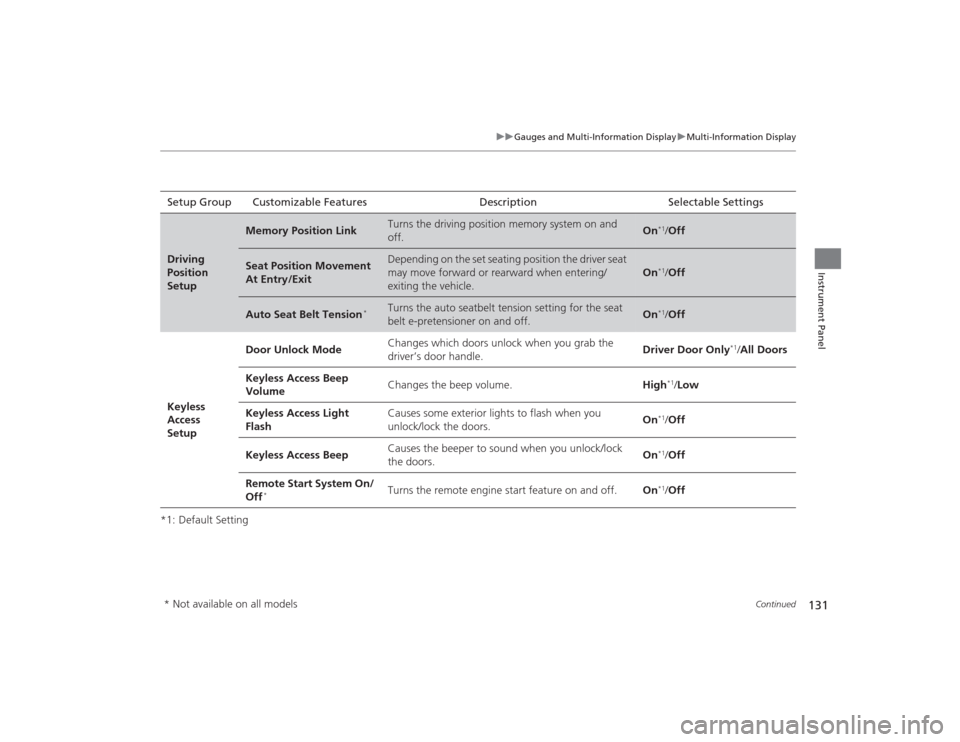
*1: Default SettingSetup Group Customizable Features Description Selectable SettingsDriving
Position
Setup
Memory Position Link
Turns the driving position memory system on and
off.
On
*1/
Off
Seat Position Movement
At Entry/Exit
Depending on the set seating position the driver seat
may move forward or rearward when entering/
exiting the vehicle.
On
*1/Off
Auto Seat Belt Tension
*
Turns the auto seatbelt tension setting for the seat
belt e-pretensioner on and off.
On
*1/Off
Keyless
Access
Setup Door Unlock Mode
Changes which doors unlock when you grab the
driver’s door handle. Driver Door Only
*1/
All Doors
Keyless Access Beep
Volume Changes the beep volume.
High
*1/Low
Keyless Access Light
Flash Causes some exterior lights to flash when you
unlock/lock the doors.
On
*1/
Off
Keyless Access Beep Causes the beeper to sound when you unlock/lock
the doors. On*1/
Off
Remote Start System On/
Off
*
Turns the remote engine start feature on and off. On
*1/Off
* Not available on all models
Page 133 of 545
132
uuGauges and Multi- Information Display uMulti-Information Display
Instrument Panel
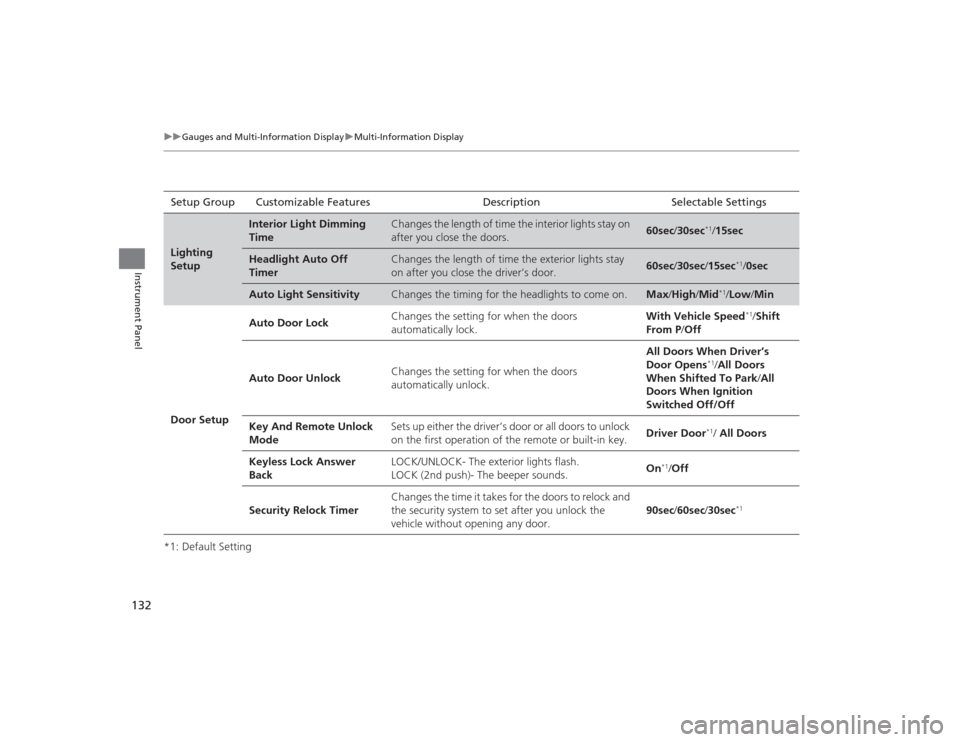
*1: Default SettingSetup Group Customizable Features Description Selectable SettingsLighting
Setup
Interior Light Dimming
Time
Changes the length of time the interior lights stay on
after you close the doors.
60sec
/30sec
*1/15sec
Headlight Auto Off
Timer
Changes the length of time the exterior lights stay
on after you close the driver’s door.
60sec /30sec /15sec
*1/ 0sec
Auto Light Sensitivity
Changes the timing for the headlights to come on.
Max /High /Mid
*1/Low/ Min
Door Setup Auto Door Lock
Changes the setting for when the doors
automatically lock. With Vehicle Speed
*1/
Shift
From P /Off
Auto Door Unlock Changes the setting for when the doors
automatically unlock. All Doors When Driver’s
Door Opens
*1/
All Doors
When Shifted To Park /All
Doors When Ignition
Switched Off/Off
Key And Remote Unlock
Mode Sets up either the driver’s door or all doors to unlock
on the first operation of the remote or built-in key.
Driver Door*1/ All Doors
Keyless Lock Answer
Back LOCK/UNLOCK- The exterior lights flash.
LOCK (2nd push)- The beeper sounds.
On
*1/
Off
Security Relock Timer Changes the time it takes for the doors to relock and
the security system to set after you unlock the
vehicle without opening any door.
90sec
/60sec /30sec
*1
Page 138 of 545
137
Controls
This chapter explains how to operate the various controls necessary for driving.
Clock.................................................. 138
Locking and Unlocking the Doors
Key Types and Functions .................. 139
Low Keyless Access Remote Signal Strength ......................................... 141
Locking/Unlocking the Doors from the Outside .......................................... 142
Locking/Unlocking the Doors from the
Inside ............................................. 148
Childproof Door Locks ..................... 150
Auto Door Locking/Unlocking .......... 151
Opening and Closing the Trunk....... 152
Security System ................................ 155
Immobilizer System .......................... 155 Security System Alarm...................... 155
Opening and Closing the Windows
.... 158Opening and Closing the Moonroof
....... 160
Operating the Switches Around the
Steering Wheel
ENGINE START/STOP Button............. 161
Turn Signals ..................................... 164
Light Switches.................................. 165
Fog Lights
*...................................... 168
Daytime Running Lights ................... 168
Wipers and Washers ........................ 169
Brightness Control ........................... 172
Defogger/Heated Door Mirror .......... 173
Driving Position Memory System ...... 174 Adjusting the Steering Wheel .......... 176
Adjusting the Mirrors ....................... 177
Interior Rearview Mirror ................... 177
Power Door Mirrors ......................... 178
Adjusting the Seats .......................... 180
Adjusting the Seat Positions ............. 180
Interior Lights/Interior Convenience Items ................................................ 187
Interior Lights .................................. 187
Interior Convenience Items .............. 189
Climate Control System ................... 199
Using Automatic Climate Control .... 199
Automatic Climate Control Sensors......207
* Not available on all models