brake light Acura TLX 2015 Owner's Guide
[x] Cancel search | Manufacturer: ACURA, Model Year: 2015, Model line: TLX, Model: Acura TLX 2015Pages: 545, PDF Size: 19.64 MB
Page 382 of 545
Continued
381
uuWhen Driving uLane Keeping Assist System (LKAS)
*
Driving
The system can be used when the fo llowing conditions are met.
• The lane in which you are driving has detectable lane markers on both sides, and
your vehicle is in the center of the lane.
• The vehicle speed is between about 45 and 90 mph (72 and 145 km/h).
• You are driving on a straight or slightly curved road.
• The turn signals are off.
• The brake pedal is not depressed.
• The wipers are not in continuous operation.■How to activate the system
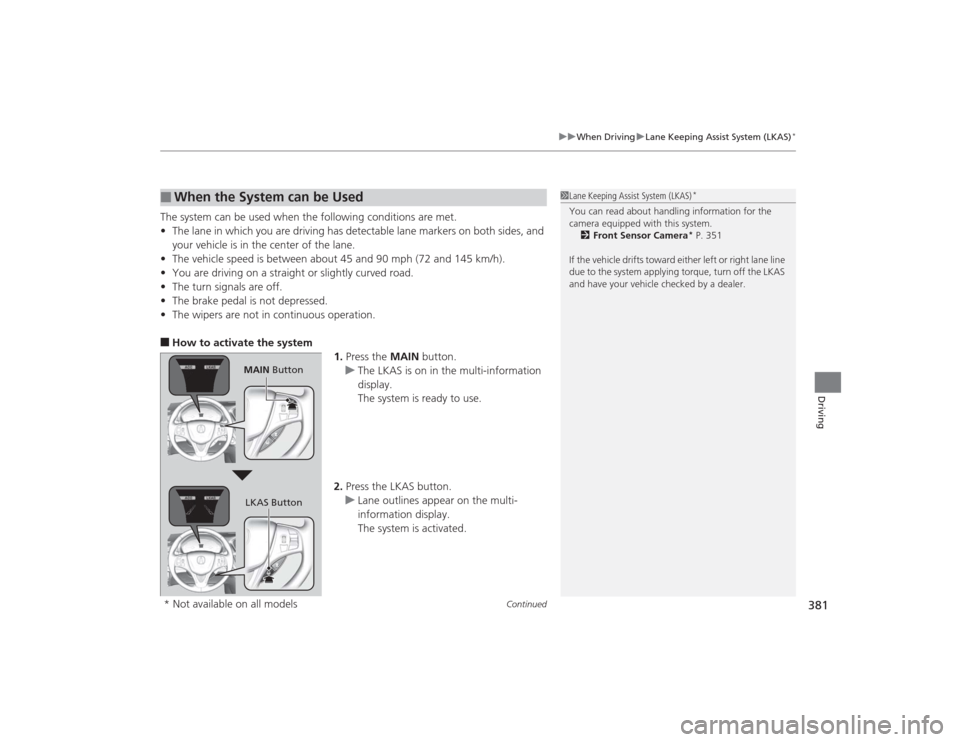
1.Press the MAIN button.
u The LKAS is on in the multi-information
display.
The system is ready to use.
2. Press the LKAS button.
u Lane outlines appear on the multi-
information display.
The system is activated.■
When the System can be Used
1Lane Keeping Assist System (LKAS)
*
You can read about handling information for the
camera equipped with this system.
2 Front Sensor Camera
* P. 351
If the vehicle drifts toward either left or right lane line
due to the system applying torque, turn off the LKAS
and have your vehicle checked by a dealer.
MAIN Button
LKAS Button
* Not available on all models
Page 389 of 545
388
uuWhen Driving uAgile Handling Assist System
Driving
Agile Handling Assist SystemLightly brakes each of the front and rear wheels, as needed, when you turn the
steering wheel, and helps support the vehicle’s stability and performance during
cornering.Precision All Wheel Steer System
*
Monitors road conditions while you are driving. In response to current driving
conditions, the system automatically makes slight adjustment to the relative rear
wheel toe settings to help enhance vehicle control and stability.
1Agile Handling Assist System
The agile handling assist system cannot enhance
stability in all driving situations. You still need to drive
and corner at speeds appropriate for the conditions
and always leave a suffi cient margin of safety.
When the VSA ® system indicator comes on and stays
on while driving, the agile handling assist system
does not activate.
You may hear a sound coming from the engine
compartment while the system is activated. This is
normal.1 Precision All Wheel Steer System
*
The Precision All Wheel Steer System cannot enhance
vehicle control and stability in all driving situations.
You still need to drive and corner at speeds
appropriate for the conditions and always leave a
sufficient margin of safety.
The toe setting of the rear wheels may get stuck in a
non-centered setting if the system malfunctions
while driving. This can cause the vehicle to pull to a
side even as you keep the steering wheel in the
center position. If this occurs, the system
automatically limits the vehicle speed to a maximum
of 50 mph (80 km/h). Reduce your speed and be
extra cautious, as handling may be difficult. Go to a
dealer immediately.
* Not available on all models
Page 397 of 545

396Driving
BrakingBrake SystemUse the parking brake to keep the vehicle stationary when parked. You can
manually apply and release, or automatically release it.■Manual operations
Use the electric parking brake switch to apply or release the brake. Manually
releasing the parking brake using the switch helps your vehicle start slowly and
smoothly when facing down hill on steep hills.
■To apply manually
Pull the electric parking brake switch up gently
and securely. u The electric parking brake indicator
comes on.
■
Parking Brake
1Parking Brake
You may hear the elect ric parking brake system
motor operating from the rear wheel area when you
apply or release the parking brake, or set the power
mode to OFF. This is normal.
The brake pedal may slightly move due to the electric
parking brake system operation when you apply or
release the parking brake. This is normal.
You cannot apply or release the parking brake if the
battery goes dead. 2 Jump Starting P. 498
If you pull up the electric parking brake switch while
driving, all four brakes get applied, not the parking
brake.
In the following situations, the parking brake
automatically operates.•When the vehicle stops more than 10 minutes
while ACC with LSF
* is activated.
•When the driver’s seat belt is unfastened while your
vehicle is stopped automatically by ACC with LSF
*.
•When the engine is turned off while ACC with LSF
*
is activated.
•When the vehicle stops with the automatic brake
hold system activated for more than 10 minutes.•When the driver’s seat belt is unfastened while
your vehicle is stopped and brake hold is applied.•When the engine is turned off while brake hold is
applied.•When there is a problem with the Brake Hold
System.
Electric Parking
Brake Switch
Models with electronic gear selector
Electric Parking
Brake Switch
Models with shift lever* Not available on all models
Page 400 of 545
Continued
399
uuBraking uBrake System
Driving
Your vehicle is equipped with disc brakes at all four wheels. The brake assist system
increases the stopping force when you depress the brake pedal hard in an
emergency situation. The anti-lock brake system (ABS) helps you retain steering
control when braking very hard.2 Brake Assist System P. 403
2 Anti-lock Brake System (ABS) P. 402■
Foot Brake
1Foot Brake
Check the brakes after driving through deep water,
or if there is a buildup of road surface water. If
necessary, dry the brakes by lightly depressing the
pedal several times.
If you hear a continuous metallic friction sound when
applying the brakes, the brake pads need to be
replaced. Have your vehicle checked by a dealer.
Constantly using the brake pedal while going down a
long hill builds up heat, which reduces the brake
effectiveness. Apply engine braking by taking your
foot off the accelerator pedal and downshifting to a
lower gear.
Do not rest your foot on the brake pedal while
driving, as it will lightly apply the brakes and cause
them to lose effectiveness over time and reduce pad
life. It will also confuse drivers behind you.
Page 401 of 545

uuBraking uBrake System
400Driving
Keeps the brake applied after releasing the brake pedal until the accelerator pedal is
pressed. You can use this system while the vehicle is temporarily stopped, such as
when you stop at a traffic light.■
Automatic Brake Hold
1Automatic Brake Hold
3
WARNING
Activating the automatic brake hold system
on steep hills or slippery roads may still
allow the vehicle to move if you remove
your foot from the brake pedal.
If a vehicle unexpec tedly moves, it may
cause a crash resulting in serious injury or
death.
Never activate the automatic brake hold
system or rely on it to keep a vehicle from
moving when stopped on a steep hill or
slippery roads.
3
WARNING
Using the automatic brake hold system to
park the vehicle may result in the vehicle
unexpectedly moving.
If a vehicle moves unexpectedly, it may
cause a crash, resulting in serious injury or
death.
Never leave the vehicle when braking is
temporarily kept by automatic brake hold
and always park the vehic le by putting the
transmission in
( P and applying the parking
brake.
■Turning on the system
Fasten your seat belt
properly, then start the
engine. Press the
automatic brake hold
button.●The automatic brake
hold system indicator
comes on. The system
is turned on.
■Activating the system
Depress the brake pedal
to come to a complete
stop. The transmission
must be in
( D or
(N.
●The automatic brake
hold indicator comes
on. Braking is kept for
up to 10 minutes.●Release the brake
pedal after the
automatic brake hold
indicator comes on.
■Canceling the system
Depress the accelerator
pedal while the
transmission is in
( D or
(R. The system is
canceled and the vehicle
starts to move.
●The automatic brake
hold indicator goes
off. The system
continues to be on.Accelerator Pedal
Brake Pedal
Automatic Brake
Hold Button
Goes
Off
On On On
On
On
U.S.
Canada
Page 403 of 545
402
uuBraking uAnti-lock Brake System (ABS)
Driving
Anti-lock Brake System (ABS)Helps prevent the wheels from locking up, and help s you retain steering control by
pumping the brakes rapidly, much faster than you.
The electronic brake distribution (EBD) system, which is part of the ABS, also
balances the front-to-rear braking distribution according to vehicle loading.
You should never pump the brake pedal. Let the ABS work for you by always
keeping firm, steady pressure on the brake pedal. This is sometimes referred to as
“stomp and steer.”■ABS operation
The brake pedal may pulsate slightly when the ABS is working. Keep holding the
pedal firmly down. On dry pavement, you will need to press on the brake pedal very
hard before the ABS activates. However, you may feel the ABS activate immediately
if you are trying to stop on snow or ice.
When the vehicle speed goes under 6 mph (10 km/h), the ABS stops.■
ABS
1 Anti-lock Brake System (ABS)NOTICEThe ABS may not function correctly if you use an
incorrect tire type and size.
When the ABS indicator comes on while driving,
there may be a problem with the system.
While normal braking is not affected, there is a
possibility of the ABS not operating. Have your
vehicle checked by a dealer immediately.
The ABS does not reduce the time or distance it takes
to stop the vehicle. It only helps with steering control
during hard braking.
In the following cases, your vehicle may need more
stopping distance than a vehicle without the ABS:•When driving on rough road surfaces, including
when driving on uneven surfaces, such as gravel or
snow.•When tire chains are installed.
You may hear a motor sound coming from the
engine compartment while system checks are being
performed immediatel y after starting the engine or
while driving. This is normal.
Page 404 of 545
403
uuBraking uBrake Assist System
Driving
Brake Assist SystemDesigned to assist the driver by generating greater braking force when you depress
the brake pedal hard during emergency braking.■Brake assist system operation
Press the brake pedal firmly for more powerful braking.
When brake assist operates, the pedal may wiggle slightly and an operating noise
may be heard. This is normal. Keep holding the brake pedal firmly down.■
Brake Assist System
Page 406 of 545
Continued
405
uuBraking uCollision Mitigation Braking System
TM (CMBS
TM)*
Driving
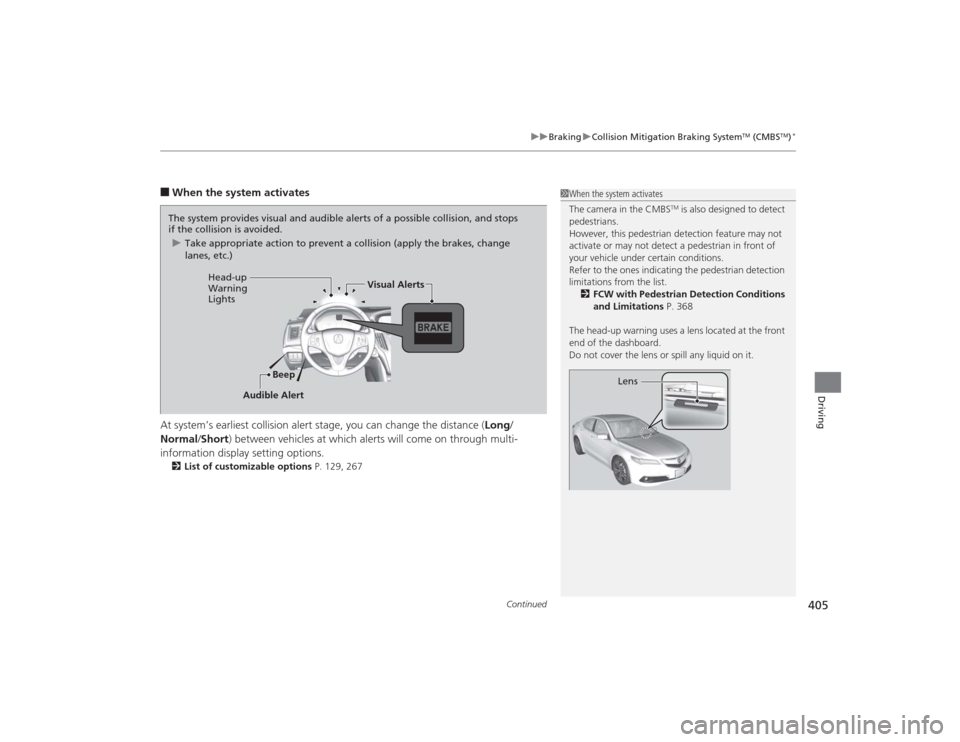
■When the system activates
At system’s earliest collision alert stage, you can change the distance ( Long/
Normal /Short ) between vehicles at which alerts will come on through multi-
information display setting options.2 List of customizable options P. 129, 267
1When the system activates
The camera in the CMBS
TM is also designed to detect
pedestrians.
However, this pedestrian detection feature may not
activate or may not detect a pedestrian in front of
your vehicle under certain conditions.
Refer to the ones indicating the pedestrian detection
limitations fro m the list.
2 FCW with Pedestrian Detection Conditions
and Limitations P. 368
The head-up warning uses a lens located at the front
end of the dashboard.
Do not cover the lens or spill any liquid on it.
Lens
The system provides visual and audible alerts of a possible collision, and stops
if the collision is avoided. u Take appropriate action to prevent a collision (apply the brakes, change
lanes, etc.)
Beep
Head-up
Warning
Lights
Visual Alerts
Audible Alert
Page 410 of 545

409
uuBraking uCollision Mitigation Braking System
TM (CMBS
TM)*
Continued
Driving
■Vehicle conditions
• Headlight lenses are dirty or the headlights are not properly adjusted.
• The outside of the windshield is blocked by dirt, mud, leaves, wet snow, etc.
• The inside of the windshield is fogged.
• An abnormal tire or wheel condition (wrong sized, varied size or construction,
improperly inflated, compact spare tire
*, etc.).
• The vehicle is tilted due to a heavy load or suspension modifications.
• The camera temperature gets too hot.
• Driving with the parking brake applied.
• When the radar sensor in the front grille gets dirty.
■Detection limitations
• A vehicle or pedestrian suddenly crosses in front of you.
• The distance between your vehicle and the vehicle or pedestrian ahead of you is
too short.
• A vehicle cuts in front of you at a slow speed, and it brakes suddenly.
• When you accelerate rapidly and approach the vehicle or pedestrian ahead of you
at high speed.
• The vehicle ahead of you is a motorcycle, bicycle, mobility scooter or other small
vehicle.
• When there are animals in front of your vehicle.
• When you drive on a curved, winding or undulating road that makes it difficult for
the sensor to properly detect a vehicle in front of you.
• The speed difference between your vehicle and a vehicle in front of you is
significantly large.
• An oncoming vehicle suddenly comes in front of you.
• You vehicle abruptly crosses over in front of an oncoming vehicle.
• When driving through a narrow iron bridge.* Not available on all models
Page 426 of 545
425
Maintenance
This chapter discusses basic maintenance.
Before Performing MaintenanceInspection and Maintenance ............ 426Safety When Performing Maintenance..... 427Parts and Fluids Used in Maintenance Service ........................................... 428
Maintenance Minder
TM..................... 429
Maintenance Under the Hood
Maintenance Items Under the Hood ..... 434Opening the Hood ........................... 436
Recommended Engine Oil ................ 437
Oil Check ......................................... 438
Adding Engine Oil ............................ 440Changing the Engine Oil and Oil Filter .. 441
Engine Coolant ................................ 443
Transmission Fluid ............................ 445
Brake Fluid ....................................... 446
Refilling Window Washer Fluid......... 446
Replacing Light Bulbs ....................... 447Checking and Maintaining Wiper
Blades .......................................... 454Checking and Maintaining Tires
Checking Tires ................................. 456Tire and Loading Information Label ...... 457Tire Labeling .................................... 457DOT Tire Quality Grading (U.S. Vehicles) .. 459Wear Indicators................................ 461 Tire Service Life ................................ 461
Tire and Wheel Replacement ........... 462
Tire Rotation .................................... 463
Winter Tires ..................................... 464
Battery ............................................... 465
Remote Transmitter Care
Replacing the Button Battery ........... 467
Climate Control System Maintenance
.... 469
Cleaning
Interior Care .................................... 470
Exterior Care.................................... 472