speed Acura TLX 2015 Owner's Guide
[x] Cancel search | Manufacturer: ACURA, Model Year: 2015, Model line: TLX, Model: Acura TLX 2015Pages: 545, PDF Size: 19.64 MB
Page 128 of 545
127
uuGauges and Multi-Information Display uMulti-Information Display
Continued
Instrument Panel
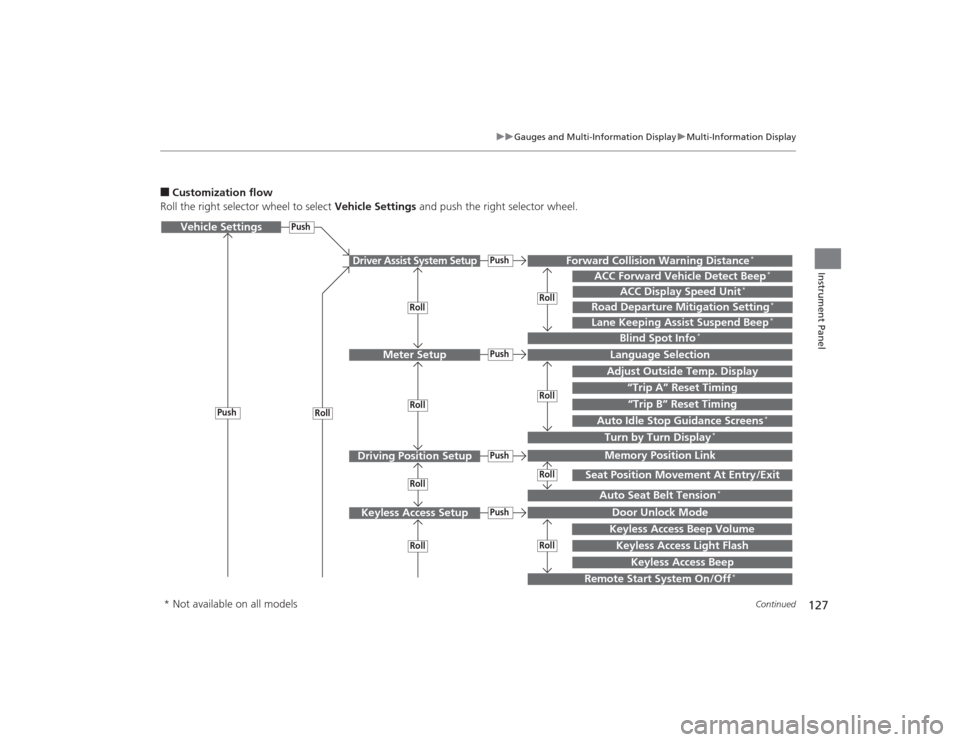
■Customization flow
Roll the right selector wheel to select Vehicle Settings and push the right selector wheel.Vehicle Settings
“Trip A” Reset Timing
Language SelectionAdjust Outside Temp. DisplayMemory Position LinkDoor Unlock ModeKeyless Access Light Flash
Driver Assist System Setup
Meter Setup
Driving Position SetupKeyless Access Setup
“Trip B” Reset Timing
Turn by Turn Display
*
Forward Collision Warning Distance
*
ACC Forward Vehicle Detect Beep
*
Push
PushPush
Lane Keeping Assist Suspend Beep
*
Blind Spot Info
*
Seat Position Movement At Entry/Exit
Auto Seat Belt Tension
*
Roll
Keyless Access Beep
Push
Roll
PushPush
RollRollRoll
RollRollRoll
ACC Display Speed Unit
*
Road Departure Mitigation Setting
*
Remote Start System On/Off
*
Keyless Access Beep Volume
Auto Idle Stop Guidance Screens
*
Roll
* Not available on all models
Page 130 of 545
129
uuGauges and Multi-Information Display uMulti-Information Display
Continued
Instrument Panel
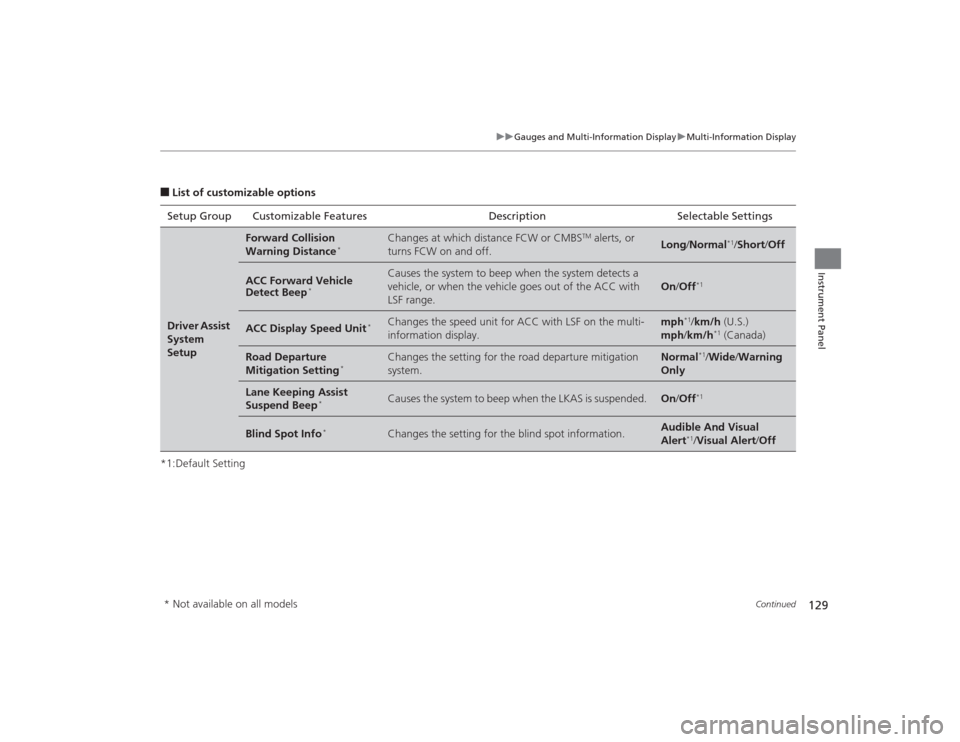
■List of customizable options
*1:Default Setting Setup Group Customizable Features Description Selectable SettingsDriver Assist
System
Setup
Forward Collision
Warning Distance
*
Changes at which distance FCW or CMBS
TM alerts, or
turns FCW on and off.
Long /Normal
*1/Short /Off
ACC Forward Vehicle
Detect Beep
*
Causes the system to beep when the system detects a
vehicle, or when the vehicle goes out of the ACC with
LSF range.
On /Off
*1
ACC Display Speed Unit
*
Changes the speed unit for ACC with LSF on the multi-
information display.
mph
*1/km/h (U.S.)
mph /km/h
*1 (Canada)
Road Departure
Mitigation Setting
*
Changes the setting for the road departure mitigation
system.
Normal
*1/Wide /Warning
Only
Lane Keeping Assist
Suspend Beep
*
Causes the system to beep when the LKAS is suspended.
On /Off
*1
Blind Spot Info
*
Changes the setting for the blind spot information.
Audible And Visual
Alert
*1/ Visual Alert /Off
* Not available on all models
Page 131 of 545
130
uuGauges and Multi- Information Display uMulti-Information Display
Instrument Panel
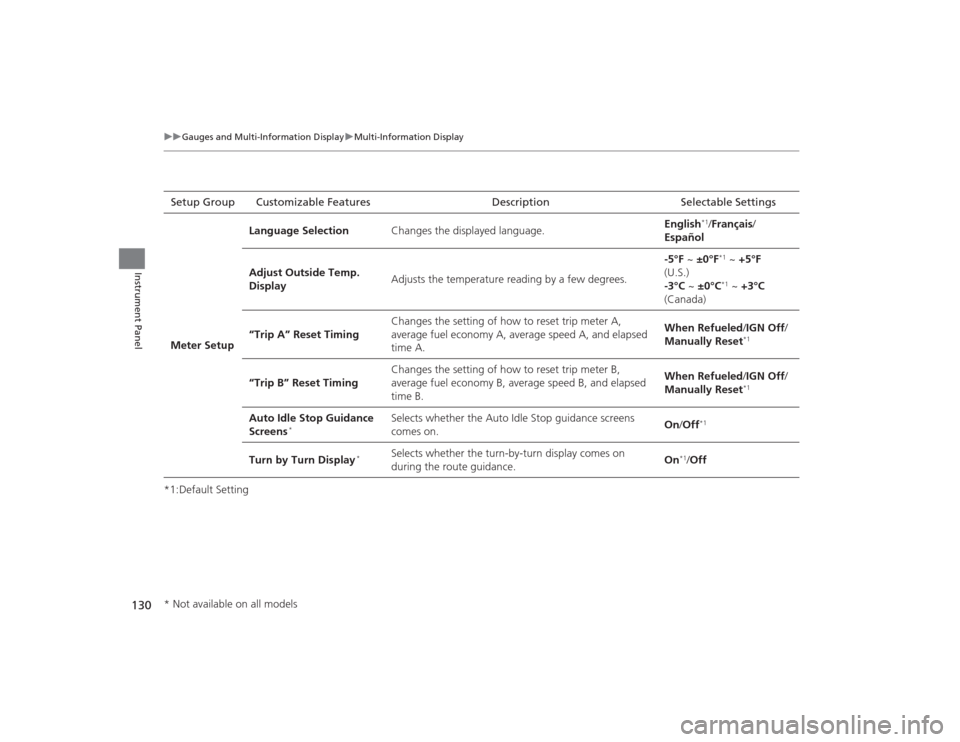
*1:Default SettingSetup Group Customizable Features Description Selectable Settings
Meter Setup Language Selection
Changes the displayed language. English
*1/
Français /
Español
Adjust Outside Temp.
Display Adjusts the temperature reading by a few degrees. -5°F ~
±0°F*1 ~ +5°F
(U.S.)
-3°C ~ ±0°C*1 ~ +3°C
(Canada)
“Trip A” Reset Timing Changes the setting of how to reset trip meter A,
average fuel economy A, average speed A, and elapsed
time A. When Refueled
/IGN Off/
Manually Reset
*1
“Trip B” Reset Timing Changes the setting of how to reset trip meter B,
average fuel economy B, average speed B, and elapsed
time B. When Refueled
/IGN Off/
Manually Reset
*1
Auto Idle Stop Guidance
Screens
*
Selects whether the Auto Idle Stop guidance screens
comes on. On
/Off
*1
Turn by Turn Display
*
Selects whether the turn-by-turn display comes on
during the route guidance. On
*1/
Off
* Not available on all models
Page 133 of 545
132
uuGauges and Multi- Information Display uMulti-Information Display
Instrument Panel
*1: Default SettingSetup Group Customizable Features Description Selectable SettingsLighting
Setup
Interior Light Dimming
Time
Changes the length of time the interior lights stay on
after you close the doors.
60sec
/30sec
*1/15sec
Headlight Auto Off
Timer
Changes the length of time the exterior lights stay
on after you close the driver’s door.
60sec /30sec /15sec
*1/ 0sec
Auto Light Sensitivity
Changes the timing for the headlights to come on.
Max /High /Mid
*1/Low/ Min
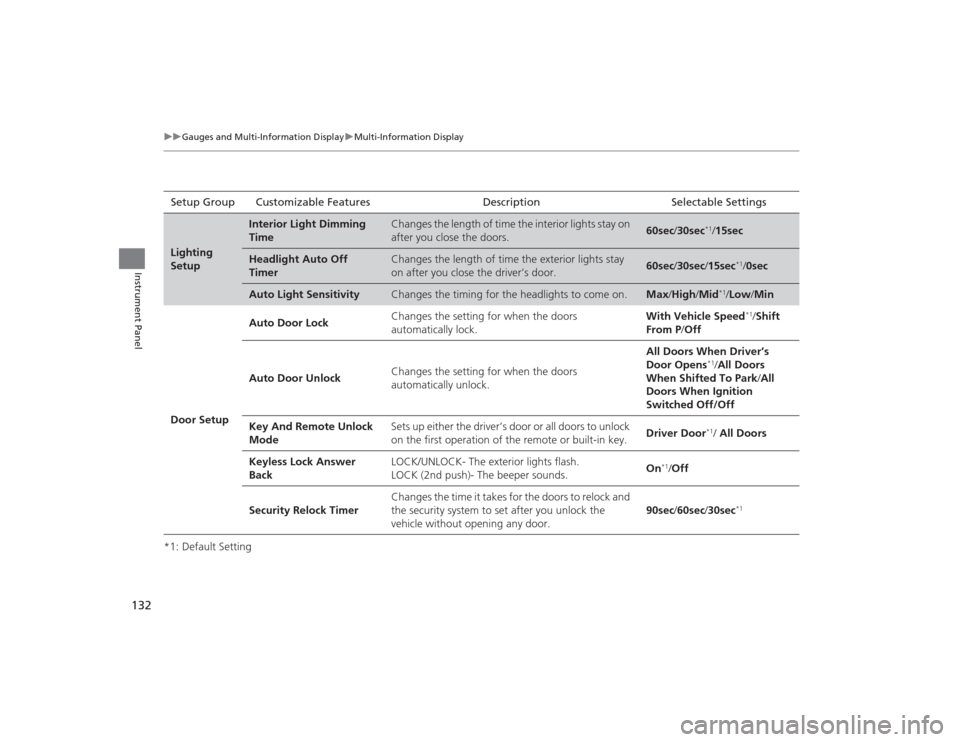
Door Setup Auto Door Lock
Changes the setting for when the doors
automatically lock. With Vehicle Speed
*1/
Shift
From P /Off
Auto Door Unlock Changes the setting for when the doors
automatically unlock. All Doors When Driver’s
Door Opens
*1/
All Doors
When Shifted To Park /All
Doors When Ignition
Switched Off/Off
Key And Remote Unlock
Mode Sets up either the driver’s door or all doors to unlock
on the first operation of the remote or built-in key.
Driver Door*1/ All Doors
Keyless Lock Answer
Back LOCK/UNLOCK- The exterior lights flash.
LOCK (2nd push)- The beeper sounds.
On
*1/
Off
Security Relock Timer Changes the time it takes for the doors to relock and
the security system to set after you unlock the
vehicle without opening any door.
90sec
/60sec /30sec
*1
Page 152 of 545

151
uuLocking and Unlocking the Doors uAuto Door Locking/Unlocking
Controls
Auto Door Locking/UnlockingYour vehicle locks all doors and unlocks the driver’s door automatically when a
certain condition is met.■Drive lock mode
All doors lock when the vehicle’s speed reaches about 10 mph (15 km/h).■Driver’s door open mode
All doors unlock when the driver’s door is opened.■
Auto Door Locking
■
Auto Door Unlocking
1 Auto Door Locking/Unlocking
You can turn off or change to another auto door
locking/unlocking setting using the audio/
information screen or multi-information display.
2 Customized Features P. 126, 259
Page 170 of 545
169
uuOperating the Switches Around the Steering Wheel uWipers and Washers
Continued
Controls
Wipers and Washers
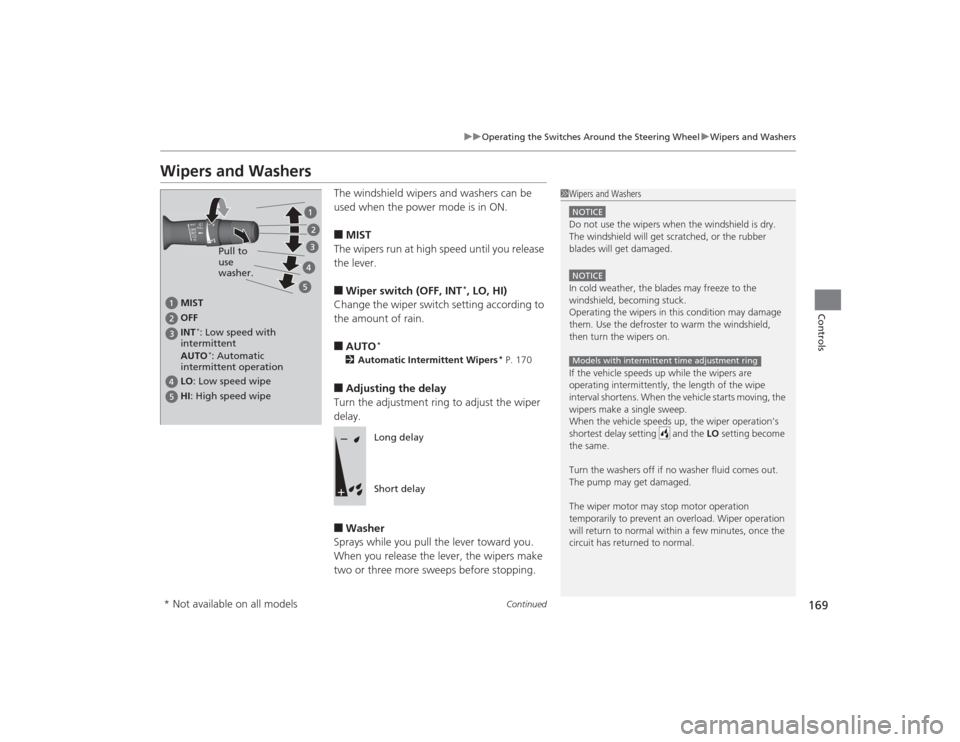
The windshield wipers and washers can be
used when the power mode is in ON.■MIST
The wipers run at high speed until you release
the lever.■Wiper switch (OFF, INT
*, LO, HI)
Change the wiper switch setting according to
the amount of rain.
■AUTO
*
2 Automatic Intermittent Wipers
* P. 170
■Adjusting the delay
Turn the adjustment ring to adjust the wiper
delay.■Washer
Sprays while you pull the lever toward you.
When you release the lever, the wipers make
two or three more sweeps before stopping.
1 Wipers and WashersNOTICEDo not use the wipers when the windshield is dry.
The windshield will get scratched, or the rubber
blades will get damaged.NOTICEIn cold weather, the blades may freeze to the
windshield, becoming stuck.
Operating the wipers in this condition may damage
them. Use the defroster to warm the windshield,
then turn the wipers on.
If the vehicle speeds up while the wipers are
operating intermitte ntly, the length of the wipe
interval shortens. When the vehicle starts moving, the
wipers make a single sweep.
When the vehicle speeds up, the wiper operation’s
shortest delay setting and the LO setting become
the same.
Turn the washers off if no washer fluid comes out.
The pump may get damaged.
The wiper motor may stop motor operation
temporarily to prevent an overload. Wiper operation
will return to normal within a few minutes, once the
circuit has returned to normal.Models with intermittent time adjustment ring
MIST
OFF
LO : Low speed wipe
HI: High speed wipe Pull to
use
washer.
INT
*: Low speed with
intermittent
AUTO*: Automatic
intermittent operation
Long delay
Short delay
* Not available on all models
Page 171 of 545
uuOperating the Switches Around the Steering Wheel uWipers and Washers
170Controls
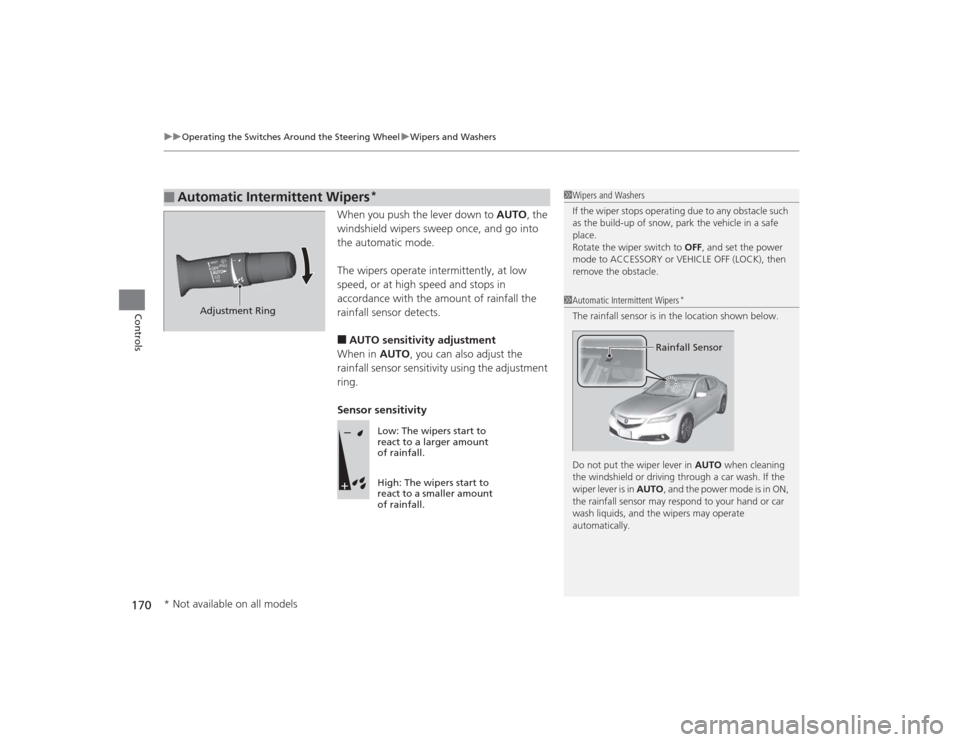
When you push the lever down to AUTO, the
windshield wipers sweep once, and go into
the automatic mode.
The wipers operate intermittently, at low
speed, or at high speed and stops in
accordance with the amount of rainfall the
rainfall sensor detects.■AUTO sensitivity adjustment
When in AUTO, you can also adjust the
rainfall sensor sensitivity using the adjustment
ring.
Sensor sensitivity
■
Automatic Intermittent Wipers
*
1 Wipers and Washers
If the wiper stops operating due to any obstacle such
as the build-up of snow, park the vehicle in a safe
place.
Rotate the wiper switch to OFF, and set the power
mode to ACCESSORY or VEHICLE OFF (LOCK), then
remove the obstacle.1 Automatic Intermittent Wipers
*
The rainfall sensor is in the location shown below.
Do not put the wiper lever in AUTO when cleaning
the windshield or driving through a car wash. If the
wiper lever is in AUTO , and the power mode is in ON,
the rainfall sensor may respond to your hand or car
wash liquids, and the wipers may operate
automatically.
Rainfall Sensor
Adjustment Ring
Low: The wipers start to
react to a larger amount
of rainfall.
High: The wipers start to
react to a smaller amount
of rainfall.
* Not available on all models
Page 175 of 545
174
uuOperating the Switches Around the Steering Wheel uDriving Position Memory System
Controls
Driving Position Memory SystemYou can store two driver’s seat (except for power lumbar) and door mirror positions
with the driving position memory system.
When you unlock and open the driver’s door with a remote transmitter, or keyless
access system, the seat and door mirrors adjust automatically to one of the two
preset positions.
The multi-information display shows you which remote transmitter you used to
unlock the vehicle when you enter.
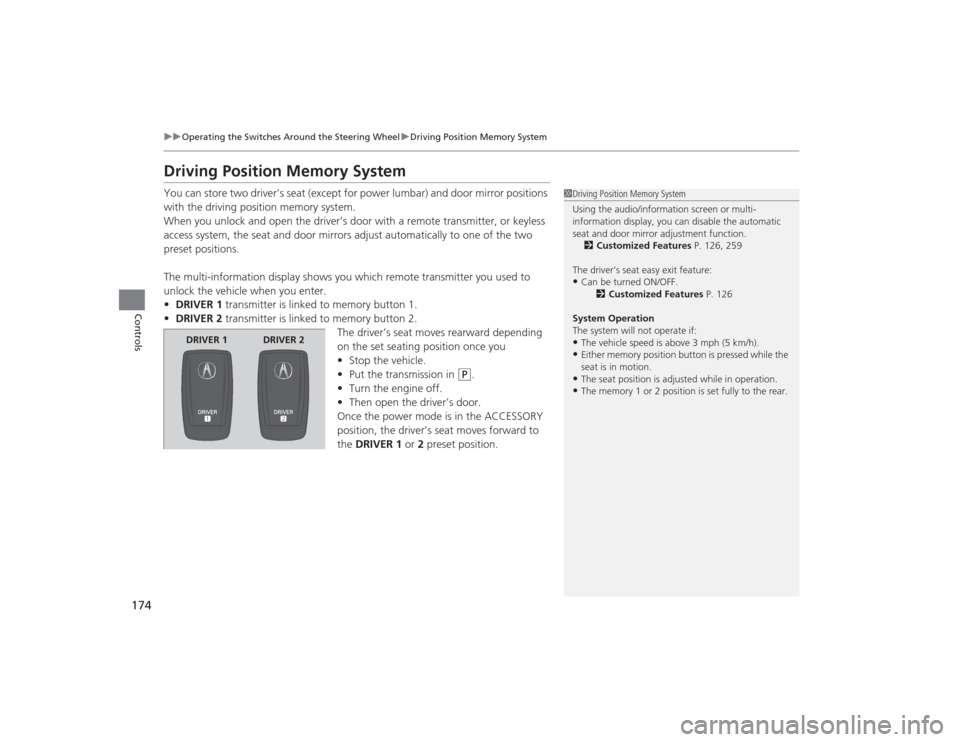
• DRIVER 1 transmitter is linked to memory button 1.
• DRIVER 2 transmitter is linked to memory button 2.
The driver’s seat moves rearward depending
on the set seating position once you
•Stop the vehicle.
• Put the transmission in
(P
.
• Turn the engine off.
• Then open the driver’s door.
Once the power mode is in the ACCESSORY
position, the driver’s seat moves forward to
the DRIVER 1 or 2 preset position.
1 Driving Position Memory System
Using the audio/information screen or multi-
information display, you can disable the automatic
seat and door mirror adjustment function.
2 Customized Features P. 126, 259
The driver’s seat easy exit feature:•Can be turned ON/OFF. 2Customized Features P. 126
System Operation
The system will not operate if:•The vehicle speed is above 3 mph (5 km/h).•Either memory position button is pressed while the
seat is in motion.•The seat position is adjusted while in operation.•The memory 1 or 2 position is set fully to the rear.
DRIVER 1 DRIVER 2
Page 200 of 545

199
Continued
Controls
Climate Control SystemUsing Automatic Climate ControlThe automatic climate control system maintains the interior temperature you select.
The system also selects the proper mix of heated or cooled air that raises or lowers
the interior temperature to your preference as quickly as possible.
Use the system when the engine is running.
1.Press the AUTO button.
2. Adjust the interior temperature using the driver’s side or passenger’s side
temperature control switch.
3. Press the (On/off) button to cancel.
1Using Automatic Climate Control
If any buttons/icons on the touch screen are pressed
while using the climate control system in AUTO, the
function of the button/icon that was pressed will take
priority.
The AUTO indicator will go off, but functions
unrelated to the button/icon that was pressed will be
controlled automatically.
During the Auto Idle Stop, the air conditioning
system will be turned off.
To prevent cold air from blowing in from outside, the
fan may operate at low speed for a while after the
AUTO button has been pressed.
If the interior is very warm, you can cool it down
more rapidly by partially opening the windows,
turning the system on auto, and setting the
temperature to low. Change the fresh mode to
recirculation mode until the temperature cools down.
When you set the temperature to the lower or upper
limit, Lo or Hi is displayed.
Pressing the button switches the climate control
system between on and off. When turned on, the
system returns to your last selection.Models with Auto Idle StopAll models
(On/off) Button
AUTO Button
On Demand Multi-Use Display
TM
Driver’s Side
Temperature
Control Switch
Passenger’s
Side
Temperature
Control Switch Passenger’s
Side
Temperature
Driver’s Side
Temperature
Page 204 of 545

Continued
203
uuClimate Control System uUsing Automatic Climate Control
Controls
■SYNC on and off
1.Select SYNC.
2. Select ON for synchronized mode, and OFF
for dual mode.
u When in synchronized mode, the
passenger’s side temperature and vent
mode become the same as the driver’s
side settings.
3. Adjust the temperature or change the
mode from the driver’s side.■Changing the fan speed
1.Select .
2. Change the fan speed with one of the
following:
The fan speed level indicators: Select your
desired speed level. The smaller indicator is
for a slower speed, and the larger for a
faster speed.
(+
/(-
: To go up or down one level at a
time.
Fan AUTO : The system automatically
selects the fan speed most suitable to the
ambient environment.
1 SYNC on and off
When you press the button, the system changes
to synchronized mode.
When the system is not in SYNC mode, the driver’s
side temperature and the front passenger’s side
temperature can be set separately.
You can also turn off SYNC mode by changing the
front passenger’s side temperature.
The system adjusts each temperature based on the
information of the sunlight sensor and the sun
position updated by the navigation system’s GPS.Models with navigation system1Changing the fan speed
While the climate control system is in AUTO, Fan
AUTO is highlighted.
Fan Speed Level Indicators