speed Acura TLX 2015 Repair Manual
[x] Cancel search | Manufacturer: ACURA, Model Year: 2015, Model line: TLX, Model: Acura TLX 2015Pages: 545, PDF Size: 19.64 MB
Page 341 of 545
340
uuWhen Driving uShifting
Driving
Use the paddle shifters to change between 1st and 8th gears without removing your
hands from the steering wheel. The transmission will switch to the sequential shift
mode.■When the shift lever is in
(D
:
The vehicle will go into the sequential shift mode momentarily, and the gear position
indicator will come on.
Once you start traveling at a constant speed, the sequential shift mode will
automatically switch off, and the gear position indicator will go off.
Hold the
(+
paddle shifter for two seconds to return to normal drive.
■When the shift lever is in
(D
with Sport+ mode:
The vehicle goes into sequential sift mode and the M (sequential shift) indicator
comes on. At speeds of 2 mph (4 km/h) or less, the vehicle automatically shifts down
into 1st gear.
If you are in 1st through 6th gears and do not operate the paddle shifters as engine
speed increases approaches the tachometer red zone, the transmission
automatically shifts up to the next gear.
You can cancel Sport+ mode by either:
• Pressing the IDS button.
• Or holding the
(+
paddle shifter for two seconds.
When the mode is canceled the sequential mode and sequential mode gear
indicators go off.
■
Sequential Shift Mode
Page 342 of 545
341
uuWhen Driving uShifting
Driving
■Second gear lock mode
If you pull the
(+
paddle shifter while stopped or driving at 6 mph (10 km/h) or less,
the gear position will be locked in 2nd gear. This makes it easier to pull away on
slippery surfaces such as snow covered roads.
To cancel the 2nd gear lock mode, pull the
(-
paddle shifter.
■
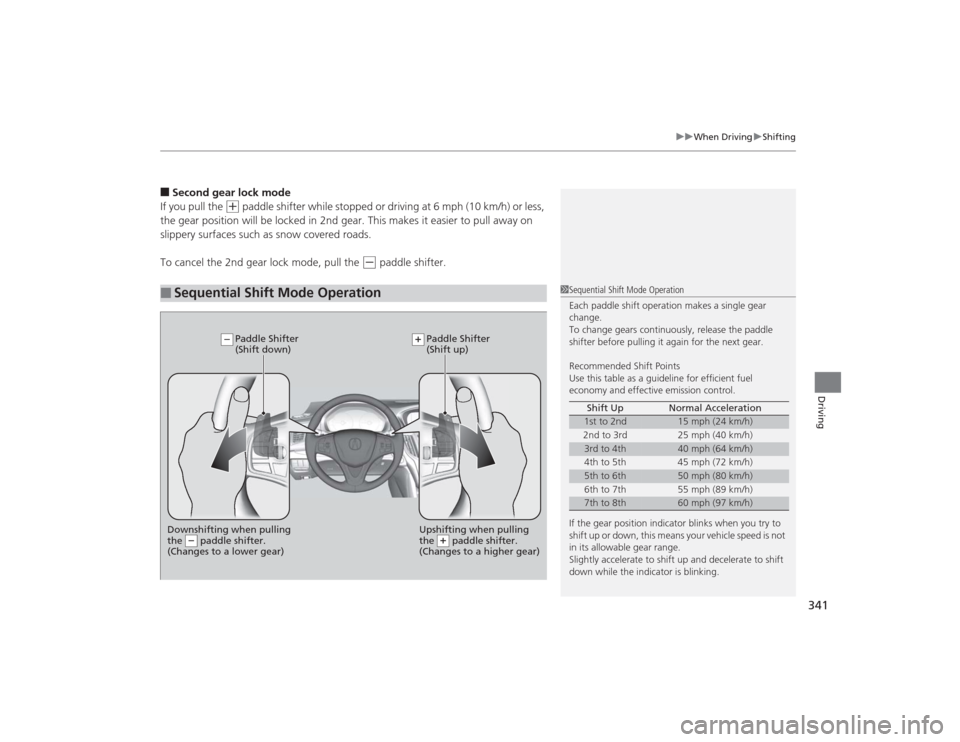
Sequential Shift Mode Operation
1 Sequential Shift Mode Operation
Each paddle shift operation makes a single gear
change.
To change gears continuously, release the paddle
shifter before pulling it again for the next gear.
Recommended Shift Points
Use this table as a guideline for efficient fuel
economy and effective emission control.
If the gear position indicator blinks when you try to
shift up or down, this means your vehicle speed is not
in its allowable gear range.
Slightly accelerate to shift up and decelerate to shift
down while the indicator is blinking. Shift Up Normal Acceleration
1st to 2nd
15 mph (24 km/h)
2nd to 3rd 25 mph (40 km/h)
3rd to 4th
40 mph (64 km/h)
4th to 5th 45 mph (72 km/h)
5th to 6th
50 mph (80 km/h)
6th to 7th 55 mph (89 km/h)
7th to 8th
60 mph (97 km/h)
Downshifting when pulling
the paddle shifter.
(Changes to a lower gear)
Upshifting when pulling
the paddle shifter.
(Changes to a higher gear)
Paddle Shifter
(Shift down) Paddle Shifter
(Shift up)
Page 344 of 545
Continued
343
uuWhen Driving uAuto Idle Stop
*
Driving
The vehicle stops with the gear position in
(D
and the brake pedal depressed.
■Auto idle stop does not activate when:
• The driver’s seat belt is not fastened.
• The engine coolant temperature is low or high.
• The transmission fluid temperature is low or high.
• The vehicle comes to a stop again before the vehicle speed reaches 5 km/h after
the engine starts.
• Stopped on a steep incline.
• A gear position other than
(D
or in Sport+.
• The engine is started with the hood open.
u Turn off the engine. Close the hood before you restart the engine to activate
Auto Idle Stop.
• The battery charge is low.
• The internal temperature of the battery is 14°F (−10°C). or less.
• The climate control system is in use, and the outside temperature is below −4°F
(−20°C) or over 104°F (40°C).
• The climate control system temperature is set to the Hi or Lo.
• is ON (indicator on).
■
Auto Idle Stop Activates When:
1Auto Idle Stop Activates When:
When ACC with LSF is in operation, the vehicle stops
without depressing the brake pedal and Auto Idle
Stop may activate.
Do not open the hood while the Auto Idle Stop
function is activated. If the hood is opened, the
engine will not restart automatically.
In this case, restart the engine with the ENGINE
START/STOP button.
2 Starting the Engine P. 322
Pressing the ENGINE START/STOP button changes
the power mode to ACCESSORY even while Auto Idle
Stop is in operation. Once in ACCESSORY, the engine
no longer restarts automatically. Follow the standard
procedure to start the engine. 2 Starting the Engine P. 322Models with ACC with LSF
Page 345 of 545

uuWhen Driving uAuto Idle Stop
*
344Driving
■Auto idle stop may not activate when:
• The vehicle is stopped by braking suddenly.
• The steering wheel is operated.
• The fan speed is high.
• Altitude is high.
• The vehicle is repeatedly accelerat ed and decelerated at a low speed.
• The climate control system is in use, and there is a significant difference between
the set temperature and the actual interior temperature.
• Humidity in the interior is high.
The brake pedal is released and the automatic brake hold system is off.■The engine restarts even if the brake pedal is depressed or the automatic
brake hold system is activated when:
• The Auto Idle Stop OFF button is pressed.
• When a steering wheel is operated.
• The gear position is in a position other than
(D
or in Sport+.
• The pressure on the brake pedal is reduced and the vehicle starts moving while
stopped on an incline.
• The pressure on the brake pedal is repeatedly applied and released slightly during
a stop.
• The battery charge becomes low.
• The accelerator pedal is depressed.
• The driver’s seat belt is unlatched.
• is ON (indicator on).
• The climate control system is in use, and the difference between the set
temperature and actual interior temperature becomes significant.
• The climate control system is being used to dehumidify the interior.
■
The Engine Automatically Restarts When:
1The Engine Automatically Restarts When:•If you are using an electronic device during Auto
Idle Stop, the device may temporarily be turned off
when the engine restarts.
Page 349 of 545

348
uuWhen Driving uCruise Control
*
Driving
Cruise Control
*
Maintains a constant vehicle speed without having to keep your foot on the
accelerator. Use cruise control on freeways or open roads where you can travel at a
constant speed with little acceleration or deceleration.
1Cruise Control
*
It may not be possible to maintain a constant speed
when driving uphill or downhill.
When not using cruise control:
Turn off cruise control by pressing the CRUISE
*/
MAIN
* button.
While in the Econ mode, it may take relatively more
time to accelerate to maintain the set speed.
3
WARNING
Improper use of the cruise control can lead
to a crash.
Use the cruise control only when traveling
on open highways in good weather.
When to use■Gear position for cruise control:
In ( D Always keep sufficient distance
between you and the vehicle in
front of you.
■Vehicle speed for cruise control:
Desired speed in a range above
roughly 25 mph (40 km/h) ~
How to use
CRUISE MAIN
is on in the
instrument panel.Cruise control is ready to use.
■Press the CRUISE
*/MAIN
*
button on the steering
wheel.
Models without
full color displayModels with full
color display
* Not available on all models
Page 350 of 545

349
uuWhen Driving uCruise Control
*
Continued
Driving
Take your foot off the pedal and press the RES/+/SET/– switch down when you
reach the desired speed.
The moment you release the RES/+/SET/– switch, the set speed is fixed, and cruise
control begins. The CRUISE CONTROL indicator comes on.■
To Set the Vehicle Speed
On when cruise control begins
RES/+/SET/− Switch
Press down and release
On
On
Models with full
color display
Models with full
color displayModels without
full color display
Models without
full color display
Page 351 of 545
uuWhen Driving uCruise Control
*
350Driving
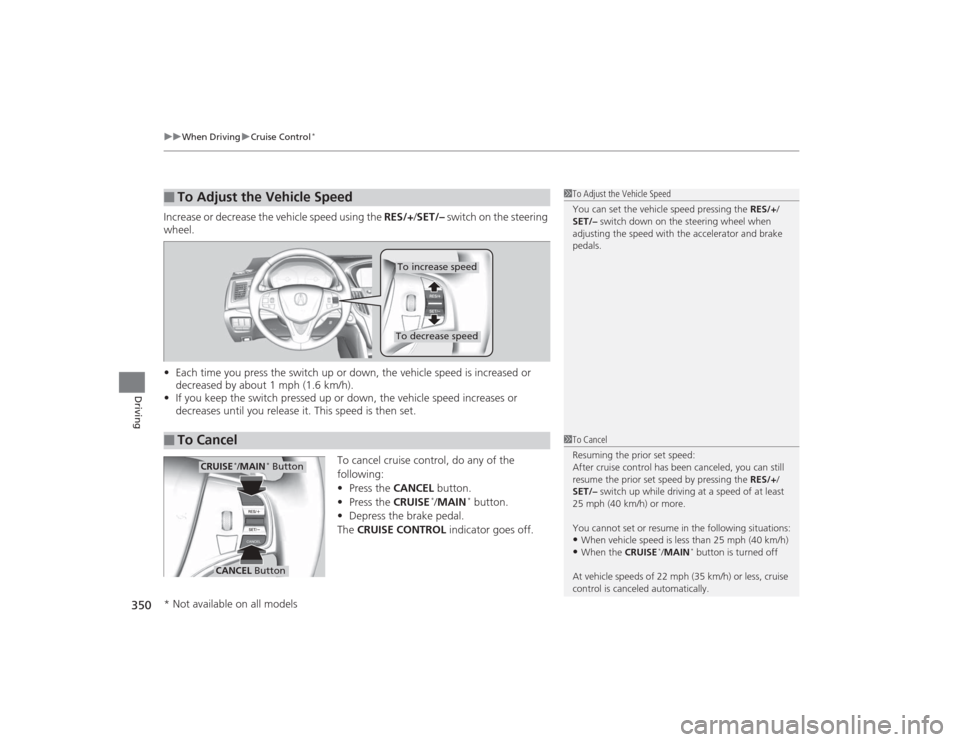
Increase or decrease the vehicle speed using the RES/+/SET/– switch on the steering
wheel.
• Each time you press the switch up or down, the vehicle speed is increased or
decreased by about 1 mph (1.6 km/h).
• If you keep the switch pressed up or down, the vehicle speed increases or
decreases until you release it. This speed is then set.
To cancel cruise control, do any of the
following:
•Press the CANCEL button.
• Press the CRUISE
*/MAIN
* button.
• Depress the brake pedal.
The CRUISE CONTROL indicator goes off.
■
To Adjust the Vehicle Speed
1To Adjust the Vehicle Speed
You can set the vehicle speed pressing the RES/+/
SET/– switch down on the steering wheel when
adjusting the speed with the accelerator and brake
pedals.
■
To Cancel
To decrease speedTo increase speed
1 To Cancel
Resuming the prior set speed:
After cruise control has been canceled, you can still
resume the prior set speed by pressing the RES/+ /
SET/– switch up while driving at a speed of at least
25 mph (40 km/h) or more.
You cannot set or resume in the following situations:•When vehicle speed is less than 25 mph (40 km/h)•When the CRUISE
*/MAIN
* button is turned off
At vehicle speeds of 22 mph (35 km/h) or less, cruise
control is canceled automatically.
CRUISE
*/MAIN
* Button
CANCEL Button
* Not available on all models
Page 353 of 545
352
uuWhen Driving uAdaptive Cruise Control (ACC) with Low Speed Follow (LSF)
*
Driving
Adaptive Cruise Control (ACC) with Low Speed Follow (LSF)
*
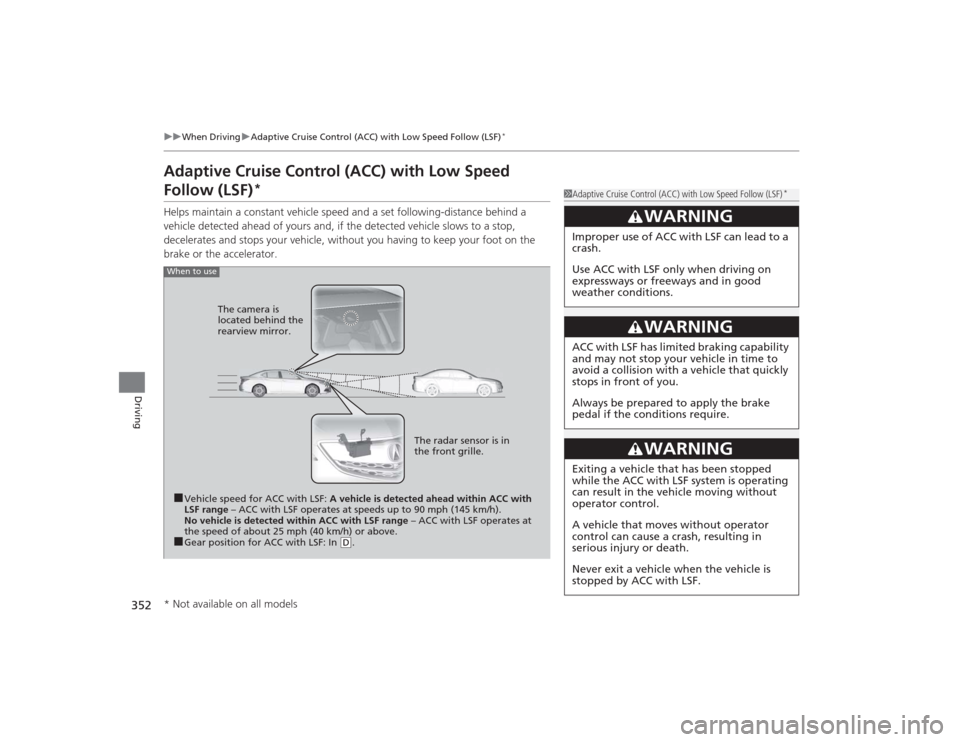
Helps maintain a constant vehicle speed and a set following-distance behind a
vehicle detected ahead of yours and, if the detected vehicle slows to a stop,
decelerates and stops your vehicle, without you having to keep your foot on the
brake or the accelerator.
1Adaptive Cruise Control (ACC) with Low Speed Follow (LSF)
*
3
WARNING
Improper use of ACC with LSF can lead to a
crash.
Use ACC with LSF only when driving on
expressways or freeways and in good
weather conditions.
3
WARNING
ACC with LSF has limited braking capability
and may not stop your vehicle in time to
avoid a collision with a vehicle that quickly
stops in front of you.
Always be prepared to apply the brake
pedal if the conditions require.
3
WARNING
Exiting a vehicle that has been stopped
while the ACC with LSF system is operating
can result in th e vehicle moving without
operator control.
A vehicle that moves without operator
control can cause a crash, resulting in
serious injury or death.
Never exit a vehicle when the vehicle is
stopped by ACC with LSF.
When to use■Vehicle speed for ACC with LSF: A vehicle is detected ahead within ACC with
LSF range – ACC with LSF operates at speeds up to 90 mph (145 km/h).
No vehicle is detected within ACC with LSF range – ACC with LSF operates at
the speed of about 25 mph (40 km/h) or above.■Gear position for ACC with LSF: In
( D. The radar sensor is in
the front grille.
The camera is
located behind the
rearview mirror.
* Not available on all models
Page 354 of 545
Continued
353
uuWhen Driving uAdaptive Cruise Control (ACC) with Low Speed Follow (LSF)
*
Driving
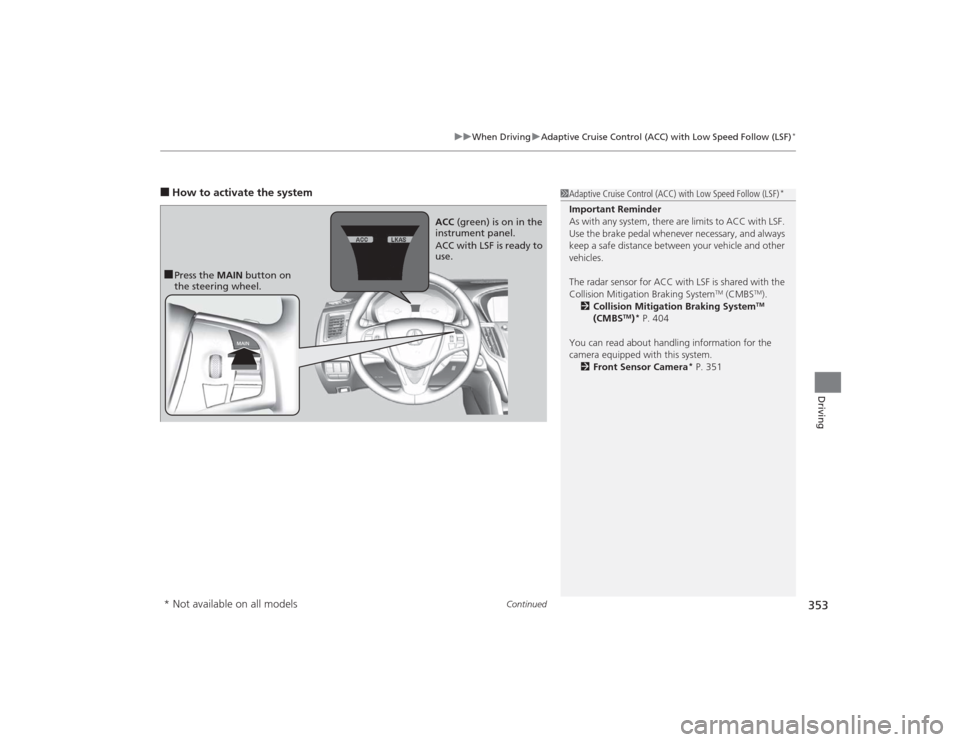
■How to activate the system
1Adaptive Cruise Control (ACC) with Low Speed Follow (LSF)
*
Important Reminder
As with any system, there are limits to ACC with LSF.
Use the brake pedal whenever necessary, and always
keep a safe distance between your vehicle and other
vehicles.
The radar sensor for ACC with LSF is shared with the
Collision Mitigation Braking System
TM (CMBS
TM).
2 Collision Mitigation Braking SystemTM
(CMBS
TM)* P. 404
You can read about handling information for the
camera equipped with this system. 2 Front Sensor Camera
* P. 351
■Press the MAIN button on
the steering wheel. ACC
(green) is on in the
instrument panel.
ACC with LSF is ready to
use.* Not available on all models
Page 355 of 545

uuWhen Driving uAdaptive Cruise Control (ACC) with Low Speed Follow (LSF)
*
354Driving
When driving at about 25 mph (40 km/h) or above: Take your foot off the
pedal and press down the RES/+/SET/– switch when you reach the desired speed.
The moment you release the switch, the set speed is fixed, and ACC with LSF begins.
When driving at slower than about 25 mph (40 km/h): If the vehicle is moving
and the brake pedal is not depressed, pressing the switch fixes the set speed to
about 25 mph (40 km/h) regardless of cu rrent vehicle speed. If the vehicle is
stationary, you can set the vehicle speed even with the brake pedal depressed. When ACC with LSF starts operating, the
vehicle icon, distance bars and set speed
appear on the multi-information display. ■
To Set the Vehicle Speed
1Adaptive Cruise Control (ACC) with Low Speed Follow (LSF)
*
When the MAIN button is pressed, ACC with LSF and
Lane Keeping Assist System (LKAS) are both turned on
or off.
ACC with LSF may not work properly under certain
conditions.
2 ACC with LSF Conditions and Limitations
P. 357
When not using ACC with LSF: Turn off adaptive
cruise by pressing the MAIN button. This also will
turn off the Lane Keeping Assist System (LKAS).
On when ACC with LSF
begins
Press down and release
RES/+ /SET/− Switch
Set Vehicle Speed
Set Vehicle Distance
* Not available on all models