econ Acura TLX 2016 Owner's Manual
[x] Cancel search | Manufacturer: ACURA, Model Year: 2016, Model line: TLX, Model: Acura TLX 2016Pages: 553, PDF Size: 31.29 MB
Page 472 of 553
471
Maintenance
Battery
Checking the Battery
The battery condition is being monitored by the sensor on the negative terminal. If
there is a problem with the sensor, the warning message on multi-information
display will let you know. Have your vehicle checked by a dealer.
If your vehicle’s battery is disconnected or goes dead:
• The audio system is disabled.
2 Reactivating the audio system P. 213
•The clock resets.
2 Clock P. 138
•The navigation system* is disabled.
2 Refer to the Navigation System Manual
Charging the Battery*
Disconnect both battery cables to prevent damaging your vehicle’s electrical system.
Always disconnect the negative (–) cable first, and reconnect it last.
1Battery
WARNING: Battery post, terminals,
and related accessories contain lead
and lead compounds.
Wash your hands after handling.
When you find corrosion, cl ean the battery terminals
by applying a baking powder and water solution.
Clean terminals with a damp towel. Cloth/towel dry
the battery. Coat the terminals with grease to help
prevent future corrosion.
When replacing the battery, the replacement must be
of the same specifications.
Please consult a dealer for more information.
3WARNING
The battery gives off explosive hydrogen
gas during normal operation.
A spark or flame can cause the battery to
explode with enough force to kill or
seriously hurt you.
When conducting any battery
maintenance, wear prot ective clothing and
a face shield, or have a skilled technician do
it.
* Not available on all models
16 ACURA TLX-31TZ36100.book 471 ページ 2015年8月26日 水曜日 午後1時54分
Page 504 of 553
503
uuEngine Does Not Start uIf the Keyless Access Remote Battery is Weak
Handling the Unexpected
If the Keyless Access Re mote Battery is Weak
If the beeper sounds, the To Start, Hold Remote Near Start Button message
appears on the multi-information di splay, and the indicator on the ENGINE START/
STOP button flashes, and th e engine won’t start.
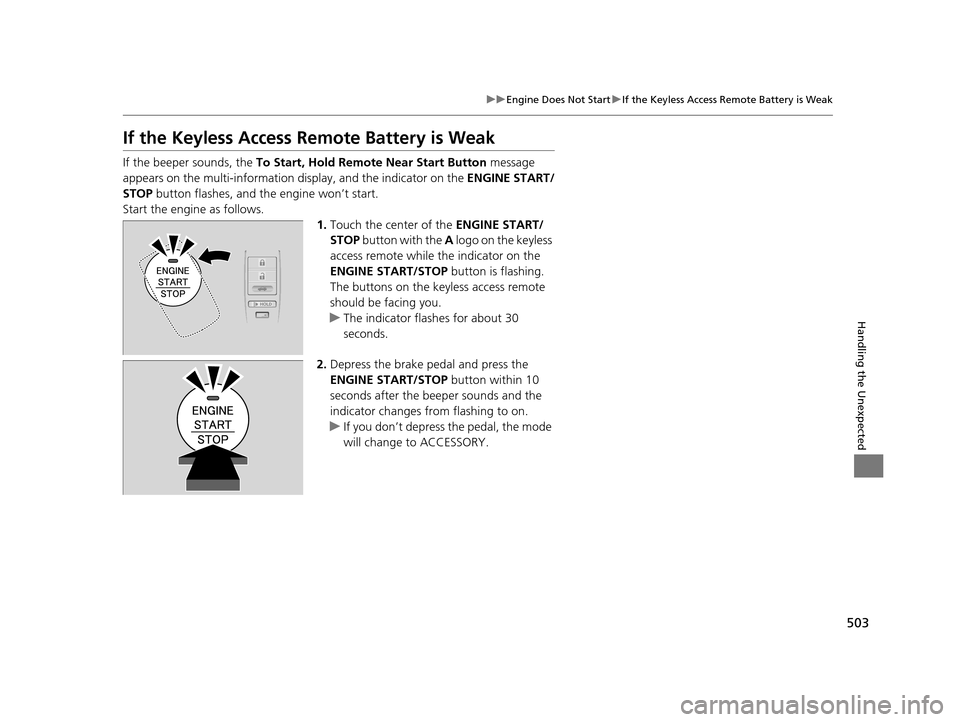
Start the engine as follows. 1.Touch the center of the ENGINE START/
STOP button with the A logo on the keyless
access remote while the indicator on the
ENGINE START/STOP button is flashing.
The buttons on the keyless access remote
should be facing you.
u The indicator flashes for about 30
seconds.
2. Depress the brake pedal and press the
ENGINE START/STOP button within 10
seconds after the beeper sounds and the
indicator changes from flashing to on.
u If you don’t depress the pedal, the mode
will change to ACCESSORY.
16 ACURA TLX-31TZ36100.book 503 ページ 2015年8月26日 水曜日 午後1時54分
Page 505 of 553
504
uuEngine Does Not Start uEmergency Engine Stop
Handling the Unexpected
Emergency Engine Stop
The ENGINE START/STOP button may be used to st op the engine due to an
emergency situation even while driving. If you must stop the engine, do either of the
following operations:
• Press and hold the ENGINE START/STOP button for about two seconds.
• Firmly press the ENGINE START/STOP button twice.
The steering wheel will not lock. However, because turning off the engine disables
the power assist the engine provides to the steering and braking systems, it will
require significantly more physical effort an d time to steer and slow the vehicle. Use
both feet on the brake pedal to slow down the vehicle and stop immediately in a
safe place.
The power mode is in ACCESSORY when the engine is stopped.
To change the mode to VEHICLE OF F, change the gear position to
(P after the
vehicle comes to a complete stop.
1 Emergency Engine Stop
Do not press the button while driving unless it is
absolutely necessary for th e engine to be switched
off.
16 ACURA TLX-31TZ36100.book 504 ページ 2015年8月26日 水曜日 午後1時54分
Page 507 of 553
506
uuJump Starting u
Handling the Unexpected
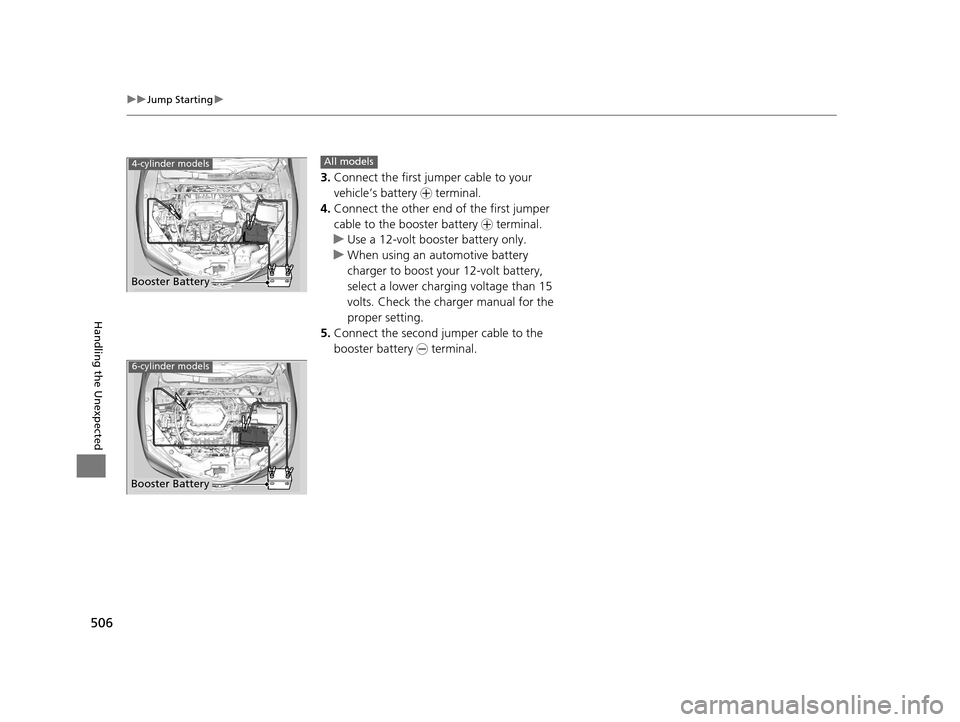
3.Connect the first jump er cable to your
vehicle’s battery + terminal.
4. Connect the other end of the first jumper
cable to the booster battery + terminal.
u Use a 12-volt booster battery only.
u When using an automotive battery
charger to boost your 12-volt battery,
select a lower charging voltage than 15
volts. Check the charger manual for the
proper setting.
5. Connect the second jumper cable to the
booster battery - terminal.
Booster Battery
4-cylinder modelsAll models
6-cylinder models
Booster Battery
16 ACURA TLX-31TZ36100.book 506 ページ 2015年8月26日 水曜日 午後1時54分
Page 508 of 553
507
uuJump Starting u
Continued
Handling the Unexpected
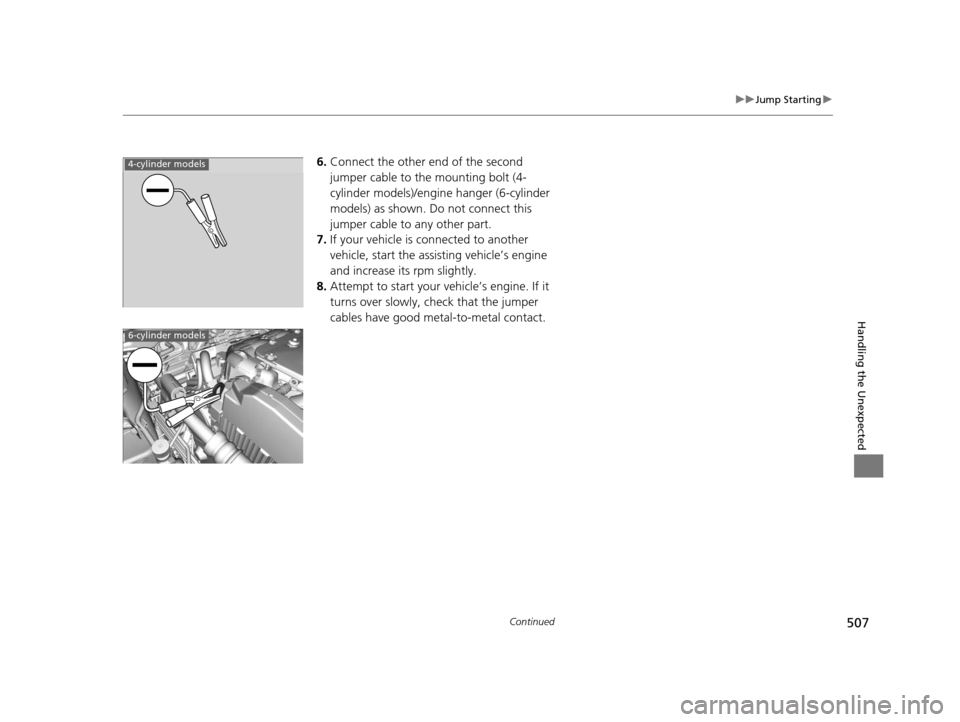
6.Connect the other end of the second
jumper cable to the mounting bolt (4-
cylinder models)/engine hanger (6-cylinder
models) as shown. Do not connect this
jumper cable to any other part.
7. If your vehicle is connected to another
vehicle, start the assisting vehicle’s engine
and increase its rpm slightly.
8. Attempt to start your ve hicle’s engine. If it
turns over slowly, check that the jumper
cables have good metal-to-metal contact.4-cylinder models
6-cylinder models
16 ACURA TLX-31TZ36100.book 507 ページ 2015年8月26日 水曜日 午後1時54分
Page 513 of 553
512
Handling the Unexpected
Indicator, Coming On/Blinking
If the Low Oil Pressure Indicator Comes On
■Reasons for the indicator to come on
Comes on when the engine oil pressure is low.
■What to do as soon as the indicator comes on
1. Immediately park the vehicle on level ground in a safe place.
2. If necessary, turn the ha zard warning lights on.
■What to do after parking the vehicle
1. Stop the engine and let it sit for about three minutes.
2. Open the hood and check the oil level.
2 Oil Check P. 444
3.Start the engine and check the low oil pressure indicator.
u The indicator goes off: Start driving again.
u The indicator does not go off within 10 seconds: Stop the engine
and contact a dealer for repairs immediately.
If the Charging System Indicator Comes On
■Reasons for the indicator to come on
Comes on when the battery is not being charged.
■What to do when the indicator comes on
Turn off the climate con trol system, rear defogger, and other electrical
systems, and immediately contact a dealer for repairs.
1 If the Low Oil Pressure Indicator Comes On
NOTICE
Running the engine with low oil pressure can cause
serious mechanical damage almost immediately.
1If the Charging System Indicator Comes On
If you need to stop temporarily, do not turn off the
engine. Restarting the engi ne may rapidly discharge
the battery.
16 ACURA TLX-31TZ36100.book 512 ページ 2015年8月26日 水曜日 午後1時54分
Page 516 of 553
515
uuIndicator, Coming On/Blinking uIf the Low Tire Pressure/TPMS Indicator Comes On or Blinks
Handling the Unexpected
If the Low Tire Pressure/ TPMS Indicator Comes On or
Blinks
■Reasons for the indicator to come on or blink
A tire pressure is significantly low. If there is a problem with the TPMS or
the compact spare tire
* is installed, the indicator blinks for about one
minute, and then stays on.
■What to do when th e indicator comes on
Stop your vehicle in a safe place. Ch eck the tire pressure and adjust the
pressure to the specified level. The spec ified tire pressure is on a label on
the driver’s side doorjamb.
■What to do when the indicator blinks
Have the tire inspected by a dealer as soon as possible. If the compact
spare tire
* causes the indicator to blink, ch ange the tire to a full-size tire.
The indicator goes off after driving for a few miles (kilometers).
1 If the Low Tire Pressure/TPMS Indicator Comes On or Blinks
NOTICE
Driving on an extremely unde rinflated tire can cause
it to overheat. An overheated tire can fail. Always
inflate your tires to the prescribed level.
TPMS Fill Assist provides visual and audible assistance
during tire pressure adjustment. With the power
mode in ON, while you adjust tire pressure up or
down, the system alerts you as follows:
Below recommended pressure: The beeper
sounds and exterior lights flash once every five
seconds.
At recommended pressure: The beeper sounds
and exterior lights flash ra pidly for ~ five seconds.
Above recommended pressure: The beeper
sounds and lights flash twice every three seconds.
* Not available on all models
16 ACURA TLX-31TZ36100.book 515 ページ 2015年8月26日 水曜日 午後1時54分
Page 536 of 553

535Continued
Information
Emissions Testing
Testing of Readiness Codes
Your vehicle has “Readiness Codes,” as part of the onboard self diagnostic system.
Some States use these codes as a test to see if your vehicle's emissions components
are working properly.
The codes may not be read properly if testing is performed just after the battery has
gone dead or been disconnected.
To check if they are set, set the power mode to ON, without starting the engine. The
malfunction indicator lamp will come on for several seconds. If it then goes off, the
readiness codes are set. If it blinks fi ve times, the readiness codes are not set.
If you are required to have your vehicle te sted before the readiness codes are ready,
prepare the vehicle for retest ing by doing the following:
1. Fill the gas tank to approximately 3/4 full.
2. Park the vehicle and leave the engi ne off for six hours or more.
3. Make sure the ambient temperature is between 40°F and 95°F (4°C and 35°C).
4. Start the engine without touching the ac celerator pedal, and let it idle for 20
seconds.
5. Keep the vehicle in
(P.
Increase the engine speed to 2,000 rpm, and hold it there until the temperature
gauge rises to at least 1/4 of the scale (about 3 minutes).
6. Let the engine idle with your foot off the accelerator for 20 seconds.
1Testing of Readiness Codes
The readiness codes are erased when the battery is
disconnected, and set again only after several days of
driving under a variety of conditions.
If a testing facility determines that the readiness
codes are not set, you may be requested to return at
a later date to complete the test.
If the testing facility determines the readiness codes
are still not set, see a dealer.
16 ACURA TLX-31TZ36100.book 535 ページ 2015年8月26日 水曜日 午後1時54分
Page 537 of 553
536
uuEmissions Testing uTesting of Readiness Codes
Information
7. Select a nearby, lightly traveled major hi ghway where you can maintain a speed
of 50 to 60 mph (80 to 97 km/h) for at least 20 minutes. Drive on the highway in
(D. Do not use cruise control. When tra ffic allows, drive for 90 seconds without
moving the accelerator pedal. (Vehicle spee d may vary slightly; this is okay.) If you
cannot do this for a continuous 90 seconds because of traffic conditions, drive for
at least 30 seconds, then repeat it two mo re times (for a total of 90 seconds).
8. Drive in city/suburban traffic for at l east 10 minutes. When traffic conditions
allow, let the vehicle coast for several se conds without using the accelerator pedal
or the brake pedal.
9. Park the vehicle and leave the engine off for 30 minutes.
16 ACURA TLX-31TZ36100.book 536 ページ 2015年8月26日 水曜日 午後1時54分
Page 543 of 553
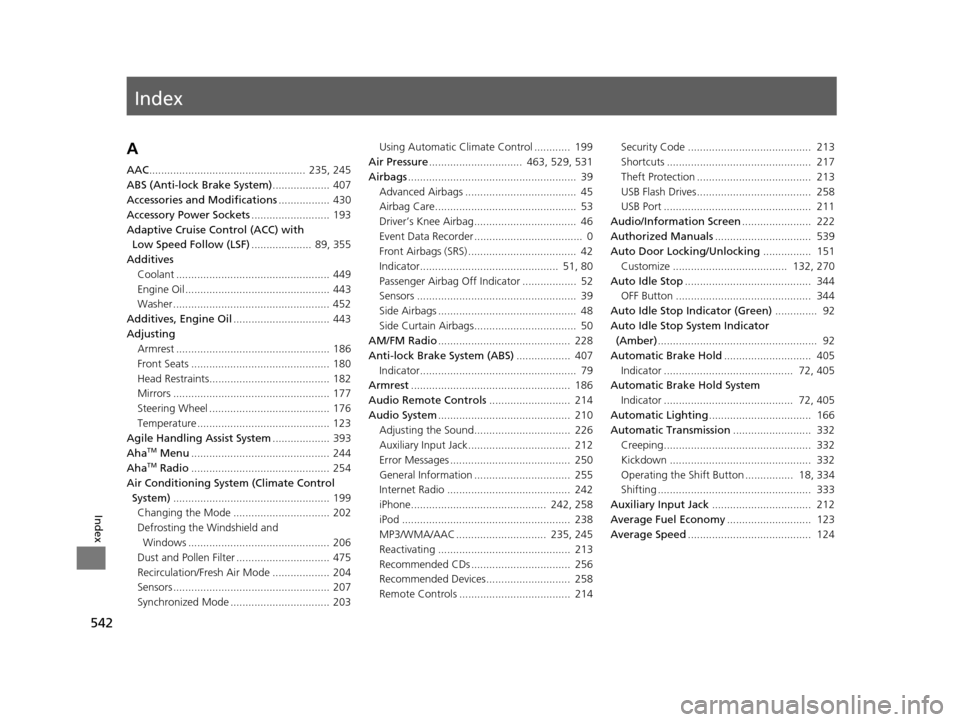
Index
542
Index
Index
A
AAC.................................................... 235, 245
ABS (Anti-lock Brake System) ................... 407
Accessories and Modifications ................. 430
Accessory Power Sockets .......................... 193
Adaptive Cruise Control (ACC) with Low Speed Follow (LSF) .................... 89, 355
Additives
Coolant ................................................... 449
Engine Oil ................................................ 443
Washer .................................................... 452
Additives, Engine Oil ................................ 443
Adjusting Armrest ................................................... 186
Front Seats .............................................. 180
Head Restraints........................................ 182
Mirrors .................................................... 177
Steering Wheel ........................................ 176
Temperature ............................................ 123
Agile Handling Assist System ................... 393
Aha
TM Menu .............................................. 244
AhaTM Radio .............................................. 254
Air Conditioning System (Climate Control System) .................................................... 199
Changing the Mode ................................ 202
Defrosting the Windshield and Windows ............................................... 206
Dust and Pollen Filter ............................... 475
Recirculation/Fresh Air Mode ................... 204
Sensors .................................................... 207
Synchronized Mode ................................. 203 Using Automatic Climate Control ............ 199
Air Pressure ............................... 463, 529, 531
Airbags ........................................................ 39
Advanced Airbags ..................................... 45
Airbag Care............................................... 53
Driver’s Knee Airbag.................................. 46
Event Data Recorder .................................... 0
Front Airbags (SRS) .................................... 42
Indicator.............................................. 51, 80
Passenger Airbag Off Indicator .................. 52
Sensors ..................................................... 39
Side Airbags .............................................. 48
Side Curtain Airbags.................................. 50
AM/FM Radio ............................................ 228
Anti-lock Brake System (ABS) .................. 407
Indicator.................................................... 79
Armrest ..................................................... 186
Audio Remote Controls ........................... 214
Audio System ............................................ 210
Adjusting the Sound................................ 226
Auxiliary Input Jack.................................. 212
Error Messages ........................................ 250
General Information ................................ 255
Internet Radio ......................................... 242
iPhone............................................. 242, 258
iPod ........................................................ 238
MP3/WMA/AAC .............................. 235, 245
Reactivating ............................................ 213
Recommended CDs ................................. 256
Recommended Devices............................ 258
Remote Controls ..................................... 214 Security Code ......................................... 213
Shortcuts ................................................ 217
Theft Protection ...................................... 213
USB Flash Drives...................................... 258
USB Port ................................................. 211
Audio/Information Screen ....................... 222
Authorized Manuals ................................ 539
Auto Door Locking/Unlocking ................ 151
Customize ...................................... 132, 270
Auto Idle Stop .......................................... 344
OFF Button ............................................. 344
Auto Idle Stop Indicator (Green) .............. 92
Auto Idle Stop System Indicator (Amber) ..................................................... 92
Automatic Brake Hold ............................. 405
Indicator ........................................... 72, 405
Automatic Brake Hold System
Indicator ........................................... 72, 405
Automatic Lighting .................................. 166
Automatic Transmission .......................... 332
Creeping................................................. 332
Kickdown ............................................... 332
Operating the Shift Button ................ 18, 334
Shifting ................................................... 333
Auxiliary Input Jack ................................. 212
Average Fuel Economy ............................ 123
Average Speed ......................................... 124
16 ACURA TLX-31TZ36100.book 542 ページ 2015年8月26日 水曜日 午後1時54分