interior light Acura TLX 2016 Owner's Guide
[x] Cancel search | Manufacturer: ACURA, Model Year: 2016, Model line: TLX, Model: Acura TLX 2016Pages: 553, PDF Size: 31.29 MB
Page 320 of 553
Continued319
uuBefore Driving uDriving Preparation
Driving
• Store or secure all items on board properly.
u Carrying too much cargo, or improperly storing it, can affect your vehicle’s
handling, stability, sto pping distance, and tires, and make it unsafe.
2Maximum Load Limit P. 321
•Do not pile items higher than the seat height.
u They can block your view and may be thrown forward in the event of sudden
braking.
• Do not place anything in the front seat footwells. Make sure to secure the floor
mat.
u An object or unsecured floor mat can in terfere with your brake and accelerator
pedal operation while driving.
• If you have any animals on board, do not let them move around in the vehicle.
u They may interfere with driv ing and a crash could occur.
• Securely close and lock all doors and the trunk.
2 Locking/Unlocking the Doors from the Inside P. 148
•Adjust your seating position properly.
u Adjust the head restraint, too.
2Adjusting the Seats P. 180
2 Adjusting the Head Restraints P. 182
•Adjust the mirrors and steering wh eel properly for your driving.
u Adjust them while sitting in the proper driving position.
2 Adjusting the Mirrors P. 177
2 Adjusting the Steering Wheel P. 176
■Interior Checks1Interior Checks
The headlight aim is set by the factory, and does not
need to be adjusted. Howeve r, if you regularly carry
heavy items in the trunk ha ve the aiming readjusted
at a dealer or by a qualified technician.
16 ACURA TLX-31TZ36100.book 319 ページ 2015年8月26日 水曜日 午後1時54分
Page 347 of 553
uuWhen Driving uAuto Idle Stop*
346
Driving
■Auto idle stop m ay not activate when:
• The vehicle is stopped by braking suddenly.
• The steering wheel is operated.
• The fan speed is high.
• Altitude is high.
• The vehicle is repeated ly accelerated and dece lerated at a low speed.
• The climate control system is in use, and there is a significant difference between
the set temperature and the actual interior temperature.
• Humidity in the interior is high.
The brake pedal is released and the automatic brake hold system is off.
■The engine restarts even if the brake pedal is depressed or the automatic
brake hold system is activated when:
• The Auto Idle Stop OFF button is pressed.
• When a steering wheel is operated.
• The gear position is in a position other than
(D or in Sport+.
• The pressure on the brake pedal is redu ced and the vehicle starts moving while
stopped on an incline.
• The pressure on the brake pedal is repeated ly applied and released slightly during
a stop.
• The battery charge becomes low.
• The accelerator pedal is depressed.
• The driver’s seat belt is unlatched.
• is ON (indicator on).
• The climate control system is in us e, and the difference between the set
temperature and actual interior temperature becomes significant.
• The climate control system is bein g used to dehumidify the interior.
■The Engine Automatically Restarts When:1The Engine Automatically Restarts When:
•If you are using an elec tronic device during Auto
Idle Stop, the device may temporarily be turned off
when the engine restarts.
16 ACURA TLX-31TZ36100.book 346 ページ 2015年8月26日 水曜日 午後1時54分
Page 372 of 553
371
uuWhen Driving uForward Collision Warning (FCW ) with Pedestrian Detection*
Continued
Driving
In certain conditions FCW with pedestrian Detection may:
• Not activate, or may not detect a vehicle or pedestrian in front of your vehicle.
• Activate even when you are aware of a vehicle or pedestrian ahead of you, or
when there is no vehicle or pedestrian ahead.
Some examples of these co nditions are listed below.
■Environmental conditions
• Driving in bad weather (rain, fog, snow, etc.).
• Sudden changes between light and dark, such as an entrance or exit of a tunnel.
• There is little contrast between objects and the background.
• Driving into low sunlight (e.g., at dawn or dusk).
• Strong light is reflec ted onto the roadway.
• Driving in the shadows of trees, buildings, etc.
• Roadway objects or structures are misinterpreted as vehicles or pedestrians.
• Reflections on the interior of the front windshield.
• The road is hilly or the vehicle is approaching the crest of a hill.
• Driving over bumps.
■FCW with Pedestrian Detection Conditions and Limitations
16 ACURA TLX-31TZ36100.book 371 ページ 2015年8月26日 水曜日 午後1時54分
Page 377 of 553
376
uuWhen Driving uLane Departure Warning (LDW)*
Driving
LDW may not activate or may not recogniz e lanes, and may activate even when
keeping in the middle of a lane, under certa in conditions. Some examples of these
conditions are listed below.
■Environmental conditions
• Driving in bad weather (rain, fog, snow, etc.).
• Sudden changes between light and dark, such as an entrance or exit of a tunnel.
• There is little contrast between la ne lines and the roadway surface.
• Driving into low sunlight (e.g., at dawn or dusk).
• Strong light is reflected onto the roadway.
• Driving in the shadows of trees, buildings, etc.
• Shadows of adjacent objects are parallel to lane markings.
• Roadway objects or structures are misinterpreted as lane markers.
• Reflections on the interior of the front windshield.
■Roadway conditions
• Driving on a snowy or wet roadway (obscured lane marking, vehicle tracks,
reflected lights, road spray, high contrast).
• Driving on a road with temporary lane markings.
• Faint, multiple, or varied lane markings are visible on the roadway due to road
repairs or old lane markings.
• The roadway has merging, split, or crossing lines (e.g., such as at an intersection
or crosswalk).
• The lane markings are extremely narrow, wide, or changing.
• The vehicle in front of you is driving near the lane lines.
• The road is hilly or the vehicle is approaching the crest of a hill.
• Driving over bumps.
■LDW Conditions and Limitations
16 ACURA TLX-31TZ36100.book 376 ページ 2015年8月26日 水曜日 午後1時54分
Page 382 of 553
381
uuWhen Driving uRoad Departure Mitigation (RDM) System*
Continued
Driving
The system may not properly detect lane ma rkings and the position of your vehicle
under certain conditions. Some examples of these conditions are listed below.
■Environmental conditions
• Driving in bad weather (rain, fog, snow, etc.).
• Sudden changes between light and dark, such as an entrance or exit of a tunnel.
• There is little contrast between lane lines and the roadway surface.
• Driving into low sunlight (e.g., at dawn or dusk).
• Strong light is reflec ted onto the roadway.
• Driving in the shadows of trees, buildings, etc.
• Shadows of adjacent objects are parallel to lane markings.
• Roadway objects or structures are misinterpreted as lane markers.
• Reflections on the interior of the front windshield.
■RDM Conditions and Limitations
16 ACURA TLX-31TZ36100.book 381 ページ 2015年8月26日 水曜日 午後1時54分
Page 390 of 553
389
uuWhen Driving uLane Keeping Assist System (LKAS)*
Continued
Driving
The system may not detect lane markings and therefore may not keep the vehicle in
the middle of a lane under certain conditions, including the following:
■Environmental conditions
• Driving in bad weather (rain, fog, snow, etc.).
• Sudden changes between light and dark, such as an entrance or exit of a tunnel.
• There is little contrast between lane lines and the roadway surface.
• Driving into low sunlight (e.g., at dawn or dusk).
• Strong light is reflec ted onto the roadway.
• Driving in the shadows of trees, buildings, etc.
• Shadows of adjacent objects are parallel to lane markings.
• Roadway objects or structures are misinterpreted as lane markers.
• Reflections on the interior of the front windshield.
■LKAS Conditions and Limitations
16 ACURA TLX-31TZ36100.book 389 ページ 2015年8月26日 水曜日 午後1時54分
Page 414 of 553

413
uuBraking uCollision Mitigation Braking SystemTM (CMBSTM)*
Continued
Driving
The system may automatically shut off and the CMBSTM indicator will come on under
certain conditions. Some examples of thes e conditions are listed below. Other
conditions may reduce some of the CMBS
TM functions.
2 Front Sensor Camera* P. 353
■Environmental conditions
• Driving in bad weather (rain, fog, snow, etc.).
• Sudden changes between light and dark, such as an entrance or exit of a tunnel.
• There is little contrast between objects and the background.
• Driving into low sunlight (e.g., at dawn or dusk).
• Strong light is reflec ted onto the roadway.
• Driving in the shadows of trees, buildings, etc.
• Roadway objects or structures are misinterpreted as vehicles and pedestrians.
• Reflections on the interior of the front windshield.
■Roadway conditions
• Driving on a snowy or wet roadway (obs cured lane marking, vehicle tracks,
reflected lights, road spray, high contrast).
• Driving on curvy, winding, or undulating roads.
■CMBSTM Conditions and Limitations
* Not available on all models
16 ACURA TLX-31TZ36100.book 413 ページ 2015年8月26日 水曜日 午後1時54分
Page 432 of 553
431
Maintenance
This chapter discusses basic maintenance.
Before Performing MaintenanceInspection and Maintenance ............ 432
Safety When Performing Maintenance..... 433Parts and Fluids Used in Maintenance Service ........................................... 434
Maintenance Minder
TM..................... 435
Maintenance Under the Hood
Maintenance Items Under the Hood ..... 440Opening the Hood ........................... 442
Recommended Engine Oil ................ 443
Oil Check ......................................... 444
Adding Engine Oil ............................ 446
Changing the Engine Oil and Oil Filter .. 447
Engine Coolant ................................ 449
Transmission Fluid ............................ 451
Brake Fluid ....................................... 452
Refilling Window Washer Fluid......... 452
Replacing Light Bulbs ....................... 453
Checking and Maintaining Wiper
Blades .......................................... 460
Checking and Maintaining Tires
Checking Tires ................................. 462
Tire and Loading Information Label ...... 463Tire Labeling .................................... 463DOT Tire Quality Grading (U.S. Vehicles) .. 465Wear Indicators................................ 467 Tire Service Life ................................ 467
Tire and Wheel Replacement ........... 468
Tire Rotation .................................... 469
Winter Tires ..................................... 470
Battery ............................................... 471
Remote Transmitter Care
Replacing the Button Battery ........... 473
Climate Control System Maintenance.... 475Cleaning
Interior Care .................................... 476
Exterior Care.................................... 478
16 ACURA TLX-31TZ36100.book 431 ページ 2015年8月26日 水曜日 午後1時54分
Page 503 of 553
502
Handling the Unexpected
Engine Does Not Start
Checking the Engine
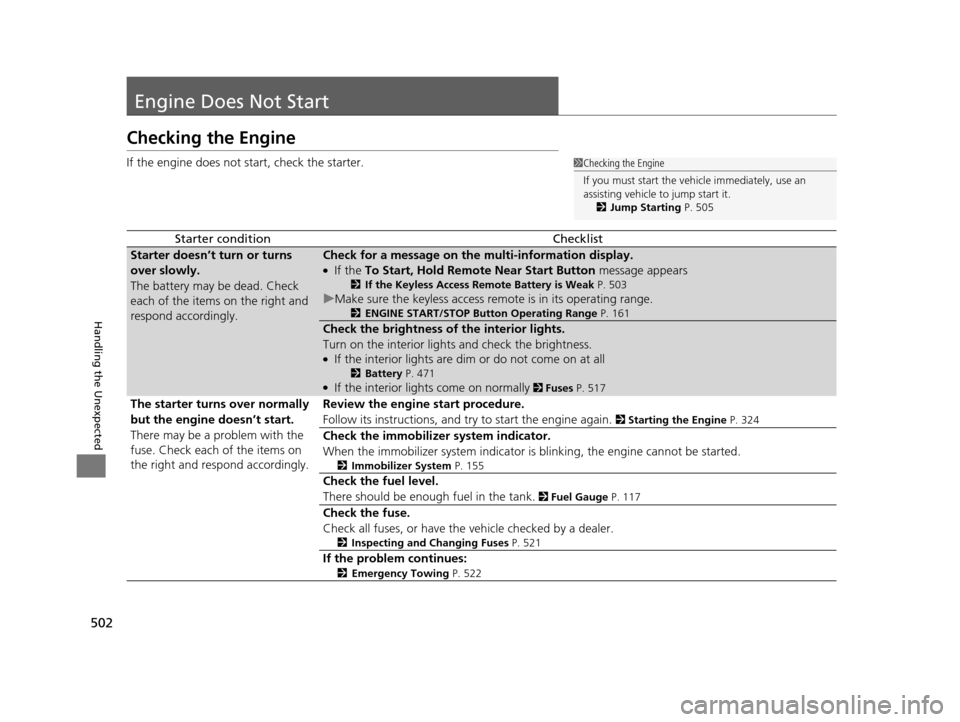
If the engine does not start, check the starter.
Starter conditionChecklist
Starter doesn’t turn or turns
over slowly.
The battery may be dead. Check
each of the items on the right and
respond accordingly.Check for a message on the multi-information display.
●If the To Start, Hold Remote Near Start Button message appears
2If the Keyless Access Remote Battery is Weak P. 503
uMake sure the keyless access remo te is in its operating range.
2ENGINE START/STOP Button Operating Range P. 161
Check the brightness of the interior lights.
Turn on the interior lights and check the brightness.
●If the interior lights are dim or do not come on at all
2Battery P. 471●If the interior lights come on normally 2 Fuses P. 517
The starter turns over normally
but the engine doesn’t start.
There may be a problem with the
fuse. Check each of the items on
the right and resp ond accordingly. Review the engine start procedure.
Follow its instructions, and try to start the engine again.
2
Starting the Engine P. 324
Check the immobilizer system indicator.
When the immobilizer system indicator is blinking, the engine cannot be started.
2Immobilizer System P. 155
Check the fuel level.
There should be enough fuel in the tank.
2 Fuel Gauge P. 117
Check the fuse.
Check all fuses, or have the vehicle checked by a dealer.
2Inspecting and Changing Fuses P. 521
If the problem continues:
2Emergency Towing P. 522
1Checking the Engine
If you must start the vehi cle immediately, use an
assisting vehicle to jump start it.
2 Jump Starting P. 505
16 ACURA TLX-31TZ36100.book 502 ページ 2015年8月26日 水曜日 午後1時54分
Page 518 of 553
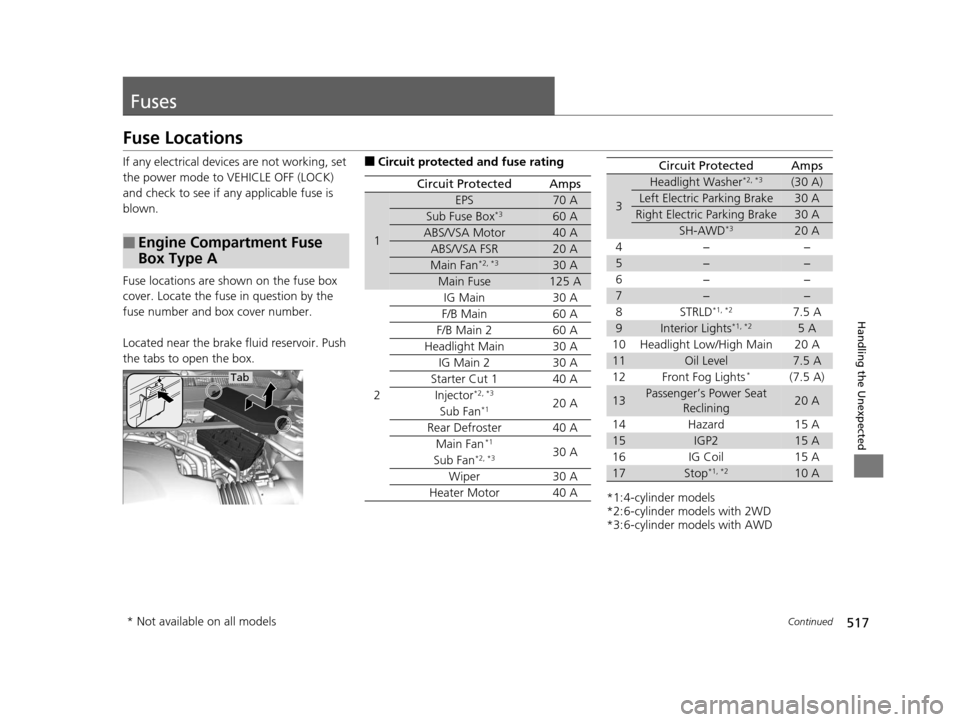
517Continued
Handling the Unexpected
Fuses
Fuse Locations
If any electrical devices are not working, set
the power mode to VEHICLE OFF (LOCK)
and check to see if any applicable fuse is
blown.
Fuse locations are shown on the fuse box
cover. Locate the fuse in question by the
fuse number and box cover number.
Located near the brake fluid reservoir. Push
the tabs to open the box.
■Engine Compartment Fuse
Box Type A
Tab
■Circuit protected and fuse rating
Circuit ProtectedAmps
1
EPS70 A
Sub Fuse Box*360 A
ABS/VSA Motor40 A
ABS/VSA FSR20 A
Main Fan*2, *330 A
Main Fuse125 A
2
IG Main30 A
F/B Main60 A
F/B Main 260 A
Headlight Main30 A
IG Main 230 A
Starter Cut 140 A
Injector*2, *320 ASub Fan*1
Rear Defroster40 A
Main Fan*130 ASub Fan*2, *3
Wiper30 A
Heater Motor40 A*1:4-cylinder models
*2:6-cylinder models with 2WD
*3:6-cylinder models with AWD
3
Headlight Washer*2, *3(30 A)
Left Electric Parking Brake30 A
Right Electric Parking Brake30 A
SH-AWD*320 A
4− −
5−−
6− −
7−−
8 STRLD*1, *27.5 A
9Interior Lights*1, *25 A
10 Headlight Low/High Main 20 A
11Oil Level7.5 A
12 Front Fog Lights*(7.5 A)
13Passenger’s Power Seat Reclining20 A
14 Hazard 15 A
15IGP215 A
16 IG Coil 15 A
17Stop*1, *210 A
Circuit ProtectedAmps
* Not available on all models
16 ACURA TLX-31TZ36100.book 517 ページ 2015年8月26日 水曜日 午後1時54分