engine Acura TLX 2016 Workshop Manual
[x] Cancel search | Manufacturer: ACURA, Model Year: 2016, Model line: TLX, Model: Acura TLX 2016Pages: 553, PDF Size: 31.29 MB
Page 198 of 553
Continued197
uuInterior Lights/Interior Convenience Items uInterior Convenience Items
Controls
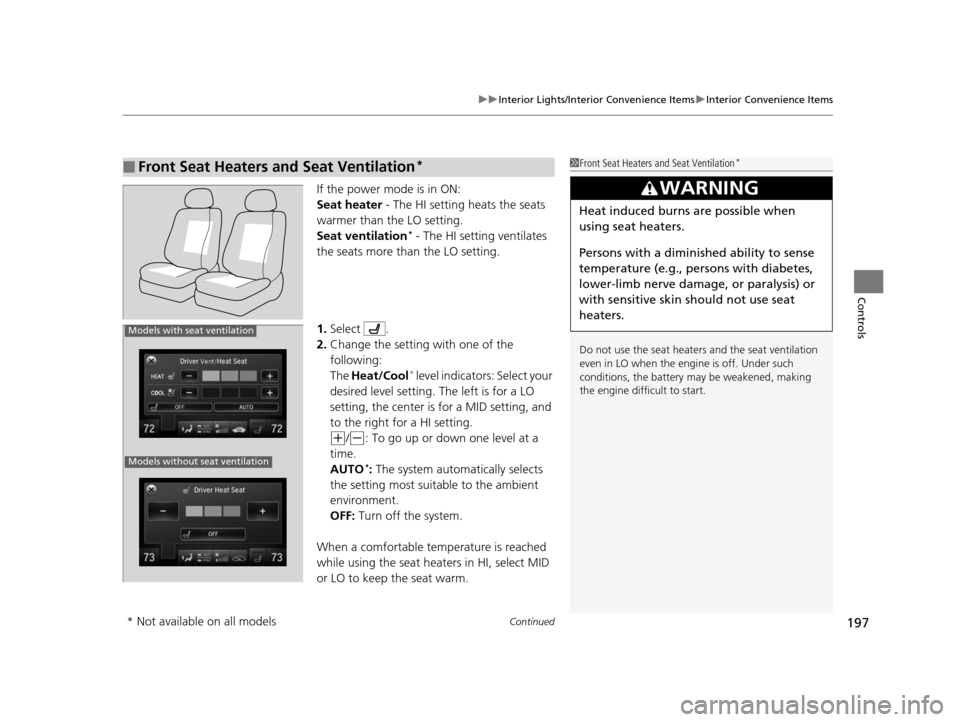
If the power mode is in ON:
Seat heater - The HI setting heats the seats
warmer than the LO setting.
Seat ventilation
* - The HI setting ventilates
the seats more than the LO setting.
1. Select .
2. Change the setting with one of the
following:
The Heat/Cool
* level indicators: Select your
desired level setting. The left is for a LO
setting, the center is for a MID setting, and
to the right for a HI setting.
(+/(-: To go up or down one level at a
time.
AUTO
*: The system automatically selects
the setting most suitable to the ambient
environment.
OFF: Turn off the system.
When a comfortable temperature is reached
while using the seat heaters in HI, select MID
or LO to keep the seat warm.
■Front Seat Heaters and Seat Ventilation*1 Front Seat Heaters and Seat Ventilation*
Do not use the seat heater s and the seat ventilation
even in LO when the engine is off. Under such
conditions, the battery ma y be weakened, making
the engine difficult to start.
3WARNING
Heat induced burns are possible when
using seat heaters.
Persons with a diminished ability to sense
temperature (e.g., persons with diabetes,
lower-limb nerve damage, or paralysis) or
with sensitive skin should not use seat
heaters.
Models without seat ventilation
Models with seat ventilation
* Not available on all models
16 ACURA TLX-31TZ36100.book 197 ページ 2015年8月26日 水曜日 午後1時54分
Page 199 of 553
uuInterior Lights/Interior Convenience Items uInterior Convenience Items
198
Controls
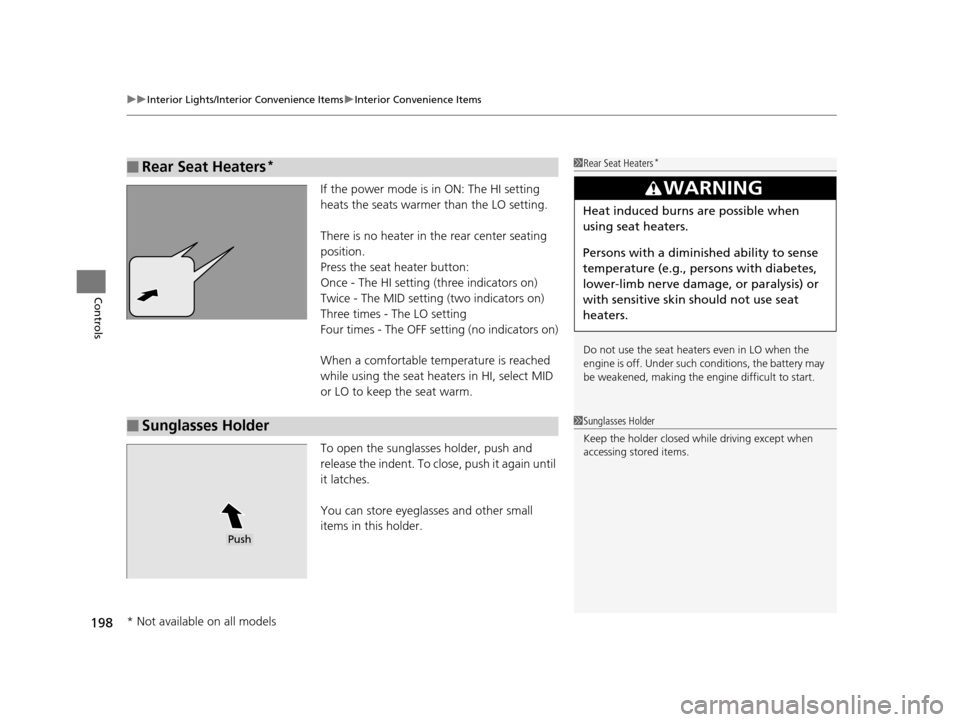
If the power mode is in ON: The HI setting
heats the seats warmer than the LO setting.
There is no heater in the rear center seating
position.
Press the seat heater button:
Once - The HI setting (three indicators on)
Twice - The MID setting (two indicators on)
Three times - The LO setting
Four times - The OFF se tting (no indicators on)
When a comfortable temperature is reached
while using the seat heaters in HI, select MID
or LO to keep the seat warm.
To open the sunglasses holder, push and
release the indent. To clos e, push it again until
it latches.
You can store eyeglasses and other small
items in this holder.
■Rear Seat Heaters*1 Rear Seat Heaters*
Do not use the seat heaters even in LO when the
engine is off. Under such conditions, the battery may
be weakened, making the engine difficult to start.
3WARNING
Heat induced burns are possible when
using seat heaters.
Persons with a diminished ability to sense
temperature (e.g., persons with diabetes,
lower-limb nerve damage, or paralysis) or
with sensitive skin should not use seat
heaters.
■Sunglasses Holder1Sunglasses Holder
Keep the holder closed wh ile driving except when
accessing stored items.
Push
* Not available on all models
16 ACURA TLX-31TZ36100.book 198 ページ 2015年8月26日 水曜日 午後1時54分
Page 200 of 553

199Continued
Controls
Climate Control System
Using Automatic Climate Control
The automatic climate control system maintains the interior temperature you select.
The system also selects the proper mix of heat ed or cooled air that raises or lowers
the interior temperature to your pr eference as quickly as possible.
Use the system when the engine is running.
1. Press the AUTO button.
2. Adjust the interior temperature using the driver’s side or passenger’s side
temperature control switch.
3. Press the (On/Off) button to cancel.1Using Automatic Climate Control
See the Navigation System Manual for the operation
of the audio system.
Images shown are for m odels without navigation
system.
If any buttons/icons on the touch screen are pressed
while using the climate control system in AUTO, the
function of the button/icon th at was pressed will take
priority.
The AUTO indicator will go off, but functions
unrelated to the button/icon that was pressed will be
controlled automatically.
During the Auto Idle Stop, the air conditioning
system will be turned off.
To prevent cold air from bl owing in from outside, the
fan may operate at low speed for a while after the
AUTO button has been pressed.
If the interior is very warm, you can cool it down
more rapidly by partial ly opening the windows,
turning the system on auto, and setting the
temperature to low. Change the fresh mode to
recirculation mode until the temperature cools down.
When you set the temperature to the lower or upper
limit, Lo or Hi is displayed.
Models with navigation system
Models with Auto Idle Stop
All models
(On/Off) ButtonAUTO Button
On Demand Multi-Use Display
TM
Driver’s Side
Temperature
Control Switch
Passenger’s
Side
Temperature
Control Switch Passenger’s
Side
Temperature
Driver’s Side
Temperature
16 ACURA TLX-31TZ36100.book 199 ページ 2015年8月26日 水曜日 午後1時54分
Page 202 of 553
Continued201
uuClimate Control System uUsing Automatic Climate Control
Controls
■Changing the interior temperature setting
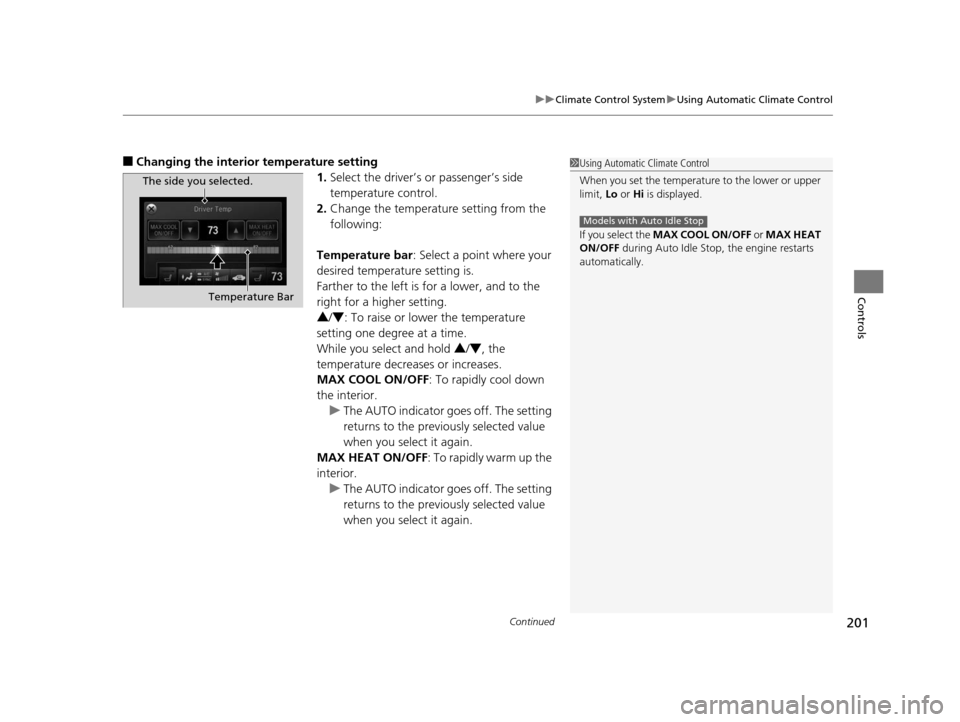
1.Select the driver’s or passenger’s side
temperature control.
2. Change the temperature setting from the
following:
Temperature bar : Select a point where your
desired temperature setting is.
Farther to the left is for a lower, and to the
right for a higher setting.
3 /4 : To raise or lower the temperature
setting one degree at a time.
While you select and hold 3 /4 , the
temperature decreases or increases.
MAX COOL ON/OFF : To rapidly cool down
the interior. u The AUTO indicator goes off. The setting
returns to the previously selected value
when you select it again.
MAX HEAT ON/OFF : To rapidly warm up the
interior.
u The AUTO indicator goes off. The setting
returns to the previously selected value
when you select it again.1Using Automatic Climate Control
When you set the temperature to the lower or upper
limit, Lo or Hi is displayed.
If you select the MAX COOL ON/OFF or MAX HEAT
ON/OFF during Auto Idle Stop , the engine restarts
automatically.
Models with Auto Idle Stop
The side you selected.
Temperature Bar
16 ACURA TLX-31TZ36100.book 201 ページ 2015年8月26日 水曜日 午後1時54分
Page 207 of 553
uuClimate Control System uUsing Automatic Climate Control
206
Controls
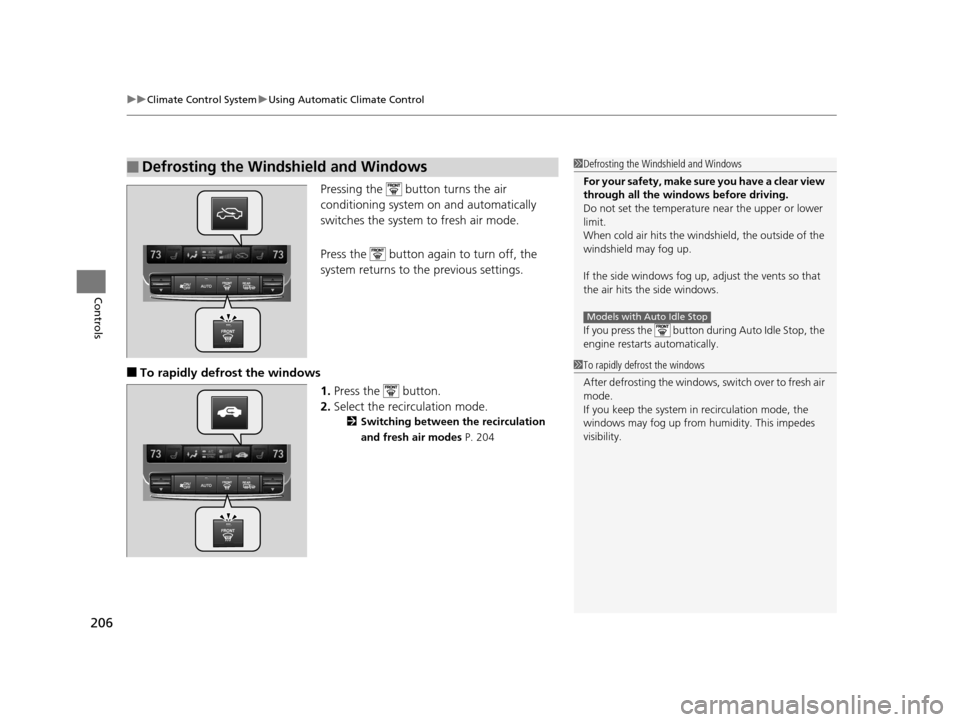
Pressing the button turns the air
conditioning system on and automatically
switches the system to fresh air mode.
Press the button again to turn off, the
system returns to the previous settings.
■To rapidly defrost the windows 1.Press the button.
2. Select the recirculation mode.
2 Switching between the recirculation
and fresh air modes P. 204
■Defrosting the Windshield and Windows1Defrosting the Windshield and Windows
For your safety, make sure you have a clear view
through all the windows before driving.
Do not set the temperatur e near the upper or lower
limit.
When cold air hits the windshield, the outside of the
windshield may fog up.
If the side windows fog up, adjust the vents so that
the air hits th e side windows.
If you press the button during Auto Idle Stop, the
engine restarts automatically.
Models with Auto Idle Stop
1 To rapidly defrost the windows
After defrosting the windows, switch over to fresh air
mode.
If you keep the system in recirculation mode, the
windows may fog up from humidity. This impedes
visibility.
16 ACURA TLX-31TZ36100.book 206 ページ 2015年8月26日 水曜日 午後1時54分
Page 262 of 553
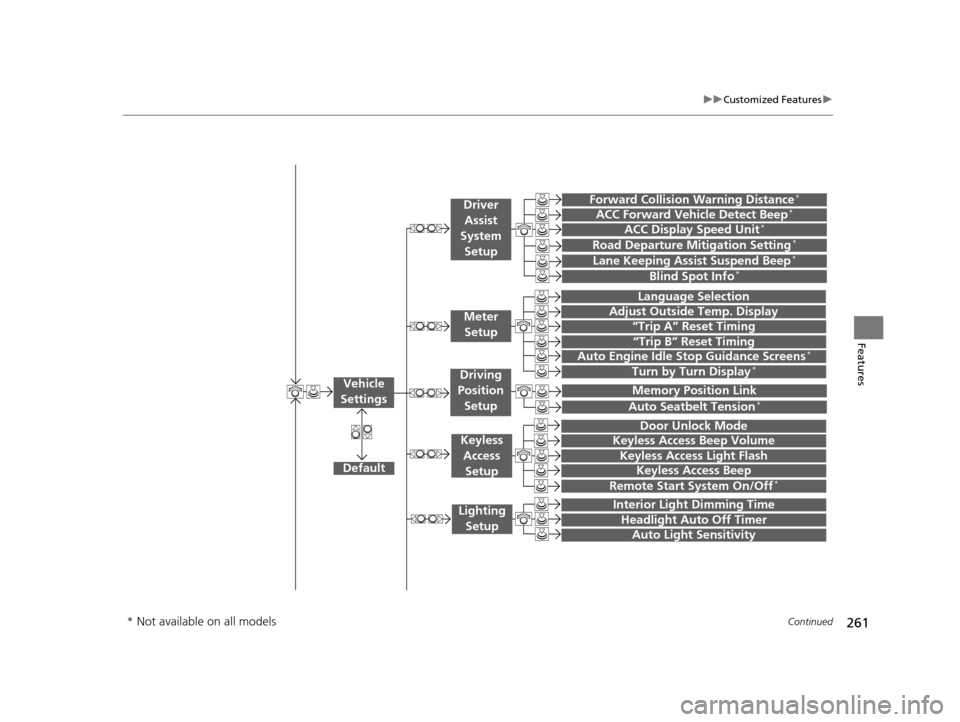
261
uuCustomized Features u
Continued
Features“Trip A” Reset Timing
“Trip B” Reset Timing
Language Selection
Adjust Outside Temp. Display
Forward Collision Warning Distance*
ACC Forward Vehicle Detect Beep*
Turn by Turn Display*
Default
Door Unlock Mode
Keyless Access Light Flash
Interior Light Dimming Time
Headlight Auto Off Timer
Auto Light Sensitivity
Vehicle
Settings
Meter Setup
Driver Assist
System
Setup
Keyless Access
Setup
Lighting Setup
Keyless Access Beep
Lane Keeping Assist Suspend Beep*
Blind Spot Info*
Auto Seatbelt Tension*
Driving
Position Setup
Road Departure Mitigation Setting*ACC Display Speed Unit*
Remote Start System On/Off*
Memory Position Link
Keyless Access Beep Volume
Auto Engine Idle Stop Guidance Screens*
* Not available on all models
16 ACURA TLX-31TZ36100.book 261 ページ 2015年8月26日 水曜日 午後1時54分
Page 269 of 553
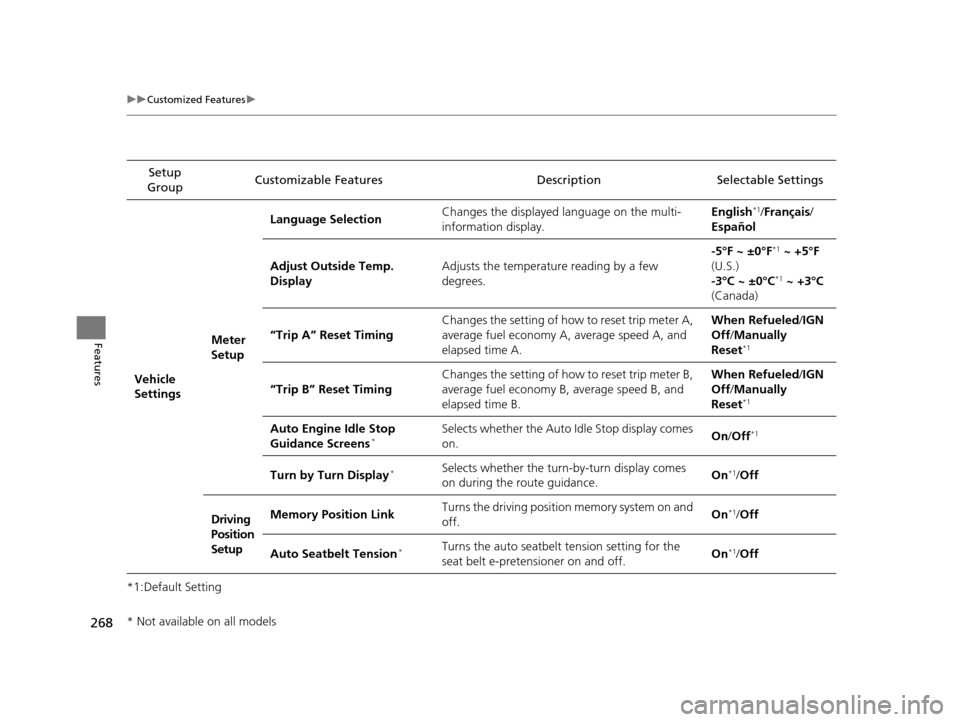
268
uuCustomized Features u
Features
*1:Default SettingSetup
Group Customizable Features Descri
ption Selectable Settings
Vehicle
Settings Meter
SetupLanguage Selection
Changes the displayed language on the multi-
information display. English
*1/
Français /
Español
Adjust Outside Temp.
Display Adjusts the temperature reading by a few
degrees. -5°F ~ ±0°F
*1
~ +5°F
(U.S.)
-3°C ~ ±0°C
*1 ~ +3°C
(Canada)
“Trip A” Reset Timing Changes the setting of how to reset trip meter A,
average fuel economy A,
average speed A, and
elapsed time A. When Refueled
/IGN
Off /Manually
Reset
*1
“Trip B” Reset Timing Changes the setting of how to reset trip meter B,
average fuel economy B,
average speed B, and
elapsed time B. When Refueled
/IGN
Off /Manually
Reset*1
Auto Engine Idle Stop
Guidance Screens*Selects whether the Auto Idle Stop display comes
on. On
/Off*1
Turn by Turn Display*Selects whether the turn-by-turn display comes
on during the route guidance. On*1/
Off
Driving
Position
Setup Memory Position Link
Turns the driving position memory system on and
off.
On
*1/
Off
Auto Seatbelt Tension
*Turns the auto seatbelt tension setting for the
seat belt e-pretensioner on and off. On*1/
Off
* Not available on all models
16 ACURA TLX-31TZ36100.book 268 ページ 2015年8月26日 水曜日 午後1時54分
Page 270 of 553
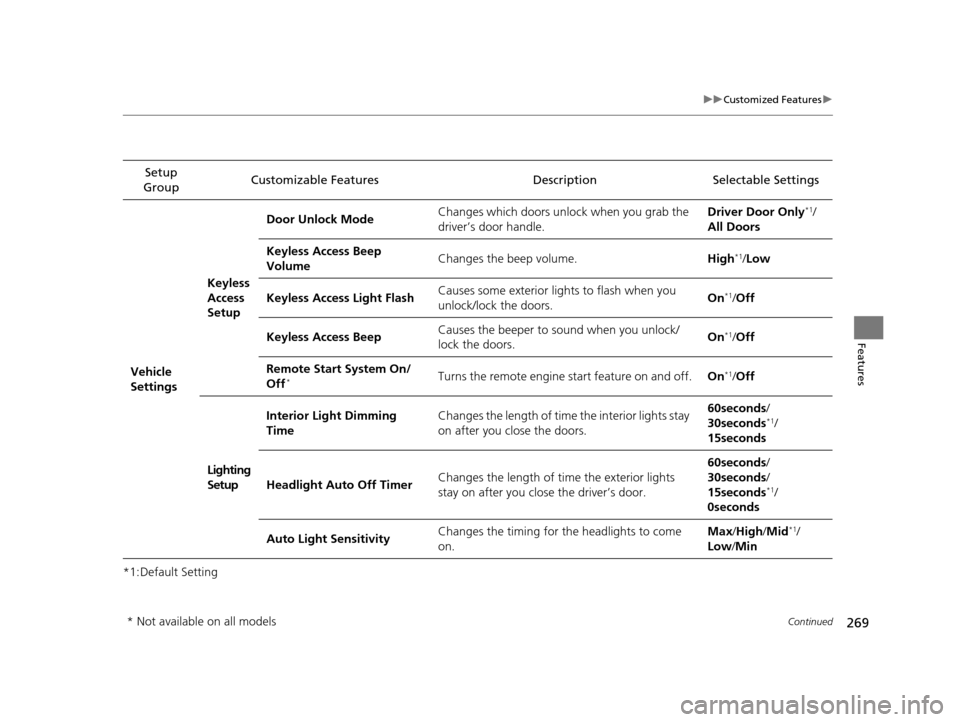
269
uuCustomized Features u
Continued
Features
*1:Default SettingSetup
Group Customizable Features Description Selectable Settings
Vehicle
SettingsKeyless
Access
Setup
Door Unlock Mode
Changes which doors unlock when you grab the
driver’s door handle. Driver Door Only
*1/
All Doors
Keyless Access Beep
Volume Changes the beep volume.
High
*1/Low
Keyless Access Light Flash Causes some exterior lights to flash when you
unlock/lock the doors. On
*1/
Off
Keyless Access Beep Causes the beeper to
sound when you unlock/
lock the doors. On
*1/
Off
Remote Start System On/
Off
*Turns the remote engine start feature on and off. On*1/Off
Lighting
Setup Interior Light Dimming
Time
Changes the length of time the interior lights stay
on after you close the doors. 60seconds
/
30seconds
*1/
15seconds
Headlight Auto Off Timer Changes the length of time the exterior lights
stay on after you close the driver’s door. 60seconds
/
30seconds /
15seconds
*1/
0seconds
Auto Light Sensitivity Changes the timing for the headlights to come
on. Max
/High /Mid
*1/
Low /Min
* Not available on all models
16 ACURA TLX-31TZ36100.book 269 ページ 2015年8月26日 水曜日 午後1時54分
Page 272 of 553
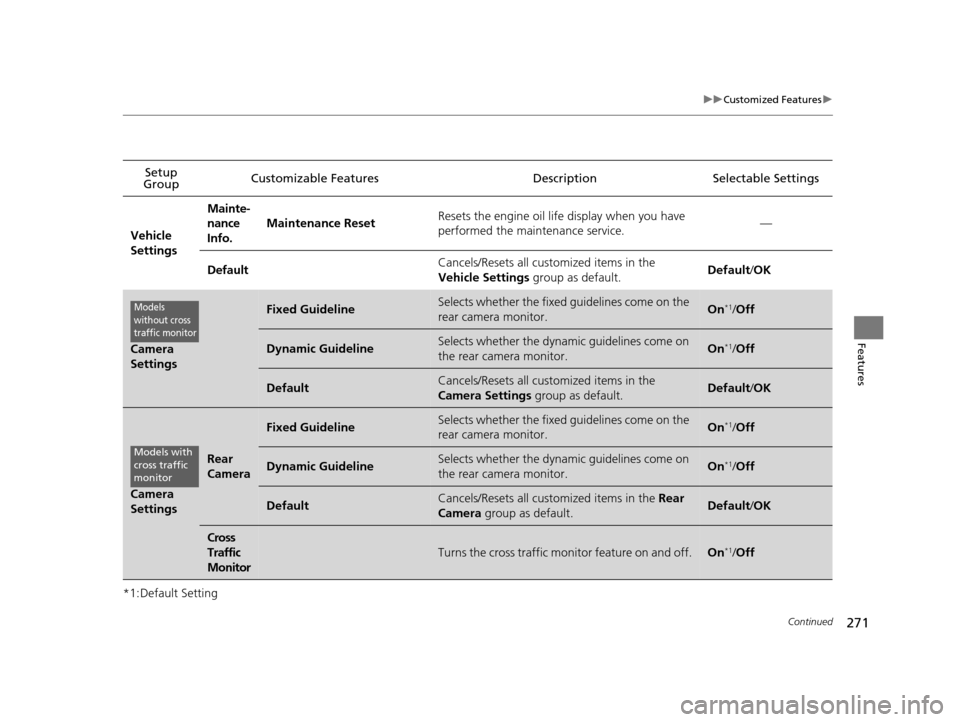
271
uuCustomized Features u
Continued
Features
*1:Default SettingSetup
Group Customizable Features Description Selectable Settings
Vehicle
Settings Mainte-
nance
Info.
Maintenance Reset
Resets the engine oil life display when you have
performed the maintenance service. —
Default Cancels/Resets all customized items in the
Vehicle Settings
group as default. Default/
OK
Camera
Settings
Fixed GuidelineSelects whether the fixed guidelines come on the
rear camera monitor.On*1/ Off
Dynamic GuidelineSelects whether the dynamic guidelines come on
the rear camera monitor.On*1/Off
DefaultCancels/Resets all customized items in the
Camera Settings group as default.Default/OK
Camera
Settings
Rear
Camera
Fixed GuidelineSelects whether the fixed guidelines come on the
rear camera monitor.On*1/ Off
Dynamic GuidelineSelects whether the dynamic guidelines come on
the rear camera monitor.On*1/Off
DefaultCancels/Resets all customized items in the Rear
Camera group as default.Default/ OK
Cross
Traffic
Monitor
Turns the cross traffic monitor feature on and off.On*1/Off
Models
without cross
traffic monitor
Models with
cross traffic
monitor
16 ACURA TLX-31TZ36100.book 271 ページ 2015年8月26日 水曜日 午後1時54分
Page 318 of 553
317
Driving
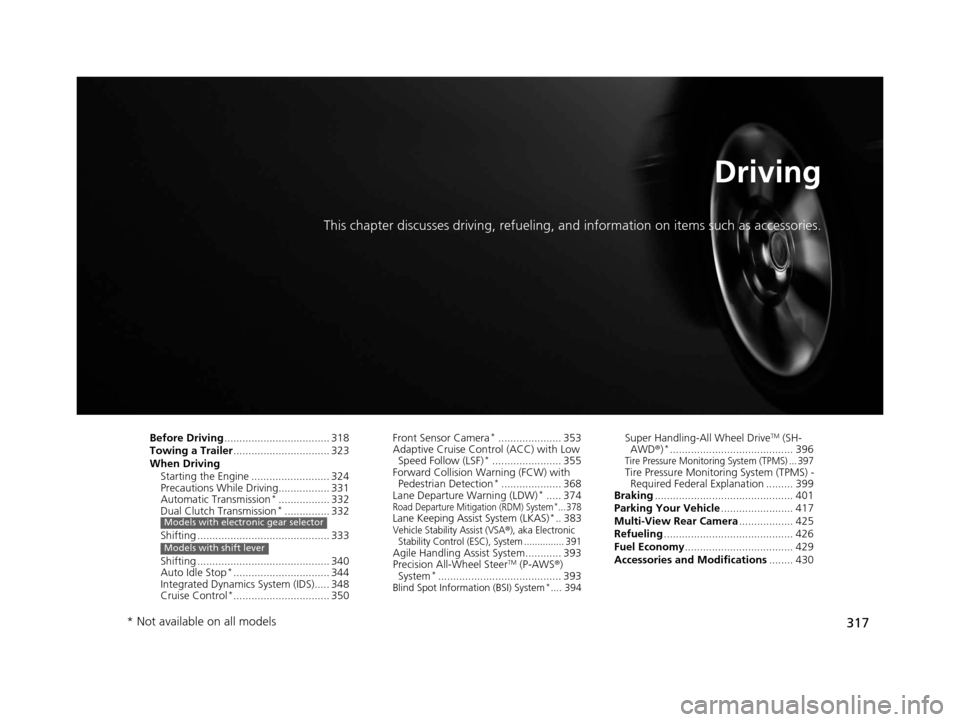
This chapter discusses driving, refueling, and information on items such as accessories.
Before Driving................................... 318
Towing a Trailer ................................ 323
When Driving
Starting the Engine .......................... 324
Precautions While Driving................. 331
Automatic Transmission
*................. 332
Dual Clutch Transmission*............... 332
Shifting ............................................ 333
Shifting ............................................ 340
Auto Idle Stop
*................................ 344
Integrated Dynamics System (IDS)..... 348
Cruise Control
*................................ 350
Models with electronic gear selector
Models with shift lever
Front Sensor Camera*..................... 353
Adaptive Cruise Control (ACC) with Low
Speed Follow (LSF)
*....................... 355
Forward Collision Warning (FCW) with Pedestrian Detection
*.................... 368
Lane Departure Warning (LDW)*..... 374Road Departure Mitigation (RDM) System*... 378Lane Keeping Assist System (LKAS)*.. 383Vehicle Stability Assist (VSA®), aka Electronic
Stability Control (ESC), System ............... 391
Agile Handling Assist System............ 393
Precision All-Wheel SteerTM (P-AWS ®)
System*......................................... 393Blind Spot Information (BSI) System*.... 394
Super Handling-All Wheel DriveTM (SH-
AWD® )*......................................... 396Tire Pressure Monitoring System (TPMS) ... 397Tire Pressure Monitoring System (TPMS) -
Required Federal Explanation ......... 399
Braking .............................................. 401
Parking Your Vehicle ........................ 417
Multi-View Rear Camera .................. 425
Refueling ........................................... 426
Fuel Economy .................................... 429
Accessories and Modifications ........ 430
* Not available on all models
16 ACURA TLX-31TZ36100.book 317 ページ 2015年8月26日 水曜日 午後1時54分