brake Acura TLX 2017 User Guide
[x] Cancel search | Manufacturer: ACURA, Model Year: 2017, Model line: TLX, Model: Acura TLX 2017Pages: 75, PDF Size: 10.99 MB
Page 46 of 75

84 || 85
DRIVING
DRIVING
Cruise Control*
Maintain a constant vehicle speed without having to keep your foot on the
accelerator pedal. Use cruise control on freeways or open roads where you can
travel at a constant speed with little acceleration or deceleration.
Improper use of cruise control can lead to a crash.
Use cruise control only when traveling on open highways in good weather.
WARNING
Setting the Vehicle Speed1.
Press the CRUISE button. The CRUISE MAIN
indicator appears.
2.
Accelerate to the desired speed (above 25 mph/40
km/h). Take your foot off the pedal and press
the SET/- switch to set the speed. The CRUISE
CONTROL indicator appears.
Adjusting the Vehicle Speed Press the RES/+ switch to increase speed, or the
SET/- switch to decrease speed.
Each time you press the button, the vehicle speed is
increased or decreased by about 1 mph (1.6 km/h).
If you keep the button pressed, the vehicle speed
increases or decreases until you release it.
Canceling Cruise ControlPress either the CANCEL button or the CRUISE
button, or the brake pedal. The CRUISE CONTROL
indicator goes off.
After cruise control has been canceled, you can still
resume the prior set speed by pressing RES/+ while
driving at a speed of at least 25 mph (40 km/h).
Press the CRUISE button to turn the system off.
CRUISE button
RES/+ button
SET/- button
CANCEL button
Econ: Maximiz es fuel efficiency .
Normal: Balances fuel efficiency and sportiness for everyday driving.
Sport : Enhances vehicle r esponse and feel through decreased steering assist and
incr eased thr ottle response.
Sport+: Adds to Sport mode and allows incr eased performance when using paddle
shifters (see page 7 8 or page 80).
Vehicle Stability Assist (VSA®)
Also known as Electr onic Stability Contr ol (ESC ), VSA helps to stabilize the vehicle
during cornering if the vehicle turns mor e or less than what was intended. It assists
in maintaining traction on slippery surfaces b y regulating engine output and
selectiv ely appl ying the brak es.
Turning VSA On or Off
VSA is turned on every time y ou turn on the vehicle. If you turn VSA off, your
v ehicle has normal braking and cornering ability , but VSA traction and stability
enhancement become less effectiv e.
Pr ess and hold the VSA
OFF button until you
hear a beep to turn VSA on or off . The VSA OFF
indicator appears when the system is off.
T raction contr ol stops functioning , which
allows the wheels to spin mor e freel y at low
speed. This can be helpful when trying to free
y our vehicle if it is stuck in mud or snow.
Integrated Dynamics System (IDS)
Choose a driving mode for your pr eference based on road conditions, vehicle speed,
and handling.
VSA OFF
button VSA OFF
indicator
The selected mode
briefly appears
in the multi-
information display.
Press IDS to
cycle through
modes.
*if equipped
Page 47 of 75

86 || 87
DRIVING
DRIVING
When in Operation
If a vehicle detected ahead of you slows down
abruptly, or if another vehicle cuts in front of you,
a beep sounds and BRAKE appears on the multi-
information display to alert you.
When a vehicle detected ahead is within ACC with
low speed follow range and stops, your vehicle also
stops. The Stopped message appears on the multi-
information display.
When the vehicle ahead of you starts again, the vehicle icon on the multi-
information display blinks. Press RES/+/SET/– up or down, or press the
accelerator pedal to resume the prior set speed.
Canceling ACCYou can press either the CANCEL button or the
CRUISE button, or press the brake pedal. The ACC
indicator goes off.
Certain conditions may cause ACC
to cancel
automaticall
y. When this happens, a beep sounds
and a message appears on the multi-information
display.
After cruise control has been canceled, you can still resume the prior set speed by
pressing the RES/+ switch.
Press the MAIN button to turn the system off.
Improper use of ACC with LSF can lead to a crash.
Use ACC with LSF only when driving on expressways or freeways and in good
weather conditions.
WARNING
Exiting a vehicle that has been stopped while the ACC with LSF system is
operating can result in the vehicle moving without operator control. Always
make sure Park (P) is selected before exiting the vehicle.
A vehicle that moves without operator control can cause a crash, resulting in
serious injury or death.
Never exit a vehicle when the vehicle is stopped by ACC with LSF.
WARNING
ACC with LSF has limited braking capability and may not stop your vehicle in
time to avoid a collision with a vehicle that quickly stops in front of you.
Always be prepared to apply the brake pedal if the conditions require.
WARNING
Adaptive Cruise Control (ACC) with Low Speed Follow (LSF)*
Helps maintain a constant vehicle speed and a set following interval behind a
vehicle detected ahead of yours. When the vehicle ahead changes speed, ACC
senses the change and accelerates or decelerates to maintain a set interval.
Activating and Setting the Vehicle Speed
1. Press the MAIN button. The ACC indicator appears.
2.
A
ccelerate to the desired speed.
Above 25 mph (40 km/h): Take your foot off the
pedal and press RES/+/SET/- to set the speed.
Below 25 mph (40 km/h) (Low Speed Follow):
Press SET/- to set the speed at 25 mph (40 km/h).
Adjusting the Vehicle Speed
Press the RES/+ switch to increase speed, or the
SET/- switch to decrease speed.
Each time you press the switch up or down, the
vehicle speed is increased or decreased by about
1 mph (1 km/h). If you keep the switch pressed up
or down, the vehicle speed increases or decreases
by 5 mph or 5 km/h until you release it.
Adjusting the Following Interval Press the Interval button to change the following
interval. Each time you press the button, the
following interval setting cycles through short,
middle, long, and extra long following intervals.
Switching to Standard Cruise ControlPress and hold the Interval button.
Interval Short Middle LongExtra Long
Approx.
Gap
(seconds) 1 .1
1.5 2 .12.8
MAIN button
RES/+ switch
SET/- switch
CANCEL button
INTERVAL button
*if equipped
Page 48 of 75

88 || 89
DRIVING
DRIVING
Lane Departure Warning (LDW)*
A camera mounted between the windshield and the rearview mirror determines if
your vehicle begins to move away from the center of a detected lane while driving
between 45–90 mph (72–145 km/h).
If you cross a detected lane line
without using the turn signal, a
message appears in the MID and a
beep sounds continuously.
Turning LDW On or Off
Press the LDW button to turn the system on or off.
A green indicator light appears on the button when
the system is on.
Important Safety Reminder
Like all assistance systems, LDW has limitations. Over-reliance on LDW may result
in a collision. It is always your responsibility to keep the vehicle within your lane.
LDW only alerts you when lane drift is detected without a turn signal in use. LDW
may not detect all lane markings or lane departures; accuracy will vary based on
weather, speed, and lane marker condition. It is always your responsibility to safely
operate the vehicle and avoid collisions.
Lane departure
message
Audible
beep
LDW
button Indicator
*if equipped
Forward Collision Warning (FCW) with Pedestrian Detection*
Warns you if the system determines there is likelihood of a frontal collision when
a vehicle is detected in front of you when your vehicle speed is 10 mph (15 km/h)
or higher, or a pedestrian is detected in front of you when your vehicle speed is
between 10–62 mph (15–100 km/h).
If you do not brake in time or
take preventive action, a visual
warning flashes, BRAKE flashes
in the MID, and a beep sounds
continuously.
Changing Settings
Determine the warning timing, or turn the system off. Use the interface dial to
make selections.
1.
Pr
ess the SETTINGS button.
2.
Select
Vehicle Settings. The vehicle must be in
Park (P).
3.
Select F
orward Collision Warning Distance.
4.
Select Long
, Normal (default), Short, or Off.
5.
Pr
ess BACK to exit the menu.
Important Safety Reminder
FCW cannot detect all pedestrians and vehicles ahead; accuracy of the system will
vary based on weather, speed, extreme interior heat, and other factors. FCW does
not include a braking function. It is always your responsibility to safely operate the
vehicle and avoid collisions.
BRAKE message
Audible
beep Visual warning
*if equipped
Page 49 of 75

90 || 91
DRIVING
DRIVING
Collision Mitigation Braking System™ (CMBS™)*
Can alert you when a potential frontal collision with a vehicle or pedestrian is
determined and reduce your vehicle speed when a collision is deemed unavoidable
to help minimize collision severity.
The system provides visual,
audible and tactile alerts if you
do not take appropriate action
to avoid a collision.
Alert Stages
The system has three alert stages for a possible collision. Depending on the
circumstances or CMBS settings, CMBS may not go through all of the stages
before initiating the last stage.
Stage 1:
Visual warnings
and audible warnings, steering wheel vibration
Stage 2:
Visual
warnings, audible warning, light seat belt retraction*,
and light brak
e application
Stage 3:
Visual
warnings, audible warning, strong seat belt retraction*,
and str
ong brake application
Turning CMBS On or OffPress and hold the CMBS OFF button. A message
appears in the MID, and the CMBS indicator
appears when the system is off.
Changing SettingsSee page 88 for how to change CMBS settings. Options include Long, Normal
(default), and Short. Use the CMBS OFF button to turn the system off.
Important Safety Reminder
CMBS is designed to help avoid collisions by automatically stopping the vehicle
when possible, and to reduce the severity of an unavoidable collision. It is still
your responsibility to operate the brake pedal and steering wheel appropriately
according to the driving conditions.
BRAKE message
Audible
beep Visual warning
*if equipped
Lane Keeping Assist System (LKAS)*
A camera mounted between the windshield and the rearview mirror determines if
your vehicle begins to move away from the center of a detected lane while driving
between 45–90 mph (72–145 km/h).
If you cross a detected lane line
without using your turn signal, a
message appears on the MID and
a beep sounds.
Light steering torque and
vibrations are applied to keep
your vehicle in the middle of the
lane.
Turning LKAS On or Off
1.
Pr
ess MAIN. LKAS appears in the MID.
2.
Pr
ess the LKAS button. Lane outlines appear
in the MID. Dotted lane lines turn solid when
the system operates.
3.
Pr
ess MAIN or the LKAS button to turn the
system off.
Important Safety Reminder
The LKAS is for your convenience only. It is not a substitute for your vehicle control.
The system does not work if you take your hands off the steering wheel or fail to
steer the vehicle.
Do not place an object on the top of the instrument panel. It may reflect onto the
windshield and prevent the system from detecting lane lines properly.
Lane departure
message
Audible
beep Steering assistance
*if equipped
Vibration
Page 50 of 75

92 || 93
DRIVING
DRIVING
Blind Spot Information (BSI)*
Alerts you to a detected vehicle in your left or right blind spot.
When a vehicle is detected in your blind spot, the
blind spot indicator turns on and stays lit until the
area is clear.
When your turn signal is on and a vehicle is detected,
the blind spot indicator blinks and a beep sounds until
the area is clear or the turn signal is off.
Changing Settings
Change the alert type, or turn the system on or off. Use the interface dial to make
selections.
1.
Pr
ess the SETTINGS button.
2.
Select
Vehicle Settings. The vehicle must be in
Park (P).
3.
Select Blind
Spot Info.
4.
Select
an alert type, or Off.
5.
Pr
ess the BACK button to exit the menu.
Important Safety Reminder
Like all assistance systems, BSI has limitations. Over-reliance on BSI may result in a
collision. The system is for your convenience only.
Failure to visually confirm that it is safe to change lanes before doing so may
result in a crash and serious injury or death. Do not rely only on the blind
spot information system when changing lanes.
Always look in your mirrors, to either side of your vehicle, and behind you for
other vehicles before changing lanes.
WARNING
BSI alert
indicator
*if equipped
Road Departure Mitigation (RDM)*
A camera mounted between the windshield and the rearview mirror determines
if your vehicle begins to cross over detected lane markings while driving between
45–90 mph (72–145 km/h).
If you get too close to a
detected lane line without
using your turn signal, a
message appears in the MID.
Steering wheel torque and
vibrations are applied to help
your vehicle stay in the lane.
Braking may also be applied
if the lane lines are solid and
continuous.
Turning the System On or Off Press the RDM button to turn the system on or
off. A green indicator appears on the button
when the system is on.
Changing SettingsDetermine the warning timing, or turn the system off. Use the interface dial to
make selections.
1.
Pr
ess the SETTINGS button.
2.
Select
Vehicle Settings. The vehicle must
be in Park (P).
3.
Select R
oad Departure Mitigation Setting.
4.
Select
from the options.
Normal (default): Steering control starts from inside the lane edge.
Wide: Steering control starts from outside the lane edge.
Warning Only: The system only provides a BRAKE message, but does not apply
steering or braking.
5.
Pr
ess the BACK button to exit the menu.
Important Safety Reminder
The system has limitations. Over-reliance on it may result in a collision. It is always
your responsibility to keep your vehicle within the driving lane.
Lane departure
message
Audible
beep Visual warning
*if equipped
Page 51 of 75

94 || 95
DRIVING
DRIVING
Multi-View Rear Camera
When you shift into Reverse (R), a real-time image of the area behind your vehicle
is shown in the display, along with helpful parking guidelines.
The rear camera view is restricted. You cannot see the corner ends of the bumper or what is underneath
the bumper. Its unique lens also makes objects appear closer or farther than they actually are.
Visually confirm that it is safe to drive before backing up. Certain conditions (such as weather, lighting,
and high temperatures) may also restrict the rear view. Do not rely on the rearview display, which does
not give you all information about conditions at the rear of your vehicle.
Wide view Normal view Top down view
Changing Guidelines
1.
Pr
ess the SETTINGS button.
2.
Select Camera
Settings.
3.
Select
Rear Camera.
4.
Select one of the options.
Fixed Guideline: Guidelines appear when you
shift into Reverse. Select On or Off.
Dynamic Guideline: Guidelines move as you turn
the steering wheel. Select On or Off.
5.
Pr
ess the BACK button to exit the menu.
Press the
interface dial
to toggle
between
views.
Parking Sensor System*
When the system senses an object when you are parking or backing up, an indicator
appears on the upper display and a series of beeps will sound. As you get closer to
the object, the beep rate increases.
Turning the System On or OffPress the parking sensor button. A green indicator
light appears on the button when the system is on.
*if equipped
Display indicators
Parking sensor button
Do not continuously spin the front tires of your vehicle. Continuously spinning
the front tires can cause damage to the transmission and SH-AWD unit.
If the SH-AWD light blinks while driving, it indicates the differential temperature
is too high. If this happens, pull to the side of the road when it is safe, shift to
park, and idle the engine until the indicator goes out.
NOTICE
Super Handling-All Wheel Drive (SH-AWD)*
Controls and transfers varying amounts of engine torque to each wheel depending
on driving conditions.
SH-AWD helps enhance stability in driving situations involving slippery surfaces,
such as on wet, icy, or snowy roads. The system does not help enhance braking. It is
still your responsibility to drive safely when you steer, accelerate, and apply brakes.
Leave sufficient distance in front of you when braking on slippery surfaces.
Page 53 of 75
98 || 99
HANDLING THE UNEXPECTED
DRIVING
HANDLING THE UNEXPECTED
Learn about what to do in critical or emergency situations.
Keyless Access Remote Battery Strength
If the battery life in your keyless access remote is weak, a message appears in the
MID with information on how to start the engine.
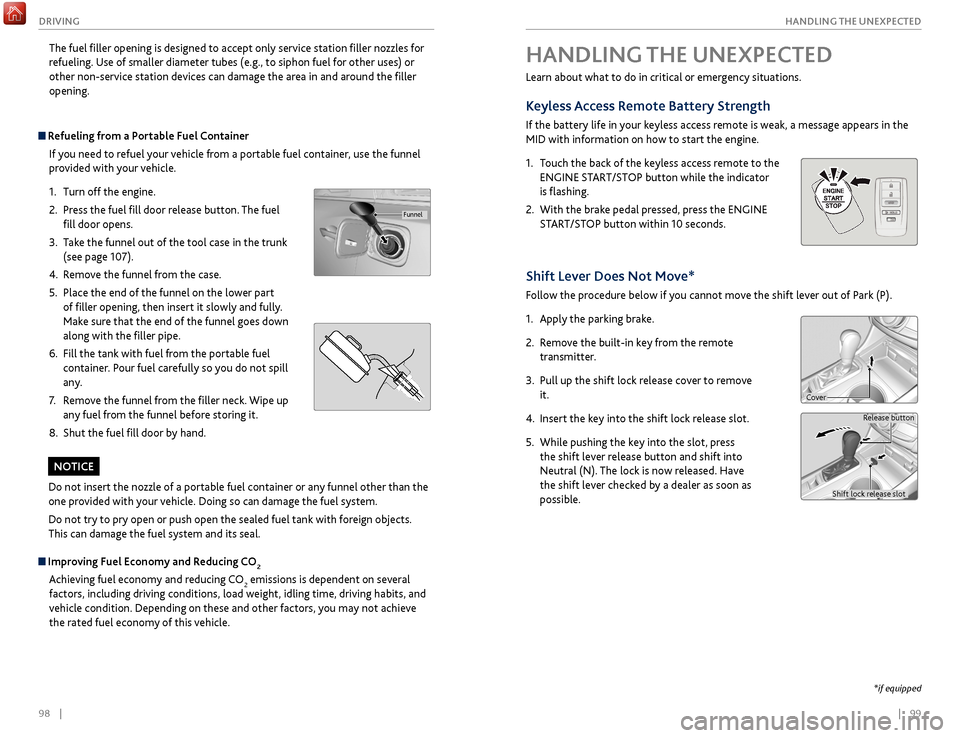
1.
T
ouch the back of the keyless access remote to the
ENGINE START/STOP button while the indicator
is flashing.
2.
With
the brake pedal pressed, press the ENGINE
START/STOP button within 10 seconds.
Shift Lever Does Not Move*
Follow the procedure below if you cannot move the shift lever out of Park (P).
1.
Appl
y the parking brake.
2.
R
emove the built-in key from the remote
transmitter.
3.
Pull up
the shift lock release cover to remove
it.
4.
Insert
the key into the shift lock release slot.
5.
While pushing
the key into the slot, press
the shift lever release button and shift into
Neutral (N). The lock is now released. Have
the shift lever checked by a dealer as soon as
possible.
Release button
Shift lock release slot
Cover
*if equipped
The fuel filler opening is designed to accept only service station filler nozzles for
refueling. Use of smaller diameter tubes (e.g., to siphon fuel for other uses) or
other non-service station devices can damage the area in and around the filler
opening.
Refueling from a Portable Fuel Container If you need to refuel your vehicle from a portable fuel container, use the funnel
provided with your vehicle.
1.
Turn off the
engine.
2.
Pr
ess the fuel fill door release button. The fuel
fill door opens.
3.
T
ake the funnel out of the tool case in the trunk
(see page 107).
4.
R
emove the funnel from the case.
5.
Place the
end of the funnel on the lower part
of filler opening, then insert it slowly and fully.
Make sure that the end of the funnel goes down
along with the filler pipe.
6.
Fill
the tank with fuel from the portable fuel
container. Pour fuel carefully so you do not spill
any.
7.
R
emove the funnel from the filler neck. Wipe up
any fuel from the funnel before storing it.
8.
Shut
the fuel fill door by hand.
Funnel
Do not insert the nozzle of a portable fuel container or any funnel other than the
one provided with your vehicle. Doing so can damage the fuel system.
Do not try to pry open or push open the sealed fuel tank with foreign objects.
This can damage the fuel system and its seal.
NOTICE
Improving Fuel Economy and Reducing CO2
Achieving fuel economy and reducing CO
2 emissions is dependent on several
factors, including driving conditions, load weight, idling time, driving habits, and
vehicle condition. Depending on these and other factors, you may not achieve
the rated fuel economy of this vehicle.
Page 55 of 75

102 || 103
HANDLING THE UNEXPECTED
HANDLING THE UNEXPECTED
Emergency Engine Stop
The ENGINE START/STOP button may be used to stop the engine due to an
emergency situation even while driving. If you must stop the engine, choose one of
the following operations:
•
Pr
ess and hold the ENGINE START/STOP button for
two seconds, or
•
Firml
y press the ENGINE START/STOP button two
times.
The steering wheel will not lock. The power mode changes to ACCESSORY, unless
the shift lever is in Park, in which case the power mode changes to VEHICLE OFF.
Because turning off the engine also disables the power assist the engine provides to
the steering and braking systems, it will require significantly more physical effort
and time to steer and slow the vehicle. Downshift gears and use both feet on the
brake pedal, if necessary, to slow the vehicle and stop immediately in a safe place.
Do not press the button while driving unless it is absolutely necessary for the
engine to be switched off.
Emergency Towing
Call a professional towing service if you need to tow your vehicle.
All models
Flat bed equipment: The operator loads your vehicle on the back of a truck. This is
the best way to transport your vehicle.
2WD models
Wheel lift equipment: The tow truck uses two pivoting arms that go under the front
tires and lift them off the ground. The rear tires remain on the ground. This is an
acceptable way to tow your vehicle.
NOTICE
Trying to lift or tow your vehicle by the bumpers will cause serious damage. The
bumpers are not designed to support the vehicle’s weight.
Improper towing such as towing behind a motorhome or other motor vehicle can
damage the transmission.
NOTICE
Overheating
Signs your engine is overheating: •
The
temperature gauge needle is at the H mark
•
The engine suddenl
y loses power
•
Steam
or spray comes out from under the hood
•
The message
Engine Temperature Too Hot appears on the display.
1.
Immediatel
y park the vehicle in a safe place. Turn
off all accessories and turn on the hazard warning
lights.
2.
If no steam
or spray is present: Keep the
engine running and open the hood (see page
118).
If steam or spray is present: Turn off the engine
and wait until it subsides. Then, open the hood
(see page 118).
3.
Check that the
cooling fan is operating and stop the engine once the
temperature gauge needle goes down. If the cooling fan is not operating,
immediately stop the engine.
4.
Once
the engine has cooled down, inspect the coolant level and check the
cooling system components for leaks. If the coolant level in the reserve tank
is low, add coolant until it reaches the MAX mark. If there is no coolant in the
reserve tank, make sure the radiator is cool, then cover the radiator cap with a
heavy cloth and open the cap. If necessary, add coolant up to the base of the
filler neck, and put the cap back on.
Once the engine has cooled sufficiently, restart it and check the temperature
gauge. If the temperature needle has gone down, resume driving. If it has not gone
down, contact a dealer for repairs.
Reserve tank MAX
MIN
Steam and spray from an overheated engine can seriously scald you.
Do not open the hood if steam is coming out.
WARNING
Removing the radiator cap while the engine is hot can cause the coolant to
spray out, seriously scalding you.
Always let the engine and radiator cool down before removing the radiator
cap.
WARNING
Continuing to drive with the temperature gauge needle at the H mark may
damage the engine.
NOTICE
Page 57 of 75
106 || 107
HANDLING THE UNEXPECTED
HANDLING THE UNEXPECTED
Handling a Flat Tire
If a tire goes flat while driving, grasp the steering wheel firmly and brake gradually
to reduce speed. Stop in a safe place. After repairing or changing the flat as
appropriate, go to a dealer as soon as possible to have the damaged tire repaired or
replaced.
Tire Repair Kit*
If a tire has a small puncture, you can use the tire repair kit to temporarily repair it.
The puncture must be smaller than 3/16-inch (4 mm) and not in the tire sidewall.
Go to a dealer to have the full-size tire permanently repaired or replaced.
Before Repairing the Tire
1.
P
ark the vehicle on firm, level, and non-slippery
surface.
2.
Mak
e sure the vehicle is in Park (P), and apply
the parking brake.
3.
Turn on the
hazard warning lights, and turn the
vehicle off.
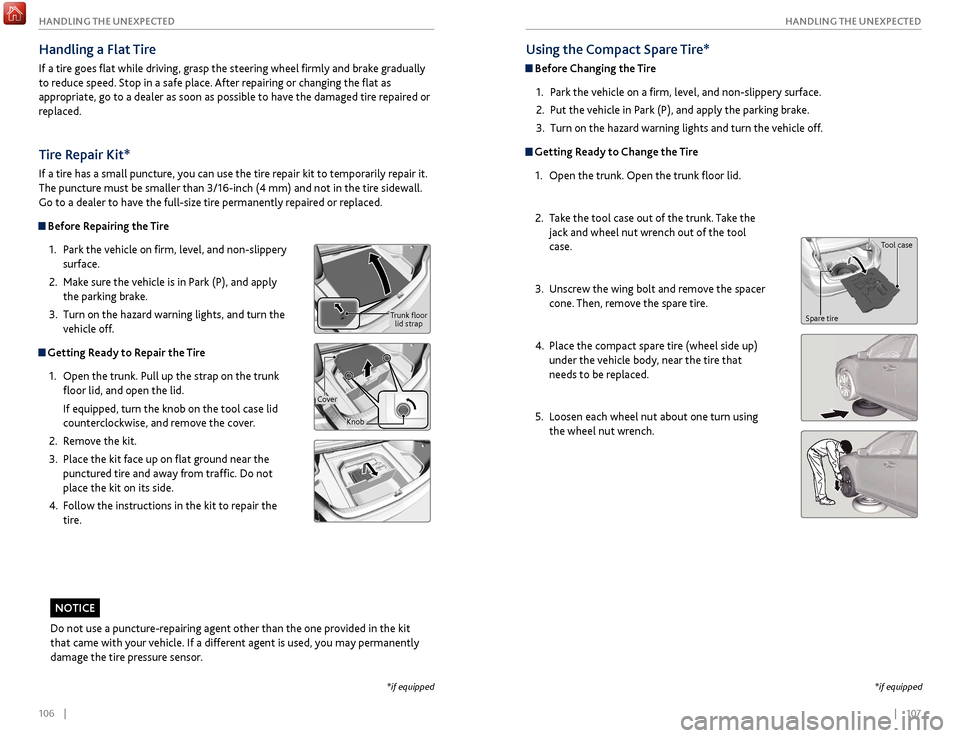
Getting Ready to Repair the Tire
1.
Open the trunk.
Pull up the strap on the trunk
floor lid, and open the lid.
If equipped, turn the knob on the tool case lid
counterclockwise, and remove the cover.
2.
R
emove the kit.
3.
Place
the kit face up on flat ground near the
punctured tire and away from traffic. Do not
place the kit on its side.
4.
F
ollow the instructions in the kit to repair the
tire.
Using the Compact Spare Tire*
Before Changing the Tire
1.
P
ark the vehicle on a firm, level, and non-slippery surface.
2.
Put
the vehicle in Park (P), and apply the parking brake.
3.
Turn on the
hazard warning lights and turn the vehicle off.
Getting Ready to Change the Tire1.
Open the trunk.
Open the trunk floor lid.
2.
T
ake the tool case out of the trunk. Take the
jack and wheel nut wrench out of the tool
case.
3.
Unscr
ew the wing bolt and remove the spacer
cone. Then, remove the spare tire.
4.
Place
the compact spare tire (wheel side up)
under the vehicle body, near the tire that
needs to be replaced.
5.
Loosen each
wheel nut about one turn using
the wheel nut wrench.
*if equipped
Tool case
Spare tire
*if equipped
Do not use a puncture-repairing agent other than the one provided in the kit
that came with your vehicle. If a different agent is used, you may permanently
damage the tire pressure sensor.
NOTICE
Trunk floor lid strap
Cover Knob
Page 59 of 75
110 || 111
HANDLING THE UNEXPECTED
HANDLING THE UNEXPECTED
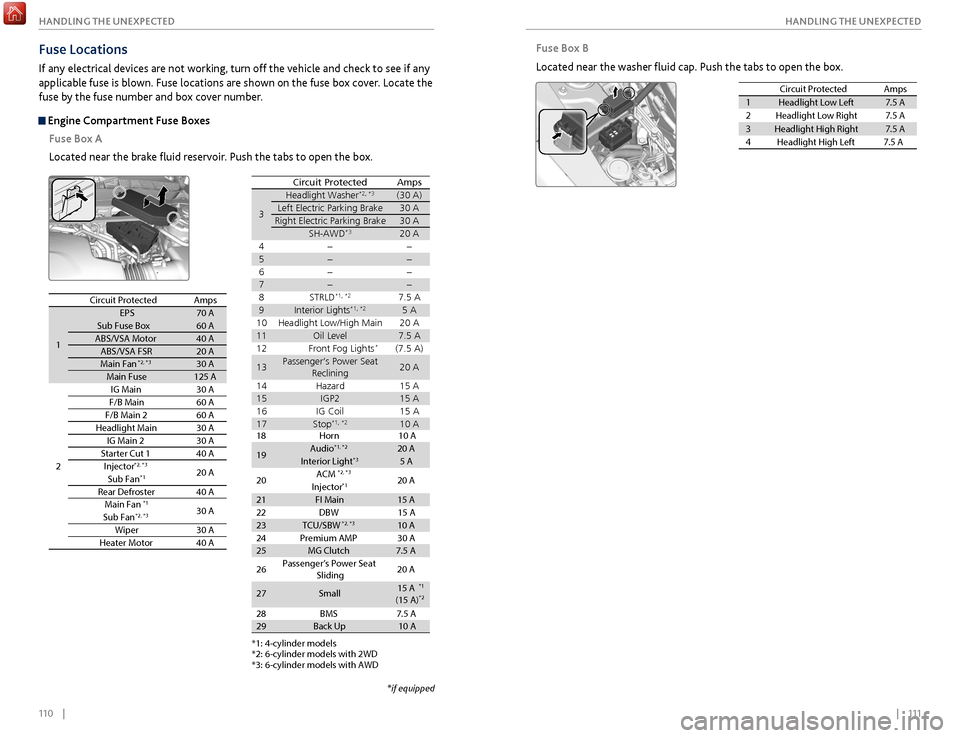
Fuse Box B
Located near the washer fluid cap. Push the tabs to open the box.
Circuit Protecte dAmps
1Headlight Low Left7.5 A
2Headlight Low Right7.5 A
3Headlight High Right7.5 A
4H eadlight High Left 7.5 A
Fuse Locations
If any electrical devices are not working, turn off the vehicle and check to see if any
applicable fuse is blown. Fuse locations are shown on the fuse box cover. Locate the
fuse by the fuse number and box cover number.
Engine Compartment Fuse Boxes
Fuse Box A
Located near the brake fluid reservoir. Push the tabs to open the box.
Circuit ProtectedAmps
1
EPS70 ASub Fuse Bo x60 AABS/VSA Motor40 AABS/VSA FSR20 AMain Fa n*2, *330 AMain Fuse125 A
2
IG Main30 AF/B Main60 AF/B Main 260 AHeadlight Main30 AIG Main 230 AStarter Cut 140 AInjector*2, *320 ASub Fan*1
Rear Defroster40 AMain Fan*130 ASub Fa n*2, *3
Wiper30 AHeater Motor40 A
*1: 4-cylinder model s
*2: 6-cylinder models with 2WD
*3: 6-cylinder models with AWD
3
Headlight Washer*2, *3(30 A)Left Electric Parking Brake30 ARight Electric Parking Brake30 ASH-AWD*3
4 5
6
7
8S TRLD*1, *27.5 A9Interior Lights*1, *25 A
10 Headlight Low/High Main 20 A
11Oil Level7.5 A
12 Front Fog Lights*(7.5 A)
13Passenger’s Power Seat
Reclinin g20 A
14 Hazard 15 A
15IGP215 A
16 IG Coil 15 A
17Stop*1, *210 A
Circuit ProtectedAmps
20 A
*if equipped
*1: 4-cylinder model s*2: 6-cylinder models with 2W D*3: 6-cylinder models with AW D
Circuit ProtectedAmps
18 Horn 10 A
19Audi o*1, *220 AInterior Light*35 A
20 ACM
20 A
Injecto r
*1
21FI Main15 A
22 DBW15 A23TCU/SBW*2, *310 A
24 Premium AMP 30 A
25MG Clutch7.5 A
26 Passenger’s Power Seat
Sliding 20
A
27Small15 A
28 BMS 7.5 A
29Back Up10 A
*2, *3
(15 A)
*1
*2