warning Acura TLX 2017 User Guide
[x] Cancel search | Manufacturer: ACURA, Model Year: 2017, Model line: TLX, Model: Acura TLX 2017Pages: 75, PDF Size: 10.99 MB
Page 19 of 75
30 || 31
VEHICLE CONTROLS
VEHICLE CONTROLS
Closing a power window on someone’s hands or fingers can cause serious
injury.
Make sure your passengers are away from the windows before closing them.
WARNING
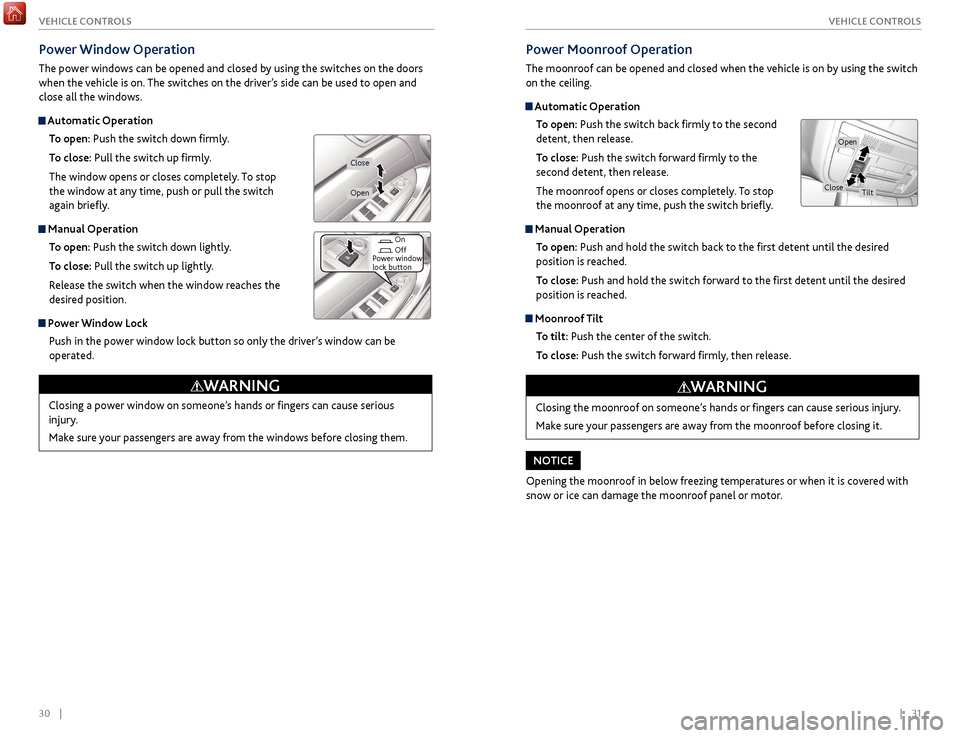
Power Window Operation
The power windows can be opened and closed by using the switches on the doors
when the vehicle is on. The switches on the driver’s side can be used to open and
close all the windows.
Automatic Operation
To open: Push the switch down firmly.
To close: Pull the switch up firmly.
The window opens or closes completely. To stop
the window at any time, push or pull the switch
again briefly.
Manual Operation To open: Push the switch down lightly.
To close: Pull the switch up lightly.
Release the switch when the window reaches the
desired position.
Power Window Lock Push in the power window lock button so only the driver’s window can be
operated.
Power Moonroof Operation
The moonroof can be opened and closed when the vehicle is on by using the switch
on the ceiling.
Automatic OperationTo open: Push the switch back firmly to the second
detent, then release.
To close: Push the switch forward firmly to the
second detent, then release.
The moonroof opens or closes completely. To stop
the moonroof at any time, push the switch briefly.
Manual Operation
To open: Push and hold the switch back to the first detent until the desired
position is reached.
To close: Push and hold the switch forward to the first detent until the desired
position is reached.
Moonroof Tilt
To tilt: Push the center of the switch.
To close: Push the switch forward firmly, then release.
Closing the moonroof on someone’s hands or fingers can cause serious injury.
Make sure your passengers are away from the moonroof before closing it.
WARNING
Opening the moonroof in below freezing temperatures or when it is covered with
snow or ice can damage the moonroof panel or motor.
NOTICE
Open
CloseTilt
On
Off
Power window
lock button
Open
Close
Page 21 of 75
34 || 35
V EHICLE C ONTROLS
V
EHICLE C ONTROLS
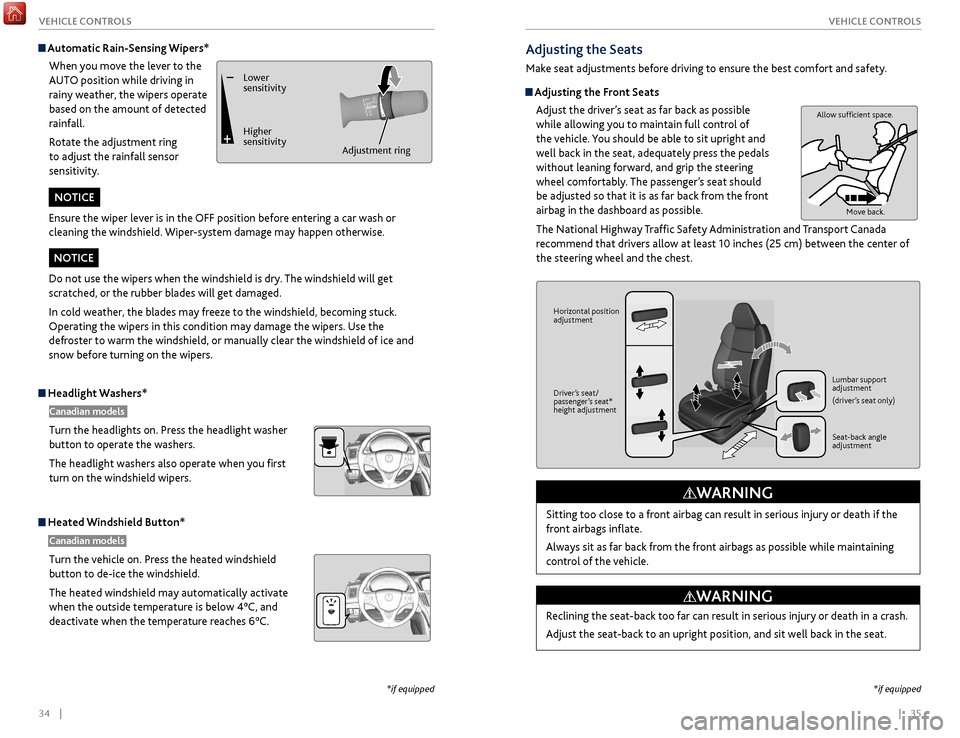
Headlight Washers*
Canadian models
Turn the headlights on. Press the headlight washer
button to operate the washers.
The headlight washers also operate when you first
turn on the windshield wipers.
Heated Windshield Button*
Canadian models
Turn the vehicle on. Press the heated windshield
button to de-ice the windshield.
The heated windshield may automatically activate
when the outside temperature is below 4°C, and
deactivate when the temperature reaches 6°C.
*if equipped
*if equipped
Adjusting the Seats
Make seat adjustments before driving to ensure the best comfort and safety.
Adjusting the Front Seats
Adjust the driver’s seat as far back as possible
while allowing you to maintain full control of
the vehicle. You should be able to sit upright and
well back in the seat, adequately press the pedals
without leaning forward, and grip the steering
wheel comfortably. The passenger’s seat should
be adjusted so that it is as far back from the front
airbag in the dashboard as possible.
The National Highway Traffic Safety Administration and Transport Canada
recommend that drivers allow at least 10 inches (25 cm) between the center of
the steering wheel and the chest.
Sitting too close to a front airbag can result in serious injury or death if the
front airbags inflate.
Always sit as far back from the front airbags as possible while maintaining
control of the vehicle.
WARNING
Allow sufficient space. Move back.
Horizontal position
adjustment
Driver’s seat/
passenger’s seat*
height adjustment Lumbar support
adjustment
(driver’s seat only)
Seat-back angle
adjustment
Reclining the seat-back too far can result in serious injury or death in a crash.
Adjust the seat-back to an upright position, and sit well back in the seat.
WARNING
Automatic Rain-Sensing Wipers*
When you move the lever to the
AUTO position while driving in
rainy weather, the wipers operate
based on the amount of detected
rainfall.
Rotate the adjustment ring
to adjust the rainfall sensor
sensitivity.
Lower
sensitivity
Higher
sensitivity Adjustment ring
Ensure the wiper lever is in the OFF position before entering a car wash or
cleaning the windshield. Wiper-system damage may happen otherwise.
NOTICE
Do not use the wipers when the windshield is dry. The windshield will get
scratched, or the rubber blades will get damaged.
In cold weather, the blades may freeze to the windshield, becoming stuck.
Operating the wipers in this condition may damage the wipers. Use the
defroster to warm the windshield, or manually clear the windshield of ice and
snow before turning on the wipers.
NOTICE
Page 22 of 75
36 || 37
V EHICLE C ONTROLS
V
EHICLE C ONTROLS
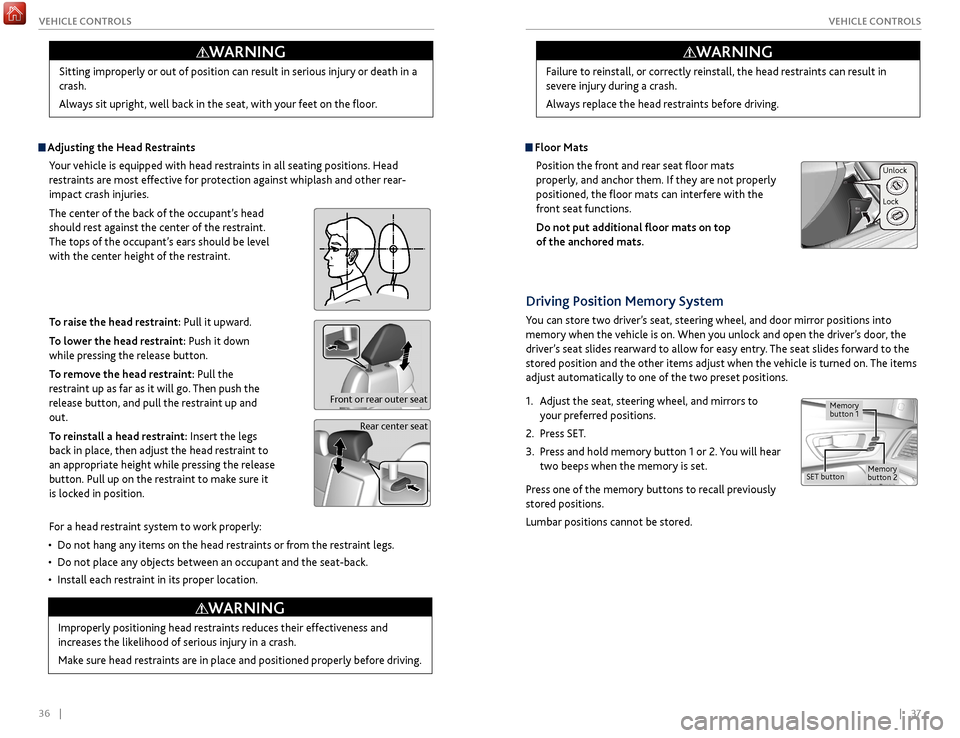
Adjusting the
Head Restraints
Your vehicle is equipped with head restraints in all seating positions. Head
restraints are most effective for protection against whiplash and other rear-
impact crash injuries.
The center of the back of the occupant’s head
should rest against the center of the restraint.
The tops of the occupant’s ears should be level
with the center height of the restraint.
To raise the head restraint: Pull it upward.
To lower the head restraint: Push it down
while pressing the release button.
To remove the head restraint: Pull the
restraint up as far as it will go. Then push the
release button, and pull the restraint up and
out.
To reinstall a head restraint: Insert the legs
back in place, then adjust the head restraint to
an appropriate height while pressing the release
button. Pull up on the restraint to make sure it
is locked in position.
For a head restraint system to work properly:
•
Do not hang an
y items on the head restraints or from the restraint legs.
•
Do not place an
y objects between an occupant and the seat-back.
•
Install each r
estraint in its proper location.
Sitting improperly or out of position can result in serious injury or death in a
crash.
Always sit upright, well back in the seat, with your feet on the floor.
WARNING
Rear center seat
Front or rear outer seat
Improperly positioning head restraints reduces their effectiveness and
increases the likelihood of serious injury in a crash.
Make sure head restraints are in place and positioned properly before driving.
WARNING
Failure to reinstall, or correctly reinstall, the head restraints can result in
severe injury during a crash.
Always replace the head restraints before driving.
WARNING
Floor Mats
Position the front and rear seat floor mats
properly, and anchor them. If they are not properly
positioned, the floor mats can interfere with the
front seat functions.
Do not put additional floor mats on top
of the anchored mats.
Unlock
Lock
Driving Position Memory System
You can store two driver’s seat, steering wheel, and door mirror positions into
memory when the vehicle is on. When you unlock and open the driver’s door, the
driver’s seat slides rearward to allow for easy entry. The seat slides forward to the
stored position and the other items adjust when the vehicle is turned on. The items
adjust automatically to one of the two preset positions.
1.
A
djust the seat, steering wheel, and mirrors to
your preferred positions.
2.
Pr
ess SET.
3.
Pr
ess and hold memory button 1 or 2. You will hear
two beeps when the memory is set.
Press one of the memory buttons to recall previously
stored positions.
Lumbar positions cannot be stored.
Memory
button 1
Memory
button 2SET button
Page 23 of 75
38 || 39
V EHICLE C ONTROLS
V
EHICLE C ONTROLS
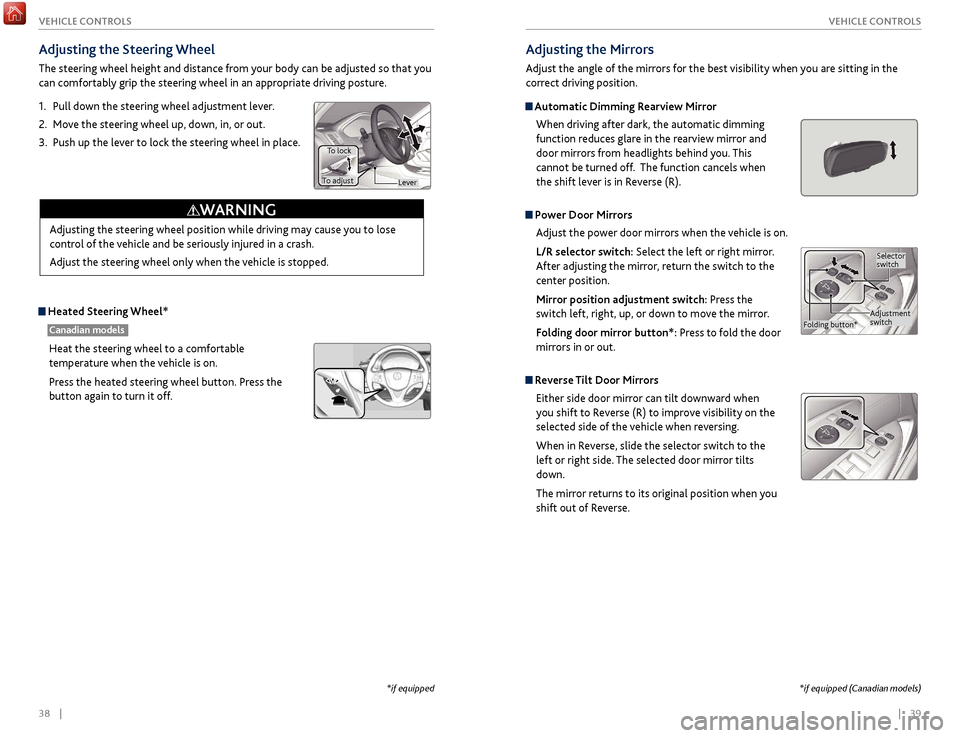
Adjusting the
Steering Wheel
The steering wheel height and distance from your body can be adjusted so that you
can comfortably grip the steering wheel in an appropriate driving posture.
1.
Pull
down the steering wheel adjustment lever.
2.
Mo
ve the steering wheel up, down, in, or out.
3.
Push up
the lever to lock the steering wheel in place.
Heated Steering Wheel*
Canadian models
Heat the steering wheel to a comfortable
temperature when the vehicle is on.
Press the heated steering wheel button. Press the
button again to turn it off.
Adjusting the steering wheel position while driving may cause you to lose
control of the vehicle and be seriously injured in a crash.
Adjust the steering wheel only when the vehicle is stopped.
WARNING
Lever
To lock
To adjust
*if equipped
Adjusting the Mirrors
Adjust the angle of the mirrors for the best visibility when you are sitting in the
correct driving position.
Automatic Dimming Rearview Mirror
When driving after dark, the automatic dimming
function reduces glare in the rearview mirror and
door mirrors from headlights behind you. This
cannot be turned off. The function cancels when
the shift lever is in Reverse (R).
Power Door MirrorsAdjust the power door mirrors when the vehicle is on.
L/R selector switch: Select the left or right mirror.
After adjusting the mirror, return the switch to the
center position.
Mirror position adjustment switch: Press the
switch left, right, up, or down to move the mirror.
Folding door mirror button*: Press to fold the door
mirrors in or out.
Reverse Tilt Door MirrorsEither side door mirror can tilt downward when
you shift to Reverse (R) to improve visibility on the
selected side of the vehicle when reversing.
When in Reverse, slide the selector switch to the
left or right side. The selected door mirror tilts
down.
The mirror returns to its original position when you
shift out of Reverse.
Adjustment
switch Selector
switch
Folding button*
*if equipped (Canadian models)
Page 25 of 75
42 || 43
V EHICLE C ONTROLS
V
EHICLE C ONTROLS
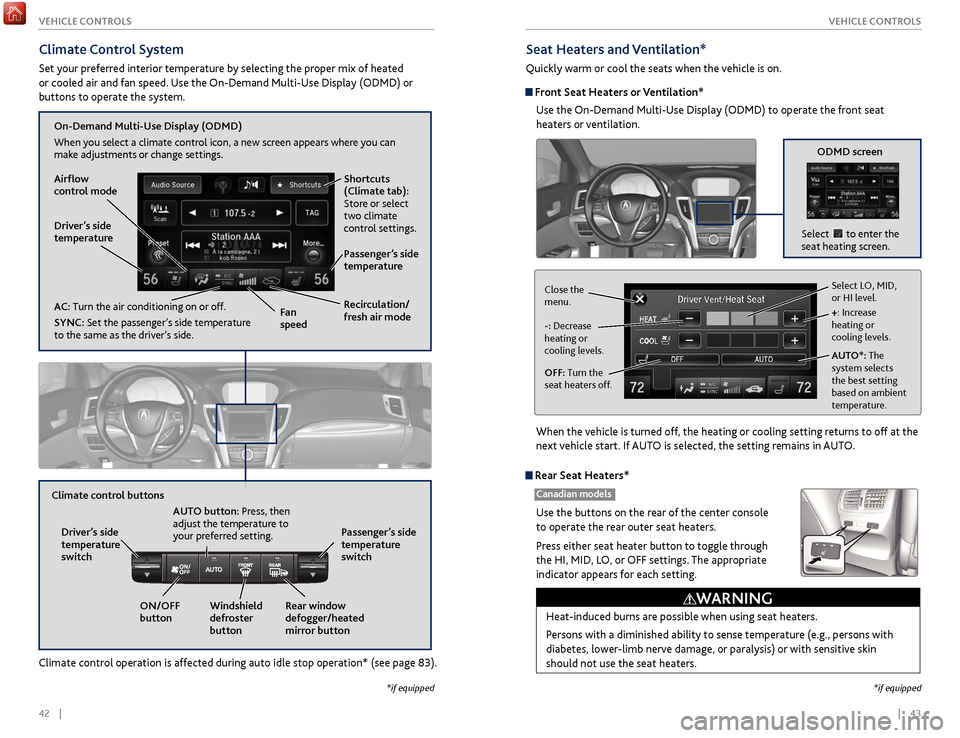
Climate Control System
Set your preferred interior temperature by selecting the proper mix of heated
or cooled air and fan speed. Use the On-Demand Multi-Use Display (ODMD) or
buttons to operate the system.
Climate control operation is affected during auto idle stop operation* (see page 83).
Recirculation/
fresh air mode
Driver’s side
temperature
On-Demand Multi-Use Display (ODMD)
When you select a climate control icon, a new screen appears where you can
make adjustments or change settings.
Airflow
control mode
AC: Turn the air conditioning on or off.
SYNC:
Set the passenger’s side temperature
to the same as the driver’s side. Fan
speedPassenger’s side
temperature Shortcuts
(Climate tab):
Store or select
two climate
control settings.
Windshield
defroster
button
Driver’s side
temperature
switch
Climate control buttons
ON/OFF
buttonAUTO button: Press, then
adjust the temperature to
your preferred setting.
Rear window
defogger/heated
mirror buttonPassenger’s side
temperature
switch
Seat Heaters and Ventilation*
Quickly warm or cool the seats when the vehicle is on.
Front Seat Heaters or Ventilation*
Use the On-Demand Multi-Use Display (ODMD) to operate the front seat
heaters or ventilation.
When the vehicle is turned off, the heating or cooling setting returns to off at the
next vehicle start. If AUTO is selected, the setting remains in AUTO.
*if equipped *if equipped
ODMD screen
Select to enter the
seat heating screen.
Select LO, MID,
or HI level.
+: Increase
heating or
cooling levels.
AUTO*: The
system selects
the best setting
based on ambient
temperature.
OFF: Turn the
seat heaters off. -: Decrease
heating or
cooling levels. Close the
menu.
Heat-induced burns are possible when using seat heaters.
Persons with a diminished ability to sense temperature (e.g., persons with
diabetes, lower-limb nerve damage, or paralysis) or with sensitive skin
should not use the seat heaters.
WARNING
Rear Seat Heaters*
Canadian models
Use the buttons on the rear of the center console
to operate the rear outer seat heaters.
Press either seat heater button to toggle through
the HI, MID, LO, or OFF settings. The appropriate
indicator appears for each setting.
Page 36 of 75
| 65
NAVIGATION64 |
Learn how to enter a destination and operate the navigation system.
Basic Navigation Operation
A real-time navigation system uses GPS and a map database to show your current
location and help guide you to a desired destination. You can operate the system
using voice commands or the system controls.
To reduce the potential for driver distraction, certain manual functions may
be inoperable or grayed out while the vehicle is moving. Voice commands are
always available.
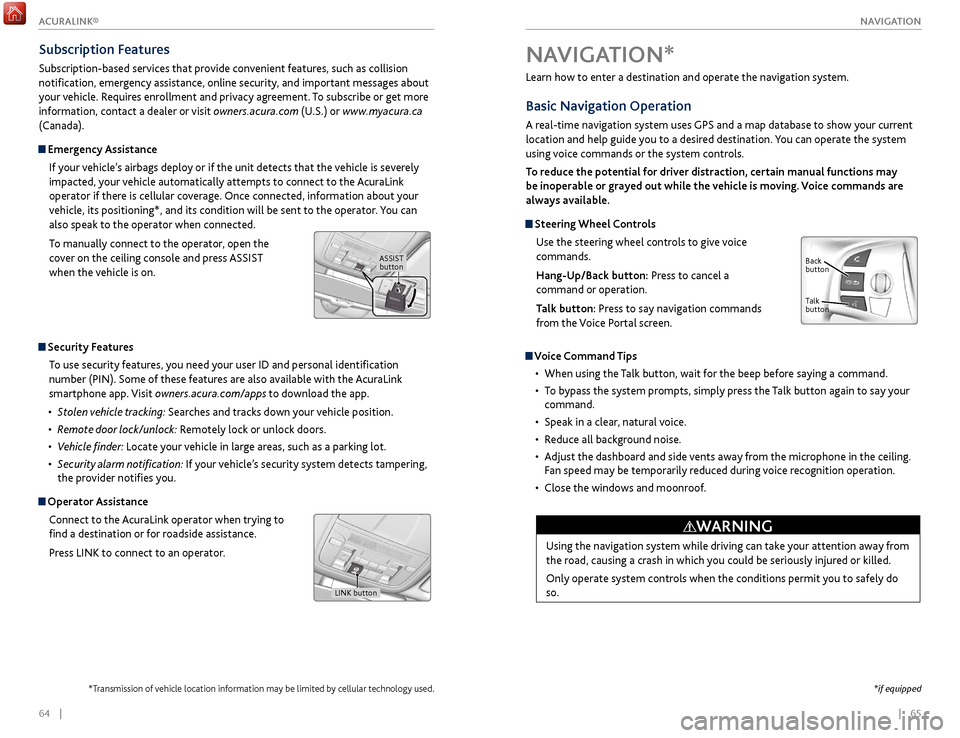
Steering Wheel Controls
Use the steering wheel controls to give voice
commands.
Hang-Up/Back button: Press to cancel a
command or operation.
Talk button: Press to say navigation commands
from the Voice Portal screen.
Voice Command Tips
•
When using
the Talk button, wait for the beep before saying a command.
•
T
o bypass the system prompts, simply press the Talk button again to say your
command.
•
Speak in a clear
, natural voice.
•
R
educe all background noise.
•
A
djust the dashboard and side vents away from the microphone in the ceiling.
Fan speed may be temporarily reduced during voice recognition operation.
•
Close
the windows and moonroof.
Using the navigation system while driving can take your attention away from
the road, causing a crash in which you could be seriously injured or killed.
Only operate system controls when the conditions permit you to safely do
so.
WARNING
NAVIGATION*
Talk
button Back
button
*if equipped
Subscription Features
Subscription-based services that provide convenient features, such as collision
notification, emergency assistance, online security, and important messages about
your vehicle. Requires enrollment and privacy agreement. To subscribe or get more
information, contact a dealer or visit owners.acura.com (U.S.) or www.myacura.ca
(Canada).
Emergency Assistance
If your vehicle’s airbags deploy or if the unit detects that the vehicle is severely
impacted, your vehicle automatically attempts to connect to the AcuraLink
operator if there is cellular coverage. Once connected, information about your
vehicle, its positioning*, and its condition will be sent to the operator. You can
also speak to the operator when connected.
To manually connect to the operator, open the
cover on the ceiling console and press ASSIST
when the vehicle is on.
ASSIST button
Security Features
To use security features, you need your user ID and personal identification
number (PIN). Some of these features are also available with the AcuraLink
smartphone app. Visit owners.acura.com/apps to download the app.
•
S
tolen vehicle tracking: Searches and tracks down your vehicle position.
•
R
emote door lock/unlock: Remotely lock or unlock doors.
•
V
ehicle finder: Locate your vehicle in large areas, such as a parking lot.
•
S
ecurity alarm notification: If your vehicle’s security system detects tampering,
the provider notifies you.
Operator Assistance
Connect to the AcuraLink operator when trying to
find a destination or for roadside assistance.
Press LINK to connect to an operator.
LINK button
*Transmission of vehicle location information may be limited by cellular technology used.
ACURALINK®
Page 41 of 75
74 || 75
DRIVING
DRIVING
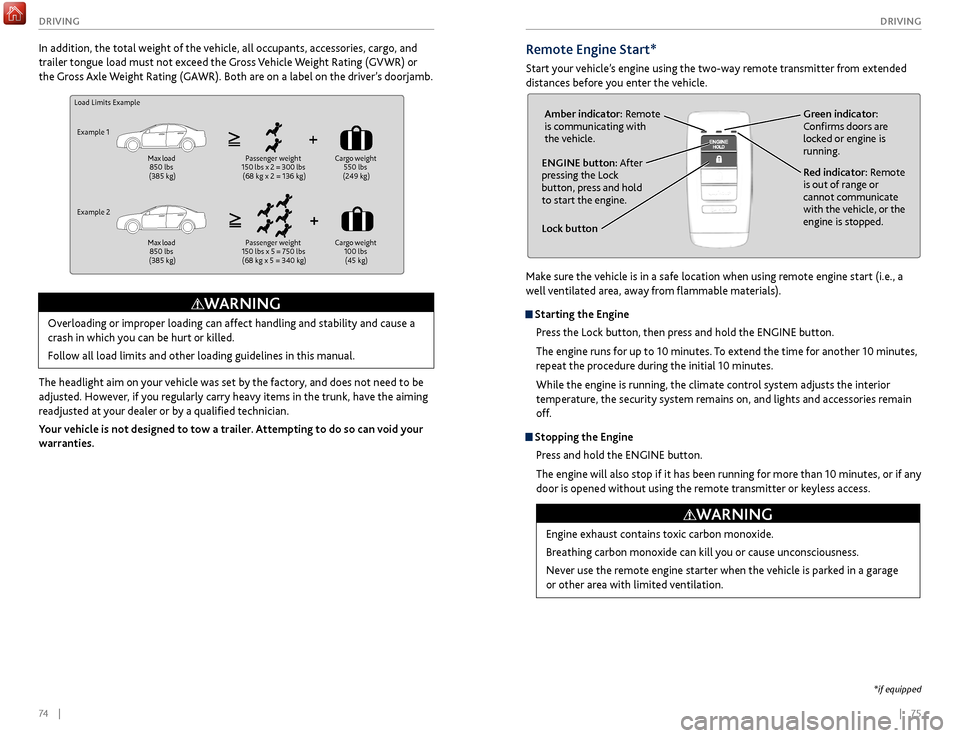
Remote Engine Start*
Start your vehicle’s engine using the two-way remote transmitter from extended
distances before you enter the vehicle.
Lock button
ENGINE button: After
pressing the Lock
button, press and hold
to start the engine.Red indicator: Remote
is out of range or
cannot communicate
with the vehicle, or the
engine is stopped.
Amber indicator: Remote
is communicating with
the vehicle.
Green indicator:
Confirms doors are
locked or engine is
running.
Engine exhaust contains toxic carbon monoxide.
Breathing carbon monoxide can kill you or cause unconsciousness.
Never use the remote engine starter when the vehicle is parked in a garage
or other area with limited ventilation.
WARNING
*if equipped
Make sure the vehicle is in a safe location when using remote engine start (i.e., a
well ventilated area, away from flammable materials).
Starting the Engine
Press the Lock button, then press and hold the ENGINE button.
The engine runs for up to 10 minutes. To extend the time for another 10 minutes,
repeat the procedure during the initial 10 minutes.
While the engine is running, the climate control system adjusts the interior
temperature, the security system remains on, and lights and accessories remain
off.
Stopping the EnginePress and hold the ENGINE button.
The engine will also stop if it has been running for more than 10 minutes, or if any
door is opened without using the remote transmitter or keyless access.
Load Limits Example
Example 1 Max load
850 lbs
(385 kg) Passenger weight
150 lbs x 2 = 300 lbs (68 kg x 2 = 136 kg) Cargo
weight
550 lbs
(249 kg)
Example 2 Max load
850 lbs
(385 kg) Passenger weight
150 lbs x 5 = 750 lbs (68 kg x 5 = 340 kg) Cargo
weight
100 lbs (45 kg)
Overloading or improper loading can affect handling and stability and cause a
crash in which you can be hurt or killed.
Follow all load limits and other loading guidelines in this manual.
WARNING
In addition, the total weight of the vehicle, all occupants, accessories, cargo, and
trailer tongue load must not exceed the Gross Vehicle Weight Rating (GVWR) or
the Gross Axle Weight Rating (GAWR). Both are on a label on the driver’s doorjamb.
The headlight aim on your vehicle was set by the factory, and does not need to be
adjusted. However, if you regularly carry heavy items in the trunk, have the aiming
readjusted at your dealer or by a qualified technician.
Your vehicle is not designed to tow a trailer. Attempting to do so can void your
warranties.
Page 43 of 75
78 || 79
DRIVING
DRIVING
*if equipped
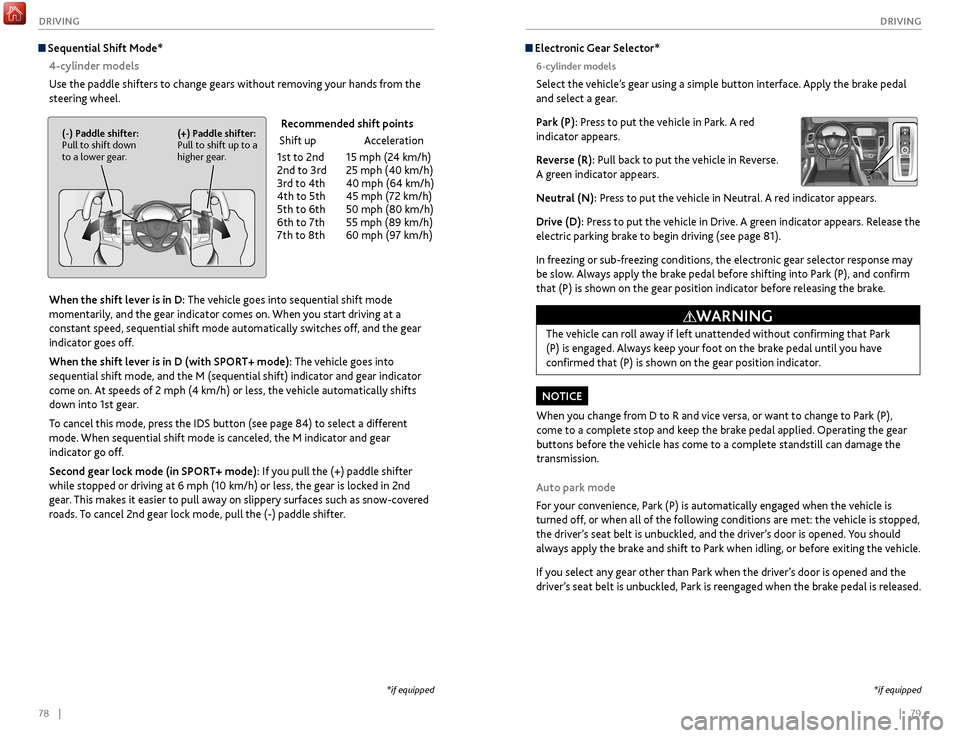
Electronic Gear Selector*
6-cylinder models
Select the vehicle’s gear using a simple button interface. Apply the brake pedal
and select a gear.
Park (P): Press to put the vehicle in Park. A red
indicator appears.
Reverse (R): Pull back to put the vehicle in Reverse.
A green indicator appears.
Neutral (N): Press to put the vehicle in Neutral. A red indicator appears.
Drive (D): Press to put the vehicle in Drive. A green indicator appears. Release the
electric parking brake to begin driving (see page 81).
In freezing or sub-freezing conditions, the electronic gear selector response may
be slow. Always apply the brake pedal before shifting into Park (P), and confirm
that (P) is shown on the gear position indicator before releasing the brake.
Auto park mode
For your convenience, Park (P) is automatically engaged when the vehicle is
turned off, or when all of the following conditions are met: the vehicle is stopped,
the driver’s seat belt is unbuckled, and the driver’s door is opened. You should
always apply the brake and shift to Park when idling, or before exiting the vehicle.
If you select any gear other than Park when the driver’s door is opened and the
driver’s seat belt is unbuckled, Park is reengaged when the brake pedal is released. The vehicle can roll away if left unattended without confirming that Park
(P) is engaged. Always keep your foot on the brake pedal until you have
confirmed that (P) is shown on the gear position indicator.
WARNING
When you change from D to R and vice versa, or want to change to Park (P),
come to a complete stop and keep the brake pedal applied. Operating the gear
buttons before the vehicle has come to a complete standstill can damage the
transmission.
NOTICE
Sequential Shift Mode*
4-cylinder models
Use the paddle shifters to change gears without removing your hands from the
steering wheel.
When the shift lever is in D: The vehicle goes into sequential shift mode
momentarily, and the gear indicator comes on. When you start driving at a
constant speed, sequential shift mode automatically switches off, and the gear
indicator goes off.
When the shift lever is in D (with SPORT+ mode): The vehicle goes into
sequential shift mode, and the M (sequential shift) indicator and gear indicator
come on. At speeds of 2 mph (4 km/h) or less, the vehicle automatically shifts
down into 1st gear.
To cancel this mode, press the IDS button (see page 84) to select a different
mode. When sequential shift mode is canceled, the M indicator and gear
indicator go off.
Second gear lock mode (in SPORT+ mode): If you pull the (+) paddle shifter
while stopped or driving at 6 mph (10 km/h) or less, the gear is locked in 2nd
gear. This makes it easier to pull away on slippery surfaces such as snow-covered
roads. To cancel 2nd gear lock mode, pull the (-) paddle shifter.
(-) Paddle shifter:
Pull to shift down
to a lower gear. (+) Paddle shifter:
Pull to shift up to a
higher gear. Recommended shift points
Shift up
Acceleration
1st
to 2nd
15 mph (2
4 km/h)
2nd
to 3rd
25 mph (40 km/h)
3r
d to 4th
40 mph (64 km/h)
4th
to 5th
45 mph (7
2 km/h)
5th
to 6th
50 mph (80 km/h)
6th
to 7th
55 mph (89 km/h)
7th
to 8th
60 mph (9
7 km/h)
*if equipped
Page 45 of 75
82 || 83
DRIVING
DRIVING
Auto Idle Stop*
Automatically stops and restarts the engine to help maximize fuel economy,
depending on environmental and vehicle conditions.
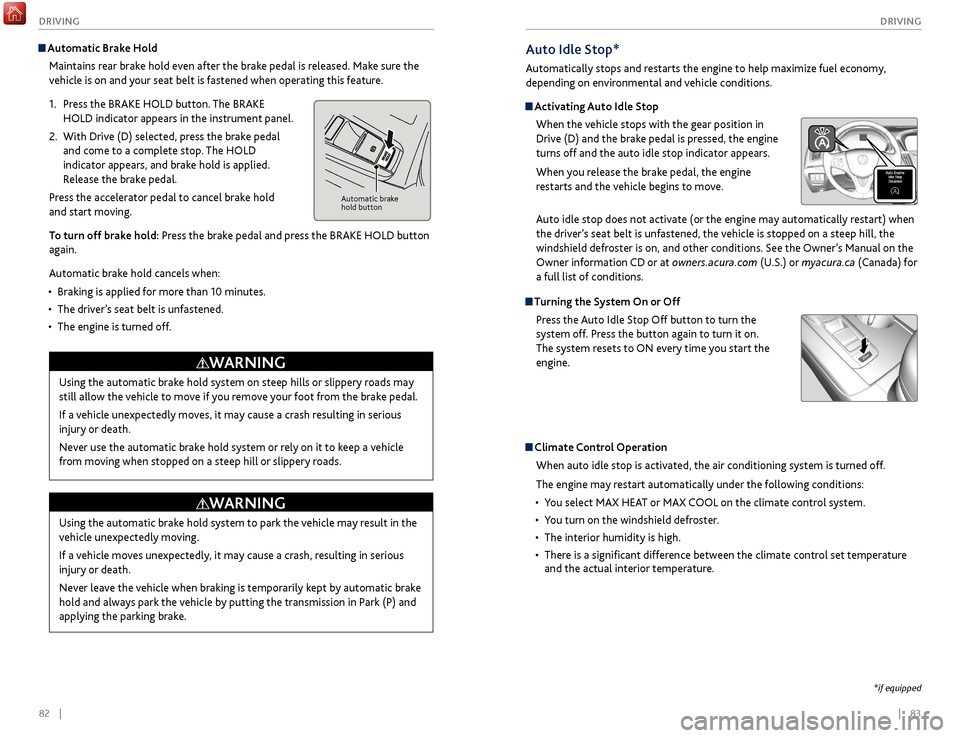
Activating Auto Idle Stop
When the vehicle stops with the gear position in
Drive (D) and the brake pedal is pressed, the engine
turns off and the auto idle stop indicator appears.
When you release the brake pedal, the engine
restarts and the vehicle begins to move.
Auto idle stop does not activate (or the engine may automatically restart) when
the driver’s seat belt is unfastened, the vehicle is stopped on a steep hill, the
windshield defroster is on, and other conditions. See the Owner’s Manual on the
Owner information CD or at owners.acura.com (U.S.) or myacura.ca (Canada) for
a full list of conditions.
Turning the System On or Off
Press the Auto Idle Stop Off button to turn the
system off. Press the button again to turn it on.
The system resets to ON every time you start the
engine.
Climate Control Operation
When auto idle stop is activated, the air conditioning system is turned off.
The engine may restart automatically under the following conditions:
•
Y
ou select MAX HEAT or MAX COOL on the climate control system.
•
Y
ou turn on the windshield defroster.
•
The interior humidity is high.
•
Ther
e is a significant difference between the climate control set temperature
and the actual interior temperature.
*if equipped
Automatic Brake Hold
Maintains rear brake hold even after the brake pedal is released. Make sure the
vehicle is on and your seat belt is fastened when operating this feature.
1.
Pr
ess the BRAKE HOLD button. The BRAKE
HOLD indicator appears in the instrument panel.
2.
With Driv
e (D) selected, press the brake pedal
and come to a complete stop. The HOLD
indicator appears, and brake hold is applied.
Release the brake pedal.
Press the accelerator pedal to cancel brake hold
and start moving.
To turn off brake hold: Press the brake pedal and press the BRAKE HOLD button
again.
Automatic brake hold cancels when:
•
Braking is applied
for more than 10 minutes.
•
The
driver’s seat belt is unfastened.
•
The
engine is turned off.
Automatic brake
hold button
Using the automatic brake hold system on steep hills or slippery roads may
still allow the vehicle to move if you remove your foot from the brake pedal.
If a vehicle unexpectedly moves, it may cause a crash resulting in serious
injury or death.
Never use the automatic brake hold system or rely on it to keep a vehicle
from moving when stopped on a steep hill or slippery roads.
WARNING
Using the automatic brake hold system to park the vehicle may result in the
vehicle unexpectedly moving.
If a vehicle moves unexpectedly, it may cause a crash, resulting in serious
injury or death.
Never leave the vehicle when braking is temporarily kept by automatic brake
hold and always park the vehicle by putting the transmission in Park (P) and
applying the parking brake.
WARNING
Page 46 of 75

84 || 85
DRIVING
DRIVING
Cruise Control*
Maintain a constant vehicle speed without having to keep your foot on the
accelerator pedal. Use cruise control on freeways or open roads where you can
travel at a constant speed with little acceleration or deceleration.
Improper use of cruise control can lead to a crash.
Use cruise control only when traveling on open highways in good weather.
WARNING
Setting the Vehicle Speed1.
Press the CRUISE button. The CRUISE MAIN
indicator appears.
2.
Accelerate to the desired speed (above 25 mph/40
km/h). Take your foot off the pedal and press
the SET/- switch to set the speed. The CRUISE
CONTROL indicator appears.
Adjusting the Vehicle Speed Press the RES/+ switch to increase speed, or the
SET/- switch to decrease speed.
Each time you press the button, the vehicle speed is
increased or decreased by about 1 mph (1.6 km/h).
If you keep the button pressed, the vehicle speed
increases or decreases until you release it.
Canceling Cruise ControlPress either the CANCEL button or the CRUISE
button, or the brake pedal. The CRUISE CONTROL
indicator goes off.
After cruise control has been canceled, you can still
resume the prior set speed by pressing RES/+ while
driving at a speed of at least 25 mph (40 km/h).
Press the CRUISE button to turn the system off.
CRUISE button
RES/+ button
SET/- button
CANCEL button
Econ: Maximiz es fuel efficiency .
Normal: Balances fuel efficiency and sportiness for everyday driving.
Sport : Enhances vehicle r esponse and feel through decreased steering assist and
incr eased thr ottle response.
Sport+: Adds to Sport mode and allows incr eased performance when using paddle
shifters (see page 7 8 or page 80).
Vehicle Stability Assist (VSA®)
Also known as Electr onic Stability Contr ol (ESC ), VSA helps to stabilize the vehicle
during cornering if the vehicle turns mor e or less than what was intended. It assists
in maintaining traction on slippery surfaces b y regulating engine output and
selectiv ely appl ying the brak es.
Turning VSA On or Off
VSA is turned on every time y ou turn on the vehicle. If you turn VSA off, your
v ehicle has normal braking and cornering ability , but VSA traction and stability
enhancement become less effectiv e.
Pr ess and hold the VSA
OFF button until you
hear a beep to turn VSA on or off . The VSA OFF
indicator appears when the system is off.
T raction contr ol stops functioning , which
allows the wheels to spin mor e freel y at low
speed. This can be helpful when trying to free
y our vehicle if it is stuck in mud or snow.
Integrated Dynamics System (IDS)
Choose a driving mode for your pr eference based on road conditions, vehicle speed,
and handling.
VSA OFF
button VSA OFF
indicator
The selected mode
briefly appears
in the multi-
information display.
Press IDS to
cycle through
modes.
*if equipped