parking brake Acura TLX 2017 Owner's Guide
[x] Cancel search | Manufacturer: ACURA, Model Year: 2017, Model line: TLX, Model: Acura TLX 2017Pages: 75, PDF Size: 10.99 MB
Page 4 of 75
| 1
V
ISUAL
I
NDEX
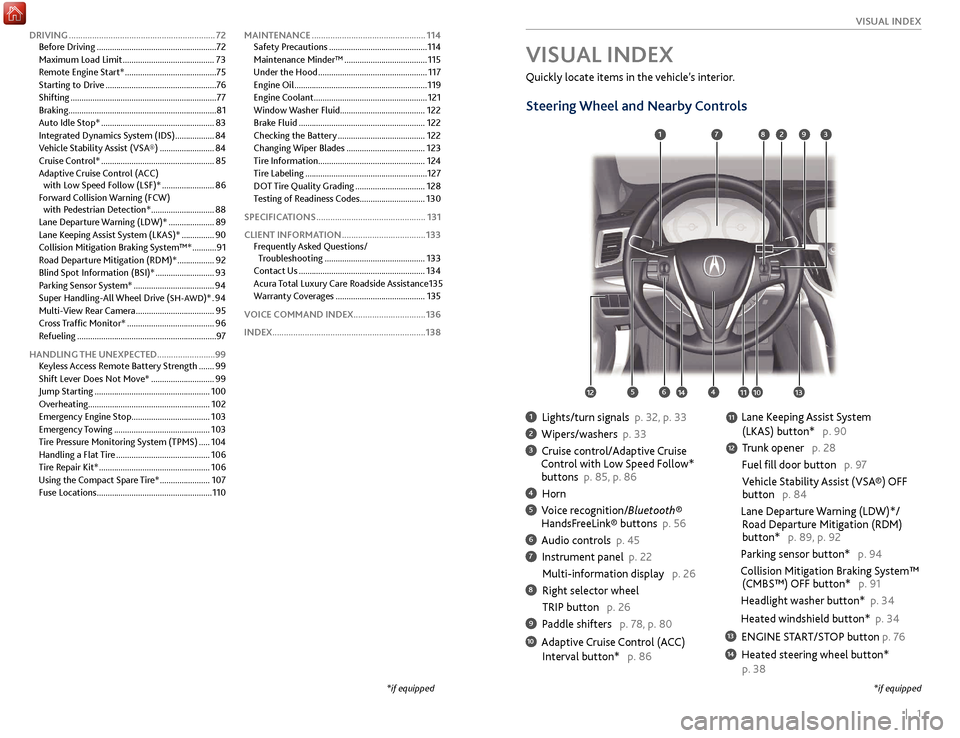
1 Lights/turn signals p. 32, p. 33
2 Wipers/washers p. 33
3 Cruise control/Adaptive Cruise
Control with Low Speed Follow*
buttons p. 85, p. 86
4 Horn
5 Voice recognition/Bluetooth® HandsF reeLink® buttons p. 56
6 Audio controls p. 45
7 Instrument panel p. 22
Multi-information
display p. 26
8 Right selector wheel
TRIP button
p. 26
9 Paddle shifters p. 78, p. 80
10 Adaptive Cruise Control (ACC)
Interval button*
p. 86
Quickly locate items in the vehicle’s interior.
Steering Wheel and Nearby Controls
Lane Keeping Assist System
(LKAS) button*
p. 90
T
runk opener p. 28
Fuel fill door button p. 97
Vehicle Stability Assist (VSA®) OFF
button
p. 84
Lane Departure Warning (LDW)*/
R
oad Departure Mitigation (RDM)
button*
p. 89, p. 92
Parking sensor button* p. 94
Collision Mitigation Braking System™
(CMBS™)
OFF button* p. 91
Headlight washer button* p. 34
Heated windshield button* p. 34
13 ENGINE START/STOP button p. 76
14 Heated steering wheel button*
p. 38
VISUAL INDEX
*if equipped
1
1011
27
4
8
13
12
1256
93
*if equipped
11
14
DRIVING ............................................................... 72
Befor e Driving ....................................................... 72
Maximum Load Limit
..........................................73
Remote Engine Start*
..........................................75
Starting to Drive
................................................... 76
Shifting
................................................................... 77
Braking
.................................................................... 81
Auto Idle Stop*
.................................................... 83
Integrated Dynamics System (IDS)
..................84
Vehicle Stability Assist (VSA®)
.........................84
Cruise Control*
.................................................... 85
Adaptive Cruise Control (ACC) with Low Speed Follow (LSF)*
........................86
Forward Collision Warning (FCW) with Pedestrian Detection*
.............................88
Lane Departure Warning (LDW)*
.....................89
Lane Keeping Assist System (LKAS)*
...............90
Collision Mitigation Braking System™*
...........91
Road Departure Mitigation (RDM)*
.................92
Blind Spot Information (BSI)*
...........................93
Parking Sensor System*
.....................................94
Super Handling-All Wheel Drive (
SH-AWD)* . 94
Multi-
View Rear Camera
.................................... 95
Cross Traffic Monitor*
........................................ 96
Refueling
................................................................ 97
HANDLING THE UNEXPECTED .........................99
Keyless Access Remote Battery Strength
....... 99
Shift Lever Does Not Move*
............................. 99
Jump Starting
..................................................... 100
Overheating........................................................ 102
Emergency Engine Stop
.................................... 103
Emergency Towing
............................................ 103
Tire Pressure Monitoring System (TPMS)
..... 104
Handling a Flat Tire
........................................... 106
Tire Repair Kit*
................................................... 106
Using the Compact Spare Tire*
....................... 107
Fuse Locations
..................................................... 110MAINTENANCE
.................................................
114
Safety Precautions .............................................
114
Maintenance Minder™ ......................................
115
Under the Hood ..................................................
117
Engine Oil .............................................................
119
Engine Coolant ....................................................
121
Window Washer Fluid ....................................... 122
Brake Fluid ..........................................................
122
Checking the Battery ........................................
122
Changing Wiper Blades ....................................
123
Tire Information .................................................
124
Tire Labeling ........................................................
127
DOT Tire Quality Grading ................................
128
Testing of Readiness Codes .............................. 130
SPECIFICATIONS ...............................................
131
CLIENT INFORMATION ....................................
133
Frequently Asked Questions/ Troubleshooting ..............................................
133
Contact Us ..........................................................
134
Acura Total Luxury Care Roadside Assistance 135
Warranty Coverages .........................................
135
VOICE COMMAND INDEX ...............................136
INDEX..................................................................138
Page 5 of 75
2 || 3
S AFETY
V
ISUAL I NDEX
99
97910911959894
93969192
SAFETY INFORMATION
Your safety—and the safety of others—is very important, and operating this vehicle
safely is an important responsibility. While we strive to help you make informed
decisions about safety, it is not practical or possible to warn you about all the
hazards associated with operating or maintaining your vehicle. Therefore, you must
use your own good judgment.
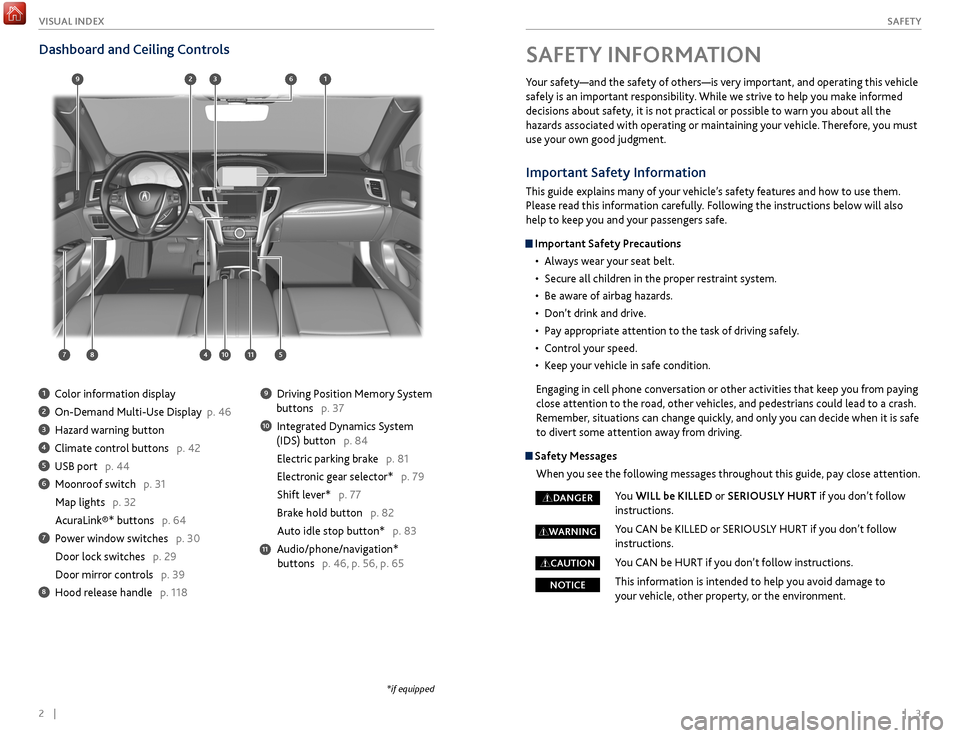
Dashboard and Ceiling Controls
1 Color information display
2 On-Demand Multi-Use Display p. 46
3 Hazard warning button
4 Climate control buttons p. 42
5 USB port p. 44
6 Moonroof switch p. 31
Map lights p. 32
AcuraLink®* buttons p. 64
7 Power window switches p. 30
Door lock switches
p. 29
Door mirr
or controls p. 39
8 Hood release handle p. 118
9 Driving Position Memory System
buttons
p. 37
10 Integrated Dynamics System
(IDS) button
p. 84
Electric parking brake p. 81
Electronic gear selector* p. 79
Shift lever* p. 77
Brake hold button p. 82
Auto idle stop button*
p. 83
Audio/phone/navigation*
buttons
p. 46, p. 56, p. 65
11
*if equipped
Important Safety Information
This guide explains many of your vehicle’s safety features and how to use them.
Please read this information carefully. Following the instructions below will also
help to keep you and your passengers safe.
Important Safety Precautions•
Al
ways wear your seat belt.
•
Secur
e all children in the proper restraint system.
•
Be awar
e of airbag hazards.
•
Don’t drink
and drive.
•
P
ay appropriate attention to the task of driving safely.
•
C
ontrol your speed.
•
K
eep your vehicle in safe condition.
Engaging in cell phone conversation or other activities that keep you from paying
close attention to the road, other vehicles, and pedestrians could lead to a crash.
Remember, situations can change quickly, and only you can decide when it is safe
to divert some attention away from driving.
Safety Messages When you see the following messages throughout this guide, pay close attention.
You WILL be KILLED or SERIOUSLY HURT if you don’t follow
instructions.
You CAN be KILLED or SERIOUSLY HURT if you don’t follow
instructions.
You CAN be HURT if you don’t follow instructions.
This information is intended to help you avoid damage to
your vehicle, other property, or the environment.
DANGER
WARNING
CAUTION
NOTICE
Page 15 of 75
22 || 23
I NSTRUMENT P
ANEL I
NSTRUMENT P
ANEL
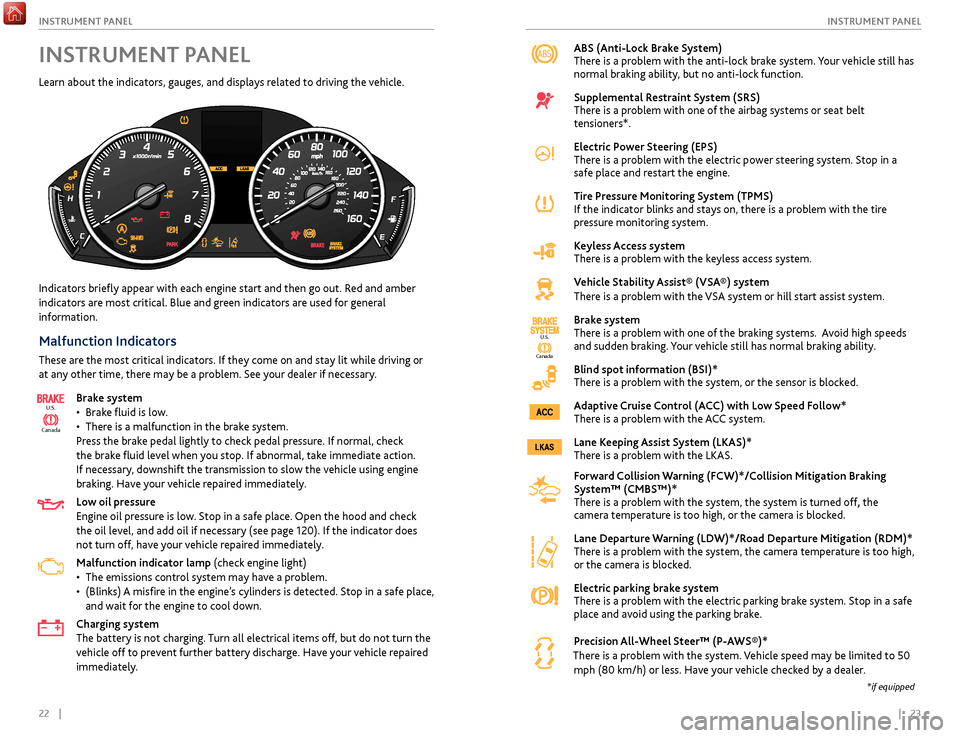
ABS (Anti-Lock Brake System)
There is a problem with the anti-lock brake system. Your vehicle still has
normal braking ability, but no anti-lock function.
Supplemental Restraint System (SRS)
There is a problem with one of the airbag systems or seat belt
tensioners*.
Electric Power Steering (EPS)
There is a problem with the electric power steering system. Stop in a
safe place and restart the engine.
Tire Pressure Monitoring System (TPMS)
If the indicator blinks and stays on, there is a problem with the tire
pressure monitoring system.
Keyless Access system
There is a problem with the keyless access system.
Vehicle Stability Assist® (VSA®) system
There is a problem with the VSA system or hill start assist system.
Brake system
There is a problem with one of the braking systems. Avoid high speeds
and sudden braking. Your vehicle still has normal braking ability.
Blind spot information (BSI)*
There is a problem with the system, or the sensor is blocked.
Adaptive Cruise Control (ACC) with Low Speed Follow*
There is a problem with the ACC system.
Lane Keeping Assist System (LKAS)*
There is a problem with the LKAS.
Forward Collision Warning (FCW)*/Collision Mitigation Braking
System™ (CMBS™)*
There is a problem with the system,
the system is turned off, the
camera temperature is too high, or the camera is blocked.
Lane Departure Warning (LDW)*/Road Departure Mitigation (RDM)*
There is a problem with the system, the camera temperature is too high,
or the camera is blocked.
Electric parking brake system
There is a problem with the electric parking brake system. Stop in a safe
place and avoid using the parking brake.
Precision All-Wheel Steer™ (P-AWS®)*
There is a problem with the system. Vehicle speed may be limited to 50 mph (80 km/h) or less. Have your vehicle checked by a dealer.
Indicators briefly appear with each engine start and then go out. Red and amber
indicators are most critical. Blue and green indicators are used for general
information.
Malfunction Indicators
These are the most critical indicators. If they come on and stay lit while driving or
at any other time, there may be a problem. See your dealer if necessary.
Brake system
•
Brak
e fluid is low.
•
Ther
e is a malfunction in the brake system.
Press the brake pedal lightly to check pedal pressure. If normal, check
the brake fluid level when you stop. If abnormal, take immediate action.
If necessary, downshift the transmission to slow the vehicle using engine
braking. Have your vehicle repaired immediately.
Low oil pressure
Engine oil pressure is low. Stop in a safe place. Open the hood and check
the oil level, and add oil if necessary (see page 120). If the indicator does
not turn off, have your vehicle repaired immediately.
Malfunction indicator lamp (check engine light)
•
The emissions contr
ol system may have a problem.
•
(Blinks)
A misfire in the engine’s cylinders is detected. Stop in a safe place,
and wait for the engine to cool down.
Charging system
The battery is not charging. Turn all electrical items off, but do not turn the
vehicle off to prevent further battery discharge. Have your vehicle repaired
immediately.
Ca nada
U.S.
INSTRUMENT PANEL
Learn about the indicators, gauges, and displays related to driving the vehicle.
Ca
nada
U.S.
*if equipped
Page 16 of 75
24 || 25
I NSTRUMENT P
ANELI
NSTRUMENT P
ANEL
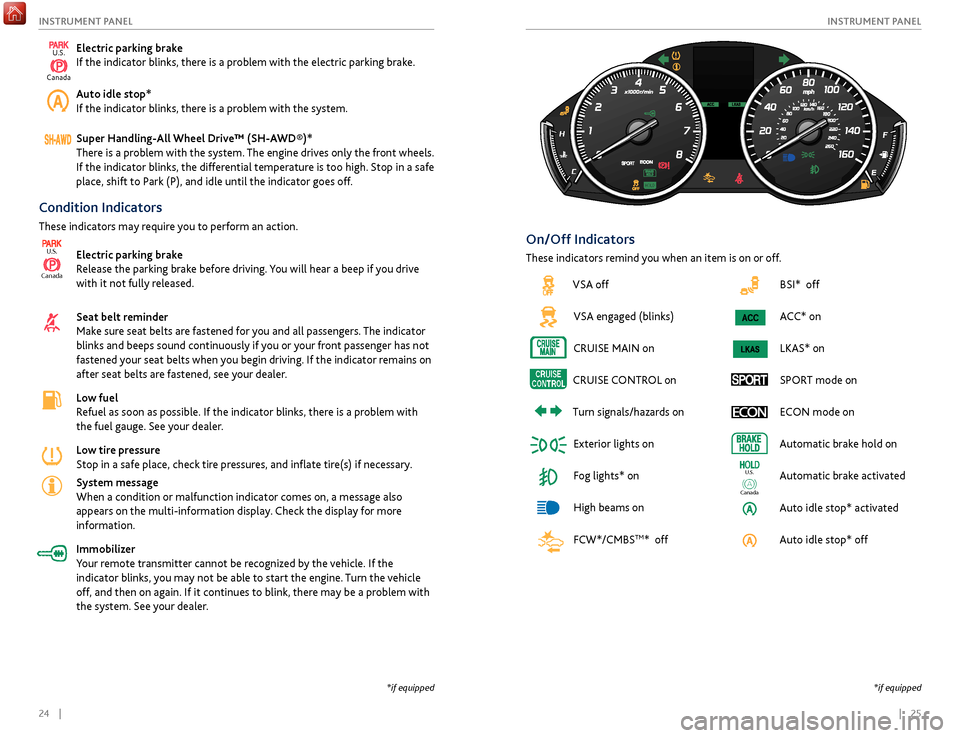
BSI* off
ACC* on
LKAS* on
SPORT mode on ECON mode on
Automatic brake hold on
Automatic brake activated
Auto idle stop* activated
Auto idle stop* off
Ca nada
U.S.
Condition Indicators
These indicators may require you to perform an action.
Electric parking brake
Release the parking brake before driving. You will hear a beep if you drive
with it not fully released.
Seat belt reminder
Make sure seat belts are fastened for you and all passengers. The indicator
blinks and beeps sound continuously if you or your front passenger has not
fastened your seat belts when you begin driving. If the indicator remains on
after seat belts are fastened, see your dealer.
Low fuel
Refuel as soon as possible. If the indicator blinks, there is a problem with
the fuel gauge. See your dealer.
Low tire pressure
Stop in a safe place, check tire pressures, and inflate tire(s) if necessary.
System message
When a condition or malfunction indicator comes on, a message also
appears on the multi-information display. Check the display for more
information.
Immobilizer
Your remote transmitter cannot be recognized by the vehicle. If the
indicator blinks, you may not be able to start the engine. Turn the vehicle
off, and then on again. If it continues to blink, there may be a problem with
the system. See your dealer.
Canada
U.S.
On/Off Indicators
These indicators remind you when an item is on or off.
*if equipped
*if equipped
Electric parking brake
If the indicator blinks, there is a problem with the electric parking brake.
Auto idle stop*
If the indicator blinks, there is a problem with the system.
Super Handling-All Wheel Drive™ (SH-AWD®)*
There is a problem with the system. The engine drives only the front wheels.
If the indicator blinks, the differential temperature is too high. Stop in a safe
place, shift to Park (P), and idle until the indicator goes off.
VSA offVSA engaged (blinks)
CRUISE
MAIN on
CRUISE
CONTROL
on
Turn
signals/hazards on
Exterior lights on
Fog lights* on
High beams on
FCW*/CMBS
TM* off
U.S.
Canada
Page 42 of 75
76 || 77
DRIVING
DRIVING
When you change the shift lever from D to R and vice versa, come to a complete
stop and keep the brake pedal depressed. Operating the shift lever before the
vehicle has come to a complete standstill can damage the transmission.
Do not operate the shift lever while pressing the accelerator pedal. You could
damage the transmission.
NOTICE
Shifting
Change your vehicle’s gears to begin driving.
Shift Lever*
4-cylinder models
Park (P): Used for parking or starting/stopping the
engine. Press the brake pedal, then press the release
button to shift.
Reverse (R): Used for reversing.
Neutral (N): Used for idling.
Drive (D): Used for normal driving or sequential
shift mode (see page 78).
Release button
*if equipped
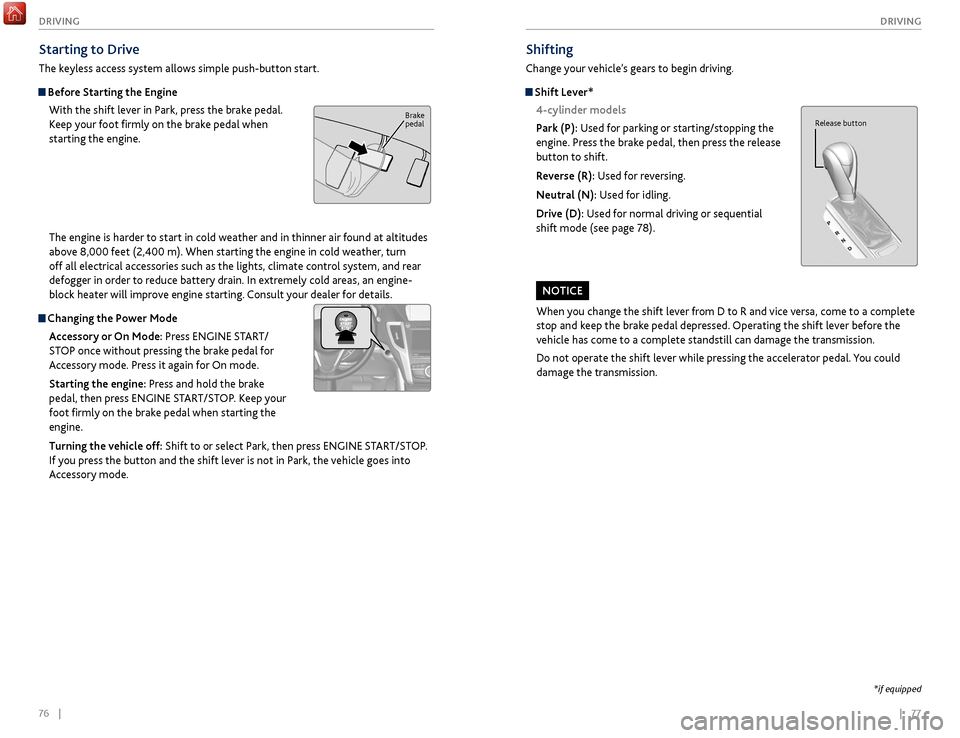
Starting to Drive
The keyless access system allows simple push-button start.
Before Starting the Engine With the shift lever in Park, press the brake pedal.
Keep your foot firmly on the brake pedal when
starting the engine.
The engine is harder to start in cold weather and in thinner air found at altitudes
above 8,000 feet (2,400 m). When starting the engine in cold weather, turn
off all electrical accessories such as the lights, climate control system, and rear
defogger in order to reduce battery drain. In extremely cold areas, an engine-
block heater will improve engine starting. Consult your dealer for details.
Changing the Power Mode
Accessory or On Mode: Press ENGINE START/
STOP once without pressing the brake pedal for
Accessory mode. Press it again for On mode.
Starting the engine: Press and hold the brake
pedal, then press ENGINE START/STOP. Keep your
foot firmly on the brake pedal when starting the
engine.
Turning the vehicle off: Shift to or select Park, then press ENGINE START/STOP.
If you press the button and the shift lever is not in Park, the vehicle goes into
Accessory mode.
Brake
pedal
Page 43 of 75
78 || 79
DRIVING
DRIVING
*if equipped
Electronic Gear Selector*
6-cylinder models
Select the vehicle’s gear using a simple button interface. Apply the brake pedal
and select a gear.
Park (P): Press to put the vehicle in Park. A red
indicator appears.
Reverse (R): Pull back to put the vehicle in Reverse.
A green indicator appears.
Neutral (N): Press to put the vehicle in Neutral. A red indicator appears.
Drive (D): Press to put the vehicle in Drive. A green indicator appears. Release the
electric parking brake to begin driving (see page 81).
In freezing or sub-freezing conditions, the electronic gear selector response may
be slow. Always apply the brake pedal before shifting into Park (P), and confirm
that (P) is shown on the gear position indicator before releasing the brake.
Auto park mode
For your convenience, Park (P) is automatically engaged when the vehicle is
turned off, or when all of the following conditions are met: the vehicle is stopped,
the driver’s seat belt is unbuckled, and the driver’s door is opened. You should
always apply the brake and shift to Park when idling, or before exiting the vehicle.
If you select any gear other than Park when the driver’s door is opened and the
driver’s seat belt is unbuckled, Park is reengaged when the brake pedal is released. The vehicle can roll away if left unattended without confirming that Park
(P) is engaged. Always keep your foot on the brake pedal until you have
confirmed that (P) is shown on the gear position indicator.
WARNING
When you change from D to R and vice versa, or want to change to Park (P),
come to a complete stop and keep the brake pedal applied. Operating the gear
buttons before the vehicle has come to a complete standstill can damage the
transmission.
NOTICE
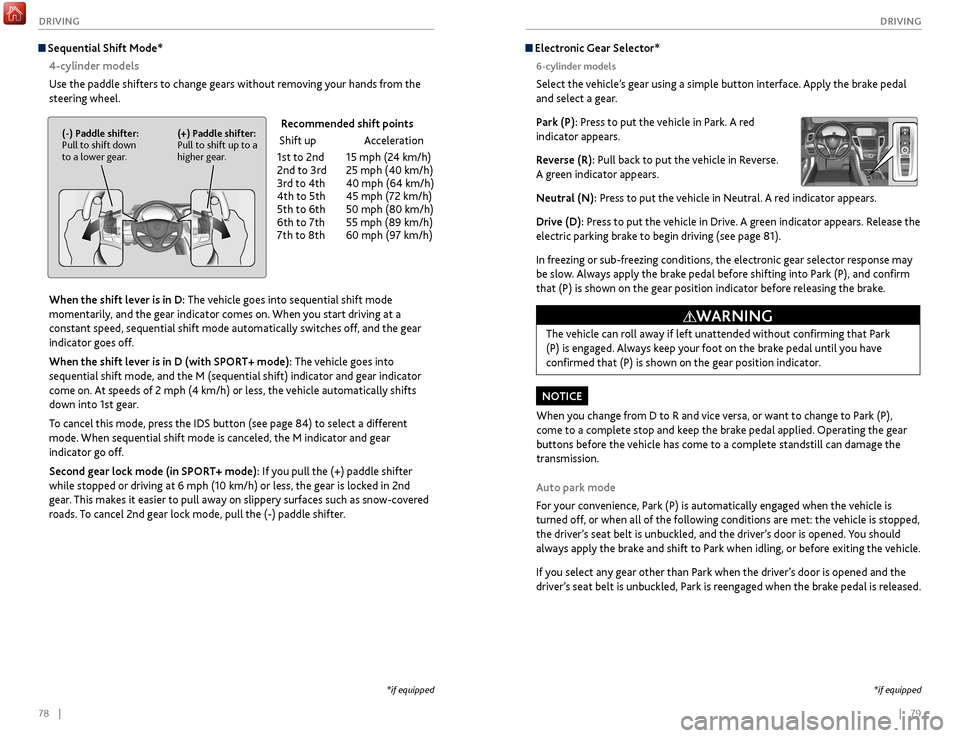
Sequential Shift Mode*
4-cylinder models
Use the paddle shifters to change gears without removing your hands from the
steering wheel.
When the shift lever is in D: The vehicle goes into sequential shift mode
momentarily, and the gear indicator comes on. When you start driving at a
constant speed, sequential shift mode automatically switches off, and the gear
indicator goes off.
When the shift lever is in D (with SPORT+ mode): The vehicle goes into
sequential shift mode, and the M (sequential shift) indicator and gear indicator
come on. At speeds of 2 mph (4 km/h) or less, the vehicle automatically shifts
down into 1st gear.
To cancel this mode, press the IDS button (see page 84) to select a different
mode. When sequential shift mode is canceled, the M indicator and gear
indicator go off.
Second gear lock mode (in SPORT+ mode): If you pull the (+) paddle shifter
while stopped or driving at 6 mph (10 km/h) or less, the gear is locked in 2nd
gear. This makes it easier to pull away on slippery surfaces such as snow-covered
roads. To cancel 2nd gear lock mode, pull the (-) paddle shifter.
(-) Paddle shifter:
Pull to shift down
to a lower gear. (+) Paddle shifter:
Pull to shift up to a
higher gear. Recommended shift points
Shift up
Acceleration
1st
to 2nd
15 mph (2
4 km/h)
2nd
to 3rd
25 mph (40 km/h)
3r
d to 4th
40 mph (64 km/h)
4th
to 5th
45 mph (7
2 km/h)
5th
to 6th
50 mph (80 km/h)
6th
to 7th
55 mph (89 km/h)
7th
to 8th
60 mph (9
7 km/h)
*if equipped
Page 44 of 75

80 || 81
DRIVING
DRIVING
Braking
Slow down or stop your vehicle, and keep it from moving when parked.
Foot Brake
Press the brake pedal to slow down or stop your
vehicle from moving.
Brake Assist SystemDuring hard or emergency braking, the system
increases braking force. The brake pedal may move
slightly or make a noise; this is normal. Continue to
hold the brake pedal firmly down.
Anti-Lock Brake System (ABS) During hard or emergency braking, the system rapidly pumps the brakes to
prevent wheel lockup and help you maintain steering control. The brake pedal
may pulsate slightly during ABS operation; this is normal. Do not pump the brake
pedal, and continue to hold it firmly down.
The ABS may not function correctly if you use an incorrect tire type and size.
NOTICE
Brake pedal
Electric Parking BrakeKeep your vehicle from moving while parked using a simple switch.
To apply: Pull up the switch. The PARK indicator
appears in the instrument panel.
To release: Press the brake pedal and make sure
your seat belt is fastened. Press the switch down to
release.
You can also lightly press the accelerator pedal if
your seat belt is fastened and the vehicle is on and in
Drive (D) or Reverse (R).
Pull
up to
apply
Press
down to
release.
Car wash mode
Follow the procedure below to use a conveyor-style car wash where you or
an attendant do not remain in the vehicle. Make sure the wiper lever is in the
OFF position (see page 33). You should inform the car wash attendant of this
procedure.
1.
When
the engine is running, apply the brake pedal and select Neutral (N).
2.
Within 5 seconds, pr
ess the ENGINE START/STOP button. The vehicle goes
into Accessory mode.
This mode lasts for 15 minutes before the gear changes to Park and the vehicle
turns off.
Sequential Mode* 6-cylinder models
Use the paddle shifters to change gears without removing your hands from the
steering wheel.
When the gear is in D: The vehicle goes into sequential mode momentarily,
and the gear indicator comes on. When you start driving at a constant speed,
sequential mode automatically switches off, and the gear indicator goes off.
When the gear is in D (with SPORT+ mode): The vehicle goes into sequential
mode, and the M (sequential mode) indicator and gear indicator come on.
To cancel this mode, press the IDS button (see page 84) to select a different
mode. When sequential mode is canceled, the M indicator and gear indicator go
off.
(-) Paddle shifter:
Pull to shift down
to a lower gear. (+) Paddle shifter:
Pull to shift up to a
higher gear. Recommended shift points
Shift up
Acceleration
1st
to 2nd
15 mph (2
4 km/h)
2nd
to 3rd
25 mph (40 km/h)
3r
d to 4th
40 mph (64 km/h)
4th
to 5th
45 mph (7
2 km/h)
5th
to 6th
50 mph (80 km/h)
6th
to 7th
55 mph (89 km/h)
7th
to 8th
60 mph (9
7 km/h)
8
th to 9th
65 mph (105 km/h)
*if equipped
Page 45 of 75
82 || 83
DRIVING
DRIVING
Auto Idle Stop*
Automatically stops and restarts the engine to help maximize fuel economy,
depending on environmental and vehicle conditions.
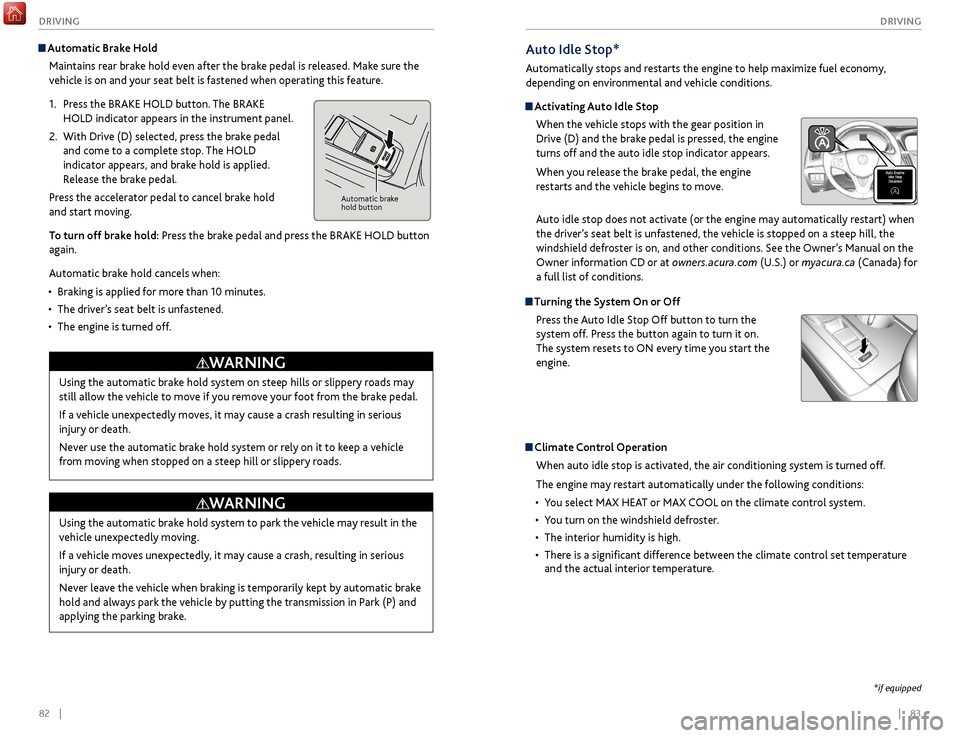
Activating Auto Idle Stop
When the vehicle stops with the gear position in
Drive (D) and the brake pedal is pressed, the engine
turns off and the auto idle stop indicator appears.
When you release the brake pedal, the engine
restarts and the vehicle begins to move.
Auto idle stop does not activate (or the engine may automatically restart) when
the driver’s seat belt is unfastened, the vehicle is stopped on a steep hill, the
windshield defroster is on, and other conditions. See the Owner’s Manual on the
Owner information CD or at owners.acura.com (U.S.) or myacura.ca (Canada) for
a full list of conditions.
Turning the System On or Off
Press the Auto Idle Stop Off button to turn the
system off. Press the button again to turn it on.
The system resets to ON every time you start the
engine.
Climate Control Operation
When auto idle stop is activated, the air conditioning system is turned off.
The engine may restart automatically under the following conditions:
•
Y
ou select MAX HEAT or MAX COOL on the climate control system.
•
Y
ou turn on the windshield defroster.
•
The interior humidity is high.
•
Ther
e is a significant difference between the climate control set temperature
and the actual interior temperature.
*if equipped
Automatic Brake Hold
Maintains rear brake hold even after the brake pedal is released. Make sure the
vehicle is on and your seat belt is fastened when operating this feature.
1.
Pr
ess the BRAKE HOLD button. The BRAKE
HOLD indicator appears in the instrument panel.
2.
With Driv
e (D) selected, press the brake pedal
and come to a complete stop. The HOLD
indicator appears, and brake hold is applied.
Release the brake pedal.
Press the accelerator pedal to cancel brake hold
and start moving.
To turn off brake hold: Press the brake pedal and press the BRAKE HOLD button
again.
Automatic brake hold cancels when:
•
Braking is applied
for more than 10 minutes.
•
The
driver’s seat belt is unfastened.
•
The
engine is turned off.
Automatic brake
hold button
Using the automatic brake hold system on steep hills or slippery roads may
still allow the vehicle to move if you remove your foot from the brake pedal.
If a vehicle unexpectedly moves, it may cause a crash resulting in serious
injury or death.
Never use the automatic brake hold system or rely on it to keep a vehicle
from moving when stopped on a steep hill or slippery roads.
WARNING
Using the automatic brake hold system to park the vehicle may result in the
vehicle unexpectedly moving.
If a vehicle moves unexpectedly, it may cause a crash, resulting in serious
injury or death.
Never leave the vehicle when braking is temporarily kept by automatic brake
hold and always park the vehicle by putting the transmission in Park (P) and
applying the parking brake.
WARNING
Page 51 of 75

94 || 95
DRIVING
DRIVING
Multi-View Rear Camera
When you shift into Reverse (R), a real-time image of the area behind your vehicle
is shown in the display, along with helpful parking guidelines.
The rear camera view is restricted. You cannot see the corner ends of the bumper or what is underneath
the bumper. Its unique lens also makes objects appear closer or farther than they actually are.
Visually confirm that it is safe to drive before backing up. Certain conditions (such as weather, lighting,
and high temperatures) may also restrict the rear view. Do not rely on the rearview display, which does
not give you all information about conditions at the rear of your vehicle.
Wide view Normal view Top down view
Changing Guidelines
1.
Pr
ess the SETTINGS button.
2.
Select Camera
Settings.
3.
Select
Rear Camera.
4.
Select one of the options.
Fixed Guideline: Guidelines appear when you
shift into Reverse. Select On or Off.
Dynamic Guideline: Guidelines move as you turn
the steering wheel. Select On or Off.
5.
Pr
ess the BACK button to exit the menu.
Press the
interface dial
to toggle
between
views.
Parking Sensor System*
When the system senses an object when you are parking or backing up, an indicator
appears on the upper display and a series of beeps will sound. As you get closer to
the object, the beep rate increases.
Turning the System On or OffPress the parking sensor button. A green indicator
light appears on the button when the system is on.
*if equipped
Display indicators
Parking sensor button
Do not continuously spin the front tires of your vehicle. Continuously spinning
the front tires can cause damage to the transmission and SH-AWD unit.
If the SH-AWD light blinks while driving, it indicates the differential temperature
is too high. If this happens, pull to the side of the road when it is safe, shift to
park, and idle the engine until the indicator goes out.
NOTICE
Super Handling-All Wheel Drive (SH-AWD)*
Controls and transfers varying amounts of engine torque to each wheel depending
on driving conditions.
SH-AWD helps enhance stability in driving situations involving slippery surfaces,
such as on wet, icy, or snowy roads. The system does not help enhance braking. It is
still your responsibility to drive safely when you steer, accelerate, and apply brakes.
Leave sufficient distance in front of you when braking on slippery surfaces.
Page 53 of 75
98 || 99
HANDLING THE UNEXPECTED
DRIVING
HANDLING THE UNEXPECTED
Learn about what to do in critical or emergency situations.
Keyless Access Remote Battery Strength
If the battery life in your keyless access remote is weak, a message appears in the
MID with information on how to start the engine.
1.
T
ouch the back of the keyless access remote to the
ENGINE START/STOP button while the indicator
is flashing.
2.
With
the brake pedal pressed, press the ENGINE
START/STOP button within 10 seconds.
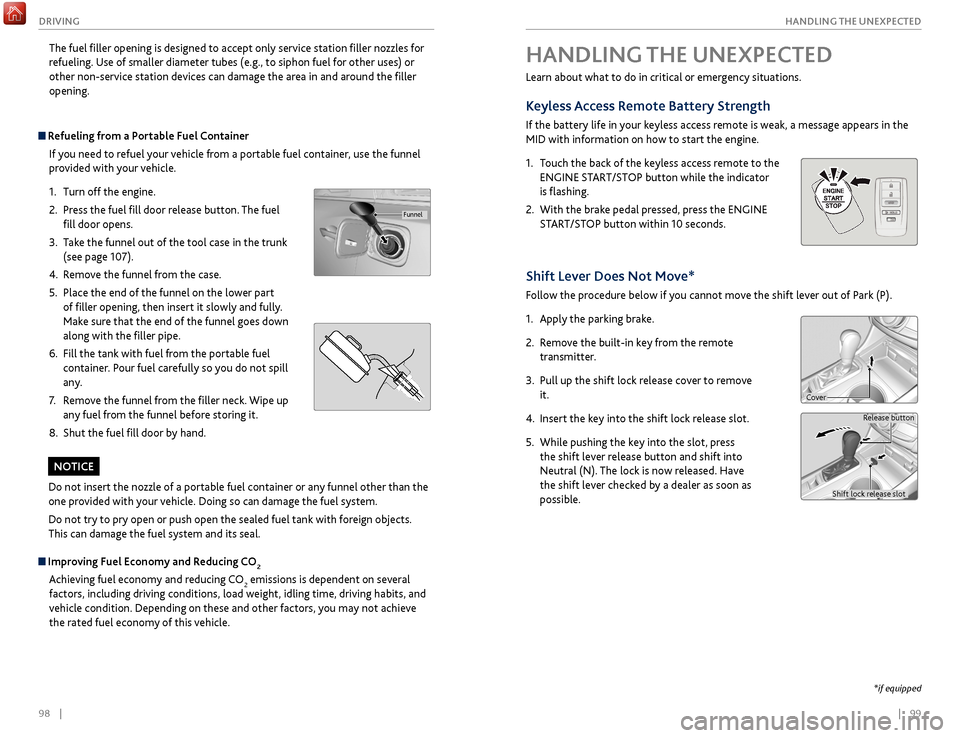
Shift Lever Does Not Move*
Follow the procedure below if you cannot move the shift lever out of Park (P).
1.
Appl
y the parking brake.
2.
R
emove the built-in key from the remote
transmitter.
3.
Pull up
the shift lock release cover to remove
it.
4.
Insert
the key into the shift lock release slot.
5.
While pushing
the key into the slot, press
the shift lever release button and shift into
Neutral (N). The lock is now released. Have
the shift lever checked by a dealer as soon as
possible.
Release button
Shift lock release slot
Cover
*if equipped
The fuel filler opening is designed to accept only service station filler nozzles for
refueling. Use of smaller diameter tubes (e.g., to siphon fuel for other uses) or
other non-service station devices can damage the area in and around the filler
opening.
Refueling from a Portable Fuel Container If you need to refuel your vehicle from a portable fuel container, use the funnel
provided with your vehicle.
1.
Turn off the
engine.
2.
Pr
ess the fuel fill door release button. The fuel
fill door opens.
3.
T
ake the funnel out of the tool case in the trunk
(see page 107).
4.
R
emove the funnel from the case.
5.
Place the
end of the funnel on the lower part
of filler opening, then insert it slowly and fully.
Make sure that the end of the funnel goes down
along with the filler pipe.
6.
Fill
the tank with fuel from the portable fuel
container. Pour fuel carefully so you do not spill
any.
7.
R
emove the funnel from the filler neck. Wipe up
any fuel from the funnel before storing it.
8.
Shut
the fuel fill door by hand.
Funnel
Do not insert the nozzle of a portable fuel container or any funnel other than the
one provided with your vehicle. Doing so can damage the fuel system.
Do not try to pry open or push open the sealed fuel tank with foreign objects.
This can damage the fuel system and its seal.
NOTICE
Improving Fuel Economy and Reducing CO2
Achieving fuel economy and reducing CO
2 emissions is dependent on several
factors, including driving conditions, load weight, idling time, driving habits, and
vehicle condition. Depending on these and other factors, you may not achieve
the rated fuel economy of this vehicle.