clock Acura TLX 2017 User Guide
[x] Cancel search | Manufacturer: ACURA, Model Year: 2017, Model line: TLX, Model: Acura TLX 2017Pages: 553, PDF Size: 33.77 MB
Page 265 of 553
264
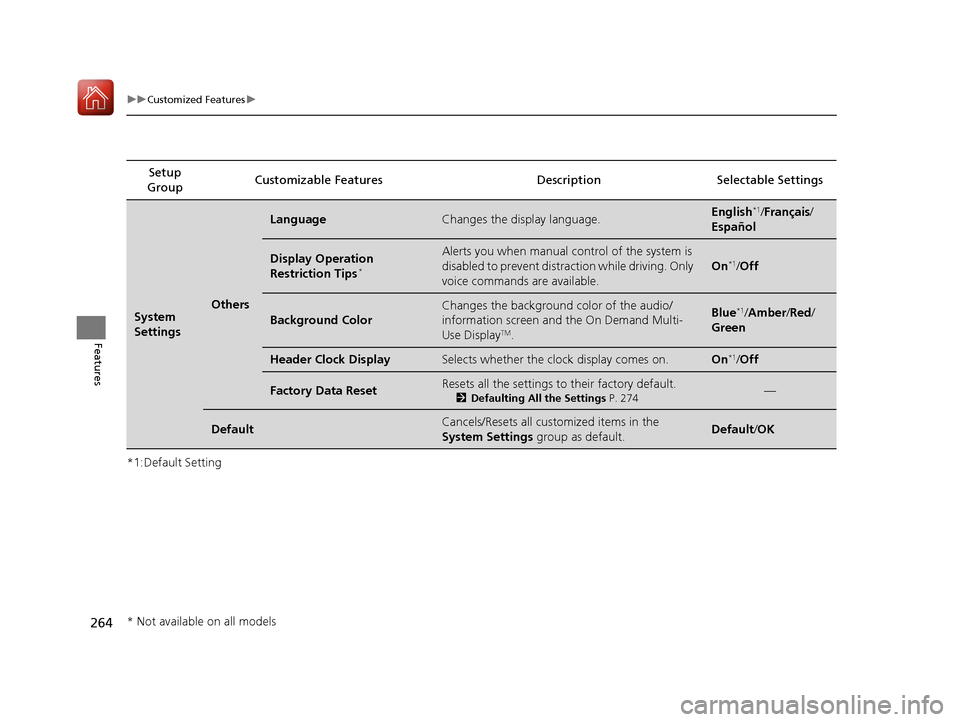
uuCustomized Features u
Features
*1:Default SettingSetup
Group Customizable Features Descri
ption Selectable Settings
System
SettingsOthers
LanguageChanges the display language.English*1/Français /
Español
Display Operation
Restriction Tips*
Alerts you when manual control of the system is
disabled to prevent distraction while driving. Only
voice commands are available.
On*1/ Off
Background Color
Changes the background color of the audio/
information screen and the On Demand Multi-
Use Display
TM.
Blue*1/Amber /Red/
Green
Header Clock DisplaySelects whether the clock display comes on.On*1/ Off
Factory Data ResetResets all the settings to their factory default.
2 Defaulting All the Settings P. 274—
DefaultCancels/Resets all customized items in the
System Settings group as default.Default/OK
* Not available on all models
17 ACURA TLX-31TZ36200.book 264 ページ 2016年6月10日 金曜日 午後6時39分
Page 274 of 553
273
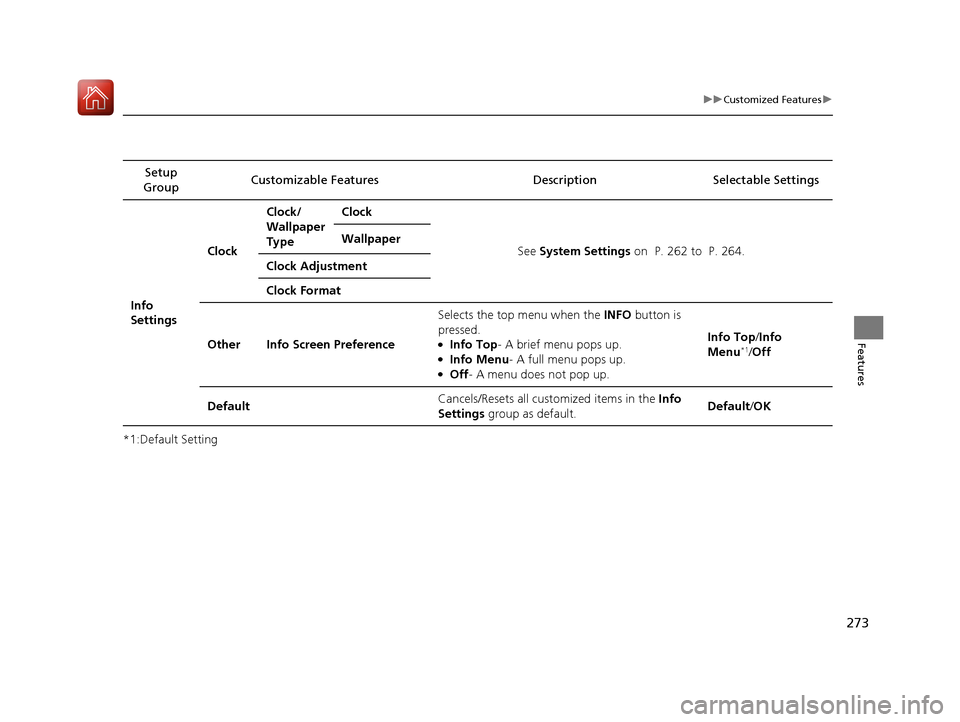
uuCustomized Features u
Features
*1:Default SettingSetup
Group Customizable Features Description Selectable Settings
Info
SettingsClock
Clock/
Wallpaper
Type
Clock
See System Settings on P. 262 to P. 264.
Wallpaper
Clock Adjustment
Clock Format
Other Info Screen Preference Selects the top menu when the
INFO button is
pressed.
●Info Top- A brief menu pops up.●Info Menu - A full menu pops up.●Off- A menu does not pop up. Info Top/
Info
Menu
*1/ Off
Default Cancels/Resets all customized items in the
Info
Settings group as default. Default/
OK
17 ACURA TLX-31TZ36200.book 273 ページ 2016年6月10日 金曜日 午後6時39分
Page 451 of 553
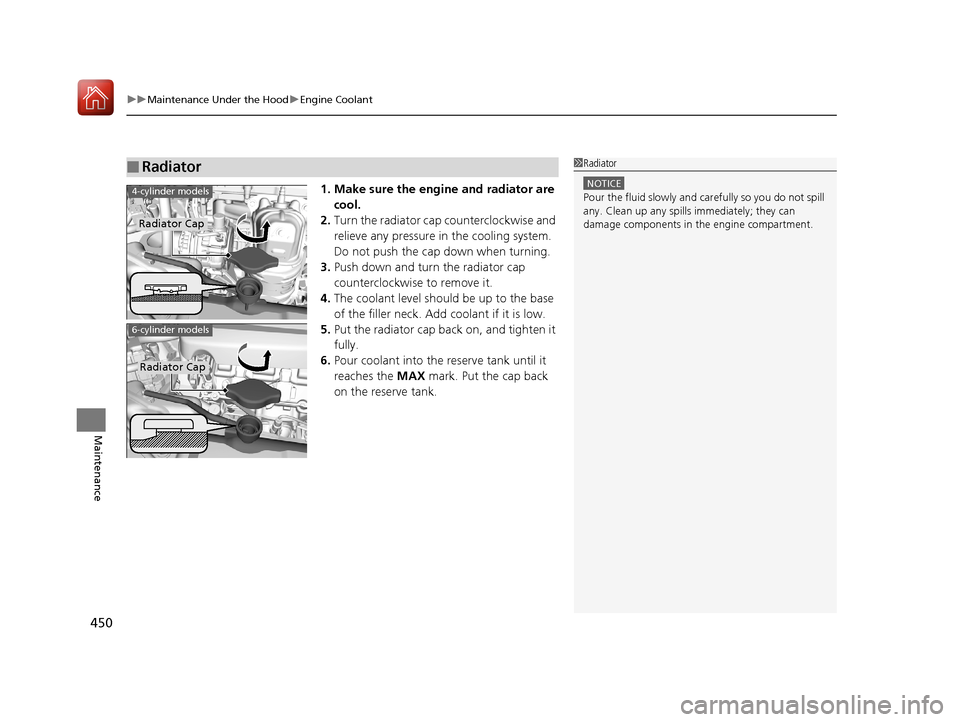
uuMaintenance Under the Hood uEngine Coolant
450
Maintenance
1. Make sure the engine and radiator are
cool.
2. Turn the radiator cap counterclockwise and
relieve any pressure in the cooling system.
Do not push the cap down when turning.
3. Push down and turn the radiator cap
counterclockwise to remove it.
4. The coolant level should be up to the base
of the filler neck. Add coolant if it is low.
5. Put the radiator cap back on, and tighten it
fully.
6. Pour coolant into the reserve tank until it
reaches the MAX mark. Put the cap back
on the reserve tank.
■Radiator1 Radiator
NOTICE
Pour the fluid slowly and ca refully so you do not spill
any. Clean up any spills immediately; they can
damage components in the engine compartment.4-cylinder models
Radiator Cap
6-cylinder models
Radiator Cap
17 ACURA TLX-31TZ36200.book 450 ページ 2016年6月10日 金曜日 午後6時39分
Page 455 of 553
454
uuReplacing Light Bulbs uFront Turn Signal Light Bulbs
Maintenance
Front Turn Signal Light Bulbs
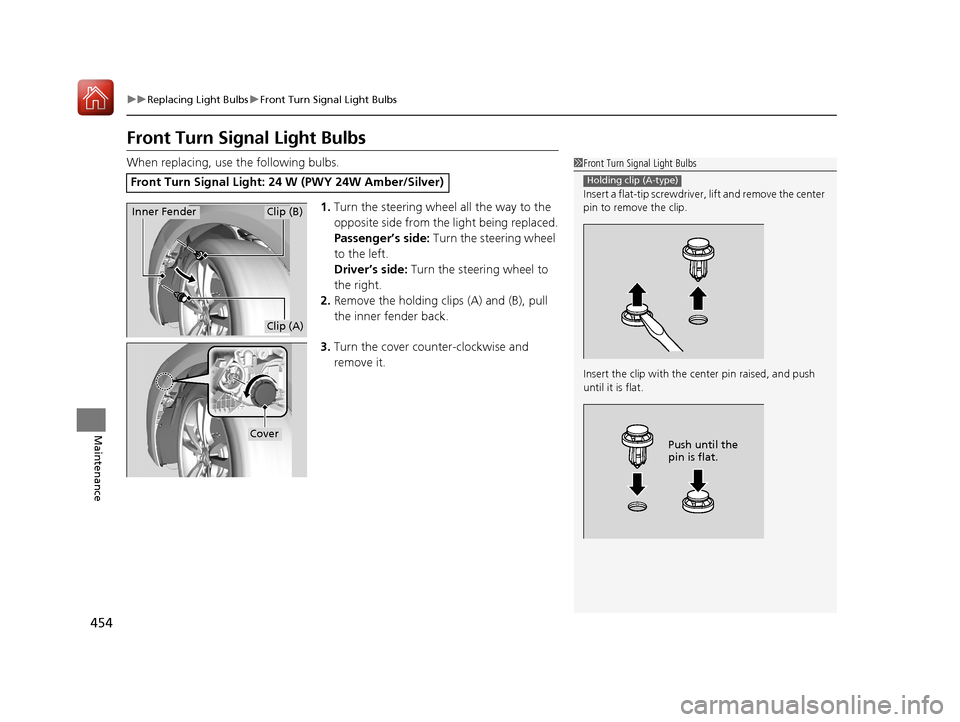
When replacing, use the following bulbs.
1.Turn the steering wheel all the way to the
opposite side from the light being replaced.
Passenger’s side: Turn the steering wheel
to the left.
Driver’s side: Turn the steering wheel to
the right.
2. Remove the holding clips (A) and (B), pull
the inner fender back.
3. Turn the cover counter-clockwise and
remove it.
Front Turn Signal Light: 24 W (PWY 24W Amber/Silver)
1Front Turn Signal Light Bulbs
Insert a flat-tip screwdriver, lift and remove the center
pin to remove the clip.
Insert the clip with the center pin raised, and push
until it is flat.
Holding clip (A-type)
Push until the
pin is flat.
Inner FenderClip (B)
Clip (A)
Cover
17 ACURA TLX-31TZ36200.book 454 ページ 2016年6月10日 金曜日 午後6時39分
Page 456 of 553
455
uuReplacing Light Bulbs uFront Turn Signal Light Bulbs
Maintenance
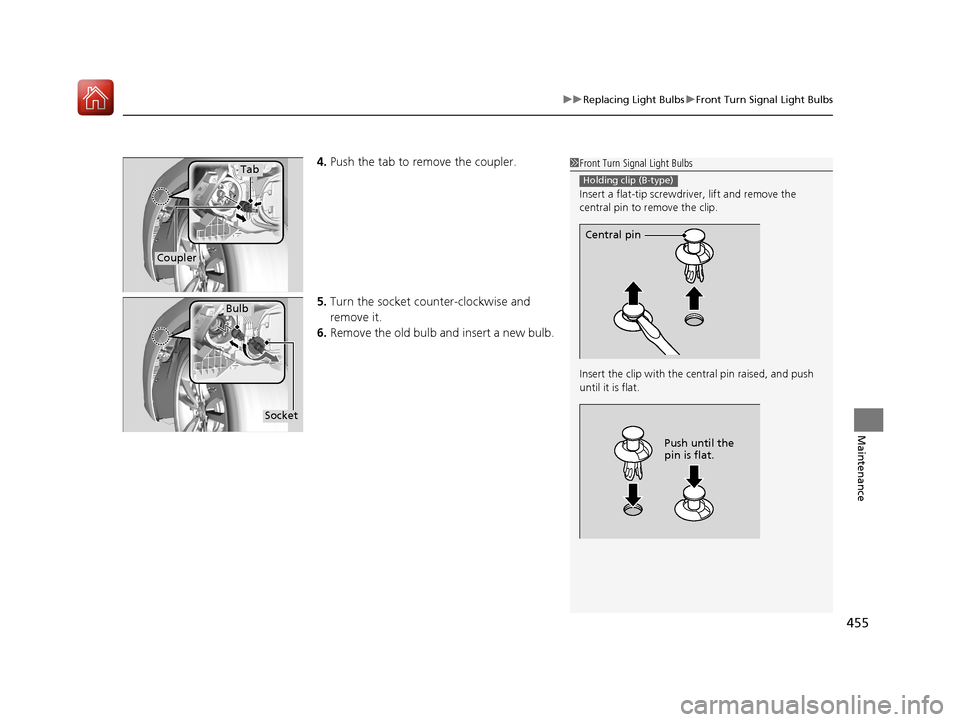
4. Push the tab to remove the coupler.
5. Turn the socket counter-clockwise and
remove it.
6. Remove the old bulb and insert a new bulb.1Front Turn Signal Light Bulbs
Insert a flat-tip screwdriver, lift and remove the
central pin to remove the clip.
Insert the clip with the central pin raised, and push
until it is flat.
Holding clip (B-type)
Central pin
Push until the
pin is flat.
Tab
Coupler
Bulb
Socket
17 ACURA TLX-31TZ36200.book 455 ページ 2016年6月10日 金曜日 午後6時39分
Page 458 of 553
457
uuReplacing Light Bulbs uBrake and Taillight/Rear Side Marker Lights
Maintenance
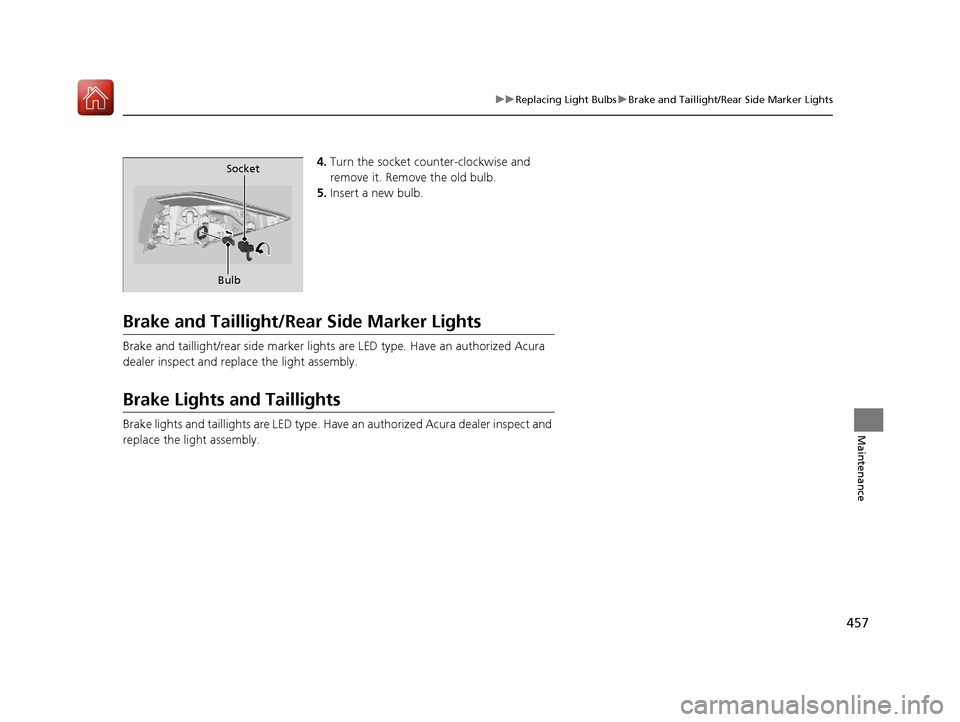
4. Turn the socket counter-clockwise and
remove it. Remove the old bulb.
5. Insert a new bulb.
Brake and Taillight/Rear Side Marker Lights
Brake and taillight/rear side marker lights are LED type. Have an authorized Acura
dealer inspect and replace the light assembly.
Brake Lights and Taillights
Brake lights and taillights are LED type. Have an authorized Acura dealer inspect and
replace the light assembly.
Bulb Socket
17 ACURA TLX-31TZ36200.book 457 ページ 2016年6月10日 金曜日 午後6時39分
Page 459 of 553
458
uuReplacing Light Bulbs uBack-Up Light Bulbs
Maintenance
Back-Up Light Bulbs
When replacing, use the following bulbs.
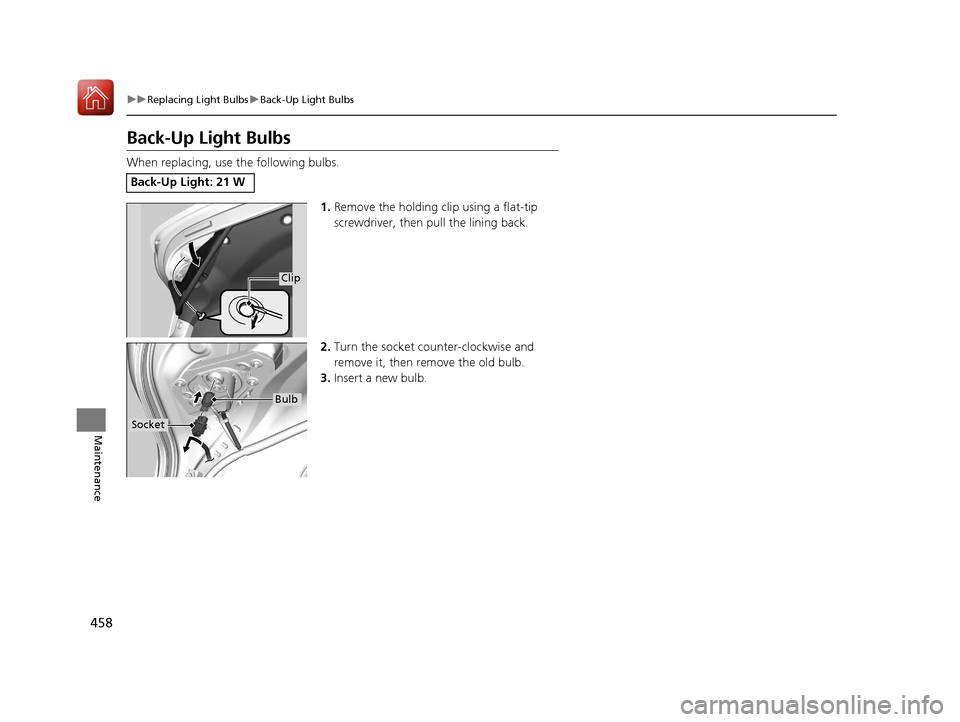
1.Remove the holding clip using a flat-tip
screwdriver, then pull the lining back.
2. Turn the socket counter-clockwise and
remove it, then remove the old bulb.
3. Insert a new bulb.
Back-Up Light: 21 W
Clip
Socket
Bulb
17 ACURA TLX-31TZ36200.book 458 ページ 2016年6月10日 金曜日 午後6時39分
Page 472 of 553
471
Maintenance
Battery
Checking the Battery
The condition of the battery is monitored by a sensor located on the negative
terminal of the battery. If there is a probl em with this sensor, the multi-information
display will display a warning message. If this happens, have you vehicle inspected
by a dealer.
Check the battery termin als for corrosion monthly.
If your vehicle’s battery is disconnected or goes dead:
• The audio system is disabled.
2 Reactivating the audio system P. 210
•The clock resets.
2 Clock P. 138
•The navigation system* is disabled.
2 Refer to the Navigation System Manual
Charging the Battery*
Disconnect both battery cables to prevent damaging your vehicle’s electrical system.
Always disconnect the negative (–) cable first, and reconnect it last.
1Battery
WARNING: Battery post, terminals,
and related accessories contain lead
and lead compounds.
Wash your hands after handling.
When you find corrosion, cl ean the battery terminals
by applying a baking powder and water solution.
Clean the terminals with a damp towel. Cloth/towel
dry the battery. Coat the terminals with grease to
help prevent future corrosion.
When replacing the battery, the replacement must be
of the same specifications.
Consult a dealer for more information.
3WARNING
The battery gives off explosive hydrogen
gas during normal operation.
A spark or flame can cause the battery to
explode with enough force to kill or
seriously hurt you.
When conducting any battery
maintenance, wear prot ective clothing and
a face shield, or have a skilled technician do
it.
* Not available on all models
17 ACURA TLX-31TZ36200.book 471 ページ 2016年6月10日 金曜日 午後6時39分
Page 488 of 553
487
uuIf a Tire Goes Flat uTemporarily Repairing a Flat Tire
Continued
Handling the Unexpected
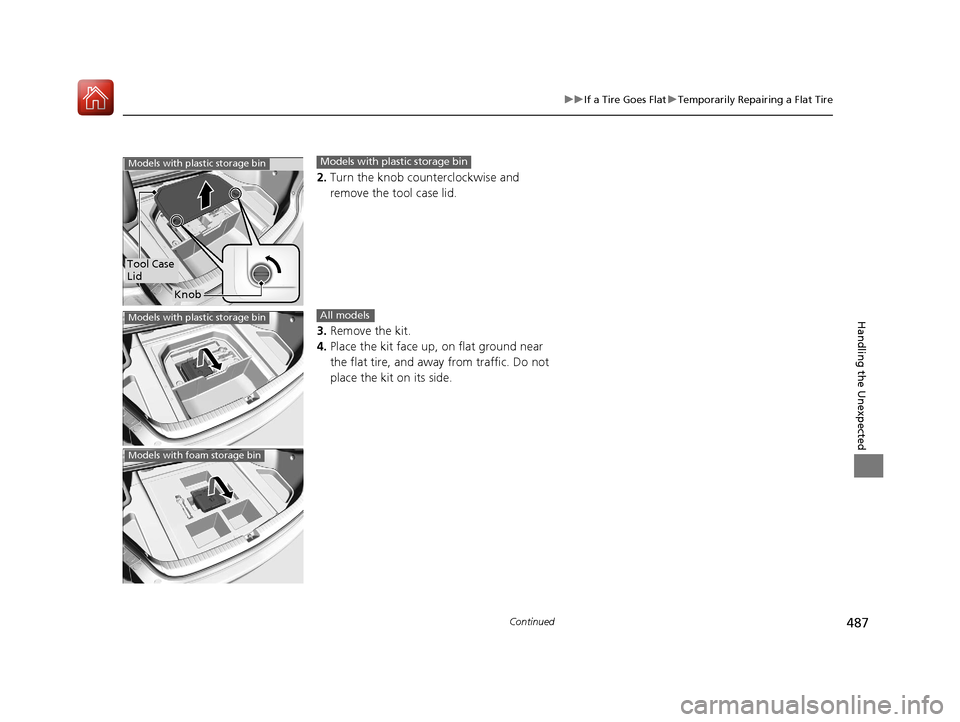
2. Turn the knob counterclockwise and
remove the tool case lid.
3. Remove the kit.
4. Place the kit face up, on flat ground near
the flat tire, and away from traffic. Do not
place the kit on its side.
Tool Case
Lid
Knob
Models with plastic storage binModels with plastic storage bin
Models with plastic storage binAll models
Models with foam storage bin
17 ACURA TLX-31TZ36200.book 487 ページ 2016年6月10日 金曜日 午後6時39分
Page 544 of 553
543
Index
Charging System Indicator ................ 74, 514
Jump Starting ......................................... 507
Maintenance (Checking the Battery) ....... 471
Belts (Seat) .................................................. 32
Beverage Holders ..................................... 191
Blind Spot Information (BSI) System ....... 393
Bluetooth ® Audio ..................................... 245
Bluetooth ® HandsFreeLink ®.................... 278
Booster Seats (For Children) ...................... 65
Brake System ............................................ 400
Anti-lock Brake System (ABS) .................. 406
Automatic Brake Hold ............................. 404
Brake Assist System................................. 407
Fluid ....................................................... 452
Foot Brake .............................................. 403
Parking Brake.......................................... 400
Brake System (Amber)
Indicator ................................................... 73
Brake System (Red)
Indicator ........................................... 70, 515
Brightness Control (Instrument Panel) ... 172
BSI (Blind Spot Information) System ....... 393
Bulb Replacement .................................... 453
Back-Up Lights ........................................ 458
Brake/Taillights........................................ 457
Brake/Taillights and Rear Side Marker
Lights .................................................... 457
Fog Lights ............................................... 453
Front Side Marker/Parking Lights ............. 453
Front Turn Signal Lights .......................... 454
Headlights .............................................. 453 High-Mount Brake Light .......................... 459
Puddle Lights ........................................... 459
Rear License Plate Lights .......................... 459
Rear Turn Signal Lights ............................ 456
Side Turn Signal/Em
ergency Indicator
Lights .................................................... 453
Bulb Specifications ................................... 530
C
Car Wash Mode........................................ 334
Carbon Monoxide Gas ................................ 66
Carrying Cargo .................................. 317, 319
CD Player ................................................... 232
Center Pocket ........................................... 190
Certification Label .................................... 532
Changing Bulbs ......................................... 453
Charging System Indicator ................. 74, 514
Child Safety ................................................. 54
Childproof Door Locks ............................. 150
Child Seat .................................................... 54
Booster Seats ............................................. 65
Child Seat for Infants ................................. 56
Child Seat for Small Children ..................... 57
Installing a Child Seat with a Lap/Shoulder Seat Belt .................................................. 61
Larger Children .......................................... 64
Rear-facing Child Seat ............................... 56
Selecting a Child Seat ................................ 58
Using a Tether ........................................... 63
Childproof Door Locks ............................. 150 Cleaning the Exterior
............................... 478
Cleaning the Interior ................................ 476
Client Service Information ....................... 540
Climate Control System ............................ 198
Changing the Mode ................................ 201
Defrosting the Windshield and Windows ............................................... 205
Dust and Pollen Filter............................... 475
Sensors ................................................... 206
Synchronized Mode................................. 202
Using Automatic Climate Control ............ 198
Clock .......................................................... 138
CMBS
TM (Collision Mitigation Braking
SystemTM) ................................................. 408
Coat Hooks ............................................... 193
Collision Mitigation Braking System
TM
(CMBSTM) ................................................. 408
Compact Spare Tire (Optional) ........ 497, 531
Compass .................................................... 312
Console Compartment ............................. 189
Controls ..................................................... 137
Coolant (Engine) ...................................... 449
Adding to the Radiator ............................ 450
Adding to the Reserve Tank..................... 449
Overheating ............................................ 512
Creeping (Automatic Transmission) ........ 330
Creeping (Dual Clutch Transmission) ...... 330
Cross Traffic Monitor ............................... 423
Cruise Control ........................................... 348
Indicator.................................................... 84
Cup Holders .............................................. 191
17 ACURA TLX-31TZ36200.book 543 ページ 2016年6月10日 金曜日 午後6時39分