tow Acura TLX 2017 User Guide
[x] Cancel search | Manufacturer: ACURA, Model Year: 2017, Model line: TLX, Model: Acura TLX 2017Pages: 553, PDF Size: 33.77 MB
Page 321 of 553
320
uuBefore Driving uMaximum Load Limit
Driving
(5) Determine the combined weight of luggage and cargo being
loaded on the vehicle. That we ight may not safely exceed the
available cargo and luggage load capacity calculated in step 4.
(6) If your vehicle will be towing a tra iler, load from your trailer will
be transferred to your vehicl e. Consult this manual to
determine how this reduces the available cargo and luggage
load capacity of your vehicle.
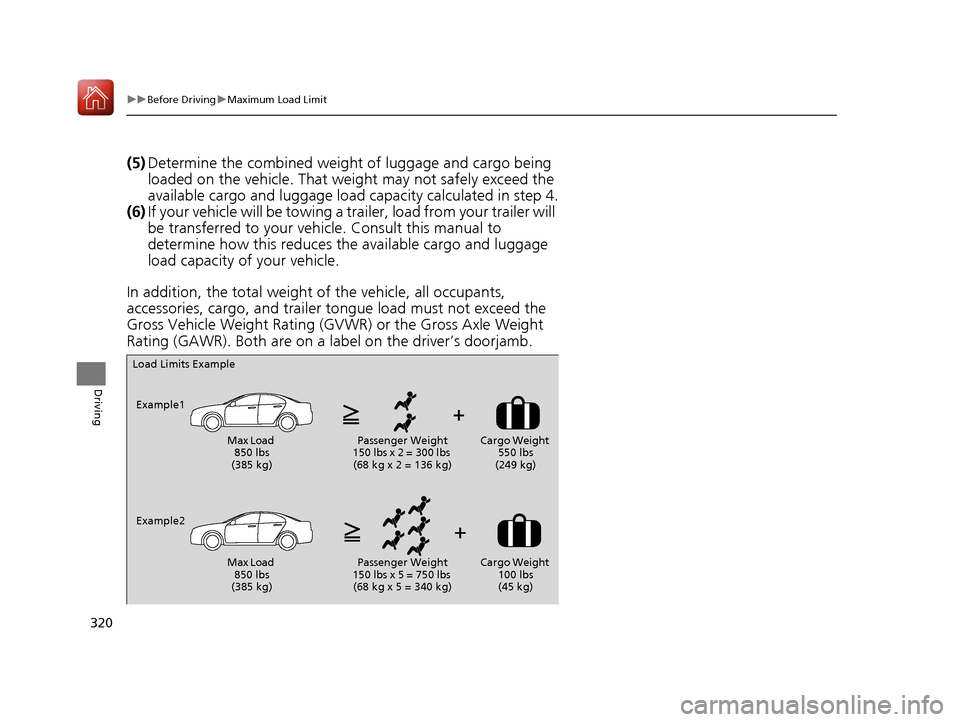
In addition, the total weight of the vehicle, all occupants,
accessories, cargo, and trailer tongue load must not exceed the
Gross Vehicle Weight Rating (GVW R) or the Gross Axle Weight
Rating (GAWR). Both are on a label on the driver’s doorjamb.
Load Limits Example
Example1 Max Load 850 lbs
(385 kg) Passenger Weight
150 lbs x 2 = 300 lbs (68 kg x 2 = 136 kg) Cargo Weight
550 lbs
(249 kg)
Example2 Max Load 850 lbs
(385 kg) Passenger Weight
150 lbs x 5 = 750 lbs (68 kg x 5 = 340 kg) Cargo Weight
100 lbs
(45 kg)
17 ACURA TLX-31TZ36200.book 320 ページ 2016年6月10日 金曜日 午後6時39分
Page 322 of 553
321
Driving
Towing a Trailer
Your vehicle is not designed to tow a trailer. Attempting to do so can void your
warranties.
Towing Your Vehicle
Your vehicle is not designed to be towed behind a motor home. If your vehicle needs
to be towed in an emergency, refer to the emergency towing information.
2Emergency Towing P. 525
17 ACURA TLX-31TZ36200.book 321 ページ 2016年6月10日 金曜日 午後6時39分
Page 330 of 553
329
uuWhen Driving uPrecautions While Driving
Continued
Driving
Precautions While Driving
Avoid driving in deep water and on flooded roads. This can damage the engine,
driveline, or cause electrical component failure.
■In Rain1Precautions While Driving
NOTICE
Do not change the gear position while pressing the
accelerator pedal. You could damage the
transmission.
NOTICE
The following can dama ge the under spoiler:
•Parking the vehicle by a parking block•Parallel parking along the road shoulder
•Driving toward the bottom of a hill
•Driving up or down to a different surface level
(such as a road shoulder)
•Driving on a rutted or bumpy road
•Driving on a road with potholes.
NOTICE
If you repeatedly turn the steering wheel at an
extremely low speed, or hold the steering wheel in
the full left or right position for a while, the electric
power steering (EPS) system heats up. The system
goes into a protective mode, and limits its
performance. The steering wheel becomes harder
and harder to operate. Once the system cools down,
the EPS system is restored.
Repeated operation under these conditions can
eventually damage the system.
If the power mode is set to ACCESSORY or VEHICLE
OFF (LOCK) while driving, the engine will shut down
and all steering and brake pow er assist functions will
stop, making it difficult to control the vehicle.
17 ACURA TLX-31TZ36200.book 329 ページ 2016年6月10日 金曜日 午後6時39分
Page 353 of 553
uuWhen Driving uFront Sensor Camera*
352
Driving
1Front Sensor Camera*
If the Some Driver Assist Systems Cannot
Operate: Camera Temperature Too High message
appears:
•Use the climate control system to cool down the
interior and, if necessary, also use defroster mode
with the air flow directed towards the camera.
•Start driving the vehicle to lower the windshield
temperature, which cool s down the area around
the camera.
If the Some Driver Assist Systems Cannot
Operate: Clean Front Windshield message
appears:
•Park your vehicle in a sa fe place, and clean the
windshield. If the message does not disappear after
you have cleaned the winds hield and driven for a
while, have your vehicle checked by a dealer.
* Not available on all models
17 ACURA TLX-31TZ36200.book 352 ページ 2016年6月10日 金曜日 午後6時39分
Page 385 of 553
uuWhen Driving uLane Keeping Assist System (LKAS)*
384
Driving
The system can be used when the following conditions are met.
• The lane in which you are driving has dete ctable lane markers on both sides, and
your vehicle is in the center of the lane.
• The vehicle speed is be tween about 45 and 90 mph (72 and 145 km/h).
• You are driving on a straight or slightly curved road.
• The turn signals are off.
• The brake pedal is not depressed.
• The wipers are not in continuous operation.
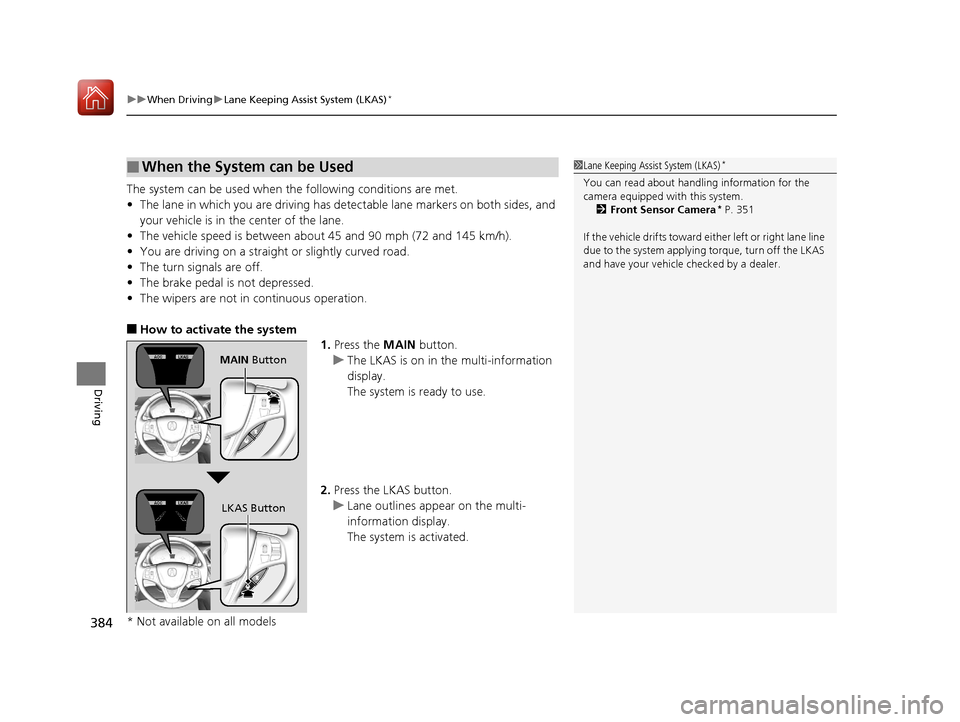
■How to activate the system
1.Press the MAIN button.
u The LKAS is on in the multi-information
display.
The system is ready to use.
2. Press the LKAS button.
u Lane outlines appear on the multi-
information display.
The system is activated.
■When the System can be Used1Lane Keeping Assist System (LKAS)*
You can read about handling information for the
camera equipped with this system.
2 Front Sensor Camera
* P. 351
If the vehicle drifts toward ei th e r l ef t o r r ight lane line
due to the system applying torque, turn off the LKAS
and have your vehicle checked by a dealer.
MAIN Button
LKAS Button
* Not available on all models
17 ACURA TLX-31TZ36200.book 384 ページ 2016年6月10日 金曜日 午後6時39分
Page 434 of 553
433
uuBefore Performing Maintenance uSafety When Performing Maintenance
Maintenance
Safety When Performing Maintenance
Some of the most important safe ty precautions are given here.
However, we cannot warn you of every conceivable hazard that can arise in
performing maintenance. Only you can decide whether you should perform a given
task.
• To reduce the possibility of fire or explos ion, keep cigarettes, sparks, and flames
away from the battery and all fuel related parts.
• Never leave rags, towels, or other flammable objects under the hood.
u Heat from the engine and exhaust can ignite them, causing a fire.
• To clean parts, use a co mmercially available degreaser or parts cleaner, not
gasoline.
• Wear eye protection and prot ective clothing when working with the battery or
compressed air.
• Engine exhaust contains carbon monoxide, which is poisonous and can kill you.
u Only operate the engine if th ere is sufficient ventilation.
• The vehicle must be in a stationary condition.
u Make sure your vehicle is parked on le vel ground, the parking brake is set, and
the engine is off.
• Be aware that hot parts can burn you.
u Make sure to let the engine and exhaust system cool thoroughly before
touching vehicle parts.
• Be aware that moving parts can injure you.
u Do not start the engine unless instruct ed, and keep your hands and limbs away
from moving parts.
u Do not open the hood while the Auto Idle Stop function
* is activated.
■Maintenance Safety
■Vehicle Safety
1Safety When Performing Maintenance
3WARNING
Improperly maintaining this vehicle or
failing to correct a pr oblem before driving
can cause a crash in which you can be
seriously hurt or killed.
Always follow the inspection and
maintenance recommendations according
to the schedules in this owner’s manual.
3WARNING
Failure to properly follow maintenance
instructions and prec autions can cause you
to be seriously hurt or killed.
Always follow the procedures and
precautions in this owner’s manual.
* Not available on all models
17 ACURA TLX-31TZ36200.book 433 ページ 2016年6月10日 金曜日 午後6時39分
Page 445 of 553
444
uuMaintenance Under the Hood uOil Check
Maintenance
Oil Check
We recommend that you check the engi ne oil level every time you refuel.
Park the vehicle on level ground.
Wait approximately three minu tes after turning the engine off before you check the
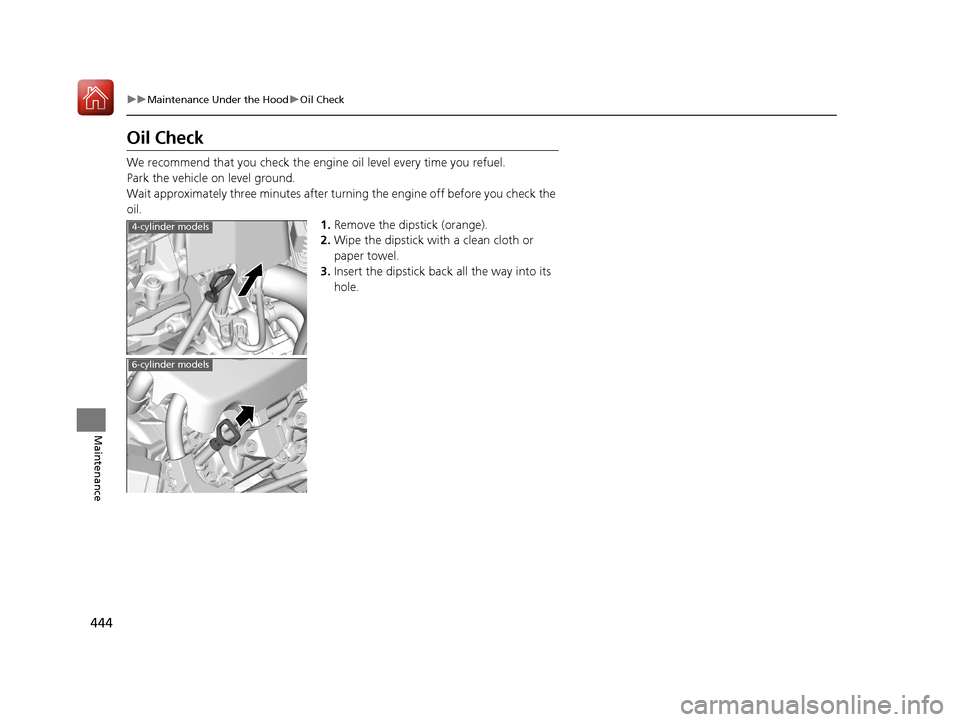
oil. 1.Remove the dipstick (orange).
2. Wipe the dipstick with a clean cloth or
paper towel.
3. Insert the dipstick back all the way into its
hole.
4-cylinder models
6-cylinder models
17 ACURA TLX-31TZ36200.book 444 ページ 2016年6月10日 金曜日 午後6時39分
Page 472 of 553
471
Maintenance
Battery
Checking the Battery
The condition of the battery is monitored by a sensor located on the negative
terminal of the battery. If there is a probl em with this sensor, the multi-information
display will display a warning message. If this happens, have you vehicle inspected
by a dealer.
Check the battery termin als for corrosion monthly.
If your vehicle’s battery is disconnected or goes dead:
• The audio system is disabled.
2 Reactivating the audio system P. 210
•The clock resets.
2 Clock P. 138
•The navigation system* is disabled.
2 Refer to the Navigation System Manual
Charging the Battery*
Disconnect both battery cables to prevent damaging your vehicle’s electrical system.
Always disconnect the negative (–) cable first, and reconnect it last.
1Battery
WARNING: Battery post, terminals,
and related accessories contain lead
and lead compounds.
Wash your hands after handling.
When you find corrosion, cl ean the battery terminals
by applying a baking powder and water solution.
Clean the terminals with a damp towel. Cloth/towel
dry the battery. Coat the terminals with grease to
help prevent future corrosion.
When replacing the battery, the replacement must be
of the same specifications.
Consult a dealer for more information.
3WARNING
The battery gives off explosive hydrogen
gas during normal operation.
A spark or flame can cause the battery to
explode with enough force to kill or
seriously hurt you.
When conducting any battery
maintenance, wear prot ective clothing and
a face shield, or have a skilled technician do
it.
* Not available on all models
17 ACURA TLX-31TZ36200.book 471 ページ 2016年6月10日 金曜日 午後6時39分
Page 484 of 553
483
Handling the Unexpected
This chapter explains how to handle unexpected troubles.
ToolsTypes of Tools .................................. 484
If a Tire Goes Flat Temporarily Repairi ng a Flat Tire....... 485
Changing a Flat Tire ......................... 497
Engine Does Not Start Checking the Engine ........................ 504
If the Keyless Access Remote Battery is Weak ............................................. 505
Emergency Engine Stop ................... 506
Jump Starting .................................... 507
Shift Lever Does Not Move .............. 511Overheating
How to Handle Overheating............. 512
Indicator, Coming On/Blinking
If the Low Oil Pressure Indicator Comes On .. 514If the Charging System Indicator Comes On ................................................. 514
If the Malfunction Indicator Lamp Comes On or Blinks ................................... 515
If the Brake System Indicator (Red) Comes On .. 515If the Electric Power Steering (EPS) System Indicator Comes On ........................... 516
If the Electric Parking Brake System Indicator Comes On ....................... 517 If the Low Tire Pressure/TPMS Indicator
Comes On or Blinks ....................... 518
If the Transmission Indicator Blinks along with the Warning Message.............. 519
Fuses Fuse Locations ................................. 520
Inspecting and Changing Fuses ........ 524
Emergency Towing ........................... 525
When You Cannot Unlock the Fuel Fill Door ................................................. 526When You Cannot Open the Trunk ..... 527RefuelingRefueling From a Portable Fuel Container ... 528
17 ACURA TLX-31TZ36200.book 483 ページ 2016年6月10日 金曜日 午後6時39分
Page 485 of 553
484
Handling the Unexpected
Tools
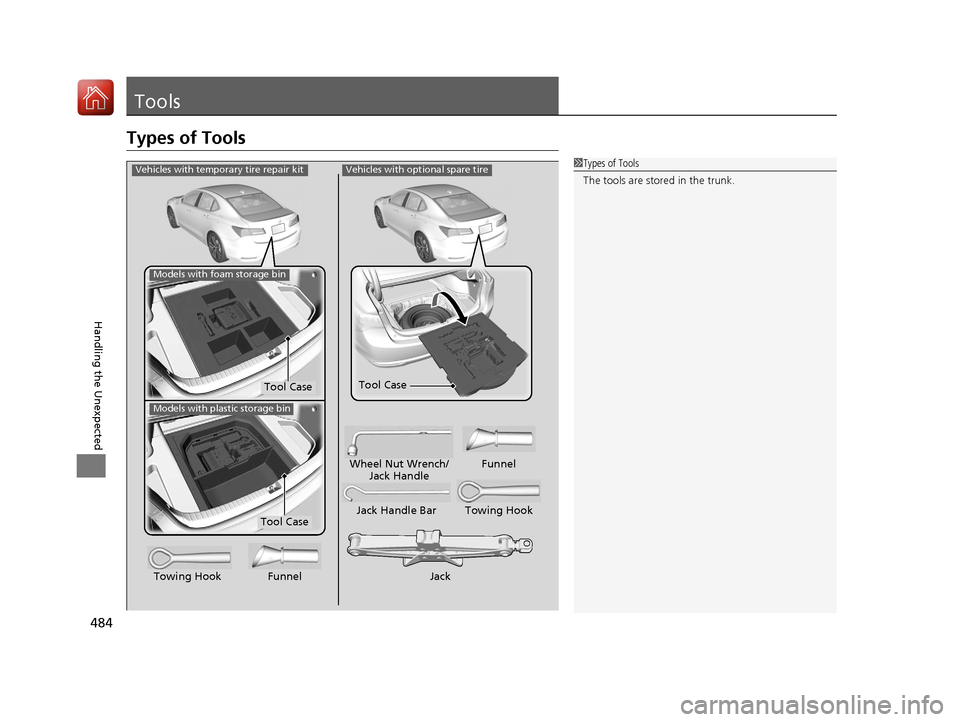
Types of Tools
1Types of Tools
The tools are stored in the trunk.Vehicles with optional spare tire
Jack
Jack Handle Bar Towing Hook
Wheel Nut Wrench/
Jack Handle Funnel
Towing Hook Funnel
Tool Case
Vehicles with temporary tire repair kit
Tool Case
Models with foam storage bin
Models with plastic storage bin
Tool Case
17 ACURA TLX-31TZ36200.book 484 ページ 2016年6月10日 金曜日 午後6時39分