wheel Acura TLX 2017 Owner's Guide
[x] Cancel search | Manufacturer: ACURA, Model Year: 2017, Model line: TLX, Model: Acura TLX 2017Pages: 553, PDF Size: 33.77 MB
Page 127 of 553
uuGauges and Multi-Information Display uMulti-Information Display
126
Instrument Panel
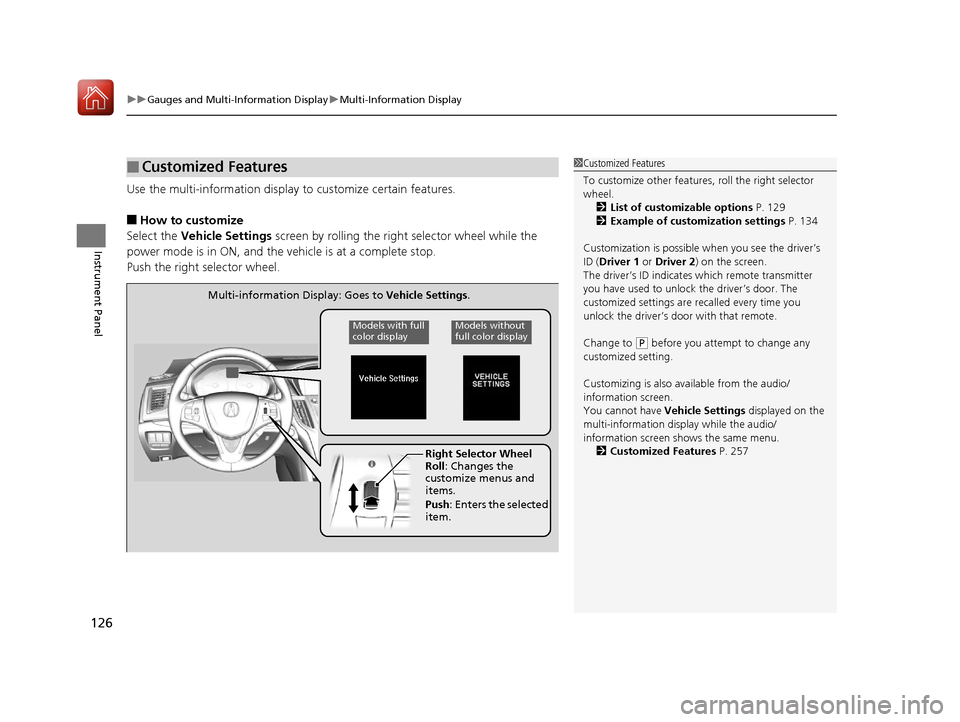
Use the multi-information display to customize certain features.
■How to customize
Select the Vehicle Settings screen by rolling the right selector wheel while the
power mode is in ON, and the vehicle is at a complete stop.
Push the right selector wheel.
■Customized Features1 Customized Features
To customize other features , roll the right selector
wheel.
2 List of customizable options P. 129
2 Example of customization settings P. 134
Customization is possible when you see the driver’s
ID ( Driver 1 or Driver 2) on the screen.
The driver’s ID indicates which remote transmitter
you have used to unlock the driver’s door. The
customized settings are recalled every time you
unlock the driver’s door with that remote.
Change to
( P before you attempt to change any
customized setting.
Customizing is also av ailable from the audio/
information screen.
You cannot have Vehicle Settings displayed on the
multi-information display while the audio/
information screen shows the same menu. 2 Customized Features P. 257
Right Selector Wheel
Roll: Changes the
customize menus and
items.
Push : Enters the selected
item.
Multi-information Display: Goes to Vehicle Settings.
Models without
full color displayModels with full
color display
17 ACURA TLX-31TZ36200.book 126 ページ 2016年6月10日 金曜日 午後6時39分
Page 128 of 553
127
uuGauges and Multi-Information Display uMulti-Information Display
Continued
Instrument Panel
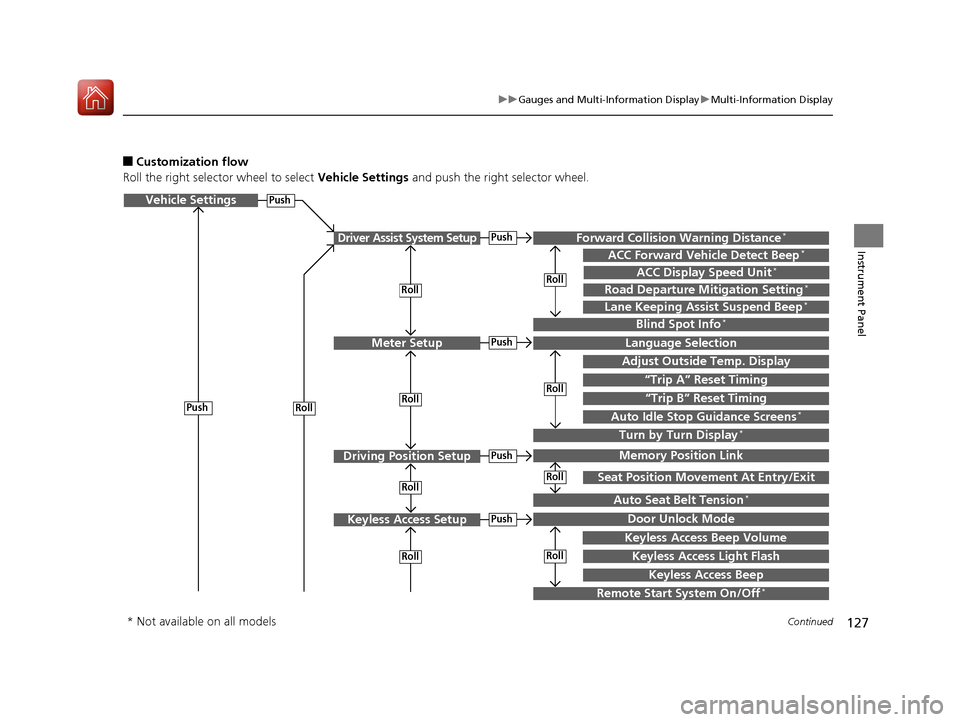
■Customization flow
Roll the right selector wheel to select Vehicle Settings and push the right selector wheel.
Vehicle Settings
“Trip A” Reset Timing
Language Selection
Adjust Outside Temp. Display
Memory Position Link
Door Unlock Mode
Keyless Access Light Flash
Driver Assist System Setup
Meter Setup
Driving Position Setup
Keyless Access Setup
“Trip B” Reset Timing
Turn by Turn Display*
Forward Collision Warning Distance*
ACC Forward Vehicle Detect Beep*
Push
Push
Push
Lane Keeping Assist Suspend Beep*
Blind Spot Info*
Seat Position Movement At Entry/Exit
Auto Seat Belt Tension*
Roll
Keyless Access Beep
Push
Roll
Push
Push
Roll
Roll
Roll
Roll
Roll
Roll
ACC Display Speed Unit*
Road Departure Mitigation Setting*
Remote Start System On/Off*
Keyless Access Beep Volume
Auto Idle Stop Guidance Screens*
Roll
* Not available on all models
17 ACURA TLX-31TZ36200.book 127 ページ 2016年6月10日 金曜日 午後6時39分
Page 135 of 553
134
uuGauges and Multi-Information Display uMulti-Information Display
Instrument Panel
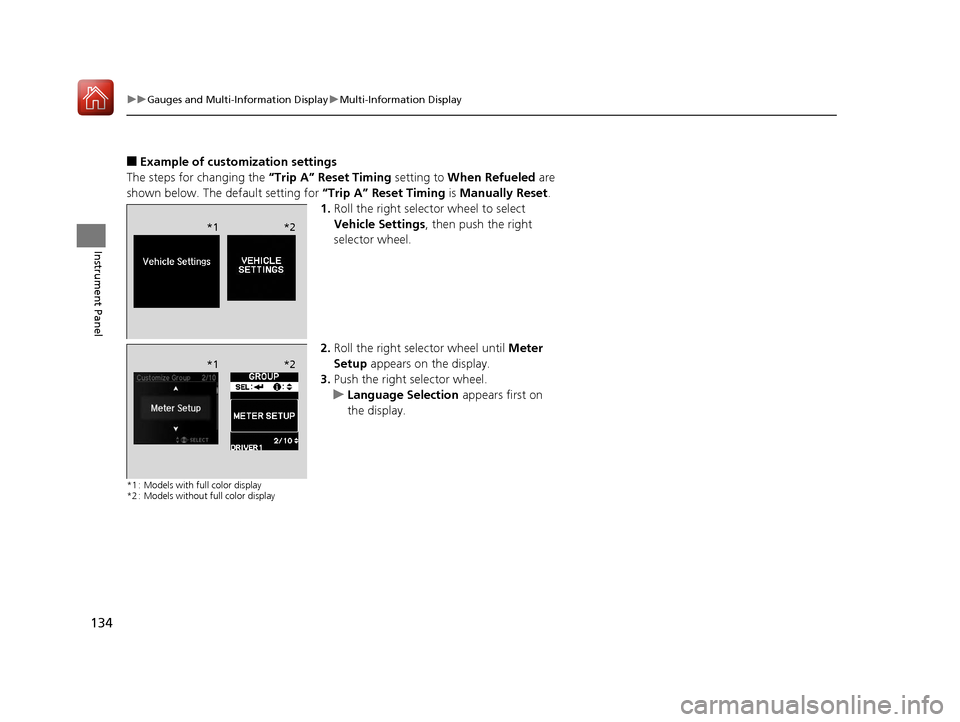
■Example of customization settings
The steps for changing the “Trip A” Reset Timing setting to When Refueled are
shown below. The default setting for “Trip A” Reset Timing is Manually Reset .
1. Roll the right selector wheel to select
Vehicle Settings , then push the right
selector wheel.
2. Roll the right selector wheel until Meter
Setup appears on the display.
3. Push the right selector wheel.
u Language Selection appears first on
the display.
*1 : Models with full color display
*2 : Models without full color display
*1 *2
*1*2
17 ACURA TLX-31TZ36200.book 134 ページ 2016年6月10日 金曜日 午後6時39分
Page 136 of 553
135
uuGauges and Multi-Information Display uMulti-Information Display
Instrument Panel
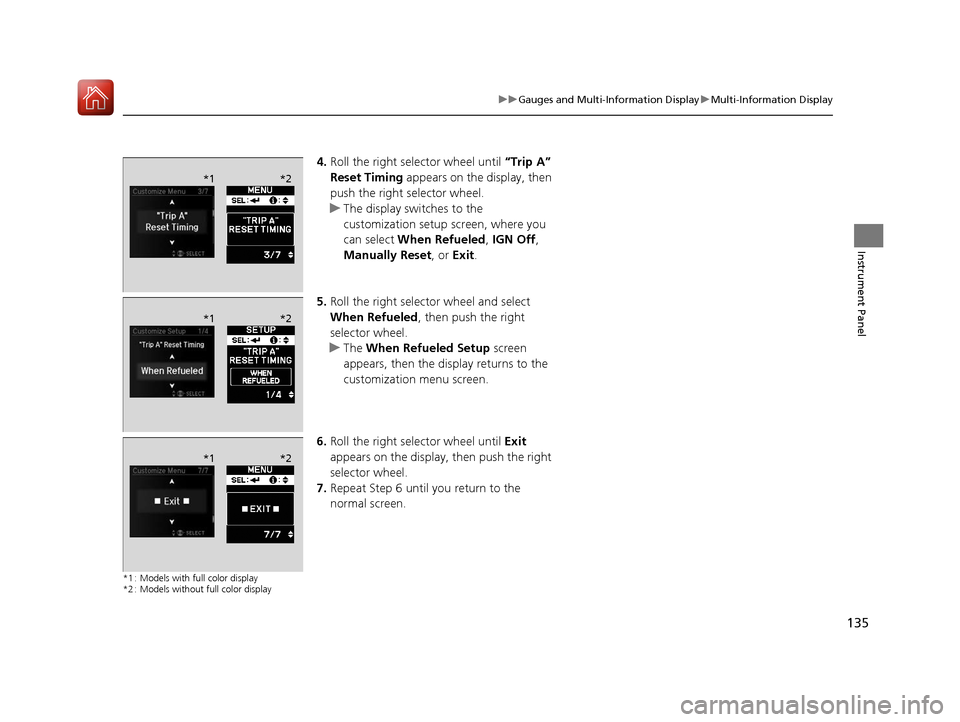
4. Roll the right selector wheel until “Trip A”
Reset Timing appears on the display, then
push the right selector wheel.
u The display swit ches to the
customization setup screen, where you
can select When Refueled , IGN Off,
Manually Reset , or Exit .
5. Roll the right selector wheel and select
When Refueled , then push the right
selector wheel.
u The When Refueled Setup screen
appears, then the di splay returns to the
customization menu screen.
6. Roll the right selector wheel until Exit
appears on the display, then push the right
selector wheel.
7. Repeat Step 6 until you return to the
normal screen.
*1 : Models with full color display
*2 : Models without full color display
*1 *2
*1*2
*1*2
17 ACURA TLX-31TZ36200.book 135 ページ 2016年6月10日 金曜日 午後6時39分
Page 138 of 553
137
Controls
This chapter explains how to operate the various controls necessary for driving.
Clock.................................................. 138
Locking and Unlocking the Doors
Key Types and Functions .................. 139
Low Keyless Access Remote Signal Strength ......................................... 141
Locking/Unlocking the Doors from the Outside .......................................... 142
Locking/Unlocking the Doors from the
Inside ............................................. 148
Childproof Door Locks ..................... 150
Auto Door Locking/Unlocking .......... 151
Opening and Closing the Trunk ....... 152
Security System ................................ 155
Immobilizer System .......................... 155 Security System Alarm...................... 155Opening and Closing the Windows
.... 158Opening and Closing the Moonroof....... 160Operating the Switches Around the
Steering Wheel
ENGINE START/STOP Button............. 161
Turn Signals ..................................... 164
Light Switches.................................. 165
Fog Lights
*...................................... 168
Daytime Running Lights ................... 168
Wipers and Washers ........................ 169
Brightness Control ........................... 172
Rear Defogger/Heated Door Mirror Button........................................ 173
Driving Position Memory System ...... 174
Adjusting the Steering Wheel .......... 176
Adjusting the Mirrors ....................... 177
Interior Rearview Mirror ................... 177
Power Door Mirrors ......................... 178
Adjusting the Seats .......................... 179
Front Seats ...................................... 179
Interior Lights/Interior Convenience
Items ................................................ 186
Interior Lights .................................. 186
Interior Convenience Items .............. 188
Climate Control System ................... 198
Using Automatic Climate Control .... 198
Automatic Climate Control Sensors......206
* Not available on all models
17 ACURA TLX-31TZ36200.book 137 ページ 2016年6月10日 金曜日 午後6時39分
Page 162 of 553
161Continued
Controls
Operating the Switches Around the Steering Wheel
ENGINE START/STOP Button
*1:Canadian models
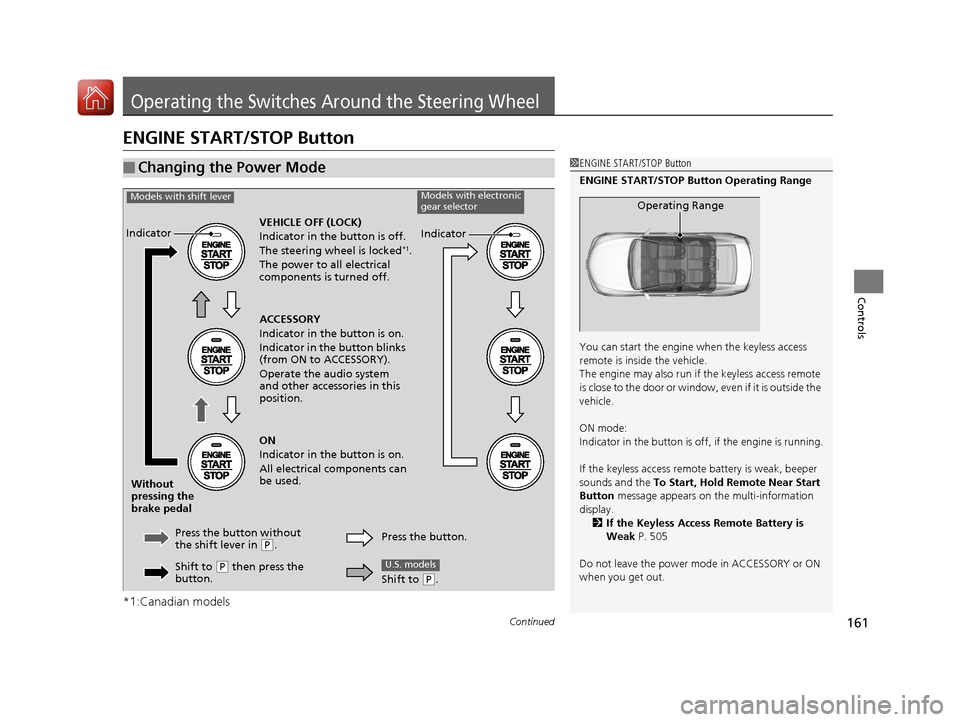
■Changing the Power Mode1ENGINE START/STOP Button
ENGINE START/STOP Button Operating Range
You can start the engine when the keyless access
remote is inside the vehicle.
The engine may also run if the keyless access remote
is close to the door or window, even if it is outside the
vehicle.
ON mode:
Indicator in the button is of f, if the engine is running.
If the keyless access remote battery is weak, beeper
sounds and the To Start, Hold Remote Near Start
Button message appears on the multi-information
display. 2 If the Keyless Access Remote Battery is
Weak P. 505
Do not leave the power mode in ACCESSORY or ON
when you get out.
Operating Range
VEHICLE OFF (LOCK)
Indicator in th e button is off.
The steering wheel is locked
*1.
The power to all electrical
components is turned off.
Press the button without
the shift lever in
( P.
Without
pressing the
brake pedal ACCESSORY
Indicator in the button is on.
Indicator in the button blinks
(from ON to ACCESSORY).
Operate the audio system
and other accessories in this
position.
ON
Indicator in the button is on.
All electrical components can
be used.
Indicator
Indicator
Models with shift leverModels with electronic
gear selector
Shift to (P then press the
button. Press the button.
Shift to (
P.
U.S. models
17 ACURA TLX-31TZ36200.book 161 ページ 2016年6月10日 金曜日 午後6時39分
Page 163 of 553
uuOperating the Switches Around the Steering Wheel uENGINE START/STOP Button
162
Controls
If you leave the vehicle for 30 to 60 minutes with the transmission in (P and the
power mode in ACCESSORY, the vehicle automa tically goes into the mode similar to
VEHICLE OFF (LOCK) to avoid draining the battery.
When in this mode:
The steering wheel does not lock.
You cannot lock or unlock doors with th e remote transmitter or the keyless access
system.
Press the ENGINE START/STOP button three times to swit ch the mode to VEHICLE
OFF (LOCK).
If you open the driver’s doo r when the power mode is set to ACCESSORY, a warning
buzzer sounds.
■Automatic Power Off
■Power Mode Reminder
1 Changing the Power Mode
If the power mode does not change from VEHICLE
OFF to ACCESSORY, press the ENGINE START/STOP
button while moving the st eering wheel left and
right. The steering wheel will unlock, allowing the
mode to change.
Canadian models
Canadian models
17 ACURA TLX-31TZ36200.book 162 ページ 2016年6月10日 金曜日 午後6時39分
Page 164 of 553
163
uuOperating the Switches Around the Steering Wheel uENGINE START/STOP Button
Controls
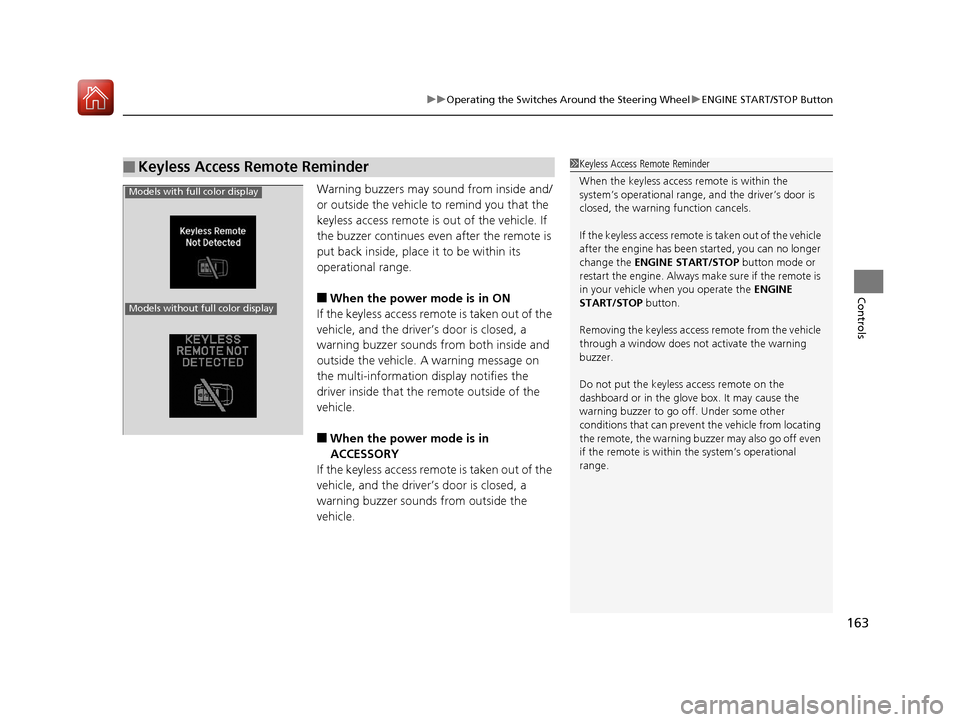
Warning buzzers may sound from inside and/
or outside the vehicle to remind you that the
keyless access remote is out of the vehicle. If
the buzzer continues even after the remote is
put back inside, place it to be within its
operational range.
■When the power mode is in ON
If the keyless access remote is taken out of the
vehicle, and the driver’s door is closed, a
warning buzzer sounds from both inside and
outside the vehicle. A warning message on
the multi-information display notifies the
driver inside that the remote outside of the
vehicle.
■When the power mode is in
ACCESSORY
If the keyless access remote is taken out of the
vehicle, and the driver’s door is closed, a
warning buzzer sounds from outside the
vehicle.
■Keyless Access Remote Reminder1 Keyless Access Remote Reminder
When the keyless access remote is within the
system’s operational range, and the driver’s door is
closed, the warni ng function cancels.
If the keyless access remote is taken out of the vehicle
after the engine has been started, you can no longer
change the ENGINE START/STOP button mode or
restart the engine. Always make sure if the remote is
in your vehicle when you operate the ENGINE
START/STOP button.
Removing the keyless access remote from the vehicle
through a window does not activate the warning
buzzer.
Do not put the keyless access remote on the
dashboard or in the glove box. It may cause the
warning buzzer to go of f. Under some other
conditions that can prevent the vehicle from locating
the remote, the warning buzzer may also go off even
if the remote is within the system’s operational
range.
Models with full color display
Models without full color display
17 ACURA TLX-31TZ36200.book 163 ページ 2016年6月10日 金曜日 午後6時39分
Page 165 of 553
164
uuOperating the Switches Around the Steering Wheel uTurn Signals
Controls
Turn Signals
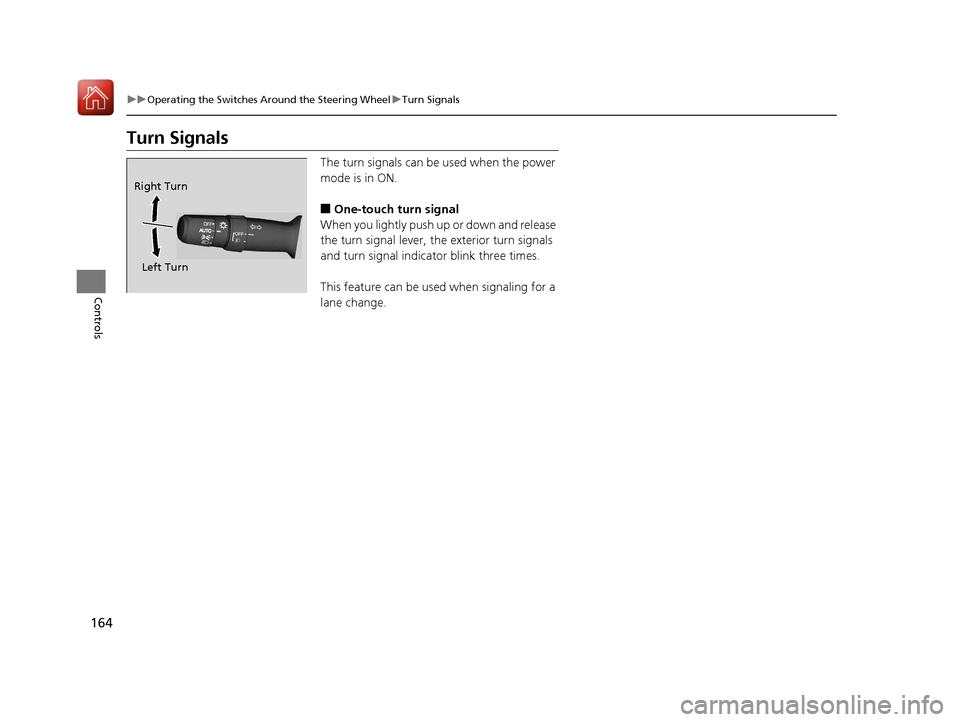
The turn signals can be used when the power
mode is in ON.
■One-touch turn signal
When you lightly push up or down and release
the turn signal lever, th e exterior turn signals
and turn signal indicator blink three times.
This feature can be used when signaling for a
lane change.
Right Turn
Left Turn
17 ACURA TLX-31TZ36200.book 164 ページ 2016年6月10日 金曜日 午後6時39分
Page 166 of 553
165
uuOperating the Switches Around the Steering Wheel uLight Switches
Continued
Controls
Light Switches
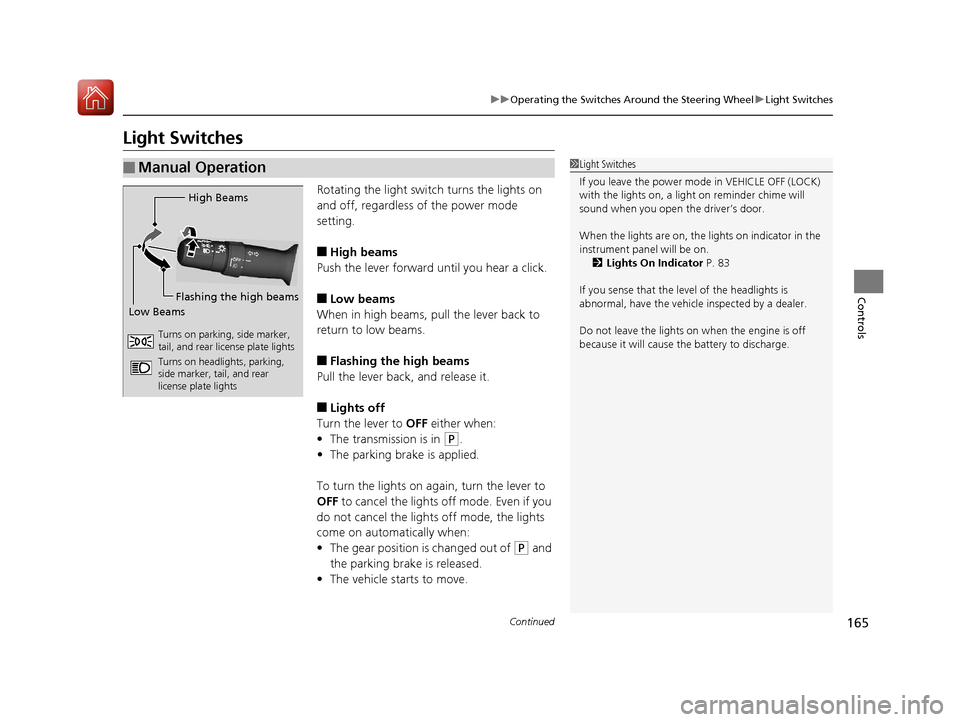
Rotating the light switch turns the lights on
and off, regardless of the power mode
setting.
■High beams
Push the lever forward until you hear a click.
■Low beams
When in high beams, pull the lever back to
return to low beams.
■Flashing the high beams
Pull the lever back, and release it.
■Lights off
Turn the lever to OFF either when:
• The transmission is in
(P.
• The parking brake is applied.
To turn the light s on again, turn the lever to
OFF to cancel the lights off mode. Even if you
do not cancel the lights off mode, the lights
come on automatically when:
• The gear position is changed out of
(P and
the parking brake is released.
• The vehicle starts to move.
■Manual Operation1Light Switches
If you leave the power mode in VEHICLE OFF (LOCK)
with the lights on, a light on reminder chime will
sound when you open the driver’s door.
When the lights are on, the lights on indicator in the
instrument pane l will be on.
2 Lights On Indicator P. 83
If you sense that the le vel of the headlights is
abnormal, have the vehicl e inspected by a dealer.
Do not leave the lights on when the engine is off
because it will cause the battery to discharge.
High Beams
Flashing the high beams
Low Beams
Turns on parking, side marker,
tail, and rear license plate lights
Turns on headlights, parking,
side marker, tail, and rear
license plate lights
17 ACURA TLX-31TZ36200.book 165 ページ 2016年6月10日 金曜日 午後6時39分