steering Acura TLX 2017 Owner's Guide
[x] Cancel search | Manufacturer: ACURA, Model Year: 2017, Model line: TLX, Model: Acura TLX 2017Pages: 553, PDF Size: 33.77 MB
Page 177 of 553
176
uuOperating the Switches Around the Steering Wheel uAdjusting the Steering Wheel
Controls
Adjusting the Steering Wheel
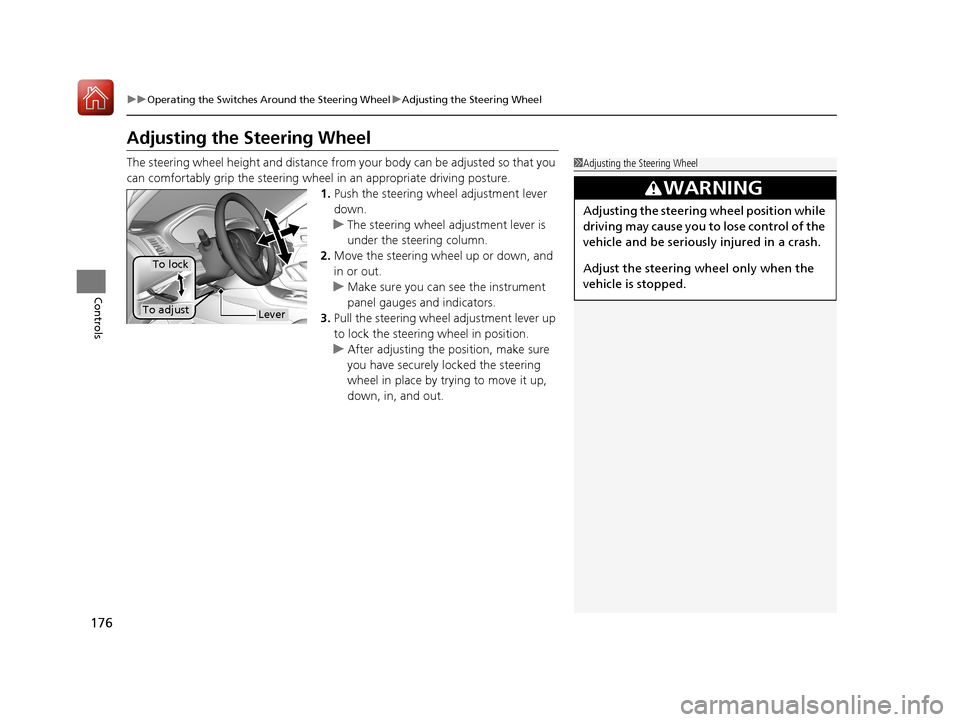
The steering wheel height and distance from your body can be adjusted so that you
can comfortably grip the steering wheel in an appropriate driving posture.
1.Push the steering wheel adjustment lever
down.
u The steering wheel adjustment lever is
under the steering column.
2. Move the steering wheel up or down, and
in or out.
u Make sure you can see the instrument
panel gauges and indicators.
3. Pull the steering wheel adjustment lever up
to lock the steering wheel in position.
u After adjusting the position, make sure
you have securely locked the steering
wheel in place by trying to move it up,
down, in, and out.1Adjusting the Steering Wheel
3WARNING
Adjusting the steering wheel position while
driving may cause you to lose control of the
vehicle and be seriously injured in a crash.
Adjust the steering wheel only when the
vehicle is stopped.
LeverTo adjust
To lock
17 ACURA TLX-31TZ36200.book 176 ページ 2016年6月10日 金曜日 午後6時39分
Page 180 of 553
179Continued
Controls
Adjusting the Seats
Front Seats
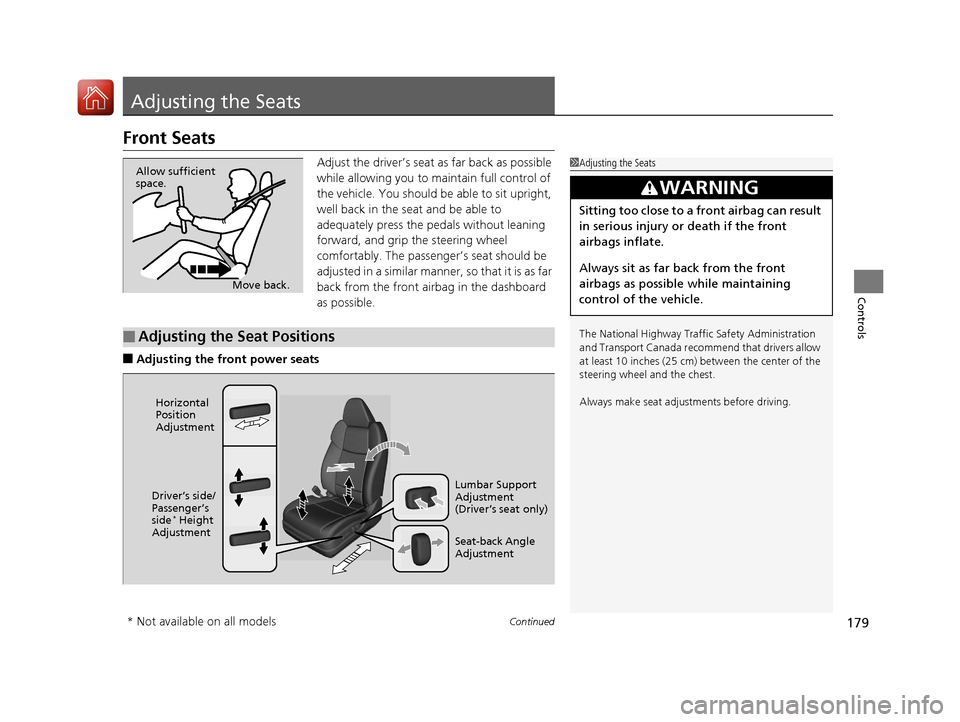
Adjust the driver’s seat as far back as possible
while allowing you to ma intain full control of
the vehicle. You should be able to sit upright,
well back in the seat and be able to
adequately press the pedals without leaning
forward, and grip the steering wheel
comfortably. The passenger’s seat should be
adjusted in a similar manner, so that it is as far
back from the front airbag in the dashboard
as possible.
■Adjusting the fro nt power seats
1Adjusting the Seats
The National Highway Traffic Safety Administration
and Transport Cana da recommend that drivers allow
at least 10 inches (25 cm) between the center of the
steering wheel and the chest.
Always make seat adjustments before driving.
3WARNING
Sitting too close to a front airbag can result
in serious injury or death if the front
airbags inflate.
Always sit as far back from the front
airbags as possible while maintaining
control of the vehicle.
Move back.
Allow sufficient
space.
■Adjusting the Seat Positions
Horizontal
Position
Adjustment
Seat-back Angle
Adjustment Lumbar Support
Adjustment
(Driver’s seat only)
Driver’s side/
Passenger’s
side
* Height
Adjustment
* Not available on all models
17 ACURA TLX-31TZ36200.book 179 ページ 2016年6月10日 金曜日 午後6時39分
Page 181 of 553
uuAdjusting the Seats uFront Seats
180
Controls
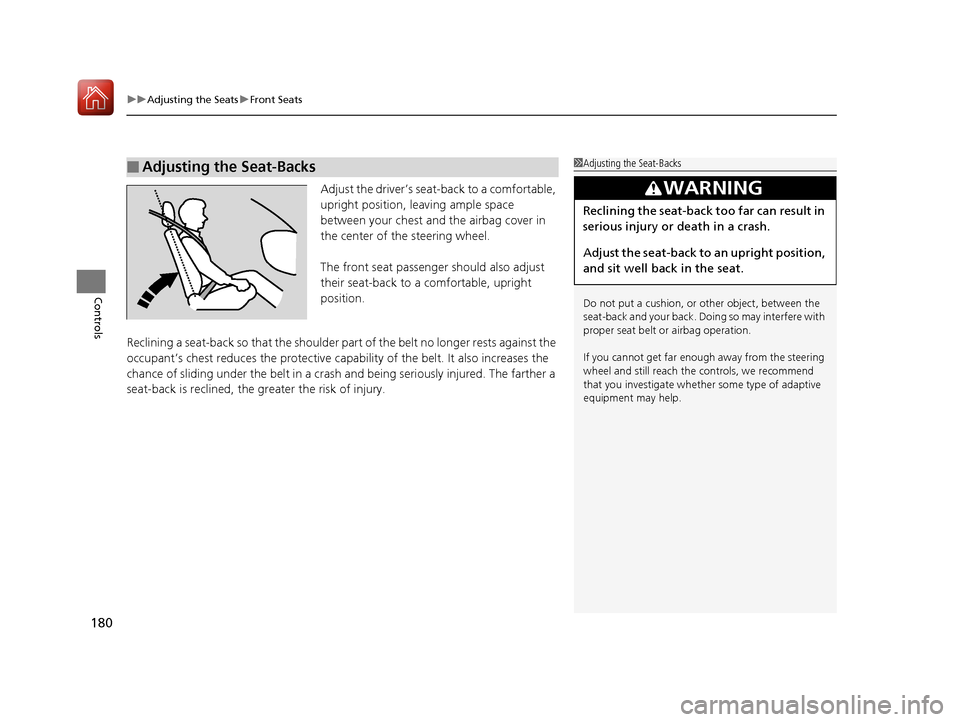
Adjust the driver’s sea t-back to a comfortable,
upright position, leaving ample space
between your chest and the airbag cover in
the center of the steering wheel.
The front seat passenger should also adjust
their seat-back to a comfortable, upright
position.
Reclining a seat-back so that the shoulder pa rt of the belt no longer rests against the
occupant’s chest reduces the protective capa bility of the belt. It also increases the
chance of sliding under the belt in a crash and being seriously injured. The farther a
seat-back is reclined, the greater the risk of injury.
■Adjusting the Seat-Backs1 Adjusting the Seat-Backs
Do not put a cushion, or other object, between the
seat-back and your back. Do ing so may interfere with
proper seat belt or airbag operation.
If you cannot get far e nough away from the steering
wheel and still reach th e controls, we recommend
that you investigate whether some type of adaptive
equipment may help.
3WARNING
Reclining the seat-back too far can result in
serious injury or death in a crash.
Adjust the seat-back to an upright position,
and sit well back in the seat.
17 ACURA TLX-31TZ36200.book 180 ページ 2016年6月10日 金曜日 午後6時39分
Page 196 of 553
Continued195
uuInterior Lights/Interior Convenience Items uInterior Convenience Items
Controls
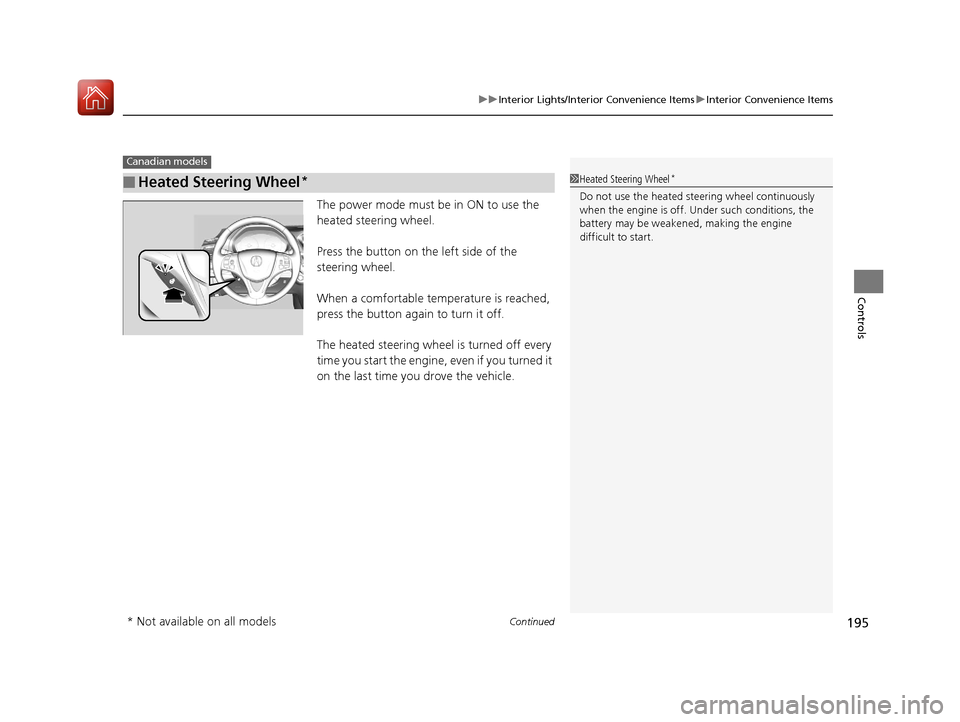
The power mode must be in ON to use the
heated steering wheel.
Press the button on the left side of the
steering wheel.
When a comfortable temperature is reached,
press the button again to turn it off.
The heated steering wheel is turned off every
time you start the engine, even if you turned it
on the last time yo u drove the vehicle.
■Heated Steering Wheel*
Canadian models
1Heated Steering Wheel*
Do not use the heated steering wheel continuously
when the engine is off. Under such conditions, the
battery may be weaken ed, making the engine
difficult to start.
* Not available on all models
17 ACURA TLX-31TZ36200.book 195 ページ 2016年6月10日 金曜日 午後6時39分
Page 227 of 553
uuAudio System Basic Operation uPlaying AM/FM Radio
226
Features
To store a station:
1. Tune to the selected station.
2. Press the MENU button.
3. Rotate to select Save Preset, then press .
4. Rotate to select the preset number you want to store that station, then press
.
You can also store that statio n by the following procedure.
1. Tune to the selected station.
2. Rotate to select the preset number you want to store the station.
3. Press and hold for a few seconds.
1. Tune to the selected station.
2. Select More.
3. Select Save Preset .
4. Select the preset number you wa nt to store that station.
You can also store that statio n by the following procedure.
1. Tune to the selected station.
2. Change the display to the preset screen.
3. Select and hold the preset number you want to store that station.
■Preset Memory1Playing AM/FM Radio
The ST indicator appears on the display indicating
stereo FM broadcasts.
Stereo reproduction in AM is not available.
Switching the Audio Mode
Press the SOURCE button on the steering wheel.
2 Audio Remote Controls P. 211
You can also switch the mode by pressing the MENU
button and selecting Change Source on the Audio
menu screen.
You can store 6 AM stations and 12 FM stations into
the preset memory.
Interface Dial
On Demand Multi-Use DisplayTM
17 ACURA TLX-31TZ36200.book 226 ページ 2016年6月10日 金曜日 午後6時39分
Page 248 of 553
247
uuAudio System Basic Operation uSiri Eyes Free
Features
Siri Eyes Free
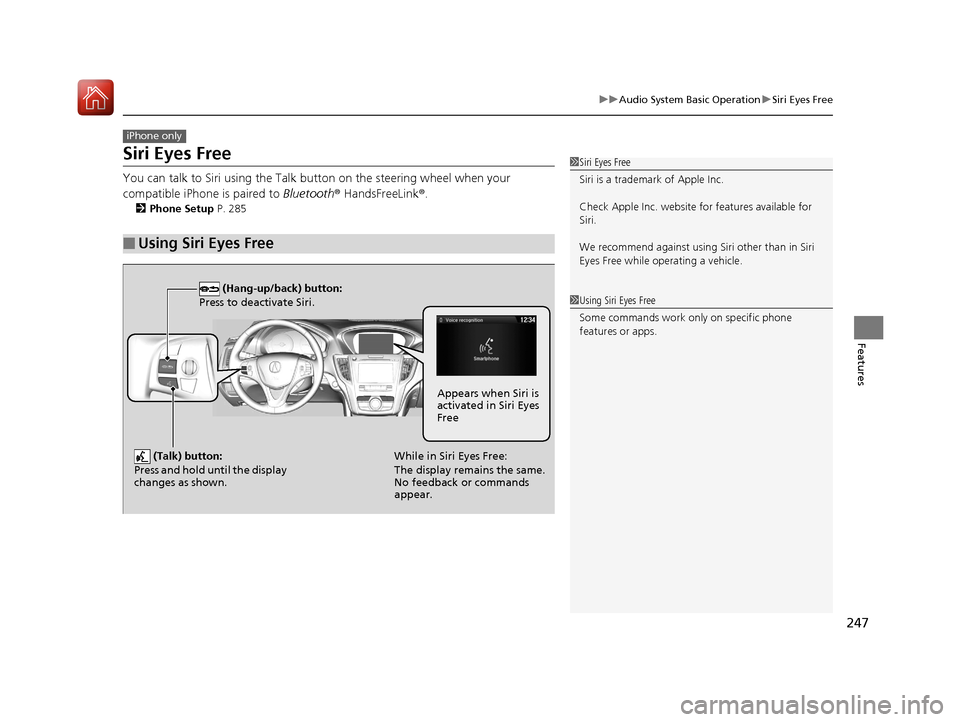
You can talk to Siri using the Talk bu tton on the steering wheel when your
compatible iPhone is paired to Bluetooth ® HandsFreeLink®.
2Phone Setup P. 285
■Using Siri Eyes Free
iPhone only
1Siri Eyes Free
Siri is a trademark of Apple Inc.
Check Apple Inc. website for features available for
Siri.
We recommend against using Si ri other than in Siri
Eyes Free while operating a vehicle.
1 Using Siri Eyes Free
Some commands work only on specific phone
features or apps. (Hang-up/back) button:
Press to deactivate Siri.
(Talk) button:
Press and hold until the display
changes as shown.While in Siri Eyes Free:
The display remains the same.
No feedback or commands
appear. Appears when Siri is
activated in Siri Eyes
Free
17 ACURA TLX-31TZ36200.book 247 ページ 2016年6月10日 金曜日 午後6時39分
Page 279 of 553
278
Features
Bluetooth® HandsFreeLink ®
Bluetooth® HandsFreeLink ® (HFL) allows you to place and receive phone calls using
your vehicle’s navigation*/audio system, without handling your cell phone.
Using HFL
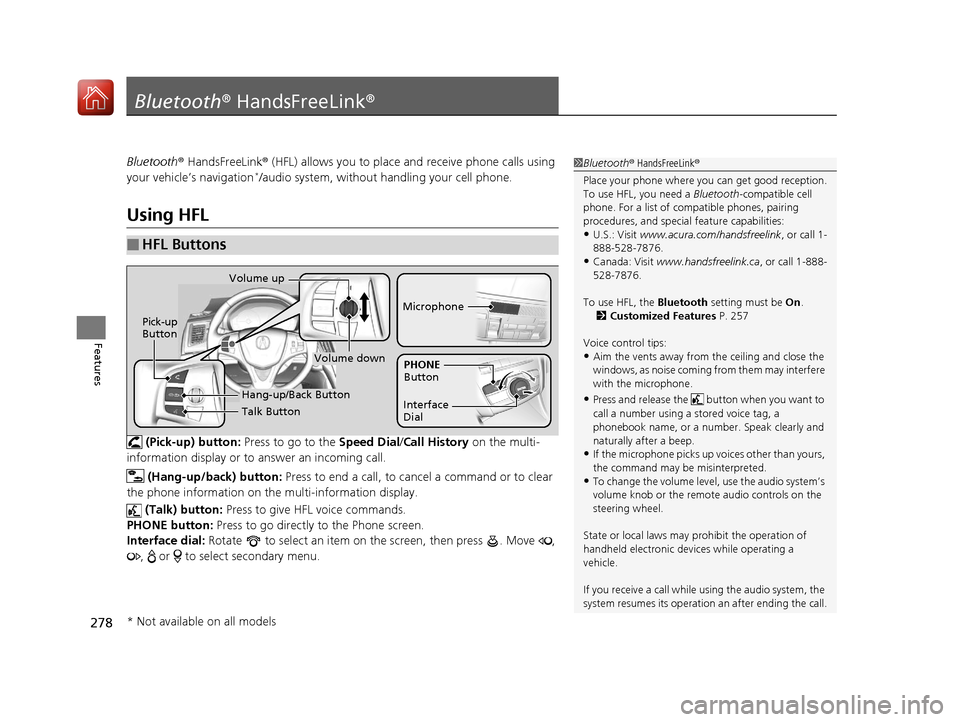
(Pick-up) button: Press to go to the Speed Dial/Call History on the multi-
information display or to answer an incoming call.
(Hang-up/back) button: Press to end a call, to cancel a command or to clear
the phone information on the multi-information display.
(Talk) button: Press to give HFL voice commands.
PHONE button: Press to go directly to the Phone screen.
Interface dial: Rotate to select an item on the screen, then press . Move ,
, or to select secondary menu.
■HFL Buttons
1 Bluetooth ® HandsFreeLink ®
Place your phone where y ou can get good reception.
To use HFL, you need a Bluetooth-compatible cell
phone. For a list of compatible phones, pairing
procedures, and special feature capabilities:
•U.S.: Visit www.acura.com/handsfreelink , or call 1-
888-528-7876.
•Canada: Visit www.handsfreelink.ca , or call 1-888-
528-7876.
To use HFL, the Bluetooth setting must be On.
2 Customized Features P. 257
Voice control tips:
•Aim the vents away from the ceiling and close the
windows, as noise coming fr om them may interfere
with the microphone.
•Press and release the but ton when you want to
call a number using a stored voice tag, a
phonebook name, or a numbe r. Speak clearly and
naturally after a beep.
•If the microphone picks up vo ices other than yours,
the command may be misinterpreted.
•To change the volume level, use the audio system’s
volume knob or the remote audio controls on the
steering wheel.
State or local laws may pr ohibit the operation of
handheld electronic devi ces while operating a
vehicle.
If you receive a call while using the audio system, the
system resumes its operation an after ending the call.
Talk Button
Volume up
Microphone
Hang-up/Back Button
Pick-up
Button
Volume down
Interface
DialPHONE
Button
* Not available on all models
17 ACURA TLX-31TZ36200.book 278 ページ 2016年6月10日 金曜日 午後6時39分
Page 303 of 553
uuBluetooth ® HandsFreeLink ®u HFL Menus
302
Features
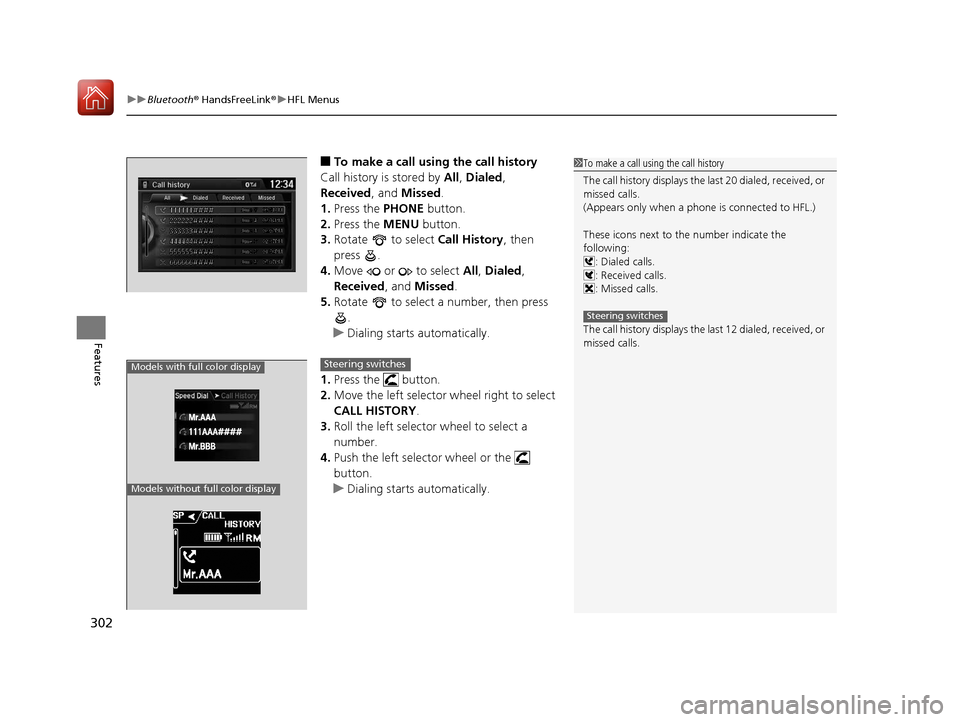
■To make a call using the call history
Call history is stored by All, Dialed ,
Received, and Missed.
1. Press the PHONE button.
2. Press the MENU button.
3. Rotate to select Call History, then
press .
4. Move or to select All, Dialed ,
Received , and Missed .
5. Rotate to select a number, then press
.
u Dialing starts automatically.
1. Press the button.
2. Move the left selector wheel right to select
CALL HISTORY.
3. Roll the left selector wheel to select a
number.
4. Push the left selector wheel or the
button.
u Dialing starts automatically.1To make a call using the call history
The call history disp lays the last 20 dialed, received, or
missed calls.
(Appears only when a phone is connected to HFL.)
These icons next to the number indicate the
following:
: Dialed calls.
: Received calls.
: Missed calls.
The call history disp lays the last 12 dialed, received, or
missed calls.
Steering switches
Models with full color display
Models without full color display
111AAA#### Mr.AAA
Mr.BBB
Steering switches
17 ACURA TLX-31TZ36200.book 302 ページ 2016年6月10日 金曜日 午後6時39分
Page 304 of 553
Continued303
uuBluetooth ® HandsFreeLink ®u HFL Menus
Features
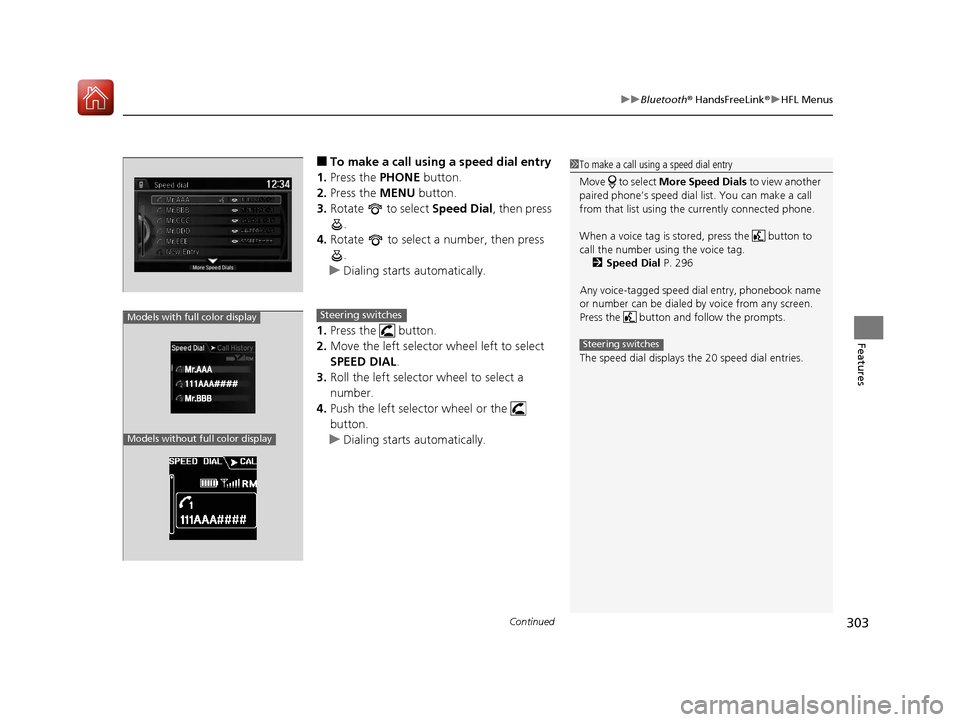
■To make a call using a speed dial entry
1. Press the PHONE button.
2. Press the MENU button.
3. Rotate to select Speed Dial, then press
.
4. Rotate to select a number, then press
.
u Dialing starts automatically.
1. Press the button.
2. Move the left selector wheel left to select
SPEED DIAL.
3. Roll the left selector wheel to select a
number.
4. Push the left selector wheel or the
button.
u Dialing starts automatically.1To make a call using a speed dial entry
Move to select More Speed Dials to view another
paired phone’s speed dial list. You can make a call
from that list using th e currently connected phone.
When a voice tag is stored, press the button to
call the number using the voice tag. 2 Speed Dial P. 296
Any voice-tagged speed di al entry, phonebook name
or number can be dialed by voice from any screen.
Press the button and follow the prompts.
The speed dial displays the 20 speed dial entries.
Steering switches
111AAA#### Mr.AAA
Mr.BBB
Models with full color display
Models without full color display
Steering switches
17 ACURA TLX-31TZ36200.book 303 ページ 2016年6月10日 金曜日 午後6時39分
Page 318 of 553
Continued317
uuBefore Driving uDriving Preparation
Driving
• Store or secure all items on board properly.
u Carrying too much cargo, or improperly storing it, can affect your vehicle’s
handling, stability, sto pping distance, and tires, and make it unsafe.
2Maximum Load Limit P. 319
•Do not pile items higher than the seat height.
u They can block your view and may be thrown forward in the event of sudden
braking.
• Do not place anything in the front seat footwells. Make sure to secure the floor
mat.
u An object or unsecured floor mat can in terfere with your brake and accelerator
pedal operation while driving.
• If you have any animals on board, do not let them move around in the vehicle.
u They may interfere with driv ing and a crash could occur.
• Securely close and lock all doors and the trunk.
2 Locking/Unlocking the Doors from the Inside P. 148
•Adjust your seating position properly.
u Adjust the head restraint, too.
2Adjusting the Seats P. 179
2 Adjusting the Front and Rear Outer Head Restraint Positions P. 181
•Adjust the mirrors and steering wh eel properly for your driving.
u Adjust them while sitting in the proper driving position.
2 Adjusting the Mirrors P. 177
2 Adjusting the Steering Wheel P. 176
■Interior Checks1Interior Checks
The headlight aim is set by the factory, and does not
need to be adjusted. Howeve r, if you regularly carry
heavy items in the trunk ha ve the aiming readjusted
at a dealer or by a qualified technician.
17 ACURA TLX-31TZ36200.book 317 ページ 2016年6月10日 金曜日 午後6時39分