display Acura TLX 2018 Owner's Manual
[x] Cancel search | Manufacturer: ACURA, Model Year: 2018, Model line: TLX, Model: Acura TLX 2018Pages: 589, PDF Size: 35.45 MB
Page 474 of 589
473
uuMaintenance MinderTMuTo Use Maintenance MinderTM
Maintenance
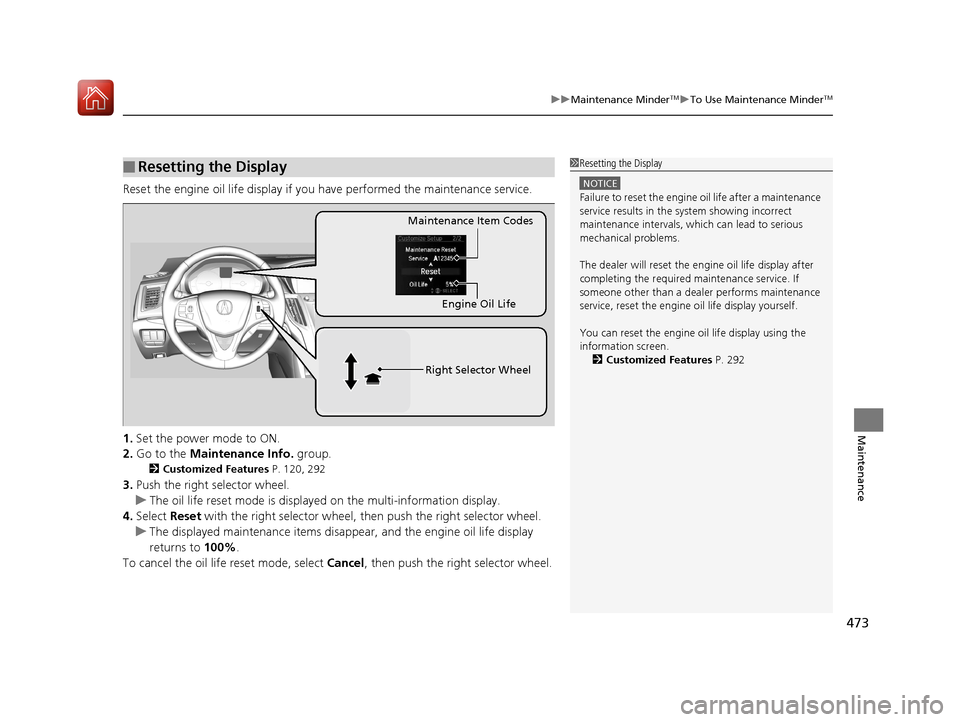
Reset the engine oil life display if you have performed the maintenance service.
1. Set the power mode to ON.
2. Go to the Maintenance Info. group.
2Customized Features P. 120, 292
3.Push the right selector wheel.
u The oil life reset mode is displayed on the multi-information display.
4. Select Reset with the right selector wheel, th en push the right selector wheel.
u The displayed maintenance items disapp ear, and the engine oil life display
returns to 100%.
To cancel the oil life reset mode, select Cancel, then push the right selector wheel.
■Resetting the Display1Resetting the Display
NOTICE
Failure to reset the engine oil life after a maintenance
service results in the sy stem showing incorrect
maintenance intervals, which can lead to serious
mechanical problems.
The dealer will reset the en gine oil life display after
completing the required ma intenance service. If
someone other than a deal er performs maintenance
service, reset the engine oil life display yourself.
You can reset the engine oi l life display using the
information screen. 2 Customized Features P. 292
Engine Oil Life
Maintenance Item Codes
Right Selector Wheel
18 ACURA TLX-31TZ36300.book 473 ページ 2017年2月21日 火曜日 午後2時32分
Page 482 of 589
481
uuMaintenance Under the Hood uChanging the Engine Oil and Oil Filter
Continued
Maintenance
Changing the Engine Oil and Oil Filter
You must change the engine oil and oil fi lter regularly in order to maintain the
engine’s lubrication. The engine may be damaged if they are not changed regularly.
Change the oil and filter in accordance with the maintenance message on the multi-
information display. 1.Run the engine until it reaches normal
operating temperature, and then turn the
engine off.
2. Open the hood and remove the engine oil
fill cap.
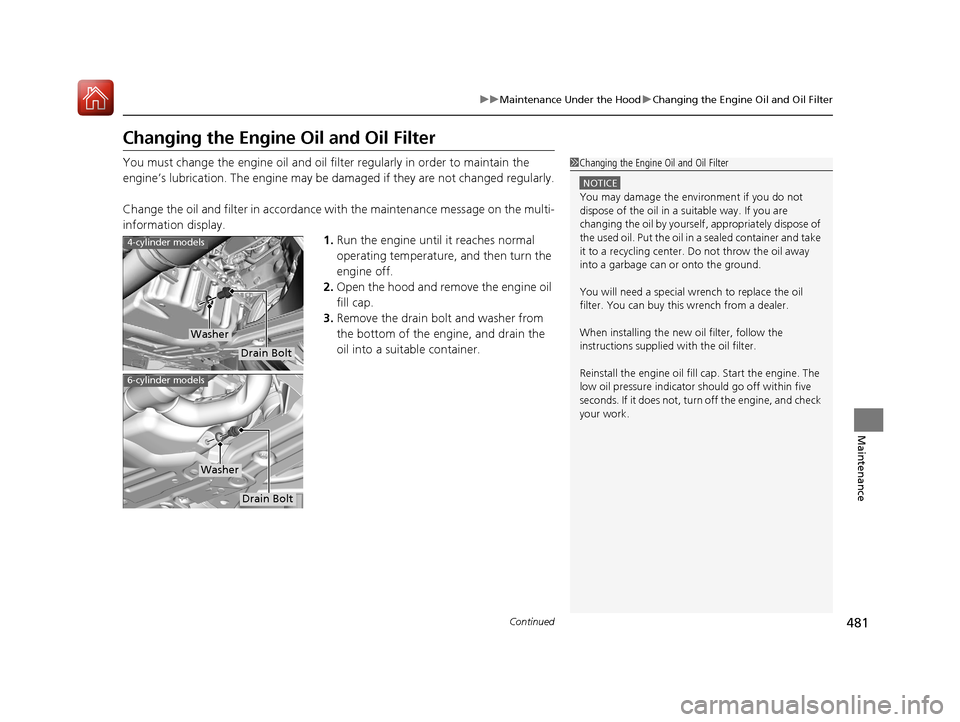
3. Remove the drain bolt and washer from
the bottom of the engine, and drain the
oil into a suitable container.1Changing the Engine Oil and Oil Filter
NOTICE
You may damage the environment if you do not
dispose of the oil in a suitable way. If you are
changing the oil by yourself , appropriately dispose of
the used oil. Put the oil in a sealed container and take
it to a recycling center. Do not throw the oil away
into a garbage can or onto the ground.
You will need a special wrench to replace the oil
filter. You can buy this wrench from a dealer.
When installing the new oil filter, follow the
instructions supplied with the oil filter.
Reinstall the engine oil fill cap. Start the engine. The
low oil pressure indicator should go off within five
seconds. If it does not, turn off the engine, and check
your work.
Drain Bolt
Washer
4-cylinder models
Drain Bolt
Washer
6-cylinder models
18 ACURA TLX-31TZ36300.book 481 ページ 2017年2月21日 火曜日 午後2時32分
Page 488 of 589
487
uuMaintenance Under the Hood uBrake Fluid
Maintenance
Brake Fluid
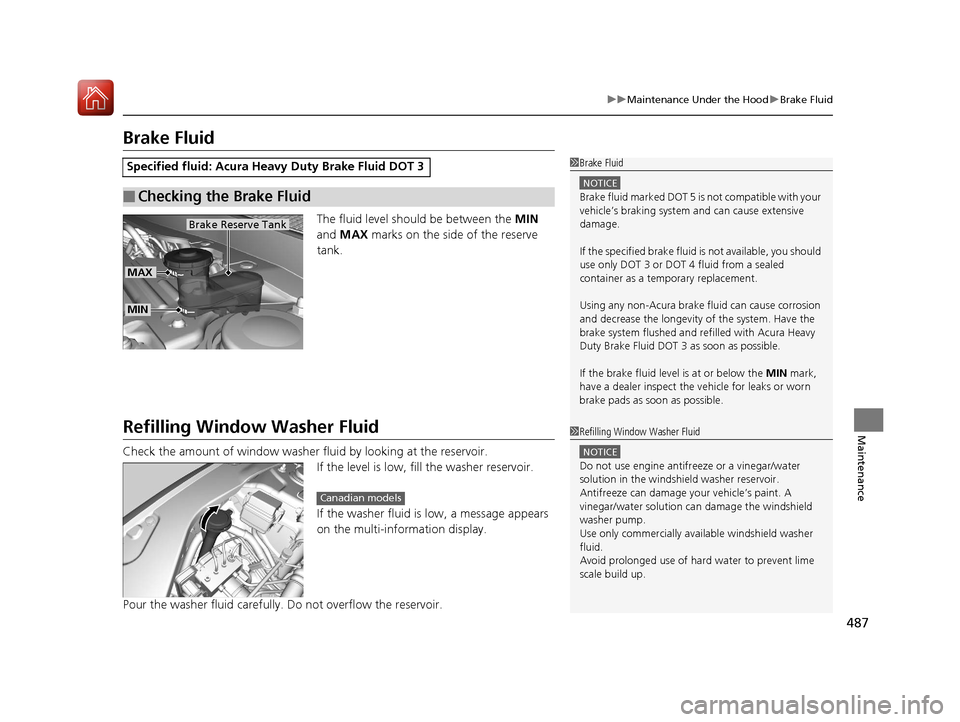
The fluid level should be between the MIN
and MAX marks on the side of the reserve
tank.
Refilling Window Washer Fluid
Check the amount of window washer fluid by looking at the reservoir. If the level is low, fill the washer reservoir.
If the washer fluid is low, a message appears
on the multi-information display.
Pour the washer fluid carefully. Do not overflow the reservoir.
Specified fluid: Acura Heavy Duty Brake Fluid DOT 3
■Checking the Brake Fluid
1 Brake Fluid
NOTICE
Brake fluid marked DOT 5 is not compatible with your
vehicle’s braking system and can cause extensive
damage.
If the specified brake fluid is not available, you should
use only DOT 3 or DOT 4 fluid from a sealed
container as a temporary replacement.
Using any non-Acura brake fl uid can cause corrosion
and decrease the longevity of the system. Have the
brake system flushed and re filled with Acura Heavy
Duty Brake Fluid DOT 3 as soon as possible.
If the brake fluid level is at or below the MIN mark,
have a dealer inspect the vehicle for leaks or worn
brake pads as soon as possible.
MIN
MAX
Brake Reserve Tank
1 Refilling Window Washer Fluid
NOTICE
Do not use engine antifreeze or a vinegar/water
solution in the windshield washer reservoir.
Antifreeze can damage y our vehicle’s paint. A
vinegar/water solution ca n damage the windshield
washer pump.
Use only commercially avai lable windshield washer
fluid.
Avoid prolonged use of hard water to prevent lime
scale build up.
Canadian models
18 ACURA TLX-31TZ36300.book 487 ページ 2017年2月21日 火曜日 午後2時32分
Page 503 of 589
502
uuChecking and Maintaining Tires uTire Rotation
Maintenance
Tire Rotation
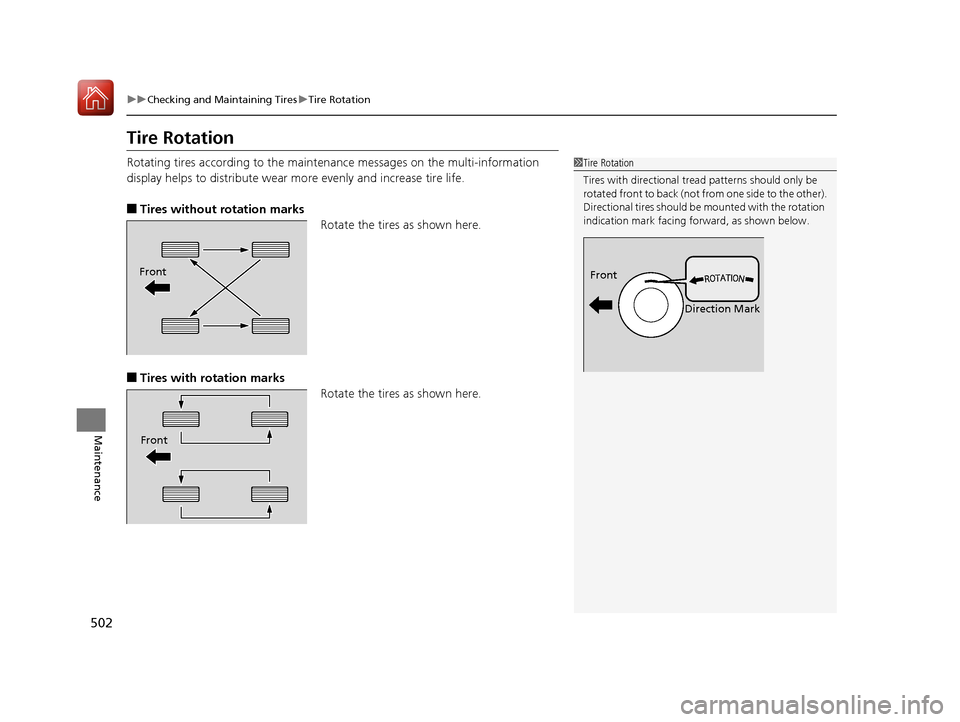
Rotating tires according to the mainte nance messages on the multi-information
display helps to distribute wear mo re evenly and increase tire life.
■Tires without rotation marks
Rotate the tires as shown here.
■Tires with rotation marksRotate the tires as shown here.
1Tire Rotation
Tires with directional trea d patterns should only be
rotated front to back (not fr om one side to the other).
Directional tires should be mounted with the rotation
indication mark facing forward, as shown below.
Front
Direction MarkFront
Front
18 ACURA TLX-31TZ36300.book 502 ページ 2017年2月21日 火曜日 午後2時32分
Page 505 of 589

504
Maintenance
Battery
Checking the Battery
The condition of the battery is monitored by a
sensor located on the negative terminal of the
battery. If there is a problem with this sensor,
the multi-information display will display a
warning message. If this happens, have you
vehicle inspected by a dealer.
Check the battery terminal s for corrosion monthly.
If your vehicle’s battery is disconnected or goes dead:
• The audio system is disabled.
2 Reactivating the audio system P. 216
•The clock resets.
2 Clock P. 132
•The navigation system* is disabled.
2 Refer to the Navigation System Manual
1Battery
WARNING: Battery post, terminals,
and related accessories contain lead
and lead compounds.
Wash your hands after handling.
When you find corrosion, cl ean the battery terminals
by applying a baking powder and water solution.
Clean the terminals with a damp towel. Cloth/towel
dry the battery. Coat the terminals with grease to
help prevent future corrosion.
When replacing the battery, the replacement must be
of the same specifications.
Consult a dealer for more information.
3WARNING
The battery gives off explosive hydrogen
gas during normal operation.
A spark or flame can cause the battery to
explode with enough force to kill or
seriously hurt you.
When conducting any battery
maintenance, wear prot ective clothing and
a face shield, or have a skilled technician do
it.
4-cylinder models
Battery
6-cylinder models
Battery
* Not available on all models
18 ACURA TLX-31TZ36300.book 504 ページ 2017年2月21日 火曜日 午後2時32分
Page 539 of 589
uuIf a Tire Goes Flat uChanging a Flat Tire
538
Handling the Unexpected
2. Place the flat tire face down in the spare tire
well.
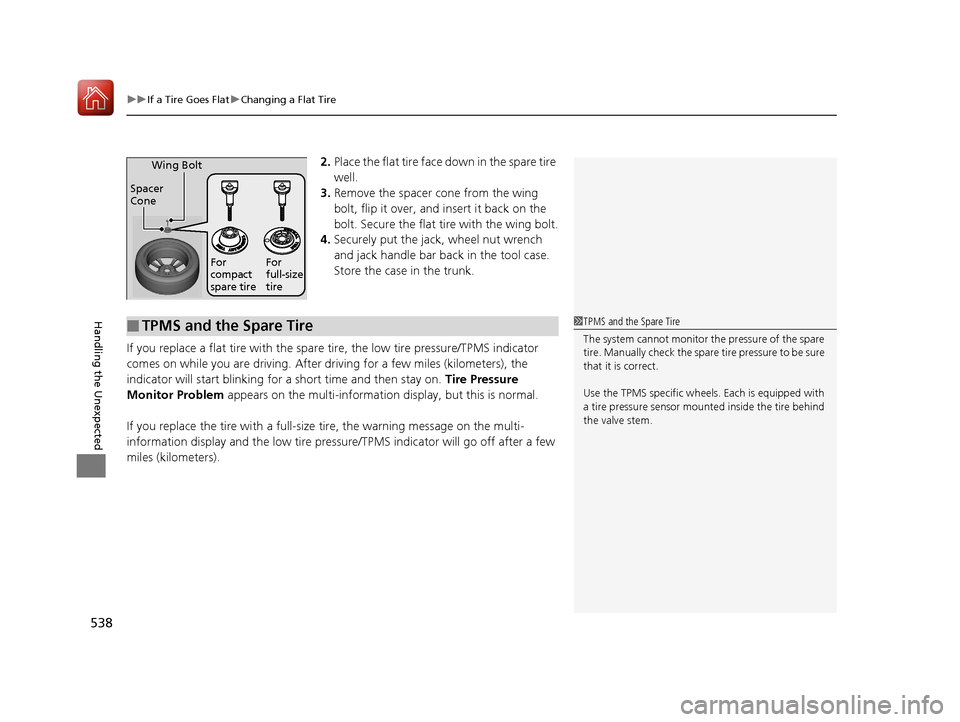
3. Remove the spacer cone from the wing
bolt, flip it over, and insert it back on the
bolt. Secure the flat tire with the wing bolt.
4. Securely put the jack , wheel nut wrench
and jack handle bar back in the tool case.
Store the case in the trunk.
If you replace a flat tire with the spare tire, the low tire pressure/TPMS indicator
comes on while you are driving. After driving for a few miles (kilometers), the
indicator will start blinking for a short time and then stay on. Tire Pressure
Monitor Problem appears on the multi-informati on display, but this is normal.
If you replace the tire with a full-size tire, the warning message on the multi-
information display and the low tire pressu re/TPMS indicator will go off after a few
miles (kilometers).
Spacer
Cone Wing Bolt
For
compact
spare tire
For
full-size
tire
■TPMS and the Spare Tire1
TPMS and the Spare Tire
The system cannot monitor th e pressure of the spare
tire. Manually check the spare tire pressure to be sure
that it is correct.
Use the TPMS specific whee ls. Each is equipped with
a tire pressure sensor mount ed inside the tire behind
the valve stem.
18 ACURA TLX-31TZ36300.book 538 ページ 2017年2月21日 火曜日 午後2時32分
Page 540 of 589
539
Handling the Unexpected
Engine Does Not Start
Checking the Engine
If the engine does not start, check the starter.
Starter conditionChecklist
Starter doesn’t turn or turns
over slowly.
The battery may be dead. Check
each of the items on the right and
respond accordingly.Check for a message on the multi-information display.
●If the To Start, Hold Remote Near Start Button message appears
2If the Keyless Access Remote Battery is Weak P. 540
uMake sure the keyless access remote is in its operating range.
2ENGINE START/STOP Button Operating Range P. 157
Check the brightness of the interior lights.
Turn on the interior lights and check the brightness.
●If the interior lights are dim or do not come on at all
2 Battery P. 504●If the interior lights come on normally 2 Fuses P. 555
The starter turns over normally
but the engine doesn’t start.
There may be a problem with the
fuse. Check each of the items on
the right and respond accordingly. Review the engine start procedure.
Follow its instructions, and try
to start the engine again.
2 Starting the Engine P. 362
Check the immobilizer system indicator.
When the immobilizer system indicator is blinking, the engine cannot be started.
2Immobilizer System P. 151
Check the fuel level.
There should be enough fuel in the tank.
2 Fuel Gauge P. 113
Check the fuse.
Check all fuses, or have the vehicle checked by a dealer.
2Inspecting and Changing Fuses P. 559
If the problem continues:
2Emergency Towing P. 560
1Checking the Engine
If you must start the vehi cle immediately, use an
assisting vehicle or booster battery to jump start it.
2 Jump Starting P. 542
18 ACURA TLX-31TZ36300.book 539 ページ 2017年2月21日 火曜日 午後2時32分
Page 541 of 589

540
uuEngine Does Not Start uIf the Keyless Access Remote Battery is Weak
Handling the Unexpected
If the Keyless Access Re mote Battery is Weak
If the beeper sounds, the To Start, Hold Remote Near Start Button message
appears on the multi-information display, and the indicator on the ENGINE START/
STOP button flashes, and the engine won’t start.
Start the engine as follows: 1.Touch the center of the ENGINE START/
STOP button with the A logo on the keyless
access remote while the indicator on the
ENGINE START/STOP button is flashing.
The buttons on the keyle ss access remote
should be facing you.
u The indicator flashes for about 30
seconds.
2. Depress the brake pedal and press the
ENGINE START/STOP button within 10
seconds after the beeper sounds while the
indicator stays on.
u If you don’t depress the pedal, the mode
will change to ACCESSORY.
18 ACURA TLX-31TZ36300.book 540 ページ 2017年2月21日 火曜日 午後2時32分
Page 548 of 589
547Continued
Handling the Unexpected
Overheating
How to Handle Overheating
Overheating symptoms are as follows:
•The temperature gauge needle is at the mark or the engine suddenly loses
power.
• The Stop Driving When Safe. En gine Temperature Too Hot message appears
on the multi-information display.
• Steam or spray comes out of the engine compartment.
■First thing to do
1. Immediately park the vehicle in a safe place.
2. Turn off all accessories and turn on the hazard warning lights.
u No steam or spray present: Keep the engine running and open the hood.
u Steam or spray is present : Turn off the engine and wait until it subsides.
Then, open the hood.
1 How to Handle Overheating
NOTICE
Continuing to drive with the temperature gauge
needle at the mark may damage the engine.
3WARNING
Steam and spray from an overheated
engine can seriously scald you.
Do not open the hood if steam is coming
out.
H
H
18 ACURA TLX-31TZ36300.book 547 ページ 2017年2月21日 火曜日 午後2時32分
Page 549 of 589
uuOverheating uHow to Handle Overheating
548
Handling the Unexpected
■Next thing to do
1.Check that the cooling fan is operating and
stop the engine once the Stop Driving
When Safe. Engine Temperature Too
Hot message on the multi-information
display goes off.
u If the cooling fan is not operating,
immediately stop the engine.
2. Once the engine has cooled down, inspect
the coolant level an d check the cooling
system components for leaks.
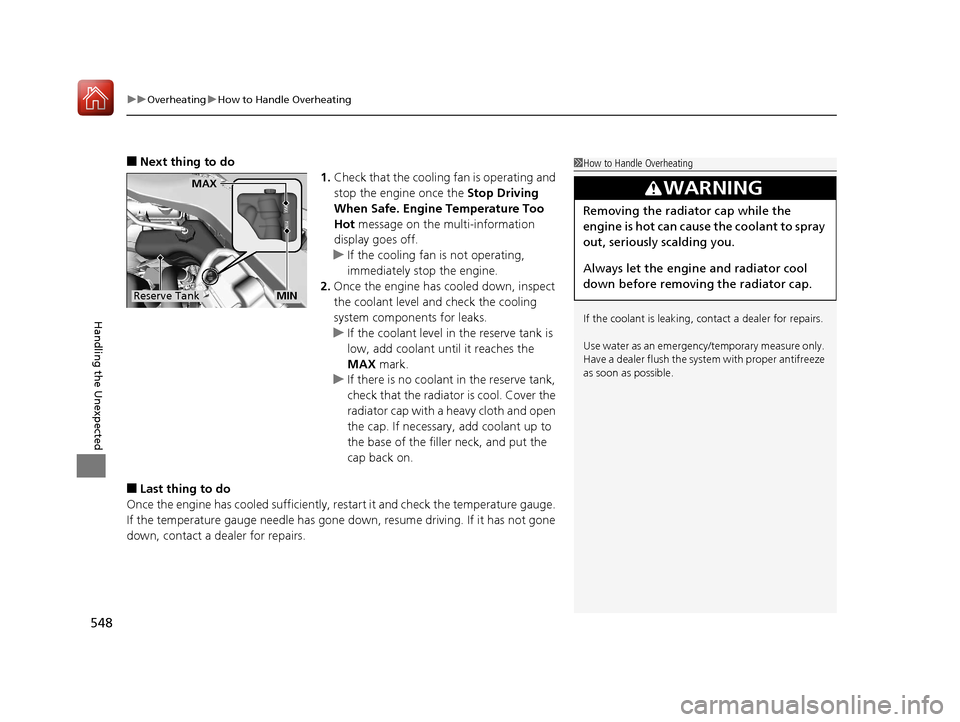
u If the coolant level in the reserve tank is
low, add coolant until it reaches the
MAX mark.
u If there is no coolan t in the reserve tank,
check that the radiator is cool. Cover the
radiator cap with a heavy cloth and open
the cap. If necessary, add coolant up to
the base of the filler neck, and put the
cap back on.
■Last thing to do
Once the engine has cooled sufficiently, restart it and check the temperature gauge.
If the temperature gauge needle has gone do wn, resume driving. If it has not gone
down, contact a dealer for repairs.
1 How to Handle Overheating
If the coolant is leaking, contact a dealer for repairs.
Use water as an emergency/temporary measure only.
Have a dealer flush the system with proper antifreeze
as soon as possible.
3WARNING
Removing the radiator cap while the
engine is hot can cause the coolant to spray
out, seriously scalding you.
Always let the engine and radiator cool
down before removing the radiator cap.
Reserve Tank
MAX
MIN
18 ACURA TLX-31TZ36300.book 548 ページ 2017年2月21日 火曜日 午後2時32分