display Acura TLX 2018 Owner's Manual
[x] Cancel search | Manufacturer: ACURA, Model Year: 2018, Model line: TLX, Model: Acura TLX 2018Pages: 589, PDF Size: 35.45 MB
Page 346 of 589
Continued345
uuBluetooth ® HandsFreeLink ®u HFL Menus
Features
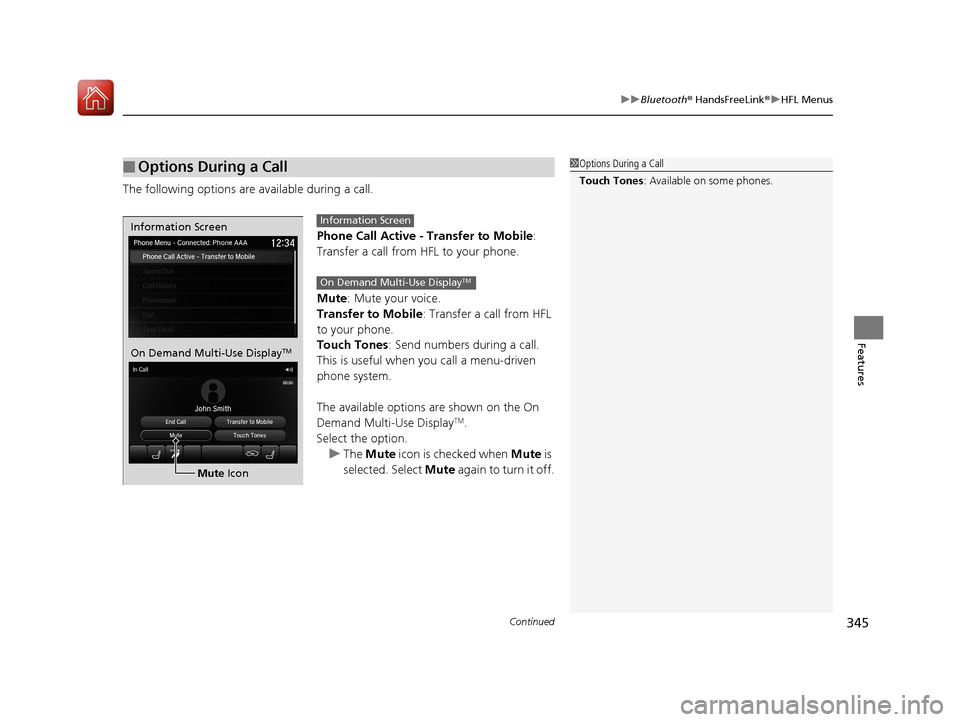
The following options are available during a call.
Phone Call Active - Transfer to Mobile :
Transfer a call from HFL to your phone.
Mute : Mute your voice.
Transfer to Mobile: Transfer a call from HFL
to your phone.
Touch Tones : Send numbers during a call.
This is useful when you call a menu-driven
phone system.
The available options are shown on the On
Demand Multi-Use Display
TM.
Select the option.
u The Mute icon is checked when Mute is
selected. Select Mute again to turn it off.
■Options During a Call1Options During a Call
Touch Tones : Available on some phones.
Information Screen
On Demand Multi-Use DisplayTM
Mute Icon
Information Screen
On Demand Multi-Use DisplayTM
18 ACURA TLX-31TZ36300.book 345 ページ 2017年2月21日 火曜日 午後2時32分
Page 347 of 589
uuBluetooth ® HandsFreeLink ®u HFL Menus
346
Features
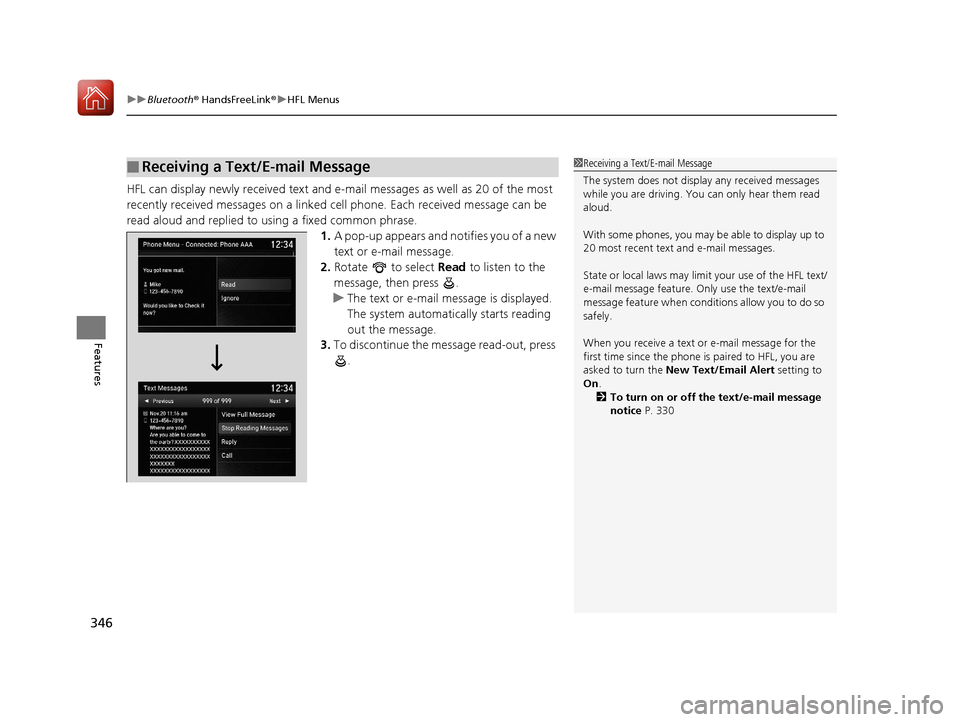
HFL can display newly received text and e-ma il messages as well as 20 of the most
recently received messages on a linked ce ll phone. Each received message can be
read aloud and replied to using a fixed common phrase. 1.A pop-up appears and notifies you of a new
text or e-mail message.
2. Rotate to select Read to listen to the
message, then press .
u The text or e-mail message is displayed.
The system automatically starts reading
out the message.
3. To discontinue the message read-out, press
.
■Receiving a Text/E-mail Message1Receiving a Text/E-mail Message
The system does not display any received messages
while you are driving. You can only hear them read
aloud.
With some phones, you may be able to display up to
20 most recent text and e-mail messages.
State or local laws may limit your use of the HFL text/
e-mail message feature. Only use the text/e-mail
message feature when conditions allow you to do so
safely.
When you receive a text or e-mail message for the
first time since the phone is paired to HFL, you are
asked to turn the New Text/Email Alert setting to
On .
2 To turn on or off the text/e-mail message
notice P. 330
18 ACURA TLX-31TZ36300.book 346 ページ 2017年2月21日 火曜日 午後2時32分
Page 349 of 589
uuBluetooth ® HandsFreeLink ®u HFL Menus
348
Features
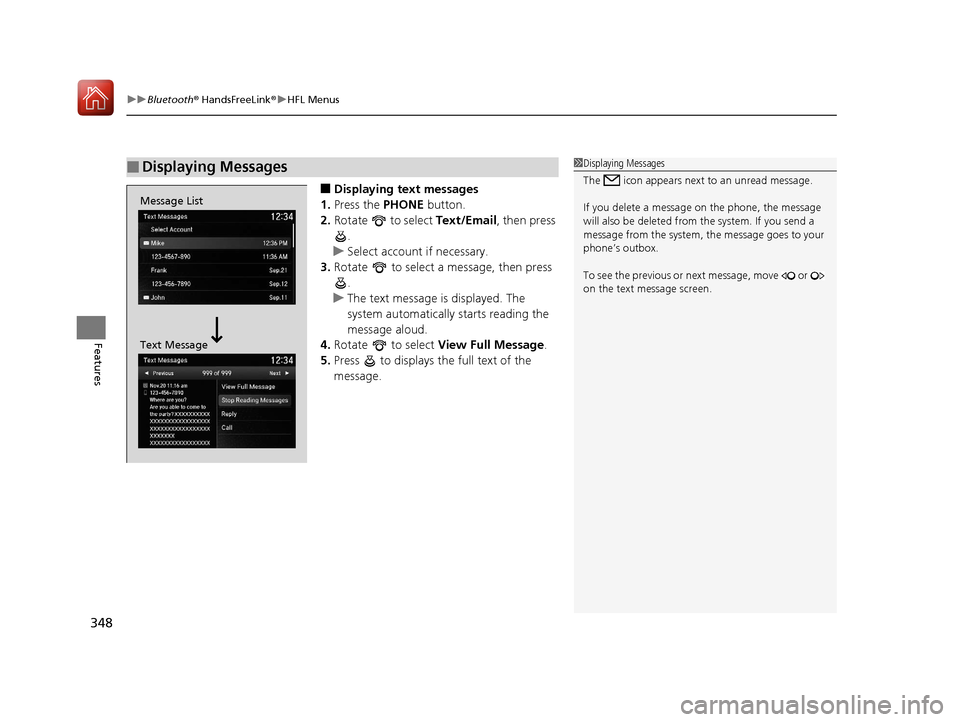
■Displaying text messages
1. Press the PHONE button.
2. Rotate to select Text/Email, then press
.
u Select account if necessary.
3. Rotate to select a message, then press
.
u The text message is displayed. The
system automatically starts reading the
message aloud.
4. Rotate to select View Full Message .
5. Press to displays the full text of the
message.
■Displaying Messages1Displaying Messages
The icon appears next to an unread message.
If you delete a message on the phone, the message
will also be dele ted from the system. If you send a
message from the system, the message goes to your
phone’s outbox.
To see the previous or ne xt message, move or
on the text message screen.
Message List
Text Message
18 ACURA TLX-31TZ36300.book 348 ページ 2017年2月21日 火曜日 午後2時32分
Page 350 of 589
Continued349
uuBluetooth ® HandsFreeLink ®u HFL Menus
Features
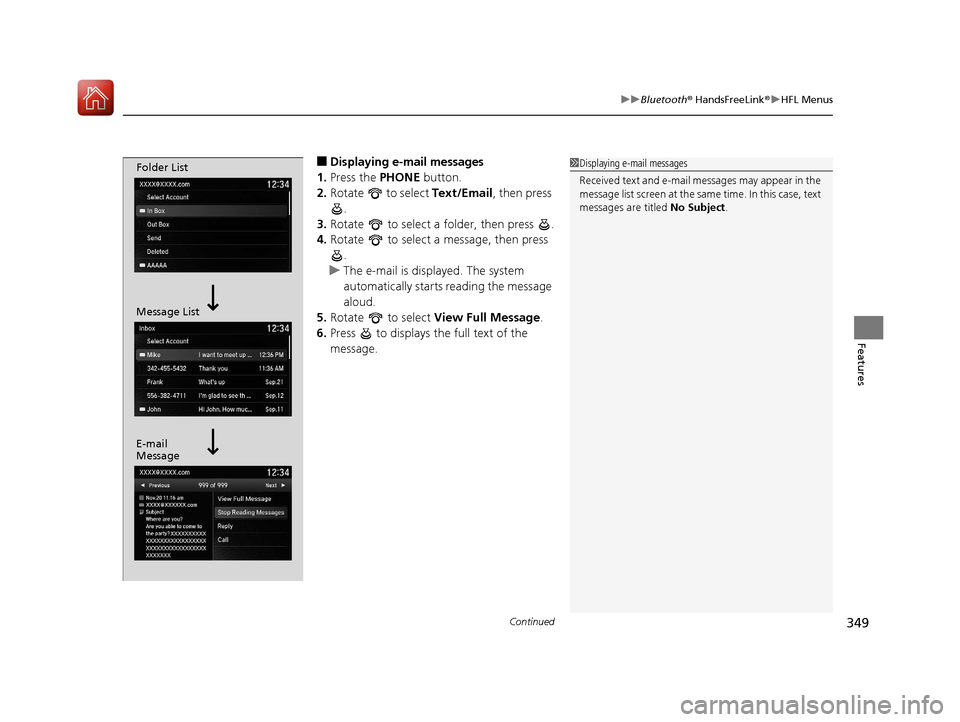
■Displaying e-mail messages
1. Press the PHONE button.
2. Rotate to select Text/Email , then press
.
3. Rotate to select a folder, then press .
4. Rotate to select a message, then press
.
u The e-mail is displayed. The system
automatically starts reading the message
aloud.
5. Rotate to select View Full Message .
6. Press to displays the full text of the
message.1Displaying e-mail messages
Received text and e-mail messages may appear in the
message list screen at the same time. In this case, text
messages are titled No Subject.Folder List
Message List
E-mail
Message
18 ACURA TLX-31TZ36300.book 349 ページ 2017年2月21日 火曜日 午後2時32分
Page 351 of 589
uuBluetooth ® HandsFreeLink ®u HFL Menus
350
Features
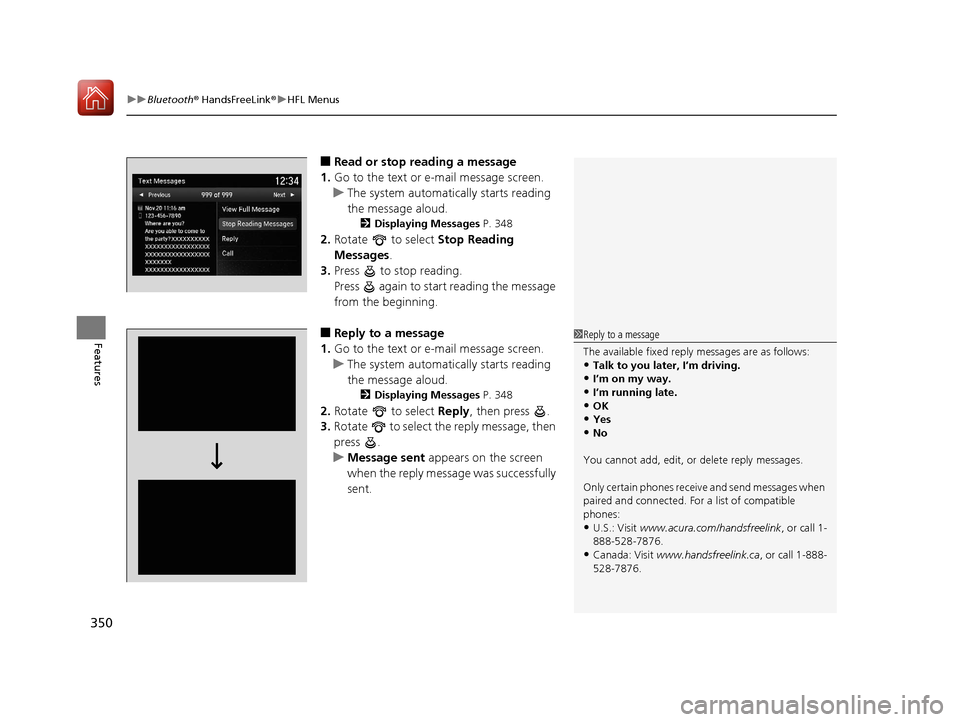
■Read or stop re ading a message
1. Go to the text or e-mail message screen.
u The system automatically starts reading
the message aloud.
2 Displaying Messages P. 348
2.Rotate to select Stop Reading
Messages.
3. Press to stop reading.
Press again to start reading the message
from the beginning.
■Reply to a message
1. Go to the text or e-mail message screen.
u The system automatically starts reading
the message aloud.
2 Displaying Messages P. 348
2.Rotate to select Reply, then press .
3. Rotate to select the reply message, then
press .
u Message sent appears on the screen
when the reply message was successfully
sent.
1 Reply to a message
The available fixed reply messages are as follows:
•Talk to you later, I’m driving.
•I’m on my way.•I’m running late.
•OK
•Yes•No
You cannot add, edit, or delete reply messages.
Only certain phones receiv e and send messages when
paired and connected. For a list of compatible
phones:
•U.S.: Visit www.acura.com/handsfreelink , or call 1-
888-528-7876.
•Canada: Visit www.handsfreelink.ca , or call 1-888-
528-7876.
18 ACURA TLX-31TZ36300.book 350 ページ 2017年2月21日 火曜日 午後2時32分
Page 352 of 589

351
uuBluetooth ® HandsFreeLink ®u HFL Menus
Features
■Making a call to a sender
1. Go to the text message screen.
u The system automatically starts reading
the message aloud.
2 Displaying text messages P. 348
2.Rotate to select Call, then press .
18 ACURA TLX-31TZ36300.book 351 ページ 2017年2月21日 火曜日 午後2時32分
Page 353 of 589
352
Features
Compass*
When you set the power mode to ON, the compass self-calibrates, and the compass
display appears.
Compass Calibration
If the compass indicates the wrong direction, or the CAL indicator blinks, you need
to manually calibrate the system.
1. Set the power mode to ON.
2. On the top screen of any source, press and hold for five seconds.
u The display switches to the Compass Settings screen.
3. Rotate to select Calibration, then press .
4. When the display changes to Calibration Start, press .
5. Drive the vehicle slowly in two circles.
u The compass starts to show a dire ction after the calibration. The CAL indicator
goes off.
1 Compass*
Compass operation can be affected under the
following conditions:
•Driving near power lines or stations•Crossing a bridge
•Passing a large vehicle, or driving near a large
object that can cause a magnetic disturbance
•When accessories such as antennas and roof racks
are mounted by magnets
1 Compass Calibration
Calibrate the compass in an open area.
While setting the compass, press the BACK button to
cancel the setting mode a nd return to the previous
screen.
Models with navigation self -calibrate using GPS. The
compass in the multi-information display and the
direction arrow on the ma p screen (when Heading-
Up view selected) may not be in sync when first
starting the vehicle, but should correct themselves as
you drive.
If the compass in the multi-information display
continues to indicate an in correct direction, please
see your Acura dealer.
Models with navigation system
* Not available on all models
18 ACURA TLX-31TZ36300.book 352 ページ 2017年2月21日 火曜日 午後2時32分
Page 354 of 589
353
uuCompass*uCompass Zone Selection
Features
Compass Zone Selection
1. Set the power mode to ON.
2. On the top screen of any source, press and hold for five seconds.
u The display switches to the Compass Settings screen.
3. Rotate to select Zone Adjust, then press .
u The display shows the current zone number the system is set to.
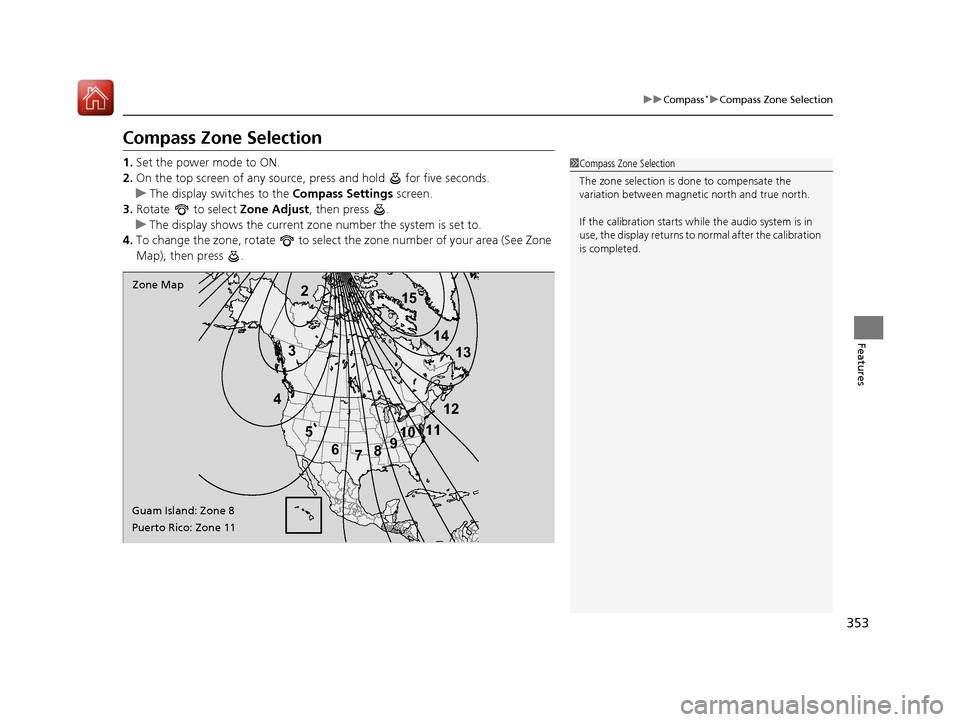
4. To change the zone, rotate to select the zone number of your area (See Zone
Map), then press .
2
3
4 5678910
111213
14
15Zone Map
Guam Island: Zone 8
Puerto Rico: Zone 11
1 Compass Zone Selection
The zone selection is done to compensate the
variation between magneti c north and true north.
If the calibration starts while the audio system is in
use, the display returns to normal after the calibration
is completed.
18 ACURA TLX-31TZ36300.book 353 ページ 2017年2月21日 火曜日 午後2時32分
Page 366 of 589
Continued365
uuWhen Driving uStarting the Engine
Driving
You can remotely start the engine usin g the two-way keyless access remote from
extended distances.
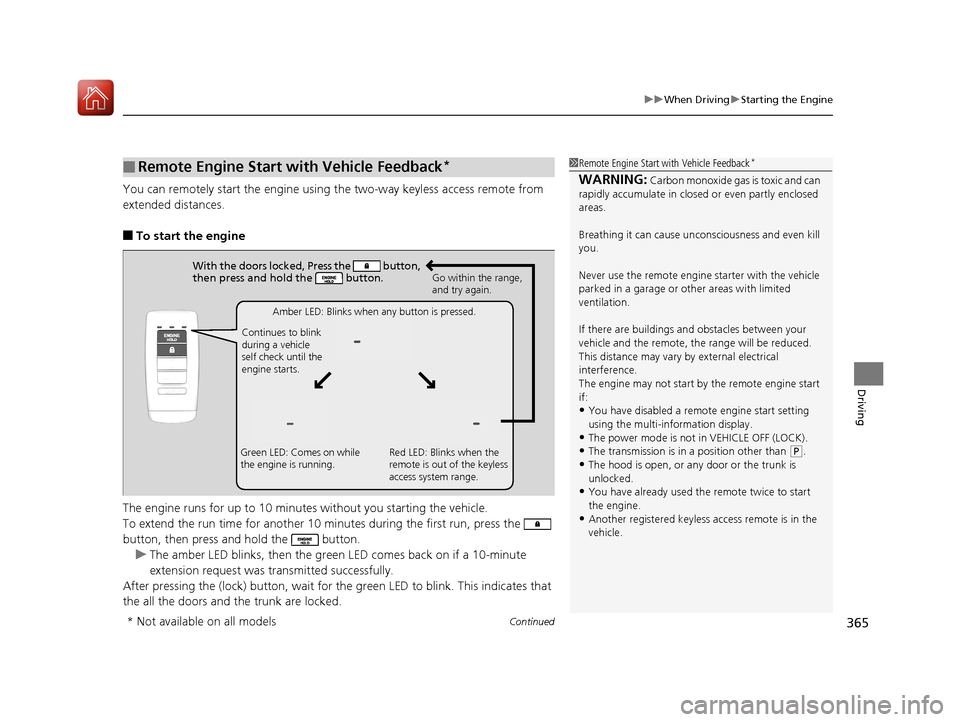
■To start the engine
The engine runs for up to 10 minu tes without you starting the vehicle.
To extend the run time for another 10 mi nutes during the first run, press the
button, then press an d hold the button.
u The amber LED blinks, then the green LED comes back on if a 10-minute
extension request was transmitted successfully.
After pressing the (lock) button, wait for the green LED to blink. This indicates that
the all the doors and the trunk are locked.
■Remote Engine Start with Vehicle Feedback*1 Remote Engine Start with Vehicle Feedback*
WARNING: Carbon monoxide gas is toxic and can
rapidly accumulate in closed or even partly enclosed
areas.
Breathing it can cause unc onsciousness and even kill
you.
Never use the remote engine starter with the vehicle
parked in a garage or other areas with limited
ventilation.
If there are buildings an d obstacles between your
vehicle and the remote, th e range will be reduced.
This distance may vary by external electrical
interference.
The engine may not start by the remote engine start
if:
•You have disabled a remo te engine start setting
using the multi-information display.
•The power mode is not in VEHICLE OFF (LOCK).•The transmission is in a position other than ( P.
•The hood is open, or any door or the trunk is
unlocked.
•You have already used the remote twice to start
the engine.
•Another registered keyless access remote is in the
vehicle.
With the doors locked, Press the button,
then press and hold the button.
Amber LED: Blinks when any button is pressed.
Continues to blink
during a vehicle
self check until the
engine starts. Go within the range,
and try again.
Green LED: Comes on while
the engine is running. Red LED: Blinks when the
remote is out of the keyless
access system range.
* Not available on all models
18 ACURA TLX-31TZ36300.book 365 ページ 2017年2月21日 火曜日 午後2時32分
Page 375 of 589
![Acura TLX 2018 Owners Manual uuWhen Driving uShifting
374
Driving
■If you want to keep the transmission in (N position [car wash mode]
With the engine running:
1. Press and hold the brake pedal.
2. Select
(N, then release the](/img/32/11123/w960_11123-374.png "Acura TLX 2018 Owners Manual uuWhen Driving uShifting
374
Driving
■If you want to keep the transmission in (N position [car wash mode]
With the engine running:
1. Press and hold the brake pedal.
2. Select
(N, then release the")
uuWhen Driving uShifting
374
Driving
■If you want to keep the transmission in (N position [car wash mode]
With the engine running:
1. Press and hold the brake pedal.
2. Select
(N, then release the button to display (N (Neutral) hold mode on the
multi-information display.
3. Press and hold
(N again for two seconds.
u This puts the vehicle in car wash mode which must be used when your vehicle
is pulled through a conveyor type automatic car wash where you or an
attendant do not remain in the vehicle.
If the ENGINE STOP/START button is pressed
after car wash mode has been activated, the
power mode will change to ACCESSORY and
a message will be displayed on the multi-
information display.u The gear position remains in
(N with the
power mode in ACCESSORY for 15
minutes, then, it automatically changes
to
(P and the power mode changes to
OFF.
u Manually changing to
(P cancels
ACCESSORY mode. The
(P indicator
comes on and the power mode changes
to OFF. You must always shift to
(P
when car wash mode is no longer
needed.
1 If you want to keep the transmission in (N position [car wash
mode]
The transmission may not stay in
(N position while
the following indicators ar e on or when the message
below appears:
•Malfunction indicator lamp
•Transmission system indicator
•Charging system indicator•The Charging System Problem message on the
multi-information display.
18 ACURA TLX-31TZ36300.book 374 ページ 2017年2月21日 火曜日 午後2時32分